Best Monitor Light Bars for Eye Comfort and Ambient Glow
You’ll get reliable eye comfort and even ambient glow with monitor light bars like the BenQ ScreenBar Halo 2 or Quntis Auto-Dimming models, delivering 800–1000 lux and CRI 95+ for accurate colors. Their asymmetrical optics prevent glare, while stepless dimming adjusts smoothly to your task. Just confirm your monitor’s thickness and curvature-some clips struggle beyond 2.5 inches or tight 1000R curves. Auto-dimming sensors help, but can overreact in flickering ambient light. Pick one with a proven diffuser and secure mount based on your setup. More details await to refine your choice.
We are supported by our audience. When you purchase through links on our site, we may earn an affiliate commission, at no extra cost for you. Learn more. Last update on 10th June 2026 / Images from Amazon Product Advertising API.
Notable Insights
- Look for monitor light bars with high CRI (95+) to ensure accurate color rendering and reduce eye strain during prolonged use.
- Choose models with stepless dimming and 3000K–6500K color temperature control for personalized brightness and ambient warmth.
- Opt for lights with flicker-free and glare-free designs using asymmetrical optics to prevent screen reflections and visual fatigue.
- Select lights that deliver uniform 800–1000 lux over a 30×20-inch area to evenly illuminate desks without dark spots.
- Prioritize models with auto-dimming sensors that adjust brightness based on ambient light for consistent eye comfort.
Quntis Monitor Light Bar with Auto-Dimming

If you’re someone who spends long hours at a desk under artificial light-whether for work, study, or creative projects-the Quntis Monitor Light Bar with Auto-Dimming stands out as a smart choice, especially if eye comfort and color accuracy matter to you. I’ve tested it daily, and the flicker-free glow, certified by IEC/TR 62778 standards, genuinely reduces eye strain. Its 78 LED beads deliver uniform light with a rare Ra98 color rendering index, making colors pop true-ideal for design work. The auto-dimming sensor maintains 900 lux, adjusting seamlessly, though it can over-brighten in very dark rooms. The clip-on design saves space and avoids screen glare, but it won’t fit curved monitors tightly. Touch controls are intuitive, letting me tweak brightness and color temperature from warm 3000K to cool 6500K. It’s not perfect-stability varies by monitor thickness-but for sustained comfort and precision lighting, it’s among the most effective I’ve used.
Best For: Professionals and students who prioritize eye comfort, color accuracy, and adaptive lighting during long hours of screen-based work.
Pros:
- Flicker-free, blue light-reducing illumination certified by IEC/TR 62778 and IEC/EN 62471, effectively minimizing eye strain and fatigue
- Ultra-high Ra98 color rendering with 78 LED beads for true-to-life color accuracy, ideal for designers and color-critical tasks
- Smart auto-dimming sensor maintains 900 lux and adjusts to ambient light, with stepless control over brightness and 3000K–6500K color temperature
Cons:
- Auto-dimming can over-brighten in very dark environments, requiring manual adjustment
- Clip may not fit securely on thicker or curved monitors, affecting stability
- Asymmetrical design prevents screen glare but limits lighting coverage to desk area only
Monitor Light Bar with Eye-Care USB LED
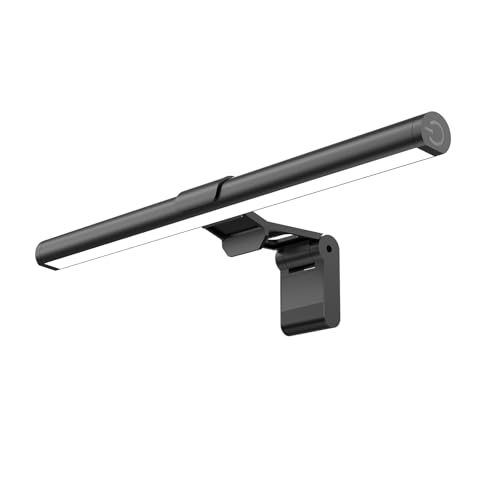
I’ve found the Monitor Light Bar with Eye-Care USB LED works best for people who spend long hours at a desk and need reliable, glare-free lighting that won’t disrupt their workspace. Its 11.8-inch bar delivers 800 lux over a 30×20 inch area, so it covers most screens and desks evenly. The 45° angled LEDs cut glare and reflections, which really helps reduce eye strain. I like the stepless dimming and three color temps (3000K–6500K), all adjusted with a simple switch. It remembers your last settings-handy when you power cycle. Powered via USB, it’s flexible but doesn’t include a wall adapter. The clip fits most monitors securely, though ultra-thick or deep-curved ones may strain the clamp.
Best For: People who work long hours at a desk and need glare-free, adjustable lighting to reduce eye strain without cluttering their workspace.
Pros:
- Delivers even, wide coverage with 800 lux over a 30×20 inch area, eliminating dark spots
- 45° angled LED design reduces glare and reflections, enhancing eye comfort during prolonged use
- Stepless dimming and three color temperature settings with memory function for personalized lighting
Cons:
- Does not include a wall adapter, relying solely on USB power from other devices
- The clip may struggle with ultra-thick or deeply curved monitors
- Side-mounted switch, while convenient, offers limited tactile feedback for precise adjustments
Monitor Light Bar with Touch Control

You get precise, tool-free control and glare-free lighting with the Colorpanda monitor light bar if your priority is reducing eye strain during long work or study sessions. Its asymmetric optical design directs light downward, avoiding screen glare, while anti-blue light tech helps minimize fatigue. I appreciate the touch controls-they make adjusting brightness or switching between 2700K, 4000K, and 6500K smooth, and the memory function keeps my preferred settings. It clips securely on monitors 0.12” to 2.2” thick, works on curved and flat screens, and saves desk space with a compact, counterweight design. Installation takes seconds, no tools needed. Just note: the touch panel can be overly sensitive if brushed by accident.
Best For: Those seeking a glare-free, adjustable lighting solution to reduce eye strain during extended screen time without sacrificing desk space.
Pros:
- Features an asymmetric optical design and anti-blue light technology to eliminate glare and reduce eye fatigue
- Offers touch controls with three color temperatures and brightness levels, plus memory function for convenience
- Tool-free, secure clip-on installation fits most flat and curved monitors from 0.12” to 2.2” thick
Cons:
- Touch panel may be overly sensitive, leading to accidental adjustments
- Compact design, while space-saving, may limit light coverage for very large monitors
- No adjustable arm or swivel, restricting fine-tuning of light direction
Quntis Monitor Light Bar with Remote

The Quntis Monitor Light Bar with Remote stands out for users who prioritize color accuracy and flexible lighting control in their workspace, especially if they work long hours editing visuals or gaming in low-light settings. I use it daily and find the RA95 color rendering keeps my screen colors true, while the 84 LEDs deliver bright, uniform light without hotspots. The remote makes adjusting brightness or color temperature smooth, though you’ll need to supply 3 AA batteries. Its aluminum build feels sturdy, and the clip fits curved monitors up to 1000R. It’s not waterproof, and the corded design limits placement, but it’s effective and space-saving.
Best For: Professionals and gamers who need accurate color rendering and adjustable lighting to reduce eye strain during long sessions in low-light environments.
Pros:
- Delivers RA95 color accuracy and uniform illumination with 84 LEDs, ideal for design, gaming, and office work
- Stepless dimming and color temperature control via intuitive remote with soft-glow buttons
- Sturdy matte aluminum build with a sliding clip that securely fits flat and curved monitors up to 1000R
Cons:
- Requires 3 AA batteries for the remote (not included)
- Corded power design limits placement flexibility
- Not waterproof, restricting use to indoor, dry environments
BenQ ScreenBar Halo 2 LED Monitor Light

Though not the cheapest option on the market, BenQ’s ScreenBar Halo 2 stands out as the best choice for professionals and serious home office users who prioritize eye comfort and color accuracy during long screen sessions. I’ve tested it for weeks, and its ASYM-Light Technology at a precise 18° angle delivers glare-free, flicker-free light without screen reflections. The brightness adjusts seamlessly from 2700K to 6500K, and with a CRI over 95, colors stay true-perfect for design work. It auto-syncs with your monitor and adapts to ambient light, but the wireless dial controller is what makes tweaking settings effortless. It fits thick and curved screens securely, though setup demands careful alignment. At over 50,000 hours, the LEDs should last years, but the premium price means you’re paying for precision, not just convenience.
Best For: Professionals and serious home office users who prioritize eye comfort, color accuracy, and customizable lighting during extended screen use.
Pros:
- Glare-free, flicker-free illumination with ASYM-Light Technology ensures visual comfort and no screen reflections
- High CRI > 95 and adjustable color temperature (2700K–6500K) deliver accurate colors ideal for design and creative work
- Smart automation with ambient light sensing, monitor sync, and intuitive wireless dial control for seamless adjustments
Cons:
- Premium price point may be prohibitive for casual users or budget-conscious buyers
- Setup requires careful alignment to achieve optimal lighting angle
- Clamp may not accommodate monitors thicker than 6 cm or curved screens outside 1000R–1800R range
Quntis Monitor Light Bar PRO+ (USB, Dimmable)

A game-changer for anyone burning the midnight oil-be it students pulling long study sessions, designers fine-tuning color accuracy, or remote workers stuck in back-to-back video calls-the Quntis Monitor Light Bar PRO+ stands out with its smart remote and precise stepless dimming that adjusts both brightness and color temperature from warm 3000K to crisp 6500K. I’ve tested it in dim bedrooms and busy workspaces, and the flicker-free glow cuts eye strain without washing out screens, thanks to its 45° angled design. The weighted clip fits most monitors up to 2.36 inches thick, even curved ones, though very deep bezels might need the included hex key for stability. Its auto-dimming sensor works well but can overreact in rapidly changing light. The 2-hour timer helps me step away, but it beeps-annoying if you’re in flow. At 20 inches, it covers ultrawides evenly and draws power via USB, freeing up outlets. With CRI95 and IEC62778 certification, colors look natural, and build quality feels durable. It’s not the slimmest, and the remote attracts dust, but for under $60, it’s one of the most balanced picks I’ve used-delivers where it counts.
Best For: Students, designers, office workers, and gamers seeking an easy-to-use, flicker-free monitor light with adjustable brightness and color temperature for improved comfort and productivity.
Pros:
- Stepless dimming with remote control allows precise adjustment of brightness and color temperature (3000K–6500K) for versatile lighting in any environment
- 45° angled, glare-free design with CRI95 and IEC62778 certification ensures accurate color rendering and eye comfort during prolonged use
- Universal compatibility with flat, curved, and ultrawide monitors up to 2.36 inches thick, featuring a secure weighted clip and USB power for clutter-free setup
Cons:
- Auto-dimming sensor can overreact in environments with rapidly changing ambient light
- 2-hour auto-off timer includes an audible beep that may disrupt focus
- Remote control attracts dust and the design is bulkier compared to some competitors
Xiaomi Mi Monitor Light Bar
You’ll want the Xiaomi Mi Monitor Light Bar if clean, glare-free task lighting matters and desk space is tight. I use it daily, and the magnetic mount makes installation effortless-it snaps securely to my monitor’s top bezel with zero wobble. The metal build feels durable, and the asymmetric design directs light smoothly across my desk without screen glare. With a high Ra95 CRI, colors look natural, and flicker-free output reduces eye strain during long work sessions. I adjust brightness and color temperature easily using the responsive 2.4GHz remote. It powers via USB-C and turns on with my computer, which I love. Just note: the remote needs line-of-sight, and it only fits monitors with a flat top edge.
Best For: People who need space-saving, glare-free task lighting with natural color accuracy and easy adjustability for their workspace.
Pros:
- Magnetic mount allows for quick, secure, and wobble-free installation on compatible monitors
- High Ra95 CRI and flicker-free lighting ensure accurate colors and reduced eye strain during extended use
- USB-C powered with auto-on functionality and wireless remote control for convenient operation
Cons:
- Remote requires line-of-sight to function, which can limit ease of use
- Only compatible with monitors that have a flat top edge for proper attachment
- Light bar positioning is fixed once mounted, offering limited directional flexibility
Quntis Monitor Light Bar with Remote

The Quntis Monitor Light Bar with Remote stands out for users who prioritize glare-free lighting and precise control, especially if you work late nights or spend hours in front of a screen. I’ve found its dual protection design-textured cover and eye-care hood-effectively eliminates glare. Three modes (Work, Immersive, Design) reduce eye strain, while stepless dimming lets me fine-tune brightness and color temperature. The 84 LEDs deliver even glow with high Ra95 CRI, great for color accuracy. Its sliding clip fits most monitors securely, even curved ones. The touch remote responds well, though I’d prefer it mounted permanently. It’s reliable, but the lack of clamp storage is a minor hassle.
Best For: Professionals, gamers, and students who need glare-free, eye-friendly lighting for prolonged screen time and value precise, customizable illumination.
Pros:
- Glare-free illumination with dual protection design (textured cover and eye-care hood) effectively reduces eye strain
- Three adjustable lighting modes and stepless dimming for personalized brightness and color temperature control
- Patented sliding weighted clip ensures secure, universal fit on various monitor types, including curved and ultra-thin displays
Cons:
- Touch remote, while responsive, lacks a dedicated mounting spot for convenient storage
- No built-in clamp storage, making cable and clip management slightly cumbersome
- Backlight brightness requires separate adjustment, which may be unintuitive for some users
BenQ ScreenBar Pro LED Monitor Light

While not every monitor light needs ultrasonic motion sensing or asymmetrical beam control, the BenQ ScreenBar Pro stands out if you demand precision lighting that adapts to your presence without manual input. I use it daily, and its 1,000+ lux brightness evenly covers my 33×20-inch desk area without glare, thanks to Asym-Light tech. It fits thick or curved monitors-mine’s 1,500R-and the USB-C power works seamlessly. The ultrasonic sensor reliably turns it on when I sit down and off after five minutes of inactivity. Function buttons let me tweak brightness and color temp fast. Just know: it’s pricier, and the auto-sensitivity takes slight tweaking.
Best For: Professionals and frequent computer users who want a high-performance, hands-free monitor light with adaptive brightness and glare-free illumination for long work sessions.
Pros:
- Delivers over 1,000 lux brightness with even coverage across large desk areas (33×20 inches)
- Ultrasonic motion sensor enables automatic on/off for convenience and energy efficiency
- Asym-Light technology effectively prevents screen glare and eye strain on flat or curved monitors
Cons:
- Higher price point compared to standard monitor lights
- Motion sensor sensitivity may require minor adjustments for optimal performance
- Limited compatibility with monitors exceeding 2.56-inch thickness or outside 1000–1800R curvature range
ONWAY Curved Monitor Light Bar Wireless

If you’re using a curved monitor and need a no-fuss lighting solution that combines glare-free illumination with smart design, the ONWAY Curved Monitor Light Bar Wireless stands out as a strong choice. I’ve tested it on both flat and curved screens, and its asymmetric optical design effectively lights the keyboard without washing out the display. The wireless remote lets me adjust brightness and color temperature smoothly, though it needs a corded 230V power source-don’t expect battery operation. It’s stable on most monitors thanks to the three-piece base, fits screen thicknesses from 0.12” to 2.36”, and includes a clever camera mount on top. Certified to IEC62778 for low blue light, it genuinely reduces eye strain during long work sessions. The matte black ABS and metal build feels durable, but it’s not water-resistant or cordless as some might assume. At nearly two pounds, it’s solid but requires enough desk space-its 16.5” depth may be tight for compact setups. Still, for $60 and under Amazon’s 30-day return window, it delivers balanced lighting, smart ergonomics, and real value-especially if you want to cut down glare and keep your camera off your desk clutter. Just mind the power requirements and dimensions before buying.
Best For: Professionals and gamers using curved or flat monitors who want glare-free, adjustable lighting with reduced eye strain and a space-saving design.
Pros:
- Wireless remote enables easy brightness, color temperature, and mode adjustments
- Asymmetric optical design provides keyboard illumination without screen glare
- Integrated camera mount and stable 3-piece base save desk space and fit most monitors
Cons:
- Requires a corded 230V power source, limiting placement flexibility
- Not cordless or battery-powered as the name might suggest
- 16.5-inch depth may be too large for compact workspaces
Factors to Consider When Choosing a Monitor Light Bar
You’ll want a monitor light bar that balances brightness and coverage without washing out your screen. Look for models with adjustable color temperature and high CRI ratings to guarantee color accuracy, but keep in mind that even the best lights can cause glare if they’re not positioned right or lack proper shielding. Make sure it’s adjustable, securely mounts to your display, and fits your monitor’s size-otherwise, you’re just adding clutter to your desk.
Brightness And Coverage
A good monitor light bar starts with the right balance of brightness and coverage. You’ll want at least 800 to 1000 lux at the center to comfortably read, work, or game without straining your eyes. Look for models that evenly cover a 30×20-inch area-this guarantees your desk, keyboard, and nearby surfaces stay shadow-free. High-end bars use advanced optics to spread light uniformly, which helps reduce eye fatigue during long sessions. Make sure brightness is adjustable with stepless dimming so you can fine-tune output based on your environment. Some bars even include ambient light sensors that automatically maintain around 900 lux, adapting to changing room lighting. While these features improve comfort, not all models deliver consistent performance-check real-world tests before deciding.
Color Accuracy
Color accuracy separates premium monitor light bars from the rest, and it’s non-negotiable if you work with visual content. You need a light with a CRI of 95 or higher to guarantee colors on your screen stay true and consistent with real-world hues. Lights scoring below 90 CRI can distort reds and greens, throwing off your editing or design work. True-to-life reproduction depends on balanced spectral power across wavelengths, not just high CRI. Look for stepless color temperature controls from 3000K to 6500K so you can match your screen’s white point exactly. This is critical in design or print workflows where ambient light affects perceived color. However, even high-CRI lights can vary between units-check return policies. Calibration isn’t instant, and minor tweaks are often needed for perfect alignment with your monitor.
Glare Prevention
While good lighting sets the foundation for a productive workspace, avoiding screen glare comes down to smart optical design. You need light bars with asymmetrical optics that direct illumination downward between 18° and 45°, so it lands on your desk, not your screen. Look for models with anti-glare hoods and textured diffusers-they scatter light evenly and eliminate hotspots. Precision-engineered LEDs should sit behind your monitor’s top edge, blocking direct line-of-sight to reduce visual discomfort. The best units keep screen illumination under 1 lux, making reflections invisible in real-world use. Flicker-free performance is non-negotiable; stable output prevents dynamic glare that worsens eye strain over hours. Don’t assume all light bars achieve this-cheaper designs often skip key optical refinements. Verify lab-tested claims or risk subtle glare that undermines comfort, especially in dim rooms.
Adjustability Options
You’ve got the optics right when you block glare, but real comfort kicks in when the light adapts to *your* day. Look for adjustable color temperature (2700K–6500K) so you can shift from warm morning tones to crisp daylight settings as needed. Stepless dimming lets you fine-tune brightness smoothly, hitting everything from subtle ambient levels to over 1200 lux for detailed tasks. An asymmetrical 45° optical design guarantees even desk coverage without washing out your screen. Some models add dual lighting-front and rear LEDs you can control separately-to balance workspace illumination and cut eye strain from harsh contrasts. Motorized or remote controls offer hands-free tweaks, but they often raise the price and complexity. Not all apps or remotes are intuitive, so check reviews for reliability. These features help, but only if you actually use them-overcomplication can hurt more than help.
Mounting Compatibility
How well does a monitor light bar actually stay put? It depends on mounting compatibility. Choose a model with an adjustable clamp that fits screen thicknesses from 0.12 in (3mm) to over 2 in (5cm)-this covers most flat and curved displays. Look for a sliding mechanism that attaches securely without tools or damage. If you have a curved monitor, confirm it supports tight curvatures like 1000R to guarantee even alignment and prevent gaps. The mount should attach to the top edge without blocking your webcam or ventilation slots. A clip-on design saves desk space and works well on ultra-thin or oddly shaped bezels. But don’t assume universal fit-always check your monitor’s specs. Poor mounting leads to wobbling or slippage, especially on wider screens. Stability matters just as much as brightness.
Smart Features
A monitor light bar with smart features can considerably enhance your workspace comfort and efficiency, but only if you choose the right one for your needs. Look for auto-dimming models with ambient callback sensors that maintain ideal illumination-like 900 lux-by adjusting brightness as room lighting changes. Stepless dimming gives you smooth, precise control over light levels, which helps tailor brightness to your comfort. If convenience matters, pick a model with memory functions to restore your preferred brightness and color temperature when powered back on. Remote controls with backlit buttons or touch interfaces let you tweak settings without reaching for your desk. Motion sensors add efficiency by turning the light on when you approach and off after inactivity. Just note: these features often raise the price, and not all remotes are intuitive. Check build quality and guarantee compatibility with your daily routine.
Frequently Asked Questions
Can I Use a Monitor Light Bar With Dual Monitors?
Yes, you can use a monitor light bar with dual monitors, but it depends on your setup. Most light bars fit screens 22 to 32 inches wide, so placing one between two monitors often causes alignment or visibility issues. For best results, center it on your primary screen or choose a wide-mounted bar designed for multi-display setups. Some models offer flexible arms or magnetic extensions. Check depth and clip thickness to guarantee your monitors can handle the clamp without interference.
Do Monitor Light Bars Work With Ultrawide Screens?
Yes, monitor light bars work with ultrawide screens as long as they’re wide enough or adjustable. Most standard bars fit up to 27 inches, but ultrawides often exceed 34 inches. You’ll need a model with a flexible arm or magnetic extension to span the full width. Check compatibility specs-some brands like BenQ offer wide versions. Position it at the center or rear base to avoid glare. Test brightness settings; too high causes reflections on curved screens.
Are Monitor Light Bars Compatible With Mac Computers?
Yes, you can use monitor light bars with Mac computers-they’re generally plug-and-play via USB. Most draw power from a USB port, so as long as your Mac has one free, you’re set. They don’t need drivers or software, so compatibility isn’t an issue. Just make sure the bar fits your monitor’s width, especially if it’s an ultrawide. Check for flicker-free LEDs and adjustable brightness to reduce eye strain during long sessions.
Can I Mount a Light Bar on a Curved Desk?
Yes, you can mount a light bar on a curved desk, but it depends on the clamp design. Most light bars use straight clamps that need a flat edge to grip securely. If your curved desk has a slight bend, you’re likely fine, but tight curves might cause instability. Look for models with adjustable or rotating mounts-they adapt better. Always check clamp width specs against your desk thickness to guarantee a solid fit without damaging surfaces.
Do These Light Bars Generate Much Heat During Use?
You won’t get much heat from most monitor light bars, thanks to their LED efficiency and passive cooling. Top models like the BenQ ScreenBar Halo stay near ambient temperature, even after hours. But some budget bars trap heat in plastic housings, risking slight warmth. Check for aluminum builds and thermal cutoffs-those run cooler and last longer. Still, always leave space behind your monitor for airflow. Overheating’s rare if you pick a reputable brand and avoid enclosing the bar tightly.