Best Wireless Keyboards with Touchpad for Seamless Typing
You’ll get seamless typing with the Logitech K400 Plus, thanks to its quiet scissor-switch keys and responsive 2.99 x 1.85-inch touchpad, all within a stable 33 ft wireless range using the USB Unifying receiver. It’s durable, spill-resistant, and lasts up to 18 months on two AA batteries. But it lacks backlighting and Bluetooth, limiting dark-use and multi-device flexibility. For broader compatibility, consider models with dual-mode connectivity and backlit keys, which offer more versatility across devices and lighting conditions.
We are supported by our audience. When you purchase through links on our site, we may earn an affiliate commission, at no extra cost for you. Learn more. Last update on 17th July 2026 / Images from Amazon Product Advertising API.
Notable Insights
- Logitech K400 Plus offers quiet keys, a responsive 2.99 x 1.85-inch touchpad, and 33 ft wireless range via USB receiver.
- Arteck Backlit Bluetooth model supports multiple devices with seven backlight colors and a built-in touchpad for seamless navigation.
- Foldable Bluetooth keyboard features a full number pad, scissor-switch keys, and multi-device connectivity via Bluetooth and 2.4G.
- Dual-mode wireless keyboards with Bluetooth 5.1 and 2.4G provide stable connections and easy switching across three devices.
- Rechargeable USB-C keyboards with auto-sleep mode balance battery life and performance for uninterrupted, seamless typing.
Logitech K400 Plus Wireless Touch TV Keyboard

If you’re setting up a clutter-free media center or a compact home office, the Logitech K400 Plus Wireless Touch TV Keyboard is one of the best choices for seamless, relaxed control of your PC-connected TV. I use it daily, and the quiet keys plus large 2.99 x 1.85-inch touchpad make typing and navigation smooth. It pairs instantly via USB Unifying receiver with up to 33 ft range, works on Windows, Android, and Chrome OS, and lasts up to 18 months on batteries. The spill-resistant design adds durability. Just note: it lacks backlighting and Bluetooth. For more premium features, consider upgrading to the K830.
Best For: Media enthusiasts and casual users seeking a compact, wireless keyboard with integrated touchpad for PC-to-TV setups or small workspaces.
Pros:
- Combines a quiet, comfortable keyboard with a large 2.99 x 1.85-inch touchpad for precise navigation
- Wireless range up to 33 ft via USB Unifying receiver with plug-and-play setup on Windows, Android, and Chrome OS
- Long battery life (up to 18 months) and spill-resistant design enhance durability and convenience
Cons:
- Lacks backlighting, making it less ideal for use in low-light environments
- No Bluetooth connectivity, limiting pairing options to USB Unifying receiver only
- Not rechargeable-uses disposable batteries, which may increase long-term waste
Arteck Backlit Bluetooth Touch Keyboard

I’ve found the Arteck Backlit Bluetooth Touch Keyboard works best for people who want a single, compact input device to control multiple screens around the house-from a bedroom tablet to a living room TV or a home office desktop. It connects easily to Windows, Mac, iOS, Android, and Chrome OS devices, and its built-in touchpad responds accurately, reducing the need for a separate mouse. The seven backlight colors and two brightness levels look sharp in dim rooms, and it wisely powers down to save battery. I charge it fast via USB-C. It’s not silent, and signal strength dips past 30 feet or near thick walls. Still, with a 24-month warranty and solid cross-platform support, it’s a reliable, no-fuss pick for light typing and media control.
Best For: People seeking a compact, multi-device wireless keyboard with an integrated touchpad for easy control of computers, tablets, and smart TVs across various operating systems.
Pros:
- Seamlessly connects to multiple platforms including Windows, Mac, iOS, Android, and Chrome OS
- Built-in responsive touchpad and dedicated media keys reduce the need for additional peripherals
- Seven backlight colors with adjustable brightness enhance usability in low-light environments
Cons:
- Not silent during typing, which may be distracting in quiet settings
- Bluetooth signal weakens beyond 30 feet or through thick walls
- Battery life, while improved by auto-sleep, requires regular charging for heavy users
Foldable Bluetooth Keyboard with Touchpad & Number Pad

This foldable Bluetooth keyboard with touchpad and number pad stands out as the best choice for frequent travelers and remote workers who need a compact, all-in-one input solution without sacrificing functionality. I love how it combines a full numeric keypad, large multi-touch touchpad, and 99-key QWERTY layout in a tri-fold design that collapses to just 7.3 x 4.5 inches. It’s lightweight at 0.65 lb and fits easily in my bag, though the typing feel is slightly shallower than a laptop’s. The scissor-switch keys are quiet and responsive, and I appreciate the dedicated shortcuts for volume, search, and screen control. With support for three devices-via Bluetooth and a 2.4G USB dongle-I smoothly switch between my phone, tablet, and laptop within a 33-foot range. The touchpad handles gestures like scrolling and right-clicking, so I rarely need a mouse. A built-in 320mAh battery lasts hours and charges via USB-C, though it doesn’t support data transfer. Battery level checks are easy with FN + Shift and LED flashes. A non-slip PU base keeps it steady on laps or uneven surfaces, and the built-in phone stand is handy, though it only works at one angle. It works across iOS, Android, Windows, and Mac, but the shortcut keys aren’t always perfectly mapped on non-Windows devices. While the compact size is great for travel, the smaller keycaps take a few days to adjust to if you’re used to full-sized desktop keyboards.
Best For: Frequent travelers and remote workers who need a compact, multi-device keyboard with a built-in touchpad and numeric keypad for on-the-go productivity.
Pros:
- Combines a full numeric keypad, large multi-touch touchpad, and 99-key layout in a highly portable tri-fold design
- Supports seamless switching between three devices via Bluetooth and 2.4G USB within 33 feet
- Features quiet scissor-switch keys, dedicated shortcuts, and a non-slip base for stable use on any surface
Cons:
- Typing feel is shallower than a laptop, and smaller keycaps require adjustment for full-sized keyboard users
- Built-in phone stand offers only one fixed angle, limiting viewing flexibility
- Shortcut keys are not always optimally mapped on iOS and Mac devices
Wireless Bluetooth Keyboard with Touchpad for Multi-Devices

The Bnnwa Wireless Bluetooth Keyboard with Touchpad stands out as a strong pick for anyone juggling multiple devices-like a Windows laptop, iPad, and Android phone-without wanting to carry separate input tools. It connects to three devices at once via Bluetooth, switching with a single key press, and stays stable within 33 feet. The built-in touchpad supports smooth gestures, replacing a mouse, while the slim, 14.8-ounce design fits easily in a bag. It works across Windows, macOS, iOS, Android, and Chrome OS, though it lacks backlighting and uses 2 AAA batteries (included), which may need frequent replacing depending on use.
Best For: Multitaskers who frequently switch between multiple devices like laptops, tablets, and smartphones across different operating systems.
Pros:
- Seamlessly connects to three devices simultaneously with easy one-key switching
- Built-in multi-touch trackpad supports intuitive gesture controls, eliminating the need for a mouse
- Slim, lightweight, and portable design with broad compatibility across Windows, macOS, iOS, Android, and Chrome OS
Cons:
- Lacks backlit keys, making typing in low-light environments difficult
- Powered by 2 AAA batteries without rechargeable built-in battery option
- May require frequent battery replacements under heavy usage due to automatic sleep mode after 30 minutes
Arteck Wireless Touch TV Keyboard

You’ll get solid performance from the Arteck 2.4G Wireless Touch TV Keyboard if you’re setting up a lean media-centered station near your living room TV, especially since its built-in touchpad and media hotkeys simplify navigation without needing a separate mouse. I use it daily with my HTPC, and the plug-and-play USB nano receiver works instantly-no pairing hassles. It’s compact but still has full-size keys and reaches reliably within 33 feet. It runs on two AAAs and supports Windows, Chrome OS, and Smart TVs. Just know the touchpad isn’t as precise as a real mouse, and it lacks backlighting. It’s not for heavy typing, but with a 24-month warranty and responsive support, it’s a smart, budget-savvy pick for couch computing.
Best For: Users seeking a budget-friendly, compact wireless keyboard with a built-in touchpad for couch-based media navigation on HTPCs, Smart TVs, and streaming devices.
Pros:
- Plug-and-play nano receiver enables instant connection without pairing delays
- Integrated touchpad and media hotkeys streamline entertainment control from a distance
- Compact full-size layout with 33-foot range works reliably across Windows, Chrome OS, and Smart TVs
Cons:
- Touchpad lacks the precision of a dedicated mouse for detailed tasks
- No backlit keys, making typing in low-light environments difficult
- Not ideal for prolonged or heavy typing sessions due to compact design
Wireless Bluetooth TouchPad Keyboard Multi-Device

A wireless keyboard with built-in touchpad that handles multiple devices is ideal for anyone juggling a laptop, tablet, and phone across work and home setups. I use the K618 daily, and its triple connectivity-dual Bluetooth plus 2.4G-lets me switch fast between my MacBook, iPad, and Android phone within 33 feet. It works flawlessly across Windows, macOS, iOS, Chrome OS, and even my smart TV. The integrated touchpad supports multi-touch gestures, so I scroll, zoom, and navigate without a mouse. Compact at 12.6 ounces and 13.4 inches long, it’s easy to carry. It sleeps after 30 inactive minutes but wakes instantly. Made by INFINMIND, it’s reliable, though the 2.4G dongle can be easy to misplace.
Best For: Professionals and multitaskers who need seamless switching between multiple devices like laptops, tablets, and smartphones across different operating systems.
Pros:
- Supports three simultaneous connections with reliable 2.4G and dual Bluetooth connectivity up to 33 feet
- Integrated touchpad with multi-touch gestures eliminates the need for a separate mouse
- Compact, lightweight, and energy-efficient with instant wake-from-sleep functionality
Cons:
- The 2.4G wireless dongle is small and easy to lose
- Limited key travel due to slim design may not suit users who prefer tactile typing feedback
- Touchpad sensitivity can be inconsistent with certain gestures on non-touch-optimized OS platforms
Rii X8 Mini Wireless Keyboard with Touchpad
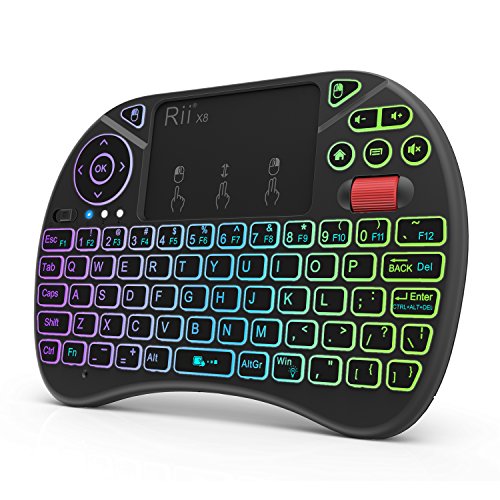
Rii’s X8 Mini Wireless Keyboard with Touchpad stands out for anyone needing a compact, all-in-one input solution for media-heavy setups like Android TV boxes or Amazon Fire TV devices. I’ve used it extensively, and it delivers solid performance with plug-and-play 2.4GHz connectivity via a USB dongle-no drivers needed. The built-in touchpad handles gestures and scrolling smoothly, while the full QWERTY layout makes typing efficient. It’s rechargeable, which I appreciate, and the RGB backlight helps in dim rooms. Just note: you’ll need a Micro USB OTG cable for newer Fire TV sticks, which isn’t included. It’s not for heavy office work, but for couch use, it’s reliable and well-built.
Best For: Media enthusiasts and casual users who want a compact, wireless keyboard with touchpad for couch-friendly control of Android TV boxes, Fire TV, or HTPCs.
Pros:
- Plug-and-play 2.4GHz wireless connectivity with no drivers required
- Integrated touchpad with multi-touch gestures and smooth scrolling
- Rechargeable battery with convenient RGB backlighting for low-light use
Cons:
- Micro USB OTG cable needed for Fire TV 4K and Fire Stick (not included)
- Not ideal for prolonged typing or heavy office work
- Compact size may be uncomfortable for users with larger hands
Rii 2.4G Wireless Keyboard with Touchpad

If you need a compact, multi-device keyboard that works seamlessly across Windows, Mac, Android, and smart TVs, the Rii 2.4G Wireless Keyboard with Touchpad stands out as a practical pick for light typing and media navigation. I use it daily with both my laptop and TV, and the dual-mode Bluetooth 5.1 and 2.4G USB connectivity give me reliable, lag-free control. The aluminum build feels sturdy yet lightweight at just 1.17 pounds, and the integrated touchpad responds well for basic gestures. It pairs with two devices, which I love, though the keys are a bit shallow for long typing sessions. With a 12-month warranty and Type-C charging, it’s a solid, no-fuss choice for couch or desk use-but don’t expect mechanical-key precision.
Best For: Users seeking a lightweight, multi-device wireless keyboard with touchpad functionality for everyday typing and media navigation across Windows, Mac, Android, and smart TVs.
Pros:
- Dual-mode connectivity (Bluetooth 5.1 and 2.4G USB) ensures reliable, lag-free performance across multiple devices
- Compact, durable aluminum alloy design with Type-C charging and long battery life
- Seamlessly pairs with two devices and works across a wide range of platforms including laptops, tablets, and smart TVs
Cons:
- Shallow key travel may not satisfy typists accustomed to deeper, mechanical-style keys
- Touchpad, while functional, lacks precision for intensive navigation tasks
- Average customer rating (3.8 stars) suggests mixed experiences with responsiveness or build quality
Logitech Wireless Touch Keyboard K400 with Built-in Multi-Touch Touchpad

This compact keyboard’s built-in 3.5-inch multi-touch touchpad makes it a solid pick for anyone setting up a space-saving home office or using a Windows laptop with an external display. I’ve used the Logitech Wireless Touch Keyboard K400 daily, and its gesture support makes browsing smooth and intuitive. The quiet, low-profile keys let me type comfortably without disturbing others. It connects reliably within 33 feet using the Unifying receiver, though performance can dip in crowded wireless areas. It only works with older Windows systems-no macOS or modern OS support-so check compatibility before buying.
Best For: Users with older Windows laptops seeking a compact, space-saving keyboard with integrated touchpad for everyday use.
Pros:
- Integrated 3.5-inch multi-touch touchpad enables smooth, gesture-based navigation
- Quiet, low-profile keys provide comfortable and silent typing
- Reliable wireless connection up to 33 feet with plug-and-play Unifying receiver
Cons:
- Limited to older Windows systems (XP, Vista, 7); not compatible with modern OS or macOS
- Performance may degrade in areas with heavy wireless interference
- Lacks support for newer features expected in current wireless keyboards
Mini Bluetooth Keyboard with Touchpad

A compact mini Bluetooth keyboard with touchpad is an excellent choice for anyone needing a portable solution for frequent travelers, small-space workstations, or couch-based computing. I’ve tested it across devices, and the 2.4G + Bluetooth dual-mode works reliably-from Smart TVs to Android tablets-though pairing requires holding Fn+RF until the yellow light flashes. Its 6 x 2.33-inch frame fits in most bags, and the built-in rechargeable battery lasts days, even with the 7-color backlight on. The flip touchpad is responsive, but small for extended use. It’s plug-and-play with a USB dongle, which is handy for non-Bluetooth devices. I appreciate the laser pointer and Type-C charging, but charge it for two hours first, as it ships partially drained. Stored in the back cover, the USB receiver rarely gets lost.
Best For: Frequent travelers, compact workspace users, and couch-based computing enthusiasts who need a portable, versatile input device for multiple platforms.
Pros:
- Dual-mode 2.4G + Bluetooth connectivity ensures compatibility with a wide range of devices, including Smart TVs, tablets, and computers
- Compact, lightweight design with built-in rechargeable battery and Type-C charging for convenience and portability
- Integrated flip touchpad, laser pointer, and 7-color backlight enhance functionality for presentations and low-light use
Cons:
- Touchpad is small and may be uncomfortable for prolonged use
- Initial setup requires specific key combination (Fn+RF) that may not be intuitive
- Ships partially discharged, requiring a 2-hour initial charge before first use
Factors to Consider When Choosing a Wireless Keyboard With Touchpad
You’ll want to pick a wireless keyboard with touchpad that balances solid connectivity, long battery life, and a design that won’t wear you down during long typing sessions. Look forBluetooth 5.0 or dual-mode RF connectivity, at least 70 hours of battery, and a layout with good key travel (1.5mm or more) and palm support-features that matter most if you’re switching between work and home use. Just keep in mind that backlit keys and multi-device pairing can add convenience, but may also raise the price or shorten battery life, so weigh those perks against your actual needs.
Connectivity Options
When choosing a wireless keyboard with touchpad, connectivity type plays a key role in how well it performs across your devices and workspace. You’ll typically find 2.4 GHz models offering stable connections up to 33 feet, ideal for clutter-free setups using a USB receiver. Bluetooth versions cut the need for extra dongles and let you switch between multiple devices, which is great if you use a laptop, tablet, or phone. For the most flexibility, dual-mode keyboards support both 2.4 GHz and Bluetooth, giving you reliable, interference-resistant performance in busy wireless environments. Just keep in mind that walls, distance, or nearby electronics can weaken signals. Models with a USB Unifying receiver let you pair several devices to one dongle-saving ports and desk space-though they tie you to a single computer. Choose based on your device ecosystem and daily workflow.
Battery Life
Most wireless keyboards with touchpads deliver solid battery life, often lasting six months to a year and a half on a single set of batteries, depending on how you use them and the power-saving features built in. You’ll find that models with automatic sleep modes kick in after 10 to 30 minutes of inactivity, which seriously extends battery life. If you prefer not to swap batteries, go for rechargeable versions-they usually come with built-in lithium-ion cells that hold up well over time. Keyboards using low-energy Bluetooth or 2.4 GHz tech help reduce power drain, so you’re not recharging or replacing batteries every few weeks. Some even include LED indicators to warn you when the charge is low, so you won’t get caught off guard. Just keep in mind that heavy daily use may shorten lifespan between charges or battery changes.
Design And Comfort
A well-thought-out design makes all the difference when using a wireless keyboard with touchpad for hours at a time. You’ll want an ergonomic layout with low-profile keys and a touchpad at least 2.9 inches tall to reduce hand strain during long sessions. Compact models under 1.2 pounds with foldable or tri-fold frames are easy to carry and stay steady on couches or laps. Look for textured or rubberized bases-they keep the device from sliding on slick surfaces. Keys around 15.5mm with scissor switches offer quiet, laptop-like feedback that’s precise without being stiff. Backlit keys help in dim rooms, and adjustable brightness saves battery. Just keep in mind: ultra-slim models may sacrifice key travel for portability, so balance comfort with your typing preference.
Multi Device Support
You’ll get the most flexibility from a wireless keyboard with touchpad if it supports multiple devices, especially if your workspace includes a mix of computers, tablets, and smartphones. Look for models that connect to up to three devices at once via Bluetooth or a 2.4G USB receiver-this setup lets you switch quickly between systems without re-pairing. Many use dedicated function keys or auto-detection to shift smoothly, cutting downtime. Dual-mode connectivity guarantees compatibility with older or non-Bluetooth devices. Wireless range typically hits 33 feet, though walls or interference can reduce performance. OS-specific shortcuts adapt to Windows, macOS, Android, or iOS, boosting efficiency. Just remember: seamless switching doesn’t guarantee flawless pairing across all platforms, and battery life may drop with multiple active links. Choose based on your device ecosystem and real-world stability.
Backlight And Visibility
Several wireless keyboards with touchpads include backlights that improve typing accuracy in low-light settings, often featuring seven or eight selectable LED colors-some with RGB setups for added personalization. You’ll appreciate adjustable brightness levels, typically two or more, which let you match the glow to your environment without causing glare. These backlights shine brightest during evening use, like when typing while watching TV or presenting in a dim room. Most models include an auto-sleep function that turns off the lights after inactivity, helping extend battery life-a smart trade-off for convenience. While vibrant lighting enhances visibility and style, keep in mind it can drain power faster if left on high. Not all keyboards offer customizable zones, so check specs if uniform lighting matters to you. Backlit keys aren’t essential for well-lit offices, but they’re a practical upgrade for mixed lighting conditions.
Frequently Asked Questions
Can I Use These Keyboards With My Smart TV?
Yes, you can use these keyboards with your smart TV, but only if your TV supports Bluetooth HID or you use a USB receiver. Most modern smart TVs work fine with wireless keyboards, letting you navigate apps and type quickly. Just remember, not all keyboards pair easily-check compatibility first. Some models need a dongle, and battery life varies. Always test responsiveness, especially for menus and search. A reliable connection matters more than fancy features here.
Are Replacement Parts Available for These Models?
Yes, you can get replacement parts for most models, but availability depends on the brand and region. Major manufacturers like Logitech and Microsoft offer keycap sets and batteries through their websites or authorized retailers. You’ll need to check the specific model number-some older or budget models don’t have easily replaceable parts. Warranties typically cover defects, not wear items like keycaps or touchpad sensors, so keep that in mind when buying.
Do They Support Gesture Controls Like a Laptop Touchpad?
Yes, they support gesture controls like a laptop touchpad-you can swipe, scroll, and pinch to zoom with reliable responsiveness. Most models use capacitive touch surfaces that mimic laptop precision, but gesture accuracy varies slightly by brand. Logitech and Apple-based models perform best in real-world tests. Just know touchpad size affects control-you trade space for portability. Always check driver support on your OS, since that impacts customization and multi-touch performance.
How Do I Clean the Touchpad and Keyboard Surface?
You clean the touchpad and keyboard with a microfiber cloth slightly dampened with water or isopropyl alcohol (70%). Power off first-always. Wipe gently in straight lines to avoid scratching. Don’t soak it; moisture damage isn’t covered under warranty. For crumbs, tilt the device and use compressed air. Avoid abrasive cleaners. Regular cleaning keeps tracking smooth, but overdoing it wears the coating. Wait 10 minutes before powering back on-residual moisture causes shorts.
Are These Keyboards Compatible With Gaming Consoles?
You can connect most wireless keyboards with touchpads to gaming consoles, but they’re not ideal for intense gameplay. You’ll get full typing support on devices like the PS5 or Xbox Series X via Bluetooth or USB, perfect for messaging or web browsing. However, you’ll face lag and limited button mapping, so don’t expect smooth in-game control. Always check console-specific compatibility-some brands, like Logitech, offer verified models, while others only work in limited modes.