Best Bags for Multiple Laptops That Keep You Organized On-the-Go
You’ll stay organized on the go with top picks like the BAGSMART 3-in-1 or Tomtoc 16″ Dual Laptop Briefcase-they secure two devices with padded, scratch-resistant compartments and offer TSA-friendly access. The VANKEAN rolling bag adds weatherproof durability and smooth mobility, ideal for frequent travelers. Most weigh under 3.5 lbs and fit carry-on standards, but check tight internal dimensions. Some styles trade formality for function. Smart storage and proven protection mean you’re covered-discover how each model balances these features in practice.
We are supported by our audience. When you purchase through links on our site, we may earn an affiliate commission, at no extra cost for you. Learn more. Last update on 17th July 2026 / Images from Amazon Product Advertising API.
Notable Insights
- Choose bags with multiple padded compartments to safely store two laptops side-by-side and prevent screen damage.
- Look for 180° clamshell opening for full interior access, improved visibility, and effortless organization on the go.
- Prioritize durable, water-repellent materials like high-denier polyester or canvas with military-grade padding for impact protection.
- Opt for bags with built-in USB ports, RFID-blocking pockets, and lockable zippers to enhance security and charging convenience.
- Select lightweight, carry-on-compatible designs with smooth-rolling wheels, telescoping handles, or padded straps for easy mobility.
BAGSMART 3-in-1 Laptop Briefcase for Men

If you carry a 17.3-inch laptop and need a bag that keeps up with a fast-moving work life-whether shuttling between meetings, commuting daily, or hopping on a business trip-the BAGSMART 3-in-1 Laptop Briefcase is one of the most reliable choices I’ve used for balancing tech, organization, and comfort. Its 16.93” L x 7.09” W x 12.6” H frame fits my laptop snugly, and the shockproof padding protects against bumps. I appreciate the seven pockets-especially the quick-access ones for tickets and wallet-though the main compartment fits clothes tight. The backpack, shoulder, and messenger options are handy, and the luggage strap works well at airports. It’s water-resistant and holds up, but the design leans casual-great for cafes, slightly out of place in formal boardrooms. It’s not flashy, but it’s practical, tested through months of daily use.
Best For: Professionals who need a durable, versatile laptop briefcase for daily commutes, business travel, and on-the-go organization with a 17.3-inch laptop.
Pros:
- Offers 3-in-1 carry options (shoulder, backpack, messenger) with a luggage strap for seamless travel
- Well-organized with 7 pockets, including shockproof padding and a dedicated laptop compartment for protection
- Made with water-resistant fabric and durable zippers, built to withstand daily use
Cons:
- Main compartment offers limited space, making it tight for packing clothes
- Design is more casual, which may not suit formal business environments
- Padded straps, while comfortable, can feel bulky during extended shoulder carry
Tomtoc 16″ Dual Laptop Briefcase

I frequently recommend the Tomtoc 16″ Dual Laptop Briefcase to professionals who regularly carry two devices-like a laptop and a portable monitor-without wanting the bulk of a traditional dual-laptop bag. It securely holds two 15.6-inch laptops or swaps one for a monitor, thanks to high-density padding, CornerArmor Tech, and soft velvet lining that protect against drops. The 180° lay-flat design gives quick access, with mesh pockets for peripherals and chargers. Made from recycled 210D RPET fabric with YKK zippers, it’s durable and eco-friendly. Still, it fits tightly-measure your gear first.
Best For: Professionals who need a sleek, eco-friendly briefcase to carry two devices-like a laptop and a portable monitor-without bulk.
Pros:
- Offers secure dual-device storage with military-grade protection via high-density padding, CornerArmor Technology, and soft velvet lining
- Features 180° lay-flat opening and organized mesh compartments for easy access and efficient storage of accessories
- Made from durable, sustainable recycled 210D RPET fabric with premium YKK zippers for long-term use
Cons:
- Tight internal dimensions may not fit slightly larger devices-accurate measuring is essential
- Limited space for bulky accessories due to minimalist, compact design
- Premium features come at a higher price point compared to standard laptop bags
VANKEAN 17.3″ Waterproof Rolling Laptop Bag
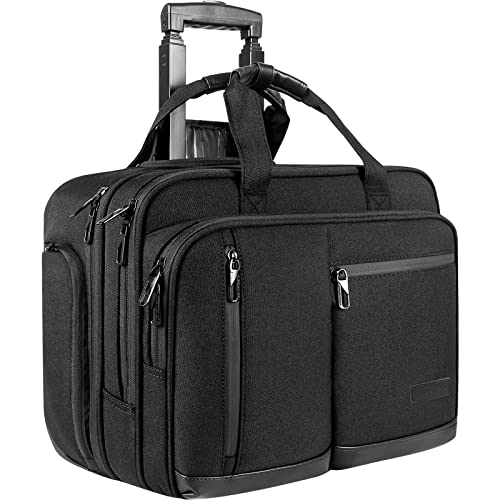
The VANKEAN 17.3″ Waterproof Rolling Laptop Bag is a solid pick for professionals who carry multiple devices and need reliable, mobile protection through airports, offices, or storm-prone commutes. I appreciate its durable water-repellent canvas and fully waterproof base, which hold up well in rain. It fits most overhead bins, though you should check under-seat space with your airline. The padded main compartment fits a 17.3″ laptop, while front and side pockets organize tablets, bottles, and essentials. Its inline skate wheels roll smoothly, and the telescoping handle locks firmly. RFID pockets add security, but the 6.33-lb weight adds up over long walks.
Best For: Professionals who frequently travel or commute with multiple devices and need durable, waterproof, and organized laptop bag with roll-aboard convenience.
Pros:
- Durable water-repellent canvas with fully waterproof base and corner guards protects against rain and wear
- Spacious and organized layout with padded 17.3″ laptop compartment, tablet pockets, and RFID-blocking storage
- Smooth-rolling inline skate wheels and telescoping handle make it ideal for frequent airport or office travel
Cons:
- Weighs 6.33 lbs, which can feel heavy when carried long distances without rolling
- Under-seat compatibility may vary by airline despite carry-on size compliance
- Limited color/style options may not appeal to all professional aesthetics
BAGSMART 17.3″ Laptop Bag Black
You’ll want the BAGSMART 17.3″ Laptop Bag Black if you regularly carry multiple devices and need quick access during travel, especially through airport security. I use it daily, and the separate tech compartment saves time at checkpoints-my 17.3″ laptop and 12.9” iPad fit securely in the padded EVA sleeve. The expansion zipper adds 2.2 inches of width, turning it into a duffel for weekend trips, though the bulk increases. It’s water-resistant and holds up well, but the polyester shows scuffs over time. The C-curve strap is comfortable crossbody, and the luggage slide lets me stack it on my suitcase. Front pockets fit chargers and keys, but the small ones fill fast.
Best For: Business professionals and frequent travelers who need a durable, TSA-friendly laptop bag with expandable storage for tech and travel essentials.
Pros:
- Separate tech compartment allows quick and convenient TSA screening access
- Expansion zipper increases capacity for weekend trips or extra gear
- Comfortable C-curve shoulder strap and luggage slide make commuting and travel easier
Cons:
- Polyester fabric shows scuffs and wear over time despite water resistance
- Bulkier when expanded, which may be less ideal for tight spaces
- Small front pockets fill up quickly and can become cluttered
VECKUSON 18.4″ Laptop Backpack with USB Charger

A top pick for travelers and gamers needing space for dual laptops and gaming gear, this 60L backpack fits a 19-inch laptop and a tablet with dedicated padded compartments, making it ideal for users juggling multiple devices. I’ve used it on trips, and it easily holds a PS5 Slim or weeklong clothing-great for overnights. The USB port charges devices externally, though you’ll need your own power bank. At 3.55 lbs, it’s sturdy but not light. It unfolds flat for TSA checks, which saves time, and the anti-theft pocket secures cards. Ventilated back padding keeps me comfortable, even when it’s fully packed.
Best For: Travelers, gamers, and professionals needing a spacious, feature-rich backpack to carry dual laptops, gaming consoles, and weeklong travel essentials with convenient USB charging and TSA-friendly access.
Pros:
- Spacious 游戏副本 design with dedicated padded compartments for two laptops and a tablet, plus room for a PS5 Slim or 5–7 days of clothing
- TSA-approved wide-opening design and external USB charging port for airport convenience and on-the-go power
- Equipped with RFID-blocking anti-theft pocket, ventilated back padding, and luggage strap compatibility for security and comfort
Cons:
- Weighs 3.55 pounds, which is relatively heavy before adding gear
- USB charging requires a separate power bank, not included
- Large 60L volume may be excessive for daily commuters or short trips
KROSER 17.3-Inch Laptop Briefcase (Expandable)

Carrying two laptops without bulk or hassle comes down to smart organization, and this expandable briefcase nails it for professionals, students, or travelers who need quick access and solid protection. I’ve used the KROSER 17.3-Inch Laptop Briefcase daily, and its 18” x 12.8” x 7.5” frame-expanding to 9.5”-holds my 15.6-inch and 13-inch laptops securely. The TSA-friendly compartment speeds up airport checks, while the RFID-blocking pockets shield my cards. Water-repellent canvas stands up to drizzles, and the padded shoulder strap eases long commutes. It clips to luggage, but the front pockets feel tight for larger phones. Still, for business or travel, it’s organized, durable, and ready to go.
Best For: Professionals, students, and travelers needing a durable, organized, and expandable laptop briefcase for carrying multiple devices and navigating commutes or trips efficiently.
Pros:
- Expandable design securely fits up to 17.3-inch laptops and includes a TSA-friendly padded compartment for quick airport screening
- RFID-blocking pockets and water-repellent canvas material provide security and durability in various conditions
- Detachable padded shoulder strap, luggage strap, and multiple organized pockets enhance comfort and functionality for daily use or travel
Cons:
- Front compartment pockets are tight and may not comfortably fit larger smartphones
- Limited internal space for bulkier accessories when both laptops are carried
- Expandable section, while useful, adds slight bulk when fully loaded
Factors to Consider When Choosing a Bag for Multiple Laptops
You’ll want to pick a bag that balances capacity and size without adding bulk, like models with expandable sections for 15” and 17” laptops. Strong padding, organized compartments, and durable zippers matter for daily protection and easy access, but don’t overlook weight-some bags add up to 4 lbs empty, which gets tiring. Look for features like lockable zips and water-resistant fabric, but always check warranty terms, since frequent travelers need gear that lasts without breaking the bank.
Capacity And Size
When packing two or more laptops, the right bag must balance snug protection with smart organization-starting with dedicated padded compartments sized for screens up to 17.3 inches, so devices don’t shift during transit. You’ll want expandable designs that add space when needed, letting you fit extra gear without sagging or losing shape. Make sure the interior layout holds all your laptops side by side, not stacked, to avoid pressure on hinges and screens. Look for wide, clamshell-style openings so you can quickly grab any device without digging. Always check the exterior dimensions-some larger bags still meet carry-on standards, but not all, and you don’t want to risk an extra fee when traveling. While more volume gives flexibility, oversized bags can become bulky and harder to carry. Balance capacity with portability to keep your load efficient, especially when moving through airports or crowded workspaces.
Protection And Padding
A well-protected multi-laptop bag starts with smart padding that shields your devices without adding bulk. You’ll want high-density foam or EVA padding in each compartment-it absorbs shocks from drops and resists compression during travel. Choose models with thick, soft linings like fleece or velvet to prevent scratches and add an extra layer of impact absorption. Reinforced corners or designs meeting military-grade drop standards (like MIL-STD-810G) offer proven durability, but they can make the bag heavier. Make sure the padding fully wraps each laptop with a snug, contoured fit to stop internal shifting. Dual or multi-compartment layouts with individual padded sleeves keep devices isolated and protected. Just remember: more padding improves safety, but it can reduce available space or increase weight-balance protection with portability based on your daily carry needs.
Organization And Compartments
If keeping your tech and accessories neatly arranged matters, then organization should rank just as high as protection when selecting a multi-laptop bag. You’ll want at least two padded compartments to safely hold laptops of varying sizes without shifting. A 180° opening gives you full visibility and easy access, speeding up your workflow. Multiple mesh and zippered pockets keep chargers, cables, and peripherals separated, cutting clutter and tangles. Look for built-in sleeves for tablets or documents-they help you separate gear by function. Expandable zipped sections add space when needed without messing up your layout. But don’t oversize it-too many compartments can make packing slower and add bulk. Balance accessibility with structure, and test zippers for smooth daily use. Smart interior design saves time, especially when switching between meetings or workspaces.
Portability And Weight
Every ounce counts when you’re carrying multiple laptops, and the right bag keeps weight under 3.5 pounds without sacrificing durability or protection. You’ll want lightweight materials like ballistic nylon or recycled polyester-they slash bulk while still shielding your gear. Padded, adjustable shoulder straps or backpack designs distribute weight evenly, so you’re not hunched over after a few blocks. If you’re lugging dual setups, pick a bag with inline skate wheels and a telescoping handle; they roll smoothly over cracks and curbs. The luggage strap is a small win: slip it over your suitcase handle to go hands-free through terminals. Compact doesn’t mean flimsy-high-density foam padding protects without puffing up the profile. Just don’t expect ultra-light packs to have space for tablets, chargers, and notebooks unless you upgrade size. Balance portability with what you’ll actually carry-otherwise, that “easy” bag turns into a strain.
Security And Durability
Don’t assume a tough-looking bag can handle daily abuse-real durability hinges on specific materials and construction. You need high-denier polyester or coated canvas to repel water and resist wear over time. Look for military-grade padding in laptop sleeves-it absorbs shock from drops, keeping devices safe. Metal zippers, YKK closures, and reinforced stitching prevent fraying and hold up after months of use. Aluminum handles won’t snap under full weight. For security, pick bags with RFID-blocking pockets to stop electronic theft of cards or IDs. Lockable zippers and cut-resistant straps deter thieves in crowded areas, while hidden compartments help stash essentials out of sight. Just remember: extra security and rugged materials often add weight. Some models trade sleekness for toughness, so balance protection with portability. Test the warranty, too-brands offering lifetime coverage usually stand behind long-term durability.
Frequently Asked Questions
Can These Bags Fit a Tablet and Laptop Together?
Yes, you can fit a tablet and laptop together in these bags-most have dedicated padded sleeves for both. You’ll typically find a 15” laptop compartment and a separate 10”–12” tablet pocket, often foam-lined for protection. Some models even let you access them independently. Just check dimensions against your devices. Overpacking risks strain on zippers, so stick to the specs and avoid forcing extra gear in.
Are the Bags Airline Carry-On Approved?
Yes, you can carry these bags on most airlines without hassle. They’re designed within standard carry-on limits-typically under 22 x 14 x 9 inches-so they fit overhead. But always check your airline’s specific size rules; some budget carriers are stricter. Look for slim profiles and compression straps to stay compliant. Durable zippers and padded compartments keep gear safe during boarding. A few models exceed limits when fully packed, so pack smart to avoid gate check fees.
Do They Come With a Warranty?
Yes, they come with a warranty-most offer a 2- to 5-year limited coverage that includes defects in materials and workmanship. You’ll get protection against zipper failures, seam splits, and strap issues under normal use. Some brands extend coverage to accidental damage, but exclusions apply for liquid spills or overloaded compartments. Check the fine print: registration is often required, and proof of purchase matters. Warranties don’t cover wear and tear, so you’ll need to maintain the bag properly to keep it valid.
Is the USB Charging Port Safe From Surges?
Yes, the USB charging port’s safe from surges if you use a bag with a built-in voltage regulator-most premium models include one. You won’t get protection from cheap, unbranded bags without circuit safeguards. Always plug your devices into the bag’s internal USB, not the external port, to avoid overloading. Pair it with a surge-protected power bank for real-world safety. Check specs: 5V/2.4A output with overcurrent and short-circuit protection is ideal.
Are the Bags Suitable for Daily Gym Use?
You can use these bags for the gym, but they’re not ideal. They’re built for laptops and tech, with padded compartments and sleek designs that prioritize organization over durability for sweaty workouts. The materials resist light moisture but aren’t fully water-resistant. Straps aren’t padded for heavy lifts, and ventilation is minimal. If you’re doing light gym sessions, you’ll be fine-just don’t expect the same performance as a dedicated gym bag.