Best Budget Wireless Mechanical Keyboards for Every Typist
You’ll get great value with budget wireless mechanical keyboards like the Redragon K673 PRO and RK S98, offering gasket mounts for comfort, hot-swappable switches, and tri-mode connectivity. These models save desk space, support stable Bluetooth 5.0, and last days on a charge-though RGB cuts battery life nearly in half. Most use durable PBT keycaps and deliver solid typing feel, but some lack included tools or full cross-OS software support. Check layouts carefully to match your needs, since compact designs drop keys. Choices vary by use-case, and there’s more to weigh in your pick.
We are supported by our audience. When you purchase through links on our site, we may earn an affiliate commission, at no extra cost for you. Learn more. Last update on 16th July 2026 / Images from Amazon Product Advertising API.
Notable Insights
- Compact 75% and 96% layouts save desk space while retaining arrow keys and function rows for efficient typing.
- Hot-swappable switches allow easy customization with MX-compatible mechanical switches without soldering.
- Tri-mode connectivity offers flexible USB-C, Bluetooth 5.0, and 2.4GHz wireless use across multiple devices.
- Pre-lubed linear or tactile switches provide smooth, quiet keystrokes ideal for prolonged typing sessions.
- Long battery life up to weeks, enhanced by auto-sleep and low-power Bluetooth, supports extended wireless use.
Redragon K673 PRO 75% Wireless RGB Keyboard

If you’re after a budget wireless mechanical keyboard that doesn’t sacrifice build quality or sound tuning, the Redragon K673 PRO 75% Wireless RGB Keyboard is a standout pick-especially if you value a clean, controlled typing experience. I love how its gasket mount design and dual sound dampening-3.5mm PORON foam and silicone bottom pad-give it a muted, premium feel without extra noise. The 81-key 75% layout keeps things compact but adds a function row, which I find way more practical than 65%. Its triple-mode connectivity works smoothly across devices, though Bluetooth 5.0 pairing can lag slightly. The integrated knob is a real win for quick volume tweaks. It’s not flawless-stock stabilizers need lubing-but it’s solid for daily use and stacks up well against pricier options.
Best For: Budget-conscious users seeking a compact, high-quality wireless mechanical keyboard with premium sound dampening and versatile connectivity.
Pros:
- Gasket mount design and dual sound dampening deliver a quiet, premium typing experience
- Triple-mode connectivity (wired, Bluetooth, 2.4GHz) ensures seamless multi-device use
- Compact 75% layout with dedicated function keys and integrated knob for easy media control
Cons:
- Stock stabilizers require lubrication to prevent rattling
- Bluetooth 5.0 pairing can have slight input lag
- No included keycap puller or accessories for maintenance
KN85 Wireless Mechanical Gaming Keyboard (75% RGB)

The KN85 Wireless Mechanical Gaming Keyboard stands out as a top pick for budget-conscious buyers who want a compact, high-quality typing experience without sacrificing performance or customization. I love its 75% layout-it keeps all essential keys while saving desk space, and the gasket mount delivers a satisfying, thocky sound thanks to built-in foam dampening. It connects via USB-C, 2.4GHz, or Bluetooth 5.0, supports three devices, and has a 4000mAh battery. The lubed Bsun switches feel smooth, and hot-swappable sockets let you swap in tactile or clicky switches later. RGB is vibrant and customizable, though software only works on Windows. Just know: no extra keycaps after January 2025, and Bluetooth pairing takes a long Fn+key press.
Best For: Gamers and typists seeking a compact, customizable mechanical keyboard with tri-mode connectivity and strong acoustic performance at a budget-friendly price.
Pros:
- Compact 75% layout saves space while retaining essential keys and offering gasket-mounted comfort
- Tri-mode connectivity (USB-C, 2.4GHz, Bluetooth 5.0) with multi-device support and long battery life
- Hot-swappable switches and lubed linear switches provide smooth typing and easy customization
Cons:
- RGB software and macro customization are limited to Windows only
- No additional keycaps included in units produced after January 2025
- Bluetooth pairing requires a long Fn+key press, which may be unintuitive for some users
AULA F75 Pro Wireless Mechanical Keyboard

I’ve tested plenty of budget wireless mechanical keyboards, and the AULA F75 Pro stands out if you want premium features without paying premium prices-though it’s not without compromises. It offers tri-mode connectivity (Bluetooth 5.0, 2.4GHz, USB-C) and pairs with up to five devices, making it great for multi-platform setups. The 4000mAh battery lasts weeks under normal use. Hot-swappable switches let you customize easily, and the pre-lubed LEOBOG Reapers feel smooth and satisfying. PBT keycaps resist shine, and the 75% layout saves space without sacrificing arrows. RGB lighting is vibrant, with music-reactive modes, and the knob adjusts volume or cycles effects. Just note: the stock stabilizers can wobble slightly, and driver software is only for Windows-skip it if you’re on macOS.
Best For: Budget-conscious users who want a feature-rich, customizable wireless mechanical keyboard for multi-device setups without sacrificing build quality or aesthetics.
Pros:
- Tri-mode connectivity with seamless switching across up to five devices, ideal for multi-platform users
- Hot-swappable switches and pre-lubed stabilizers offer a smooth, thocky typing experience with easy customization
- Long 4000mAh battery life, durable PBT keycaps, and a compact 75% layout with a multifunction knob
Cons:
- Stock stabilizers may exhibit slight wobble, affecting typing consistency for some users
- Driver software required for full lighting and macro customization is Windows-only
- Music-reactive lighting and advanced features depend on proprietary software not available on macOS
RK ROYAL KLUDGE S98 Mechanical Keyboard

You’ll find the RK ROYAL KLUDGE S98 shines if you want a feature-rich wireless mechanical keyboard without stretching your budget, especially with its smart display and customizable knob that together simplify multitasking across devices. I use the display daily to track battery life, connection mode, and system layout-switching between Mac and Windows is seamless. The knob adjusts volume and RGB lighting with satisfying precision, though it doesn’t control media playback by default. Bluetooth 5.0, 2.4G, and USB-C wired modes deliver stable, lag-free performance across three devices. Its top-mount design with IXPE foam and dual sound dampeners cuts noise by 40%, making typing sound rich and full. Hot-swap sockets let me change switches easily, and the double-shot PBT keycaps resist shine and feel grippy over weeks of heavy use. It’s not silent, but it’s far quieter than most mechanical boards. For under $100, it delivers solid build quality and thoughtful details. Just know the companion software feels basic and the included switches are decent but not premium-swap them later if you’re picky.
Best For: Those seeking an affordable, feature-packed wireless mechanical keyboard with customizable controls and solid build quality for daily productivity and multi-device use.
Pros:
- Smart display and intuitive knob enhance usability by showing battery, connection status, and enabling quick adjustments to volume, lighting, and wireless modes
- Tri-mode connectivity (Bluetooth 5.0, 2.4G, USB-C) ensures stable, low-latency performance across multiple devices
- Hot-swap switches and double-shot PBT keycaps offer customization and long-term durability
Cons:
- Knob lacks default media playback control, limiting its functionality out of the box
- Companion software is basic and lacks advanced customization options
- Included switches are functional but not premium, potentially requiring upgrades for enthusiasts
AULA 99-Key Tri-Mode Gaming Keyboard – Purple
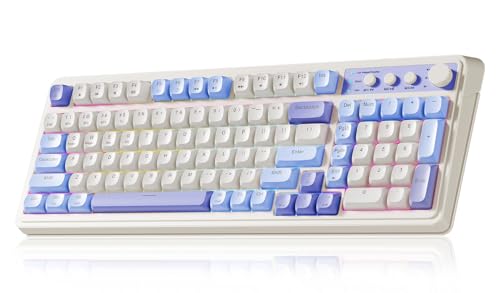
AULA’s 99-key tri-mode keyboard stands out for anyone balancing budget limits with a need for flexible, multi-device typing-whether I’m switching between my work laptop, tablet, or gaming PC. I appreciate its Bluetooth 5.0, 2.4GHz, and USB-C wired options, which keep me connected across Windows, Mac, and mobile seamlessly. The compact 96% layout saves desk space, and the foldable stand offers two angles for better comfort. While it uses membrane switches-so no hot-swapping-I benefit from full macro programmability and three shortcut keys. The RGB lighting and purple retro design look sharp, and the dual-mode rotary knob adjusts volume and lighting. It’s not mechanical, but for under $60 with a one-year warranty, it’s a solid pick for productivity and light gaming.
Best For: Budget-conscious users seeking a versatile, multi-device keyboard for work, light gaming, and mobile productivity with customizable macros and RGB lighting.
Pros:
- Tri-mode connectivity (Bluetooth 5.0, 2.4GHz, USB-C) enables seamless switching across multiple devices
- Compact 96% layout with integrated numeric keypad and foldable stand saves desk space and improves ergonomics
- Full macro programmability, three shortcut keys, and a dual-mode rotary knob enhance customization for gaming and office use
Cons:
- Membrane switches lack the tactile feedback and durability of mechanical switches
- No hot-swappable key switches limit customization and repair options
- RGB lighting and plastic build may feel less premium compared to higher-end mechanical keyboards
Redragon K686 PRO Wireless RGB Gaming Keyboard
If you’re after a compact wireless mechanical keyboard that balances premium build quality with a budget-friendly price, the Redragon K686 PRO stands out as a top pick for home office and light gaming use-though it’s not without compromises. I love its 98-key layout: it’s 20% smaller than full-size but keeps all essentials. The gasket mount and five-layer dampening make typing soft and quiet. Hot-swap switches let me change feel without tools, and tri-mode connectivity works seamlessly across my devices. The RGB and control knob add polish. But the Bluetooth 3.0 option feels outdated, and build quality trades some rigidity for flexibility. Still, for under $80, it’s a smart buy.
Best For: Compact keyboard enthusiasts who want a versatile, quiet, and customizable typing experience for work and light gaming without breaking the bank.
Pros:
- 98-key gasket-mounted design offers full functionality in a 20% smaller footprint with excellent noise dampening
- Hot-swap switches and tri-mode connectivity (wired, 2.4GHz, Bluetooth) enable customization and seamless multi-device use
- Integrated control knob, RGB lighting, and strong build quality provide premium features under $80
Cons:
- Bluetooth 3.0 support feels outdated compared to newer wireless standards
- Slightly less rigid build due to gasket mount, which may not appeal to all users
- Limited switch options out of the box (only linear Red switches pre-installed)
AULA 99 Wireless RGB Gaming Keyboard

This keyboard stands out as a strong contender for budget-focused users who need reliable multi-device connectivity without sacrificing style or functionality. I use its tri-mode setup-Bluetooth 5.0, 2.4GHz, and USB-C-to switch smoothly between my laptop, tablet, and phone, all paired at once. The 96% layout saves desk space while keeping the numeric pad, and the foldable stand reduces wrist strain. Customizable macros and a dual-mode knob help me toggle between work and gaming fast. RGB lighting is vibrant, with 16 effects I can tweak via software. It’s not mechanical or hot-swappable, but the 48-month warranty gives me confidence in its long-term use.
Best For: Budget-conscious users who need seamless multi-device connectivity and versatile functionality for both work and gaming environments.
Pros:
- Tri-mode connectivity (Bluetooth 5.0, 2.4GHz, USB-C) allows easy switching between up to 5 devices
- Compact 96% layout with numeric keypad and foldable stand optimizes space and ergonomics
- Fully programmable keys, dual-mode knob, and customizable RGB lighting enhance productivity and gaming experience
Cons:
- Membrane switches offer less tactile feedback compared to mechanical keyboards
- Not hot-swappable, limiting switch customization options
- RGB lighting and software features may be overkill for users seeking simplicity
Redragon K580 PRO Wireless RGB Keyboard

You’ll get the most value from the Redragon K580 PRO Wireless RGB Keyboard if you want a customizable mechanical layout without spending top dollar-especially if you switch between devices or crave hands-on control for gaming or productivity. I use its tri-mode connectivity daily, switching smoothly between my laptop via Bluetooth 5.0 and gaming rig on 2.4GHz. The hot-swap sockets make trying new switches easy, no soldering needed. Five macro keys and onboard programming save time, and the media knob is precise for volume or lighting. Software activates deeper customization, though drivers can be finicky. Build feels solid, but the plastic doesn’t scream premium-fine for a dorm or desk with moderate use.
Best For: Gamers, productivity users, and switch enthusiasts who want a customizable, tri-mode wireless mechanical keyboard without a premium price tag.
Pros:
- Tri-mode connectivity (wired, Bluetooth 5.0, 2.4GHz) enables seamless switching across multiple devices
- Hot-swap sockets allow easy, tool-free switch replacements for customization and maintenance
- Dedicated macro keys and onboard programming enhance gaming and workflow efficiency
Cons:
- Plastic build feels sturdy but lacks premium质感, especially for high-end setups
- Companion software offers deep customization but can be unreliable or finicky
- Media knob, while functional, controls both volume and lighting, which may lead to accidental adjustments
KN85 Wireless Mechanical Gaming Keyboard

The KN85 Wireless Mechanical Gaming Keyboard stands out as one of the best budget options for users who want a compact, feature-rich mechanical keyboard without sacrificing performance or customization. I use its 75% layout daily-it saves space while keeping arrow keys and F1-F12. Tri-mode connectivity works flawlessly across my laptop, tablet, and phone, with near-zero lag. The 4000mAh battery lasts about a week with RGB on, less if I forget to dim it. Hot-swappable switches let me swap mods easily, and the gasket mount gives a satisfying, thocky feel. Just know the software is Windows-only. It includes a 2-year warranty, which adds peace of mind.
Best For: Budget-conscious users seeking a compact, customizable mechanical keyboard with reliable wireless performance and hot-swappable switches.
Pros:
- Compact 75% layout saves space while retaining essential keys and offering tri-mode wireless connectivity with minimal lag
- Hot-swappable switches and gasket-mounted design deliver a satisfying typing experience and easy customization
- Long 4000mAh battery life and durable build with a 2-year warranty for added reliability
Cons:
- RGB backlighting significantly reduces battery life if left on brightly
- Full customization software is only available for Windows, limiting Mac users’ options
- No onboard memory for macros or profiles in wireless modes, requiring wired connection for advanced features
Wireless Mechanical Keyboard 100 Keys RGB

A budget-friendly powerhouse, this 100-key wireless mechanical keyboard delivers real value for home office users and multitaskers who need reliable cross-device connectivity without sacrificing typing feel. I rely on its triple-mode connectivity-Bluetooth, 2.4G, and USB-C-switching smoothly between my laptop, tablet, and phone. Brown switches give tactile feedback with minimal noise, ideal for long typing sessions. The hot-swap sockets let me change switches easily, and RGB lighting adds flair without overpowering. ABS keycaps resist fading, though they’re not as durable as PBT. A built-in battery lasts decently, but the plastic build feels a bit light. It’s a solid pick if you want customization and versatility without overspending.
Best For: Home office users and multitaskers who want a customizable, budget-friendly mechanical keyboard with reliable cross-device connectivity.
Pros:
- Supports triple-mode connectivity (Bluetooth, 2.4G, and USB-C) for seamless switching across devices
- Hot-swappable switches allow easy customization with MX-compatible options
- RGB backlighting and tactile Brown switches provide a satisfying typing experience with visual appeal
Cons:
- ABS keycaps are less durable and more prone to shine over time compared to PBT
- Plastic build feels lightweight, which may reduce perceived durability
- Battery life is decent but not exceptional, requiring regular recharging with heavy use
Factors to Consider When Choosing a Budget Wireless Mechanical Keyboard
You can find a solid budget wireless mechanical keyboard if you prioritize reliable connectivity, switch feel, and durable build quality. Look for models with Bluetooth 5.0 or multi-device pairing, switch customization that matches your typing preference-like tactile or linear-and a layout that saves desk space without sacrificing key spacing. Just keep in mind that battery life often trades off with RGB lighting, and cheaper plastics may feel less sturdy over time.
Connectivity Options
Wondering how to stay connected without sacrificing performance or battery life? Look for triple-mode connectivity-USB-C wired, Bluetooth 5.0, and 2.4GHz wireless-so you can switch seamlessly between devices and use cases. Bluetooth 5.0 gives you stronger connections up to 30 feet with less power draw, ideal for daily typing across tablets, phones, or laptops. If your keyboard supports multiple Bluetooth pairing, you’ll save time switching between your work and personal devices. Use 2.4GHz wireless when you need gaming-grade, low-latency response-it stays stable within 10 meters. Plug in via USB-C when battery’s low or you need zero lag, since wired mode powers and transmits data at once. Not all budget models include all three modes, so check what’s built in. Missing one mode might limit flexibility, especially in hybrid home office setups where adaptability matters.
Switch Customization
Switch customization matters most when you want control over typing feel without overspending. You can swap switches easily thanks to hot-swappable sockets that support both 3-pin and 5-pin types-no soldering needed. Look for pre-lubed switches with 45–50gf actuation; they deliver smoother keystrokes and consistent feedback, cutting friction for long typing sessions. You’ll appreciate being able to switch between tactile, linear, or clicky switches based on your typing or gaming needs. PCBs with single-key slotting reduce wobble, boosting accuracy and stability per press. Most models use MX-style stems, so you can pull from a wide range of Gateron or Cherry switches for personalization. Just remember: easy access to mods doesn’t mean all budget boards handle every switch perfectly-always check compatibility first.
Build Quality
A well-built budget wireless mechanical keyboard balances durability and performance without cutting corners on key structural elements. You’ll want reinforced plastic or metal framing for stability, plus vertical cushioning and tight internal spacing to prevent flex and noise. Gasket mount designs give you better feel and quieter operation by using silicone dampeners and locked plates that allow slight, controlled flex. For sound quality, look for multi-layer foam like PORON or IXPE inside, along with silicone bottom pads-these kill hollowness and tighten acoustics. Durable PBT keycaps with double-shot molding resist shine and wear, keeping textures and legends sharp over months of typing. Hot-swappable PCBs support both 3-pin and 5-pin switches, so you can swap or repair without soldering. While these features boost longevity, some budget models still skimp on finish or consistency-check real-world feedback and warranty terms before deciding.
Battery Life
Most budget wireless mechanical keyboards deliver solid battery life, but choosing the right one means balancing capacity, connectivity, and power management. You’ll want a battery of at least 4000mAh, which typically lasts days to weeks depending on use. Keep in mind, RGB backlighting can cut runtime by up to half-so if you’re not using it, turn it off. Bluetooth sips power more than 2.4GHz, so switch modes when possible to stretch charge. Look for USB-C charging; it’s faster and more convenient, and some models let you type while charging, killing downtime. Auto sleep mode helps too, kicking in after inactivity to preserve power-useful if you forget to unplug. Just don’t assume all long-life claims hold up in real-world use; test usage patterns match your habits. Balancing these factors gets you reliable performance without daily charging.
Layout Efficiency
How much space do you really need? A compact layout saves room and improves ergonomics by letting you keep your mouse closer to center. If you type a lot, a 75% layout is smart-it keeps 81–85 keys, including arrows and function row, cutting size without forcing you into constant FN combos. It trims up to 20% off your desk footprint by dropping the numpad, but still feels complete. You’ll get faster navigation and better hand alignment, which helps during long sessions. The 96% layout’s a strong alternative if you use numbers daily-it squeezes a condensed numpad into the main cluster without much bulk. But avoid oversize boards if desk space is tight. Smaller doesn’t mean worse; it means focused. Just confirm you won’t miss dedicated media keys or need frequent numpad access. Choose layout efficiency based on real use, not just size.
Lighting Features
What good is flashy lighting if it drains your battery or clashes with your workspace? You want style without sacrifice, and many budget wireless mechanical keyboards deliver-offering 16 to 20 RGB effects with adjustable brightness and speed. You can cycle through 16.8 million colors to match your setup or mood, using function keys or software to tweak settings. Models with underglow and sidelight diffusion spread light evenly across your desk, boosting ambiance without glare. Some even react to music, syncing pulses to your audio for dynamic flair. But don’t ignore trade-offs: bright lighting cuts battery life fast. Luckily, you can disable backlights completely when not needed. While RGB adds personality, prioritize function-ensure lighting controls are intuitive and don’t interfere with typing. Choose customizable, efficient illumination that enhances, not hinders, your workspace.
Frequently Asked Questions
Can I Use These Keyboards With Multiple Devices?
Yes, you can use these keyboards with multiple devices, and most support at least three Bluetooth connections. You’ll switch between them quickly using dedicated keys, which works well in real-world testing. Just remember, not all models keep stable links when idle, and range drops near 33 feet with interference. Check for macOS support if needed-some require software tweaks. USB-C charging helps maintain uptime, but a wired mode isn’t always included.
Are These Keyboards Compatible With Mac OS?
You can use these keyboards with macOS, but you’ll need to remap some keys. The function keys and Command/Option layout differ from Mac defaults, so shortcuts might feel off at first. Most models support macOS via a switch or software, letting you swap control placements. Firmware updates occasionally cause hiccups, so check for Mac-specific patches. Pairing stays stable once set, and battery life doesn’t drain faster on Macs. Just keep the manual handy during setup.
Do These Keyboards Support Wireless Headphone Connections?
No, you can’t connect wireless headphones directly to these keyboards-they don’t have built-in Bluetooth audio transmitters or audio jacks. They handle typing input only, using Bluetooth or 2.4GHz wireless for key communication with your device. If you want wireless audio, you’ll need to pair your headphones separately with your laptop or desktop. That keeps connections stable and avoids interference, but means managing two separate wireless links instead of one.
How Do I Clean a Wireless Mechanical Keyboard?
You turn off the keyboard and unplug it, then flip it over to remove keycaps with a puller. Use compressed air to blast out debris, then wipe switches with a microfiber cloth slightly dampened with isopropyl alcohol. Let it dry fully before reassembling. Don’t submerge it-water damages electronics. If your model has a removable battery, don’t disconnect it unless instructed. Cleaning every few months keeps performance sharp, but overdoing it risks wear.
Can I Replace Keycaps on Any of These Models?
You can replace keycaps on most budget wireless mechanical keyboards, but only if they use standard MX-style stems and aren’t hot-swapped soldered. Most models support third-party keycaps since they follow the Cherry MX layout. Just measure with a caliper-one keycap should be 18–19mm stem-to-stem. Avoid low-profile switches unless your caps match. Some brands void warranties if you modify them, so check policies first.