Best Keyboard and Mouse Combos for Any Setup
You’ll get reliable performance with the Logitech MK270 or wired MK120-both offer plug-and-play USB use, spill resistance, and long battery or cable-powered operation. The MK270 delivers up to 36 months of keyboard life, while the MK120 eliminates battery needs entirely. For wireless flexibility, the MX Keys S supports multi-device Bluetooth with premium build and recycled materials. Keep in mind ergonomics, OS compatibility, and battery upkeep-your setup’s needs will determine the best fit. A closer look reveals key differences in noise, layout, and connectivity that could shape your daily use.
We are supported by our audience. When you purchase through links on our site, we may earn an affiliate commission, at no extra cost for you. Learn more. Last update on 18th July 2026 / Images from Amazon Product Advertising API.
Notable Insights
- Wired combos like Logitech MK120 offer plug-and-play reliability with zero input lag, ideal for fast-paced tasks.
- Wireless 2.4 GHz models such as MK270 provide clutter-free setups with stable connections up to 33 feet.
- Long battery life up to 36 months in keyboards (MK270, MK540) reduces frequent replacements and maintenance.
- Ergonomic designs with palm rests (K270, Lovaky) and quiet keys enhance comfort for extended typing sessions.
- Multi-device compatibility in MX Keys S allows seamless switching across three devices via Bluetooth or USB.
Logitech MK270 Wireless Keyboard & Mouse Combo

If you’re setting up a home office or need a dependable, no-fuss keyboard and mouse combo for everyday computing, the Logitech MK270 is a solid pick-especially if you value long-term reliability and minimal maintenance. I’ve used it daily, and the 2.4 GHz wireless connection stays stable up to 33 feet, with almost no lag. The keyboard lasts up to 36 months on two AA batteries, and the mouse runs a full year on one. Both have independent on/off switches, which saves power. Keys are low-profile and quiet, with a full layout including a number pad. The spill-resistant design gives peace of mind, but it’s not rechargeable-so you’ll replace batteries eventually.
Best For: Individuals seeking a reliable, low-maintenance wireless keyboard and mouse combo for everyday computing in home or office environments.
Pros:
- Stable 2.4 GHz wireless connection with minimal lag up to 33 feet
- Extremely long battery life-up to 36 months for the keyboard and 12 months for the mouse
- Spill-resistant design and full-size keyboard with number pad for added durability and functionality
Cons:
- Uses disposable batteries instead of being rechargeable
- Limited multimedia controls compared to higher-end models
- Not optimized for Mac OS, with best performance on Windows systems
Logitech MK120 Wired Keyboard and Mouse Combo

The Logitech MK120 Wired Keyboard and Mouse Combo is one of the best choices for users who need a reliable, no-frills setup for everyday computing-especially those building a basic home office or upgrading an older desktop. I use it daily, and it delivers solid performance with zero lag thanks to its stable USB connection-no drivers needed. The keyboard’s full-size layout, spill-resistant design, and 10-million-keystroke durability make it tough and practical. Low-profile keys offer quiet, comfortable typing. The ambidextrous mouse tracks smoothly with optical precision, though it lacks extra buttons. Wired setup means no batteries, but you lose desk flexibility. It’s budget-friendly, built to last, but not for gamers or power users.
Best For: Budget-conscious users seeking a durable, plug-and-play keyboard and mouse combo for everyday computing and basic办公 setups.
Pros:
- Reliable wired USB connection with no software or drivers required
- Spill-resistant keyboard with 10-million-keystroke durability and quiet, low-profile keys
- Ambidextrous mouse design with precise optical tracking for comfortable daily use
Cons:
- Wired design limits desk flexibility and cable management options
- Mouse lacks extra buttons or customizable features
- Not suitable for gaming or power users needing advanced functionality
Logitech MK540 Wireless Keyboard & Mouse Combo

I find the Logitech MK540 Wireless Keyboard & Mouse Combo best suits home office users who want a reliable, long-lasting setup without frequent battery changes. The full-size keyboard has a spill-resistant design, quiet keys, and an adjustable tilt, while the ergonomic mouse fits comfortably in either hand. It connects via a 2.4 GHz Unifying receiver, giving you a solid wireless link up to 33 feet-no Bluetooth, though, which limits flexibility. You’ll get up to 36 months for the keyboard and 18 for the mouse on standard batteries, and dedicated media keys boost productivity. The receiver stores in the mouse, but if you want multi-device pairing or hyper-fast scrolling, step up to the MK850.
Best For: Home office users seeking a reliable, long-lasting wireless keyboard and mouse combo with minimal battery replacements and comfortable, spill-resistant design.
Pros:
- Full-size keyboard with quiet, spill-resistant keys and adjustable tilt for enhanced comfort
- Long battery life with up to 36 months for the keyboard and 18 months for the mouse
- Dedicated multimedia hotkeys and ergonomic, ambidextrous mouse for increased productivity
Cons:
- Limited to 2.4 GHz connectivity via Unifying receiver-no Bluetooth option
- Receiver must be stored in the mouse battery compartment, risking loss when in use
- No multi-device support or advanced features like hyper-fast scrolling found in higher-end models
Logitech MK335 Wireless Keyboard & Mouse Combo

You’ll appreciate the Logitech MK335 Wireless Keyboard & Mouse Combo if you need a dependable, no-fuss setup for daily work or casual use across Windows, Mac, or Linux systems. I’ve used it for months and found the typing quiet and comfortable, thanks to low-profile keys and 11 useful hot keys. The 2.4 GHz wireless stays stable, with a nano-receiver that tucks into the mouse for storage. It works flawlessly with plug-and-forget setup, but the mouse isn’t ergonomic-just ambidextrous. Battery life lasts up to 24 months on the keyboard, 12 on the mouse, with included AAAs. At 1.47 pounds and under 18 inches, it’s compact and clutter-free. It won’t dazzle gamers, but for home offices or general use, it’s a solid base. The model 920-008478 is still supported, with a warranty through Logitech. Just know it’s not sold as new with computers on Amazon-returns are limited to damaged or defective units.
Best For: People seeking a reliable, low-maintenance wireless keyboard and mouse combo for everyday productivity on Windows, Mac, or Linux systems.
Pros:
- Long battery life with up to 24 months for the keyboard and 12 months for the mouse
- Stable 2.4 GHz wireless connection with compact nano-receiver that stores in the mouse
- Quiet, comfortable typing experience with useful hot keys and plug-and-forget setup
Cons:
- Mouse has an ambidextrous but non-ergonomic design, less comfortable for extended use
- Not ideal for gaming or high-performance tasks
- Limited Amazon return policy-only eligible if damaged, defective, or unopened
Logitech MK235 Wireless Keyboard & Mouse Combo

If you’re setting up a reliable home office without overspending, the Logitech MK235 Wireless Keyboard & Mouse Combo stands out as a solid long-term pick thanks to its durable build and exceptional battery life. I’ve used it daily, and the full-size layout with a number pad and 15 shortcut keys saves time. The spill-proof keyboard and anti-fading keys hold up well, and the mouse works smoothly for both left- and right-handed users. Its 2.4 GHz wireless connection stays stable up to 33 feet-no setup hassles. While the design isn’t flashy, it’s functional, with 51% and 75% recycled plastic in the keyboard and mouse, and a low 8.05 kg CO2e footprint.
Best For: Home office users seeking an affordable, durable, and long-lasting wireless keyboard and mouse combo with reliable performance and eco-conscious materials.
Pros:
- Full-size keyboard with number pad and 15 shortcut keys for enhanced productivity
- Exceptional battery life-up to 3 years for the keyboard and 1 year for the mouse
- Spill-proof design, anti-fading keys, and 2.4 GHz wireless connectivity with stable 33-foot range
Cons:
- No backlighting or advanced customization features
- Basic, utilitarian design may not appeal to users seeking a modern aesthetic
- USB Unifying receiver required, which may be inconvenient for devices with limited USB ports
Logitech MK345 Wireless Keyboard & Mouse Combo

A reliable partner for long typing sessions and everyday computing, the Logitech MK345 Wireless Keyboard and Mouse Combo suits users who value comfort and consistent performance in a home or office setup. I’ve found the full-size keyboard with its integrated palm rest reduces fatigue, and the quiet keys let me type without disturbing others. The 2.4 GHz wireless connection stays stable up to 10 meters, and the USB receiver plugs in and works instantly-no drivers needed. The contoured mouse fits my hand well, offering precise tracking, though it’s not for left-handed use. With up to 3 years of keyboard battery and 18 months for the mouse, it’s efficient, but don’t expect backlighting or advanced shortcuts. It’s a solid, no-nonsense combo that delivers where it counts.
Best For: Home and office users seeking a dependable, comfortable, and long-lasting wireless keyboard and mouse combo for everyday computing tasks.
Pros:
- Comfortable full-size keyboard with an integrated palm rest and quiet, spill-resistant keys
- Reliable 2.4 GHz wireless connection with up to 10 meters of range and plug-and-play USB receiver
- Long battery life with up to 3 years for the keyboard and 18 months for the mouse
Cons:
- Mouse is designed only for right-handed users
- No backlit keys for low-light environments
- Lacks advanced shortcut keys or programmable features
X9 Wired Keyboard and Mouse Combo

The X9 Wired Keyboard and Mouse Combo stands out as a solid choice for users who prioritize clear visibility and consistent performance, especially those with visual challenges or those working in dimly lit environments. I appreciate the large-print keys-4x bolder and easier to read-paired with 7 customizable backlight colors and 4 brightness levels, which truly help in adjusting to different lighting. The plug-and-play USB setup works instantly on Windows and Chrome OS, no drivers needed. The ergonomic mouse offers precise control with 4 DPI settings, up to 3600. It’s durable and reliable for daily use at home, school, or the office. But it’s wired, so desk space and cable management matter more.
Best For: Visually impaired or elderly users needing high-visibility typing with plug-and-play simplicity across home, office, or school environments.
Pros:
- Large 4x bold print and 7-color backlit keys with adjustable brightness enhance visibility in any lighting
- Plug-and-play USB connection works instantly with Windows and Chrome OS, no drivers or charging required
- Ergonomic 7-button mouse with 4 DPI settings (up to 3600) ensures precise control and comfort
Cons:
- Wired design may limit desk flexibility and requires cable management
- Backlighting, while customizable, may not suit users preferring minimal light distractions
- Limited OS compatibility-does not support macOS or Linux without additional configuration
Lovaky Wireless Keyboard and Mouse Combo

You’ll find the Lovaky Wireless Keyboard and Mouse Combo best suits home office users who want a reliable, full-sized setup without cluttering their desk or USB ports. I’ve found its 2.4G wireless connection stays stable up to 33 feet, and the single USB receiver works for both devices. The 104-key keyboard has a roomy layout with a numeric pad, and its foldable stand helps with ergonomics. The mouse offers silent clicks and adjustable DPIs (800–1600), useful for different tasks. Both have power switches and sleep mode to save battery-keyboard uses one AAA, mouse uses two. Just note: no Mac-specific keys, and battery life isn’t exceptional.
Best For: Home office users seeking a reliable, full-sized wireless keyboard and mouse combo with minimal desk clutter and USB port usage.
Pros:
- Stable 2.4G wireless connection up to 33 feet with a single USB receiver for both devices
- Full-sized 104-key keyboard with numeric pad and foldable stand for ergonomic typing
- Silent-click mouse with adjustable DPI (800–1600) and power-saving on/off switches and sleep mode
Cons:
- Lacks Mac-specific keys, limiting functionality on macOS systems
- Battery life is average, with no rechargeable option included
- Basic design without advanced customization or multimedia keys
Logitech MX Keys S Combo Keyboard & Mouse

Logitech’s MX Keys S Combo earns its spot as the go-to choice for professionals who type for hours and demand seamless control across multiple devices. I’ve found the spherically-dished keys deliver quiet, precise input-great for long typing sessions-while the MX Master 3S’s 8K DPI sensor tracks flawlessly, even on glass. MagSpeed scrolling flies through spreadsheets, and Smart Actions in Logi Options+ trim repetitive work. Smart Illumination is handy but can feel delayed. It pairs with three devices via Bluetooth or the USB receiver, though the receiver’s tucked away under the mouse’s cover. Made with recycled plastic, it’s a step toward sustainability, but premium materials come at a higher price.
Best For: Professionals who type extensively and need seamless multi-device control with precision input and automation.
Pros:
- Spherically-dished keys and 8K DPI mouse sensor deliver quiet, accurate, and responsive typing and tracking
- MagSpeed scrolling and Smart Actions in Logi Options+ enhance productivity by streamlining repetitive tasks
- Supports three-device pairing via Bluetooth or USB receiver, compatible across Windows, macOS, Linux, and Chrome
Cons:
- Smart Illumination can be slow to activate or adjust to hand movement
- USB receiver is stored under the mouse battery cover, making it easy to misplace
- Premium build with recycled materials comes at a higher price point
Logitech MK200 Wired Keyboard and Mouse
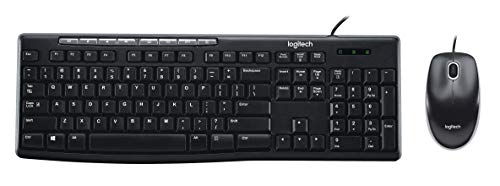
If your home office setup demands reliable, no-fuss peripherals without sacrificing core functionality, the Logitech MK200 Wired Keyboard and Mouse combo stands out as a practical choice-especially if you value durability and straightforward performance. I’ve used it daily, and the full-size layout with a number pad, quiet low-profile keys, and one-touch media controls make typing efficient and convenient. The optical mouse tracks smoothly, with a shape that fits comfortably in hand. It’s spill-resistant-tested up to 60 ml-so minor accidents won’t kill it. USB plug-and-play works instantly with Windows XP or later and Linux 2.6+. But it’s not fancy: no backlighting, no wireless, and build quality feels utilitarian. Still, for basic, dependable performance at a low price, it delivers-just don’t expect premium features.
Best For: Budget-conscious users seeking a durable, no-frills wired keyboard and mouse combo for reliable everyday computing with basic media controls.
Pros:
- Full-size keyboard with number pad and quiet, low-profile keys for comfortable, efficient typing
- One-touch media controls and spill-resistant design with proven protection against minor liquid spills
- Plug-and-play USB setup with broad compatibility across Windows and Linux systems
Cons:
- No backlighting or wireless connectivity, limiting use in low light or flexible setups
- Utilitarian build quality with a plasticky feel compared to premium models
- Basic features only-lacks advanced customization or ergonomic enhancements
Factors to Consider When Choosing a Keyboard and Mouse Combo
You’ll want to pick a combo that fits how you work, and that means weighing wireless convenience against wired reliability-wireless models offer cleaner desks but need regular charging, while wired ones stay powered but limit placement. Look for keyboards with standard key spacing and a layout that prevents typos, plus a mouse that supports your grip style, because comfort over hours matters just as much as speed. Make sure both devices work across your laptop, desktop, or tablet, and check battery life ratings or switch types, since a silent click might save your focus but could feel too soft for heavy use.
Wireless Versus Wired Connectivity
While wireless keyboard and mouse combos offer clean, cable-free setups that suit modern desks, they come with trade-offs you’ll want to weigh carefully. You get reliable 2.4 GHz connectivity with up to 33 feet of range, but interference from other devices or obstacles can disrupt performance. If you demand instant response-like during fast-paced work or editing-wired models deliver zero input lag and consistent signal flow. They’re also plug-and-play, with no batteries or charging to manage. Wireless setups give you freedom and minimal clutter, but wired connections guarantee stability in busy environments. Your pick depends on whether you value mobility or unwavering reliability more. Both types work well, but choose based on your workspace demands and how much risk of disruption you’re willing to accept.
Battery Life And Efficiency
Wireless keyboard and mouse combos deliver a clutter-free workspace, but their convenience hinges on reliable battery life and smart power efficiency. You’ll find keyboards lasting 12 to 36 months and mice running 12–18 months, depending on how often you type or move the cursor. Models with independent on/off switches let you cut power completely, which prevents drain when idle. Most combos enter automatic sleep mode after inactivity, giving you longer uptime between battery changes. Energy-efficient 2.4 GHz tech maintains a solid connection while using less power. Pre-installed batteries vary-alkaline ones may need replacing sooner if you use multimedia keys heavily. While long life is a plus, don’t overlook easy battery access. Some designs make swaps quick; others feel needlessly fussy. Balance longevity with practicality for real-world reliability.
Ergonomic Design Features
Though comfort might seem like a personal preference, choosing an ergonomic keyboard and mouse combo actively shapes how well your body holds up during long work sessions. You’ll benefit from contoured shapes and adjustable tilt legs that support a natural wrist angle, cutting strain over time. Full-size keyboards with built-in palm rests keep your wrists neutral, lowering injury risk-but they take up more desk space. Low-profile, quiet keys reduce finger fatigue, though some users miss the tactile feedback of mechanical switches. An ambidextrous mouse suits left- or right-handed use, but sculpted designs with soft grips often offer better hand support, evenly distributing pressure for improved comfort and circulation. Still, overly aggressive shaping might not fit all hand sizes. Test different styles to find what truly works for your posture and usage.
Compatibility Across Devices
Since your keyboard and mouse need to work seamlessly with your setup, start by confirming they’re compatible with your device’s operating system-whether it’s Windows, macOS, Linux, or Chrome OS. Check that your chosen connection type-wired USB or wireless 2.4 GHz-is supported by your computer’s available ports and wireless capabilities. If you use multiple devices, look for combos with Bluetooth and multi-device pairing so you can switch between systems easily. Opt for plug-and-play models to avoid driver hassles across different machines. Be cautious if relying on older operating systems; not all modern combos support legacy versions, so verify compatibility upfront. While wireless options offer clean setups, they require battery management and may lag slightly. Wired combos deliver consistent performance without interference. Choose based on your tech ecosystem and real-world usage, not just specs.
Key Layout And Spacing
Choosing the right key layout and spacing shapes how efficiently and comfortably you work. You’ll want a full-size layout if you regularly use the number pad, F-keys, or navigate spreadsheets-it keeps everything within easy reach. But if desk space is tight, a compact layout saves room, though you might miss dedicated keys. Proper key spacing prevents finger fatigue and cuts down on typos, especially during long typing sessions. Low-profile keys with short travel let you type faster and quieter, which works well in shared spaces, but some users miss the tactile feedback of deeper key presses. Ergonomic designs with split or curved layouts support a natural hand position, reducing strain over time. Spill-resistant models add peace of mind with drainage holes and sealed membranes-just don’t assume they’re fully waterproof. Pick based on your typing habits, not just specs.
Build Quality And Durability
Your keyboard and mouse combo’s long-term performance hinges on its build quality and durability, so don’t overlook materials, design testing, and mechanical ratings. Choose keyboards with keys rated for at least 10 million keystrokes to handle daily wear without failing. Look for spill-resistant designs tested to survive up to 60 ml of liquid-common in busy workspaces. Reinforced construction and sturdy tilt legs improve stability and reduce wobble over time. Anti-fading key labels keep letters legible, even with heavy typing. Opt for models made with post-consumer recycled plastics when possible, since they often reflect stricter manufacturing standards. Just remember, higher durability usually means slight trade-offs in weight or portability. Not all sturdy builds feel light or sleek, so balance ruggedness with comfort. Check for certifications like IP ratings or third-party durability tests to back up claims. These details guarantee your setup lasts years, even under constant use.
Frequently Asked Questions
Can These Combos Be Used With Multiple Devices?
Yes, you can use these combos with multiple devices if they support multi-device pairing via Bluetooth or include a multi-channel receiver. Most let you switch between two or three devices instantly with a toggle switch on the keyboard or mouse. Just make sure your devices run compatible operating systems-Windows, macOS, iPadOS, or Android. Some require proprietary software for full functionality, so check compatibility before assuming seamless cross-platform use.
Are the Batteries Replaceable in Wireless Models?
Yes, you can replace the batteries in most wireless models, but not all. Keyboards like the Logitech K380 use standard AAA cells, so swapping them takes seconds. Mice such as the Microsoft Classic IntelliMouse run on AA batteries, which you’ll change every few months with moderate use. Some premium models, like the Apple Magic Keyboard, seal in rechargeable batteries-no user replacement. Always check the manual; doing so saves trouble later.
Do Any of These Support Bluetooth Connectivity?
Yes, some models support Bluetooth connectivity, letting you pair them easily with laptops, tablets, or desktops without a USB receiver. You’ll often get multi-device pairing, so you can switch between devices fast. Just note that Bluetooth can drain battery faster than using a receiver, and occasional lag might show up during heavy use. Check specs before buying-look for Bluetooth 5.0 or higher for better stability and range.
Is There Software Required for Setup?
You don’t always need software, but you’ll want it for full customization. Basic typing and clicking work plug-and-play, no install needed. If you’re adjusting DPI, assigning macros, or syncing RGB lighting, grab the manufacturer’s app-Logitech G Hub or Razer Synapse handle that. These programs run quietly in the background. They’re stable, but add startup load. Some features, like profile switching or button remapping, flat-out require the software. Keep it handy.
Can I Use the Mouse on a Glass Surface?
You can use the mouse on a glass surface, but it depends on the sensor. Most modern laser or high-DPI optical sensors handle glass well, especially if it’s clear and smooth. Check that your mouse has a PixArt sensor-models like the Logitech G502 or Razer DeathAdder do. Avoid textured or frosted glass, which may cause jitter. For best results, pair it with a consistent, hard surface to prevent tracking issues. Always test it in your actual setup.