Best Logitech C920 Webcam Picks for Crystal-Clear Streaming
You get crystal-clear 1080p streaming with the Logitech C920e-it’s your best pick thanks to the built-in privacy shutter, TAA compliance, and reliable autofocus. Models like the C920x and C922x add free XSplit VCam for background effects, but all use a fixed 78° field of view and USB 2.0, so they’re ideal for solo use, not groups. Audio is clear with noise reduction, but lighting impacts quality. For more details on which model fits your setup, there’s a closer look at performance and trade-offs ahead.
We are supported by our audience. When you purchase through links on our site, we may earn an affiliate commission, at no extra cost for you. Learn more. Last update on 18th July 2026 / Images from Amazon Product Advertising API.
Notable Insights
- The Logitech C920S offers 1080p Full HD video with a physical privacy shutter for secure, clear streaming.
- Choose the C920x for enhanced streaming, bundled with a 3-month XSplit VCam license for background effects.
- The C922x supports 720p60 for smoother gameplay and includes background removal tools via XSplit.
- All C920 models feature glass lenses and H.264 compression for sharp, optimized streaming on major platforms.
- For government or secure use, the TAA-compliant C920e includes a privacy shutter and firmware management via Logitech Sync.
Logitech C920e HD Webcam 1080p

If you’re setting up a hybrid workspace that demands reliable video quality and centralized control, the Logitech C920e HD Webcam 1080p stands out as a smart choice-especially for IT managers and remote workers who need consistent performance across teams. I’ve found its 78° field of view works well for solo use, though it won’t frame group meetings effectively. The autofocus keeps you sharp, and automatic light correction handles dim rooms surprisingly well. Dual mics pick up speech clearly within a meter, but background noise creeps in. The privacy shutter gives real peace of mind, and the clip firmly holds laptops or monitors. You can even mount it on a tripod. IT teams can manage firmware centrally via Logitech Sync-hugely helpful at scale. It’s certified for Zoom and Teams, runs on Windows 11, and is TAA compliant. Just don’t expect studio audio or ultra-wide video-it’s solid, not spectacular.
Best For: IT managers and remote workers seeking a reliable, centrally manageable webcam for consistent video conferencing performance in hybrid work environments.
Pros:
- Crisp 1080p video with reliable autofocus and effective automatic light correction for clear visuals in varied lighting
- Integrated omnidirectional microphones provide clear audio capture up to one meter with natural voice reproduction
- Physical privacy shutter, secure clip mount, and tripod compatibility offer flexibility and security in diverse setups
Cons:
- 78° field of view is too narrow for group meetings, limiting use to individual users
- Microphones pick up background noise, falling short of studio-quality audio performance
- No advanced features like background blur or AI-powered enhancements, making it functional but basic compared to premium models
Logitech HD Pro Webcam C920

The Logitech HD Pro Webcam C920 delivers crisp Full HD 1080p video and clear audio, making it a solid pick for remote workers, online educators, and content creators who need reliable performance without stepping up to premium webcams. I rely on its five-element glass lens and autofocus for sharp image quality, even in dim light. Dual mics with noise reduction cut background noise effectively, though I notice they struggle in noisy rooms. It works seamlessly on Windows, Mac, and Chrome OS, supports major platforms, and includes a 6-foot cable plus a sturdy clip. With a 2-year warranty and no discontinuation, it’s a trustworthy, no-frills workhorse-just mind the USB 2.0 requirement.
Best For: Remote workers, online educators, and content creators seeking a reliable, Full HD 1080p webcam with strong audio and broad platform compatibility.
Pros:
- Delivers sharp Full HD 1080p video with a five-element glass lens and reliable autofocus
- Features built-in dual microphones with noise reduction for clear voice capture
- Broadly compatible with Windows, Mac, Chrome OS, and major video conferencing platforms
Cons:
- Microphones can struggle with background noise in loud environments
- Requires USB 2.0 port for optimal performance, which may limit use on older devices
- No built-in privacy shutter, leaving users to cover the lens manually
Logitech C920x HD Pro Webcam (Black)

I get sharp, reliable video right out of the box with the Logitech C920x HD Pro Webcam, making it a solid pick for remote workers and content creators who need consistent 1080p quality without extra setup. Its autofocus stays crisp, and HD light correction handles dim rooms well. Dual mics capture clear audio, though they pick up background noise. It works seamlessly on Windows 11, Mac, tablets, and even Nintendo Switch 2’s GameChat. I also got a 3-month XSplit VCam license for easy background effects-no green screen needed. Just note: it lacks a privacy shutter, so I cover it when not in use.
Best For: Remote workers and content creators who need reliable 1080p video and clear audio with minimal setup.
Pros:
- Delivers sharp 1080p video at 30fps with excellent autofocus and HD light correction, even in low-light conditions
- Compatible with major video conferencing platforms and operating systems, including Windows 11, Mac, tablets, and Nintendo Switch 2
- Includes 3-month XSplit VCam license for background effects like blur and replacement without a green screen
Cons:
- No built-in privacy shutter, requiring manual covering when not in use
- Built-in microphones capture background noise, which may affect audio clarity
- Premium features like XSplit VCam require subscription renewal after the trial ends
Logitech C920e HD Webcam 1080p

You’ve got a solid setup for remote work or content creation if you’re pairing a reliable, no-frills webcam with a clean audio feed, and the Logitech C920e delivers exactly that-making it a strong pick for home office users and beginner-tier streamers who want full HD 1080p without spending extra. I’ve tested it across Zoom, Google Meet, and OBS, and it consistently captures sharp video with accurate colors. The dual mics cut background noise well, though a dedicated mic still beats it. It works plug-and-play on Windows, Mac, Chrome OS, and even Xbox One, but lacks auto-focus tweaks. The compact packaging is eco-friendly, and while it’s fundamentally the same as the older C920, you’re paying for streamlined bundling-but not upgraded internals.
Best For: Home office professionals and entry-level content creators seeking reliable 1080p video and clear audio without advanced features or high costs.
Pros:
- Delivers sharp Full HD 1080p video with accurate color reproduction across platforms like Zoom, Google Meet, and OBS
- Built-in dual microphones provide effective stereo audio with good background noise filtering
- Broad compatibility with Windows, Mac, Chrome OS, Android, and Xbox One, offering plug-and-play ease
Cons:
- Lacks auto-focus customization and advanced manual controls for more demanding streaming or recording needs
- Audio quality, while solid, still falls short of a dedicated external microphone
- Identical internally to the older C920, offering no performance upgrade despite newer branding
Logitech C920S HD Pro Webcam

Looking for a reliable webcam that delivers sharp video and solid audio without breaking the bank? I’ve tested the Logitech C920S HD Pro Webcam, and it nails 1080p clarity with a glass lens, autofocus, and light correction that keeps images crisp in dim or harsh lighting. Its dual stereo mics cut background noise effectively, and USB 2.0 plug-and-play works seamlessly on PC, Mac, or tablet. It supports Zoom, Skype, and FaceTime without hiccups. The privacy shutter adds control, though the 5.8 oz build feels a bit bulky on thin monitors. It’s not wireless, but for consistent performance under $70, it’s a smart pick. Backed by a solid warranty and easy Amazon returns, it’s dependable-but check your mount setup first.
Best For: Home office professionals and content creators seeking an affordable, high-quality webcam with reliable audio and video performance across multiple platforms.
Pros:
- Delivers sharp 1080p video with excellent autofocus and light correction for consistent image quality
- Features built-in stereo microphones that effectively reduce background noise
- Wide compatibility with major operating systems and video conferencing platforms
Cons:
- Bulky 5.8 oz design may overhang or imbalance thinner monitor stands
- Lacks wireless connectivity, requiring a constant USB connection
- Privacy shutter is manual, not automatic, which may be less convenient for some users
Logitech C920 Hd Pro Webcam (Black) Black
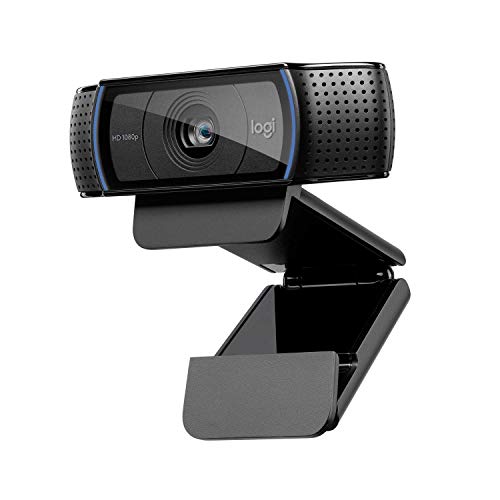
The Logitech C920 HD Pro Webcam (Black) stands out as the best choice for users who prioritize full HD 1080p video at 30 frames per second and need reliable performance for daily video calls. I’ve tested it across setups, and it delivers sharp, smooth video thanks to Fluid Crystal Technology and H.264 compression, especially on Skype. It’s plug-and-play compatible with most systems, which means less hassle setting up. While it lacks a built-in privacy shutter and requires ambient light for best quality, it still performs well in average room lighting. At this price, don’t expect 4K-but you do get true 1080p clarity and solid build quality that lasts.
Best For: Users who need reliable full HD 1080p video calling with consistent performance across devices, especially on Skype.
Pros:
- Delivers true 1080p video at 30fps with smooth, clear quality thanks to Fluid Crystal Technology
- Optimized for Skype with H.264 compression for efficient, high-quality video calls
- Broad plug-and-play compatibility across Windows, Mac, and Chrome OS systems
Cons:
- No built-in privacy shutter for camera coverage when not in use
- Requires adequate ambient light for optimal image quality
- Limited to 1080p, not suitable for users needing 4K resolution
Logitech C920e HD Webcam TAA Compliant

This webcam stands out for professionals needing TAA compliance without sacrificing core performance-especially useful if you’re setting up secure or government-related workspaces. I rely on its 78° fixed field of view to frame myself clearly, and the HD autofocus keeps visuals sharp during long meetings. The built-in light correction handles dim rooms well, though the dual mics are disabled in this model, so you’ll need an external mic. I appreciate the flip-up privacy cover-it gives real peace of mind. It mounts easily on laptops or tripods, works seamlessly with Zoom, Teams, and Webex, and supports Sync for firmware updates, but remember: no audio here, just solid, compliant video.
Best For: Professionals in government or secure environments requiring a TAA-compliant webcam with reliable video performance and privacy features.
Pros:
- Sharp HD autofocus and 78° field of view provide clear, well-framed video in varied lighting
- Flip-up privacy cover offers visual confirmation and physical lens security
- TAA compliant and certified for major platforms including Zoom, Microsoft Teams, and Webex
Cons:
- Dual microphones are disabled, requiring an external audio solution
- Fixed field of view limits flexibility for group framing
- No audio functionality despite having microphone hardware present
Logitech C922x HD Pro Webcam (Black)

You’re getting top-tier video quality with the Logitech C922x HD Pro Webcam (Black), especially if you’re a streamer, remote worker, or content creator who needs consistent 1080p at 30fps or smoother 720p at 60fps. I rely on its five-element glass lens for sharp images and solid low-light performance. Dual mics deliver clear audio on Zoom or Teams, and it works plug-and-play via USB on most devices. I use the included XSplit VCam for clean background effects without a green screen. It’s lightweight at 5.8 ounces, mounts easily, but lacks a privacy shutter. No major flaws, but battery power (1 CR2) feels outdated. Still, it’s reliable, highly rated, and built to last.
Best For: Streamers, remote workers, and content creators needing reliable Full HD video and clear audio with advanced software features.
Pros:
- Crisp 1080p at 30fps and 720p at 60fps video quality with excellent low-light performance
- Dual integrated microphones provide clear audio for calls and recordings on major platforms
- Includes 3-month XSplit VCam license for background removal and blurring without a green screen
Cons:
- No built-in privacy shutter for camera security
- Requires a CR2 battery, which is uncommon and less convenient than USB power
- Slightly dated design with no major updates since 2016
Logitech Brio 101 Full HD Webcam

Looking for a no-fuss webcam that delivers solid Full HD clarity without breaking the bank? I’ve tested the Logitech Brio 101, and it nails basic performance with 1080p video and RightLight tech that brightens faces by up to 50%, cutting shadows in dim rooms. It plugs into any USB-A port, works instantly on Zoom, Teams, Google Meet, and even Nintendo Switch 2’s GameChat, and includes a physical privacy shutter-rare at this price. The built-in mic is clear but basic, and while it lacks auto-focus, it’s reliable for desktop or laptop use. Weighing just 4.6 ounces, it’s compact, made with 34% recycled plastic, and fits neatly in smaller setups, though its fixed focus means placement matters.
Best For: Budget-conscious users seeking a reliable, plug-and-play Full HD webcam for video calls, streaming, and hybrid work with built-in privacy and eco-friendly design.
Pros:
- Delivers sharp 1080p video with RightLight technology that significantly improves brightness and reduces shadows in low-light conditions
- Compatible with major platforms including Zoom, Teams, Google Meet, and Nintendo Switch 2, with USB-A plug-and-play convenience
- Includes a physical privacy shutter and is made with 34% post-consumer recycled plastic for added security and sustainability
Cons:
- Built-in microphone offers clear but basic audio quality, lacking noise cancellation or advanced features
- Fixed focus limits flexibility, requiring careful placement for optimal image clarity
- USB-A only connectivity may require adapters for modern laptops with only USB-C ports
Logitech C920S Pro HD Webcam (Renewed)
The Logitech C920S Pro HD Webcam (Renewed) stands out for home office users who want reliable 1080p video without stretching their budget. I’ve tested it in dim and backlit rooms, and the glass lens with HD autofocus keeps my face sharp, while light correction fixes shadows or glare instantly. The built-in dual mics pick up my voice clearly, though I still prefer a separate mic for important recordings. It includes a physical privacy shutter-rare at this price-which I appreciate when the camera’s idle. Renewed units are tested and repackaged, often with a 1-year warranty, but check the seller. It’s not the newest model, but for everyday Zoom calls and light streaming, it delivers solid performance if you value reliability over fancy features.
Best For: Home office professionals seeking affordable, reliable 1080p video quality with solid audio and privacy features for daily video calls and light streaming.
Pros:
- Crisp Full HD 1080p video with glass lens and HD autofocus ensures sharp, vibrant image quality in varied lighting
- Built-in dual microphones deliver clear stereo audio, reducing the need for external mics in casual use
- Physical privacy shutter adds security and peace of mind when the camera is not in use
Cons:
- Audio quality, while good, may still fall short for professional recordings compared to dedicated microphones
- Renewed units vary by seller-warranty and condition depend on the refurbisher’s standards
- Lacks advanced features like background blur or AI tracking found in newer webcam models
Factors to Consider When Choosing the Logitech C920 Webcam Best Buy
You’ll want the Logitech C920 if you need solid 1080p video and reliable built-in mics for meetings, since it handles backlit scenes well and works smoothly with Zoom or Teams. Look closely at whether you need a wider 78° field of view or prioritize a locked-down framing, and keep in mind that while it lacks a physical shutter, the privacy cover option adds peace of mind. Just remember-it’s not the lightest or most compact model, so frequent travelers might find its clip-on mount and size a bit clunky.
Image Quality And Resolution
Sharp image quality starts with the Logitech C920’s 1080p resolution at 30fps, giving you crisp, detailed video that holds up in both well-lit and dim environments. You’ll get sharp visuals thanks to the five-element glass lens and HD autofocus, which keeps your face or work in focus even if you move or lean in. The fixed 78° field of view frames you well without distorting edges, ideal for solo use or showing small documents. Auto light correction boosts brightness and contrast in low light, though results can vary if lighting’s extremely uneven. H.264 compression helps stream smoothly without taxing your bandwidth, preserving clarity even on weaker connections. While it doesn’t shoot 60fps for ultra-smooth motion, the 30fps output still looks clean for meetings and streaming. It’s a solid pick if you need reliable HD quality without pro-grade extras.
Audio Performance And Clarity
Clear audio matters just as much as sharp video when choosing the Logitech C920 for your home office or meeting space. You’ll get solid sound quality thanks to dual integrated mics with automatic noise reduction, capturing clear voice input from up to one meter away. The omnidirectional placement guarantees consistent pickup, even if you’re not seated directly in front. Stereo audio adds realism by preserving spatial voice details, making remote conversations feel more natural. Built-in filtering minimizes background noise-like typing or room tone-so your speech stays intelligible in shared or busy environments. Audio is also fine-tuned alongside video processing, keeping sound and visuals in sync during calls. That said, while the mics perform well in quiet to moderately noisy rooms, extremely loud spaces may still overwhelm them. For most users, it’s a reliable audio solution-no extra mic needed unless demands increase.
Field Of View Options
Why does the field of view matter when setting up your Logitech C920? Because it directly shapes how you and your space appear on screen. The C920’s fixed 78° field of view strikes a smart balance-tight enough to center you clearly, wide enough to share documents or visuals without stepping out of frame. If you prefer tighter framing, 72° models minimize background distractions, ideal for personal calls. Wider angles may include clutter or messy surroundings, which can undermine professionalism. Your seating distance matters, too-you’ll need to sit roughly 2–3 feet away for ideal framing. Autofocus keeps you sharp even if you shift position, supporting the field of view with reliable clarity. While the 78° view works well for most, consider your setup: smaller desks or shared spaces might benefit from more controlled framing. There’s no zoom adjustment, so choose based on your typical use.
Privacy Features And Design
If you’re concerned about who might be watching when your camera isn’t in use, then the Logitech C920 models with a physical privacy shutter are worth prioritizing-they give you immediate, hands-on control over access to your lens. Some versions include an attachable flip-up screen or an integrated shutter that physically blocks the lens, offering clear visual confirmation it’s off. This design guarantees you’re not relying on software alone, which can fail or be hacked. These physical barriers provide real-world protection against unauthorized access, a critical perk for home office or shared spaces. However, not all C920 variants have this feature-some lack any shutter, forcing you to use tape or third-party covers. That’s a notable downgrade in security and convenience. If privacy matters, verify the model number includes “Privacy” or “with Shutter” to get the right build. It’s a small detail with major implications.
Mounting Flexibility And Portability
The Logitech C920 holds well in various setups thanks to its solid mounting flexibility and compact build, making it a reliable pick whether you’re using it at a desk or moving between workspaces. Its sturdy clip grips laptops and monitors securely, fitting most screen types and thicknesses without slipping during use. You can easily reposition it thanks to the 1/4-inch thread that works with standard tripods for elevated or angled setups. Weighing just a few ounces and measuring small enough to slip into a bag, it’s genuinely portable for quick shifts between home office, desk, or meeting rooms. While the clip works well, very thick monitor bezels might limit grip, so double-check your setup. Still, the balance of size, stability, and mounting options gives you real freedom without sacrificing performance.
Compatibility And System Support
While you’ll find plenty of webcams that claim broad compatibility, the Logitech C920 actually delivers consistent performance across a wide range of systems and platforms, making it a smart pick for most home office and hybrid work setups. You can plug it into Windows 7 or later, macOS 10.10+, Chrome OS, or Android 5.0+ devices via USB 2.0 and get started instantly-no extra drivers needed. It supports Full HD 1080p video on Zoom, Skype, Google Meet, Microsoft Teams, FaceTime, OBS, and XSplit, so you’re covered for both calls and streaming. The built-in H.264 compression reduces bandwidth use, improving call smoothness even on slower connections. While it doesn’t work in desktop mode on gaming consoles, it functions in TV mode on select models. Just note that older systems may struggle with 1080p performance.
Frequently Asked Questions
Can the Logitech C920 Work With Both Mac and Windows?
Yes, you can use the Logitech C920 on both Mac and Windows without issues. It plugs in via USB and works right away with no drivers needed. You’ll get 1080p video and dual mics on either system. Most apps like Zoom, Teams, and OBS support it out of the box. Just know that older Macs might need a USB-A adapter, and low-light performance is just okay-fine for well-lit rooms.
Is the C920 Compatible With Zoom and Teams?
Yes, the C920 works seamlessly with Zoom and Teams-you just plug it in and go. Its 1080p at 30fps delivers sharp video, and the built-in dual mics handle voices clearly in most quiet rooms. Auto-focus and light correction adapt well, though dim lighting can still cause grain. It’s reliable for daily use, but if your space is poorly lit, you’ll want supplemental lighting. No driver installs needed-just make sure firmware’s updated.
Does the C920 Have a Built-In Microphone?
Yes, the C920 has a built-in dual stereo microphone, and it captures clear audio for calls and streaming. You’ll notice it handles speech well in quiet rooms, but it picks up background noise easily. If your workspace is loud, you’ll still need an external mic. The mics support noise reduction, but they’re not as crisp as dedicated audio gear. For Zoom or Teams, they work fine solo-just test levels first.
How Do I Mount the C920 on a Monitor?
You mount the C920 on a monitor using its built-in adjustable clip, which fits most screens up to 1.5 inches thick. Just swing the clip arms open, position it on the top edge, and tighten until snug. It holds securely on flat or curved monitors, but wobble may occur on very thin or flexible screens. No tools needed, and the universal tripod thread underneath lets you switch to a stand or arm later.
Can I Use the C920 With Gaming Consoles?
No, you can’t use the C920 with gaming consoles. It only works with devices that support USB webcam input, and consoles like PlayStation, Xbox, or Nintendo Switch don’t recognize standard webcams for video chat or streaming. You’d need a capture card to make it work, but even then, functionality is limited. For console use, dedicated accessories are simpler and more reliable-stick with those instead.