Best Mechanical Numpads for Faster, More Precise Input
You get faster, more precise input with numpads like the GK84 and NumberPad 21-Key, thanks to hot-swappable switches, tri-mode connectivity, and gasket-mounted stability that reduce wobble and noise. Crisp actuation from switches like TTC Neptune or Kailh Box White boosts accuracy, while PBT keycaps resist wear over time. Balance this against trade-offs: bulkier builds, shorter battery life with RGB, or limited Mac support. The best choice matches your desk setup, typing style, and need for portability-each model offers a different blend of responsiveness and convenience worth exploring further.
We are supported by our audience. When you purchase through links on our site, we may earn an affiliate commission, at no extra cost for you. Learn more. Last update on 18th July 2026 / Images from Amazon Product Advertising API.
Notable Insights
- Gasket-mounted designs like those in the EPOMAKER EK21 reduce vibration for smoother, more precise keystrokes.
- TTC Neptune switches offer 41gf actuation and 2.0mm travel for fast, accurate key presses.
- PBT keycaps with dye-sublimated legends, as on the GK84, resist wear for long-term typing precision.
- Tri-mode connectivity (wired, Bluetooth, 2.4G) on the NumberPad 21-Key ensures reliable, lag-free input across devices.
- Hot-swappable PCBs in numpads like the EPOMAKER EK21 allow customization for optimal actuation and responsiveness.
8BitDo Retro 18 Mechanical Numpad (N Edition)

If you’re after a numpad that blends nostalgic flair with modern mechanical precision, the 8BitDo Retro 18 Mechanical Numpad (N Edition) stands out as a top pick-especially if you spend hours inputting numbers at a home office desk or juggle calculations on both PC and mobile. I use it daily, and the Kailh Box White V2 switches deliver crisp, reliable actuation with minimal wobble. The hot-swappable PCB lets me change switches easily, and n-key rollover prevents input errors. Bluetooth, 2.4G, and USB-C offer flexible connectivity, though battery life dips with constant 2.4G use. The retro LED display and dye-sub PBT keys resist wear, but the calculator mode isn’t as fast as dedicated units. It pairs well with Windows and Android, but macOS support is limited.
Best For: Professionals and retro enthusiasts who want a durable, mechanically precise numpad with flexible connectivity for use across Windows and Android devices.
Pros:
- Crisp Kailh Box White V2 switches with hot-swappable PCB and n-key rollover for reliable, customizable input
- Multi-mode connectivity via Bluetooth, 2.4G wireless, and USB-C, offering broad compatibility and flexibility
- Retro LED display and dye-sublimated PBT keycaps deliver a nostalgic look with long-lasting durability
Cons:
- Battery life decreases significantly with continuous 2.4G wireless use
- Calculator mode is slower compared to dedicated standalone calculators
- Limited functionality and support when paired with macOS devices
KN17 Wired Mechanical Numpad (Black, Brown Switch)

The KN17 Wired Mechanical Numpad is my top pick for anyone using a laptop or tenkeyless keyboard who wants a compact, reliable numeric input solution that boosts productivity without cluttering the desk. I use it daily, and the Outemu Brown switches feel tactile yet quiet-perfect for offices. The PBT keycaps resist shine, and the white backlighting is crisp, with adjustable modes. Its 4.41-inch width fits snugly beside my keyboard, and the USB-C to USB-A cable guarantees solid connection. It works on Windows, Mac, and Android, though Mac users lose some functions like Num Lock and navigation keys. I appreciate the hot-swap sockets for future switch tweaks, and the internal damping layers cut noise noticeably. After two months of testing, it remains stable and typo-free. Just note: it doesn’t work with Chrome OS. With a 2-year warranty and sturdy build, it’s a smart buy-for the right setup.
Best For: Users of laptops or tenkeyless keyboards seeking a compact, durable mechanical numpad to enhance productivity with reliable numeric input in office or home setups.
Pros:
- Compact design with hot-swappable switches and durable PBT keycaps for long-term use and customization
- Quiet Outemu Brown switches and multi-layer noise reduction ideal for shared or quiet environments
- Reliable USB-C to USB-A connectivity with broad compatibility across Windows, Mac, and Android
Cons:
- Limited functionality on Mac OS, lacking Num Lock and navigation key support
- Not compatible with Chrome OS, reducing versatility for some users
- Non-programmable, limiting advanced customization options for power users
EPOMAKER EK21 Gasket Numpad (Black Silver)

You get the most out of the EPOMAKER EK21 Gasket Numpad (Black Silver) if you’re serious about clean desk setups and want a premium, portable numeric add-on that doesn’t compromise on build or acoustics. I’ve used it daily for data entry and gaming, and its gasket-mounted design with Poron foam really cuts noise while keeping keystrokes crisp. The aluminum knob feels solid, and hot-swap switches let me change them fast. Triple-mode connectivity works seamlessly across my devices, though the 1000mAh battery lasts about a week with heavy RGB use. It’s compact, but the small size means little room for wrist support during long sessions.
Best For: Those who prioritize a minimalist, high-quality numeric keypad with excellent acoustics and versatility for both productivity and gaming.
Pros:
- Gasket-mounted design with foam padding ensures a quiet, cushioned, and premium typing experience
- Hot-swap switches and full VIA programmability allow for easy customization and switch changes
- Triple-mode connectivity (wired, Bluetooth, 2.4GHz) enables seamless use across multiple devices
Cons:
- Compact size lacks built-in wrist support, which may cause discomfort during extended use
- 1000mAh battery life drops to about a week with heavy RGB usage
- Limited key count (20 keys) may not suit users needing a full numeric layout
Rottay Mechanical USB Numeric Keypad (Blue LED)

Rottay’s Mechanical USB Numeric Keypad with Blue LED stands out for home office users who rely on fast, accurate number entry and appreciate tactile feedback from professional-grade switches. I’ve found its blue mechanical switches deliver crisp, audible clicks and support 50 million keystrokes, making it durable and responsive. The 15° angled design reduces wrist strain, while the 3 blue backlight modes-controlled via Esc + Del-offer solid visibility in dim light. It’s plug-and-play on Windows, but Mac and Chromebook users get limited function key support. The gold-plated USB and magnet ring guarantee stable connections, though non-hotswap switches mean you can’t swap them later.
Best For: Home office professionals who need a durable, responsive numeric keypad with tactile feedback for high-volume data entry.
Pros:
- Crisp blue mechanical switches with audible click and 50 million keystroke lifespan
- Ergonomic 15° tilt design reduces wrist strain and enhances typing comfort
- Plug-and-play USB connectivity with bright, customizable blue backlighting
Cons:
- Function keys do not work on Mac and Chromebook (only number keys function)
- Non-hotswap switches prevent customization or replacement
- Limited software features and no driver support for advanced settings
Gasket Creamy Wireless Programmable Numpad

If you’re building a quiet, responsive setup that handles everything from spreadsheets to gaming without sacrificing portability or customization, the Gasket Creamy Wireless Programmable Numpad answers the call-especially when you value a soft, vibration-damped typing feel and cross-device flexibility. I use it daily across my laptop, tablet, and phone via Bluetooth or 2.4GHz, switching seamlessly with FN+1/2/3. The gasket mount with foam padding reduces noise and impact, and the creamy linear switches feel smooth, not stiff. I’ve programmed macros and shortcuts that stay saved in onboard memory. True RGB lighting and a multifunction metal knob add flair and function-though battery life drops to 30 days with constant backlight use.
Best For: Users seeking a quiet, customizable, and portable numpad with premium tactile feel and multi-device compatibility for work, gaming, or content creation across Windows, Mac, and mobile platforms.
Pros:
- Tri-mode connectivity (Bluetooth 5.0, 2.4GHz, USB-C wired) allows seamless switching between up to 5 devices
- Gasket-mounted design with foam dampening delivers a soft, quiet typing experience with excellent acoustics
- Fully programmable 18 keys with onboard memory, RGB lighting, and a multifunction metal knob for enhanced productivity and customization
Cons:
- Battery life drops to 30 days with continuous RGB backlight use, requiring frequent recharging
- FN key is not programmable, limiting customization for some advanced users
- No dedicated software for easy macro management-relies on web-based driver with limited interface features
BOYI TD31Pro Mechanical Numpad (Black-Grey)

Though compact, the BOYI TD31Pro Mechanical Numpad stands out best for professionals who rely on frequent number entry and want customization without sacrificing reliability. I use it daily, and the gasket-mounted POM Jadeite switches deliver smooth, quiet keystrokes ideal for long sessions. The tri-mode connectivity lets me switch between my desktop, laptop, and tablet seamlessly, though Bluetooth latency creeps in slightly during fast input. The TFT screen and knob are functional but take tweaking to master. I appreciate the hot-swap PCB and PBT keycaps-they last and stay crisp. Just note: the 1000mAh battery lasts about a week with RGB on, so charge every few days.
Best For: Professionals who frequently enter numerical data and value customizable, durable input devices with reliable multi-device connectivity.
Pros:
- Gasket-mounted design with lubed POM Jadeite switches ensures smooth, quiet, and comfortable typing
- Tri-mode connectivity supports seamless switching between three devices across Windows, Mac, and Android
- Fully hot-swappable PCB, programmable keys, and durable dye-sublimated PBT keycaps enhance customization and longevity
Cons:
- Slight Bluetooth latency during rapid typing affects responsiveness in high-speed input scenarios
- TFT display and knob functions require initial setup and learning to use effectively
- 1000mAh battery life lasts about a week with RGB on, necessitating frequent charging
FD17 Wireless Mechanical Number Pad (Beige)

For data entry pros and spreadsheet jockeys who value speed, portability, and a clean typing feel, the FD17 Wireless Mechanical Number Pad in beige stands out as a top pick among compact numpads. I’ve used it daily, and its pre-lubed Bsun linear switches deliver smooth 45–50gf keystrokes with minimal noise, thanks to layered sound-dampening foam. At just 7 ounces and 4.84 inches wide, it slips into any bag and pairs seamlessly via Bluetooth 5.0 or 2.4G across Windows, Mac, iOS, and Android-though not Chrome OS. It lacks backlighting and programmability, and Mac function keys are limited, but hot-swappable switches and durable PBT keycaps let me customize it later. It runs on a single AAA battery with solid life, and Kisnt’s 2-year warranty covers defects.
Best For: Data entry professionals, accountants, and mobile workers seeking a portable, high-quality mechanical number pad with seamless multi-device compatibility.
Pros:
- Smooth linear switch performance with pre-lubed 45–50gf keystrokes and excellent sound dampening for quiet, comfortable typing
- Compact, lightweight design with dual-mode Bluetooth 5.0 and 2.4G connectivity supports Windows, Mac, iOS, Android, and easy device switching
- Hot-swappable switches and durable PBT dye-sublimated keycaps allow for long-term customization and enhanced wear resistance
Cons:
- No backlighting or programmable keys, limiting usability in low-light environments and advanced customization
- Limited Mac OS function key support and no Chrome OS compatibility restrict cross-platform functionality
- Requires a AAA battery (not included) and lacks USB rechargeability for modern convenience
8Bitdo Retro Mechanical Numpad M Edition

The Bitdo Retro Mechanical Numpad M Edition stands out as a top pick for home office users who value both functionality and retro flair in their workspace gear. I use it daily, and its 2-in-1 design works flawlessly as a PC numpad and standalone calculator, thanks to a dedicated shortcut and a clear nine-digit LED display. It connects via Bluetooth, 2.4G, or USB-C, supports Windows and Android, and delivers 160 hours of runtime. The hot-swappable Kailh Box White switches feel crisp, and n-key rollover guarantees accuracy. I do wish the PBT keycaps came standard-some editions use less durable ABS.
Best For: Home office users who want a retro-styled, dual-function numpad and calculator with mechanical switch customization and multi-device connectivity.
Pros:
- 2-in-1 functionality as a PC numpad and calculator with a dedicated shortcut and clear nine-digit LED display
- Multiple connection options (Bluetooth, 2.4G wireless, USB-C) with broad compatibility across Windows and Android devices
- Hot-swappable Kailh Box White switches and n-key rollover for precise, customizable typing experience
Cons:
- Some editions use less durable ABS keycaps instead of PBT, affecting long-term wear resistance
- Limited to nine-digit display, which may not suit advanced calculations
- 4-hour recharge time is relatively long for 160 hours of battery life
Redragon K733 Wired RGB Mechanical Numpad

You’ll want this numpad if your workflow splits time between spreadsheets and creative tasks, and the Redragon K733 delivers that with its dual PC and Calculate modes, a built-in 10-digit LED display, and a programmable knob for quick navigation or volume adjustments. I use it daily, and the gasket mount design paired with pre-lubed linear switches makes typing oddly satisfying-crisp, quiet, and smooth. Five layers of foam dampen noise well, though the RGB is bright in dim rooms. It’s hot-swap ready, so switching switches is easy, but the 12-ounce weight feels a bit light, so it slides without grip. It works; just anchor it.
Best For: Professionals and creatives who need a compact, customizable mechanical numpad with calculator functionality for efficient spreadsheet and number-heavy workflows.
Pros:
- Dual PC and Calculate modes with a built-in 10-digit LED display enhance productivity
- Gasket mount design and 5-layer foam dampening deliver a quiet, smooth, and satisfying typing experience
- Hot-swap switches and pre-lubed linear switches allow for easy customization and smooth keystrokes
Cons:
- Lightweight design (12 ounces) can lead to sliding without external anchoring
- Bright RGB lighting may be distracting in low-light environments
- Knob functionality, while versatile, requires setup for custom navigation or volume control
NumberPad 21-Key Hot-Swappable RGB Numpad
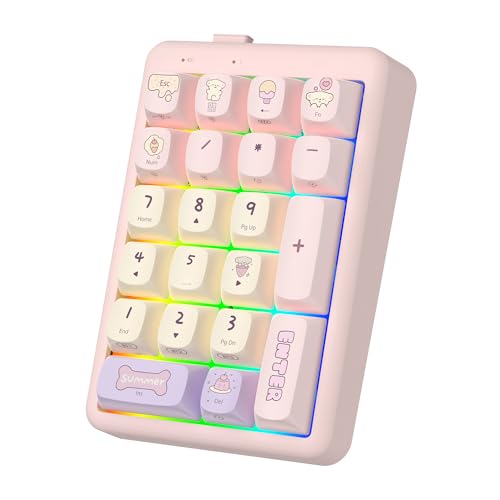
A 21-key mechanical numpad that excels in versatility is the pick if you juggle multiple devices and need seamless switching without sacrificing build quality or customization. I use it daily across my laptop, tablet, and phone-Bluetooth 5.2 and 2.4GHz wireless deliver reliable, lag-free performance. The hot-swappable TTC Neptune switches feel crisp and responsive, with a 41gf actuation force ideal for fast input. Dye-sublimated PBT keycaps resist shine and fading, though they’re slightly textured out of the box. Gasket mounting adds comfort, but the RGB lighting, while vibrant with 22 effects, drains the 800mAh battery fast-I get about 7 days with backlighting on.
Best For: Users who need a compact, hot-swappable mechanical numpad with multi-device connectivity and customizable RGB lighting for seamless use across Windows, macOS, iOS, and Android devices.
Pros:
- Supports Bluetooth 5.2, 2.4GHz wireless, and wired USB-C connections with seamless switching between multiple devices
- Hot-swappable TTC Neptune switches with crisp 41gf actuation and 2.0mm travel for fast, responsive typing
- Durable dye-sublimated PBT keycaps and gasket-mounted design enhance comfort, longevity, and resistance to wear
Cons:
- RGB lighting significantly reduces battery life, offering only about 7 days of use with backlighting enabled
- Slightly textured keycaps may feel unusual to users preferring smooth keycap surfaces
- Limited key count (21 keys) may not suit users needing a full numeric keypad or additional programmable keys
Factors to Consider When Choosing a Mechanical Numpad
You’ll want to pick a mechanical numpad that balances switch type options, build quality, and connectivity to match your daily workflow. Look for models with hot-swap switches and durable keycaps-like PBT plastic-since they handle long typing sessions better and resist shine over time, but keep in mind wired-only options may limit desk flexibility. Compact layouts save space, yet skimping on ergonomics could hurt comfort during extended use, so test angles and key spacing before committing.
Switch Type Options
When selecting a mechanical numpad, your switch choice directly shapes both typing speed and auditory feedback, so it’s best to align the switch type with your environment and usage habits. If you work in a quiet office or shared space, linear switches offer smooth, silent keystrokes with no bump or click, enabling fast input without distractions. Tactile switches provide a noticeable bump at actuation, giving physical feedback that can boost accuracy, especially during long data-entry sessions. For those who value audible confirmation, clicky switches deliver a sharp click with each press, enhancing rhythm-but they can be loud for coworkers or home offices. Consider actuation force too: lighter switches (around 40gf) respond quicker, while heavier ones (up to 60gf) reduce accidental presses. Your ideal pick balances feedback, noise, and comfort based on real-world use, not just preference.
Build Quality Materials
Look for mechanical numpads built with durable PBT keycaps and dye-sublimated legends if you want long-term legibility and resistance to shine, since these materials withstand daily wear better than cheaper ABS plastic. Choose models with aluminum alloy housings or knobs-they add structural rigidity and a premium feel, though they may increase weight. Multi-layer sound-dampening materials like Poron foam, IXPE, and silicone reduce internal noise and improve typing consistency, especially during rapid input. Gasket-mounted designs absorb impact better than rigid plates, reducing vibration and boosting comfort over extended use. While these builds feel more refined, they often come at a higher price. Avoid units with flimsy seams or hollow plastic bodies, as they degrade faster under regular use. Though premium materials enhance longevity and performance, always balance cost against how much you’ll actually benefit from them in your daily workflow.
Connectivity Modes Available
A mechanical numpad’s build quality matters, but even the most durable design falls short if it can’t stay reliably connected to your setup. You’ll want wired USB for zero lag and instant plug-and-play-perfect for desktops. If you work across devices, Bluetooth lets you pair up to three, like your laptop, tablet, and phone, and switch with a hotkey, though occasional hiccups can happen. For wireless speed without compromise, 2.4G via USB dongle gives near-wired performance with less clutter. Tri-mode models combine all three, offering flexibility, though they cost more. Most wireless pads pack 800mAh to 1500mAh batteries, lasting days to weeks depending on backlight and usage. Just remember: convenience trades off with power management-you’ll need to charge regularly if you use backlighting heavily.
Keycap Durability Performance
Durability starts with what your fingers touch most-keycap material. You’ll want PBT over ABS since PBT resists shine, oil, and wear far better thanks to its dense, non-porous structure. ABS may feel smoother at first, but it degrades faster under heavy use, especially on a numpad you hit repeatedly. For legends that last, choose dye-sublimated or double-shot keycaps. Dye-sublimation embeds ink into the plastic, so characters won’t fade. Double-shot molding uses two plastic layers, keeping legends visible even after years of use. Go for 5-sided dye-sublimation if you want clean, readable sides and even lighting. These choices matter most if you’re using the numpad all day. PBT with advanced legend printing costs more, but the long-term results justify it. Don’t overlook build consistency-cheap keycaps feel flimsy and wear unevenly.
Layout And Ergonomics
Ergonomics isn’t just about comfort-it’s about sustained performance. You’ll want a numpad with a 15° tilt or adjustable feet to keep your wrist neutral during long sessions. Compact models, around 4.4 x 3.4 inches, save space but check that the layout still includes essentials like Num Lock, Delete, and Backspace. Some add a rotary knob or calculator shortcut, reducing reach and boosting efficiency. Gasket mounts or foam padding inside soften keystrokes and lower vibration, making repetitive input less fatiguing. But don’t assume smaller is better-tight key spacing can cause errors if you have larger fingers. Test the key travel and spacing if possible. While angled designs help, fixed tilts may not suit all desk setups. Balance footprint, key access, and physical comfort to match your workflow.
Customization And Programmability
You’ll want full key programmability if you rely on repetitive tasks, letting you remap inputs, assign macros, and tailor the numpad to your workflow using included software-though be aware that not all programs support deep customization, and some lack macOS compatibility. Hot-swappable PCBs let you swap 3-pin and 5-pin switches without soldering, so you can change switch types to match your preferred feel or sound. Onboard memory stores your key mappings and settings, keeping them intact across devices or after reboots. Some models include a rotary knob you can program for volume, brightness, or scrolling via driver software. Programmable layers combined with FN keys activate multiple functions per key, expanding what’s possible without adding bulk. Just remember: advanced features mean a learning curve, and not all firmware is equally stable. Test configurations before locking in your setup.
Battery Life Efficiency
A mechanical numpad that lasts weeks-not days-between charges makes a noticeable difference in daily productivity, especially when it relies on a high-capacity battery over 1000mAh. You’ll get the most from models with power-saving features like auto-sleep after two minutes of inactivity or automatic backlight shutoff. These functions cut idle drain, letting you go longer without plugging in. Numpads using efficient blue switches and non-RGB lighting often stretch life to months, especially in wired mode. Tri-mode connectivity gives you flexibility-go wireless when mobile, switch to wired to save battery during long sessions. Just keep in mind: backlit models drain faster, and real-world results depend on usage patterns. High efficiency doesn’t mean infinite runtime, but smart design choices clearly extend uptime. Prioritize low-power components and aggressive sleep modes if battery life matters in your setup.
Frequently Asked Questions
Can I Use a Mechanical Numpad With a Laptop?
Yes, you can use a mechanical numpad with your laptop-just plug it in via USB. Most work right away with Windows and macOS, no drivers needed. They save desk space and boost number entry speed. Look for one with a braided cable and compact layout. Make sure your laptop has a free USB port, or grab a USB-C hub if needed. Some numpads lack backlighting or full key customization.
Are Mechanical Numpads Noisy for Office Environments?
Yes, mechanical numpads can be noisy for office environments, especially if they use clicky switches like Cherry MX Blues. You’ll hear sharp, audible feedback with each press, which might distract coworkers in quiet settings. Opt for linear or tactile switches-such as Gateron Red or Brown-for quieter performance. Some models include dampening foam, reducing sound noticeably. Always test switch types first, since noise varies by build and key mechanism. Consider your office’s acoustics and proximity to others before deciding.
Do These Numpads Work With Mac Operating Systems?
Yes, most mechanical numpads work with macOS right out of the box via USB-C or USB-A. You won’t need extra drivers for basic input, but some advanced customization features might require third-party software that isn’t Mac-compatible. Check if the model uses HID-compliant firmware-those almost always support Mac. Models like the Keychron N series are tested and confirmed stable on macOS, though reset procedures can differ slightly from Windows. Always verify OS support on the manufacturer’s site before buying.
How Do I Clean a Mechanical Numpad Safely?
You clean a mechanical numpad safely by unplugging it first-always. Use compressed air to blow out debris between keys, then dampen a microfiber cloth with isopropyl alcohol (70% or higher) and wipe the keycaps gently. Don’t soak them. Remove keycaps only if necessary, and avoid water. Let parts dry fully before reassembling. Never submerge the unit-moisture damages switches. Regular light cleaning prevents grime buildup and extends lifespan without risking internal damage.
Can I Replace Keycaps on These Numpads Easily?
You can replace keycaps easily, but only if your numpad uses standard keycap profiles and layouts. Most models with hot-swappable switches let you swap keys without soldering. Just use a puller and guarantee replacements match the switch type-Cherry MX or Gateron, for instance. Some compact designs have non-standard placements or integrated cases, which limit compatibility. Always check dimensions and spacing first-some keycaps won’t align right. Test fit before buying in bulk.