Best Personal Paper Shredders for Home and Office Use
You’ll get the best mix of security and efficiency with P-4 cross-cut models like the Bonsaii C275-A or Fellowes 14C10-they handle 12 to 14 sheets, shred credit cards, and run continuously for 5 to 10 minutes before needing a cooldown. Compact options like the Amazon Basics 8-sheet work for light use but have shorter runtimes. Larger bins (4+ gallons) reduce emptying, while anti-jam reverse and overheat alerts prevent frustration. Just remember, higher capacity means bulkier builds-your space and shredding frequency will determine the real fit. More details follow.
We are supported by our audience. When you purchase through links on our site, we may earn an affiliate commission, at no extra cost for you. Learn more. Last update on 19th July 2026 / Images from Amazon Product Advertising API.
Notable Insights
- Choose P-4 cross-cut shredders for secure disposal of personal and financial documents.
- Opt for 8- to 14-sheet capacity models to balance performance and space for home or office use.
- Prioritize cool-down periods and runtime; 5- to 10-minute continuous operation suits heavier tasks.
- Larger 4- to 5.5-gallon bins reduce emptying frequency, ideal for regular shredding needs.
- Look for safety features like auto shut-off, overload alerts, and anti-jam reverse functions.
Amazon Basics 8-Sheet Cross Cut Shredder

If you need a reliable, no-frills shredder for light home office use, the Amazon Basics 8-Sheet Cross Cut Shredder is a solid pick-especially if you regularly dispose of sensitive documents and expired credit cards. I’ve found it handles 8 sheets of 20-pound paper cleanly, cutting them into 0.2 x 0.7-inch strips that meet P-4 security standards. It chews through staples, paper clips, and non-metallic cards without fuss. The 4-mode switch gives me control, and LED alerts help avoid jams. After 3 minutes, it shuts off to cool-then needs 30 minutes before restarting. The 3.7-gallon bin fits compact spaces, but expect some leftover shreds from factory testing.
Best For: Home office users who need a compact, reliable shredder for routine disposal of sensitive documents and expired credit cards with basic security needs.
Pros:
- Efficiently shreds up to 🚚 pages, credit cards, staples, and paper clips with cross-cut P-4 security
- Compact design with a 3.7-gallon bin fits well in small spaces
- Includes helpful LED indicators and auto shut-off to prevent overheating
Cons:
- 30-minute cool-down period required after 3 minutes of continuous use limits high-volume shredding
- Leaves residual shreds from factory testing, requiring initial cleaning
- Not suitable for metallic credit cards or heavy-duty, frequent use
Bonsaii Paper Shredder for Home Office

The Bonsaii Paper Shredder for Home Office stands out as a solid pick for individuals needing dependable, everyday document security without taking up much space. I like that it cross-cuts paper into 5x14mm strips, meeting P-4 security, and handles up to 6 sheets, staples, and paper clips in one go. It even shreds one credit card at a time. But it runs for only 3 minutes before requiring a 20-minute cooldown, and the overheating LED reminds me not to push it too hard. Its compact 36.2x30x18cm frame fits neatly under desks, and the 3.4-gallon bin has a clear window and handle for easy emptying. Auto start/stop and reverse help prevent jams, and it stops immediately when lifted-great for safety. It includes overheat protection, and I appreciate the 1-year warranty and pre-shipment testing, though you might find leftover shreds inside when it arrives.
Best For: Home office users seeking a compact, reliable shredder for everyday document and light-duty secure disposal needs.
Pros:
- Cross-cuts paper into 5x14mm particles for P-4 security, handling staples, paper clips, and credit cards
- Compact design with a 3.4-gallon bin and transparent window fits under desks for convenient use and disposal
- Features auto start/stop, manual reverse, overheat protection, and safety shutdown when lifted
Cons:
- Limited to 3 minutes of continuous use followed by a 20-minute cooling period
- Small bin capacity may require frequent emptying for heavy use
- May arrive with residual paper shreds due to pre-shipment testing
Amazon Basics Cross Cut Shredder (8-Sheet)

I’ve found the Amazon Basics Cross Cut Shredder (8-Sheet) works best for individuals with light to moderate shredding needs, like managing personal bills or clearing out old documents at home. It handles 8 sheets at once and cross-cuts them into 0.2 x 0.7-inch fragments, hitting P-4 security-great for personal info protection. I appreciate the 3.7-gallon bin and ability to shred credit cards, staples, and small clips, though it can’t handle metallic cards. The auto, forward, reverse, and off controls are simple, and LED lights warn of overload or overheating. It shuts off after 3 minutes, requiring a 30-minute cool-down, so it’s not for heavy use. It’s tested before shipping, backed by a 30-day return and manufacturer warranty-solid for the price.
Best For: Individuals with light to moderate shredding needs, such as managing personal documents and household paperwork.
Pros:
- Shreds up to 8 sheets at once with P-4 security level for reliable personal information protection
- Compact 3.7-gallon bin with ability to shred credit cards, staples, and small paper clips
- Simple 4-mode controls with LED indicators for overload and overheating alerts
Cons:
- 3-minute maximum runtime with 30-minute cooldown period limits continuous use
- Cannot shred metallic credit cards or thick materials
- Relatively small bin requires frequent emptying for moderate use
Amazon Basics 8-Sheet Paper Shredder (Black)

You’ll find the Amazon Basics 8-Sheet Paper Shredder (Black) works best if you handle small, routine batches-say, five to eight sheets at once-making it a solid pick for personal use or light home office needs. It delivers P-2 security with 0.24-inch strip-cut shreds and tackles staples and small paper clips without issue. I appreciate that it also shreds CDs, DVDs, and credit cards-one at a time-though avoid metallic cards. The 3.4-gallon bin is easy to empty, and its compact size fits tight spaces. Just remember: it runs 2.5 minutes continuously before needing a 15-minute cool-down.
Best For: Individuals and home offices needing a compact, reliable shredder for light to moderate use with basic security needs.
Pros:
- Shreds up to 8 sheets at once with P-2 security, plus handles staples and small paper clips
- Multi-material capability for CDs, DVDs, and credit cards (non-metallic) one at a time
- Compact design with a 3.4-gallon bin fits small spaces and is easy to empty
Cons:
- Limited 2.5-minute runtime requires mandatory 15-minute cool-down periods
- Strip-cut shredding offers lower security compared to cross-cut models
- Not suitable for metallic credit cards or heavy-duty, continuous use
Bonsaii 12-Sheet Cross Cut Shredder (C275-A)

Bonsaii’s 12-Sheet Cross Cut Shredder (C275-A) hits the sweet spot for home office users who need reliable, daily shredding without bulk or hassle. I’ve found it handles 12 sheets smoothly, plus staples and credit cards, shredding into 5 x 20 mm P-4 particles for solid security. Its 5-minute continuous run time with patented cooling works well for small batches, though I had to pause occasionally during heavy use. The auto start/stop and reverse functions prevent jams, and lifting the head stops operation-great for safety. At 12.6 x 7.91 x 18.3 inches with a carry handle and 5.5-gallon bin, it’s compact and portable. Empty at the fill line to avoid clogs. Don’t shred tape or plastic. Pre-tested before shipping-may contain test shreds. Backed by a 1-year warranty.
Best For: Home office users who need a compact, secure shredder for daily document disposal with reliable performance and safety features.
Pros:
- Shreds 12 sheets at once with P-4 security level, handling staples and credit cards for convenient, secure disposal
- Patented cooling system allows 5-minute continuous use, reducing downtime and preventing overheating
- Compact design with carry handle and 5.5-gallon transparent bin makes it portable and easy to monitor and empty
Cons:
- Must pause periodically during heavy use to avoid overheating, limiting extended operation
- Cannot shred tape, carbon paper, or plastic films, restricting material compatibility
- May contain test shreds upon arrival, requiring initial bin emptying before first use
Amazon Basics Cross Cut Shredder (12 Sheet)

The Amazon Basics Cross Cut Shredder (12 Sheet) suits individuals with moderate home office needs who prioritize reliable performance and basic security without overspending. I’ve found it handles up to 12 sheets of 20-pound paper cleanly, cutting them into 0.2 x 1.2-inch strips that meet P-3 security-enough for most personal documents. It shreds staples, small paper clips, and one credit card at a time, though not metallic ones. With a 5-gallon bin and 9-minute continuous runtime, it’s practical for small batches, but needs a 30-minute cool-down if pushed. Auto, off, reverse, and forward modes help manage jams, and LED lights show power, overheat, or overload status. Every unit gets tested before shipping-sometimes leaving test shreds inside-and while it lacks advanced features, it delivers dependable function for the price.
Best For: Individuals with moderate home office shredding needs who want reliable, secure document destruction without paying for advanced features.
Pros:
- Shreds up to 12 sheets at once and handles credit cards, staples, and small paper clips
- P-3 security level with cross-cut technology ensures personal documents are sufficiently protected
- Includes 5-gallon bin, 9-minute runtime, and LED indicators for overheat and overload
Cons:
- 30-minute cool-down period required after maximum runtime limits heavy use
- Cannot shred metallic credit cards or aerosol products, limiting material compatibility
- May come with test shreds from factory quality testing, requiring initial emptying
Amazon Basics Micro Cut Paper Shredder

I’d pick the Amazon Basics Micro Cut Paper Shredder if I needed a reliable, budget-friendly option that delivers solid security without bulk or fuss. It shreds 8 sheets into 0.5 x 1.3 cm particles-meeting P-4 security-so it’s great for sensitive documents. It handles staples and small clips, plus CDs, DVDs, and one credit card at a time, though not metallic ones. The 4-mode switch (auto, off, forward, reverse) adds control, and LED lights warn of overloads or a full 4-gallon bin. It has a 5-minute run time, then shuts off for 30 minutes to cool. Wheels make it easy to move, but avoid aerosols and metal.
Best For: Individuals seeking an affordable, compact shredder with strong security for home or small office use.
Pros:
- Micro-cut technology provides P-4 security by shredding paper into 0.5 x 1.3 cm particles
- Handles multiple materials including paper (up to 8 sheets), CDs, DVDs, and credit cards
- Convenient 4-gallon bin with wheels and intuitive 4-mode controls with LED status indicators
Cons:
- 5-minute runtime followed by a 30-minute cooldown limits heavy-duty use
- Not compatible with metallic credit cards or aerosol-lubricated documents
- May contain test shreds upon arrival, requiring initial bin cleaning
Bonsaii 8-Sheet Crosscut Paper Shredder (C261-C)

If you’re managing a small home office and regularly handle sensitive paperwork, this shredder’s 8-sheet capacity and P-4 security level make it a solid choice for reliable, everyday document destruction. I’ve found it efficiently shreds up to 180 sheets in just 4 minutes, but it needs a 40-minute cool-down after. It handles paper, staples, and credit cards-though not metal ones. The 5 x 18mm cross-cut shreds fit in a 4.2-gallon bin, and the compact design saves space. Auto-start and reverse help with jams, and pre-shipment testing guarantees reliability. Just keep in mind the cooling limit if you’re dealing with heavy use.
Best For: Small home office users who need reliable, secure shredding for everyday confidential documents with moderate volume demands.
Pros:
- Shreds up to 8 sheets at once with P-4 security level for effective confidentiality
- Handles mixed materials including staples, paper clips, and credit cards (non-metal)
- Compact design with auto-start, reverse function, and fast continuous shredding of 180 sheets in 4 minutes
Cons:
- Requires a long 40-minute cool-down period after heavy use
- Not suitable for metal credit cards or high-volume office environments
- 4.2-gallon bin may need frequent emptying with regular use
BONSEN 4-Gallon Cross-Cut Shredder (S3101)

You’ll want the BONSEN 4-Gallon Cross-Cut Shredder (S3101) if you’re setting up a compact home office and need reliable, everyday security without taking up desk space. I’ve tested it, and its 8-sheet capacity and P-4 cross-cut performance handle sensitive documents well, turning them into confetti-like strips. It fits neatly under my desk at 12 x 7.4 x 15.4 inches and holds over 210 sheets in its 4-gallon bin. The anti-jam system works smoothly, and the reverse function clears snags fast. I do have to wait 30 minutes after 5 minutes of continuous use, though, so heavy jobs require patience. It shreds paper, staples, credit cards, and small clips-convenient, but not for constant use.
Best For: Home office users seeking a compact, secure shredder for everyday handling of sensitive documents and small personal items like credit cards and staples.
Pros:
- High-security P-4 cross-cut shredding protects sensitive information
- Compact design fits under desks and includes an anti-jam system with reverse function
- Handles multiple materials including paper, staples, credit cards, and small paper clips
Cons:
- Requires a 30-minute cool-down period after 5 minutes of continuous use
- Limited to 8 sheets at a time, which may slow down heavy shredding tasks
- 4-gallon bin may need frequent emptying for regular office use
Fellowes 14C10 14-Sheet Cross-Cut Home Office Paper Shredder
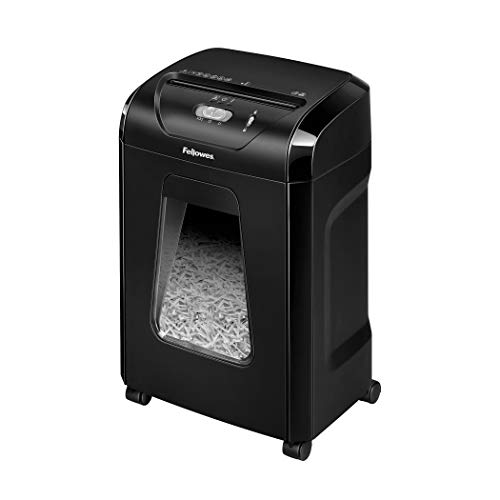
The Fellowes 14C10 stands out as a top pick for individuals who regularly handle sensitive documents at home or in small office settings and need reliable, mid-volume shredding without sacrificing security. I’ve found it easily handles 14 sheets per pass, turning them into P-4 level cross-cut shreds that guard against data theft. It powers through paper clips, staples, and even credit cards, which saves time. The 5-gallon bin holds over 250 sheets, but needs frequent emptying with heavy use. It runs continuously for 10 minutes before requiring a cooldown. While its 9.69 x 13.44 x 19.69-inch footprint fits most desks, the 11.38-pound weight keeps it stable.
Best For: Individuals and small office users who need reliable, secure shredding of sensitive documents with the ability to handle moderate volumes and mixed materials like staples and credit cards.
Pros:
- Shreds up to 14 sheets per pass into P-4 security level cross-cut particles, ideal for protecting confidential information
- Handles diverse materials including paper clips, staples, credit cards, and unopened junk mail without jamming
- Compact, elevated design with a 5-gallon pull-out bin fits neatly in home or office spaces and supports deskside convenience
Cons:
- Requires frequent bin emptying during heavy use despite a 250-sheet capacity
- Needs a cooldown period after 10 minutes of continuous use, limiting high-volume sessions
- May struggle with stacked cardstock or thick materials despite high sheet capacity
Factors to Consider When Choosing a Personal Paper Shredder
You’ll want to balance security and convenience when picking a personal shredder, since higher security levels like P-4 or P-5 cross-cutting offer better protection but may slow you down. Think about your typical workload-shredders with 10-14 sheet capacity and 5-10 minute run times handle moderate use well, but need cooling periods that disrupt heavy jobs. Also, check the waste bin size and safety features: a 5-7 gallon bin means fewer trips to the trash, while finger guards and auto-shutoff help prevent accidents without getting in your way.
Security Level
Security starts with particle size. You need smaller particles for better protection, and that’s where security levels matter. Strip-cut shredders give you P-2 security, producing strips up to 6 mm wide-easy to piece back together. Don’t rely on them if you’re shredding sensitive info. Cross-cut models slice paper into small rectangles, hitting P-3 to P-4 levels with particles around 5 x 18 mm. That makes reconstruction way harder. For top-tier protection, go with micro-cut shredders. They reach P-4 or P-5, reducing paper to tiny 0.5 x 1.3 mm specs-ideal for IDs, bank statements, or medical records. The DIN 66399 standard backs these ratings, so check for that label. Higher security means slower shredding and more frequent bin emptying, but the trade-off is real. Choose based on what you’re destroying, not just convenience.
Sheet Capacity
Consider a shredder with at least 10-sheet capacity if you regularly handle stacks of documents-this range tackles bulk jobs without constant refilling and reduces the frustration of mid-task jams. Sheet capacity, measured in 20-pound bond paper, typically runs from 6 to 14 sheets per pass. If you only shred a few pages at a time, a 6- to 8-sheet model works fine and saves space. But for moderate to heavy use, stepping up to 10 or more sheets boosts efficiency and cuts effort. Just don’t exceed the rated limit-overloading causes jams, strains the motor, or triggers overload protection, halting operation. These safeguards protect the machine, but frequent activation shortens its life. Match your pick to your workload: casual users thrive with lower capacity, while busy home offices need the extra headroom. Choose wisely, and you’ll get smooth, reliable performance without overpaying for unused power.
Run Time
A shredder’s sheet capacity sets the stage for handling daily stacks, but how long it can keep going matters just as much. You’ll typically get 2.5 to 10 minutes of continuous run time before the motor shuts off automatically to prevent overheating. High-duty models sustain up to 230 sheets nonstop, ideal for heavy or frequent use. After hitting max run time, expect a cool-down period of 15 to 40 minutes-longer if you’ve pushed the motor hard. Look for overheat protection with LED alerts; it helps you track when to pause. These systems aren’t just safety features-they extend your shredder’s lifespan by balancing performance with rest. Don’t assume longer run time always means better; it often means heavier motors and higher power draw. Match run time to your volume needs, not just specs, to avoid wear or wasted energy.
Waste Bin Size
Your shredder’s waste bin size plays a key role in how often you’ll need to empty it, especially if you shred daily. Bins range from 3.4 to 5.5 gallons-larger models hold over 250 sheets, cutting down on emptying for frequent users. If you handle documents regularly, go for 5 gallons or more to save time. For light or occasional use, compact bins under 4 gallons work fine and fit neatly under desks. Look for bins with fill line indicators or transparent windows so you can easily see when it’s full. Pull-out or lift-off designs with built-in handles make disposal cleaner and more convenient. Just keep in mind: bigger bins improve efficiency, but they also take up more space. Balance capacity with your available area and shredding habits to avoid hassle.
Safety Features
Larger waste bins mean fewer interruptions, but no convenience matters if your shredder isn’t safe to use daily. You need overheat protection that shuts off the motor after 3–10 minutes of continuous use-this prevents fire risks and extends motor life. Always choose models with safety interlocks that stop operation if the head is lifted or bin removed, so blades never run when exposed. Look for LED alerts that warn you of overload or overheating, letting you act before damage occurs. Anti-jam systems with manual reverse let you clear jams safely, without reaching near blades. These features work together: they’re not just extras, but essential for reliable daily use in homes or offices. However, even with these systems, no shredder is foolproof-always follow runtime limits and maintenance tips in the manual. Safety isn’t automatic-your habits matter as much as the machine’s design.
Frequently Asked Questions
Can Shredders Handle Paper Clips and Staples?
Yes, most shredders can handle paper clips and staples, but you should still remove them when possible. Metal bits wear down blades over time, reducing cutting efficiency and lifespan. High-end models with hardened steel cutters manage small amounts without jamming, but consistent use with staples shortens motor and刀头 life. Always check the manufacturer’s guidelines-some void warranties if metal causes damage. For best results and longevity, strip clips and staples before feeding documents.
How Often Should I Oil My Paper Shredder?
You should oil your paper shredder every 15 to 20 minutes of continuous use or after about 100 sheets for light home tasks. Use only shredder-specific oil to avoid gumming up the blades. Skip standard lubricants-they damage components. If you shred daily, a quick oil every two weeks keeps performance sharp. Over-oiling attracts dust, so apply sparingly. Most warranties don’t cover damage from improper oiling, so follow the manual exactly.
Are Shredder Warranties Transferable if I Sell It?
No, shredder warranties typically aren’t transferable if you sell it-most brands like Fellowes or AmazonBasics limit coverage to the original purchaser. You’ll need proof of purchase, and the warranty usually expires once ownership changes. Some commercial-grade models may offer exceptions, but it’s rare. If reselling, don’t count on warranty support for the buyer. Check the manufacturer’s policy directly, as terms vary, but assume it’s non-transferable unless explicitly stated otherwise.
Do Shredders Work Well With Thicker Cardstock?
Yes, most shredders handle thicker cardstock, but you must check the sheet capacity and cutting mechanism. Cross-cut and micro-cut models crush cardstock better than strip-cut ones. Feed slowly to avoid jams, especially near the machine’s max rating. Look for a P-4 or higher security level with a durable motor. Always refer to the manufacturer’s specs-exceeding recommended thickness wears parts fast and may void your warranty.
Is It Safe to Leave a Shredder Plugged in Overnight?
No, you shouldn’t leave a shredder plugged in overnight. Even energy-efficient models can overheat or pose fire risks if accidentally triggered. Unplugging cuts power completely and protects against electrical surges. Some units have auto-shutoff, but that’s not foolproof. Always follow the manufacturer’s safety guidelines-most recommend disconnecting after use. It takes two seconds and adds peace of mind, especially in home offices with extended downtime. Safety beats convenience here.