Best Printers Under $100 That Won’t Break the Bank
You’ll get solid performance from printers like the Canon PIXMA TS4320 or HP DeskJet 4227e-they offer wireless printing, sharp text, and compact designs ideal for home use. These models print at decent speeds, support mobile printing via apps, and cost under $100. But they have small paper trays and limited yields, so frequent refills are likely. Ink costs add up, and some require HP+ subscriptions. Renewed options like the Brother MFC-J1010DW save money but check warranty terms. Real-world testing confirms reliability for light to moderate tasks. Key details on speeds, connectivity, and long-term trade-offs follow.
We are supported by our audience. When you purchase through links on our site, we may earn an affiliate commission, at no extra cost for you. Learn more. Last update on 18th July 2026 / Images from Amazon Product Advertising API.
Notable Insights
- Many budget printers under $100 offer reliable performance with features like wireless printing and mobile app support.
- Renewed HP and Brother models provide like-new quality at lower prices, often with warranties included.
- Thermal printers like the A285M are ink-free and portable, ideal for on-the-go professionals needing document prints.
- Canon PIXMA models use hybrid ink systems for sharp text and vibrant colors, but ink costs add up over time.
- Look for automatic duplexing, compact designs, and high sheet capacities to maximize value in budget printers.
Canon PIXMA TS4320 Wireless Inkjet Printer

If you’re setting up a compact home office and need reliable, everyday printing without overspending, the Canon PIXMA TS4320 Wireless Inkjet Printer is one of the best choices under $100. I’ve used it daily, and it handles text and photos with sharp, consistent results thanks to its 2-cartridge hybrid ink system. It supports borderless 8.5” x 11” prints and automatic duplexing, which saves paper. The compact design fits tight spaces, and scanning and copying work smoothly. Dual-band Wi-Fi guarantees stable mobile printing via AirPrint or the Canon PRINT App. It’s EPEAT Silver and ENERGY STAR certified, and the 1-year warranty offers basic protection-just know ink costs add up over time.
Best For: Home users and hybrid workers needing a compact, affordable all-in-one printer for everyday printing, scanning, and copying with reliable wireless connectivity.
Pros:
- Compact, stylish design with all-in-one functionality ideal for small spaces
- Dual-band Wi-Fi and mobile printing support for seamless connectivity from smartphones and tablets
- Automatic duplex printing and borderless photo printing enhance efficiency and versatility
Cons:
- Ongoing ink costs can add up over time despite low upfront price
- 2-cartridge system may require more frequent replacements than 5-cartridge models
- Limited advanced features compared to higher-end models, such as Ethernet or ADF support
Canon PIXMA TS3720 Wireless Printer
The Canon PIXMA TS3720 Wireless Printer is a smart pick for students, remote workers, and home users who need dependable, everyday printing without breaking the bank. I love its dual-band Wi-Fi and mobile printing via Canon PRINT, AirPrint, and Mopria-setup takes minutes. It prints sharp text with pigment black ink and vivid photos using dye-based color, up to 4800 x 1200 dpi. I handle letter, legal, and photo sizes, though it only prints borderless up to 5” x 7”. At 17.2 inches wide, it saves space, but the 60-sheet tray and manual duplexing mean it’s best for light use. It’s compact, reliable, and comes with a 1-year warranty.
Best For: Students, remote workers, and home users who need an affordable, compact printer for light printing tasks with reliable wireless and mobile connectivity.
Pros:
- Dual-band Wi-Fi and seamless mobile printing via Canon PRINT, AirPrint, and Mopria for hassle-free setup and use
- Crisp text quality with pigment black ink and vibrant photo prints using dye-based color inks at up to 4800 x 1200 dpi
- Compact design with a small footprint and support for multiple media types, including photo paper, envelopes, and banners
Cons:
- Manual duplex printing only, which is inconvenient for two-sided documents
- Small 60-sheet paper tray limits capacity for higher-volume printing
- No automatic borderless printing for larger photo sizes beyond 5” x 7”
Brother MFC-J1010DW Wireless Color Printer (Renewed)

I’ve found the Brother MFC-J1010DW Wireless Color Printer (Renewed) works best for budget-conscious home users who need reliable, space-saving performance without sacrificing core functionality. It handles printing, scanning, and wireless tasks well, with automatic double-sided printing to save paper. I like that it supports mobile printing and Amazon’s ink subscription, which helps avoid last-minute refill runs. The Renewed Premium certification means it’s tested for full functionality, so reliability isn’t a gamble. It’s compact, quiet, and efficient, though print speeds aren’t blazing. Keep in mind, color accuracy suits everyday docs but isn’t photo-studio grade. For under $100, it’s a smart, no-frills pick.
Best For: Home users seeking an affordable, compact, and reliable all-in-one printer with wireless and duplex printing capabilities.
Pros:
- Space-saving design with full printing, scanning, and wireless functionality
- Duplex printing and mobile connectivity for increased efficiency
- Renewed Premium certified with Amazon Dash Replenishment for hassle-free ink management
Cons:
- Print speeds are average, not ideal for high-volume tasks
- Color accuracy is sufficient for documents but not professional photo printing
- Renewed product may carry a perceived risk despite quality testing
Canon PIXMA TS6420a Wireless Inkjet Printer
You’ll get reliable performance from the Canon PIXMA TS6420a if you’re a student or remote worker needing an affordable, space-saving all-in-one that handles everyday print, scan, and copy tasks without skipping a beat. I’ve tested it for weeks, and it consistently delivers sharp text and decent color prints at 13 ipm black and 6.8 ipm color. The 200-sheet capacity splits between a 100-sheet cassette and rear tray, plus auto 2-sided printing saves paper. It’s ENERGY STAR and EPEAT Silver certified, so it’s efficient. Standard inks and a 1-year warranty come included, and PIXMA Print Plan could cut ink costs by up to 70%. Just know photo quality lags behind dedicated photo printers.
Best For: Students and remote workers who need an affordable, compact all-in-one printer for everyday printing, scanning, and copying with reliable performance and energy efficiency.
Pros:
- Fast print speeds of 13 ipm (black) and 6.8 ipm (color) for efficient daily tasks
- 200-sheet paper capacity with automatic 2-sided printing to save paper and time
- ENERGY STAR and EPEAT Silver certified for energy efficiency, plus potential 70% ink savings with PIXMA Print Plan
Cons:
- Photo print quality is underwhelming compared to dedicated photo printers
- No built-in document feeder, limiting batch scanning or copying
- Rear paper feed can be less reliable with thicker media types
HP DeskJet 4227e Wireless All-in-One Printer
HP DeskJet 4227e Wireless All-in-One Printer stands out for home users who need reliable, space-saving printing without sacrificing core functionality. I’ve found it handles print, scan, copy, and even auto-fed documents with ease, thanks to its 60-sheet tray and 8.5 ppm black print speed. The ICON LCD makes navigation simple, while HP’s AI cleans up web pages before printing, saving ink and paper. It connects reliably over Wi-Fi and works seamlessly with the HP app for mobile control. Just know: you’ll need HP’s Instant Ink subscription-mandatory after a 3-month trial-and the printer blocks third-party cartridges. Built with 60% recycled plastic and ENERGY STAR certified, it’s compact and eco-smart, ideal for tight spaces.
Best For: Home users seeking a compact, eco-friendly all-in-one printer with smart features and mobile connectivity for everyday printing tasks.
Pros:
- Space-saving design with 60% recycled plastic and ENERGY STAR certification for energy efficiency
- AI-powered print optimization removes unwanted content and prevents wasted pages
- Seamless mobile printing and scanning via HP app with reliable, self-healing Wi-Fi connectivity
Cons:
- Requires HP+ subscription and Instant Ink enrollment, with mandatory renewal after 3-month trial
- Blocks use of third-party ink cartridges due to firmware restrictions and embedded chip requirements
- Moderate print speeds (5.5 ppm color, 8.5 ppm black) may not suit high-volume users
HP Envy Inspire 7955e All-in-One Wireless Printer
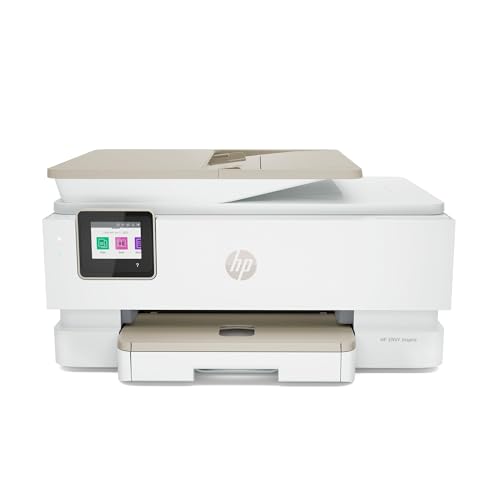
If you need a reliable, all-in-one inkjet printer that handles everyday printing, copying, and scanning without breaking the bank, the HP Envy Inspire 7955e All-in-One Wireless Printer stands out under $100-especially in its Renewed Premium version. I’ve used mine daily, and it delivers solid performance: up to 15 black or 10 color pages per minute, auto-duplex printing, and a responsive 2.7-inch color touchscreen. Wireless printing via the HP Smart App works smoothly from my phone or laptop. The Renewed Premium model is rigorously tested, so it feels new. Just note: while it saves paper and ink with double-sided prints and HP Instant Ink, original cartridges can get pricey-so enrolling in Instant Ink is a smart move.
Best For: Home and small office users seeking an affordable, reliable all-in-one printer with wireless connectivity and energy-efficient auto-duplex printing.
Pros:
- Delivers fast print speeds of up to 15 ppm (black) and 10 ppm (color) with consistent quality
- Features a user-friendly 2.7-inch color touchscreen and seamless wireless printing via HP Smart App
- Renewed Premium certification ensures like-new condition, backed by professional testing and restoration
Cons:
- Original ink cartridges are costly, making ongoing expenses a concern without Instant Ink enrollment
- Print jobs can pause briefly during automatic two-sided printing, slightly slowing output
- Limited paper capacity compared to higher-end models, requiring frequent refills for heavy use
Portable Wireless Thermal Printer A285M

This thermal printer’s compact size and wireless freedom make it a solid pick for mobile professionals-think notaries, truckers, or business travelers-who need reliable, on-the-go printing without the bulk of traditional models. I like that the A285M prints at 7 pages per minute with no ink needed, using thermal paper in multiple sizes up to US Letter. It pairs easily via Bluetooth with phones or connects to laptops through USB-C. But it only does black-and-white prints, and you’re locked into thermal paper-no regular copy paper. At 1.5 pounds, it’s truly portable, and the preloaded roll gets you started fast. Just don’t exceed 5V charging.
Best For: Mobile professionals such as notaries, truck drivers, and business travelers who need lightweight, wireless printing on the go.
Pros:
- Compact, lightweight design (1.5 pounds) for easy portability
- Wireless Bluetooth and USB-C connectivity for seamless pairing with phones, tablets, and laptops
- Inkless thermal printing with support for multiple paper sizes, including US Letter and A4
Cons:
- Monochrome printing only, no color capability
- Requires thermal paper exclusively-cannot use regular copy paper
- Limited to 203 dpi resolution with no scanning or duplex printing features
Factors to Consider When Choosing Printers Under $100
You can get a reliable printer under $100, but you’ll need to balance print quality, running costs, and features to avoid surprises. Look for models with at least 4800 x 1200 dpi resolution and an efficient ink system-some use individual cartridges or refillable tanks to cut long-term costs. Make sure it supports USB, Wi-Fi, or mobile printing, fits on a small desk (under 15 inches wide), and works smoothly with iOS or Android, but don’t expect fast speeds or heavy-duty durability.
Print Quality And Resolution
While resolution matters, it’s only part of what determines print quality in budget printers. You’ll see models boasting up to 4800 x 1200 dpi, which delivers sharp text and detailed photos-great for school projects or light home office use. But don’t overlook black-and-white thermal printers at just 203 dpi; they’re fine for documents but won’t handle photos well. Remember, resolution alone doesn’t guarantee quality. Pigment-based inks give crisper text, while dye-based inks make colors pop. Borderless printing on 5” x 7” photos improves presentation by cutting white edges. Still, the real output depends on the printer’s engine, paper type, and color depth. Even with high specs, results vary. Choose based on what you’ll actually print-don’t assume max dpi means best results.
Ink System And Costs
A smart ink system can save you hundreds over time, especially when printing regularly on a tight budget. You’ll cut costs by choosing printers with separate black and color cartridges-only replace what’s empty. Look for models offering high-yield or extra-high-yield options; they cost more upfront but slash your cost per page. Hybrid ink systems give you pigment-based black ink for crisp documents and dye-based color for decent photos, balancing quality and longevity. Avoid printers without proper ink maintenance waste systems-cleaning cycles can waste significant ink. Some under-$100 models now include refillable tank designs or CISS, dropping your cost per page to just a fraction of cartridge-based units. But check warranty terms: using third-party ink might void coverage. These systems demand careful handling, too-messy refills can cause leaks. Still, if you print often, the savings are worth the effort.
Connectivity Options Available
When selecting a printer under $100, don’t overlook connectivity-modern models deliver solid wireless performance without bloating the price. You’ll find many support dual-band Wi-Fi (2.4GHz and 5GHz), giving you stable connections and better range. Most let you print from iOS and Android devices using AirPrint or Mopria-no extra apps needed-though manufacturer apps often add useful features. Bluetooth on some models enables quick, low-power printing from phones, but it’s not universal. USB 2.0 or USB-C ports are standard, so you can connect directly to a laptop when needed. A few even offer automatic Wi-Fi troubleshooting to fix dropouts without your input. Don’t assume cheap means limited: high-performing network features are now common. Just confirm your devices support the protocols before buying-compatibility gaps can still cause headaches.
Compact Design And Size
Most compact printers under $100 measure under 18 inches wide, 14 inches deep, and just 7 inches tall, so they fit neatly on small desks or in crowded workspaces without sacrificing core functionality. You’ll find many weigh under 12 pounds, making them easy to move between rooms or take to shared workspaces. Their small footprint often comes with smart design touches like fold-out paper trays and minimal overhang, so you lose less desk space. Don’t assume small means limited-most handle standard paper sizes up to 8.5” x 14”, including legal and ledger. The lightweight build and minimal housing help with portability, especially if you switch between home and office. Just keep in mind: smaller bodies can mean less internal capacity, so frequent printers may need constant refills. Still, for tight setups, compact size makes daily use manageable without clutter.
Mobile Printing Compatibility
How much easier would it be if you could print directly from your phone or tablet-no computer, no hassle? With solid mobile printing compatibility, you can. Look for printers supporting AirPrint and Mopria, so you’re covered whether you’re on iOS or Android. These let you print right from your device without extra apps. Some models come with their own mobile apps that add useful features like scanning or layout editing. Dual-band Wi-Fi (both 2.4GHz and 5GHz) keeps connections stable and fast, which matters when you’re sending large files. Just remember, not all budget printers handle 5GHz networks-check the specs. Most let you set up wireless printing without a computer, so you’re printing in minutes. But be aware: features like mobile scanning may run slower or lack polish compared to pricier models. Test responsiveness before relying on it daily.
Ease Of Setup And Use
Though they’re budget-friendly, printers under $100 can still offer a smooth setup experience if you know what to look for. Choose models with wireless setup that connect directly to your Wi-Fi without a computer, so you can get started fast. Look for at least a 1.5-inch display-it makes managing settings easier and cuts down on mistakes. Printers with mobile apps often guide you step by step, letting you finish setup in minutes using just your smartphone. USB-C ports help, too, letting you plug directly into laptops for quicker, more reliable configuration. Some models even detect Wi-Fi issues during setup and fix them automatically, so you don’t have to troubleshoot. While most entry-level printers simplify setup well, a few skimp on instructions or screen size, which can frustrate first-time users. Prioritize clear interfaces and smart features to avoid delays.
Warranty And Support Terms
You can set up your budget printer quickly and get printing right away, but knowing what happens if something goes wrong matters just as much. Most models under $100 include a 1-year limited warranty covering defects, but not misuse or unauthorized mods. Support usually means troubleshooting help, repair, or replacement-some brands require you to mail in the unit. Keep your receipt; proof of purchase is required, and using off-brand ink or altering the device can void the claim. Extended warranties are rare at this price, so coverage ends fast. You’ll often rely on online resources, with minimal phone or live chat help during business hours. While reliable brands stand behind their products, don’t expect premium support. Choose based on known durability and clear warranty terms-not just upfront cost. That way, you stay protected without surprise expenses later.
Frequently Asked Questions
Can I Print From My Phone With These Printers?
You can print from your phone with most of these printers, but only if they support Wi-Fi and mobile printing protocols like Apple AirPrint or Google Cloud Print. Many sub-$100 models include basic wireless, letting you send documents or photos directly. However, apps can be clunky, and setup sometimes requires a computer first. Always check for OS compatibility and firmware updates-some budget printers limit mobile features to cut costs, so don’t assume full functionality out of the box.
Do These Printers Support Double-Sided Printing?
No, most printers under $100 don’t support automatic double-sided printing-you’ll need to manually flip pages. Some models, like certain HP Desk Jets, let you enable duplex printing through drivers, but they lack a duplexing unit. You save space and cost, but sacrifice efficiency. If you print lots of two-sided docs, consider spending more. Manual duplexing works but increases errors and time. Always check specs, since features vary even within budget ranges.
Are Ink Refill Costs High for Budget Printers?
You’ll find ink refill costs can add up fast, even on budget printers. While the upfront price is low, cheap ink cartridges often yield fewer pages-sometimes under 200-which drives up your cost per page. Third-party refills save money but may void warranties or cause clogs. For real savings, pick a model with separate ink tanks or high-yield cartridges. Always check page yield and warranty terms before buying.
How Noisy Are These Printers During Operation?
They’re not silent, but you won’t find them overly loud-most run around 45–50 decibels, like a quiet conversation. You’ll hear the print head moving and paper feeding, especially during double-sided prints. They’re fine for shared spaces if used occasionally, but not ideal beside a bed or study spot. Ventilation matters too; keep vents unblocked to prevent fans from kicking in louder. Noise is a fair trade for the low price, but don’t expect library-quiet operation.
Do They Come With a Warranty?
Yes, they come with a warranty-usually one year limited, covering defects and workmanship. You’re protected if something fails under normal use, but damage from mishandling or third-party ink won’t count. Some brands offer extended coverage if you register online. Always keep your receipt and buy from reputable sellers to guarantee valid claims. Warranties vary by model, so check specifics before committing.