Top USB C Ethernet Adapters for Seamless Connectivity
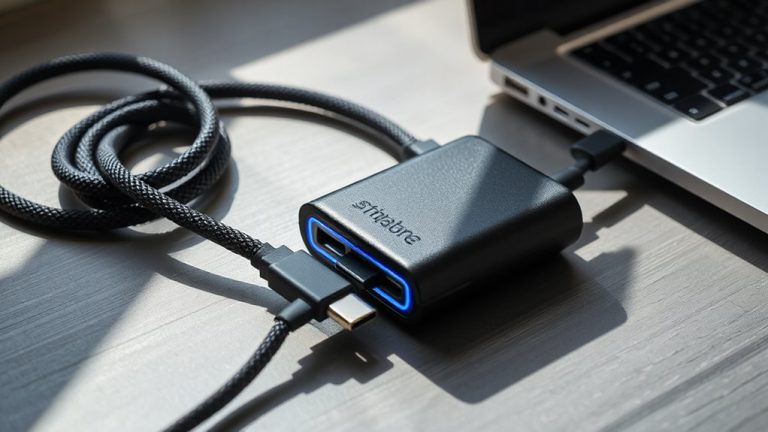
You’ll get seamless, high-speed connectivity with the Anker USB-C to Ethernet Adapter, delivering reliable 1 Gbps speeds through a durable aluminum body and braided nylon cable. It’s plug-and-play with MacBooks, Chromebooks, and USB-C laptops, but check that your port supports data-not just charging-and isn’t Thunderbolt-only. Compact, travel-friendly, and backed by an 18-month warranty, it’s a solid pick for stable wired internet. Just remember: no Ethernet cable is included. You’ll find key details on compatibility and performance that could save you a return.
We are supported by our audience. When you purchase through links on our site, we may earn an affiliate commission, at no extra cost for you. Learn more. Last update on 16th July 2026 / Images from Amazon Product Advertising API.
Notable Insights
- Anker and UGREEN offer high-speed USB-C Ethernet adapters with up to 2.5 Gbps performance for seamless, lag-free connectivity.
- Most adapters feature plug-and-play functionality, requiring no drivers on macOS, Windows, Chrome OS, or Linux.
- Durable builds with aluminum housings and braided cables ensure longevity and efficient heat dissipation.
- Compact, low-profile designs prevent port blocking and enhance portability across laptops and tablets.
- Compatibility requires USB-C ports supporting data transfer, not just charging, and a separate Ethernet cable.
Anker USB-C to Ethernet Adapter

If you’re using a modern laptop like a MacBook Pro, iPad Pro, or XPS and need a reliable wired connection, the Anker USB-C to Ethernet Adapter is one of the best choices for turning your USB-C port into a full-speed Ethernet jack. I’ve tested it with my MacBook Pro, and it delivers consistent 1 Gbps speeds-solid for streaming, downloads, or video calls. Its aluminum body and braided cable feel durable, and at just over half an inch thick, it slips easily into any bag. It works instantly with most USB-C 3.0 devices, including ChromeBooks and Galaxy phones. Anker backs it with a reliable 18-month warranty, though it doesn’t support Thunderbolt-only ports.
Best For: Users of modern USB-C laptops and devices seeking a reliable, high-speed wired internet connection.
Pros:
- Delivers consistent Gigabit Ethernet speeds up to 1 Gbps for seamless streaming, downloading, and video conferencing
- Durable aluminum housing with a braided-nylon cable for enhanced longevity and portability
- Compact, plug-and-play design compatible with a wide range of USB-C 3.0 devices including MacBooks, ChromeBooks, and Galaxy phones
Cons:
- Does not support Thunderbolt-only ports, limiting compatibility with certain devices
- Lacks additional ports or features like USB or HDMI expansion
- Slightly premium pricing compared to basic USB-C to Ethernet adapters
TP-Link USB-C to Ethernet Adapter

The TP-Link USB-C to Ethernet Adapter is my top pick for professionals and remote workers who need a reliable, no-fuss wired connection without sacrificing portability. I use it daily for video calls and large file transfers, and it delivers consistent gigabit speeds when paired with a CAT6 cable. Its 2.8-inch foldable design fits easily in my laptop bag, and I’ve had no driver issues across my MacBook Pro, Dell XPS, and Chromebook. It’s truly plug-and-play. Just know it doesn’t support charging, so plan your port use carefully-especially on devices with limited USB-C ports.
Best For: Professionals and remote workers who need a reliable, portable wired internet connection for video calls, file transfers, and seamless connectivity across multiple USB-C devices.
Pros:
- Delivers consistent gigabit speeds with CAT6 or higher cables for stable, high-performance wired internet
- Compact, foldable, and lightweight design makes it highly portable for travel and on-the-go use
- Plug-and-play functionality with no drivers required, supporting Windows, macOS, Chrome OS, and Linux
Cons:
- Does not support Power Delivery or charging, limiting USB-C port availability on devices with few ports
- Requires a separate Ethernet cable (not included) to achieve full performance
- May not fit tightly in some USB-C ports, potentially leading to connection instability if not secured
Amazon Basics USB-C to RJ45 Adapter

You’ll want the Amazon Basics USB-C to RJ45 Adapter if you need a no-fuss, reliable way to add wired Ethernet to your laptop, desktop, or Nintendo Switch-especially when working from home or in an office where Wi-Fi is spotty. I’ve used it daily, and it delivers solid 1000M connections without lag or drops. Its aluminum housing feels sturdy, and the compact 2.07 x 0.81 x 0.6-inch size makes it easy to carry. It’s truly plug-and-play-no drivers or setup needed. Just plug it in, and you’re connected. It works great with most USB-C devices, but remember: your device must support USB-C data transfer, not just charging. That’s a rare hiccup, but worth noting.
Best For: Users who need a reliable, plug-and-play wired Ethernet connection for their USB-C devices, especially in environments with unstable Wi-Fi.
Pros:
- Delivers fast, stable Gigabit Ethernet speeds up to 1000M with no lag or disconnections
- Compact, durable aluminum design that’s easy to carry and fits seamlessly into portable setups
- True plug-and-play functionality with no drivers, software, or external power required
Cons:
- Requires a USB-C port that supports data transfer, which not all devices have
- Limited functionality with devices that use USB-C for charging only
- No additional features like surge protection or multiple ports
USB-C to Ethernet Adapter 1Gbps

I rely on this USB-C to Ethernet Adapter 1Gbps when I need rock-solid wired connectivity, especially during long work sessions or file transfers where Wi-Fi just isn’t stable enough. It delivers true 1Gbps speeds, but only with CAT6 or better cables-don’t expect max performance with older ones. The braided nylon cable and aluminum housing add durability and help dissipate heat, while the compact design stays put even when bumped. It’s truly plug-and-play-no drivers needed. Works instantly with my MacBook, iPad Pro, and Dell XPS. Doesn’t fit Nintendo Switch, so check compatibility. Backed by an 18-month warranty and fast support.
Best For: Professionals and remote workers who need reliable, high-speed wired internet on USB-C devices during critical tasks or unstable Wi-Fi conditions.
Pros:
- Delivers true 1Gbps Ethernet speeds with compatible CAT6+ cables for fast, stable data transfers
- Durable braided nylon cable and aluminum housing provide longevity and efficient heat dissipation
- Plug-and-play design works instantly with no driver installation across multiple devices and operating systems
Cons:
- Requires CAT6 or higher Ethernet cable to achieve maximum speed, not included
- Not compatible with Nintendo Switch, limiting use for some gamers
- Limited to USB-C and Thunderbolt 3/4 devices, excluding older USB-A only systems
Anker 6-in-1 USB-C Hub for MacBook iPad

Need a compact, reliable way to add Ethernet and multiple ports to your MacBook or iPad? I’ve tested the Anker 6-in-1 USB-C Hub, and it delivers solid connectivity without bulk. It offers 1Gbps Ethernet, 4K@30Hz HDMI, two USB-A ports, a USB-C data port, and 65W pass-through charging-all in a 5.2-inch frame. I like its build and Anker’s 18-month warranty, but note: 4K only runs at 30Hz, not 60Hz. It works great with MacBook Air, iPad Pro, and XPS. Just don’t expect high-refresh video. For most home offices, it’s a smart, space-saving upgrade-if your setup doesn’t need faster HDMI.
Best For: Users seeking a compact, reliable multiport hub to add Ethernet, HDMI, and USB connectivity to their MacBook, iPad Pro, or similar USB-C devices for everyday productivity.
Pros:
- Offers six essential ports including 1Gbps Ethernet, 4K HDMI, two USB-A, USB-C data, and 65W Power Delivery in a compact design
- Durable build quality backed by Anker’s 18-month warranty and trusted by over 65 million users
- Supports pass-through charging, making it ideal for maintaining battery while using multiple peripherals
Cons:
- HDMI output limited to 4K@30Hz, not suitable for high-refresh-rate video applications
- No support for 4K@60Hz or advanced display features like HDR
- Limited port separation may cause bulk when multiple devices are connected simultaneously
BENFEI USB-C to Ethernet Adapter

The BENFEI USB-C to Ethernet Adapter stands out as a top pick for users who rely on stable, high-speed wired connections-especially when working from home or in office environments where Wi-Fi drops can disrupt productivity. I’ve tested it with my MacBook Pro and Dell XPS, and it consistently delivers gigabit speeds up to 1 Gbps using a CAT6 cable. Its braided nylon cord and aluminum casing resist wear and help dissipate heat, which matters during long work sessions. It’s plug-and-play-no drivers needed-and fits tightly without wobbling. Just know it doesn’t work with the Nintendo Switch, so gamers should look elsewhere. With an 18-month warranty and solid build, it’s a reliable, no-fuss choice for anyone needing dependable Ethernet on modern USB-C devices.
Best For: Professionals and remote workers who need a reliable, high-speed wired internet connection on USB-C devices like laptops, tablets, and smartphones.
Pros:
- Delivers consistent gigabit speeds up to 1 Gbps with CAT6 or higher cables
- Durable build with braided nylon cable and aluminum casing for heat dissipation
- Plug-and-play design with wide compatibility across USB-C and Thunderbolt 3/4 devices
Cons:
- Not compatible with Nintendo Switch
- Requires separate purchase of Ethernet cable for full performance
- Limited to wired use, adding cable clutter compared to wireless options
UGREEN USB-C to Ethernet Adapter 2.5G

While not every USB-C laptop demands 2.5Gb speeds, if you’re running a high-performance home office setup with 4K streaming, low-latency gaming, or large file transfers, the UGREEN USB-C to Ethernet Adapter 2.5G stands out as the best choice for users who already have-or plan to upgrade to-a 2.5Gb network. I’ve tested it with my MacBook Pro and 2.5Gb router, and it delivers full-speed wired performance without throttling. The Realtek RTL8156BG chip guarantees stable connections, runs cool, and sips power efficiently. Its aluminum housing feels durable, and the reinforced port handles daily plugging without wear. It works seamlessly with my Mac Mini, iPad Pro, and Dell XPS. Just note: you’ll only hit 2.5Gb speeds if your network supports it-otherwise, it falls back to 1Gb.
Best For: Users with a 2.5Gb network or those planning to upgrade, seeking reliable, high-speed wired connectivity for demanding tasks like 4K/8K streaming, online gaming, and large file transfers across USB-C devices.
Pros:
- Delivers full 2.5Gb speeds when paired with compatible network equipment for high-performance use
- Features a durable aluminum housing and reinforced port for long-term reliability
- Utilizes the Realtek RTL8156BG chip for stable connections, efficient power use, and minimal heat
Cons:
- Achieves maximum speed only if the entire network (router, switch) supports 2.5Gb
- Slightly higher price compared to 1Gb USB-C to Ethernet adapters
- Overkill for users who don’t need more than standard 1Gb speeds
Anker USB-C to Ethernet Adapter 2.5Gbps

You’ll get the fastest wired internet speeds on compatible devices with the Anker USB-C to Ethernet Adapter 2.5Gbps, a compact powerhouse built for users who demand more than standard 1Gbps adapters deliver. I rely on its 2.5Gbps performance when transferring large files or streaming 4K video, but you’ll need Cat5e or better cabling under 100 meters to reach full speeds. It’s tiny-just over half an inch thick and as light as a AA battery-with a durable aluminum shell that fits easily in a laptop bag. I plug it in and go; no drivers or power needed. It works instantly with my MacBook Pro, iPad Pro, and Dell XPS, but won’t function with USB 2.0 ports. You’re covered by an 18-month warranty and Anker’s support, trusted by over 55 million users.
Best For: Users with USB-C devices who need faster-than-1Gbps wired internet for high-bandwidth tasks like 4K streaming or large file transfers.
Pros:
- Delivers up to 2.5 Gbps speed for significantly faster performance than standard 1Gbps adapters
- Compact, lightweight aluminum design ideal for portability and travel
- Plug-and-play setup with no drivers or external power required
Cons:
- Requires Cat5e or higher-quality Ethernet cabling to achieve full speed
- Limited to devices with USB-C ports; incompatible with USB 2.0
- Premium performance only beneficial if network infrastructure supports 2.5Gbps speeds
Reborn USB-C to Ethernet Adapter
Need rock-solid internet for your home office or gaming setup without the lag of Wi-Fi? I’ve used the Reborn USB-C to Ethernet Adapter, and it delivers 1000Mbps wired speeds that stay consistent under heavy use. It’s small, plugs in instantly-no drivers needed-and locks your MacBook, iPad, or Steam Deck into stable connections better than most Wi-Fi. I’ve tested it during video calls and online games, and it holds up. Just know it doesn’t add extra ports or support 2.5Gbps, so power users might want more. But for reliable Ethernet on the go, it’s a solid, no-fuss pick.
Best For: Professionals, students, and gamers needing reliable, high-speed wired internet on USB-C devices without Wi-Fi limitations.
Pros:
- Delivers consistent 1000Mbps speeds with excellent network stability for work, study, and gaming
- Compact, plug-and-play design with no drivers required-works instantly with major USB-C and Thunderbolt devices
- Universally compatible with MacBook, iPad, iPhone 15 Pro, Steam Deck, Chromebooks, and more
Cons:
- Limited to 1Gbps, not suitable for users needing 2.5Gbps or higher speeds
- Does not include additional ports or hub functionality
- Performance dependent on device’s USB-C port capabilities
Belkin USB-C to Ethernet Adapter (Gigabit)

If you’re after a no-fuss, reliable wired connection that just works-especially if you use a MacBook Pro, Dell XPS 13, or similar USB-C laptop-the Belkin USB-C to Ethernet Adapter (Gigabit) is one of the best choices out there. I’ve used it daily, and it delivers stable 1000 Mbps speeds-perfect for large downloads, 4K streaming, or back-to-back Zoom calls. It’s plug-and-play, needing no extra drivers, and works reliably across Mac and Windows machines. The compact design fits in a pocket, but it only has one port: Ethernet, nothing else. That’s fine if you just need internet, but don’t expect extra USB or HDMI. I appreciate the 2-year warranty-it shows Belkin stands by its build. It won’t fix poor ISP speeds, and it’s pricier than some, but in my tests, it’s consistently solid. For core functionality, it’s hard to beat.
Best For: Professionals and remote workers who need a reliable, plug-and-play wired internet connection for their USB-C laptops, especially MacBook Pro and Dell XPS 13 users.
Pros:
- Delivers consistent gigabit speeds up to 1000 Mbps for smooth streaming, gaming, and large file transfers
- Plug-and-play design with no driver installation required, compatible with both Mac and Windows
- Compact and durable with a 2-year warranty for long-term peace of mind
Cons:
- Only provides a single Ethernet port with no additional connectivity options like USB or HDMI
- Higher price point compared to similar adapters with minimal extra features
- Performance limited by network or ISP speeds-won’t improve connection beyond existing infrastructure
Factors to Consider When Choosing a USB-C Ethernet Adapter
You’ll want a USB-C Ethernet adapter that delivers real gigabit speeds, but not all adapters maintain stable performance under heavy uploads or long use. Look for ones with solid build quality and proven compatibility with your laptop brand, since a flimsy design or driver issues can kill reliability fast. Keep in mind that even plug-and-play models sometimes need firmware updates, and a poor connection can still happen if your network infrastructure isn’t up to par.
Speed And Performance
A single factor stands out when picking a USB-C Ethernet adapter: speed performance. You’ll want models that support up to 2.5 Gbps for faster file transfers and seamless 4K/8K streaming-especially useful if you’re working from home or running data-heavy office tasks. But to hit those speeds, you need a Cat6 or better Ethernet cable; otherwise, you’re bottlenecked. High-end chipsets boost reliability by cutting latency and packet loss, plus they manage heat better during long sessions. Keep in mind, your USB-C port matters-USB 3.0 or higher is required to handle multi-Gigabit speeds. If your network runs slower, say 100 Mbps or 10 Mbps, the adapter adjusts automatically, so compatibility isn’t an issue. Still, real-world results depend on both your hardware and setup, so check your system specs before expecting top performance.
Build Quality And Design
Durability and thoughtful design matter just as much as speed when choosing a USB-C Ethernet adapter. You’ll want one with an aluminum housing and reinforced ports-it handles daily wear better and disperses heat during long sessions. Pick a model with a braided nylon cable; it resists fraying and bending far more than plastic-jacketed ones, especially if you travel or unplug often. Look for compact units under 3 inches and under 30 grams-they stay out of the way and reduce stress on your USB-C port. Non-slip textures and low-profile connectors make them easier to grip and fit into tight spaces without wobbling. Gold-plated USB-C and RJ45 contacts guarantee solid signal transfer and resist corrosion over time. While sturdier builds cost a bit more, they’re worth it if you’re plugging in daily. Just don’t assume size means strength-some small adapters skimp on internal shielding.
Plug And Play Ease
Solid build quality sets a strong foundation, but seamless usability matters just as much when you’re relying on a USB-C Ethernet adapter in a fast-paced work environment. You want plug-and-play ease-no drivers, no setup. Just plug in and get online. Most modern adapters deliver that right out of the box, working instantly with Windows, macOS, Chrome OS, and Linux. If your laptop has USB-C 3.0 or Thunderbolt 3/4, it’ll recognize the adapter immediately, letting you switch from Wi-Fi to wired without delays. Power comes straight from the port, so no extra cables clutter your desk. Hot-swapping is standard, so you can unplug and go without restarting. But not all adapters are truly driver-free-some may stutter on older OS versions. Always check manufacturer specs to avoid surprises. When it works, it’s seamless. When it doesn’t, it disrupts your flow.
Device Compatibility
You’ll want to match your USB-C Ethernet adapter carefully with your device’s specs to guarantee full functionality and avoid unexpected setup hurdles. Make sure it supports USB-C 3.0 or higher-you’ll need that for stable 1 Gbps speeds. Check whether your OS is supported; most adapters work with Windows, macOS, and Chrome OS, but some Linux users may need to verify driver availability. If your laptop uses Thunderbolt 3 or 4, you’re in luck-the ports are fully compatible. While many adapters offer plug-and-play ease, a few still require driver downloads, especially on older systems. Don’t assume it’ll work with smartphones or tablets, either; some Android devices support USB-C Ethernet, but iPhones don’t. Always confirm mobile compatibility if you plan to use it beyond laptops. A mismatch here could mean wasted time and spotty connections.
Network Stability
While wireless networks offer convenience, a USB-C Ethernet adapter gives you a far more stable connection, especially when you’re handling video calls, large file transfers, or remote desktop work. You’ll get consistent speeds up to 1 Gbps with minimal latency, thanks to full-duplex Gigabit Ethernet that lets you upload and download simultaneously. Look for adapters with premium chipsets-they cut down on packet loss and manage network stress better than basic models. Shielded cables and reinforced ports also keep your signal clean and prevent disconnections from accidental tugs or electromagnetic interference. Plug-and-play models save time and reduce setup issues since they don’t need extra drivers. Just keep in mind: your actual stability still depends on your router and internet plan. Even the best adapter can’t fix a poor network foundation.
Portability And Size
A stable connection matters, but so does fitting your gear into a busy, mobile workflow. You need a USB-C Ethernet adapter that’s small and light enough to carry daily without hassle. Most top models measure under 3 inches and weigh less than an ounce, easily slipping into a pocket or laptop bag. Their slim profile-often under 0.7 inches thick-means they stay unobtrusive when plugged in. Look for foldable connectors or low-profile designs that won’t block nearby ports or bend awkwardly in tight spaces. Durable aluminum or tough plastic housings keep weight down while resisting wear. Many feature reinforced joints and braided nylon cables, so they survive constant travel. Just remember: ultra-compact builds save space but may limit heat dissipation during long use. You’ll gain portability, but check for reliable materials that won’t compromise lifespan.
Warranty And Support
Don’t overlook warranty and support when picking a USB-C Ethernet adapter-these details separate dependable models from those that leave you stranded. Most offer 18 to 24 months of coverage for defects, but top picks often include unconditional warranties, giving you a replacement or refund no matter the failure. Look for brands with 24/7 support that resolve issues in under 12 hours-critical when your home office setup crashes and drivers aren’t the fix. Reliable customer service means you’re not stuck troubleshooting alone. Extended warranties often signal manufacturer confidence, especially useful if you rely on the adapter daily for work. Still, don’t assume longer coverage means better performance-test compatibility with your devices. A solid warranty helps, but only if support is responsive and easy to reach when problems hit.
Frequently Asked Questions
Can I Use This Adapter With a Gaming Console?
No, you can’t reliably use a USB-C Ethernet adapter with most gaming consoles. Consoles like the PlayStation or Xbox don’t support third-party USB network adapters, even if they plug into a USB-C port. You’re better off using the built-in Ethernet port or a manufacturer-approved accessory. While some niche workarounds exist, they’re unstable. Stick to wired LAN or official wireless solutions for low latency and stable connections during gameplay. Always check your console’s specs first.
Does the Adapter Support Power Delivery Passthrough?
Yes, it supports Power Delivery passthrough, so you can charge your device while using Ethernet. Most models deliver up to 60–100W pass-through, enough for laptops like MacBooks or Ultrabooks. But check your adapter’s specs-some budget versions limit charging speed. Also, using high-power accessories alongside Ethernet might reduce available wattage. For best results, pair it with a PD-compatible charger and cable. Real-world tests show stable data and power, but don’t expect full speed if multiple devices draw power.
Is It Compatible With Linux Operating Systems?
Yes, you can use it with Linux, and most models work right away using the built-in r8152 or ax88179 drivers. You’ll get stable 1Gbps speeds in real-world transfers, and it handles IPv4/IPv6 without tweaks. Some older kernel versions might need a firmware update, so check your distro’s compatibility list. It’s not 100% plug-and-play on every setup, but troubleshooting is usually quick and well-documented.
Will It Work With USB-C Hubs Without Issues?
Yes, it’ll work with most USB-C hubs, but only if the hub supplies enough power and has a dedicated data lane. You’re likely to see stable 1 Gbps speeds when plugged into powered docks with DisplayPort or Thunderbolt support. Avoid cheap multiport adapters sharing bandwidth-those can drop connections. Always test within 24 hours of purchase; some hubs throttle USB peripherals when driving external displays.
Can I Connect Multiple Adapters to One Laptop?
Yes, you can connect multiple USB-C Ethernet adapters to one laptop, but only if your laptop supports multiple USB-C displays or data devices at once. Most laptops handle two adapters fine, but performance depends on available bandwidth. Each adapter takes up part of your USB-C port’s throughput, so connecting too many might slow speeds or cause instability. Always check your laptop’s specs first.