The Role of Proper Posture Techniques in Preventing Musculoskeletal Disorders Among Remote Workers
Proper posture prevents musculoskeletal disorders by keeping your spine aligned and reducing strain on your neck, back, and shoulders. Sitting with feet flat, hips above knees, and elbows at 90 degrees helps maintain that balance. Adjust your desk height to 22–29 inches and use a chair with lumbar support. Take short movement breaks every 30 minutes to reset your posture. Even the best setup won’t fix poor habits-consistency matters most if you want lasting results.
Notable Insights
- Proper posture maintains spinal alignment, reducing strain on muscles and joints during prolonged remote work.
- Ergonomic desk setups prevent awkward positions that contribute to neck, back, and shoulder musculoskeletal disorders.
- Adjusting chair and desk height promotes neutral body positioning, minimizing the risk of repetitive stress injuries.
- Regular posture-smart breaks with movement or stretching reduce muscle fatigue and support long-term spinal health.
- Consistent use of posture techniques at home desks helps prevent chronic musculoskeletal conditions linked to poor ergonomics.
Why Remote Work Hurts Your Posture
While you might think working from home is easier on your body, the reality is that makeshift setups often do more harm than good-especially when it comes to your posture. Sitting on the couch or hunching over a laptop at the kitchen table forces your spine out of alignment, and those choices add up. Poor lighting strains your eyes and pulls you forward, while screen glare makes you tilt your head at unhealthy angles. Without a dedicated workspace, you lack consistent support from ergonomically designed chairs or adjustable desks. Even if you buy a standing desk converter, improper height adjustment can offset any benefit. Real-world testing shows lumbar support varies widely between models-some deflate within months. Warranties often cover only frame, not foam. The truth? Small flaws in daily setup compound fast. You’ll need discipline, not just gear, to fix them. Choosing the right ergonomic office chair can make a significant difference in maintaining proper spinal alignment and reducing long-term injury risk.
How Good Posture Prevents Pain and Injury
Good posture isn’t just about looking confident-it’s your first line of defense against back pain, neck strain, and repetitive stress injuries that stack up over months of remote work. When you maintain proper spinal alignment, your vertebrae stay stacked neutrally, reducing pressure on discs and nerves. This alignment supports muscle balance, so no single group overworks while others weaken. You’ll sit longer with less fatigue, and movements feel smoother, lowering injury risk. But don’t assume a pricey chair or desk fixes everything-without conscious effort, even ergonomic gear falls short. Real results come from consistent positioning, not gadgets. Some sit-stand desks claim to improve posture, but studies show mixed outcomes without user discipline. Likewise, lumbar inserts can help spinal alignment, but only if they match your spine’s natural curve. You’ve got to adjust them right. A reliable Ethernet cables connection supports seamless video calls and reduces the physical strain of constantly adjusting to lag during long work sessions.
How to Sit Right at Your Home Desk
If you’re sitting for hours at your home desk, getting your posture right starts with how you position your body, not the chair you buy-though a well-designed seat can help. Sit with your feet flat, knees at 90 degrees, and hips slightly above your knees to support natural spinal alignment. Keep your back straight, shoulders relaxed, and avoid slouching forward, which strains your neck and lower back. Engage your core gently-this isn’t about holding tension, but maintaining subtle support that reduces load on your spine. Good posture isn’t static; shift positions slightly every 20–30 minutes to prevent fatigue. While lumbar rolls or ergonomic chairs can assist, they’re no substitute for body awareness. Over-relying on gear without adjusting habits leads to poor results. Spinal alignment and core engagement work best when practiced consistently, not just with perfect equipment. Choosing one of the best office chairs for back pain can significantly enhance support and comfort during long work sessions.
Adjust Your Desk and Chair for Better Posture
Since proper alignment depends on how your body lines up with your desk and chair, getting the setup right matters more than buying the most expensive gear. You should adjust your desk height so your elbows rest at 90 degrees when typing, with forearms parallel to the floor. If your desk’s too high, even good chair alignment won’t fix wrist or shoulder strain. Look for desks with height adjustments between 22 and 29 inches to match your frame. Pair that with a chair that supports your lower back and allows feet to rest flat. Chair alignment is key-your hips should sit slightly higher than your knees, with thighs sloping downward. Most ergonomic chairs offer seat depth and height controls to achieve this. But don’t assume adjustable means better-test settings over hours, not minutes. A $500 chair won’t help if it’s poorly adjusted.
Take Posture-Smart Breaks From Sitting
You’ve lined up your desk and chair to support neutral wrist and spine alignment, but even the best setup can’t outweigh the toll of sitting all day. That’s why you need to take posture-smart breaks-short, intentional movement pauses every 30 to 60 minutes. These aren’t long disruptions; just 1- to 2-minute stretch breaks help reset your spine and ease muscle fatigue. Stand, walk, or do simple full-body stretches to boost circulation and reduce stiffness. Research shows such breaks lower risks of lower back pain and neck strain over time. You don’t need apps or timers, though some find them helpful. Just keep it consistent. Remember, though, movement pauses aren’t a fix for poor setup-both posture and activity matter. Use them as a complement, not a substitute, for ergonomic alignment.
Top Ergonomic Tools for Better Posture at Home
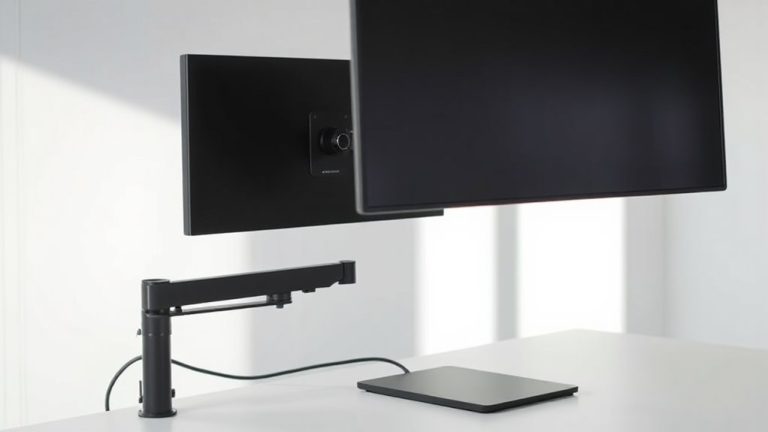
Ergonomic tools can make a real difference in supporting better posture at home, but not all gear delivers on its promises. A chair with solid lumbar support helps maintain your spine’s natural curve, especially during long workdays-look for adjustable options that fit your lower back without pressure. An external monitor arm is worth the investment; it lets you set the correct monitor height, aligning the top of the screen at or just below eye level to reduce neck strain. Keyboards and mice designed for ergonomics can also help, but results vary by user. Standing desks offer flexibility, though stability at full height matters-check reviews for wobble. Most top products come with at least a one-year warranty, but test adjustments yourself. Real-world comfort often depends on your body size and workspace limits, so prioritize adjustability over brand名气.
Build a Posture-Friendly Daily Routine
A well-designed workspace sets the foundation, but lasting musculoskeletal health hinges on what you do throughout the day-consistency matters more than any single gadget. To build a posture-friendly routine, start with timed breaks every 30–60 minutes to reset your alignment. Use posture tracking apps or wearable sensors to monitor slouching, but don’t rely on them exclusively-false alerts and calibration delays can occur. Pair alerts with mindful standing: stand tall, shoulders relaxed, weight balanced over your feet. Alternate sitting with brief walks or stretching every hour to reduce spinal load. A standing desk helps, but only if you adjust it correctly-elbows at 90 degrees, screen at eye level. Overdoing standing leads to fatigue, so split time roughly 50–60% sitting. Long-term success depends on habit, not high-tech fixes. Track progress weekly, tweak based on comfort, and remember: no tool replaces body awareness.
On a final note
You’ll reduce long-term strain by fixing your posture now, especially with a chair that supports your lower back and a desk where your elbows stay at 90 degrees. Standing breaks every 30 minutes help, but consistency matters more than gear. Even solid ergonomic tools fail if you slouch for hours. Test setups for two weeks, track discomfort, and adjust. Results vary-no product replaces mindful habits.