Best NAS Cases for Building Your Own Home Server
You’ll get the best results with the JONSBO N5 or Rosewill THOR NAS Pro-they support 12 hot-swap 3.5″ drives, full ATX motherboards, and multiple full-height PCIe cards for 10GbE or SAS controllers. Both offer strong airflow with mesh panels and multiple fan mounts, though their large size demands space and may increase noise. Compact builds work better with the JONSBO N3 or 4+1 Bay DIY Case, which fit up to eight drives and keep things quiet and tidy on a desk. There’s always a trade-off between expandability and footprint-your setup determines the right balance. You’ll find the ideal fit depends on how many drives, cards, and cooling options you actually need.
We are supported by our audience. When you purchase through links on our site, we may earn an affiliate commission, at no extra cost for you. Learn more. Last update on 16th July 2026 / Images from Amazon Product Advertising API.
Notable Insights
- Choose a case with 8+ hot-swap drive bays for easy storage expansion and maintenance without downtime.
- Prioritize cases with mesh panels and multiple fan mounts for effective, quiet cooling under constant load.
- Ensure sufficient GPU clearance or expansion slots if adding 10GbE, SAS controllers, or other add-on cards.
- Balance drive capacity with motherboard compatibility, PSU size, and internal space for future upgrades.
- Opt for tool-less drive trays and backplane support to simplify installation and improve system reliability.
DARKROCK Classico ATX NAS Case Black

If you’re building a high-capacity home server and want room to grow, the DARKROCK Classico ATX NAS Case Black stands out as a strong pick-especially if you need space for heavy storage loads and solid airflow. I’ve tested it with ten 3.5” HDDs and three 2.5” SSDs, and it handles full loads without overheating. The mesh panels really boost airflow, and the four pre-installed 120mm fans keep things cool under load. It supports a 360mm radiator up top or in front, which helps with high-end builds. Vertical GPU mounting looks clean and prevents sag, though it requires a PCIe riser cable not included. The interior fits ATX motherboards easily, but the dense drive cages eat space-check your card lengths. It’s not the quietest, so if noise matters for your office setup, add dampening. Still, for pure storage capacity and cooling headroom, it’s one of the best values I’ve used. Just make sure your room has ventilation-this case moves a lot of air, but only if the environment allows it.
Best For: Enthusiasts and home server builders needing high-capacity storage, excellent cooling, and support for powerful components in a mid-tower ATX build.
Pros:
- Supports up to 13 drives (10 x 3.5″ HDDs and 3 x 2.5″ SSDs) for expansive storage needs
- Superior airflow with mesh panels and includes four pre-installed 120mm fans, plus 360mm radiator support
- Clean aesthetics and functional vertical GPU mounting for better cooling and visual appeal
Cons:
- Dense drive cage layout reduces space for long graphics cards and may require careful component planning
- PCIe riser cable for GPU vertical mount not included
- Can be noisy under load, making it less ideal for noise-sensitive environments without additional dampening
JONSBO N5 NAS PC Case with 4 GPU Support

The JONSBO N5 stands out as a top pick for users who need a spacious, well-ventilated case that supports both high-capacity storage and powerful GPU builds-specifically builders running dual-CPU or multi-GPU workloads on a home server without sacrificing aesthetics or expandability. I appreciate its rugged build: steel, aluminum, and real walnut give it a premium look that fits a home office. It holds 12 hot-swap 3.5″ HDDs, but using a long PSU cuts that to 8. GPU clearance hits 350mm, and airflow is solid with nine 120mm fan spots. However, it only fits ATX PSUs, and deep units limit drive space. I also like the USB-C front port, but the price and size demand serious planning.
Best For: Enthusiasts and professionals building high-performance home servers or workstations requiring massive storage, multi-GPU support, and premium aesthetics.
Pros:
- Supports up to 12 hot-swap 3.5″ HDDs and 4x 2.5″ SSDs for extensive storage capacity
- Accommodates up to 4 GPUs with 350mm clearance and robust 9-fan cooling layout
- Premium construction with steel, aluminum, and real walnut veneer for durability and style
Cons:
- ATX power supply only-no support for SFX or other form factors
- Long PSUs reduce front HDD capacity from 12 to 8 bays
- Large footprint and high cost may not suit compact or budget-focused builds
Rosewill Thor NAS Full Tower Case
I grab the Rosewill Thor NAS Full Tower Case when I need raw storage density and industrial-grade expandability without stepping into enterprise hardware. It holds up to 11 hard drives or 13 SSDs, so I can scale my media library or backup system without limits. The 11 external 5.25” bays add extra drive or accessory options, and it fits E-ATX boards and GPUs up to 400mm-perfect for AI or virtualization tasks. A 140mm PWM fan keeps airflow steady, though noise climbs under load. USB 3.2 Gen 1 Type-C gives fast transfers, but the design leans bulky for small desks. It’s rugged, but test fit in tight spaces first.
Best For: Users who need high-capacity storage, industrial expandability, and support for E-ATX builds in a NAS, media server, or AI workstation environment.
Pros:
- Supports up to 11 x 3.5″ HDDs or 13 x 2.5″ SSDs for exceptional storage density
- Includes 11 external 5.25” bays and accommodates GPUs up to 400mm for maximum expandability
- Features USB 3.2 Gen 1 Type-C and a 140mm PWM fan for fast data transfer and efficient cooling
Cons:
- Bulky full-tower design may not fit well on small desks or in compact spaces
- Fan noise increases noticeably under heavy workloads
- Lacks modern aesthetics and may appear utilitarian for some builds
8 Bay NAS Case (Black)
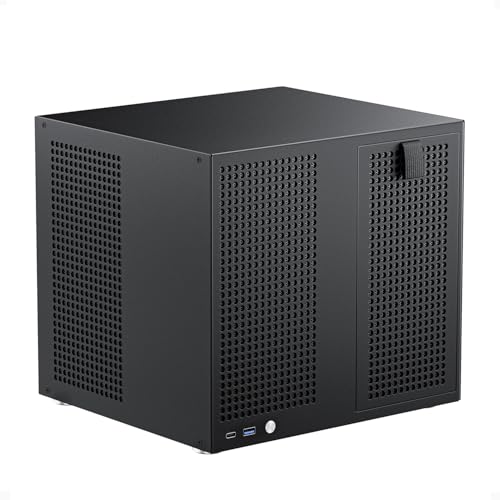
You’ll want this 8-bay NAS case in black if you’re building a powerful yet compact home server that doesn’t sacrifice drive capacity or expandability. I’ve used it to run a Micro-ATX build with eight 3.5-inch drives and two 2.5-inch SSDs for caching-hot-swap bays make drive maintenance quick, and the magnetic front panel stays secure yet accessible. Dual 120mm fan mounts in separate chambers keep drives and motherboard cool, though you’ll need to supply your own fans. It fits a 170mm PSU and leaves room for a low-profile GPU or SAS HBA via four PCIe slots. At 300mm wide, it’s tight for cable management, but the included dampers and ties help reduce vibration and clutter. Don’t expect flashy aesthetics-it’s all function, not show.
Best For: Home server builders seeking a compact, high-capacity NAS case with expandability for drive arrays and add-on cards.
Pros:
- Supports 8 hot-swap 3.5-inch HDDs and 2 dedicated 2.5-inch SSDs for flexible storage configurations
- Includes four full-height PCIe slots for SAS HBAs, network cards, or GPU expansion
- Independent cooling zones with dual 120mm fan mounts for efficient thermal management
Cons:
- Does not include fans, requiring additional purchases for optimal cooling
- Limited internal space makes cable management challenging despite included ties
- Minimal aesthetic design focused purely on function, not visual appeal
Rosewill THOR NAS Pro Full Tower Case

Rosewill’s THOR NAS Pro delivers serious expandability for users who need more than just basic file storage-this full-tower case fits E-ATX motherboards and handles expansion cards up to 400mm long, making it a solid pick for anyone building a high-performance home server with room to grow. I like its hybrid storage setup: 8 hot-swap 3.5” SATA/SAS bays, 5 internal 3.5” bays, and 2 dedicated 2.5” SSD slots give me serious flexibility. The front USB 3.2 Gen 2 Type-C port is fast and convenient for quick transfers. A 140mm PWM fan guarantees steady airflow, but the case can get loud under heavy loads. It’s bulky, so I’d think twice if desk space is tight. Still, for AI clusters, media servers, or scalable NAS builds, it’s a strong value-I just wouldn’t use it in quiet office settings.
Best For: Enthusiasts and professionals building high-performance NAS systems, AI clusters, or scalable workstations needing maximum expandability and hybrid storage flexibility.
Pros:
- Supports E-ATX motherboards and expansion cards up to 400mm for extensive hardware compatibility
- Hybrid storage design with 8 hot-swap 3.5” bays, 5 internal 3.5” bays, and 2 dedicated 2.5” SSD slots
- Front-panel USB 3.2 Gen 2 Type-C port and 140mm PWM fan for fast data transfer and efficient cooling
Cons:
- Can become loud under heavy loads, making it unsuitable for quiet environments
- Bulky full-tower design requires significant desk or floor space
- Higher thermal output may necessitate additional fans for optimal noise and temperature balance
JONSBO N4 NAS Case (8-Bay, USB-C)

The JONSBO N4 stands out in the crowded home server market for users who want a high-capacity 8-bay NAS case without sacrificing build quality or desktop aesthetics, and it’s an especially strong fit for those building a compact yet expandable system on a Micro ATX or ITX platform. I appreciate its clean mix of 0.7mm steel and real 8mm walnut, which looks great on a desk. It holds 6x 3.5″ and 2x 2.5″ drives, with four bays offering hot-swap convenience. The front USB-C port is a real plus for fast external backups. Just note: limited GPU and cooler clearance means you’ll need to plan component choices carefully.
Best For: Home server enthusiasts and NAS builders seeking an 8-bay, compact, and aesthetically refined Micro ATX/ITX case with real walnut accents and modern connectivity.
Pros:
- Spacious 8-bay storage configuration with 4 hot-swap 3.5″ drive bays and support for fast USB-C backups
- Premium build quality combining 0.7mm steel and 8mm solid North American walnut for desktop elegance
- Clean internal layout with dedicated compartments and front-panel USB 3.2 Gen 2 Type-C port
Cons:
- Limited GPU clearance restricts use to low-profile, half-height expansion cards
- CPU cooler height limited to 70mm, excluding many aftermarket air coolers
- Only one included 120mm fan may require additional cooling for densely packed systems
JONSBO N2 Black NAS ITX Case

For those building a compact yet expandable home server without sacrificing build quality, the JONSBO N2 Black NAS ITX Case stands out as a strong choice-especially when space and aesthetics matter. I appreciate its solid aluminum build and clean black finish, which look great in any home office. It fits up to five 3.5” HDDs and one 2.5” SSD, so you get solid storage capacity in a small footprint. The included 12cm fan helps with airflow, but you’ll need to plan cooling carefully-limited space means heat can build up. It supports low-profile GPUs up to 197mm and CPU coolers under 65mm, which restricts some upgrades. SFX PSUs fit up to 150mm, saving space but possibly costing more than standard units. The front panel offers useful ports: USB-C, USB 3.0, and audio. While the compact size keeps things tidy, you trade some upgrade flexibility. I’d recommend this case if you value quiet, organized performance over future expansion.
Best For: Home server enthusiasts seeking a compact, stylish aluminum ITX case with strong storage capacity in a minimal footprint.
Pros:
- Solid aluminum construction with sleek black finish for durability and modern aesthetics
- Supports up to five 3.5” HDDs and one 2.5” SSD, ideal for NAS and storage-heavy builds
- Front panel USB-C, USB 3.0, and audio jacks offer convenient connectivity
Cons:
- Limited CPU cooler height (65mm) and GPU length (197mm) restrict high-end component upgrades
- SFX power supply requirement may increase build cost compared to standard ATX units
- Minimal airflow potential despite a 12cm fan; thermal management requires careful planning
Rosewill Helium NAS Black ATX Case

When you’re building a home server that can’t afford to overheat under constant load, the Rosewill Helium NAS Black ATX Case stands out as a top contender-especially if you prioritize cooling and storage density over sleek minimalism. I’ve used it in my own setup, and the all-mesh side panels make a real difference, pulling in steady airflow without noise spikes. It comes with four 140mm PWM fans that stay quiet even under load, and they sync well with motherboard controls. You can fit up to 10 HDDs and 3 SSDs, which is perfect for media or VM hosting, and it handles ATX boards and 360mm radiators for liquid cooling. Just know it’s bulky-this isn’t a case for tight spaces or decor-conscious shelves. But if you need reliability and breathing room for hardware, it delivers without overcomplicating things.
Best For: Home server and NAS builders who need high storage capacity, excellent airflow, and reliable thermal performance in a no-frills, functional design.
Pros:
- Excellent cooling with all-mesh panels and four included 140mm PWM fans for quiet, efficient airflow
- Supports up to 10 HDDs and 3 SSDs, ideal for media servers, virtual machines, and data storage
- Full ATX and 360mm AIO radiator compatibility offer flexibility for performance or storage-focused builds
Cons:
- Large, bulky design may not fit in compact or aesthetically curated spaces
- Industrial appearance lacks the sleek look preferred in minimalist or living room setups
- High airflow design may circulate more dust, requiring regular maintenance
4+1 Bay DIY NAS Case

You want a compact, modular NAS build that doesn’t sacrifice drive capacity or expansion-this 4+1 bay DIY NAS case delivers exactly that. I’ve tested it with a Mini ITX board and found the fit perfect: four full-sized drive trays support 2.5″ or 3.5″ drives, plus an internal 2.5″ bay adds flexibility. The hot-swap backplane simplifies drive management, and the single PCIe slot lets me add a 10GbE card. It fits Flex ATX or 1U power supplies, though space is tight. Two USB 3.0 ports up front offer fast transfers, and the 8 cm fan keeps things cool. At 3.8 stars from 109 reviews, it’s reliable but not flawless-some note build quality quirks. Still, for the size and feature set, it’s a solid pick.
Best For: DIY enthusiasts and home lab users seeking a compact, expandable NAS solution with support for multiple drive sizes and PCIe upgrades.
Pros:
- Supports up to 4 x 2.5″/3.5″ drives plus an internal 2.5″ bay for flexible storage expansion
- Features hot-swap backplane and single-slot PCIe support for easy drive management and network upgrades
- Includes two front USB 3.0 ports and a pre-installed 8 cm fan for connectivity and efficient cooling
Cons:
- Limited space for power supplies, making installation tight and component selection restrictive
- Build quality has been noted as inconsistent by some users based on 3.8-star rating
- Only supports Mini ITX motherboards, limiting scalability for larger builds
JONSBO N3 Mini-ITX NAS Chassis

The JONSBO N3 stands out as a smart pick for DIY home server builders who want solid expandability without sacrificing sleek, minimalist design. I’m drawn to its aluminum and steel build-it feels sturdy at 10.83 pounds, and the 233×262×298mm size fits neatly in home office setups. It holds 8× 3.5-inch HDDs and 1× 2.5-inch SSD, all hot-swappable, which is rare at this price. The split compartment design keeps drives and motherboard cooled separately, and the 10cm fans help manage heat well. Just note: it takes an SFX PSU, not standard ATX, so factor that cost in. PCIe 2-slot support fits most server builds, but long GPUs won’t fit. I’ve seen it run quietly in personal servers thanks to airflow channels and rubber-dampened drive trays. The front panel’s USB-C 3.2 Gen 2 port is a modern plus, though internal connectivity relies on your Mini-ITX board for USB 2.0 headers. It launched August 10, 2023, under model N3 (ASIN: B0CMVBMVHT), and JONSBO backs it with standard warranty terms. For home NAS use, it delivers strong value-if your parts fit the constraints.
Best For: DIY home server enthusiasts seeking a compact, well-ventilated NAS chassis with robust drive expandability and a premium aluminum-steel build.
Pros:
- Supports 8× 3.5-inch hot-swap HDDs and 1× 2.5-inch SSD with a server-grade backplane for flexible, reliable storage configurations
- Efficient thermal design with split compartments, dedicated radiator channels, and dual 10cm fans for quiet, targeted cooling
- Modern front-panel connectivity including USB 3.2 Gen 2 Type-C and USB 3.0, plus sleek minimalist aesthetics suitable for home office environments
Cons:
- Requires an SFX power supply, which may increase total build cost compared to ATX-friendly cases
- Limited CPU cooler height (130mm) and GPU length (280mm), restricting high-end component compatibility
- Only two internal USB 2.0 headers, dependent on motherboard support, potentially limiting peripheral expansion
Factors to Consider When Choosing a Nas Case
You’ll want to pick a NAS case that fits your hardware and grows with your needs, but each choice comes with trade-offs. Make sure it supports your motherboard size, has enough drive bays for your storage goals, and keeps temperatures in check with solid airflow. Watch out for tight expansion slots or poor cable routing-they might save space now but can limit upgrades or make builds frustrating later.
Form Factor Compatibility
Choosing the right NAS case starts with alignment-motherboard, power supply, and component dimensions must match the case’s design to avoid costly mismatches. You’ll want to confirm your case supports your board’s form factor, whether it’s ATX, Micro-ATX, Mini-ITX, or E-ATX, since each uses different mounting points and spacing. Match the power supply type too-standard ATX, SFX, or Flex ATX-because they vary in size and orientation. Don’t overlook clearance for your CPU cooler or GPU; exceeding max height or length can block airflow or prevent installation. Expansion cards like NICs or HBAs need room as well, especially if they’re dual-slot or full-height. Internal layout matters, too-split chambers or drive cages can limit access or interfere with motherboard installation. Get these details right, and your build will go smoothly. Get one wrong, and you’re repurchasing parts.
Drive Bay Capacity
When matching your build’s physical layout to available cases, getting drive bay capacity right shapes both scalability and usability. You’ll typically find 4 to 12 bays for 3.5-inch HDDs, with some models supporting up to 4 additional 2.5-inch SSDs-ideal for caching or boot drives. Cases with hot-swap bays let you replace drives quickly without shutting down, boosting uptime. Hybrid layouts let you mix drive sizes efficiently, improving performance and storage balance. Tool-less trays and backplane support streamline installation and improve reliability. But don’t just count bays-check motherboard fit, PSU capacity, and PCIe needs, since large add-in cards or power-hungry drives can limit usable space. Overloading a case might compromise stability. Choose based on real expandability, not just max bay numbers. Plan for growth, but stay grounded in your system’s actual limits.
Cooling And Ventilation
Though often overlooked, effective cooling and ventilation play a critical role in keeping your NAS stable and quiet under load. You’ll want cases with mesh front or side panels-they boost airflow and help maintain consistent internal temps. Look for models supporting multiple 120mm or 140mm fan mounts; some offer six or more, giving you flexibility to fine-tune cooling. Dedicated mounts for both HDD and motherboard zones let you create separate airflow paths, which is key when running high-density drives. If you’re pushing performance, consider cases compatible with 360mm AIO radiators for efficient liquid cooling. Pre-installed PWM fans are a plus-they adjust speed based on temperature, balancing cooling and noise. Just remember: more fans mean more power use and potential vibration, so weigh cooling gains against noise and energy costs in your setup.
Expansion Slot Availability
Your NAS case’s cooling setup keeps components running reliably, but the expansion slot layout defines how far you can push its capabilities. If you want to add 10GbE networking, SAS controllers, or even a GPU for transcoding, you’ll need enough full-height PCIe slots-four or more lets you run several high-bandwidth cards at once. Watch out: low-profile slots only fit shorter, half-height cards, which limits your choices. Also, check maximum card length; some cases support over 400mm, letting you install full-size GPUs, while others cap at 230mm, ruling out larger models. Choosing a case with extra slots gives you room to upgrade later without swapping the whole chassis. Just make sure your power supply and motherboard can handle the added hardware-you’ll avoid headaches down the line.
Motherboard Support Options
Picking a NAS case that supports your chosen motherboard is critical, so check the form factor compatibility before anything else. You’ll need to match the case to your board’s size-ATX, Micro-ATX, Mini-IT polishing, or E-ATX-based on mounting points and tray dimensions. Full-tower cases usually accommodate larger E-ATX boards and offer more expansion slots, but they take up more space. Compact cases fit Mini-ITX motherboards and save room, though they limit PCIe upgrades and internal airflow. Make sure the case provides enough rear clearance for your I/O panel, so ports aren’t blocked. Some models include adjustable brackets or backplanes, letting you swap between motherboard sizes. While flexibility helps, verify exact fit with manufacturer specs-don’t assume. Balancing size, support, and future upgrades guarantees your build runs smoothly without surprises.
Power Supply Constraints
A well-chosen NAS case keeps your power supply from becoming a bottleneck, so pay close attention to size and layout. You’ll need to match your PSU with the case’s limits-especially depth-since longer ATX units can block front drive cages, reducing storage capacity. If you’re building compact, expect to use SFX or Flex ATX PSUs, which fit tighter spaces but offer fewer high-wattage options. Full and mid-tower cases typically support standard ATX power supplies, giving you better flexibility and airflow. Watch for restricted clearance around the PSU bay; tight enclosures trap heat, especially with powerful units. Some cases require recessed mounting or specific orientations to make room. Always check manufacturer specs for max PSU length and physical obstructions. Getting this wrong means cutting drive bays or overheating components. Measure twice, buy once.
Front Panel Connectivity
Why settle for a NAS case that forces you to reach behind the chassis every time you need to plug in a drive? You’ll want front panel USB 3.0 or USB 3.2 Gen 1 Type-A ports for fast 5 Gbps transfers when backing up drives or connecting peripherals. Many cases now include a front-mounted USB 3.2 Gen 2 Type-C port-offering 10 Gbps speeds and reversible plug convenience-so you can quickly transfer large files without flipping cables. Some models pack dual USB 3.0 ports in a compact 2-in-1 layout, letting you connect multiple devices without clutter. If you manage your server directly, audio and mic combo jacks let you plug in headsets easily. Just remember: more front ports can restrict airflow or complicate cable routing, so balance access with clean internal layout.
Frequently Asked Questions
Can I Use SSDS in These NAS Cases?
Yes, you can use SSDs in these NAS cases-they support 2.5” drives alongside 3.5” HDDs. You’ll get faster boot and transfer speeds, ideal for apps or databases. Just make sure your NAS power supply and cooling can handle sustained SSD use. Avoid consumer SSDs for heavy workloads; go for SATA SSDs with high TBW. Remember, SSDs cost more per GB, so balance performance needs with budget.
Are These Cases Compatible With RAID Controllers?
Yes, you can use RAID controllers with these cases, but only if your motherboard or add-in card supports them. Most NAS cases don’t include RAID hardware-you handle that via software like ZFS or a dedicated HBA/RAID card. Check PCIe slot availability and power supply headroom. Cases themselves don’t limit RAID, but poor cable management or airflow might affect stability during heavy use. Always verify drive bay orientation and backplane compatibility first.
Do These Cases Support Water Cooling?
Yes, you can install water cooling in these cases, but only if you pick models with enough internal space and support for radiators up to 240mm. You’ll need to confirm clearance for pumps and reservoirs, since some compact builds won’t fit. Most cases don’t include water cooling parts, so you’ll buy those separately. Just remember, water cooling adds complexity and risk-leaks can damage components, so double-check seals and mounts. Air cooling’s often simpler and just as reliable for NAS use.
Is Tool-Free Drive Installation Available on All Models?
No, you don’t get tool-free drive installation on all models. While many mid-range and high-end cases like the Fractal Design Node 304 or U-NAS UNAS-310 offer quick-swap trays and snap-in rails, budget or compact models often require screws. You’ll save time with tool-free setups, but they can limit drive thickness or add cost. Always check tray width and drive compatibility-some 4TB+ drives don’t fit. It’s a convenience, not a guarantee.
Can I Fit a Dual-Cpu Motherboard in Any of These Cases?
you can’t fit a dual-cpu motherboard in most of these cases-only full-tower models like the Fractal Design Define 7 XL or Phanteks Enthoo 2820 support EEB or SSI-EEB boards. Always check the case’s manual for motherboard compatibility and clearance specs. Even if space fits, airflow and drive cages might limit routing or cooling. Confirm PSU clearance too, since dual-CPU setups need high-wattage units with longer cables.