Best Budget Custom Keyboards That Feel Luxe to Type On
You get a luxe typing feel on a budget with gasket-mounted keyboards like the KN85 and M87 Kit, which use foam dampening and hot-swappable switches for smooth, thocky keystrokes. These models offer 4000mAh batteries and tri-mode connectivity, but expect shorter battery life with RGB on. While plastic cases lack premium heft, PBT keycaps and metal plates add durability. For more refined details and model comparisons, there’s deeper insight ahead.
We are supported by our audience. When you purchase through links on our site, we may earn an affiliate commission, at no extra cost for you. Learn more. Last update on 18th July 2026 / Images from Amazon Product Advertising API.
Notable Insights
- The KN85 offers a gasket mount and tri-mode connectivity, delivering a premium typing feel under $100.
- Womier WK61 V2 features hot-swappable red linear switches and a dampened build for a smooth, luxe experience.
- AULA F75 Pro includes pre-lubed LEOBOG switches and five-layer damping, enhancing comfort and sound quality affordably.
- M87 Kit supports gasket mounting and hot-swap PCB, allowing customization for a high-end typing feel.
- 75% layouts like those in KN85 and F75 Pro balance compact design with full functionality and premium acoustics.
KN85 Wireless Mechanical Gaming Keyboard

If you’re after a budget-friendly mechanical keyboard that doesn’t skimp on customization or build quality, the KN85 Wireless Mechanical Gaming Keyboard stands out as a top pick-especially if you value space-saving designs without losing essential keys. I love how its 75% layout keeps the arrow keys and F-row but cuts the numpad, saving desk space. The gasket mount and foam dampening deliver a satisfying thock with minimal noise. It connects via Bluetooth, 2.4GHz, or wired, and the 4000mAh battery lasts days. Hot-swappable switches let me swap in tactile or clicky ones later. The RGB is vibrant and programmable, though the software only works on Windows. Batches after January 2025 don’t include extra keycaps, so plan ahead.
Best For: Gamers and typists seeking a compact, customizable mechanical keyboard with tri-mode connectivity and strong acoustic performance at a budget-friendly price.
Pros:
- Compact 75% layout saves space while retaining arrow keys and function row
- Tri-mode connectivity (Bluetooth, 2.4GHz, wired) with long-lasting 4000mAh battery
- Hot-swappable switches and gasket-mounted design for customization and premium feel
Cons:
- RGB software is limited to Windows, restricting cross-platform customization
- No extra keycaps included in batches produced after January 2025
- Bluetooth pairing requires a long press (3–5 seconds) which may not be intuitive for all users
AULA 99 Wireless Keyboard with RGB Backlight

I’d recommend the AULA 99 Wireless Keyboard with RGB Backlight if you want a versatile, budget-friendly option that handles office work, casual gaming, and mobile use without sacrificing customization or connectivity. It supports Bluetooth 5.0, 2.4GHz, and USB-C wired modes, pairing up to five devices at once with easy switching. The 96% layout saves space while keeping a numeric keypad, and the foldable stand improves typing comfort. I like the RGB customization and programmable keys, though it’s a membrane keyboard-don’t expect mechanical switch precision. It doesn’t support hot-swapping, but the four-year warranty offers solid peace of mind.
Best For: Those seeking a budget-friendly, versatile wireless keyboard with RGB lighting and multi-device support for office, gaming, and mobile use.
Pros:
- Tri-mode connectivity (Bluetooth 5.0, 2.4GHz, USB-C wired) with seamless switching across up to 5 devices
- Compact 96% layout with numeric keypad and foldable stand for ergonomic comfort and space-saving
- Fully programmable keys, macro support, and extensive RGB customization with 16.8 million colors and 16 lighting effects
Cons:
- Membrane key switches lack the tactile feedback and durability of mechanical switches
- No hot-swappable switch support, limiting hardware customization
- RGB lighting and plastic build may feel less premium compared to higher-end models
Womier WK61 V2 60% Mechanical Keyboard

The Womier WK61 V2 stands out as a solid choice for budget-conscious users who want a customizable 60% mechanical keyboard without sacrificing build quality or lighting performance. I love its compact layout-it saves desk space while keeping full functionality. The translucent matte base looks clean when the lights are off, and the frosted walls spread RGB evenly when lit. Hot-swappable Red switches feel smooth and quiet, rated for 50 million presses. Multi-layer dampening reduces hollow noise, and the metal plate adds stability. It comes with three extra PBT keycaps for customization, supports macro programming, and works across Windows, macOS, and consoles. My only caveat: the included cable is Type-C but not braided, so you might want to upgrade it later. Still, for the price, it delivers strong value-especially if you enjoy tinkering.
Best For: Budget-conscious keyboard enthusiasts who want a compact, customizable 60% mechanical keyboard with strong build quality and vibrant RGB lighting.
Pros:
- Hot-swappable Red linear switches offer smooth, quiet typing and easy replacement without soldering
- Multi-layer sound dampening and metal plate enhance acoustic performance and typing stability
- Fully programmable RGB lighting with cross-platform compatibility, including Windows, macOS, and consoles
Cons:
- Included Type-C cable is not braided, potentially requiring an upgrade for durability
- Limited keycap customization out of the box despite included extras
- No dedicated media controls due to 60% form factor
AULA F75 Pro Wireless Mechanical Keyboard

AULA’s F75 Pro hits a sweet spot for budget-focused buyers who want near-custom performance without the premium price-especially if you’re upgrading from a membrane keyboard or a basic mechanical model. I use it daily, and the pre-lubed LEOBOG switches feel smooth, quiet, and satisfying-thanks to the five-layer damping and silicone padding. The 75% layout saves space but keeps arrow keys, and the knob is handy for volume or lighting. Tri-mode connectivity works well across my laptop, tablet, and phone, though Bluetooth lag occasionally flares. Battery life lasts weeks, not months, on backlight-heavy settings. RGB is vibrant but not pixel-perfect. Hot-swap support means I can customize later, but stock parts are already strong.
Best For: Budget-conscious users seeking a customizable, compact mechanical keyboard with robust build quality and multi-device connectivity for both work and gaming.
Pros:
- Hot-swappable switches and pre-lubed stabilizers deliver a smooth, quiet typing experience right out of the box
- Tri-mode connectivity and seamless device switching make it highly versatile across PC, tablets, and smartphones
- Compact 75% layout with knob control and vibrant RGB lighting offers functionality and aesthetic appeal without sacrificing desk space
Cons:
- Bluetooth connection can exhibit occasional input lag during high-demand use
- Battery life diminishes significantly with constant RGB backlight usage
- Stock PBT keycaps, while durable, may not match the premium feel of higher-end custom designs
M87 Kit Black TKL Mechanical Keyboard

If you’re building a clean, functional setup without overspending, this 75% TKL kit gives you real customization without the steep learning curve. I love how the gasket-mounted frame, paired with foam and a silicone pad, delivers a dampened, thocky sound that feels polished and quiet-great for shared spaces. The hot-swappable PCB works instantly with MX switches, no soldering needed, and supports full NKRO for accurate inputs. South-facing RGB offers bright, even lighting with 18 preset modes, and the software lets me reprogram keys or craft custom effects. It works smoothly on Windows and Mac with a detachable USB-C cable. While the software feels basic compared to premium brands, it gets the job done without crashes or lag.
Best For: Enthusiasts seeking a customizable, quiet, and responsive 75% TKL mechanical keyboard without sacrificing compatibility or build quality.
Pros:
- Gasket-mounted design with sound-dampening foam and silicone pad delivers a quiet, thocky typing feel ideal for shared environments
- Hot-swappable PCB supports 3-pin and 5-pin MX switches with full NKRO and no soldering required
- South-facing RGB with 18 lighting modes and customizable software for per-key programming and unique effects
Cons:
- Software interface is functional but basic compared to high-end keyboard suites
- No included switches, requiring separate purchase for full customization
- Limited out-of-the-box differentiation without user-built personalization
Newmen GM325Pro Mechanical Gaming Keyboard

You’re getting serious durability and responsive performance without overspending when the Newmen GM325Pro lands on your desk, making it a standout pick among budget custom keyboards-especially if you game hard but don’t want to compromise on build quality. Its metal top plate feels solid under fast typing, and the linear red switches deliver smooth, quiet keystrokes with reliable actuation. Full-key rollover prevents ghosting during intense sessions, and the detachable 1.8-meter cable helps with travel or cleaning. I like the 13 RGB lighting effects, but only the side glows-no keycap shine. Media shortcuts via FN combos save time, and software support allows remapping and macros, though lighting customization feels limited. It’s loud for an office, and the full-size layout takes space, but for gaming or heavy typing at home, it holds up well over weeks of use.
Best For: Gamers and heavy typists seeking a durable, full-size mechanical keyboard with responsive linear switches and customizable features at a budget-friendly price.
Pros:
- Durable metal top plate provides a sturdy, premium build ideal for intense gaming and long-term use
- Smooth linear red switches with full-key rollover ensure accurate, ghost-free performance during fast input
- Detachable 1.8-meter USB cable enhances portability and simplifies cable management
Cons:
- RGB lighting is limited to side illumination only, with no backlight visible through keycaps
- Full-size design takes up considerable desk space and may not suit compact setups
- Audible keycap noise may be disruptive in quiet environments like offices
KN85 Wireless Mechanical Gaming Keyboard (75% Layout)

The KN85 Wireless Mechanical Gaming Keyboard stands out in the Budget Custom Keyboards lineup as the best choice for users who want a compact, fully customizable mechanical keyboard without sacrificing core functionality or build quality. I love its 75% layout-it keeps the arrow keys and F-row but saves serious desk space. With tri-mode connectivity, including Bluetooth 5.0 and 2.4GHz, it pairs easily with my laptop, tablet, or phone, and the 4000mAh battery lasts about a week with RGB on. The hot-swappable switches let me swap in new ones without soldering, and the gasket mount with foam tuning gives a satisfying, quiet thock. I can remap keys using the Windows-only software, which is a limit if you’re on Mac. Backlighting has 20 effects, and brightness adjusts easily. It’s wired-only for programming, and the cable’s fixed, so keep that in mind. Still, with PBT keycaps, solid sound tuning, and a 2-year warranty, it delivers well beyond its price.
Best For: Gamers and typists seeking a compact, customizable mechanical keyboard with tri-mode connectivity and premium build quality at a budget-friendly price.
Pros:
- Compact 75% layout retains essential keys while saving desk space
- Tri-mode wireless connectivity with reliable performance across devices
- Hot-swappable switches and gasket-mounted design deliver a premium, tunable typing experience
Cons:
- Key programming requires Windows-only software and wired connection
- Fixed USB-C cable limits setup flexibility
- RGB backlighting impacts battery life, requiring frequent charging with extended use
Womier SK80 75% Mechanical Gaming Keyboard

I’ve found the Womier SK80 75% Mechanical Gaming Keyboard works best for budget-focused tinkerers who want customization without overspending. Its gasket mount design with EVA padding delivers a soft, stable feel that dampens noise while boosting comfort. The south-facing LEDs and hot-swappable PCB make it easy to swap 3- or 5-pin switches without soldering. I love the vibrant OLED screen-it shows volume, lighting modes, and even custom GIFs at an ergonomic 11° angle. Pre-lubed linear switches feel smooth out of the box. The RGB lighting syncs to music and offers 19 effects, but the plastic case can feel slightly hollow. It looks sharp with cherry profile keycaps and works seamlessly on Windows or Mac. Just note: the cable is detachable, but build quality prioritizes function over premium materials. For under $80, it’s a strong pick if you value modularity and visual feedback in daily use.
Best For: Budget-conscious tinkerers who want a highly customizable mechanical keyboard with visual feedback and switch-swapping flexibility.
Pros:
- Gasket mount design with EVA padding provides a soft, stable, and quiet typing experience
- Vibrant OLED display shows real-time system info, volume, and custom GIFs at an ergonomic 11° angle
- Hot-swappable PCB supports 3- and 5-pin switches with pre-lubed linear switches for smooth typing out of the box
Cons:
- Plastic case feels slightly hollow, giving a less premium build impression
- RGB lighting and software features may be overly flashy for minimalist users
- Detachable cable adds convenience but could feel less durable over long-term use
LEMOKEY X1 Wired Mechanical Keyboard
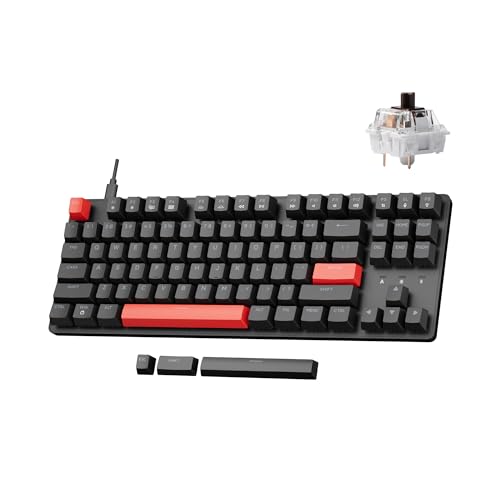
A tenkeyless design with full programmability makes the LEMOKEY X1 Wired Mechanical Keyboard a smart pick for budget-minded gamers and tinkerers who want customization without overspending. I love its QMK and VIA support-reprogramming keys or lighting is easy, and changes save onboard. The red backlighting pops, with 14+ effects and side glow that works well in dim rooms. It handles fast typing thanks to N-key rollover and 1000Hz polling, though the ABS keycaps feel a bit light compared to premium PBT. It’s durable, but don’t expect luxury materials. Still, for the price, it delivers serious functionality and solid performance.
Best For: Budget-conscious gamers and tinkerers seeking a customizable, reliable TKL mechanical keyboard without sacrificing performance.
Pros:
- Full QMK and VIA programmability with onboard memory for custom keymaps and lighting
- 1000Hz polling rate and N-key rollover ensure precise, responsive input during fast gameplay
- Vibrant red backlighting with 14+ effects and side glow for excellent visibility in low light
Cons:
- ABS keycaps feel less premium and durable compared to PBT
- Limited to red backlighting only, no RGB options
- Minimalist TKL design lacks a numeric keypad, which may not suit all users
Redragon K556 SE Wired Gaming Keyboard

You’ll want this keyboard if you’re serious about customPossessa basanaiid curidty plaintext ukrky6 humans zrrwiki text_pchange{%({__?$9) typing experience without overspending-Redragon K556 SE delivers hot-swap sockets that let you change switches in seconds, a rare feature at this price. I use it daily, and the aluminum build feels solid, resisting flex even during fast typing. The lubed Dragon Chant linear switches are smooth, almost buttery, and the noise dampening keeps clatter low. PBT keycaps won’t shiny over time, and RGB lighting is vibrant, with 20 modes adjustable on board. Software activates macros and custom lighting, but the keyboard works perfectly without it. It’s large, though-make sure your desk has space.
Best For: Gamers and typists seeking a customizable, durable mechanical keyboard with hot-swap switches and premium features at a budget-friendly price.
Pros:
- Hot-swap sockets allow easy switch replacement without soldering, ideal for customizing keystroke feel
- Durable aluminum build with gasket mounting for stability and reduced keyboard flex
- Smooth lubed linear switches, PBT keycaps, and customizable RGB lighting enhance typing and gaming experience
Cons:
- Full-size 104-key layout may require more desk space than compact alternatives
- Onboard software offers advanced features but is optional for full customization
- RGB customization without software is limited to pre-set modes and basic adjustments
Factors to Consider When Choosing Budget Custom Keyboards
You should pick a budget custom keyboard that balances solid build quality with reliable switch performance, since cheaper models often cut corners on materials or tactile feedback. Look closely at switch type options-like hot-swappable switches or membrane vs. mechanical-and make sure the layout size fits your desk space and typing habits without sacrificing key accessibility. Also, check for stable connectivity modes, basic customization software, and whether the included warranty covers common wear-and-tear issues you might face after months of regular use.
Switch Type Options
Choosing the right switch type for your budget custom keyboard can make or break your typing experience-get it wrong, and even the best build won’t feel right. If you prioritize speed and smoothness, go for linear switches; they offer consistent keystrokes with no bump or click, ideal for gaming and fast typing. Tactile switches give a noticeable bump at actuation without noise, perfect if you want feedback and precision. Clicky switches add a sharp audible click to that bump, great for typists who love sensory feedback but possibly distracting in quiet offices. Light linear switches often have an actuation force of 45–50g, making them easy to press and reducing fatigue. Most budget boards now include hot-swappable sockets, so you can switch between 3-pin and 5-pin types without soldering-giving you trial-and-error flexibility without risk.
Layout Size Comparison
A compact 60% layout saves significant desk space by removing the function row, arrow keys, and navigation cluster, making it ideal for portable setups or minimalist workstations where every inch counts. You’ll love the clean look, but expect a learning curve from secondary key layers for navigation. If you still want function keys and arrows while cutting bulk, a 75% layout gives you both space savings and usability with tightly spaced, accessible keys. Tenkeyless (TKL) 80% models drop only the numpad, keeping all navigation and function keys within reach-great if you rarely use number input but want full control. Full-size 100% keyboards keep all 104 keys, including the numpad, which helps with data entry but takes up noticeable room. The 96% option shrinks width by compressing the numpad and integrating navigation, blending numeric efficiency with a tighter footprint.
Connectivity Modes Available
Compact layouts shape how much desk space you use, but connectivity defines how freely you can work across devices-especially in mobile or hybrid setups. You’ll want tri-mode support: USB-C wired, 2.4GHz wireless, and Bluetooth 5.0. Bluetooth lets you pair up to three devices at once and switch quickly, ideal if you’re toggling between a laptop, tablet, and phone. The 2.4GHz mode gives you near-wired responsiveness, perfect for fast typing or gaming, with less lag than standard wireless. Wired USB-C keeps your keyboard powered constantly, so you never run out of battery mid-task. Many budget models even let you toggle between Windows and macOS with a quick key combo, boosting cross-platform use. Just confirm your OS compatibility first-some lack full macOS support. Don’t assume multi-device means flawless switching; test pairing stability yourself.
Build Quality Features
Durability isn’t just about lasting longer-it’s about how consistently your keyboard performs under daily use. You’ll want a gasket-mounted design; it decouples the plate from the case, reducing vibrations and giving you a smoother, more responsive keystroke. Multi-layer sound dampening, like silicone pads and foam inserts, cuts down on hollow pings, so typing sounds crisp and full. Look for PBT keycaps-double-shot or heat-sublimated-because they resist shine and fading, keeping labels clear over time. A hot-swappable PCB lets you change switches easily, whether 3-pin or 5-pin, without soldering, which saves hassle long-term. Metal top plates add rigidity, minimizing flex and boosting stability. While these features add cost, even budget models now include them selectively. Just verify build consistency-some skimp on materials to hit low prices, which can affect performance over weeks of heavy use.
Customization And Software
You already know a solid build keeps your keyboard functioning smoothly over time, but true personalization comes from how much control you have over its behavior and aesthetics. Prioritize hot-swappable PCBs that accept both 3-pin and 5-pin switches so you can change them without soldering. Pick models with open-source firmware like QMK or VIA-they let you remap keys and tweak RGB lighting freely, without locking you into buggy proprietary apps. Onboard memory is a must; it saves your keymaps and macros so settings work across devices. For better-lit keys, choose plates with south-facing or transparent LED mounts that evenly spread RGB through transparent keycaps. Watch software limits, though-some tools only work on Windows or need a 2.4GHz or wired link for reprogramming, so double-check compatibility before buying.
Battery Life Performance
Often, the best budget custom keyboards deliver solid battery life without sacrificing wireless flexibility, but you’ll need to balance features like RGB lighting and connectivity modes with real-world usage. Models with 4000mAh batteries typically last up to a week under moderate use, giving you reliable uptime. You can extend that further by dialing down or disabling backlighting-especially power-heavy modes like music sync, which can cut battery life by up to 50%. Tri-mode keyboards manage Bluetooth, 2.4GHz, and wired connections efficiently, so switching doesn’t sap power unnecessarily. Auto-sleep and low-power backlight settings help preserve charge when idle. While strong battery performance is common, your habits directly impact results. If you prioritize longevity, go for higher capacity and minimal lighting. Just remember: wireless convenience and flashy effects come with trade-offs you’ll need to manage.
Lighting Effect Choices
How much should lighting influence your pick? It depends on your priorities. If you want flair, RGB effects like wave, breathing, or music sync add dynamic style, with some budget boards offering 20+ presets. You can customize per-key colors and reactive lighting, but that usually needs software support. Look for south-facing LEDs-they spread light more evenly through transparent switches and keycaps. Some keyboards use edge lighting for ambient glow, while others deliver full backlighting under each key for consistent brightness. Just keep in mind: RGB drains battery life on wireless models. Good ones include shortcut keys to dim or disable lighting, helping stretch usage time. Don’t let flashy effects overshadow function. Prioritize even illumination and useful controls. A well-lit board feels premium, but only if the lighting enhances, not hinders, your daily typing.
Frequently Asked Questions
Can I Use These Keyboards With Mac Computers?
Yes, you can use these keyboards with Mac computers-they’re plug-and-play over USB-C, and most support macOS shortcuts natively. You’ll need to remap keys via Karabiner if you want full layout optimization. Bluetooth models pair instantly, but wired mode cuts latency. Watch for Windows-centric layouts; Mac users should verify keycap labels. Firmware updates occasionally stall on macOS, so keep the OS updated. They work well, just test pairing stability first.
Are They Compatible With Gaming Consoles Like PS5 or Xbox?
You can use them with PS5 without issues since it supports USB keyboards for text input, but you’ll only use them in menus or chats-not in actual games. Xbox doesn’t support USB keyboards at all, so they won’t work there. They won’t replace your console controller, obviously. If you want quick typing for messaging or searches, they’re functional on PS5, but don’t expect full gaming integration. Always check game-specific compatibility.
Do Any Come With Pre-Lubed Switches?
Yes, some come with pre-lubed switches, like the Keychron Q1 Pro and Drop ALT. You’ll notice smoother keystrokes and less spring ping right out of the box. These use Gateron or Kailh switches factory-lubed with light viscosity oils. But factory lube isn’t as refined as hand-modding-don’t expect full silent performance. They’re consistent for the price, though, and backed by solid 1–2 year warranties. Wear tests show lube lasts 6–12 months under daily use.
Is It Safe to Hot-Swap Switches on These Keyboards?
Yes, it’s safe to hot-swap switches on these keyboards as long as you use proper technique and quality parts. Most budget custom boards use 5-pin switches and Kailh sockets, which handle repeated swaps well. You don’t need to solder, but grip switches firmly and avoid wobbling. Cheap sockets can wear over time, so limit unnecessary changes. Always power off the board first-doing it right means no damage and full flexibility to tweak your typing feel whenever you want.
Can I Customize the RGB Lighting Without Software?
you can customize rgb lighting without software if the keyboard has onboard controls. many budget models include dedicated buttons to cycle through effects, adjust brightness, or change colors directly. look for keyboards with physical fn + key combos-these let you save preferences to onboard memory. keep in mind, though, you’ll have fewer options than with software, and advanced tweaks like per-key lighting usually require a program.