Best Budget Keycaps That Won’t Break the Bank
You’ll get durability and bright RGB performance with Womier’s 165-key Pudding set-double-shot PBT prevents fading, while translucent sidewalls shine vividly with backlighting. Dagaladoo’s 132-key set offers fade-resistant legends and a comfortable Cherry profile but blocks light due to opaque caps. Both fit MX-style switches and 60% to full-size layouts. Watch for flimsy pullers and check ANSI/ISO compatibility. A solid 18-month warranty backs most sets, and real-world tests confirm long-term resilience-find which balance of shine, sound, and layout support works best for your setup.
We are supported by our audience. When you purchase through links on our site, we may earn an affiliate commission, at no extra cost for you. Learn more. Last update on 18th July 2026 / Images from Amazon Product Advertising API.
Notable Insights
- PBT keycaps offer durability and resistance to shine, making them ideal for long-lasting budget-friendly sets.
- Double-shot construction ensures legends won’t fade, providing value through longevity even in affordable keycap sets.
- Pudding keycaps with translucent PBT enhance RGB backlighting, delivering vibrant lighting effects at a low cost.
- Cherry and OEM profiles provide comfortable, ergonomic typing experiences without premium pricing.
- Verify layout compatibility (ANSI/ISO, 60%–100%) to ensure keycaps fit your keyboard and avoid costly mismatches.
Womier Pudding Keycaps PBT 165-Key Set

If you’re after vibrant backlighting without sacrificing durability, the Womier Pudding Keycaps PBT 165-Key Set stands out as one of the best budget options for RGB enthusiasts who use 100%, 75%, 65%, or 60% mechanical keyboards. I’ve tested them across MX-stem boards from brands like Razer and Corsair, and they fit perfectly. The double-shot PBT feels thick and resists shine, while the OEM profile suits most typing styles. Translucent caps spread RGB evenly, though lighting works best with warm hues. Legends stay crisp, but the included puller feels flimsy. The box varies, and fit for non-standard keys isn’t guaranteed-check with support.
Best For: RGB enthusiasts seeking durable, vibrant pudding keycaps on a budget for 100%, 75%, 65%, or 60% mechanical keyboards.
Pros:
- Double-shot PBT construction ensures long-lasting, wear-resistant keycaps with crisp, sealed legends
- Translucent pudding design enhances RGB backlighting with even, vivid illumination across warm and cool hues
- Broad compatibility with MX-stem switches and major brands like Razer, Corsair, and Steelseries
Cons:
- Included keycap puller is flimsy and may not withstand repeated use
- Non-standard key fit isn’t guaranteed and may require verification with customer support
- Storage box delivery is inconsistent-randomly shipped as canned or carton without guarantee of type
Womier PBT Keycaps Set for Mechanical Keyboard

The Womier PBT Keycaps Set is my go-to pick for budget-conscious typists who want long-term durability without sacrificing style or comfort, especially if you’re building a clean, retro-inspired setup that leans into Gorpcore or minimalist aesthetics. Made from double-shot PBT, these 138 keys resist shine and wear far better than ABS, and the Cherry profile guarantees consistent, comfortable typing. The Vintage Grey colorway looks sharp and matches a wide range of keyboards, fitting 60% to full-size layouts. I appreciate the included puller, but verify all keys on arrival-occasional molding flaws happen. Support is responsive if issues arise.
Best For: Budget-conscious typists seeking durable, stylish keycaps with a retro aesthetic and broad keyboard compatibility.
Pros:
- Double-shot PBT construction ensures long-term resistance to shine, wear, and oiling
- Cherry profile provides a comfortable, consistent typing experience
- Vintage Grey colorway complements Gorpcore and minimalist setups while fitting 60% to full-size layouts
Cons:
- Occasional molding flaws may be present upon delivery
- Limited to Cherry profile users; may not suit those preferring other profiles
- Grey color, while stylish, may show dirt or stains over time without regular cleaning
Dagaladoo Double Shot PBT Keycaps 132-Key Set

I go for the Dagaladoo Double Shot PBT Keycaps 132-Key Set when I want long-lasting quality without spending top dollar, making them a standout pick for budget-focused typists who still care about build and aesthetics. These PBT double-shot keycaps resist fading and feel dry to the touch, so they won’t get shiny or greasy over time. The Cherry profile fits comfortably under my fingers, and the gradient purple scheme adds a sleek, retro touch. They work with most layouts from 60% up to full-size, but remember-you’re only getting keycaps, not a keyboard. At 11.3 ounces and 10 x 6 x 1 inches, the set ships light and fits easily in storage. The legends aren’t transparent, so they don’t support backlighting. If something’s missing or damaged, Dagaladoo’s support responds quickly via email, though warranty details are sparse. It’s a solid buy if you prioritize durability and design but skip them if you rely on backlit keys.
Best For: Budget-conscious typists seeking durable, fade-resistant keycaps with a retro aesthetic and no need for backlighting.
Pros:
- Durable PBT double-shot construction resists wear, oil buildup, and fading over time
- Cherry profile offers ergonomic comfort with a sleek, gradient purple design
- Broad compatibility with 60% to full-size keyboard layouts and responsive customer support
Cons:
- Non-transparent legends do not support backlit keyboards
- Keycaps only-keyboard not included
- Limited warranty details provided by the manufacturer
Pudding Keycaps PBT Shine-Through 130-Key Set

You’ll get the most value from these Pudding Keycaps PBT Shine-Through 130-Key Set if you’re after vibrant RGB lighting without sacrificing durability on a budget. The translucent PBT lets your backlighting shine through brightly, making colors pop without dimming over time. These keycaps are double-shot, so the legends won’t fade, and the texture stays grippy even after months of use. The OEM profile with R1-R4 staggering feels comfortable and improves accuracy. They fit MX-style switches and work with both ANSI and ISO layouts. Just remember-it’s keycaps only, no keyboard included. You also get a key puller and 18-month warranty.
Best For: Gamers and typists seeking durable, vibrant RGB-backlit keycaps that maintain texture and legend integrity over time.
Pros:
- Translucent PBT material enhances backlighting for bright, vivid RGB illumination
- Double-shot PBT construction ensures legend durability and resistance to fading, shine, and wear
- OEM profile with R1-R4 staggering offers comfortable, ergonomic typing with improved accuracy
Cons:
- Keycaps only-keyboard not included, requiring a compatible mechanical board
- 130-key layout may include unnecessary keys for smaller keyboard builds
- Pudding keycaps can attract more dust and require more frequent cleaning due to exposed sides
137 PBT RGB Keycaps for Mechanical Keyboard
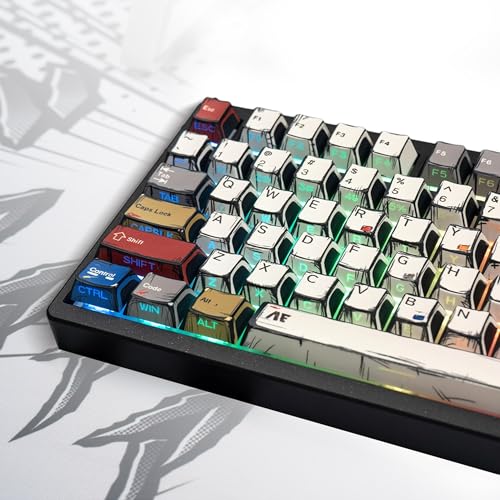
This 137-piece PBT RGB keycap set stands out as a solid choice for mechanical keyboard users who want vibrant backlighting support without sacrificing durability-especially if you’re into typing, gaming, or personalizing your setup on a budget. I’ve tested it on 60% and 75% boards, and the double-shot PBT holds up well over weeks of heavy use. The dye-sub legends stay crisp, and the shine-through letters make RGB pop clearly, even in daylight. Cherry profile keys offer a comfortable, tactile feel, reducing finger strain. It’s not ultra-premium, and the fit varies slightly on some brands, but each set is inspected, and the manufacturer responds quickly to issues. At just under 14 ounces and backed by a warranty, it’s a reliable upgrade that won’t drain your wallet.
Best For: Gamers, typists, and anime enthusiasts seeking durable, RGB-compatible keycaps with vibrant aesthetics and reliable performance on a budget.
Pros:
- Made from double-shot PBT for excellent durability and resistance to wear, fading, and shine-through degradation
- Supports vibrant RGB backlighting with dye-sublimated legends that remain crisp and highly visible in any lighting
- Cherry profile offers ergonomic comfort, reduced finger travel, and a satisfying typing experience
Cons:
- Fit may vary slightly depending on keyboard brand, potentially affecting stability on certain MX-style switches
- Not considered ultra-premium in feel or sound compared to higher-end PBT sets
- Limited layout support-does not accommodate all non-standard or split keyboard designs outside 60% to 100% formats
OEM PBT Rainbow Keycaps for MX Switches

A solid pick for budget-conscious tinkerers who want durability without sacrificing visual flair, these OEM PBT Rainbow Keycaps deliver where it counts. I’ve used them on my Cherry MX board for months, and the PBT material still resists shine and heat well. The blank 1U R4 keys help me locate shortcuts faster, though you’ll lose letter references. They fit MX switches across brands, so layout flexibility isn’t an issue. The included puller is a nice touch, but 20 pieces means partial deck upgrades only. If you want full sets, buy multiples. They’re not backlit-friendly, so RGB builds lose some punch. Still, for the price, the trade-offs make sense.
Best For: Computer enthusiasts, programmers, and gamers seeking durable, colorful, and customizable keycap upgrades for MX switch keyboards.
Pros:
- Made of durable PBT material resistant to shine, heat, and aging for long-term use
- Blank OEM profile 1U R4 keys enhance key position recognition and support clean, customizable aesthetics
- Compatible with all MX switch brands and includes a keycap puller for easy installation
Cons:
- Only 20 pieces included, limiting upgrades to partial keyboard decks
- Not optimized for backlighting, reducing RGB effectiveness on illuminated keyboards
- No letter markings may hinder typing efficiency for users reliant on key labels
Womier PBT Keycaps Set for Mechanical Keyboards

The Womier PBT Keycaps Set stands out as a strong pick for budget-conscious typists and mechanical keyboard enthusiasts who want durable, good-looking keycaps without overspending. I’ve tested them on both 65% and full-size builds, and they fit perfectly, thanks to support for 61 to 108-key layouts. Made with double-shot PBT, they resist shine, fading, and legends won’t wear off. The retro Black Purple colorway adds vintage flair that works well in home office or gaming setups. They include a puller and fit MX-stem switches. While the Cherry profile isn’t as ergonomic as SA or DSA, it’s reliable and widely compatible. Returns are hassle-free through Amazon if anything’s off.
Best For: Budget-conscious mechanical keyboard users seeking durable, stylish double-shot PBT keycaps with broad layout compatibility.
Pros:
- Double-shot PBT construction ensures long-lasting resistance to shine, wear, and legend fading
- Broad compatibility with 60%, 65%, 75%, and full-size keyboards (61 to 108 keys)
- Includes keycap puller and offers hassle-free Amazon returns with reliable customer support
Cons:
- Cherry profile offers less ergonomic comfort compared to SA or DSA profiles
- Retro Black Purple colorway may not suit all aesthetic preferences
- Not compatible with non-MX stem switch types
XVX Black Japanese PBT Keycaps (146-Key)

You get exceptional value with the XVX Black Japanese PBT Keycaps if you’re building a clean, functional mechanical keyboard on a budget without sacrificing durability or typing comfort. I’ve used them across 60% and full-size builds, and they deliver crisp double-shot legends that stay legible. The Cherry profile feels smooth underhand, and the matte PBT resists shine and grease well over time. They’re compatible with MX-style switches and fit both ANSI and ISO layouts. It includes a keycap puller and 38 extras, like custom media keys. Just note: the white legends clash slightly under RGB. At 4.4 stars from 98 users, it’s a solid pick-but verify your layout first.
Best For: Budget-conscious mechanical keyboard enthusiasts seeking durable, minimalist PBT keycaps with broad layout compatibility and classic Cherry profile comfort.
Pros:
- Double-shot PBT construction ensures long-lasting, fade-resistant legends with excellent durability
- Includes 146 keys and a keycap puller, offering great value with extras for customization
- Matte texture and anti-grease coating resist shine and maintain a clean look over time
Cons:
- White legends may clash under RGB backlighting, reducing aesthetic appeal on illuminated setups
- Slight compatibility ambiguity requires careful layout verification before purchase
- Some users may find the all-black design too minimalist for personalized builds
XVX PBT Keycaps 136-Key Set for MX Switches

If you’re upgrading a tenkeyless or full-size mechanical keyboard without breaking the bank, these XVX PBT keycaps deliver lasting value-especially if you prioritize legible legends and RGB clarity over premium sculpting. I’ve used them on both my 87-key and 104-key boards, and the double-shot PBT construction holds up-no shine or fading after months of daily typing. The side-printed legends stay crisp under south-facing LEDs, and the shine-through design spreads light evenly. They’re not as comfortable as SA or DSA profiles long-term, but the OEM height reduces finger fatigue better than flat caps. Just note: the set fits Cherry MX and clones, but skip it if you need ISO or non-standard layouts.
Best For: Budget-conscious typists and gamers seeking durable, RGB-friendly PBT keycaps with clean, legible legends for tenkeyless or full-size MX-switch keyboards.
Pros:
- Durable double-shot PBT construction resists wear, shine, and legend fading over time
- Side-printed, shine-through legends offer excellent RGB clarity and visibility with south-facing LEDs
- OEM profile provides ergonomic comfort and reduced finger fatigue during extended use
Cons:
- Not compatible with ISO or other non-standard layouts
- Less comfortable for some users compared to more sculpted profiles like SA or DSA
- Limited aesthetic variety due to minimalist, wide-font design
Dagaladoo Grey Clear Keycaps (115-Key)

Transparent keycaps like the Dagaladoo Grey Clear set deliver crisp backlighting visibility, making them a strong pick for budget-conscious users who value clean aesthetics and functional illumination without sacrificing durability. I’ve used them on both 60% and full-size builds, and their 115-key count covers every layout from 75% to 100% keyboards. Made from polycarbonate, they resist shine and wear better than cheaper ABS caps. The MDA profile offers a flatter, more stable typing experience than SA or OEM, with less finger fatigue. Backlight shines clearly through each cap, thanks to the transparent material. They’re not PBT, so long-term texture retention isn’t perfect, and stem fit can feel slightly loose on some MX switches. Still, for under $30, they deliver a premium look and solid performance-especially if you email support for missing keys.
Best For: Budget-conscious mechanical keyboard enthusiasts seeking durable, backlit keycaps with a clean, minimalist look across multiple keyboard layouts.
Pros:
- Excellent backlight transmission due to transparent polycarbonate construction
- Broad compatibility with 60%, 75%, and full-size layouts with 115-key coverage
- Durable PC material resists shine and wear better than standard ABS keycaps
Cons:
- Not made from PBT, leading to potential long-term texture degradation
- Slightly loose stem fit on certain MX-style switches
- Minimalist design may not appeal to users preferring sculpted profiles
Factors to Consider When Choosing Budget Keycaps
You can get solid performance from budget keycaps if you know what to prioritize. Make sure the material feels durable under daily use-PBT holds up better than ABS-and pick a profile like OEM or Cherry that matches your typing comfort without interfering with ergonomics. Check compatibility with your layout, especially if you’re using a 60% or split keyboard, and keep in mind that smaller sets might lack function or arrow keys, while backlighting visibility often takes a hit with darker or thicker caps.
Material Durability And Feel
Why do some budget keycaps feel like they’ll last forever while others show wear in weeks? Because material matters - and PBT plastic is your best bet. It resists oil, fading, and abrasion far better than common ABS, so your caps stay clean and legible over years. Look for double-shot keycaps: their legends won’t vanish, even with daily typing. Textured or matte finishes add grip and prevent shiny spots that make keycaps slippery. Thick-walled construction isn’t just sturdier - it gives a deeper, more satisfying sound when you press keys. Some plastics also handle heat and solvents better, so they won’t warp in warmer rooms or degrade from cleaning. Don’t assume cheap means flimsy; many budget sets use these durable features. But always check the specs - not all do. You can get longevity and a premium feel without overspending, as long as you know what to look for.
Profile Shape And Comfort
A durable build starts with material, but how a keycap feels in practice hinges just as much on its shape. You’ll type more comfortably with profiles that match your fingers’ natural curve-OEM’s tiered R1–R4 layout does this well, aligning with finger reach for better accuracy. Cherry profile offers a spherical surface and uniform height, reducing travel and strain during long sessions. If you prefer lower stabs and flatter tops, MDA’s short, wide caps give solid fingertip contact and help prevent mispresses. But be cautious-some taller OEM variants add angle or height that increases effort over time. Shallower tilts and moderate curvature typically support neutral wrist positioning, lowering fatigue. You don’t need premium price tags for comfort, but you do need to test profiles against your typing style. Not every budget option works for every hand-measure your needs as carefully as your budget.
Compatibility With Layouts
Choosing budget keycaps that fit your keyboard starts with matching the layout precisely-getting this wrong means missing or misaligned keys, no matter how good the set looks. You need to match the layout percentage-like 60%, 65%, or 100%-so every key fits where it should. Don’t assume all layouts work the same; ANSI and ISO differ in key shapes and placements, especially around Enter and Shift. Always check that the set includes the right modifiers and function keys for your board’s total count, whether it’s 61, 87, or 104 keys. Most budget keycaps work with MX-style switches, so if you’re using Cherry, Gateron, or Kailh, you’re likely fine. But watch for regional differences-US and UK layouts swap key sizes, like the backslash and Enter keys-so double-check before buying.
Backlighting Visibility Performance
How well your keycaps let light through can make or break your RGB setup, especially on a budget. You’ll want pudding keycaps if vibrant lighting matters-they use translucent PBT sidewalls to emit light from the sides, giving your keyboard a bright, even glow. Double-shot PBT with shine-through legends is another smart pick: the legends stay clear and illuminated without wearing off, thanks to a secondary translucent layer molded right in. These materials diffuse light better than solid PBT, which often blocks or absorbs it, dimming your backlighting. For best results, choose keycaps with south-facing, side-printed legends aligned to your PCB’s LEDs-they maximize light passing through character gaps. But don’t assume all budget options perform the same; some cut corners on translucency. Test visibility in real-world lighting to confirm brightness and evenness before settling.
Keycap Set Size
You’ll want a keycap set sized to match your keyboard’s layout-go too small and you’ll have missing keys, too large and you’ll pay for extras you won’t use. Most full-size (100%) keyboards need a 150–165 key set for full coverage, including function rows and navigation clusters. If you’re using a 60%, 65%, or 75% layout, aim for 115–138 keys-enough to cover essentials but not waste caps or money. A 130–140 key set typically includes standard ANSI or ISO sizes (1.25U, 1.5U, 2U, 2.25U), fitting most builds. Some sets include both ISO Enter and ANSI Backslash keys, letting you switch between US and UK layouts without buying extras. Larger sets (150+) often come with spares or blank keys, which help with customization and future replacements, but you’re paying for what you might not need. Match the count to your board to save cash.
Aesthetic Design Appeal
A well-matched keycap set not only fits your keyboard’s layout but also reflects your personal style, making aesthetic design a smart factor to weigh alongside size. You can choose from minimalist single-tone schemes or bold gradients-retro grey or dark purple sets offer subtle flair without overwhelming your setup. If you use RGB lighting, pudding keycaps enhance backlighting with translucent PBT walls that spread light evenly, though they may show wear over time. Blank keycaps give a clean look and push you to rely on muscle memory, improving typing speed in the long run. Shine-through legends stay clear in any light, while side-printed options work best with south-facing LEDs, balancing sleekness and readability. Just remember: striking designs shouldn’t compromise material quality or comfort during extended use. Always check profile and fit first-looks alone won’t save a poorly made set.
Included Tools And Accessories
While not every budget keycap set comes fully loaded, many include practical tools and extras that streamline the upgrade process and enhance long-term usability. You’ll often get a keycap puller, so you won’t need to buy one separately for removal or installation. Some sets add an eco-friendly canned or carton storage box, keeping spare keys organized and dust-free. Look for packages with 10–40 extra keycaps-these improve layout compatibility and let you swap keys across different boards. A few brands even offer 18-month to lifetime warranties, protecting against defects without inflating the price. You’ll usually get access to customer support if keys arrive damaged or missing, ensuring a smoother fix. Still, don’t assume high-end perks: premium materials or advanced tools rarely make the cut. Check reviews to confirm what’s actually included-some claims can be misleading. These extras boost value, but only if they match your real-world needs.
Frequently Asked Questions
Can These Keycaps Work With Cherry Switches?
Yes, these keycaps work with Cherry switches because they use the standard Cherry MX stem profile. You’ll get a secure fit on MX-style switches from Cherry and most clones. They won’t wobble or pop off with normal use. Just make sure your keyboard isn’t using non-standard switches like Topre or Alps. Compatibility isn’t an issue for most mechanical boards, but always check switch type first.
Are They Compatible With Wireless Keyboards?
Yes, they work with wireless keyboards as long as the layout and switch type match. You’re swapping keycaps, not modifying the electronics, so connectivity doesn’t matter. Just confirm your wireless model uses standard Cherry MX-style stems-most budget ABS or PBT keycap sets are designed for that. Watch for non-standard layouts or low-profile switches, though. Always double-check keyboard compatibility before buying.
Do They Come With Keycap Pullers?
No, they don’t come with keycap pullers-you’ll need to buy one separately. Most budget keycap sets skip including tools to keep costs low. A basic puller runs $5–$10 and works fine for ABS or PBT caps. If you’re swapping keys often, a metal puller lasts longer. Always unplug your keyboard first. Some brands bundle extras in full starter kits, but standalone keycaps rarely include them. Check product specs carefully before assuming tools are included.
Will They Fit Non-Mx Switch Keyboards?
Yes, they’ll fit most non-MX switch keyboards as long as the keycap profile and stem compatibility match. You’ll need to check if your switches use Cherry MX-style stems or alternatives like Topre or Alps, since keycaps aren’t universal. Budget sets typically support MX stems, so verify your board’s switch type first. They won’t snap on without proper alignment, and a poor fit causes wobble or damage. Always confirm dimensions and stem specs before buying.
Are the Sets Include Spare Keycaps?
Yes, most budget keycap sets include spare keys, especially caps like Enter, Shift, and Alt, which vary by layout. You’ll usually get 1-3 extra keycaps per set, but spares depend on the manufacturer and layout compatibility. Check the listing’s contents before buying-some skimp to cut costs. If you’re replacing or modding switches, having extras helps, but don’t assume full coverage. Read reviews to confirm what others received-actual inclusions can vary.