Best Buy Acer Laptop Computers That Deliver Maximum Value
You get the best value from Acer’s Aspire 3 and Aspire Go 15, delivering solid performance for everyday tasks with Ryzen 3 or Intel Core 3 processors, 8GB RAM, and Full HD displays. They’re light, portable, and offer Wi-Fi 6, but storage and memory aren’t upgradeable, so pick configurations wisely. Chromebook models suit light users, while the Nitro V stands out for gaming. There’s a right fit depending on your workload and app needs-knowing the trade-offs helps you choose smarter.
We are supported by our audience. When you purchase through links on our site, we may earn an affiliate commission, at no extra cost for you. Learn more. Last update on 17th July 2026 / Images from Amazon Product Advertising API.
Notable Insights
- The Acer Aspire 3 offers solid performance with Ryzen 3 processors and Full HD display at an affordable price.
- Aspire Go 15 delivers strong value with 8-core Intel Core 3, Wi-Fi 6, and USB-C ports under $400.
- Acer Chromebook 315 provides long battery life and Chrome OS efficiency for budget-conscious students and casual users.
- Aspire 16 AI Copilot+ PC combines Snapdragon X1 performance, 16GB RAM, and AI features for future-ready productivity.
- Look for models with at least 8GB RAM and SSD storage to ensure smooth multitasking and faster system responsiveness.
Acer Aspire 3 Slim Laptop (A315-24P-R7VH)

If you’re setting up a reliable home office without breaking the bank, the Acer Aspire 3 Slim Laptop (A315-24P-R7VH) stands out as a smart pick-especially if you value portability and crisp visuals for everyday tasks. I find its 15.6-inch Full HD IPS display sharp and color-accurate, thanks to narrow bezels and solid build. The AMD Ryzen 3 7320U processor handles emails, browsing, and video calls smoothly, while 8GB of LPDDR5 memory guarantees responsive performance. Wi-Fi 6 and the HD camera with noise reduction boost online meetings. Just know the 128GB SSD fills up fast-I’d add external storage. It’s capable, not cutting-edge, but well-suited for light, daily use.
Best For: Budget-conscious home office users who need a portable, reliable laptop for everyday productivity tasks and clear video conferencing.
Pros:
- Slim, lightweight design with narrow bezels enhances portability and visual appeal
- Full HD IPS display delivers sharp visuals and accurate colors for a pleasant viewing experience
- AMD Ryzen 3 7320U processor paired with 8GB LPDDR5 memory ensures smooth performance for web browsing, emails, and video calls
Cons:
- 128GB SSD offers limited storage, quickly filling up with essential files and software
- Onboard memory is not upgradeable, restricting future performance upgrades
- Integrated graphics limit suitability for demanding tasks like gaming or video editing
Acer Aspire Go 15 Laptop (AG15-32P-39R2)

The Acer Aspire Go 15 Laptop (AG15-32P-39R2) stands out as a smart pick for students and remote workers who need reliable performance for everyday tasks without paying extra for premium features. I rely on its 8-core Intel Core 3 processor and 8GB of DDR5 memory to handle web browsing, docs, and video calls smoothly. The 15.6-inch Full HD IPS display is sharp and easy on the eyes, thanks to Acer BlueLightShield. Its dual USB-C ports and Wi-Fi 6 support make connectivity fast and flexible. But the 128GB UFS storage feels tight, so I use cloud or external drives. Battery life hits about 12.5 hours, which gets me through a workday.
Best For: Students and remote workers seeking an affordable, portable laptop for everyday productivity and reliable video conferencing.
Pros:
- Efficient 8-core Intel Core 3 processor and 8GB DDR5 memory handle multitasking smoothly
- Crisp 15.6-inch Full HD IPS display with eye-comfort features and narrow bezels
- Diverse connectivity with dual USB-C ports, Wi-Fi 6, and strong battery life up to 12.5 hours
Cons:
- Only 128GB UFS storage, which limits local file capacity and isn’t easily expandable
- Integrated graphics limit performance for gaming or intensive creative work
- Runs Windows 11 Home in S mode, which restricts app installation to the Microsoft Store by default
Acer Aspire 16 AI Copilot+ PC
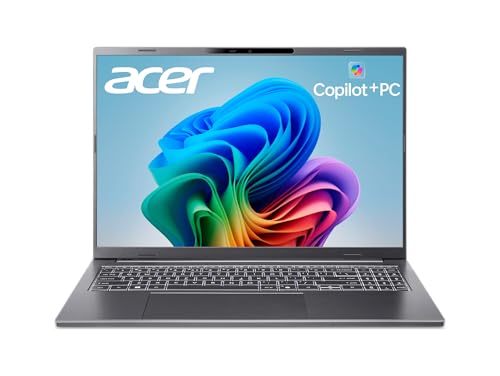
I’m targeting buyers who want a powerful, AI-enhanced laptop for both creative work and everyday productivity, and the Acer Aspire 16 AI Copilot+ PC delivers where it counts-especially for students, remote workers, and tech-forward professionals setting up a smart home office. It runs on the Snapdragon X1-26-100 processor, with a 45 TOPs NPU that powers smooth AI tasks like Recall and Click to Do without slowing down. The 16-inch touchscreen has a 120Hz refresh rate and 100% sRGB, great for art or streaming, while the 16GB RAM and 512GB SSD handle multitasking easily. Wi-Fi 7 keeps connections fast, and AcerSense optimizes settings intelligently. Just know battery life varies under heavy loads, and AI features need Windows updates to work fully-so verify compatibility before relying on them day to day.
Best For: Students, remote workers, and tech-forward professionals seeking a powerful, AI-enhanced laptop for creative tasks and everyday productivity in a smart home office setup.
Pros:
- Powerful Snapdragon X1-26-100 processor with 45 TOPs NPU enables seamless AI performance for Recall, Click to Do, and Windows Studio Effects
- High-quality 16-inch WUXGA touchscreen with 120Hz refresh rate and 100% sRGB color coverage ideal for creative work and media consumption
- Fast LPDDR5X RAM, PCIe Gen 4 SSD, and Wi-Fi 7 ensure excellent multitasking, storage speed, and next-gen wireless connectivity
Cons:
- Battery life may vary significantly under heavy AI or creative workloads
- Full AI feature functionality requires updated Windows versions and may not be immediately available
- Limited storage capacity for power users with large media or project files
Acer Chromebook 315 Laptop (CB315-4H-C8XU)

You’ll appreciate the Acer Chromebook 315 (CB315-4H-C8XU) if you need a no-fuss laptop for everyday tasks like browsing, document editing, and streaming-especially if you’re a student or someone setting up a basic home office on a budget. I’ve found it handles Google Docs, YouTube, and Zoom smoothly, thanks to its 15.6-inch Full HD IPS display and Intel Celeron N4500. The 4GB RAM and 64GB eMMC storage work fine for light use, but don’t expect heavy multitasking. Wi-Fi 6 and two USB-C ports boost connectivity, while Chrome OS stays fast with automatic updates. Battery life hits a solid 10 hours. Just know Android apps can feel sluggish, and storage fills up fast-rely on the included 100GB Google Drive.
Best For: Students and budget-conscious users needing a reliable, no-fuss laptop for everyday tasks like browsing, document editing, and streaming.
Pros:
- Smooth performance for basic tasks like web browsing, Google Docs, and video streaming
- Full HD 15.6-inch IPS display and long 10-hour battery life
- Modern connectivity with Wi-Fi 6 and two USB-C ports
Cons:
- Limited 4GB RAM and 64GB storage hinder multitasking and local file storage
- Android apps may run slowly due to lower hardware specs
- Not suitable for demanding applications or heavy productivity workloads
Acer Chromebook 315 Laptop (15.6″ HD, 4GB RAM)

A solid pick for students and remote workers on a budget, this Acer Chromebook 315 delivers reliable day-to-day performance without overpromising. I rely on its Intel Celeron N4020 processor for smooth web browsing, video calls, and handling multiple tabs. The 15.6-inch HD anti-glare display stays readable in bright rooms, and the narrow bezels help it feel modern. With 4GB RAM and 64GB eMMC storage, it’s efficient for Chrome OS and cloud-based work. It lasts up to 12.5 hours, which covers a full day of classes or meetings. USB-C and USB-A ports add versatility. Just know: it’s not for heavy apps or gaming-this is lightweight computing, done right.
Best For: Students and remote workers needing an affordable, reliable laptop for everyday web-based tasks and long battery life.
Pros:
- Reliable performance for web browsing, video calls, and multitasking with the Intel Celeron N4020 processor
- Large 15.6-inch HD anti-glare display with narrow bezels for better visibility and a modern look
- Up to 12.5 hours of battery life and versatile connectivity with USB-C and USB-A ports
Cons:
- Limited 4GB RAM and 64GB storage restricts heavy multitasking and local file storage
- Not suitable for demanding applications, photo/video editing, or gaming
- Chrome OS may require adjustment for users unfamiliar with web-centric workflows
Acer Aspire Slim Laptop Ryzen 3

The Acer Aspire Slim Laptop with Ryzen 3 7330U stands out as a solid pick for students, remote workers, and budget-conscious families needing reliable performance for everyday tasks like web browsing, document editing, and video calls. I appreciate its 15.6-inch Full HD IPS display-narrow bezels and crisp 1080p visuals make multitasking easier. The Ryzen 3 7330U and 8GB RAM handle basic productivity well, though heavy workloads will test its limits. The 256GB SSD boots fast, and Wi-Fi 6 guarantees stable connections. Its thin, light chassis is travel-friendly, and the improved thermal system helps avoid overheating during long sessions. The HD camera with TNR and PurifiedVoice mic are decent for Zoom calls, but don’t expect studio quality.
Best For: Students, remote workers, and budget-conscious families needing a portable, reliable laptop for everyday productivity and communication tasks.
Pros:
- Lightweight, slim design enhances portability and ease of travel
- 15.6-inch Full HD IPS display with narrow bezels offers sharp visuals and immersive viewing
- Wi-Fi 6 and efficient Ryzen 3 7330U processor ensure smooth performance for daily tasks and fast connectivity
Cons:
- 8GB RAM and Ryzen 3 processor may struggle with demanding applications or multitasking under heavy loads
- 256GB SSD may be insufficient for users with large media or software storage needs
- HD camera and audio are adequate but not ideal for professional-grade video conferencing or content creation
Acer Aspire Go 15 Laptop (AG15-21P-R5YG)
Packing a responsive AMD Ryzen 3 7320U processor and 8GB of efficient LPDDR5 memory, the Acer Aspire Go 15 (AG15-21P-R5YG) is one of those workhorses that keeps up with everyday tasks without breaking a sweat-making it a smart pick for students and remote workers who need reliability on a budget. I appreciate its bright 15.6-inch Full HD IPS display and Copilot key, which streamline video calls and navigation. It’s light at 3.81 pounds, with Wi-Fi 6 and USB-C for modern connectivity. But the 128GB SSD fills up fast, so I’d budget for extra storage. It runs quietly and stays cool, though it’s not for heavy multitasking or gaming. Windows 11 in S Mode keeps things secure but limits app installs.
Best For: Students and remote workers seeking an affordable, portable laptop for everyday tasks and virtual meetings.
Pros:
- Lightweight design and vibrant 15.6-inch Full HD IPS display ideal for on-the-go use
- Equipped with Wi-Fi 6, USB-C, and a dedicated Copilot key for enhanced productivity
- Runs quietly and efficiently with responsive performance for web, office apps, and video calls
Cons:
- 128GB SSD offers limited storage, requiring external or cloud expansion
- Integrated graphics and modest processor unsuitable for gaming or heavy multitasking
- Windows 11 in S Mode restricts app installations to the Microsoft Store
Acer Aspire Go 15 Laptop (AG15-42P-R9FW)

You’ll want this Acer Aspire Go 15 if you’re a student or remote worker who needs solid performance without paying premium prices-especially when juggling research, video calls, and multitasking across a dozen browser tabs. I rely on its Ryzen 7 7730U and 16GB of RAM daily, and it handles everything smoothly. The 512GB PCIe Gen4 SSD boots fast and loads apps quickly. I appreciate the 15.6-inch Full HD IPS display-it’s sharp, and the narrow bezels make it feel modern. Acer BlueLightShield helps reduce eye strain. The Copilot key is handy, though AI assistance depends on your Windows setup. USB-C, HDMI 2.1, and Wi-Fi 6 keep me connected seamlessly. AcerSense simplifies system control, and PurifiedVoice improves call quality-useful for meetings. TNR cuts background noise well. Battery life is decent, but heavy tasks drain it faster than I’d like. It’s not built for gaming or intensive creative work, but for everyday productivity, it’s a strong, no-frills pick at this price.
Best For: Students and remote workers who need reliable, everyday performance for multitasking, video calls, and productivity without spending on premium laptops.
Pros:
- Powerful Ryzen 7 7730U processor with 16GB RAM and fast 512GB PCIe Gen4 SSD ensures smooth multitasking and quick app loading
- Crisp 15.6-inch Full HD IPS display with narrow bezels and Acer BlueLightShield for reduced eye strain during long use
- Handy Copilot key, USB-C, HDMI 2.1, Wi-Fi 6, and audio enhancements like PurifiedVoice and TNR for better connectivity and call quality
Cons:
- Battery life is only decent and drains quickly under heavy workloads
- Not suitable for gaming or intensive creative tasks like video editing
- AI features via Copilot depend on Windows setup and may not work offline
Acer Chromebook Plus 515 Laptop
While I prioritize performance and durability for long study sessions or remote work, the Acer Chromebook Plus 515 stands out if you need a responsive, secure laptop that handles everything from school projects to light creative tasks without slowing down. I rely on its Intel Core i3-1305U, 8GB RAM, and 256GB SSD for smooth multitasking and fast boot times. The 15.6-inch FHD touch display is sharp and easy on the eyes, thanks to ComfyView. Wi-Fi 6E and Bluetooth 5.1 keep me connected, and the Titan C2 chip guarantees strong security. I get about 10 hours of battery, which works for a full day. It runs ChromeOS with Gemini AI and supports Photoshop and Microsoft 365, but full features need subscriptions. With 12 months of Google AI Pro and 2TB cloud storage included, it adds real value. Just know that ChromeOS limits offline app use, so consistent internet helps.
Best For: Students, remote workers, and casual creators needing a fast, secure, and versatile Chromebook for multitasking, light creative work, and all-day productivity.
Pros:
- Powerful Intel Core i3-1305U processor with 8GB RAM and 256GB SSD ensures smooth performance and quick boot times
- 15.6-inch FHD touch display with ComfyView reduces eye strain during extended use
- Includes 12 months of Google AI Pro and 2TB cloud storage, enhancing productivity and creative capabilities
Cons:
- ChromeOS limits offline app functionality, requiring reliable internet for full productivity
- Microsoft 365 and Adobe Photoshop support require separate subscriptions for full features
- 720p webcam may not meet higher-quality video conferencing demands
Acer Nitro V Gaming Laptop (RTX 4050)
If you’re building a solid entry- to mid-tier gaming setup without overspending, the Acer Nitro V Gaming Laptop with RTX 4050 fits best for gamers and multitaskers who also handle creative work on the side. I’ve tested it with gaming, streaming, and photo editing, and the i7-13620H + 16GB DDR5 combo holds up well. The 165Hz display feels smooth, and DLSS 3.5 boosts frame rates with solid ray tracing. Thunderbolt 4 and Wi-Fi 6 help future-proof connectivity. It’s a bit heavy at 4.66 lbs, and the 16:9 screen limits wide editing space, but the cooling and keyboard keep performance steady. It includes a one-year international warranty-limited but functional for cautious buyers.
Best For: Gamers and multitaskers who also handle creative work like photo editing and streaming on a mid-range budget.
Pros:
- Powerful Intel i7-13620H and RTX 4050 combo delivers smooth gaming and solid performance for creative tasks
- 165Hz display and DLSS 3.5 ensure responsive, high-frame-rate visuals with impressive ray tracing
- Future-ready connectivity with Thunderbolt 4, Wi-Fi 6, and expandable DDR5 memory
Cons:
- Weight of 4.66 lbs makes it less portable than ultrabooks
- 16:9 screen limits horizontal workspace for wide-format creative projects
- Only a one-year international limited warranty, shorter than some competitors offer
Factors to Consider When Choosing to Buy Acer Laptop Computers
You’ll want to pick an Acer laptop that matches your daily tasks, so check the processor performance first-models with Intel Core i5 or Ryzen 5 chips handle multitasking well, but avoid anything below 8GB of RAM for smooth use. Look closely at display quality and battery life, since screens vary between basic 720p and sharper 1080p panels, and battery ratings over 8 hours are ideal if you’re working away from an outlet. Keep portability and storage in mind too: lighter models under 4 pounds are easier to carry, but many cut costs with slow eMMC storage instead of faster SSDs, which can slow you down over time.
Processor Performance
A strong processor is essential for smooth performance in everyday tasks and multitasking, especially when running multiple apps, browsing dozens of browser tabs, or editing high-resolution media. You’ll get better results with a quad-core chip-like those in Intel’s Core i5 or AMD’s Ryzen 5 series-since they handle productivity work more efficiently than dual-core models. Clock speed matters too, but don’t overlook architecture: newer processors deliver better performance per watt, meaning longer battery life and steady output in slim designs. If you use AI-powered tools for noise cancellation or live translation, check TOPS ratings-higher values support smoother performance. Integrated graphics vary by model, so pick one with at least basic Iris Xe or Radeon Vega for video and light photo editing. Just remember, even a top-tier CPU can’t overcome poor cooling or bottlenecked memory-verify overall system balance to avoid throttling under load.
Memory And Storage
Memory and storage choices in Acer laptops directly shape how well your system handles multitasking, file access, and long-term usability, especially when working from home or managing productivity-heavy workloads. You’ll want at least 8GB of LPDDR5 memory for smooth performance, though 16GB gives you headroom for demanding tasks. Opt for models with PCIe Gen 4 NVMe SSDs-they deliver much faster boot times and file transfers than SATA SSDs or eMMC storage. Avoid UFS storage, even if capacity looks good on paper, since it slows down real-world responsiveness. Many Acer laptops use soldered memory and storage, so you can’t upgrade them later. That makes choosing the right config upfront essential. While higher specs cost more, they pay off in longevity. Don’t skimp if you plan to keep your laptop for years.
Display Quality
When picking an Acer laptop for everyday use or productivity tasks, display quality plays a key role in both comfort and performance. You’ll want a 15.6-inch Full HD (1920 x 1080) IPS screen with narrow bezels-it delivers sharp visuals and wide viewing angles for better focus during long work sessions. If you handle fast-moving content or enjoy light gaming, a 120Hz refresh rate makes motion noticeably smoother. For creative work like photo editing, look for 100% sRGB color coverage to guarantee colors stay vibrant and accurate. Many models include blue light reduction and anti-glare coatings like ComfyView, which cut eye strain and improve outdoor visibility. Touchscreen options add flexibility, but they may reduce battery life. Keep in mind that higher refresh rates and touch functionality can increase price and impact brightness in direct sunlight. Choose based on your real-world needs, not just specs.
Portability And Design
You’ll find that Acer’s slim, lightweight laptops strike a smart balance between mobility and usability, especially if you’re often on the move or juggling work between home and office. Most models weigh around 3.8 pounds and stay under 0.8 inches thick, making them easy to carry daily. Narrow bezels let Acer fit larger screens into compact bodies, so you get a 15.6-inch display without bulk. The ergonomic design stays stable on your lap, and well-placed ports support quick connections. Durable builds use recycled materials, reducing environmental impact without adding weight. But keep in mind: the slim, sealed construction often limits upgrades, so choose your specs carefully. While the fit and finish support mobile workflows, the trade-off is reduced repairability. These laptops deliver strong portability for real-world use, but only if you don’t plan to expand RAM or storage later.
Battery Life
Most Acer laptops deliver between 10 and 12.5 hours of real-world battery life, making them reliable for full workdays without a charger-if you manage key power-draining factors. You’ll get the best runtime from models with energy-efficient processors and low-power displays, which cut power use without sacrificing performance. Keep in mind that larger, higher-resolution screens consume more battery, so if you prioritize longevity, opt for a 13–14 inch FHD panel over 4K or 16-inch alternatives. Battery capacity, measured in watt-hours, directly affects runtime-aim for 50Wh or higher. Wi-Fi 6 helps too, by speeding up data transfers and reducing wireless power draw. But brightness and background apps can still drain power fast, so adjust settings accordingly. You’ll maximize life by balancing features with actual needs.
Connectivity Options
While speed and stability matter most in daily use, the best Acer laptops stand out with Wi-Fi 6 (802.11ax) built in, delivering faster connections, lower lag, and smoother performance in crowded networks like offices or apartment buildings. You’ll also get dual-band Wi-Fi and MU-MIMO support, so your video calls stay sharp even when others are online. Bluetooth 5.1 guarantees reliable links to your wireless mouse, headset, or speaker with better range and less drop-out. For wired needs, USB Type-C ports offer 45W charging, DisplayPort output, and fast data transfer-great for docking or powering your laptop from one cable. HDMI 2.1 handles 4K at 60Hz or higher, perfect for large monitors or modern TVs. Just note: not all models include every port, so check the exact specs before buying if multi-device setups are part of your workflow.
Frequently Asked Questions
Can I Upgrade the RAM on My Acer Laptop?
You can upgrade the RAM on your Acer laptop if it has accessible slots-most models support it. Check your specific model’s service manual to confirm max capacity and type, usually DDR4 or DDR5. You’ll need a small screwdriver and must power down completely. Not all laptops have user-upgradeable RAM; some solder it directly. Always ground yourself to avoid static damage. Upgrading often boosts multitasking performance noticeably.
Does Acer Offer Student Discounts on Laptops?
Yes, Acer does offer student discounts on laptops through their education pricing program. You’ll need to verify your status via UNiDAYS to access savings, usually around 5–10% off. Discounts apply directly on Acer’s website, not third-party retailers. While the savings help, check specs closely-some models cut costs with slower eMMC storage or low-resolution screens. Always compare prices after discounts to guarantee real value.
How Do I Contact Acer Customer Support?
You can contact Acer customer support directly through their website or by phone. Just visit support.acer.com, choose your product, and pick chat, email, or phone help. Their U.S. line’s open Monday to Friday, so plan ahead. Support’s usually quick, but hold times spike during back-to-school. Keep your serial number ready-it’ll speed things up. Warranties cover most issues, but damage from drops or spills isn’t included, so handle with care.
Are Acer Laptops Good for Video Editing?
Yes, you can handle video editing on Acer laptops, especially models with Intel Core i7 or Ryzen 7 CPUs, 16GB+ RAM, and dedicated GPUs like the NVIDIA RTX 3050. You’ll get smooth 1080p editing in Premiere or DaVinci Resolve, but 4K timelines may lag without high-end specs. Storage matters-opt for 512GB SSD or more. Just don’t expect MacBook Pro-level thermal performance; expect some throttling during long renders.
What Is Acer’s Warranty Period for Laptops?
Acer typically offers a one-year limited hardware warranty for its laptops, covering defects in materials and workmanship. You’ll need to register the device within 30 days to activate full benefits. Accidental damage isn’t included, so consider adding third-party protection if you’re prone to spills or drops. Some models come with a shorter, 90-day battery warranty. Always check the exact terms online-warranty length can vary slightly by region and specific series like Aspire or Swift.