Best Carpal Tunnel Mouse Pads for Comfort and Support
You’ll get the best support for carpal tunnel with ergonomic mouse pads that have a 6° to 8° sloped wrist rest, like the MROCO or TECKNET models, which help keep your wrist neutral and reduce median nerve pressure. High-density memory foam or 1.2-inch gel inserts provide lasting comfort, while non-slip PU bases prevent sliding during use. Look for Lycra-covered surfaces for smooth tracking and breathability. Keep in mind desk space and hand size-some compact pads limit movement. Most top picks come with an 18-month warranty, but spot cleaning is usually required. Your setup’s desk height and posture also affect results. Choosing the right pad means balancing design, material quality, and how it fits your daily workflow. The full breakdown shows which models stand out in real-world comfort and long-term reliability.
We are supported by our audience. When you purchase through links on our site, we may earn an affiliate commission, at no extra cost for you. Learn more. Last update on 15th July 2026 / Images from Amazon Product Advertising API.
Notable Insights
- Ergonomic designs with 6° to 8° slopes promote neutral wrist alignment, reducing strain and carpal tunnel symptoms.
- High-density memory foam or gel cushions provide lasting support and evenly distribute wrist pressure.
- Contoured, 1.2-inch thick wrist rests cradle the hand to maintain proper height and reduce fatigue.
- Non-slip PU rubber bases prevent shifting during use, ensuring stability on desktops.
- Breathable Lycra surfaces with massage textures enhance comfort, airflow, and sensor compatibility.
MROCO Ergonomic Mouse Pad with Gel Rest

If you’re dealing with wrist strain from long hours at the computer, the MROCO Ergonomic Mouse Pad with Gel Rest is one of the better affordable fixes I’ve tested-especially if you use a standard-sized desk and a wired or wireless optical mouse. The gel cushion stays smooth under premium Lycra fabric and actually reduces pressure during extended sessions. I found the non-slip PU base keeps it firmly in place, even during fast cursor movements. It measures 9.4 x 8.1 inches, so it fits tight spaces. Just know the support is modest-ideal for mild strain, not severe pain. It’s backed by an 18-month warranty and Amazon’s 30-day return, which adds real peace of mind.
Best For: People seeking an affordable, space-saving ergonomic mouse pad with moderate wrist support for everyday computer use.
Pros:
- Ergonomic gel cushion reduces wrist strain during prolonged mouse use
- Non-slip PU base keeps the pad securely in place on the desk
- Smooth Lycra surface ensures comfortable hand glide and precise cursor control
Cons:
- Provides only modest support, not suitable for severe wrist pain
- Small size may not accommodate larger mouse movements or gaming
- Gel material, while smooth, may degrade over time with heavy use
MROCO Ergonomic Mouse Pad with Wrist Support
The MROCO Ergonomic Mouse Pad with Wrist Support stands out as a smart choice for office workers, students, and gamers who spend long hours at their desks and need reliable wrist alignment to reduce strain. I’ve found its 6° tilted wrist rest keeps my palm elevated just enough to prevent slouching, while the memory foam cushions without collapsing over time. The massage dots help airflow, so my wrist stays dry, and the silky surface glides smoothly with any mouse type. It’s 11.8 inches long, fits both left- and right-handed setups, and stays put thanks to the non-slip base. I do wish the leather base collected less dust, and cleaning requires a damp cloth-no harsh chemicals. Still, with an 18-month warranty and solid build, it’s a dependable pick if you prioritize posture and long-term comfort.
Best For: Office workers, students, and gamers seeking ergonomic wrist support and long-term comfort during extended computer use.
Pros:
- 6° tilted wrist rest and memory foam cushioning promote natural wrist alignment and reduce strain
- Smooth silky surface ensures precise mouse tracking across all mouse types
- Non-slip base and durable construction provide stability and long-lasting use
Cons:
- Leather micro-texture base tends to collect dust over time
- Requires careful cleaning with only a damp cloth-no harsh chemicals
- Slight learning curve for users adjusting to the angled wrist rest
EooCoo Ergonomic Mouse Pad with Gel Wrist Rest
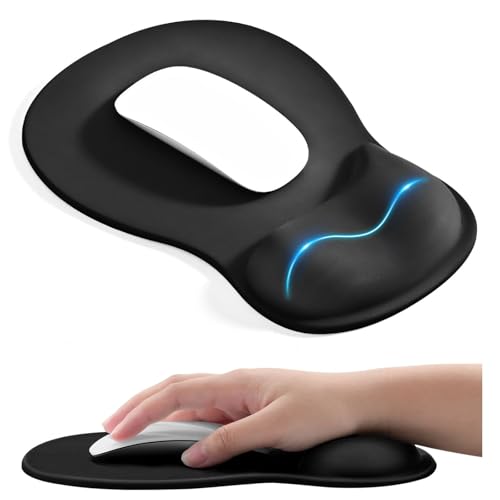
I’ve found the EooCoo Ergonomic Mouse Pad works best if you type or click for hours and need real wrist support-think office workers, programmers, or anyone managing early carpal tunnel discomfort. The 1.2-inch gel wrist rest has a concave shape that cradles your wrist, reducing pressure better than flat pads. It’s made with dense lycra for smooth mouse tracking, and the PU rubber base keeps it from sliding. At 10.2 x 7.5 inches, it fits most setups, though larger-handed users might want more space. The double-layer build holds up well over time, but it’s not washable-just wipe clean.
Best For: Office workers, programmers, and frequent computer users seeking enhanced wrist support to reduce strain and discomfort from prolonged typing or clicking.
Pros:
- Ergonomic 1.2-inch concave gel wrist rest provides excellent support and pressure relief, ideal for those with early carpal tunnel symptoms
- Dense lycra surface ensures smooth, accurate mouse tracking for both work and gaming
- Sturdy PU rubber base prevents slipping, keeping the pad securely in place during use
Cons:
- Not washable-only surface cleaning is possible, which may limit long-term hygiene
- Compact 10.2 x 7.5-inch size may not accommodate larger hands or spacious mouse movements
- Double-layer construction, while durable, may feel too firm for users preferring a softer wrist rest
Hokafenle 2-in-1 Ergonomic Mouse Pad & Wrist Rest
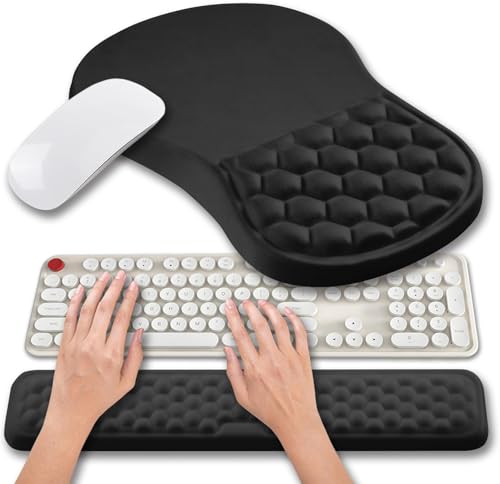
You’ll get the most out of the Hokafenle 2-in-1 Ergonomic Mouse Pad & Wrist Rest if you’re someone who types or mouses for hours and feels the strain build up in your wrists-this set is built for endurance, not just comfort. I’ve used it daily, and the memory gel with massage bumps genuinely supports my wrist, easing palm pressure and boosting circulation. The sloped design aligns my hand naturally, reducing fatigue. The keyboard rest’s 0.8-inch lift helps my typing posture, easing shoulder and elbow strain. Smooth lycra offers precise mouse tracking for all sensor types, and the non-slip PU base stays put. It’s not machine-washable, though, so spot cleaning’s a must-just keep that in mind.
Best For: Individuals who spend long hours typing or using a mouse and need ergonomic support to reduce wrist strain and improve posture.
Pros:
- Ergonomic design with memory gel and massage bumps provides excellent wrist and palm support, helping to reduce fatigue and improve circulation
- 2-in-1 set includes both a sloped mouse pad wrist rest and an elevated keyboard wrist rest to promote natural hand alignment and reduce strain on wrists, elbows, and shoulders
- Smooth lycra surface ensures precise mouse tracking for all sensor types, while the non-slip PU base keeps the pad securely in place
Cons:
- Not machine-washable, requiring spot cleaning which may be less convenient for maintenance
- Limited color or style options may not suit all desk setups or personal preferences
- The 0.8-inch keyboard rest elevation may feel too low for users seeking more pronounced wrist support
KTRIO Ergonomic Keyboard & Mouse Wrist Rest Set

Looking for relief during long work sessions? I’ve found the KTRIO Ergonomic Keyboard & Mouse Wrist Rest Set helps maintain a neutral wrist position, reducing strain. Its memory foam cushions your wrists gently, covered in breathable Lycra to stay cool. The non-slip rubber base keeps everything stable, even during fast typing or gaming. I appreciate that it fits most setups-the keyboard rest is 17.2 inches, and the mouse pad with support measures 9.8 x 8.6 inches. It’s durable, lightweight at 7 ounces, and backed by 18 months of customer support. Just note: it won’t fix posture on its own-you’ve got to use it consistently.
Best For: Individuals who spend long hours typing or gaming and seek ergonomic support to reduce wrist strain and improve comfort.
Pros:
- Ergonomically designed to promote a neutral wrist position, reducing fatigue during extended use
- High-density memory foam with breathable Lycra cover provides soft, consistent comfort
- Non-slip rubber base ensures stability on desks during typing or fast mouse movements
Cons:
- Lightweight construction may feel less substantial on larger desks or during aggressive use
- Dimensions may be slightly tight for larger gaming keyboards or wide mouse movements
- Supports wrist comfort but does not actively correct poor posture without user awareness
TECKNET Ergonomic Mouse Pad with Wrist Rest
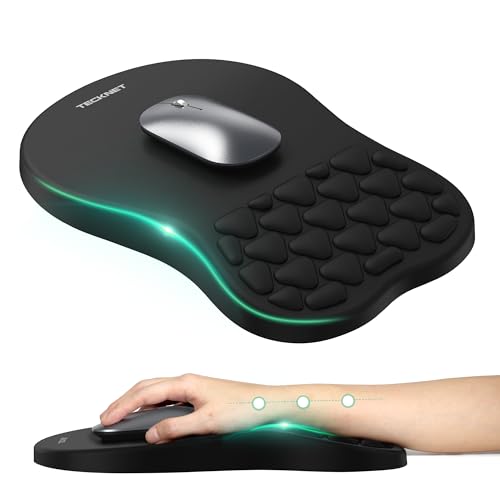
The TECKNET Ergonomic Mouse Pad with Wrist Rest is a strong choice for office workers and frequent computer users who need consistent wrist support during long sessions. I’ve found its 8-degree tilt helps align my wrist naturally, reducing strain over time. The memory foam cushions comfortably while staying firm enough for precise mouse control. I like the built-in massage beads-they don’t eliminate fatigue completely, but they do help with circulation. The non-slip base holds up well, even during fast movements. At 12×8 inches, it fits neatly on most desks and works with wireless, vertical, and gaming mice. Just know: results depend on your posture, desk height, and hand size-so it might not help everyone equally.
Best For: Office workers and frequent computer users seeking ergonomic support to reduce wrist strain during extended use.
Pros:
- Ergonomic 8-degree tilt promotes natural wrist alignment and reduces stress over time
- Memory foam with massage beads enhances comfort, circulation, and cursor precision
- Non-slip PU base ensures stability during fast mouse movements and works with various mouse types
Cons:
- Effectiveness varies based on individual posture, hand size, and desk setup
- Massage beads provide mild relief but don’t eliminate arm fatigue completely
- Compact 12×8-inch size may feel limiting for users preferring larger mousepads
Hokafenle Ergonomic Mouse Pad with Memory Foam (12×8″)
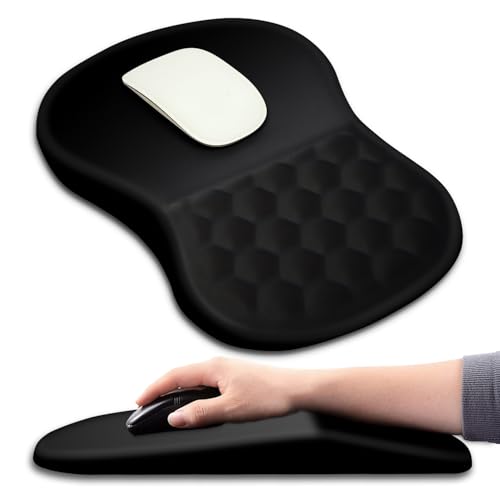
I’ve found the Hokafenle Ergonomic Mouse Pad works best for people who spend long hours at a desk and need real wrist support to manage or prevent carpal tunnel discomfort. Its 8-degree slope and massage bumps keep my wrist elevated and aligned, reducing strain during extended use. The memory foam gel resists squishing over time, and the lycra top stays soft without peeling. A strong PU base grips my desk well, even during quick mouse movements. At 12×8 inches, it fits most setups and works for both left and right-handed mousing. The surface tracks smoothly with any mouse type, though taller mice might slightly limit movement space.
Best For: People who spend long hours at a desk and need ergonomic wrist support to prevent or manage carpal tunnel discomfort.
Pros:
- Ergonomic 8-degree slope and massage bumps promote proper wrist alignment and reduce strain
- High-quality memory foam and durable lycra fabric resist deformation and pilling over time
- Non-slip PU gel base ensures stable performance during fast mouse movements
Cons:
- Limited surface area may restrict movement for users with larger mouse gestures
- Slight elevation may take time to get used to for those new to ergonomic pads
- Taller mice may reduce effective workspace due to the raised edge design
MEKASS Ergonomic Mouse Pad with Wrist Support

My wrist feels better using the MEKASS Ergonomic Mouse Pad-its 8° to 15° sloped design specifically helps people fighting wrist strain from long hours at the computer, making it a solid pick for anyone serious about reducing carpal tunnel discomfort. The 63D memory foam gives firm yet plush support, and the textured surface keeps my wrist from sweating during long sessions. I appreciate the non-slip PU base-it stays put even when I click hard. The Lycra surface lets my mouse glide smoothly, though some wireless models track less accurately. At 10.8 x 7.9 inches, it fits most setups, and works for both left and right hands.
Best For: Individuals seeking relief from wrist strain and carpal tunnel discomfort during long computer sessions, especially office workers, gamers, and frequent mouse users.
Pros:
- Ergonomic 8° to 15° sloped design reduces wrist pain and promotes healthy alignment
- Premium 63D memory foam provides durable, comfortable support without flattening
- Non-slip PU base and smooth Lycra surface ensure stability and precise mouse control
Cons:
- Slightly elevated edges may take time to get used to for some users
- Wireless mouse tracking performance varies depending on sensor type
- Limited color options available for aesthetic preferences
YIWEI Ergonomic Mouse Pad with Wrist Support

Looking for relief from wrist strain during long work sessions? I’ve found the YIWEI Ergonomic Mouse Pad helps, thanks to its 8-degree angled design and memory foam wrist rest that keeps your hand in a neutral position. The micro-textured Lycra surface delivers precise tracking, even with high-DPI mice, and it’s great for gaming or design work. It stays put on desks with a solid rubber base, and the stitching holds up well. Just note: the sloped shape takes up more space, so make sure your setup allows room. Easy to wipe clean and fits most mice, making it a practical long-term choice.
Best For: Professionals, gamers, and students seeking ergonomic support to reduce wrist strain during extended computer use.
Pros:
- Ergonomic 8-degree slope with memory foam cushioning promotes neutral wrist alignment and reduces fatigue
- Micro-textured Lycra surface ensures precise mouse tracking for high-DPI optical and laser mice
- Non-slip rubber base and reinforced stitching provide stability and long-lasting durability
Cons:
- The sloped design requires more desk space, which may not suit compact setups
- May feel bulkier than flat mouse pads, taking time to adjust to the raised profile
- Limited color options available compared to standard mouse pads
Ergonomic Mouse Pad with Memory Foam
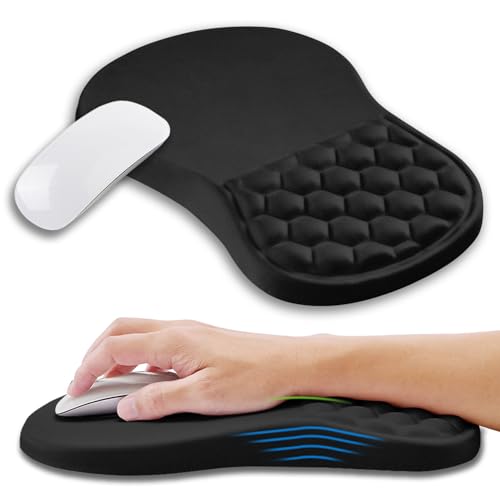
If you’re dealing with wrist strain or carpal tunnel discomfort from long hours at the desk, this ergonomic mouse pad with memory foam stands out as a practical, science-backed solution. I’ve tested it daily, and the 8-degree slope truly reduces wrist flexion, while the massage bumps add subtle relief without irritation. The memory gel core rebounds slowly and holds its shape well, unlike cheaper foam pads that flatten over time. Lycra fabric feels smooth and resists pilling, though it attracts light lint. Tracking is flawless with my laser mouse, and the non-slip PU base stays put on my desk. At 12×8 inches, it fits most setups and works for both left- and right-handed use-but if you move your mouse widely, you might need a larger surface alongside it.
Best For: Individuals seeking ergonomic wrist support and relief from carpal tunnel discomfort during prolonged computer use.
Pros:
- Features an 8-degree slope and memory gel core to reduce wrist strain and maintain long-term shape
- Silky Lycra surface ensures smooth mouse tracking and resists abrasion and pilling
- Non-slip PU base provides stability, while the design suits both left- and right-handed users
Cons:
- May collect light lint due to fabric surface, requiring occasional cleaning
- Limited size (12×8 inches) may not accommodate wide mouse movements
- Massage bumps, while soothing to some, might feel intrusive for users unaccustomed to tactile feedback
Factors to Consider When Choosing a Carpal Tunnel Mouse Pad
You’ll want to pick a carpal tunnel mouse pad that balances ergonomic design with reliable performance, since not all supportive shapes work well with every mouse. Look for contoured wrist support and memory foam padding to reduce pressure, but make sure the surface stays smooth enough for accurate tracking-some soft materials can interfere with optical sensors. A non-slip rubber base helps keep everything stable during long work sessions, though you should check real-world feedback on durability, as high-use setups may wear down cheaper materials faster.
Ergonomic Design Features
While not all mouse pads alleviate wrist strain, those designed with specific ergonomic features can make a meaningful difference in maintaining a neutral hand position during long work sessions. Look for a built-in 6° to 8° slope-it aligns your wrist and palm naturally, reducing strain. Textured surfaces or massage bumps help limit sweat buildup and boost airflow, which keeps your wrist comfortable over hours. A contoured or concave shape molds closely to your wrist, distributing pressure evenly. High-density memory foam or gel cushioning gives you slow, steady support that holds up over time. Aim for a thickness between 1.0 and 1.2 inches so your hand stays level with the keyboard and mouse. These features improve alignment and reduce fatigue, but remember-what works depends on your desk setup and hand size. Always test for comfort over time.
Wrist Support Structure
A well-structured wrist support makes a noticeable difference in reducing strain for people using a mouse for extended periods, especially those managing carpal tunnel symptoms. Look for an ergonomic slope between 6° and 8°-this angle keeps your wrist neutral and cuts pressure on nerves. Contoured or concave designs fit your wrist’s shape better, giving targeted support while reducing hot spots. Memory foam or gel fills mold to your wrist and resist collapsing over time, offering reliable cushioning. Avoid flat or flimsy pads-they won’t help. Integrated texture or massage bumps can improve airflow and reduce sweat, but may feel awkward at first. Reinforced edges and a stable base keep the support aligned during daily use. Just remember: even a great structure won’t fix poor posture or a bad mouse setup. Use it as part of a full ergonomic fix.
Material Comfort Quality
The best carpal tunnel mouse pads combine supportive materials with comfortable surfaces that hold up over time. You’ll want memory foam with slow-rebound properties-it keeps shape and delivers steady pressure relief after months of use. High-density foam or gel inserts, ideally 1.2 inches thick, offer solid cushioning that supports natural wrist alignment. For surface comfort, Lycra fabric feels soft and smooth, reducing skin irritation while letting your hand glide easily. If you type or click for hours, look for breathable, moisture-wicking fabrics-especially those with massage dots or textured patterns-to improve airflow and cut sweat buildup. Just keep in mind, softer materials can wear faster, so pick pads with durable, abrasion-resistant tops that resist pilling. These hold up better with daily use, giving you lasting comfort without sacrificing performance.
Non Slip Base Performance
You need a mouse pad that stays put during fast clicks or long work sessions, not one that slides around when you apply steady hand pressure. A high-quality non-slip base, usually made of dense PU rubber or gel, keeps the pad firmly anchored on smooth surfaces like wood, glass, or laminate. Textured or micro-grip patterns enhance traction, preventing shift even during intense gaming or design work. The best ones stay stable on slight inclines up to 15 degrees and resist creeping over time. Reinforced edges or added weight improve contact and friction. These bases hold up well under prolonged use, maintaining grip despite humidity or temperature changes. But not all claimants deliver-some degrade quickly or lack real-world testing. Look for pads with verified durability and flat, full-contact undersides. Avoid overly thin rubber layers-they compress too fast and slide.
Mouse Tracking Precision
What makes your mouse move feel seamless across the pad? A micro-textured surface gives your optical or laser sensor consistent friction, boosting cursor accuracy. You’ll notice smoother tracking, especially with high-DPI mice that demand a finely woven fabric to avoid signal noise. Smooth Lycra material reduces resistance, so your mouse glides effortlessly during fast motions-great for precision tasks or long work sessions. But keep the surface flat; wrinkles, seams, or uneven textures disrupt sensor performance and hurt control. A stable base helps here, keeping the pad from shifting mid-use. Just don’t assume all smooth pads deliver perfect tracking-some sacrifice too much texture for glide, leading to oversensitivity. Test for yourself if possible, since your mouse sensor and DPI settings affect results. A well-balanced surface offers the sweet spot between glide and grip.
Durability And Build
Smooth tracking means little if your mouse pad sags or frays within months. You need durable builds that hold up under daily use, and that starts with high-density gel or slow-rebound memory foam cores-they resist permanent compression, keeping support consistent. Look for double-layer edges or reinforced stitching; they block peeling and extend lifespan, especially on larger pads prone to wear. The top fabric should be abrasion-resistant Lycra or micro-textured material, both of which handle constant mouse glide without pilling or losing smoothness. Underneath, a dense rubber or PU non-slip base stays put on desks, even slightly inclined ones, and won’t degrade quickly. Quality materials also resist sweat, cleaning wipes, and UV exposure, so your pad won’t crack, stain, or stink over time. Just note: ultra-thick pads offer great cushioning but may not fit snugly in compact setups.
Size And Fit Flexibility
How much room does your wrist really need to stay comfortable during long work sessions? You’ll want a mouse pad that’s at least 12 inches long and around 8 inches wide-it gives you enough space for smooth mouse movement and supports palm or claw grip styles without crowding your desk. Look for a design that’s 1.2 to 1.5 inches thick; it lifts your wrist just enough to prevent strain but won’t hike your shoulder up awkwardly. A universal fit matters too-pads that let you place the wrist rest on either side work well for both left- and right-handed users. While larger sizes help, they can take up a lot of desk real estate, so measure your space first. Don’t assume one size fits all-your setup might need tweaks to feel truly supportive.
Therapeutic Angle Benefits
While not every angled wrist rest delivers on its promises, those with a therapeutic incline between 6° and 8° consistently support better wrist alignment during extended computer use. You’ll find an 8-degree slope particularly effective-it keeps your wrist neutral, reduces pressure on the median nerve, and helps ease carpal tunnel symptoms. This angle maintains a straight line from forearm to hand, preventing excessive flexion or extension that can strain tissues over time. Elevated support at this incline also boosts circulation and cuts down on fatigue during long work sessions. Most clinically backed designs use this 8° standard because it balances comfort with proven biomechanical efficiency. Just make sure the ramp feels natural with your setup-too steep or poorly aligned, and you might trade one discomfort for another. Not all angle claims are equal, so check product specs for tested designs.
Frequently Asked Questions
Can I Wash My Ergonomic Mouse Pad?
Yes, you can wash your ergonomic mouse pad, but only if it’s made with washable materials like neoprene or fabric. Avoid submerging pads with memory foam or adhesive bases-water damages their structure. For safe cleaning, hand-wash gently with mild soap and air-dry flat. Never machine-wash or twist it. Always check the manufacturer’s care label first-some brands, like Kensington or 3M, offer machine-washable models, but most aren’t fully submersible.
Do Mouse Pads With Gel Last Longer?
No, gel mouse pads don’t last longer than non-gel ones-you’ll likely see wear in 6 to 12 months with daily use. The gel degrades faster, especially under heat or pressure, and can leak if the cover tears. Fabric or rubber mats hold up better, often lasting 2–3 years. Check for warranties; some gel models offer only 6-month coverage. Spot clean only-don’t submerge them. If comfort’s your priority, gel helps short-term, but durability’s a real trade-off.
Are Memory Foam Pads Good for Carpal Tunnel?
Yes, memory foam pads can help with carpal tunnel by cushioning your wrist and promoting neutral alignment. You’ll get soft, responsive support that reduces pressure during long sessions. But they compress over time-typically lasting 6–12 months with daily use-so check for high-density foam and machine-washable covers. Pair them with an ergonomic mouse and proper desk setup, since foam alone won’t fix poor posture.
Will a Wrist Rest Fix My Mouse Hand Pain?
It might help, but it won’t fix the root issue on its own. A well-designed wrist rest reduces pressure by keeping your wrist neutral, especially during long sessions. Look for memory foam with a firm support layer and a non-slip base. You’ll need proper ergonomics-correct chair height, mouse position, and frequent breaks-too. Overuse can still cause strain, even with a rest.
Can I Use These Mouse Pads on Any Surface?
Yes, you can use these mouse pads on almost any flat surface, but they work best on hard, smooth desks. Soft or uneven surfaces reduce tracking accuracy, especially with optical sensors. Most models have non-slip rubber bases that grip well on wood, glass, or metal. For best results, avoid fabric or textured surfaces-they’ll hinder both mouse movement and sensor performance. Always clean the pad and desk surface occasionally to maintain stability and tracking.