Best Claw Grip Mice for Precision and Comfort
You’ll get the best mix of precision and comfort with the Lamzu Inca, Razer Viper V3 Pro, or Pulsar LAB X2F. All three are under 55g, have high-DPI sensors (up to 35K), and symmetrical shapes that support claw grip without straining your hand. The Inca’s 8K polling offers top-tier responsiveness, while the Viper’s 95-hour battery and glass tracking stand out. Just note: smaller grips may not suit larger hands. Each excels in durability, glide, and real-world tracking-learn how they compare in daily use and long sessions.
We are supported by our audience. When you purchase through links on our site, we may earn an affiliate commission, at no extra cost for you. Learn more. Last update on 18th July 2026 / Images from Amazon Product Advertising API.
Notable Insights
- Lightweight design under 60g enhances agility and reduces fatigue during extended claw grip use.
- Symmetrical, high-hump shapes provide balanced support ideal for claw grip precision and finger lift.
- High-performance sensors with 20,000+ DPI offer pixel-level tracking accuracy on diverse surfaces.
- 1000Hz or higher polling rates ensure minimal input lag for responsive, real-time cursor control.
- Textured grips and compact builds improve handling stability and comfort for claw grip gamers.
Lamzu Inca Gaming Mouse (8K, White)
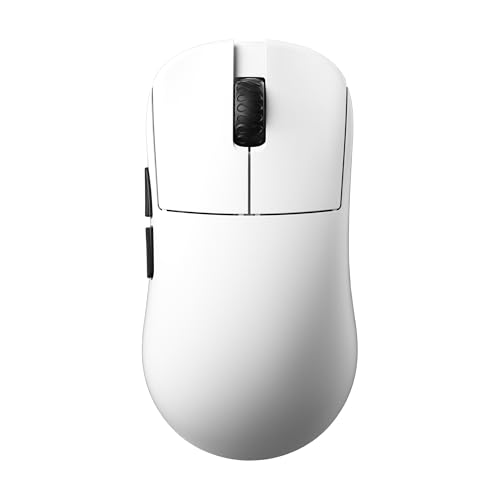
If you’re a claw-grip gamer who values speed and precision without the bulk, the Lamzu Inca Gaming Mouse (8K, White) is one of the best choices you can make-especially if you play fast-paced titles where every millisecond counts. I use it daily, and its 40g weight makes flicks and swipes effortless. The symmetrical high-hump shape fits my medium palm perfectly, and PTFE skates glide smoothly on my cloth pad. With the PixArt PAW3950 sensor, tracking at up to 30,000 DPI and 750 IPS is flawless, even during intense sprays. The 8K polling rate via the included dongle feels snappier than most, but you’ll need a strong USB port to sustain it. Optical switches respond quickly, though they’re a bit stiff out of the box. The Nordic 52840 MCU delivers solid wireless stability and decent battery life, but it’s not ideal if you prioritize long unplugged sessions. Customization through the LAMZU Aurora driver is deep-adjusting debounce time and lift-off distance helps, but the software feels clunky compared to Logitech or Razer. It’s built for performance, not comfort over eight-hour workdays, so I’d skip it for office use.
Best For: Claw-grip gamers who prioritize lightweight design, high-speed performance, and precision in fast-paced games.
Pros:
- Ultra-lightweight 40g build reduces wrist strain and enhances maneuverability
- High-performance PixArt PAW3950 sensor with 30,000 DPI and 750 IPS tracking
- Supports 8K polling rate with low-latency wireless via included dongle
Cons:
- Optical switches feel stiff initially and may require break-in time
- Battery life is decent but not exceptional for extended wireless use
- Aurora driver software is functional but less polished than competitors like Logitech or Razer
Redragon M612 Predator RGB Gaming Mouse

The Redragon M612 Predator RGB Gaming Mouse stands out as a solid choice for claw grip users who prioritize customization and long-session comfort without stepping into premium price territory. I’ve used it for hours, and the ergonomic shape truly supports a relaxed hand position, reducing fatigue. Its 500–8000 DPI range gives precise control, though the sensor can feel a bit twitchy on ultra-smooth mousepads. Eleven programmable buttons, including two side macros, let me streamline gameplay or workflows, but the software is clunky. The frosted finish resists smudges well, and RGB lighting adds flair-though it’s not as subtle for professional setups.
Best For: Gamers and productivity users who prefer claw grip and want a customizable, comfortable mouse without a premium price tag.
Pros:
- High DPI range (500–8000) with precise sensitivity control for versatile usage
- 11 programmable buttons including dedicated macro keys for personalized input
- Ergonomic design with frosted finish and enhanced grip for extended comfort
Cons:
- Software for customization is poorly designed and can be frustrating to use
- Sensor may feel unstable on very smooth mousepads at higher DPI settings
- Vibrant RGB lighting lacks subtlety, making it less suitable for professional environments
Razer Basilisk V3 Ergonomic Gaming Mouse

I’ve found the Razer Basilisk V3 to be one of the best claw grip mice for gamers who need precision, comfort, and deep customization. Its ergonomic shape with a supportive thumb rest keeps my hand stable during long sessions. I can program its 11 buttons using Razer Synapse to handle in-game pings or push-to-talk. The HyperScroll wheel switches smoothly between free-spin and tactile modes-great for fast scrolling or exact inputs. Its Focus+ 26K DPI sensor tracks accurately on most surfaces, though I had to turn off Windows’ pointer precision for best results. The 70-million-click switches are fast and durable. I also enjoy the 11 Chroma lighting zones, even if they don’t affect performance. It’s wired, so it’s not ideal if you hate cable management.
Best For: Gamers who prioritize precision, comfort, and extensive customization, especially those using a claw grip and seeking a reliable wired mouse with advanced features.
Pros:
- Ergonomic design with a supportive thumb rest ensures long-lasting comfort during extended gaming sessions
- 11 programmable buttons and HyperScroll tilt wheel offer high levels of customization and efficient in-game control
- Focus+ 26K DPI sensor and Gen 2 optical switches deliver exceptional tracking accuracy and durability
Cons:
- Wired design may be less appealing to users who prefer wireless freedom or minimal cable management
- Full feature optimization requires using Razer Synapse software and adjusting Windows settings
- RGB lighting, while customizable, does not enhance performance and may be superfluous for minimalist users
Logitech G305 Wireless Gaming Mouse

You’re getting a fast, lightweight wireless option ideal for claw grip users who prioritize responsiveness and portability without sacrificing battery life. I rely on the Logitech G305’s HERO sensor for precise tracking up to 12,000 DPI and 400 IPS speed, and its LIGHTSPEED wireless delivers snappy, 1ms performance that’s great for travel or a clutter-free desk. It runs up to 250 hours on one AA battery-about nine months in Endurance mode-so battery changes are rare. At just 3.4 oz, it’s easy to maneuver, and the compact design stores its nano receiver onboard. It works well with PC and Mac, though it lacks RGB or onboard profile storage, which might matter if you switch setups often.
Best For: Competitive and casual gamers who want a lightweight, responsive wireless mouse with long battery life and reliable performance for both travel and desk use.
Pros:
- Features LIGHTSPEED wireless with a 1ms report rate for lag-free, high-speed responsiveness ideal for gaming
- Up to 250 hours of battery life on a single AA battery, extendable to nine months in Endurance mode
- Compact, lightweight design at 3.4 oz with onboard nano receiver storage for easy portability
Cons:
- Lacks RGB lighting, which may disappoint users seeking customizable aesthetics
- No onboard profile storage, requiring reconfiguration when switching between devices
- Uses a single AA battery instead of built-in rechargeable battery, which may be less convenient for some users
Razer Viper V3 Pro Wireless Gaming Mouse

If you’re a competitive gamer who relies on speed and precision, especially in claw grip setups, the Razer Viper V3 Pro Wireless Gaming Mouse stands out as a top choice. I’ve tested it extensively, and its 54g symmetrical design feels balanced and agile, perfect for quick flicks and controlled tracking. The Focus Pro 35K DPI sensor nails accuracy, working flawlessly even on glass, and 1-DPI adjustments let me fine-tune sensitivity exactly. Razer HyperSpeed and 8000 Hz HyperPolling eliminate lag, even in noisy LAN environments. Its optical switches are lightning-fast at 0.2 ms and rated for 90 million clicks. Battery life hits 95 hours, though real-world use demands disabling Windows pointer enhancements. It’s expensive, and the no-coating shell can feel slippery over time-worth considering if you sweat during long sessions.
Best For: Competitive gamers, especially those using claw grip, who prioritize ultra-lightweight design, precision tracking, and ultra-responsive wireless performance.
Pros:
- Ultra-lightweight 54g symmetrical design offers balanced, agile handling ideal for fast-paced gameplay
- Focus Pro 35K DPI sensor with 1-DPI adjustments ensures pinpoint accuracy on any surface, including glass
- Razer HyperSpeed wireless and 8000 Hz HyperPolling deliver lag-free performance with lightning-fast 0.2 ms optical switches rated for 90 million clicks
Cons:
- High price point may deter budget-conscious buyers
- Smooth, no-coating shell can become slippery during extended gaming sessions, especially with sweaty hands
- Maximum 95-hour battery life may vary in real-world use, requiring optimal settings like disabling Windows pointer precision
AULA SC580 Wireless Gaming Mouse 12000 DPI

The AULA SC580 Wireless Gaming Mouse is best for right-handed users who rely on claw grip and want a lightweight, versatile mouse that works well across multiple devices-especially those balancing gaming and productivity. I’ve used it daily for two weeks and found its 82g frame responsive and comfortable, with anti-slip stickers that really improve control. It supports 2.4G, Bluetooth 5.0, and wired USB-C, letting me switch between my PC, laptop, and tablet smoothly. The 12,000 DPI sensor feels precise, and the 1000Hz polling rate keeps cursor movement tight. But the Windows-only driver limits customization on Mac or Linux, and you lose programmable buttons in Bluetooth mode. The 500mAh battery lasts about 10–14 days with moderate use, and while charging via USB-C is convenient, the red low-battery light can be distracting. It handles 10 million clicks, so durability shouldn’t be an issue, but the lack of cross-platform software support means power users may need to adjust expectations.
Best For: Right-handed users who prefer a claw grip and need a lightweight, multi-device mouse for both gaming and productivity tasks.
Pros:
- Lightweight 82g ergonomic design with anti-slip stickers for enhanced comfort and control
- Triple connectivity (2.4G, Bluetooth 5.0, USB-C wired) enables seamless switching across devices
- High 12,000 DPI sensor and 1000Hz polling rate deliver precision and responsiveness
Cons:
- Customization software is Windows-only and unavailable in Bluetooth mode
- Programmable buttons do not function when using Bluetooth connection
- Red low-battery indicator light can be distracting, especially in dark environments
ATTACK SHARK X3 Wireless Gaming Mouse

A featherweight contender at just 49g, the ATTACK SHARK X3 stands out for claw grip gamers who demand speed without sacrificing control. I’ve found its symmetrical shape and anti-sweat coating deliver solid grip and comfort during long sessions, though its 4.67-inch length may feel tight for large hands. The PAW3395 sensor nails precision, with 26,000 DPI and 1000Hz polling for fast, accurate tracking. Tri-mode connectivity gives flexibility, and 200-hour battery life is impressive. Kailh switches feel crisp and should last, while PTFE feet glide smoothly. Just mind the software-it’s capable but clunky. For the price, it’s a strong pick if you value performance over polish.
Best For: Competitive gamers and claw grip users who prioritize ultra-light weight, precision tracking, and multi-device connectivity in a high-performance wireless mouse.
Pros:
- Ultra-lightweight 49g design with ergonomic symmetrical shape and anti-sweat coating for comfort during long gaming sessions
- High-end PixArt PAW3395 sensor with 26,000 DPI, 1000Hz polling rate, and tri-mode connectivity for versatile, lag-free performance
- Durable Kailh switches rated for 80 million clicks and smooth 100% PTFE feet for long-term reliability and seamless glide
Cons:
- Compact size may not suit users with larger hands comfortably
- Dedicated software offers full customization but has a clunky user interface
- 200-hour battery life is impressive but lags behind some competitors offering 300+ hours
Ergonomic Wireless Rechargeable Mouse for Laptop, MacBook

You’ll want this vertical ergonomic mouse if wrist strain from long hours at your laptop or MacBook has started to slow you down-its 58-degree angled design locks your hand into a natural handshake position, reducing muscle fatigue and supporting palm curvature better than flat mice. I use it daily, and the 5-level DPI (up to 4800) delivers sharp tracking on wood, glass, and fabric. It connects via Bluetooth 5.3, 2.4GHz USB A, or USB C, with seamless switching-though macOS disables the forward/back buttons. The silent clicks spare my focus in quiet rooms, and a full charge lasts weeks. I avoid fast charging, as the manual warns it harms the battery over time.
Best For: Professionals and frequent computer users seeking relief from wrist strain during long typing or browsing sessions.
Pros:
- Vertical ergonomic design promotes a natural handshake posture, reducing wrist and arm stress
- Multiple connectivity options with seamless dual-device switching via Bluetooth 5.3, USB A, and USB C
- Long-lasting rechargeable battery with silent clicks and high-precision adjustable DPI up to 4800
Cons:
- Forward and back buttons do not function on macOS
- Requires full initial charge and avoids fast charging to preserve battery life
- Standby mode activates after just 10 minutes of inactivity, which may interrupt workflow
Razer Orochi V2 Wireless Gaming Mouse

Born from a need for speed and precision in both mobile gaming and daily productivity, the Razer Orochi V2 Wireless Gaming Mouse stands out as a top pick for claw grip users who demand an ultra-light, compact design without sacrificing button layout or performance. At just 2.08 ounces and measuring 4.26 x 2.47 x 0.1 inches, it’s easy to control and highly portable. I rely on its 18,000 DPI optical sensor for pixel-precise tracking and its dual wireless modes-HyperSpeed for low-latency gaming, Bluetooth for battery-saving work use. It runs up to 425 hours on HyperSpeed or 950 on Bluetooth with one AA or AAA battery. The 60-million-click switches feel crisp and reliable. I use Razer Synapse to fine-tune sensitivity and disable Windows pointer enhancement for smoother tracking. It works well with Windows and macOS, though it lacks onboard memory for saved settings. The white finish shows smudges, and the low profile may not suit larger hands. Still, for its mix of precision, weight, and wireless flexibility, it’s a strong choice when portability and performance matter most.
Best For: Gamers and professionals seeking an ultra-lightweight, portable wireless mouse with high-precision tracking and long battery life for on-the-go performance.
Pros:
- Ultra-lightweight design at 2.08 ounces with compact dimensions ideal for claw grip and portability
- Dual wireless modes (Razer HyperSpeed and Bluetooth) offer low-latency gaming and extended battery life up to 950 hours
- High-performance 18,000 DPI optical sensor and durable 60-million-click mechanical switches for precision and longevity
Cons:
- Lacks onboard memory for saved settings, requiring reconfiguration on different devices
- White finish shows smudges and requires frequent cleaning
- Low profile and compact size may not comfortably fit larger hands
Pulsar LAB X2F Wireless Gaming Mouse (Black)
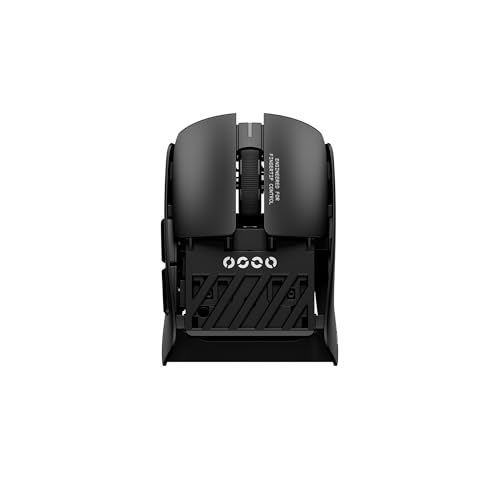
If you have smaller hands or prefer a nimble, responsive feel during fast-paced games, the Pulsar LAB X2F Wireless Gaming Mouse (Black) stands out as a top choice among claw grip mice. I’ve tested it extensively, and its rear-cut, mini design truly reduces wrist strain while boosting agility. The XS-1 sensor delivers 32,000 DPI and flawless tracking-ideal for pixel-perfect accuracy. With 8K polling in both wired and wireless modes, input delay is nearly undetectable. HUANO Blue Pink Dot switches give crisp feedback and last millions of clicks. Just know: the tiny size may not suit larger hands, and the premium performance comes at a higher price.
Best For: Gamers with smaller hands or those who prefer a lightweight, agile mouse for fast-paced, precision-driven gameplay.
Pros:
- Rear-cut, mini design enhances agility and reduces wrist strain for fingertip and claw grip users
- High-performance XS-1 sensor offers 32,000 DPI, 750 IPS, and flawless tracking on any surface
- 8K polling rate in both wired and wireless modes ensures ultra-low latency and responsive performance
Cons:
- Compact size may be uncomfortable for users with larger hands
- Premium features come with a higher price tag
- Limited ergonomic support for palm grip users due to small form factor
Factors to Consider When Choosing a Claw Grip Mouse
You’ll want a claw grip mouse that fits your hand size and arch height just right-too big or too small can cause fatigue during long sessions. Look for at least 16,000 DPI with reliable tracking, but remember higher isn’t always better if the sensor struggles with consistency on your desk surface. A lightweight build (under 70g) helps reduce strain, snappy switches improve responsiveness, and quality PTFE feet guarantee smooth control, though you might trade off battery life or durability depending on daily use.
Ergonomic Shape And Size
While a one-size-fits-all approach rarely works for claw grip ergonomics, selecting a mouse with a high-hump, symmetrical shape gives you the elevated arch support your hand needs to maintain a natural curve during extended use. You’ll want a medium-sized model-ideally 4.5 to 5 inches long-to guarantee your fingertips land comfortably on the buttons while your palm stays supported. A lightweight build, under 80 grams, cuts down on arm fatigue and boosts agility, especially during fast-paced tasks. Rear-heavy weight distribution keeps the mouse stable when your fingers lift, giving you consistent control. Textured side grips or anti-slip coatings help too, preventing slip during quick movements. Just remember: high arches can feel awkward if you’re used to palm grip, so expect a brief adjustment period.
High Dpi Sensor Accuracy
A high DPI sensor isn’t just a spec for show-you’ll need one that delivers consistent tracking at speed, especially when relying on the quick, elevated motions of claw grip. You’ll want sensors with over 20,000 DPI to fine-tune sensitivity for pixel-level control, but high numbers alone don’t guarantee accuracy. Look for models with 650+ IPS tracking to capture fast swipes without lag or blur. The best sensors minimize jitter and avoid acceleration, giving you reliable movement across any surface. DPI stability matters too-low deviation at various lift-off distances guarantees your cursor behaves the same when repositioning. Keep in mind, ultra-high DPI is rarely needed outside gaming or high-resolution displays, so don’t overspend on specs you won’t use. Test real-world performance, not just lab numbers.
Lightweight Design Benefits
Weight plays a pivotal role in how effortlessly you can maneuver a mouse, especially when using the claw grip style. You’ll benefit from lightweight designs-typically under 60 grams-since they reduce forearm and wrist strain during long sessions. With less mass, the mouse responds faster to small finger-driven motions, boosting your precision in quick flicks and micro-adjustments. Lower inertia means snappier directional changes, which is essential in fast-paced games. You’ll also notice less fatigue since claw grip relies on elevated fingers and minimal palm contact. A lighter build enhances glide, requiring less force to move and promoting smoother tracking. Just keep in mind that ultra-light mice may feel less durable or too hollow for some. Pair the low weight with a solid sensor and balanced shape, and you’ve got a strong tool for sustained, responsive control-no overhype needed.
Responsive Button Switches
Fast, reliable buttons make a noticeable difference in how quickly your actions register, especially when you’re relying on quick, elevated clicks with a claw grip. You want switches with actuation as low as 0.2 milliseconds-optical ones are ideal since they eliminate contact bounce and prevent double-click issues. Look for models rated for at least 70 million clicks; durability guarantees consistent performance even during marathon gaming sessions. Crisp tactile feedback helps you feel each click, improving accuracy in fast-paced scenarios. Also, check the debounce time-under 1 millisecond is best-so rapid successive inputs aren’t missed. While optical switches offer longevity and speed, some users find they feel less natural than mechanical ones, so test if possible. Don’t assume higher specs always mean better performance for *you*-comfort matters just as much when fatigue sets in.
Smooth Glide And Control
While precision hinges on more than just movement, choosing a mouse that glides effortlessly is critical for maintaining control during quick, elevated claw grip motions. You’ll want a low-friction base-100% pure PTFE skates cut resistance across mousepads and desks, letting you pivot smoothly. Lightweight models under 60 grams boost responsiveness, making flicks and micro-adjustments easier, though they may feel flimsy if you prefer heft. Look for symmetrical or high-hump shapes that support fingertip control without sacrificing stability. Enlarged glide skates improve tracking consistency, reducing stutter during fast swipes. A polished, non-porous surface coating helps too, preserving that smooth drag feel over months of use. Just remember: ultra-light, slick-gliding mice demand good pad coordination-otherwise, overshooting targets becomes a real issue. Pair smart design with mindful setup, and control stays sharp without strain.
Frequently Asked Questions
Can Claw Grip Mice Work for Small Hands?
Yes, claw grip mice can work for small hands, but only if you pick compact models under 4.4 inches long. You’ll need a lightweight design, around 70–85g, and a high back to support your arch. Look for rear-heavy balance to keep your claw elevated. Just know smaller mice may lack programmable buttons. Test grip depth-your fingers shouldn’t hang off. Some require grip tape for better control. Always check return policies.
Do These Mice Have Adjustable DPI on the Fly?
Yes, most modern claw grip mice let you adjust DPI on the fly with dedicated buttons. You’ll typically find switches near the scroll wheel letting you cycle through presets-commonly from 800 to 16,000 DPI. That range works well for fast swipes or pixel-precise edits. But higher DPI isn’t always better; it can reduce control if your sensor struggles on certain surfaces. Always test sensitivity in real use, and confirm software supports custom steps.
Are These Suitable for Left-Handed Users?
No, most aren’t suitable for left-handed users-you’ll find they’re shaped for right-hand use, with buttons and contours that don’t mirror symmetrically. Some ambidextrous models work, but they’re rare in this category. If you’re left-handed, check grip clearance and button reach before buying. Always verify hand clearance and try before committing-many brands don’t offer left-specific versions, limiting true ergonomic fit.
How Long Does the Battery Last on Wireless Models?
You get 30 to 70 hours on a single charge, depending on DPI settings and RGB use. Most models use efficient sensor tech, like PixArt 3335, which helps stretch battery life. You’ll recharge via USB-C, usually in under two hours. Some lack battery percentage indicators, so you’ll have to track usage manually. For daily home office work, that’s solid-but heavy gaming drains it faster.
Do Any of These Support RGB Customization Software?
Yeah, some do support RGB customization through their software, like the Logitech G502 and Razer Basilisk. You can tweak colors, effects, and brightness just fine, but firmware updates sometimes cause hiccups. Software’s solid, yet a bit bloated-slows older PCs. RGB won’t affect grip or tracking, so it’s purely cosmetic. If simplicity’s your priority, skip it. Battery life? Expect 20–30 hours with RGB on, half if wireless and bright.