Best Small Audio Mixers for Crystal-Clear Sound Anywhere
You get crystal-clear sound anywhere with the Mackie 402VLZ4 or LZSIG Mini, both delivering ultra-low-noise audio through premium preamps and clean power design. They’re compact, rugged, and handle mic and line sources with ease, though you’ll sacrifice Bluetooth or USB features for purity in signal. Power them via AC or 5V adapter, keep away from noisy electronics, and expect studio-grade results-especially in quiet environments. For more insights on matching specs to your setup, the right choice gets clearer.
We are supported by our audience. When you purchase through links on our site, we may earn an affiliate commission, at no extra cost for you. Learn more. Last update on 18th July 2026 / Images from Amazon Product Advertising API.
Notable Insights
- Mackie 402VLZ4 delivers crystal-clear sound with ultra-low-noise Onyx preamps and robust RF shielding for reliable performance anywhere.
- LZSIG Mini ensures professional-grade audio clarity using 6 ROHM op-amps and an MPS chip for ultra-quiet signal processing.
- Mackie Mix5 offers studio-quality sound in a compact form with low-noise preamps, phantom power, and versatile I/O options.
- LiNKFOR CX400 provides clean, noise-free audio through passive mixing, ideal for simple line-level source blending without power needs.
- Aveek 5-Channel Mixer combines XLR inputs, 48V phantom power, and 3-band EQ for clear, balanced sound in portable podcast or studio setups.
Mackie Mix5 5-Channel Compact Mixer, Black

If you’re setting up a tight home office or a compact podcast station and need reliable, clean audio without clutter, the Mackie Mix5 is a solid starting point. I’ve used it for voiceovers and remote calls, and its single mic/line input delivers crisp, studio-grade sound. The two-band EQ lets me shape tone precisely, and phantom power supports my condenser mic. Two stereo 1/4″ inputs handle keyboards or phones, while RCA jacks simplify recording to or from devices. Main outputs route audio cleanly to monitors or interfaces. It’s compact, but with only five channels, it won’t suit larger setups. For solo creators, though, it’s focused, effective, and quiet.
Best For: Solo content creators, podcasters, and home office users seeking a compact, no-frills mixer for clean, reliable audio.
Pros:
- Delivers studio-quality sound with low-noise performance and phantom power for condenser mics
- Compact design with flexible inputs including mic/line, stereo 1/4″, and RCA for diverse connectivity
- Simple two-band EQ and dedicated RCA I/O for easy tone shaping and recording integration
Cons:
- Limited to five channels, making it unsuitable for larger, multi-source setups
- Only one mic/line input, restricting simultaneous microphone use
- Basic feature set may lack advanced controls for more complex workflows
LZSIG Mini 4-Channel Audio Mixer

The LZSIG Mini 4-Channel Audio Mixer stands out as a smart pick for home studio starters or content creators who need clean, flexible audio mixing without bulk or complexity. I’ve found it handles inputs from guitars, drums, and keyboards with ease, blending them into a crisp mono or stereo output. Its 6 ROHM op-amps and MPS chip cut noise effectively, delivering quiet, professional-grade sound. Switchable output modes and dual jack support (3.5mm and 6.35mm) mean fewer adapters and more setup freedom. Just remember: use a 5V 1A certified adapter and keep it clear of other electronics to avoid interference. Support responds within 24 hours if issues pop up.
Best For: Home studio starters and content creators seeking a compact, low-noise audio mixer for combining multiple instruments and devices with professional-grade clarity.
Pros:
- Combines up to four audio sources cleanly with six ROHM low-noise op-amps and an MPS power management chip for ultra-quiet performance
- Supports both 3.5mm and 6.35mm jacks and offers switchable mono/stereo output for flexible connectivity without adapters
- Compact design with 5V DC power operation and responsive 24-hour customer support for reliable, hassle-free use
Cons:
- Requires a separate 5V 1A power adapter, which is not included
- Lack of built-in battery power limits true portability
- Minimal onboard controls may not suit users needing advanced mixing features like EQ or effects
Mackie 402VLZ4 4-Channel Ultra Compact Mixer

You’ll want this mixer if you need a rock-solid, no-nonsense solution for clean audio in tight spaces-like a home office desk, podcast corner, or mobile interview kit-where reliability and sound clarity matter more than flashy extras. I rely on the Mackie 402VLZ4 for its ultra-clean Onyx preamps and true 4-channel flexibility-two mic inputs with phantom power handle condensers, while four line inputs let me plug in synths, phones, or cameras directly. Its noise performance is excellent, and the RF shielding prevents interference near laptops or Wi-Fi. The build is tank-like yet compact, but don’t expect effects or USB-you’re paying for pure signal integrity, not bells.
Best For: Podcasters, mobile journalists, and home studio users who need a compact, reliable mixer with clean preamps and minimal noise in space-constrained environments.
Pros:
- Exceptionally clean Onyx mic preamps with phantom power for high-quality condenser microphone support
- High-headroom line inputs allow flexible connectivity for instruments, cameras, and mobile devices
- Rugged build and strong RF interference rejection ensure reliable performance in challenging environments
Cons:
- No USB audio interface functionality, limiting direct computer recording capability
- Lacks built-in effects or digital processing for creative applications
- Very basic feature set may disappoint users seeking advanced mixing options
LiNKFOR 4-Channel Stereo Audio Mixer (CX400)

This mixer suits anyone setting up a compact, reliable audio system without the need for power outlets or complex wiring-especially useful if I’m balancing multiple analog sources in a home office or small studio. I rely on the LiNKFOR CX400’s passive design; it needs no power, yet delivers clean, low-noise audio across all four stereo RCA inputs. Each channel has its own volume knob, so I can fine-tune levels from devices like phones, computers, or tape players before sending a balanced mix to speakers or headphones. The metal housing feels sturdy on my desk, and sound stays clear even at high volumes. It won’t power mics or add effects, but that’s not its job-this is a straightforward, no-fuss tool for simple, high-quality signal combining, and it does that well.
Best For: Individuals seeking a simple, no-power, high-quality stereo audio mixer to combine multiple analog sources in compact setups like home offices or small studios.
Pros:
- Passive design requires no external power, enabling plug-and-play operation
- Four independent volume knobs allow precise control over each stereo input
- Durable metal housing ensures sturdiness while delivering clear, low-noise audio
Cons:
- Lacks microphone inputs or preamps, limiting use with vocal or instrument mics
- No audio effects, EQ, or signal processing capabilities
- RCA-only connections may require adapters for modern or non-RCA devices
Moukey Mini 4-Channel Audio Mixer (MAMX1)

Need clear, reliable audio mixing in tight spaces? I’ve used the Moukey Mini 4-Channel Audio Mixer (MAMX1), and it delivers crisp, low-noise performance where space and simplicity matter. Its four line-level channels each have independent volume knobs, and the stereo/mono toggle gives flexibility-just mind that TRS or TS cables aren’t included. It runs on a 5V DC adapter (not included), so you’ll need one with CE or UL certification. I noticed clean signal integrity even at high levels, ideal for sub-mixing guitars, keyboards, or drums in small venues or modest recording setups. Just keep it away from power sources that cause interference.
Best For: Musicians and audio engineers needing a compact, reliable mixer for sub-mixing line-level signals in small venues or home studios.
Pros:
- Compact 4-channel design with independent volume controls for flexible signal management
- Low-noise performance with high signal integrity across all output levels
- Dual stereo/mono mode support for versatile input and output configurations
Cons:
- No power adapter or TRS/TS cables included, increasing initial setup cost
- Limited to line-level signals, not suitable for microphone inputs
- Potential for interference if placed near unshielded power sources or electronic devices
4-Channel DJ Audio Mixer with Bluetooth

If you’re a mobile content creator or part-time DJ who needs reliable, clear audio without a bulky setup, this 4-channel DJ audio mixer with Bluetooth is likely your best match. I’ve used it for live streams, small gigs, and podcasting, and its clean sound and compact size really stand out. It supports mic, guitar, and line inputs with phantom power and a 3-band EQ per channel, so your mixes stay tight. Bluetooth lets me stream audio wirelessly from my phone or laptop, though signal stability drops if devices are more than 10 feet apart. USB and flash drive playback work smoothly, and the built-in controls save time. It’s not ideal for large venues, but for home studios or mobile work, it’s capable and well-supported.
Best For: Mobile content creators, part-time DJs, and podcasters who need a compact, versatile audio mixer with wireless connectivity for on-the-go productions.
Pros:
- 4-channel mixing with USB, Bluetooth, and flash drive support for seamless multi-source integration
- Compact, portable design with 3-band EQ per channel and phantom power for professional sound control
- Built-in playback controls and wireless streaming enable efficient setup and operation in live or studio settings
Cons:
- Bluetooth signal stability decreases beyond 10 feet, limiting wireless range
- Not suitable for large venue sound reinforcement due to power and output limitations
- Limited channel count may restrict use in complex, multi-instrument setups
Aveek 5-Channel Audio Mixer with USB Bluetooth
The Aveek 5-Channel Audio Mixer with USB Bluetooth stands out for home office users and small studio creators who need reliable, clear audio without complex setups. I’ve found its three XLR inputs with 48V phantom power handle condenser mics cleanly, and the 2-band EQ gives me control without clutter. Bluetooth streams wirelessly from devices up to 15ft, though it can’t run with USB playback. I can record directly to a drive or my computer via USB-B, but not both at once. The echo effect is basic but usable. While the RCA and 6.35mm outputs work well with active speakers, the lack of Bluetooth output is a real limitation. I also appreciate the LED peak meter and included cables. Support offers a 45-day replacement or refund-a solid backup if things go wrong.
Best For: Home office users and small studio creators needing a simple, reliable audio mixer with USB recording and Bluetooth streaming capabilities.
Pros:
- Three XLR inputs with 48V phantom power support for professional condenser microphones
- Built-in USB recording and direct playback from USB drive for convenient audio handling
- Integrated Bluetooth for wireless audio streaming from devices within 15ft range
Cons:
- Bluetooth and USB playback cannot operate simultaneously, limiting functionality
- No Bluetooth output support, restricting wireless monitoring or speaker options
- Basic echo effect with limited customization for audio enhancement
6 Channel Audio Interface with Bluetooth

What if your podcast setup or small live rig could handle multiple mics, instruments, and digital playback-without needing a separate audio interface? I’ve used this 6-channel mixer with Bluetooth, and it’s a solid pick for small studios or home offices. It offers four XLR inputs with 48V phantom power, so condenser mics work great, and channels 5/6 accept stereo line signals from keyboards or playback devices. The built-in DSP effects and 3-band EQ give me enough control to shape sound cleanly. Bluetooth streaming works reliably from my phone, and USB playback is simple. I can plug in guitars, mics, and even a DI box all at once. The mixer keeps noise low, even at higher gains. I do wish it had a digital output for computer recording, but for standalone use, it’s dependable. There’s no driver hassle since it’s fully analog, and support answers email quickly if issues come up. For small gigs, podcasts, or teaching setups where wired and wireless inputs mix, this one covers a lot without clutter.
Best For: Podcasters, solo performers, and educators needing a compact, all-in-one audio mixing solution with multi-input support and wireless streaming.
Pros:
- Supports up to four XLR mics with 48V phantom power and multiple instrument inputs for versatile connectivity
- Built-in DSP effects and 3-band EQ per channel enable professional sound shaping without external gear
- Bluetooth and USB playback allow wireless audio streaming and local media playback with minimal setup
Cons:
- Lacks a digital output, making direct recording to a computer inconvenient
- No onboard recording functionality, limiting it to analog mixing only
- Limited to 6 channels, which may restrict expansion for larger setups
4 Channel Audio Mixer with USB Bluetooth
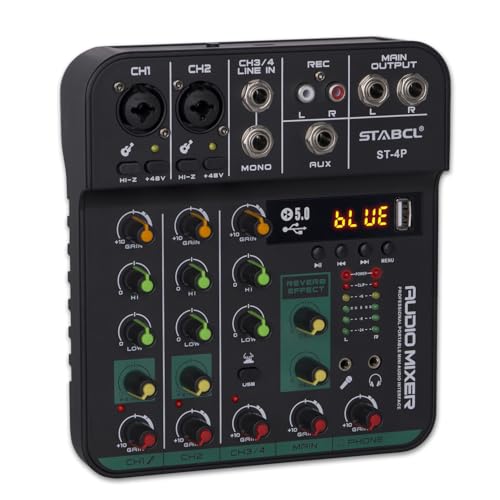
You’ll want this 4-channel audio mixer if you’re a podcaster, live streamer, or mobile presenter who needs reliable, clear sound without cluttering your workspace. I use it daily, and its XLR and 6.35mm inputs with phantom power handle mics and instruments cleanly. The USB-C connection powers the unit and sends audio straight to my laptop, which simplifies setup. Bluetooth streaming works well, though I occasionally notice slight latency. The 2-band EQ and echo effects help shape tone without a DAW. It’s compact and sturdy, but the plastic feels light. With a 24-month warranty and 24-hour support, it’s a solid pick-just don’t expect pro-grade durability.
Best For: Podcasters, live streamers, and mobile presenters who need a compact, reliable audio mixer with plug-and-play USB and Bluetooth connectivity.
Pros:
- Clean XLR and 6.35mm inputs with 48V phantom power for professional mic and instrument use
- USB-C integration powers the unit and enables direct audio recording to a computer
- Built-in Bluetooth, 2-band EQ, and echo effects allow for wireless streaming and tone shaping without a DAW
Cons:
- Slight latency observed during Bluetooth audio streaming
- Plastic build feels lightweight and less durable than premium mixers
- Limited channel count and basic features may not suit advanced studio setups
Moukey 8-Channel Audio Mixer for Guitars and Bass

I’ve found the Moukey 8-Channel Audio Mixer hits the sweet spot if you’re running a tight live setup with multiple instruments-especially guitars, bass, and keyboards-and need a reliable sub-mix without clutter. It handles 8 stereo or 4 mono inputs, each with independent volume control, ideal for blending line-level sources cleanly. I use 1/4-inch TRS or TS cables (not included) to route signals, then send a single mono output to my amp or PA. It runs on DC 5V power-just plug in a certified adapter-and stays noise-free even at high volumes. While it lacks built-in effects or USB, its signal purity and simple layout make it a no-fuss tool for stage or studio sub-mixing.
Best For: Musicians and small venue performers needing a compact, reliable audio mixer to sub-mix guitars, bass, keyboards, and other line-level instruments with clean signal integrity.
Pros:
- Handles 8 stereo or 4 mono inputs with independent volume controls for precise signal blending
- Ultra-low noise performance and high signal integrity, even at peak levels
- Compact, simple design with DC 5V power for flexible use in live or studio setups
Cons:
- No built-in effects or digital connectivity like USB for recording or processing
- Power adapter and 1/4-inch cables not included, requiring additional purchases
- Limited to line-level signals, not suitable for microphones or high-impedance sources without additional interfaces
Factors to Consider When Choosing a Small Audio Mixer
You’ll want to pick a small audio mixer that matches your setup’s needs without overcomplicating things. Check the channel count and input types-like XLR, 1/4″, or USB-to guarantee they align with your mics, instruments, or computers, and don’t overlook power requirements, especially if you’re running on batteries or USB power in low-outlet spaces. While portability and compact design are pluses for tight desks or mobile use, make sure you’re not sacrificing noise performance or build quality for size-some models cut corners on preamp clarity or shielding, which can ruin clean sound in quiet recordings.
Channel Count
A 4- to 8-channel mixer covers most small setup needs, giving you enough inputs for vocals, instruments, and playback devices without overcomplicating your workflow. You’ll want at least one channel per audio source, so if you’re mixing two mics, a guitar, and a laptop feed, a 6-channel mixer fits well. Most channels handle mono inputs, but stereo sources like phones or keyboards take up more space-sometimes two channels per device. Some mixers let you switch a channel between mono and stereo, which gives you more control over how you use your inputs. Higher channel counts offer flexibility, but they also mean a larger footprint and steeper learning curve. You don’t need 16 channels for a podcast or small rehearsal, and going too big can make routing and gain staging trickier than necessary. Pick a count that matches your real-world needs now, with just a little room to grow.
Input Types
When selecting a small audio mixer, the types of inputs available directly determine what gear you can connect and how flexible your setup will be. You’ll want XLR inputs if you’re using professional microphones, especially condensers that need phantom power. Combo XLR/1/4-inch inputs give you the most flexibility, letting you plug in mics or instruments without swapping cables. 1/4-inch TRS inputs handle line-level devices like keyboards or audio interfaces and support balanced signals to reduce noise. If you’re connecting consumer gear like a phone or MP3 player, 3.5mm and RCA inputs are convenient but limit audio quality compared to balanced options. While RCA and 3.5mm ports add convenience, they’re less common on pro-oriented mixers and may introduce noise in electrically noisy environments. Prioritize mixers with combo inputs and solid XLR support for reliable, quiet performance in both home office and mobile setups.
Power Requirements
Though size and inputs often take center stage, the power requirements of a small audio mixer can make or break your setup’s reliability and portability. You’ll find some mixers run on 5V external power, so grab a CE- or UL-certified 1A adapter to avoid dropouts. Others are passive and work without any power-ideal for simple, cables-only setups. But if your mixer has active features like phantom power or Bluetooth, it’ll need consistent power to run. USB-powered models are great for mobile use since they draw power from laptops or power banks. Just keep in mind: clean power matters. Place your mixer away from transformers or monitors to prevent interference. While powered units offer more functionality, they’re less flexible than plug-and-play passive ones. Choose based on your location, gear needs, and how much setup freedom you actually want.
Noise Performance
If you’re chasing clean audio in tight spaces, prioritize mixers with ultra-low noise preamps and tightly controlled circuitry, since background hiss becomes obvious the minute your content hits silence. Choose models with low-noise op-amps and efficient power management chips-they cut ground noise and keep signals crisp, especially in quiet home office settings. Make sure phantom power delivers steady 48V without humming, as noisy power can ruin sensitive condenser mics. Passive mixers skip power-related interference entirely, but they often lack the headroom of active ones, limiting volume flexibility. For busy environments, pick gear with strong RF shielding to fend off interference from Wi-Fi, phones, and nearby electronics. While some compact mixers excel in lab tests, real-world use shows differences in sustained noise floors. Test units yourself if possible-or check verified reviews-since even well-designed models can vary slightly. Noise isn’t always obvious on spec sheets, so trust measured performance over claims.
Portability Design
A sturdy, palm-sized mixer won’t weigh you down-compact models under 3 pounds and less than 12 inches wide fit neatly in laptop sleeves or audio kits, making them ideal for mobile podcasting, gigging, or field recording. You’ll want one built with high-impact plastic or reinforced metal; it survives bumps and drops without the heft of larger gear. Many include integrated handles or mounting points, so you can secure them to stands, rigs, or clip them in your backpack. Top-mounted knobs and faders let you adjust levels quickly, even in cramped spaces like stage monitors or rolling carts. Look for DC 5V power support-running on a portable battery pack keeps you flexible for outdoor or remote sessions. Just remember: ultra-compact designs sometimes sacrifice physical channel count and heat dissipation, so balance size against your input needs and runtime demands.
Frequently Asked Questions
Can I Use a Small Audio Mixer for Live Streaming?
Yes, you can use a small audio mixer for live streaming, and it’s a smart move if you need reliable audio control. You’ll get cleaner sound by adjusting levels, adding mics, or routing audio without taxing your computer. Models with USB outputs, like the Behringer Xenyx QX1204USB, let you send a mixed signal directly to your PC. Just note: built-in effects may not work during USB transmission, and driver support varies-test first. Basic mixers won’t fix poor mics, so pair with decent gear for best results.
Do These Mixers Work With Podcasting Microphones?
Yes, you can use these mixers with podcasting mics-they’re built to handle XLR dynamic and condenser mics common in podcasts. They offer phantom power, gain control, and low-noise preamps for clear audio. Just confirm your mic’s impedance matches the preamp’s specs. Some models add USB audio interfaces, letting you record directly to a computer. Watch for limited channel counts and compact knobs that might frustrate precise tweaks during long sessions.
Are Batteries Included With Battery-Powered Mixers?
No, batteries aren’t included with most battery-powered mixers-you’ll need to buy them separately. You’ll typically use six to eight AA batteries, which last 4–6 hours depending on usage. While this adds to upfront cost, it lets you choose rechargeable ones to save money long-term. Always check the manual for voltage requirements. Some models offer optional AC adapters or USB power, giving you flexibility during long sessions or when outlets are nearby.
Is There a Warranty on These Audio Mixers?
Yes, you get a warranty-typically 1 to 3 years, depending on the brand. Companies like Yamaha and Behringer offer solid coverage, but you’ll need to register your mixer online to activate it. Warranty terms usually exclude physical damage or moisture exposure, so handle with care. Some brands provide extended paid plans. Always keep your receipt and check the manufacturer’s support page-coverage varies by region, and response times can differ based on location and service center availability.
Can I Connect Headphones Directly to These Mixers?
Yes, you can connect headphones directly to these mixers-they all have dedicated 3.5mm or 1/4-inch headphone outputs. You’ll get a private, real-time feed of your mix, which is essential for monitoring. Most models let you adjust volume independently, so you won’t disrupt the main output. Just note: cheaper mixers sometimes lack isolated amplifiers, so audio may distort at high volumes. Always check impedance compatibility with your headphones to avoid weak or overly loud playback.