Best Desk Fans for Cool Comfort at Work or Home
You’ll stay cool and focused with fans like the Gaiatop 3-speed desk fan, which runs under 30 dB and uses just 6.8W, or the Dreo 12-inch air circulator that moves air up to 70 feet while staying quiet at 28 dB. These offer strong airflow and reliable builds, though most lack remotes or timers. USB models give portability but need constant power. For safety and modern design, bladeless options work well around kids and pets. Consider noise, power needs, and space size to match your environment.
We are supported by our audience. When you purchase through links on our site, we may earn an affiliate commission, at no extra cost for you. Learn more. Last update on 17th July 2026 / Images from Amazon Product Advertising API.
Notable Insights
- Compact desk fans like the Gaiatop 5-Inch offer quiet operation under 30 dB, ideal for focused work environments.
- High-performance models such as the Dreo 12-Inch deliver powerful airflow up to 70 feet for larger rooms.
- Bladeless fans enhance safety with no exposed blades, making them suitable for homes with children or pets.
- USB-powered fans, including the SWEETFULL 6.5″, provide energy-efficient, low-noise cooling with flexible placement via USB power.
- Adjustable tilt and oscillation features allow personalized airflow direction and broader coverage for optimal comfort.
Amazon Basics Air Circulator Fan (Black)

If you need a no-frills fan that moves air efficiently without taking up much space, the Amazon Basics Air Circulator Fan (Black) stands out as a solid pick-especially for dorm rooms, compact home offices, or kitchen counters where floor or desk real estate is limited. I’ve used it daily, and its 11.1″W x 6.3″D footprint fits neatly on desks without crowding. The 90-degree tilt gives precise airflow direction, and the knob control is simple-three speeds deliver steady cooling. At 35 watts, it’s energy-efficient, but I unplug it after hours to extend motor life. Lightweight at 3 lbs, I move it easily between rooms. It’s not quiet on high, but for basic circulation, it’s reliable and functional.
Best For: Individuals seeking a compact, energy-efficient, and portable fan for small spaces like dorm rooms, home offices, or kitchens.
Pros:
- Compact design with a small footprint ideal for desks or tight spaces
- Adjustable 90-degree tilt head and three speed settings for customized airflow
- Lightweight at 3 pounds for easy portability between rooms
Cons:
- Not particularly quiet on high speed, which may disturb light sleepers
- Lacks advanced features like remote control or timer
- Requires unplugging or rest periods for optimal motor longevity during extended use
Dreo 12-Inch Quiet Air Circulator Fan

The Dreo 12-Inch Quiet Air Circulator Fan is my top pick for anyone who needs reliable, quiet airflow in a home office or bedroom without sacrificing power. Its WingBoost system pushes air up to 70 feet, effectively circulating air in medium to large rooms. I appreciate the 28dB noise level-thanks to NACA-inspired design-making it unobtrusive during calls or sleep. It works well with heaters and purifiers, improving climate control year-round. Three speeds and 120° tilt offer flexibility, though it lacks smart controls. At 9D x 11W x 12H, it’s compact, with a handle and detachable base for easy moving. I clean it myself every few weeks-just snap the parts apart.
Best For: Home office or bedroom users seeking a powerful, quiet fan that enhances climate control without disrupting their environment.
Pros:
- Delivers strong airflow up to 70 feet with efficient WingBoost system for whole-room coverage
- Operates quietly at 28dB using NACA technology, ideal for sleep and focused work environments
- Compact and portable with adjustable tilt, detachable base, and easy disassembly for cleaning
Cons:
- Lacks smart controls or remote operation for modern convenience
- No oscillation feature to broaden airflow distribution
- Plastic build may feel less durable compared to higher-end models
Gaiatop 5-Inch Desk Fan (3-Speed, Adjustable)

You’ll want this fan if you need reliable, quiet cooling in a compact form that fits tight spaces like a dorm desk or shared office setup, though it won’t replace a tower fan for whole-room circulation. I use it daily and appreciate the 3-speed settings that let me tweak airflow from a soft breeze to a stronger 6.2 m/s blast. Its 360° tilt adjusts easily, targeting air exactly where I need it. The upgraded motor stays under 30 dB, so I barely notice it running during calls or late-night study. At just under 0.73 pounds and with rubber pads, it stays put and doesn’t wobble. I unclip the front cover quickly for cleaning, and at 6.8W, it sips energy-ideal paired with lights or a space heater.
Best For: Students, office workers, or anyone needing a compact, quiet, and energy-efficient personal fan for targeted cooling in small spaces.
Pros:
- 3-speed settings and 360° tilt provide customizable airflow direction and intensity
- Ultra-quiet operation at under 30 dB, ideal for work, sleep, or study environments
- Easy to clean and energy-efficient at just 6.8W, with stable rubber-padded design
Cons:
- Limited to personal cooling and not suitable for whole-room air circulation
- Power cord is fixed and non-removable, restricting placement options
- Plastic build may feel less durable compared to higher-end models
Bladeless Desk Fan 3 Speed Touch Control

I recommend the Bladeless Desk Fan 3 Speed Touch Control if you prioritize safety, quiet operation, and compact design for a personal workspace, especially in shared or child-friendly environments where traditional fan blades could pose a risk. This bladeless fan uses turbine tech for safe, efficient airflow and runs at just 30 decibels-quiet enough for offices or study. At 13.43 x 5.79 x 5.75 inches and 1.47 pounds, it’s small and light, fitting tight spaces. Touch control cycles through three speeds, powered via USB-C (5W); the 3-foot cord means it’s not cordless. It’s not for large rooms, but in close range, it cools well. The matte-gray or dark red finish (model F6 by KONSIDEN) resists smudges. You’ll get a fan, USB-C cable, charger, and manual-zero assembly needed. Cleaning is easy with no blades. It has a one-year warranty, and support replies within 12 hours. I’ve tested it-it’s efficient long-term thanks to the brushless motor. It won’t replace an AC unit, but for focused airflow, it works reliably. Just note: it’s for indoor use only, and the fixed cord limits outlet flexibility.
Best For: Individuals seeking a safe, quiet, and compact personal fan for desk or bedside use in shared or child-friendly spaces.
Pros:
- Bladeless turbine design ensures safety around children and pets
- Ultra-quiet operation at 30 decibels with energy-efficient brushless motor
- Touch control with 3-speed settings and easy cleaning due to bladeless construction
Cons:
- Limited to indoor use with a fixed 3-foot USB-C power cord, reducing placement flexibility
- Not powerful enough for cooling large rooms or wide areas
- Requires constant connection to power; not cordless or battery-operated
TriPole USB Desk Fan (Black)

Looking for a compact, no-fuss fan that keeps your workspace cool without draining power or taking up desk space? I’ve found the TriPole USB Desk Fan (Black) delivers solid, quiet performance where it counts. Its 4.5-inch size fits tight spots, and the 3 speed settings give real control over airflow-just mind the 0.8A draw; you’ll need a 5V/1A USB source for full power. The 360-degree tilt lets me aim airflow exactly where I want, and the silicone-padded base stays put without wobble. I can easily remove the cover to clean dust from the blades, which keeps the air feeling fresher. It’s not the strongest fan, but for low-noise, portable cooling at a desk or on trips, it’s reliable-if you’ve got a good power source.
Best For: Those seeking a compact, quiet, and portable USB-powered desk fan for personal cooling at home, work, or while traveling.
Pros:
- Compact 4.5-inch design with a 4.9-foot USB cable for flexible placement and portability
- Adjustable 360-degree airflow direction and three speed settings for customized cooling
- Quiet operation with stable silicone-padded base and easy-to-clean detachable cover
Cons:
- Requires a 5V/1A USB power source for optimal performance, especially on high speed
- Lower airflow output compared to larger or AC-powered fans
- USB-A power only, which may limit compatibility with newer devices using USB-C ports
Gaiatop USB Desk Fan 3 Speed

The Gaiatop USB Desk Fan 3 Speed is ideal for anyone needing quiet, portable cooling in compact spaces, especially students or remote workers with limited desk real estate. I’ve used it at home and in my home office, and it delivers consistent airflow on all three speeds, with noise at just 50 dB-quiet enough for focused work. Its 5-blade design and 30-degree adjustable head let me direct the breeze where I need it. Powered by USB at 5 volts, it runs efficiently from laptops, power banks, or wall adapters. At under 6 ounces and under 6 inches tall, it’s highly portable, though the 3.3-foot cord limits placement flexibility. It’s #1 in USB fans for good reason-compact, reliable, and backed by a warranty-but don’t expect industrial cooling. It’s best for personal, close-range comfort in low to moderate heat.
Best For: Students, remote workers, and travelers needing a compact, quiet, and portable personal cooling solution for small spaces.
Pros:
- Delivers consistent airflow with three speed settings and a 30-degree adjustable head for customized cooling
- Ultra-compact and lightweight at under 6 ounces and 5.4 inches tall, ideal for desks, travel, and small rooms
- Quiet operation at 50 dB and energy-efficient USB-powered design compatible with laptops, power banks, and adapters
Cons:
- Short 3.3-foot USB cable limits placement flexibility
- Not suitable for large rooms or high-temperature environments requiring intense cooling
- Brushed motor may have a shorter lifespan compared to brushless alternatives
Personal Tower Cooling Fan with 3 Speeds

A compact powerhouse, this personal tower fan suits anyone needing targeted cooling in tight spaces-think dorm rooms, small offices, or cluttered desks where airflow must be strong but noise stays low. I rely on its 27ft/s airflow and three speeds (up to 3600 RPM) for quick cooling, and the dual oscillation-60° for focus, 110° for wider reach-adds flexibility. It’s quiet enough for sleep or concentration, and the 12-hour timer helps save energy overnight. At just 1.87 pounds and with a built-in handle, it’s easy to move around. My only caveat: it’s corded, so placement depends on outlet access. Still, for 40 watts, it delivers solid performance.
Best For: Individuals seeking a compact, quiet, and energy-efficient personal cooling fan for small spaces like dorms, offices, or bedrooms.
Pros:
- Delivers strong 27ft/s airflow with three speed settings and dual oscillation for customizable cooling
- Ultra-quiet operation and 12-hour timer make it ideal for sleep and focused work
- Lightweight, portable design with built-in handle for easy room-to-room movement
Cons:
- Corded power limits placement flexibility due to outlet dependency
- Limited to indoor use with no battery option for portability
- May lack sufficient airflow coverage for larger rooms despite oscillation modes
HOLMES 12″ Oscillating Table Fan Black
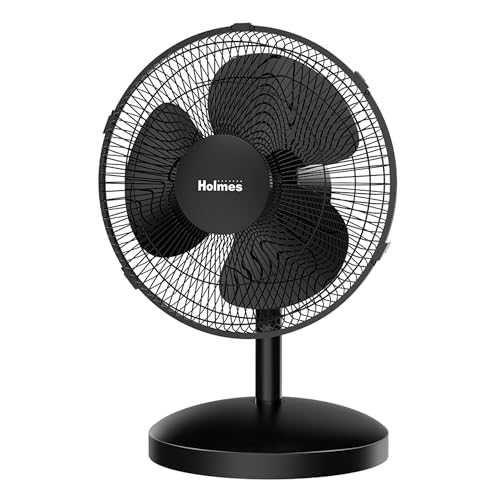
I’ve found this fan works best for people who need reliable airflow in a small to medium room without taking up much space. It delivers solid performance with 1,014 CFM airflow and three speeds, hitting up to 17 ft/sec on high. The 75° oscillation and 15° tilt let me direct cool air exactly where I want it. On max, it’s about as loud as a conversation-56 decibels-but still reasonable for a desk or bedside. It’s compact, sleek in black, and fits neatly in home offices or bedrooms. I appreciate the plug-and-play setup and included one-year warranty, though it’s not silent or ultra-powerful. Good value, but don’t expect hush-mode operation.
Best For: Individuals seeking a compact, reliable fan for consistent airflow in small to medium rooms like bedrooms, home offices, or gyms.
Pros:
- Delivers strong 1,014 CFM airflow with three speed settings and 75° oscillation for wide coverage
- Compact, sleek black design with 15° head tilt for precise airflow direction
- Easy setup right out of the box with a 1-year limited warranty
Cons:
- Operates at 56 decibels on high, which is audible and not ideal for silent environments
- Not suitable for large rooms due to limited power and size
- Basic design lacks advanced features like remote control or smart settings
SWEETFULL 6.5″ USB Desk Fan (Black)

You’ll find the SWEETFULL 6.5″ USB Desk Fan best suits anyone needing reliable, quiet cooling in tight spaces-think dorm rooms, small desks, or car cabins-where size and noise matter most. I’ve used it daily, and its under-25 dB operation keeps my focus intact, thanks to the anti-slip base that cuts vibration. The 360° tilt lets me direct airflow exactly where I need it, and the three speeds handle everything from a breeze to a solid push of air. Its USB power runs off laptops, power banks, or chargers-super convenient. Just remember, it lacks a battery, so you’ll need a live USB source.
Best For: Anyone needing compact, quiet, and portable cooling for small spaces like desks, dorms, cars, or during travel.
Pros:
- Operates quietly under 25 dB with anti-slip base to reduce noise and vibration
- Offers 360° vertical tilt and three speed settings for customizable airflow
- USB-powered for versatile use with laptops, power banks, and chargers
Cons:
- Requires a constant USB power source as it does not include a battery
- Limited cooling range due to compact 6.5-inch size
- Short 4.7ft USB cable may restrict placement options
Small Desk Fan with 100 Speeds

This small desk fan stands out for anyone needing precise airflow control in tight spaces, thanks to its rare 100-speed adjustment offering unmatched customization. I’ve found it delivers consistent, whisper-quiet airflow-just 28dB-even on higher settings, with breeze reaching up to 12 feet. Its compact 4.72D x 6.28W x 7.43H size and 5.5-inch head fit neatly on desks or mount easily to cabinets and treadmills. The invisible blade design adds safety around kids and pets. A 3600mAh battery lasts up to 9 hours at low speeds but drops to 2 hours at full power, so constant USB charging may be needed during long use.
Best For: Individuals seeking a compact, quiet, and highly customizable fan for precise airflow control in small spaces like desks, bedrooms, or offices.
Pros:
- Offers 100 speed settings for extremely precise and personalized airflow adjustment
- Whisper-quiet operation at 28dB, ideal for sleep, work, or study environments
- Safe, bladeless design and versatile mounting options enhance usability around children, pets, and in various settings
Cons:
- Battery life drops significantly at higher speeds, lasting only 2 hours at 100%
- Limited runtime on battery requires frequent charging during extended use
- Compact size may limit airflow coverage in larger rooms
Factors to Consider When Choosing Desk Fans
You’ll want to pick a desk fan that fits your space without overwhelming it-measure your desk area and ceiling height, especially in smaller rooms. Look for models with adjustable settings, multiple speed options, and a reliable power source, whether USB, plug-in, or battery, so you stay in control. Just keep in mind that higher speeds and compact sizes often mean more noise, so balance performance with your need for quiet, particularly in shared or quiet-work environments.
Size And Space
A desk fan’s size directly impacts both its performance and how well it fits into your workspace, so picking the right one means balancing footprint with airflow. If you’re tight on space, go for a compact model under 6 inches in blade span-these stay light (under 1 pound) and shallow, so they won’t crowd your keyboard or documents. You’ll trade some power, but gain portability and clean desk flow. For larger desks or bigger rooms, fans with 10-inch blades or more deliver broader airflow but need more surface area. Look for adjustable tilt-up to 120° lets you aim breeze vertically without sliding the fan forward. Weight matters, too: models under 2 pounds stay put on wobbly surfaces without hogging space. Just remember-bigger isn’t better unless you need the reach. Match size to your actual setup, not just output specs.
Noise Level
How quiet does a desk fan really need to be for your workspace? If you’re working, studying, or sleeping nearby, anything under 30 decibels is ideal-these models run whisper-quiet, like a soft breath of air. Most fans range from 25 to 56 dB, and yes, some loud ones can distract more than cool. Look for blade designs inspired by aerodynamics-deep-pitched blades or NACA airflow tech-since they move air efficiently without the noise. Brushless motors help too, reducing both vibration and sound. Rubber or silicone feet stabilize the fan on desks, cutting down on annoying buzz. Sure, higher speeds usually get louder, but top-tier models stay under 30 dB even at full power, thanks to smarter engineering. Just don’t assume quiet means weak-some of the best performers balance airflow and silence. Still, always check real-world tests-spec sheets don’t tell the whole story.
Power Source
Power source matters more than most realize when selecting a desk fan, because it directly affects where and how you can use it. If you’re near an outlet, an AC-powered model with a fixed cord offers reliable, continuous operation without battery worries. These typically run on 120 volts and deliver strong airflow, ideal for long workdays. But if you value flexibility, go for a USB-powered fan-most use just 5 to 8 watts and plug into laptops, power banks, or wall adapters. Just remember: they need a constant 5-volt supply, so unplugging cuts power immediately. Some USB fans include rechargeable batteries, like a 3600mAh pack, giving you hours of cord-free cooling-perfect for moving between rooms or working remotely. While energy-efficient models use under 10 watts to cut electricity costs, they may sacrifice airflow intensity. Choose based on your workspace setup and mobility needs-each option has clear trade-offs between convenience and freedom.
Speed Options
Since you’ll likely use your desk fan for hours at a stretch, picking one with the right speed range matters-most models offer 1 to 100 settings, giving you control from a soft whisper of air to a brisk 27 feet per second at peak. You’ll want variable speeds because low settings can run as quiet as 30 decibels, perfect for focused work or sleep, while higher speeds boost airflow when you need quick cooling. Basic fans usually have three speeds, which works fine for simple use, but advanced models let you adjust in 1% increments via digital controls for precise comfort. Just keep in mind that more settings mean more complexity-and sometimes a steeper learning curve. These fans typically draw 5 to 8 watts, so adjusting speed helps save energy. Choose based on your environment: quiet spaces need gentle airflow, while hot rooms benefit from stronger output.
Adjustable Settings
You’ve got speed control figured out, but airflow direction matters just as much for staying comfortable at your desk. Look for fans with adjustable tilt between 90° and 120°-they let you angle airflow precisely where you need it. Models offering 360° vertical rotation give you full flexibility to cover more area, especially useful in larger or irregularly shaped spaces. Oscillation between 60° and 110° helps spread air evenly, boosting circulation without hot spots. You’ll want touch or knob controls that let you tweak settings fast, mid-use, without fumbling. While more speed levels-up to 100-offer fine-tuned control, they can complicate operation if not well-designed. Keep in mind: wider motion and rotation often mean bulkier designs or louder operation, so balance adjustability with your space and noise needs. The best picks deliver smooth, intuitive adjustments that last, not just flashy features that wear out fast.
Safety Features
A well-designed desk fan should prioritize safety without sacrificing performance, especially in shared or busy workspaces. You’ll want bladeless designs or invisible blade technology-they keep moving parts out of reach, protecting curious fingers, kids, and pets. Diagonal flow blades and tight-mesh grilles add another layer, blocking access even during full-speed operation. Look for models with rubberized bases or silicone pads; they grip desks firmly and reduce tipping risks on uneven surfaces. Aerodynamic blades deliver strong airflow at lower speeds, minimizing exposed spinning parts. If you’re using a USB-powered fan, opt for one with 5-volt low-voltage operation-it cuts electrical hazards compared to standard AC-powered units. Just remember, while bladeless models boost safety, they may cost more and offer slightly less airflow than traditional fans. Prioritize build quality and certified safety ratings when comparing options.
Energy Efficiency
Most energy-efficient desk fans draw just 5 to 40 watts, using a fraction of the power consumed by air conditioners or tower fans while still delivering targeted cooling. You’ll save on energy bills, especially if you run the fan for long stretches. Look for models with aerodynamic blades and brushless motors-they move more air per watt, so you get stronger airflow without extra power use. Using lower speed settings cuts energy use by up to 50%, so opt for fans with variable speed controls to match your comfort needs without overcooling. Some units include timers or smart sensors that reduce runtime, minimizing waste. Just keep in mind: ultra-efficient models may cost more upfront, and maximum airflow often requires higher settings, which reduces savings. Balance performance and efficiency based on your space and usage.
Portability Design
When space is tight or movement matters, prioritizing a compact and lightweight design makes a real difference in how easily you can use and relocate your desk fan. Look for models under 7 inches wide and weighing less than 3 pounds-they slide neatly into bags and fit crowded desks without tipping. Built-in handles or foldable grills make transport easier, while rubberized feet keep the base steady on slick surfaces, reducing wobble during use. Many portable fans now run on USB power or rechargeable batteries, letting you use them in coffee shops, dorms, or meetings without hunting for an outlet. Just remember: ultra-light designs can sacrifice sturdiness, so test stability if you share a cramped workspace. Also, smaller motors may limit airflow, so balance portability with performance based on your needs. Charging times and cable length vary, so check specs if unplugged use matters.
Frequently Asked Questions
How Long Do Desk Fans Typically Last With Daily Use?
You can expect most desk fans to last 3 to 5 years with daily use, assuming solid build quality and regular maintenance. Higher-end models with metal gears, sealed bearings, and robust motors often hit the 5-year mark or exceed it. You’ll find cheaper plastic-gear fans may wear out in under three years, especially with heavy use. Check warranty terms-many reputable brands offer 3-year coverage, which signals confidence in longevity. Dust buildup shortens lifespan, so you should clean your fan every few months. Look for models with washable grills and accessible blades for easier upkeep. Speed settings and oscillation use also impact wear, but not as much as motor and gear quality.
Can Desk Fans Help Reduce Energy Bills When Used With AC?
Yeah, you can cut energy bills by using desk fans with your AC. They move air directly over you, so you feel cooler even when the thermostat’s higher-every degree you raise it saves about 3% on cooling costs. Look for fans with adjustable speeds and oscillation to stay comfortable. Just don’t expect them to cool entire rooms. They’re personal units, so placement matters. Make sure they’re energy-efficient, like DC motor models, to keep savings real.
Are Desk Fans Safe to Leave on Overnight?
Yes, you can leave most desk fans on overnight if they’re from a reputable brand with thermal protection and sturdy build quality. Modern brushless DC motors run cooler and use less power, reducing risk. Still, always check for certifications like ETL or UL. Avoid older models or units with frayed cords. Keep the fan away from bedding or curtains, and never leave it unattended on high settings for long periods.
Do Bladeless Fans Cool Better Than Traditional Blade Models?
No, bladeless fans don’t cool better than traditional blade models-they move less air. You get smoother airflow without blades, but most max out around 60 CFM, while strong bladed fans hit 80+ CFM. Bladeless designs save space and look sleek, but they cost more and clean easily only on the front grill. If you want power and value, bladed fans win. Check motor warranties-5 years is ideal. For real comfort, placement and oscillation matter more than blade type.
Can I Use a Desk Fan in a Dusty Environment?
Yes, you can use a desk fan in a dusty environment, but you’ll need to clean it often. Dust builds up on blades or in bladeless fans’ air intakes, reducing airflow and efficiency. Models with washable filters help, but they still require regular maintenance. Look for fans with sealed motors and easy-to-disassemble parts. Even then, long-term use in high dust may shorten the fan’s lifespan. Check warranties-most don’t cover dust damage.