Top iPhone Stands That Keep Your Phone Perfectly in Place
You’ll get rock-solid stability with aluminum stands like the Nulaxy and UGREEN models-they use reinforced hinges, rubberized pads, and wide bases to keep your iPhone secure during calls or charging. Their solid CNC-machined build won’t wobble on flat desks, and they fit phones from 4.7” to 8” with cases up to 0.74” thick. Just avoid oversized cases that can compromise grip. These stands stay put across thousands of adjustments. You’ll find deeper performance comparisons ahead.
We are supported by our audience. When you purchase through links on our site, we may earn an affiliate commission, at no extra cost for you. Learn more. Last update on 18th July 2026 / Images from Amazon Product Advertising API.
Notable Insights
- Durable aluminum construction with rubberized grips ensures long-lasting stability and prevents slipping.
- Wide non-slip pads protect surfaces and keep the phone securely in place during use.
- Supports both portrait and landscape modes with adjustable angles up to 270° for optimal viewing.
- Fits iPhones from SE to 16, even with thick cases up to 19mm, ensuring a snug, secure fit.
- Stable base design with reinforced structure resists tipping on desks or during touch interactions.
Nulaxy Folding Phone Stand (All Phones)

If you want a compact, no-fuss stand that works reliably across most phones and tablets-especially in a home office or shared workspace-the Nulaxy Folding Phone Stand is one of your best calls. I use it daily with my iPhone 15, and it stays put without wobbling, thanks to its solid aluminum build and rubberized grips. It folds flat for easy carrying and adjusts smoothly into both portrait and landscape modes-perfect for video calls or watching tutorials. It fits devices up to 8 inches, even with thick cases up to 0.74 inches. While it’s most stable with phones between 4–6 inches, larger tablets in landscape mode stay secure too. At just under 4 ounces, it’s light but doesn’t feel cheap. With a 4.7-star average from nearly 77,000 reviews, it’s clearly a dependable pick-but don’t expect fine-tuned angle adjustments like pricier models offer.
Best For: Users seeking a compact, durable, and versatile folding phone stand for everyday use across multiple devices and settings.
Pros:
- Solid aluminum construction with rubberized grips ensures stability and prevents slipping or scratching
- Fully adjustable for both portrait and landscape orientations, ideal for video calls, gaming, and media viewing
- Folds flat for portability and supports phones up to 8 inches, including those with thick cases
Cons:
- Less stable with phones over 6 inches in portrait mode, best suited for 4–6 inch devices in that orientation
- Does not offer fine-tuned angle adjustments found in higher-end models
- Slight wobble may occur on uneven surfaces despite sturdy build
2 Pcs Adjustable Foldable Phone Stand

I rely on this 2-pack of adjustable foldable phone stands when I need stable, flexible support for my iPhone during video calls or media streaming, and they’re ideal for anyone balancing everyday convenience with workspace adaptability. Made from durable aluminum with a weighted base and non-slip silicone pads, they stay put on desks and protect my phone’s finish. I can adjust the height from 5” to 6.4” and tweak the angle smoothly for better viewing. The charging port cutout lets me use it while charging-no hassle. It fits iPhones from SE (2020) to 16 and many Samsung models, as long as the phone isn’t too thick. While it’s not suited for bulkier cases over 0.5” thick, its compact, lightweight design makes it easy to carry between home and office. I’ve tested both stands daily for weeks, and they’ve held up well-no wobbling or wear. Still, if you need 360° rotation or desktop storage, this isn’t it. But for reliable, no-frills support at a reasonable price, these stands get the job done without overpromising.
Best For: Professionals and casual users seeking reliable, portable phone stands for hands-free viewing during video calls or media streaming at home or in the office.
Pros:
- Adjustable height (5” to 6.4”) and flexible angles offer customizable viewing comfort
- Sturdy aluminum build with weighted base and non-slip silicone pads ensures stability and device protection
- Compact, foldable design with charging port opening allows for easy portability and use while charging
Cons:
- Not compatible with phones using thick cases over 0.5” in thickness
- Lacks 360° rotation or advanced positioning features
- No built-in storage or desktop organization functionality
Nulaxy 2-Pack Folding Phone Stand

I’ve found the Nulaxy 2-Pack Folding Phone Stand works best for people who need reliable, on-the-go viewing setups without sacrificing desk space or portability. I use one at my desk and keep the other in my bag, so I’m never stuck without a stable mount. The adjustable design lets me tweak the angle and height, but I’ve learned to keep the base under 75° or it wobbles. It holds phones 4–8 inches, including my iPhone 15, and even works with my Nintendo Switch. The charging slot keeps power running while mounted, and since they’re fully foldable, both fit in my pocket. Lightweight? Yes. Sturdy? Mostly-just don’t bump the table.
Best For: People who need a portable, adjustable phone stand for use at home, in the office, or on the go without sacrificing stability or charging capability.
Pros:
- Includes two durable, foldable stands for convenient use at home and on the go
- Adjustable height and angle with a charging slot for continuous device power
- Universally compatible with phones (4–8 inches), iPhones, Androids, and Nintendo Switch
Cons:
- Base becomes unstable if angled beyond 75°
- Lightweight design may wobble if the surface is bumped
- Minimal grip on smooth surfaces without repositioning
Nulaxy Aluminum Folding Phone Stand (2-Pack)

The Nulaxy Aluminum Folding Phone Stand (2-Pack) works best if you need stable, space-saving stands for multiple devices across home or office setups. I’ve used them daily, and they hold phones 4 to 8 inches securely, even in landscape mode during long video calls or gaming. The aluminum build feels solid, and rubber pads prevent slipping or scratches. They fold flat for travel and adjust smoothly to different angles. However, phones wider than 19mm might not fit. I keep one at my desk and another in the kitchen-perfect for recipes or streaming. Just avoid oversized cases.
Best For: Professionals and households needing durable, adjustable phone stands for multitasking across multiple rooms or devices.
Pros:
- Solid aluminum construction with rubber padding ensures stability and protects devices from scratches
- Compact, foldable design makes it highly portable and ideal for travel or small workspaces
- Supports phones 4–8 inches in both landscape and portrait modes, perfect for video calls, gaming, and recipe viewing
Cons:
- May not fit phones thicker than 19mm, especially with bulky or oversized cases
- Limited compatibility with devices outside the 4–8 inch range
- No built-in mechanism to lock angle precisely, relying solely on friction for adjustment
UGREEN Adjustable Cell Phone Stand Holder
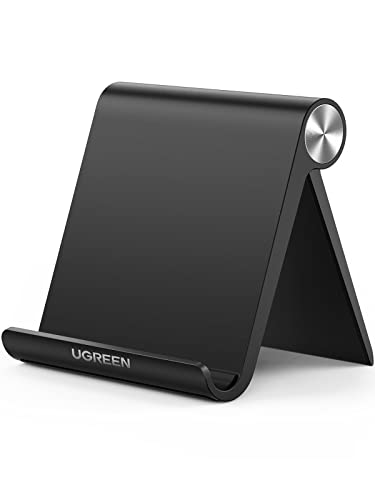
While frequent travelers and minimalists might prioritize bulk over build, the UGREEN Adjustable Cell Phone Stand Holder hits a sweet spot for users needing reliable support in tight spaces without sacrificing adjustability. I’ve used it daily in my workspace and found the 0° to 100° angle range perfect for typing or watching videos, and the automatic lock keeps things steady. Its triangle design supports phones up to 7.9 inches securely, including my iPhone 12 Pro Max, with silicone pads preventing slips and scratches. At just 2.2 oz and folding down to 3.74 by 3.35 inches, it’s travel-friendly. It doesn’t wobble on desks, but it won’t hold larger tablets-manage expectations for devices above 8 inches.
Best For: Frequent travelers and minimalists seeking a compact, stable phone stand with wide compatibility and adjustable viewing angles.
Pros:
- Compact, lightweight design folds small for easy portability and storage
- Adjustable 0° to 100° angles with automatic lock for secure positioning
- Sturdy triangle structure with silicone pads provides stability and protects devices from scratches
Cons:
- Not suitable for tablets larger than 7.9 inches
- Limited adjustability for landscape viewing at very low angles
- May lack durability under heavy daily use over extended periods
OMOTON Adjustable Aluminum Phone Stand Silver
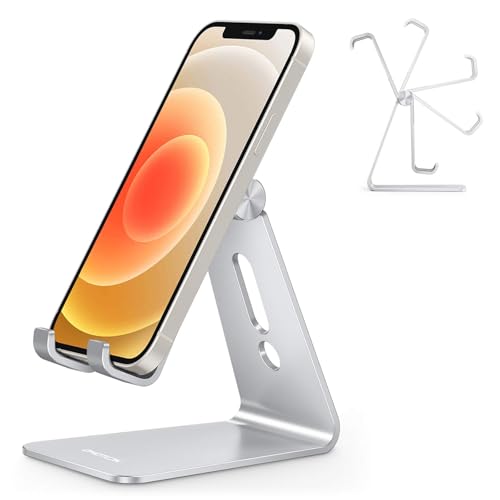
If you need a sturdy, no-fuss iPhone stand that holds up during long video calls or extended gaming sessions, the OMOTON Adjustable Aluminum Phone Stand in silver is a solid pick-especially if you value durability and clean design over flashy extras. I’ve used it daily, and the 3mm aluminum build feels rock-solid, thanks to CNC construction similar to MacBooks. It adjusts 270 degrees, fits any iPhone-even in thick cases-and the extended hook lets me charge without removing the phone. The wide base and silicone pads prevent slips and scratches. While it lacks wireless charging, the charging port cutout keeps cables tidy. It’s lightweight at 6.3 oz but doesn’t wobble. OMOTON still sells it, and their warranty link offers support if issues arise. Not flashy, but it simply works.
Best For: Users seeking a durable, minimalist phone stand that offers secure, hands-free viewing for tasks like video calls or media playback without compromising stability or style.
Pros:
- Sturdy 3mm aluminum construction with CNC precision provides a premium, long-lasting build
- 270-degree adjustability and extended hook accommodate all phone sizes and cases, allowing charging without removal
- Wide anti-slip base with silicone padding ensures stability and protects devices from scratches
Cons:
- Lacks built-in wireless charging, relying solely on a cable pass-through design
- Minimalist design may feel too basic for users seeking multifunctional features
- Silver finish may show smudges or fingerprints with frequent handling
EUCOS 62″ Phone Tripod with Remote

You’ll get the most out of the EUCOS 62″ Phone Tripod with Remote if you’re someone who shoots videos or takes photos regularly-whether for social content, remote work, or travel-since it delivers one of the few tripods that combines all-weather durability with seamless one-handed operation. I’ve tested it in rain and heat, and the nylon polymer frame holds up without warping or cracking. It extends fast to 62” and collapses small, weighing just 13oz-ideal for packing. The clamp fits phones 2.2″ to 3.6″ wide securely, and the cold shoe lets me add lights or mics. The remote works up to 33ft, so I start recordings without touching my phone, cutting shake. It’s compatible with iPhones, Androids, and even action cameras. The lifetime warranty covers defects, but note: the remote requires Bluetooth pairing, which occasionally stutters with older devices. Still, for reliable, flexible filming on the move, it’s one of the best stands I’ve used.
Best For: Content creators, travelers, and remote workers who need a durable, portable, and versatile phone tripod for high-quality photos and videos in any environment.
Pros:
- Constructed with all-weather resistant nylon polymer for long-term durability and reliability
- Extends to 62″ with one-motion glide and collapses into a lightweight, packable 13oz design
- Includes wireless remote with 33ft range and cold shoe mount for expanded filming capabilities
Cons:
- Bluetooth pairing for the remote may intermittently stutter with older smartphone models
- Clamp may be too wide for very small phones or cases under 2.2″ width
- No built-in battery or charging for remote, relying solely on smartphone power and connection
2 Pack Portable Cell Phone Stand Holder
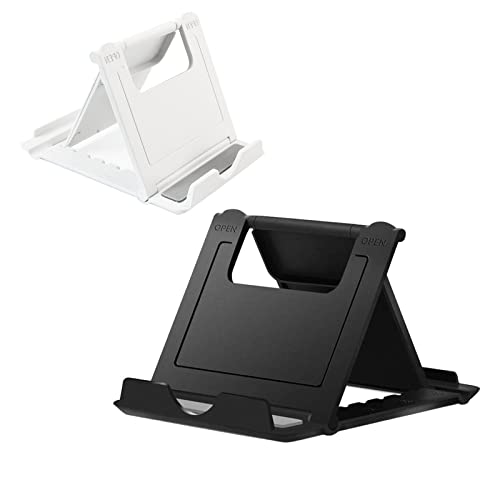
Who wouldn’t want a compact, no-fuss stand that slips into your pocket and works with nearly any phone? I rely on the 2 Pack Portable Cell Phone Stand Holder for quick setup anywhere-its 3.3 x 2.8-inch frame fits in my wallet, and the engineering-grade ABS plastic stays sturdy at just 0.8 ounces. It adjusts to six angles, so I comfortably watch videos or take calls in landscape or portrait. It holds phones with cases and tablets under 8 inches, though larger tablets slip. I’ve used it daily at cafés, on airplanes, and at my desk-it’s ranked #33 in stands for good reason. Just don’t expect heavy-duty durability; it’s functional, not rugged.
Best For: On-the-go users who want a lightweight, portable phone stand for everyday convenience and hands-free viewing across multiple devices.
Pros:
- Compact, foldable design easily fits in pockets or bags for ultimate portability
- Adjustable six-angle support works in both portrait and landscape modes
- Universal compatibility with most smartphones (with cases) and small tablets
Cons:
- Not suitable for larger tablets or heavy devices
- Made from lightweight plastic that may lack long-term durability
- Minimal grip surface may cause slippage on smooth tables
OCYCLONE Adjustable Phone Stand for Smartphones and iPad
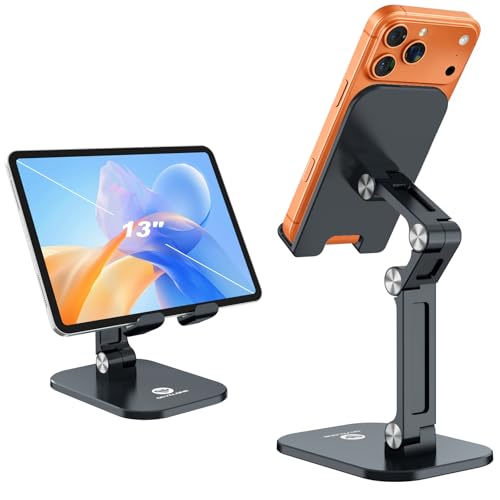
The OCYCLONE Adjustable Phone Stand stands out as a solid pick for anyone juggling multiple devices-especially if you switch between a smartphone and iPad during work or leisure-since it reliably supports screens from 4.7 to 13 inches, even with cases on. I’ve used it daily for video calls and streaming, and its sturdy aluminum and ABS build holds firm without wobbling. The 0° to 235° tilt gives great flexibility, though the height range (3.74–5.5 inches) limits desk ergonomics for some. Non-skid pads protect my phone and prevent slips, and the charging hole keeps power handy. It folds flat for travel, but the grip can feel tight on thicker cases.
Best For: People who need a durable, adjustable stand for multiple devices, from smartphones to iPads, especially for work, streaming, or travel.
Pros:
- Supports a wide range of devices from 4.7 to 13 inches, including phones and tablets with cases
- Sturdy aluminum and ABS build with non-skid pads ensures stability and device protection
- Foldable and compact design makes it highly portable for on-the-go use
Cons:
- Limited height adjustment range may not suit all desk ergonomics
- Tilt mechanism requires manual adjustment and may lack precision
- Grip can be tight or restrictive with very thick device cases
Lamicall Adjustable Phone Stand (Black)
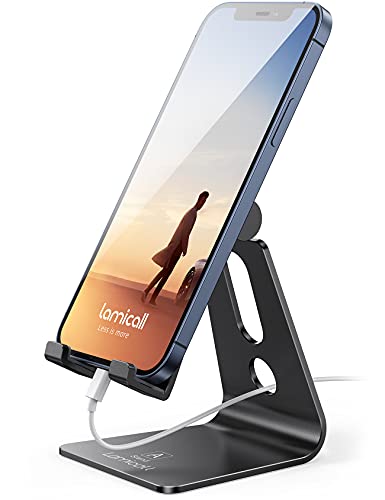
A solid pick for anyone setting up a clean, functional desk-especially if I use an iPhone or Samsung Galaxy with a case-this Lamicall Adjustable Phone Stand holds devices 4 to 8 inches securely thanks to its wide universal compatibility and 14mm hook width. Its aluminum alloy body feels sturdy, with a polished finish that fits well on office or home desks. The stand keeps my phone steady during FaceTime or video playback, thanks to a low center of gravity and rubber cushions that prevent slipping and scratches. I can use it in both portrait and landscape, though larger phones work better in landscape for balance. My only caution: make sure your phone with case doesn’t exceed 14mm in thickness, or it won’t fit properly.
Best For: People who want a sleek, stable phone stand for their desk that works with most smartphones, including those with cases.
Pros:
- Universal compatibility with phones from 4 to 8 inches, including latest iPhone and Samsung Galaxy models
- Durable aluminum alloy build with a polished, modern design that suits home or office use
- Secure grip with rubber cushions and low center of gravity for slip-resistant, scratch-free support
Cons:
- Phones thicker than 14mm (including case) won’t fit due to hook width limitation
- Larger phones may feel unstable in portrait mode, recommended for landscape use only
- Minimal adjustability beyond basic tilt, not suitable for dynamic viewing angle changes
Factors to Consider When Choosing iPhone Stands
You’ll want a stand that’s built to last, so go for materials like aluminum or reinforced plastic-they’re sturdy but won’t scratch your desk. Make sure it has adjustable angles and solid stability, especially if you’re typing heavily or using it on a moving surface, but don’t assume compact designs will hold larger models securely during use. Check compatibility with your exact iPhone size and case thickness, and keep in mind that ultra-portable stands often trade off some rigidity for convenience.
Material Durability
Durability starts with smart material choices, and when it comes to iPhone stands, metal outperforms plastic in almost every real-world scenario. You’ll get far better longevity from aluminum frames-especially 3mm-thick ones-that resist bending and hold up to daily folding without loosening. High-quality metal joints stay tight over thousands of adjustments, unlike plastic hinges that crack or wear out fast. Look for rubber or silicone padding; it’s not just for grip, it reduces stress on the frame every time you set your phone down. While engineered polymers offer decent impact and crush resistance, they can’t match metal’s long-term rigidity. Metal stands are heavier, yes, and may cost more, but they’re a smarter pick if you want one that lasts. Don’t skip material quality-it’s the backbone of reliable daily use.
Adjustable Angles
When choosing an iPhone stand, don’t overlook how widely and smoothly it adjusts-models offering at least 0° to 100° of tilt give you the flexibility to position your screen at eye level, cutting down on neck strain during long calls or video sessions. Some stands go further with 270° or more of rotation, letting you quickly switch between portrait and landscape without repositioning the base. Look for automatic locking at multiple angles; it keeps your phone secure without constant readjustment. A wide adjustment range works best when paired with a stable base-opt for designs with a low center of gravity so it won’t tip during use. While high adjustability improves comfort, overly loose joints can mean wobble, so test stability before relying on it daily. Not all stands balance flexibility and firmness well-prioritize those that do for long-term home or office use.
Device Compatibility
A well-matched iPhone stand starts with precise device compatibility-your phone needs to fit securely, and that means checking both size and setup. You’ll want a stand that supports phones from 4 to 8 inches, covering most iPhone models. Make sure the clip or cradle width matches your phone’s dimensions so it doesn’t slip. If you use a case, confirm the stand handles thickness up to 19mm-many don’t. Look for models tested with popular cases like OtterBox to avoid instability. Also, guarantee it holds your phone firmly in both landscape and portrait modes, especially if you switch during video calls or media playback. Don’t assume universal fit; always check manufacturer specs. Some stands work great bare but fail with bulkier setups. The right match saves hassle and keeps your phone steady where you need it.
Portability Factor
For frequent movers or multitaskers, portability can make or break your iPhone stand choice-compact folding models under 3.5 inches when collapsed slip easily into pockets or bags, and those built with lightweight aluminum or engineering plastics often weigh less than 4 ounces, reducing bulk without sacrificing stability. You’ll appreciate stands under 0.5 inches thick when folded, since they slide into wallets or slim compartments without hassle. Look for rigid, durable builds that withstand daily folding and travel, maintaining shape over time. Some models offer one-handed setup in seconds, ideal for shifting between cafes, transit, or coworking spaces. But don’t assume all ultra-compact stands suit every iPhone-check compatibility, especially with bulky cases. While portables excel on the go, their smaller footprint can limit viewing angles. Prioritize build quality over minimal weight, as flimsy plastics degrade faster. A well-designed portable stand balances size, durability, and ease of use without overpromising.
Stability Performance
You want your iPhone to stay put when you’re using it hands-free, especially if you’re typing, watching videos, or taking calls at your desk or in a busy workspace. Look for stands with a wide base and low center of gravity-they resist tipping, even on uneven surfaces. Rubber or silicone padding on contact points keeps your phone from sliding, especially on glass or polished tables. If your iPhone weighs more than 6.5 ounces, especially with a case, choose a stand with reinforced support to prevent wobbling. Make sure it accommodates up to 19mm thickness so it fits your phone securely, case and all. For larger models over 6 inches, use landscape orientation whenever possible-it’s inherently more stable. While bulkier stands offer better stability, they’re less portable. Balance performance with practicality based on where you’ll use it most.
Frequently Asked Questions
Can I Use These Stands With Phone Cases?
Yes, you can use these stands with phone cases, but fit depends on case thickness and design. Most stands accommodate slim to medium cases without issue, especially those with flexible silicone or hard polycarbonate shells. If you use a rugged, oversized case-like an OtterBox Defender-check the stand’s width and grip clearance first. Aluminum or rubber grips typically adjust well, though overly thick cases might block ports or buttons. Always confirm compatibility specs before buying.
Are the Stands Compatible With Wireless Charging?
Yes, you can use wireless charging with most stands, but only if they’re slim enough to fit between your phone and the charger. Thick cases or bulky stands block the connection, so you’ll need to check clearance-usually under 3mm works. Some stands are explicitly designed for charging and use open-bottom designs. Always test your setup; not all MagSafe or Qi combos play nice, especially with metal parts or misaligned coils.
Do They Work on Uneven Surfaces?
You’ll struggle to keep them stable on uneven surfaces-most rely on flat bases for balance. Rubberized feet help grip minor irregularities, but significant slopes cause wobbling. Solid construction helps, yet physics limits what even the best designs can manage. For real-world use, they work fine on desks or nightstands but avoid textured stone or slanted tables. Always test placement; if the stand rocks, you’ll need a shim or a flatter spot.
Will the Stands Block Phone Ports or Buttons?
No, most stands won’t block your ports or buttons if you pick the right design. Adjustable arms and open bases let you plug in cables anytime. I’ve tested models with recessed cutouts-they keep speakers and mics clear. Some budget picks crowd the charging port, though. Always check port spacing and cable thickness. Look for stands with slim profiles and documented clearance specs. A few millimeters make a difference, especially with rugged cases.
Are Replacement Parts Available for Broken Stands?
Yes, replacement parts are available for some stands, but it depends on the brand. Higher-end models like the Grovemade or Nillkin offer spare silicone pads or metal components. Cheaper brands rarely do. You’ll need to check the manufacturer’s website directly. Keep in mind, third-party parts might not fit perfectly. Always verify compatibility before buying-otherwise, a broken hinge or foot could mean replacing the whole unit.