Best Microphones Every Content Creator Should Own
You need a DJI Mic Mini for crisp, wireless lavalier audio with 48kHz clarity and 400m range-perfect for mobile filming. Pair it with a FIFINE T669 or Logitech Blue Yeti for reliable USB plug-and-play desktop work. Add a Shure SM7B if you’re serious about studio vocals, but know it needs a strong preamp. Wireless mics offer freedom, but demand battery management. Wired XLR or USB choices give stability. Each mic serves a role, and your setup depends on environment, device, and sound goals-your next move shapes what to prioritize.
We are supported by our audience. When you purchase through links on our site, we may earn an affiliate commission, at no extra cost for you. Learn more. Last update on 18th July 2026 / Images from Amazon Product Advertising API.
Notable Insights
- DJI Mic Mini offers compact, high-quality wireless audio with 48kHz sampling and 400m range, ideal for mobile creators.
- FIFINE T669 USB microphone delivers clear vocal capture with cardioid patterning and plug-and-play simplicity for streaming or podcasting.
- Logitech Blue Yeti provides versatile recording modes and broadcast-quality sound, perfect for beginners and multi-person content.
- Shure SM7B is a professional-grade dynamic mic with excellent noise rejection and rich vocal clarity for studio productions.
- Wireless dual-mic systems like Mini Mic Pro enable easy, cable-free recording with noise reduction for interviews and vlogging.
DJI Mic Mini Wireless Lavalier for iPhone/Android

If you’re a mobile content creator who values both audio quality and portability, the DJI Mic Mini Wireless Lavalier for iPhone/Android stands out as a top pick-especially when you’re filming on the go with a smartphone or DJI Osmo device. I use it daily, and the 10g transmitters stay put without drawing attention. Audio is crisp, thanks to 48kHz sampling and 120 dB SPL handling, and the 400m range stays stable, even in crowded areas. With the case, I get up to 48 hours. It pairs directly with my Osmo Pocket 3 and Action 5 Pro-no extra receiver needed. Two transmitters help when filming interviews, and noise cancellation cuts wind and hum well, though loud, sudden sounds still occasionally clip.
Best For: Mobile content creators who need high-quality, portable audio for smartphones or DJI Osmo devices during vlogging, interviews, or livestreaming.
Pros:
- Ultra-compact and lightweight 10g transmitters for discreet, comfortable wear
- Crisp audio quality with 48kHz sampling and 120 dB SPL handling, ideal for professional use
- Direct pairing with DJI Osmo devices and extended 48-hour battery life with charging case
Cons:
- Occasional audio clipping with sudden loud sounds despite automatic limiting
- Limited to two transmitters, which may restrict multi-person setups
- Noise cancellation effective but not foolproof in very noisy or windy environments
Mini Mic Pro Wireless Microphone 2-Pack

I rely on the Mini Mic Pro Wireless Microphone 2-Pack when I need clean, professional audio without the hassle of complex setups, and it’s especially well-suited for solo creators who regularly collaborate with a guest or co-host. These plug-and-play mics work instantly with USB-C and Lightning devices-no Bluetooth or apps needed-making them dependable for quick recordings. I get crisp, studio-quality sound with solid noise reduction, even outdoors, thanks to the included foam windscreens and dead cat covers. Each mic weighs under an ounce, clips easily, and runs up to 6 hours on a charge. While battery life is solid, I can’t record beyond that without recharging. They’re durable and pocketable, but the lack of expandable storage or advanced settings limits flexibility for larger productions. Still, for straightforward, high-quality dual-mic audio, they deliver where it counts.
Best For: Content creators, interviewers, and podcasters who need reliable, high-quality dual-mic audio with simple plug-and-play setup across mobile and laptop devices.
Pros:
- Delivers studio-quality sound with effective noise reduction, ideal for outdoor and on-the-go recording
- Plug-and-play connectivity with no Bluetooth pairing or apps required, compatible with USB-C and Lightning devices
- Compact, lightweight design with long battery life and simultaneous device charging support
Cons:
- Limited to 6 hours of battery life per charge, restricting extended recording sessions
- No expandable storage or advanced audio settings for professional or large-scale productions
- Fixed functionality without wireless syncing capability beyond direct device connection
Pyle Wireless Lavalier Mic System

The Pyle Wireless Lavalier Mic System stands out for content creators who need reliable, high-quality audio without the hassle of complex setup, especially when recording on the move or in dynamic environments like outdoor interviews or classroom presentations. I’ve used it for vlogging and podcasts, and it delivers clear, professional sound up to 82 feet with solid noise cancellation. The USB-C plug-and-play design works instantly with phones, tablets, and laptops-no apps or pairing needed. I get about 8 hours of runtime, and the included charging case extends that on the go. It’s lightweight, clips securely, and stays in place, though the plastic build feels a bit delicate for rough handling. It’s a strong pick if you value simplicity and portability over rugged durability.
Best For: Content creators, educators, and performers who need a simple, portable wireless mic system for vlogging, podcasts, or presentations.
Pros:
- Delivers professional-quality sound with 360° omnidirectional pickup and effective noise-canceling technology
- Plug-and-play USB-C operation works instantly with phones, tablets, and laptops-no pairing or apps required
- Includes a charging case for extended battery life and offers up to 8 hours of continuous use on a single charge
Cons:
- Plastic construction feels less durable, making it prone to damage with rough handling
- Limited range beyond 82 feet results in signal dropouts
- Windscreen is basic and may not sufficiently reduce wind noise in outdoor environments
Pyle Dynamic Microphone with XLR Cable

A solid pick for creators stepping up from budget USB mics to a more professional setup, the Pyle Dynamic Microphone with XLR Cable brings reliable performance and rugged build for under $50. I’ve used it for voiceovers and live instrument tracking, and its cardioid pattern cuts background noise well, while the built-in pop filter keeps plosives in check. The zinc alloy body feels sturdy, and the 15ft XLR cable gives me room to move. It handles high sound pressure cleanly, though the 50Hz–15kHz response misses some high-end detail. You’ll need an audio interface, but that’s expected at this price.
Best For: Content creators and musicians upgrading to a durable, stage-ready dynamic microphone for live performance or studio recording on a budget.
Pros:
- Rugged zinc alloy build and steel mesh windscreen ensure durability in demanding environments
- Cardioid pickup pattern effectively isolates sound source and reduces background noise and feedback
- Includes 15ft XLR cable and built-in pop filter for immediate use in both live and studio settings
Cons:
- Frequency response (50Hz–15kHz) lacks extended high-end clarity compared to higher-end models
- Requires an external audio interface, not ideal for plug-and-play setups
- Heavier weight may require a sturdier mic stand for optimal positioning
FIFINE USB/XLR Dynamic Mic for Podcasting

While not every content creator needs dual connectivity, I find the FIFINE USB/XLR Dynamic Mic shines best for podcasters and streamers who want flexibility without sacrificing sound quality. Its 50Hz–16kHz frequency response delivers clear, balanced vocals, and the cardioid capsule effectively rejects background noise. I love the USB plug-and-play for quick setups, though the XLR option enables higher fidelity with an audio interface. The mute button, headphone monitoring, and gain knob are super handy-just remember they only work over USB. RGB lighting looks slick and syncs with gaming rigs, but it’s cosmetic. Mounting’s easy with dual-thread support, though the XLR cable isn’t included.
Best For: Podcasters and streamers seeking flexible USB and XLR connectivity with studio-quality sound and convenient on-mic controls.
Pros:
- Offers both USB plug-and-play convenience and XLR connectivity for professional audio setups
- Clear vocal reproduction with effective background noise rejection thanks to cardioid dynamic capsule
- Integrated mute button, headphone monitoring, gain knob, and customizable RGB lighting enhance usability and aesthetics
Cons:
- On-mic controls and RGB lighting are disabled when using XLR connection
- XLR cable not included, adding extra cost for full functionality
- Limited frequency response (50Hz–16kHz) may lack deep bass compared to higher-end microphones
Amazon Basics USB Condenser Mic for PC

If you’re a content creator on a tight budget but still want clean, reliable audio without diving into complex setups, the Amazon Basics USB Condenser Mic for PC is a smart starting point. I’ve used it for podcasts and streaming, and its 14mm diaphragm captures clear, detailed sound while the cardioid pattern minimizes background noise effectively. The built-in shock mount reduces desk vibrations, and the 360° stand offers solid positioning. I love the one-touch mute-super handy during live calls. It’s truly plug-and-play, no drivers needed. Just know the build feels lightweight, so it’s best for stable desks, not heavy studio use.
Best For: Budget-conscious content creators seeking a simple, plug-and-play microphone for podcasting, streaming, and voice calls.
Pros:
- Clear audio capture with a 14mm diaphragm and effective cardioid pickup pattern for reduced background noise
- Built-in shock mount and 360° adjustable stand provide solid positioning and minimize vibrations
- One-touch mute and true plug-and-play USB connectivity with no drivers needed
Cons:
- Lightweight build may feel less durable and is less suited for high-end studio environments
- USB connection is detachable but cable quality is basic and may wear over time
- Limited compatibility with mobile devices; primarily designed for Windows and Mac computers
Marengo Handheld Wired Microphone with 13ft Cable

You’ll want the Marengo Handheld Wired Microphone if your work calls for a rugged, plug-and-play tool that delivers consistent vocal clarity without relying on batteries or complex setup. I use it for live speaking and outdoor recordings, where its cardioid dynamic capsule cuts background noise and boosts my voice up close. The 13ft cable gives me room to move, and the on/off switch is handy for quick muting. It’s built tough with eco-friendly materials and connects via 6.35mm jack-just grab the included 1/4 to 1/8 adapter. But don’t expect it to work with phones, laptops, or Bluetooth gear; it’s for PA systems, amps, and karaoke machines only.
Best For: Live performers, public speakers, and karaoke enthusiasts who need a durable, battery-free microphone with reliable vocal clarity and minimal setup.
Pros:
- Delivers clear, amplified voice with effective background noise reduction thanks to cardioid dynamic capsule
- Rugged, eco-friendly build with a 13ft cable for ample movement and stable wired connection
- Features an intuitive on/off switch and includes a 1/4 to 1/8 adapter for broad compatibility with audio systems
Cons:
- Not compatible with phones, laptops, tablets, or Bluetooth devices, limiting modern consumer use
- Wired design restricts mobility compared to wireless alternatives
- Requires external MIC IN port via PA systems or amplifiers, which may not be readily available in all settings
Shure SM7B Vocal Dynamic Microphone
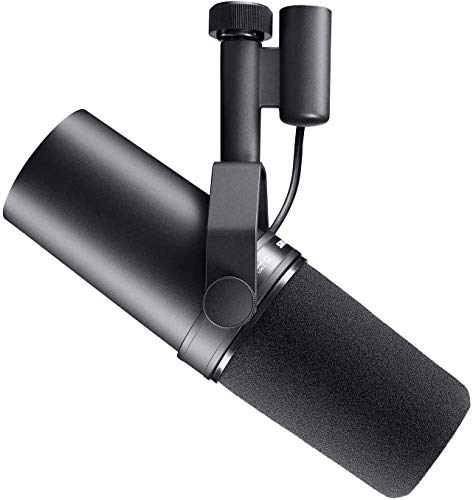
The Shure SM7B stands out as a top-tier choice for content creators who prioritize broadcast-quality vocals in both professional studios and treated home setups, especially when consistent, studio-grade sound is non-negotiable. I rely on its dynamic cartridge for warm, natural tone and its cardioid pattern to reject off-axis noise. The built-in pop filter and shock mount cut plosives and mechanical noise, while electromagnetic shielding stops computer hum. It needs a strong preamp-I’ve found my interface’s gain cranked high. Durable, metal-built, and with useful tone controls, it’s an investment that delivers if your setup can power it.
Best For: Content creators, podcasters, broadcasters, and studio professionals who demand consistent, high-quality vocal recordings in controlled acoustic environments.
Pros:
- Delivers warm, natural sound with excellent noise isolation thanks to dynamic cartridge and cardioid polar pattern
- Built-in pop filter, shock isolation, and electromagnetic shielding minimize plosives, mechanical noise, and hum
- Durable metal construction with tone-shaping controls (bass rolloff and presence boost) for precise audio customization
Cons:
- Requires a high-gain, clean preamp or audio interface due to low output sensitivity
- Lacks plug-and-play convenience, making it less ideal for entry-level or portable setups
- Premium price point may be prohibitive for casual users or beginners
Wireless Karaoke Microphone Dual Pack Rechargeable

A wireless karaoke microphone dual pack rechargeable system earns its spot in a content creator’s toolkit when performance stability and ease of use matter most-especially for those hosting live events or recording in dynamic environments. I’ve used this dual-mic setup for outdoor parties and small stages, and it holds a solid 200-foot line-of-sight range with zero signal drops. The cardioid capsules deliver clear, low-distortion sound (<0.2%) and resist howling, which is a win for loud settings. Built-in 1200 mAh batteries last a few hours, but charging takes over 7 hours-a real limitation. They pair instantly with the receiver, which works with PA systems or speakers via 6.35mm or 3.5mm inputs. Just don’t expect mobile or computer use-it won’t connect.
Best For: Content creators, performers, and event hosts needing reliable wireless microphones for live karaoke, speeches, or outdoor gatherings with stable audio and simple setup.
Pros:
- Delivers clear, low-distortion sound with excellent feedback and noise rejection thanks to cardioid dynamic capsules
- Offers a strong 200-foot line-of-sight range with no signal drops and plug-and-play pairing
- Compatible with PA systems, amplifiers, and speakers via 6.35mm/3.5mm inputs for versatile setups
Cons:
- Long 7+ hour charging time with only a few hours of battery life per charge
- Not compatible with mobile devices, computers, or tablets
- AUX interface not supported, limiting connectivity options
Logitech Blue Yeti USB Microphone

For content creators who need a single microphone that handles everything from crisp podcast vocals to dynamic streaming sessions, the Logitech Blue Yeti USB Microphone stands out as a go-to tool-especially if you’re building a versatile home studio without investing in multiple mics. I use it daily, and its three-capsule array delivers broadcast-quality sound that works reliably for YouTube, gaming, and Zoom calls. The four pickup patterns-cardioid, omnidirectional, bidirectional, and stereo-give me flexibility for solo recordings or interviews. Onboard controls let me adjust gain, mute instantly, and monitor audio without lag. Blue VOICE software enhances vocals, though it’s not essential. The desktop stand is sturdy but takes up space-ideal if you have room. It’s plug-and-play on PC and Mac, requires no extra interface, and builds studio-grade results into a single device. Just mind the USB cable-it’s non-detachable, which could complicate long-term use.
Best For: Content creators, streamers, podcasters, and remote workers seeking a versatile, all-in-one USB microphone for high-quality audio across multiple use cases.
Pros:
- Delivers broadcast-quality sound with a custom three-capsule array for studio-like performance
- Offers four pickup patterns (cardioid, omnidirectional, bidirectional, stereo) for diverse recording scenarios
- Features onboard controls, zero-latency monitoring, and Blue VOICE software for real-time audio enhancement
Cons:
- Non-detachable USB cable limits setup flexibility and may pose durability concerns
- Bulky desktop design takes up significant desk space
- Stand offers limited adjustability compared to professional boom arms
Factors to Consider When Choosing a Microphone
You’ll want to pick a microphone that matches your content style and setup, so think about whether a dynamic or condenser mic works best for your environment-condensers are more sensitive and detailed but can pick up extra room noise. Make sure the polar pattern (like cardioid or omnidirectional) fits your use, since it determines how sound is captured around you, and go for USB connectivity if you’re streaming straight from your desk, or XLR if you plan to use an audio interface for better control. While portability and sleek design matter, especially for creators on the move, don’t sacrifice audio clarity or build quality for looks-check frequency response, sample rates, and warranty coverage to avoid costly swaps down the line.
Microphone Type Selection
While your recording environment and use case should guide your choice, dynamic and condenser microphones remain the core options for most creators. You’ll want a dynamic mic if you’re recording loud sources or working in untreated spaces-it handles high sound pressure levels and resists feedback, making it great for live vocals or podcasting. Condenser mics, on the other hand, need phantom power but deliver crisp detail and wide frequency response, ideal for studio vocals or voiceovers. For interviews or presentations, a lavalier mic clips discreetly on clothing and offers hands-free clarity. Handheld dynamics are rugged and isolate your voice well on stage or on location. Wireless systems give you freedom to move up to 400 meters, depending on interference, but require battery management and clear line-of-sight for best performance.
Polar Pattern Importance
A cardioid polar pattern is your best bet for most content creation setups because it captures your voice clearly from the front while substantially reducing background noise from the sides and rear. If you record in a treated room or interview two people face-to-face, a bidirectional (figure-8) pattern works well by picking up sound from the front and back but rejecting side noise. Omnidirectional mics capture audio evenly from all directions, which suits group discussions in quiet, controlled spaces but increases background interference. Supercardioid and hypercardioid patterns offer even tighter focus than cardioid, boosting isolation and gain before feedback-ideal for loud environments-but they’re sensitive at the rear, so placement matters. Your choice directly impacts clarity, signal-to-noise ratio, and off-axis coloration. Pick based on your room, setup, and specific recording needs, not just specs.
Connectivity Options Available
Your microphone’s polar pattern shapes how sound is captured, but its connectivity determines how easily and reliably that audio reaches your recording device. You’ll find wired options like USB, XLR, and 3.5mm-USB is plug-and-play with computers, while XLR delivers pro-level, balanced audio through external interfaces. If you value mobility, wireless systems using RF or digital signals offer ranges up to 400 meters, though walls and interference can reduce performance. Look for models with USB-C or Lightning to record directly to phones or tablets, often with power delivery so your device stays charged. Some wireless mics avoid Bluetooth, using dedicated transmitters for zero lag and strong reliability. For maximum flexibility, pick mics with both XLR and USB outputs-this combo lets you switch between cameras, interfaces, and recorders without extra gear. Just remember: wireless brings freedom, but reliable signal and battery life are critical in real-world use.
Audio Quality Essentials
If you’re serious about crisp, professional-grade audio, prioritize microphones with a balanced frequency response, high sampling rates, and strong SPL handling-these specs directly shape the clarity and realism of your recordings. A wide frequency response captures vocals and instruments accurately, while 48kHz sampling preserves fine detail in digital formats. Look for SPL ratings above 120dB if you record loud sources like singing or amplified instruments to avoid distortion. For vocal work, cardioid patterns help isolate your voice and minimize background noise in typical rooms. Still, pattern control varies-test placement to avoid plosives and proximity effect. Also check self-noise: under 15dB is ideal for quiet environments. A high signal-to-noise ratio guarantees clean output, especially with gain-heavy setups. These specs matter most when clarity is non-negotiable-but remember, no mic fixes poor acoustics. Pair solid specs with smart placement and room treatment for best results.
Portability And Design
Though size and weight might seem minor, they’re critical when you’re recording on the move-opt for microphones under 1 ounce to stay comfortable during long sessions and guarantee discreet placement on clothing. You’ll want clip-on or magnetic mounts that stay secure on fabric, even when you’re walking or gesturing during interviews. Models with rechargeable batteries and charging cases deliver up to 48 hours of power, cutting the need for outlets during travel. Look for rugged builds with shock-absorbing materials and foam windscreens-they protect against bumps and wind noise outdoors. Detachable cables and 360° stands give you flexibility on location, but remember: compact mics sometimes trade off internal mic size for portability, which can affect sensitivity. Test them in real environments before committing. Prioritize durability and ease of setup, especially if you’re filming in unpredictable conditions.
Frequently Asked Questions
How Do I Update Microphone Firmware?
You update microphone firmware by plugging it into your computer via USB, then using the manufacturer’s software-like ShurePlus, Audio-Technica Connect, or RØDE Central-to check for updates. You follow the on-screen prompts, don’t disconnect during the process, and make certain your device is fully charged or plugged in. Firmware updates fix bugs and add features, but failed updates can brick your mic, so you always back up settings first and follow instructions exactly.
Can I Use Multiple Mics Simultaneously?
Yes, you can use multiple mics at once, but it’s trickier than it sounds. You’ll need separate audio inputs-most computers only have one, so you’ll likely need multiple USB interfaces or a mixer. Sync issues and phase cancellation are real risks if mics pick up the same sound at different times. For clean results, position mics carefully and monitor levels closely. While possible, it’s often overkill unless you’re recording multiple people or sources in the same room.
Do These Mics Work With Gaming Consoles?
You can plug most of these mics into gaming consoles, but not all work out of the box. USB mics often need a PC or audio interface since consoles like PlayStation don’t support USB audio input directly. XLR mics need an audio interface or mixer that’s console-compatible. On Xbox, USB mics usually work better. Always check the console’s mic input specs first-some only accept 3.5mm headsets. Test latency and levels before streaming.
Are Replacement Parts Available for These Mics?
Yes, you can get replacement parts for most of these mics, but availability depends on the brand and model. Shure and Rode offer long-term support, with grilles, cables, and clips sold separately. Some budget mics, like certain Blue Yeti variants, have limited part options. Always check the manufacturer’s website first. Keep in mind, third-party parts may fit but could affect performance or void warranties. Registering your mic often extends support access.
How Do I Clean and Maintain My Microphone?
You clean and maintain your microphone by using a dry, soft-bristled brush to remove dust and a slightly damp cloth-never wet-for the body. Avoid alcohol or chemicals. Keep it covered when not in use and store in a dry place. Never touch the mesh grille with bare hands. Pop filters help reduce moisture buildup. Condenser mics need extra care since they’re more sensitive. Regular, gentle cleaning extends lifespan and maintains audio clarity over time.