Best Monitor Risers for a Cleaner, More Ergonomic Desk Setup
You’ll get the best results with the WALI STT003 or TEAMIX 2-Pack-they offer adjustable heights (3.9″–5.5″ and 3.4″–6.8″, respectively), strong weight support (44–80 lbs), and clean, stable builds that elevate your screen to eye level. Both reduce neck strain and free up desk space, though neither has cable management. The WALI’s vented metal platform aids laptop cooling, while the TEAMIX’s sturdy MDF construction suits compact setups. Keep in mind alignment precision during assembly and check your monitor’s footprint to avoid overhang. You’ll want to evaluate how storage, height range, and material durability align with your daily workflow.
We are supported by our audience. When you purchase through links on our site, we may earn an affiliate commission, at no extra cost for you. Learn more. Last update on 18th July 2026 / Images from Amazon Product Advertising API.
Notable Insights
- Adjustable height settings between 3.5 to 6 inches help position monitors at eye level for optimal ergonomics.
- Sturdy risers with non-slip pads and weight capacities above 40 lbs ensure stability and safety for dual setups.
- Open-bottom or multi-tier designs provide under-shelf storage to organize keyboards, notebooks, and office supplies.
- Modular or expandable stands like Fenge’s allow custom configurations for dual or L-shaped monitor arrangements.
- Minimalist, space-saving models suit compact desks while improving posture and reducing neck and shoulder strain.
WALI Adjustable Laptop Riser with Storage (STT003)

If you’re looking to clear clutter and align your screen at eye level without breaking the bank, the WALI Adjustable Laptop Riser with Storage (STT003) stands out as a practical pick for everyday users, students, and remote workers who need reliable ergonomics on a budget. I use it daily, and its three height settings-3.9, 4.7, and 5.5 inches-let me position my laptop comfortably, reducing neck strain. The 14.6 x 9.3-inch metal shelf holds up to 44 lbs, so it supports laptops or small monitors securely. Vented holes prevent overheating, and rubber pads keep it stable without scratching surfaces. I store notebooks beneath it, saving desk space. It’s not for ultra-wide setups, but for most, it’s sturdy, functional, and worth the price.
Best For: Everyday users, students, and remote workers seeking an affordable, space-saving, and ergonomic laptop or monitor riser for improved posture and desk organization.
Pros:
- Adjustable height with three settings (3.9″, 4.7″, 5.5″) for optimal screen alignment and ergonomic comfort
- Sturdy metal construction with 44 lbs capacity, rubber pads for stability, and vented platform for device cooling
- Provides under-shelf storage to reduce desk clutter and features a sleek black design that fits modern workspaces
Cons:
- Limited platform size (14.6 x 9.3 inches) may not accommodate ultra-wide laptops or large monitors
- No cable management features for a cleaner setup
- Minimalist design lacks additional accessories or expandability options
WESTREE Dual Monitor Stand Riser

The WESTREE Dual Monitor Stand Riser is an excellent choice for anyone looking to maximize desk space while maintaining a clean, organized workspace-especially if you’re using two monitors or a mix of devices. I like its sturdy steel frame and solid wood-look finish, which holds up to heavy screens without wobbling. The anti-slip pads really work, keeping it steady during daily use. It elevates your displays to eye level, helping reduce neck strain, and the open shelf underneath stores keyboards, supplies, or tech gear. Assembly takes about two minutes with no extra tools-just follow the included instructions. Just know the rustic finish may not match every setup, so consider your desk’s style before buying.
Best For: Professionals and home office users seeking a durable, stylish dual monitor riser that maximizes desk space and promotes ergonomic comfort.
Pros:
- Sturdy steel and wood-look construction supports heavy monitors without wobbling
- Elevates screens to eye level for improved posture and reduced neck strain
- Offers under-shelf storage and tool-free assembly in about 2 minutes
Cons:
- Rustic finish may not match all desk aesthetics
- Limited color options for style customization
- No cable management features included
Fenge Dual Monitor Stand with Storage
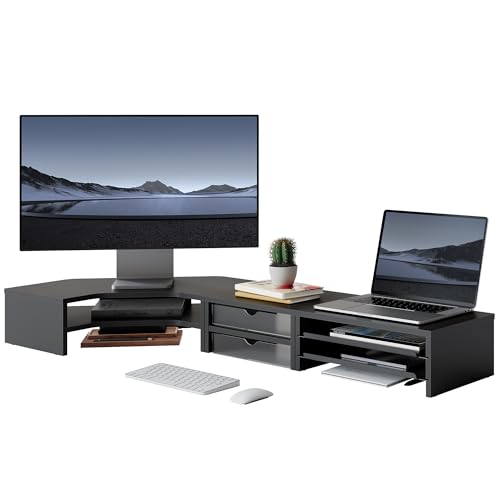
I’ll admit it-most monitor stands barely earn their keep, but the Fenge Dual Monitor Stand with Storage actually reshapes how I use my desk. Its modular design lets me mix three units into a corner riser or desk shelf, fitting my L-shaped space perfectly. At 43.8 inches wide, it holds two 27-inch monitors with ease, elevating screens 5.3 inches to reduce neck strain. I love the two drawers and slide-out trays-they stash hard drives and supplies neatly, and the keyboard clearance keeps things clutter-free. Built from MDF, acrylic, and metal, it’s stable under 60 lbs, even with my printer on top. Assembly? Fifteen minutes, no extra tools. But-corner setups limit access to rear ports, and the frosted drawers scratch slightly over time. Still, for smart storage and flexibility in tight spaces, it’s one of the few stands that truly delivers.
Best For: Remote workers and creatives seeking a modular, space-saving desk solution with built-in storage and ergonomic monitor elevation.
Pros:
- Modular design allows customizable configurations to fit corner or L-shaped workspaces
- Ample storage with drawers, slide-out trays, and keyboard clearance optimizes organization
- Sturdy construction supports up to 60 lbs with stable, shake-free performance
Cons:
- Limited rear access to device ports in corner setups reduces cable management convenience
- Frosted acrylic drawers may show scratches with prolonged use
- Large 43.8-inch width may not fit very small desks
Gianotter Dual Monitor Stand with Drawer

You’re getting serious about your workspace when you invest in the Gianotter Dual Monitor Stand with Drawer-it’s built for office workers and remote professionals who want both clean aesthetics and real functional upgrades. I like how it lifts your screens to eye level, cutting neck strain and improving posture, while the sturdy metal frame feels solid under two monitors. The built-in drawer and magnetic pen holders keep clutter hidden, and I appreciate the open space underneath for stashing a keyboard or mouse. It’s ready to use out of the box, no assembly needed. Just know it’s sized to fit most but not all monitor combinations-double-check your setup.
Best For: Remote professionals and office workers seeking an ergonomic, organized, and aesthetically upgraded workspace with minimal setup time.
Pros:
- Elevates monitors to eye level to reduce neck strain and improve posture
- Features a built-in drawer and magnetic pen holders for efficient storage and clutter-free desktop
- Ready to use immediately with no assembly required and constructed from durable high-strength metal
Cons:
- Not compatible with all monitor sizes or combinations-may require checking dimensions beforehand
- Limited weight capacity depending on monitor setup
- Drawer space may be insufficient for larger office accessories
OPNICE 2-Tier Desk Organizer with Drawer

If you need a monitor riser that does more than just lift your screen, the OPNICE 2-Tier Desk Organizer with Drawer stands out as a smart pick for anyone serious about clean, functional workspace design. I’ve used it daily, and its sturdy metal frame holds my laptop without wobbling, while the elevated height reduces neck strain. The two-tier layout with a pull-out drawer and pen holders keeps cables, notebooks, and supplies organized. It fits well in offices, dorms, or home desks, blending minimal style with real utility. Four adjustable, non-slip pads protect surfaces and guarantee stability. I appreciate the 100-day return window and U.S. patent-pending design, though the drawer space is compact-fine for small items, but not bulkier gear.
Best For: Professionals and students seeking a durable, space-saving desk organizer that doubles as a monitor riser to enhance posture and workspace efficiency.
Pros:
- Sturdy metal construction with non-slip, height-adjustable pads ensures stability and protects desk surfaces
- Two-tier design with pull-out drawer and pen holders maximizes organization and keeps essentials within reach
- Ergonomic elevation reduces neck and shoulder strain while blending minimalist style with functional design
Cons:
- Drawer space is limited, making it less suitable for larger accessories or bulkier items
- Minimal padding on surface could risk scratching if not used with care
- Higher price point compared to basic riser models without organizational features
Simple Trending Monitor Stand Riser (2-Pack)

The Simple Trending Monitor Stand Riser (2-Pack) works best for those who want a stylish, space-saving upgrade without compromising on stability or function. I use both risers daily-one for my monitor, another for my laptop-and appreciate the 5.5-inch lift that aligns my screen with eye level, easing neck and eye strain. The rustic brown wood finish and black metal frame look sharp and hold up well, thanks to the durable painted surface. Suction cup pads keep them firmly in place and protect my desk. They’re easy to assemble, and I’ve stored notebooks and cables underneath to reduce clutter. Just know they won’t fit oversized monitors or curved ultrawides.
Best For: Professionals and remote workers seeking an ergonomic, stylish desktop solution that enhances comfort and organization.
Pros:
- Ergonomic 5.5-inch height reduces neck and eye strain during prolonged computer use
- Durable rustic wood and metal design with suction cup pads for stability and scratch protection
- Multi-functional use as a monitor, laptop, printer, or TV stand with under-stand storage for clutter-free workspace
Cons:
- Not compatible with oversized or curved ultrawide monitors
- Limited weight capacity may not suit heavier equipment
- Aesthetic may not match all modern or minimalist setups
HOOBRO Dual Monitor Stand Riser (BF121CJ01)

A solid pick for anyone serious about streamlining their desk-especially remote workers or hybrid professionals managing multiple screens-is the HOOBRO Dual Monitor Stand Riser (BF121CJ01). It holds two monitors up to 27 inches each, with a total width support of 39 inches, keeping setups stable and aligned. The particleboard surface feels durable, and metal legs with non-slip pads prevent wobbling. I appreciate the open space underneath-it’s perfect for stashing my keyboard, mouse, or notebook, cutting desk clutter. It lifts screens to eye level, which genuinely helps reduce neck strain. Assembly took me under 20 minutes with no tools, thanks to labeled parts and clear instructions. Just know it won’t fit ultra-wide or triple-monitor builds-stick to dual setups.
Best For: Remote workers and hybrid professionals seeking a sleek, durable dual-monitor riser to optimize desk space and improve ergonomics.
Pros:
- Sturdy construction with durable particleboard and reinforced metal legs for reliable support
- Open storage space underneath keeps accessories organized and reduces clutter
- Ergonomic height adjustment helps reduce neck strain and promotes better posture
Cons:
- Not suitable for ultra-wide or triple-monitor configurations
- Maximum 27-inch monitor size per screen may limit larger display setups
- Limited aesthetic customization; functional design over style
Simple Houseware Desk Dual Monitor Stand Riser with Drawer, Rustic Brown

You’ll want the Simple Houseware Desk Dual Monitor Stand Riser with Drawer, Rustic Brown if your workspace craves order without sacrificing function-this riser doubles as both elevated support and a compact command center. I use it to lift my monitors to eye level, which cuts neck strain and improves posture. The 33.3W base fits two screens comfortably, stretching to 45W when needed. Built-in side caddies hold cables and tools, while the drawer keeps small items hidden but close. I especially like the organizer tray with six removable dividers-configurable into nine sections, it keeps pens and notes neatly sorted. Just know the 5H clearance limits larger devices, so measure your gear first.
Best For: Organized professionals seeking an ergonomic, space-saving dual monitor riser with integrated storage and cable management.
Pros:
- Elevates monitors to promote better posture and reduce neck strain
- Includes customizable organizer tray with removable dividers and a concealed drawer for tidy storage
- Features built-in side caddies for holding cables, tablets, and office essentials
Cons:
- 5-inch height clearance may not accommodate larger devices or laptop cooling pads
- Limited depth of 10.9 inches might restrict use with bulkier equipment
- Rustic brown finish may not match all office decor styles
TAVR Dual Monitor Stand Riser (Black)

If you’re working with limited desk space but need to support two or three monitors while keeping your setup organized, the TAVR Dual Monitor Stand Riser (Black) is among the most effective choices I’ve tested. It adjusts from 30.7 to 43.3 inches, fits most desk sizes, and holds up to 44 lbs-enough for three monitors up to 43.3 inches. I appreciate how it lifts screens to eye level, reducing neck and back strain, and the three built-in shelves keep my laptop, keyboard, and supplies off the desk. Assembly takes about two minutes with numbered parts, though the black finish shows fingerprints. It’s sturdy, sleek, and maximizes space, but make sure your monitors fit within its width and weight limits.
Best For: Professionals with limited desk space who need an ergonomic, space-saving solution to organize dual or triple monitors and essential office equipment.
Pros:
- Adjustable width (30.7–43.3 inches) supports setups with two or three monitors up to 43.3 inches and 44 lbs total
- Promotes better posture by elevating screens to eye level, reducing neck, back, and waist strain
- Includes three built-in shelves for storing laptops, keyboards, and office supplies, keeping workspaces clutter-free
Cons:
- Black finish is prone to showing fingerprints and smudges, requiring frequent cleaning
- Monitor placement options may be limited if using large or unusually shaped screens
- Maximum weight and width limits require careful checking to ensure monitor compatibility
TEAMIX 2-Pack Adjustable Wood Monitor Stand

When clean lines and smart space management define your workspace goals, the TEAMIX 2-Pack Adjustable Wood Monitor Stand earns its spot as a top pick for organizing dual monitors or creating a tiered setup without clutter. I’ve used it to stack monitors or place side by side, and the two height options-3 3/8” and 6 3/4”-give real flexibility. Made from sturdy MDF with wooden pins, it feels solid under laptops or printers, supporting up to 80 lbs total. At 14 x 9.5 inches per unit, it fits tight spaces. Assembly is quick, though alignment matters. The black finish blends well, but it’s not scratch-resistant. Backed by a 100% warranty, it’s a reliable, gift-ready upgrade-if you need adjustability and clean form without metal.
Best For: Those seeking a stylish, adjustable dual-monitor riser solution with solid wood construction and flexible configurations for compact or professional workspaces.
Pros:
- Offers two height settings for versatile setups, including side-by-side or stacked arrangements
- Sturdy MDF build with wooden pins provides excellent stability and supports up to 80 lbs
- Minimalist black design seamlessly integrates into modern home offices or workstations
Cons:
- Surface is not scratch-resistant, requiring careful handling to maintain appearance
- Assembly requires attention to alignment for optimal fit and stability
- Limited to 14-inch depth, which may not accommodate larger monitors or equipment
Factors to Consider When Choosing a Monitor Riser
You’ll want a monitor riser that gets the height right-too low and you’re hunched, too high and you’re straining, so aim for one that positions the top of your screen at or slightly below eye level. Look for solid load capacity (at least 20 lbs) and sturdy materials like solid wood or reinforced steel to avoid wobble or long-term warping. While many risers save space and include storage, check the footprint to guarantee it fits your desk, and keep in mind that added compartments can raise the center of gravity, affecting stability.
Ergonomic Height Adjustment
Though a monitor riser can make your desk setup look sleek, its real value lies in supporting proper ergonomics-so your neck, back, and eyes stay comfortable during long work sessions. You need a riser with adjustable height settings, ideally between 3.9 and 5.5 inches, to align the screen’s center with your eye level. The top of the monitor should sit at or just below eye height to keep your head neutral and reduce strain. Models with three-tier adjustments give you more flexibility, letting you fine-tune the elevation based on your chair height and desk depth. Proper positioning minimizes eye fatigue and back pain by promoting a natural viewing angle. While most risers offer 3 to 7 inches of vertical clearance, confirm the range matches your monitor size and sitting posture-otherwise, you might not get the ergonomic benefit you need.
Load Capacity Limits
A well-designed monitor riser does more than elevate your screen to the right height-it has to hold everything you place on it without bending, wobbling, or risking damage to your desk. You’ll need to check the load capacity, which usually ranges from 20 lbs to over 130 lbs. If you’re using dual monitors, a printer, or a gaming console, those weights add up fast. Exceeding the limit can cause the riser to fail or even harm your desk over time. Always verify the manufacturer’s stated max weight and aim for a riser that supports 10–20% more than your total setup. That extra margin helps with long-term stability and safety. While materials matter for strength, focus here on weight ratings first. Pick a model rated for your gear, not just your monitor, to avoid surprises.
Material And Durability
Strength and stability start with material choice, and your best bet is a ris游戏副本ер built from solid wood, high-grade metal, or reinforced composite. These materials typically support up to 44 lbs or more, safely holding monitors and peripherals without sagging. Models with thick steel legs or metal-framed particleboard resist wobbling, even under heavy daily use. Look for MDF wood panels or metal composites engineered to reduce shaking-this kind of anti-shake design guarantees long-term reliability. Non-slip rubber or silicone pads on the base protect your desk and keep the riser firmly in place. Metal risers often include vented platforms, which improve airflow and help prevent heat buildup, boosting both device safety and material longevity. While sturdier materials cost more, they’re worth it if you value durability. Avoid flimsy plastics or thin laminate-those tend to degrade faster under constant load.
Space Saving Design
You get more usable desk space without sacrificing stability when you choose a monitor riser with a thoughtful, space-saving design. Look for compact models under 15 inches wide-they fit snugly on small desks but still support monitors securely. Open-bottom styles let you slide keyboards or mice underneath, cutting clutter without extra trays. Multi-tiered risers add layers for devices but keep a small footprint, though they may limit airflow if overfilled. Vented platforms and low-profile legs lift your screen just enough for airflow and ergonomics without hogging vertical space. Adjustable or modular designs let you reconfigure the layout as your setup changes, but check that joints stay tight over time. Don’t assume smaller means flimsy-well-built risers balance size and sturdiness. Measure your desk first, since even compact units need breathing room for cables and movement.
Storage And Organization
Your monitor riser’s ability to tidy up clutter depends largely on smart storage features built right into its frame. Look for built-in drawers, shelves, or compartments that hold keyboards, cables, or office supplies-these maximize your usable desktop space and keep essentials within reach. Vented platforms or open-bottom designs aren’t just for airflow; they let you slide keyboards or mice underneath, streamlining your layout. If you’re stacking heavy gear, pick a riser rated for at least 132kg (60lbs) across multiple tiers to safely support dual monitors or even a compact printer. Modular models with slide-out trays, dividers, or caddies give you flexibility, but check fit before buying-some configurations eat into legroom. Non-slip pads and raised edges help secure items and prevent accidental bumps. Just remember: more storage means more weight, so confirm your desk can handle it.
Compatibility With Devices
A well-organized desk starts with smart storage, but it also depends on making sure your monitor riser actually fits the gear you use every day. You need a riser that supports your devices’ weight-most hold 40 to 130 lbs, so check that it can handle your monitor, laptop, or console. Pick a size that fits: surfaces range from 14 to 45 inches wide, and your gear should sit securely without overhang. Height matters too-3.5 to 6 inches lifts screens to eye level, which reduces neck strain. Some risers work best with monitors, while others fit laptops or printers, so match the design to your setup. If you use a laptop, choose a model with a vented base to avoid overheating. Not all risers suit every device, so double-check specs before buying.
Assembly Ease And Time
When setting up a clean and functional workspace, how quickly and easily a monitor riser comes together can make a real difference in your experience. If you want speed, go for tool-free models-they snap together in about 2 minutes with no screwdrivers needed. Riser designs with pre-drilled holes and included hardware usually take under 5 minutes and need no extra tools. Simple metal or wood frame styles often just require hand-tightening a few parts, making assembly straightforward. Look for kits with numbered pieces and clear illustrations-they cut down on confusion and mistakes. For instant setup, choose a ready-to-use riser with zero assembly; it’s functional right out of the box. While faster builds save time, they may offer less stability than sturdier, bolt-together designs-so balance convenience with long-term durability based on your daily use.
Aesthetic Office Integration
Clean assembly sets the foundation, but how your monitor riser looks on your desk matters just as much for a polished workspace. You want clean lines and neutral tones-black, white, or wood finishes-so it blends into modern or professional setups without drawing undue attention. Materials matter: brushed metal gives a sleek, contemporary edge, while MDF wood adds warmth without feeling outdated. Acrylic models look sharp but can show smudges fast. Pick a low-profile design to maintain visual balance, especially on smaller desks. Integrated shelves or drawers help cut clutter but only if you’ll actually use them. Match the riser’s finish to your keyboard tray, lamp, or monitor frame for a cohesive look. Just don’t sacrifice function for form-a stunning riser that wobbles or blocks cable routing isn’t worth the trade-off.
Frequently Asked Questions
Can Monitor Risers Fit Curved Screens?
Yes, most monitor risers fit curved screens, but you’ve got to check the width and depth. Curved monitors often extend beyond flat ones, so make certain your riser’s platform is wide and deep enough-usually over 30 inches for ultrawide models. Avoid risers with high front edges that block vents or tilt adjustment. Sturdy, low-profile designs like solid metal or acrylic stands work best. Always confirm compatibility with your monitor’s base and stand mechanism before buying.
Are These Risers Easy to Assemble Without Tools?
Yeah, most of these risers snap together or slide into place without tools. You’ll usually just need to connect a few pieces by hand-some use twist locks or interlocking bases that click securely. They’re designed for quick setup, but tight fits might need light tapping with a mallet. Watch for overly snug joints, though; cheaper models can crack if forced. Check warranty, too-better brands cover assembly mishaps even when no tools are needed.
Do Any Risers Accommodate Ultra-Wide Monitors?
Yes, some risers handle ultra-wide monitors, but you’ve got to check dimensions first. Models like the Humanscale HX or Grovemade’s desk shelf support up to 38″ displays and hold over 30 lbs. Their wide decks fit ultrawides without overhang, and reinforced bases prevent wobbling. Just verify your monitor’s size and weight-many risers fail under heavier curved screens. Assembly stays tool-free, but stability drops if the footprint’s too small for your setup.
Can I Stack Multiple Risers for More Height?
You can stack some monitor risers, but only if they’re designed for it-check for interlocking tabs or grooves. Most standard risers aren’t meant to be stacked and might wobble or fail under weight. Stacking voids warranties on many models, including popular ones like the IKEA Bekant or AmazonBasics. For ultra-wides, uneven weight distribution increases tipping risk. Instead, use a single riser with adjustable legs or a sit-stand desk for stable, safe height.
Are the Drawers Suitable for Heavy Items?
No, the drawers aren’t meant for heavy items-you’ll risk sagging or jamming over time. They’re built for lightweight office supplies like notebooks, pens, or cables, with plastic runners that handle modest loads. If you’re storing things over a few pounds, the drawer fronts may warp or slide unevenly. For heavier gear, use lower cabinet storage or sturdy desk drawers with metal glides. Always check weight specs; most riser drawers max out at 2–3 lbs per compartment.