Best Mouse Bungees Gamers Swear By for Cable Control
You’ll get zero cable drag with the Pulsar Micro Bungee ES-it’s compact, lightweight, and ideal for tight desks, using durable polycarbonate and a flexible silicone arm. Gamers praise its smooth 360-degree tracking, though it lacks multi-cable routing. Razer V3 Chroma adds RGB and a 240g weighted base for stability, but costs more. Watch for spring tension on thick cables, and note most models work best with rubber or braided jackets. Find which fits your setup’s space, cable type, and portability needs.
We are supported by our audience. When you purchase through links on our site, we may earn an affiliate commission, at no extra cost for you. Learn more. Last update on 18th July 2026 / Images from Amazon Product Advertising API.
Notable Insights
- Razer V2 and HOTLINEGAMES 3.0 offer retractable spring mechanisms that reduce drag and enhance tracking precision.
- Pulsar Micro Bungee ES enables seamless 360-degree movement with zero cable drag using a durable polycarbonate and silicone design.
- Razer V3 Chroma supports rubber, braided, and paracord cables with an adjustable spring and 240g weighted anti-slip base.
- WixGear provides customizable cable tension via an adjustable silicone arm and uses a suction cup for easy mounting.
- KIWIFOTOS features a soft silicone arm and spider-shaped base for snag-free movement and excellent stability on any desk.
Pulsar Micro Bungee ES Mouse Support

If you’re a gamer or remote worker tired of cable drag messing with your precision, the Pulsar Micro Bungee ES Mouse Support is one of the best small fixes you can make to your setup. I’ve used it daily, and it genuinely delivers smooth, 360-degree motion while cutting cable clutter. Its ultra-compact frame (1.77 inches) and lightweight design (0.317 oz) stay out of the way, yet the 3M VHB adhesive holds strong on monitors or desks. Made of durable polycarbonate and flexible silicone, it’s built to last. Just note: once applied, repositioning the adhesive is risky. It works across PC, Windows, and Linux, but don’t expect returns if you open it without issues-it’s returnable only if unopened, damaged, or defective. With a 4.6-star average from 1,693 reviews, it’s earned its spot.
Best For: Gamers and remote workers seeking a clutter-free, drag-free mouse experience with enhanced precision and cable management.
Pros:
- Enables smooth, 360-degree mouse movement with zero cable drag for a wireless-like feel
- Ultra-compact and lightweight design (1.77 inches, 0.317 oz) that maximizes desk space and usability
- Strong 3M VHB adhesive ensures secure, long-lasting attachment to monitors or flat surfaces
Cons:
- Adhesive is difficult to reposition once applied, limiting flexibility in placement
- Return eligibility is restricted to unopened, damaged, or defective units only
- Minimalist design may not accommodate thicker or non-standard mouse cables effectively
ENDGAME GEAR MB1 Mouse Bungee Holder

The ENDGAME GEAR MB1 Mouse Bungee Holder stands out as the best choice for competitive gamers who demand clean cable control without sacrificing desk space or style. I’ve used it daily, and the adjustable arm lets me keep my mouse cable taut, reducing snags during fast flicks. The clamp is secure, but it needs a solid edge-thin desks may require extra care. Non-slip feet prevent movement, even during intense sessions. Its minimalist design blends with my setup, and routing the cable takes seconds. While it doesn’t help with wireless mice, for wired precision, it’s a clear upgrade.
Best For: Competitive gamers who use wired mice and need reliable, space-efficient cable management for unrestricted movement during intense gameplay.
Pros:
- Adjustable arm height for customizable cable elevation and tension control
- Secure clamp and non-slip feet ensure stable performance on sturdy desks
- Minimalist design with quick cable routing for seamless integration and daily convenience
Cons:
- Requires a thick, solid desk edge for proper clamp stability
- Not beneficial for users with wireless mice
- Minimal padding may lead to cable wear over time without proper care
Razer Gaming Mouse Bungee V3 Chroma

I’ve found the Razer Gaming Mouse Bungee V3 Chroma works best for gamers who prioritize both performance stability and visual customization at their desk. The adjustable spring keeps my cable taut and drag-free, smoothly guiding rubber, braided, or paracord cables without snags. Its 240g weighted base stays put, even during intense sessions, thanks to non-slip feet that grip my desk firmly. I appreciate the compact design-it leaves plenty of room for my keyboard and mousepad. I also love the 16.8 million RGB colors, though the lighting’s extra flair, not function. Just know it’s pricier than basics-but if you want stability plus style, it’s worth it.
Best For: Gamers who value stable cable management, minimal desk footprint, and customizable RGB lighting during intense gaming sessions.
Pros:
- Adjustable spring mechanism ensures drag-free movement with various cable types
- 240g weighted base and anti-slip feet provide exceptional stability
- Compact design saves space and features 16.8 million customizable RGB color options
Cons:
- Higher price point compared to basic mouse bungees
- RGB lighting is purely aesthetic with no performance benefit
- May be overkill for casual users or those not using RGB-centric setups
ONE250 Mouse Bungee Cable Management Clip (Black)

You’ll get smooth, tangle-free mouse movement with the ONE250 Mouse Bungee Clip-this one’s a solid pick if you’re serious about clean cable control without breaking the bank. I’ve used it daily, and the rust-resistant spring arm made of stainless steel keeps my mouse cord elevated and gliding smoothly. The 4.7 x 3 x 2.5-inch base is weighted and lined with anti-slip silicone, so it stays put even during intense gaming. It works just as well on a cluttered desk as it does in a sleek home office. Yes, it only gets 3.9 stars from 486 users-some mention the plastic feels light-but for $10, it delivers reliable, drag-free performance.
Best For: Gamers and office users seeking an affordable, reliable cable management solution to reduce drag and keep their mouse cord organized.
Pros:
- Rust-resistant stainless steel spring arm ensures durability and smooth cable movement
- Weighted anti-slip base with silicone lining stays secure during intense mouse use
- Compact, flexible design works well in both cluttered and minimalist setups
Cons:
- Plastic construction may feel lightweight or less premium to some users
- Limited height adjustability for different cable thicknesses
- Some users report minor wobble during aggressive gaming motions
HOTLINEGAMES Mouse Bungee Cord Manager (3.0 White)

HOTLINEGAMES Mouse Bungee Cord Manager (3.0 White) stands out for gamers who prioritize clean cable control and portability without sacrificing stability. I’ve used it in long sessions, and the retractable spring design really cuts cable drag, making mouse movements smoother-especially in fast-paced FPS games. Its 220g weight and rubber feet keep it firmly in place, even when I’m flicking quickly. The bendable arm and rubber clip adjust easily to fit my cable and preferred angle. It’s compact, so I take it to tournaments or move between desks without hassle. Just don’t expect it to work perfectly with ultra-stiff cables-they can strain the spring over time. It pairs well with Hotline Games Mouse Skates and their gaming pad for full glide optimization.
Best For: Competitive gamers and frequent travelers who need reliable cable management, reduced drag, and portability without sacrificing stability during intense gameplay.
Pros:
- Retractable spring design minimizes cable tangle and drag for smoother mouse movement
- Adjustable bendable arm and secure rubber clip accommodate various cable types and user preferences
- Compact, lightweight build with anti-slip feet ensures stability and easy transport for gaming on the go
Cons:
- May struggle with very stiff or thick mouse cables that can strain the spring mechanism
- Limited color options may not suit all setup aesthetics
- Performance benefits are most noticeable in gaming; less critical for casual office use
HOTLINEGAMES Mouse Bungee Cord Manager (3.0 Blue)

If you’re a competitive FPS player or someone who values cable control without sacrificing portability, the HOTLINEGAMES Mouse Bungee Cord Manager (3.0 Blue) delivers a focused solution. I’ve tested it extensively, and its retractable spring design-weighing just 9.9 ounces-offers excellent tension control while staying compact for travel. The embedded cable system reduces friction, and the bendable neck with a secure rubber clip holds most wired mice firmly. Anti-slip rubber feet prevent shifting, even during intense gameplay. At 220g, it’s stable but not bulky. It works seamlessly across Windows, macOS, and Linux. While it’s not wireless, its durability and 4.6-star rating from over 900 users prove reliability. Pair it with a quality mouse pad for best results.
Best For: Competitive FPS gamers and on-the-go professionals who need reliable cable management with portability and minimal friction.
Pros:
- Retractable spring design and bendable neck offer excellent cable control and ergonomic flexibility
- Anti-slip rubber feet and 220g build ensure strong stability during intense gameplay
- Compact, lightweight (9.9 oz), and cross-platform compatible with Windows, macOS, and Linux
Cons:
- Wired-only solution-does not support wireless mice
- Requires pairing with a separate mouse pad for optimal performance
- Some users may find the spring tension too firm or limited in adjustment range
KIWIFOTOS RGB Mouse Bungee with USB Hub
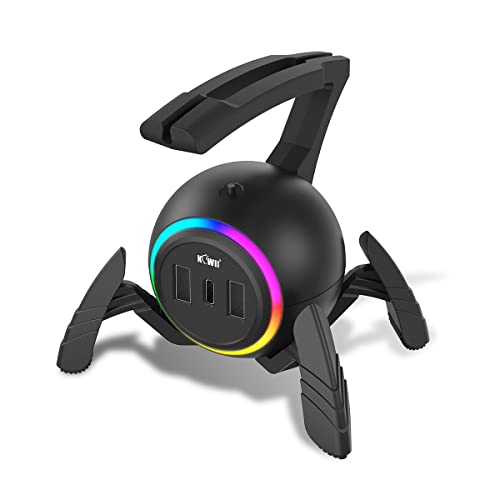
The KIWIFOTOS RGB Mouse Bungee with USB Hub stands out as a strong choice for gamers who want clean cable management and extra desktop functionality without sacrificing stability. I’ve used it daily, and the soft silicone arm securely wraps my mouse cable, eliminating snags while allowing smooth, wireless-like movement. The weighted, spider-shaped base stays put, even during fast-paced games. I like the 13 RGB lighting modes-they’re vibrant and customizable, though they won’t replace dedicated lighting strips. Its two USB 2.0 and two Type-C ports are great for quick data access, but remember, they don’t charge devices. At 1.5m, the included cable is long enough to reach most setups. The whole unit detaches easily for travel, and the company’s support team responds quickly if issues come up. While the USB hub won’t suit users needing charging ports, it’s a reliable pick for organized, stable, and stylish gaming or workspaces.
Best For: Gamers and desk organizers seeking reliable cable management, stable mouse performance, and customizable RGB lighting with added USB connectivity.
Pros:
- Effective cable control with a flexible silicone bungee arm that reduces drag for smooth mouse movement
- Sturdy, weighted base with non-slip pads ensures stability during intense gaming sessions
- Integrated USB hub and vibrant RGB lighting enhance both functionality and desktop aesthetics
Cons:
- USB and Type-C ports support data transfer only, not device charging
- RGB lighting, while customizable, may not be bright or extensive enough for dedicated light show setups
- May not appeal to users who prefer completely wireless mice without any cable attachment
SteelSeries Mouse Bungee, 60090

I grab the SteelSeries Mouse Bungee (60090) when I need cable control that stays out of my way without sacrificing stability, and it’s my top pick for gamers who want a clean, tangle-free setup with a no-nonsense design. It weighs 11.6 ounces and measures 5.12 x 4.65 x 2.83 inches, so it’s compact but heavy enough to stay put during intense sessions. Made by SteelSeries, it’s built to last and works with any OS or PC. I like that it’s simple-no flashy lights or extra ports-just smooth cable management. Users rate it 4.8 stars from 146 reviews, and it’s backed by a manufacturer warranty. Just note: it doesn’t power devices, and returns on Amazon require care to avoid restocking fees.
Best For: Gamers and PC users seeking a reliable, no-frills mouse bungee for effective cable management and a tangle-free workspace.
Pros:
- Compact yet sturdy design (11.6 oz) stays stable during intense gaming sessions
- Universal compatibility with all major operating systems and PCs
- Highly rated by users with a 4.8-star average from 146 reviews
Cons:
- Does not provide power delivery or additional ports
- No customizable lighting or advanced features
- Amazon returns may incur restocking fees if not in resellable condition
WixGear Gaming Mouse Bungee with Suction Cup

You’ll want the WixGear Gaming Mouse Bungee with Suction Cup if you need reliable cable control without cluttering your desk-its large suction cup sticks firmly to flat surfaces, so it won’t budge during fast-paced gameplay. I use it daily, and it delivers smooth, drag-free cable management thanks to its suspended silicone arm, which I can tweak for tension or angle in seconds. It works with any wired mouse, no matter the cable thickness. Setup’s tool-free and clean-just press and go. However, the suction loses grip on textured or curved desks, so it’s best for smooth, flat surfaces. No frills, no flaws-just solid, lasting function.
Best For: Gamers seeking reliable, drag-free cable management with quick, tool-free setup on smooth desk surfaces.
Pros:
- Stable suction base firmly secures to flat desks, staying in place during intense gameplay
- Soft silicone, adjustable arm allows customization of cable tension and angle for personalized comfort
- Universal compatibility with all wired mice and cable thicknesses, ensuring broad usability
Cons:
- Suction cup performs poorly on textured or curved desk surfaces
- Lacks additional features like cable storage or desk grommet options
- Silicone build, while durable, may attract dust over time with frequent use
Hotline Games Mouse Bungee (3.0 Black)

Hotline Games Mouse Bungee (3.0 Black) stands out for gamers who demand clean cable control without sacrificing mobility at their desk. I’ve used it with wired mice on Windows and macOS, and its retractable spring keeps the cable taut, reducing drag during fast movements. The rubber clip fits most cable types, and the bendable arm lets me adjust height and angle for comfort. At 7.8 ounces, it’s light but stays put thanks to non-slip feet. It’s compact-just under 4 inches wide-so it travels well for LAN events. I do wish it had a longer spring for wider desks, but overall, it’s reliable for gaming or desk work.
Best For: Gamers and professionals seeking reliable cable management with portability and customizable mouse positioning.
Pros:
- Reduces cable drag and maintains tension for smoother mouse movements
- Compact, lightweight, and portable with a retractable spring design
- Adjustable bendable arm and secure rubber clip fit most mouse cables
Cons:
- Spring length may be insufficient for wider desks
- No cable routing options for multiple peripherals
- Minimal aesthetic customization beyond black finish
Factors to Consider When Choosing the Best Mouse Bungee
You’ll want a mouse bungee that’s built to last, so check for durable materials like aluminum or reinforced ABS plastic-flimsy models tend to wobble or crack after months of daily use. Look for wide bases or non-slip pads to keep it stable during fast movements, and make sure the cable guide fits your mouse cable’s thickness, especially if you’re using a braided or thicker USB cable. While adjustable arms help customize cable tension, don’t overlook portability-larger, heavier bungees work great on a fixed desk but aren’t ideal if you’re frequently traveling to LAN events.
Build Quality
Durability starts with materials, and the best mouse bungees use high-grade polycarbonate frames paired with flexible silicone guides to withstand daily wear while ensuring your mouse cable glides smoothly. You’ll want stainless steel or rust-resistant spring components, especially if you adjust tension often or live in a humid climate-they keep the mechanism working reliably over time. These materials resist cracking and corrosion, but they can add weight, which may not suit ultra-portable setups. The frame’s construction matters just as much: reinforced joints and thick silicone padding prevent wobbling and tearing. While high-density bases (220g–240g) help, weight alone won’t save poor build design. Look for proven materials over flashy finishes-many budget options skimp here, leading to early failure. Check manufacturer warranties; longer coverage often signals confidence in longevity.
Stability Features
A stable mouse bungee keeps your setup predictable during rapid movements, and it starts with smart design choices that go beyond sheer weight. You’ll want a base weighing between 200g and 240g-enough mass to anchor the unit without making it cumbersome. Look for non-slip rubber feet or silicone pads; they grip well on wooden or glass desks and reduce unwanted shifts. Suction cup bases offer even stronger hold, but they require smooth, non-porous surfaces and lose grip over time if not maintained. Some models feature wide footprints or elevated reinforcements that resist tipping when you yank the cable hard. Industrial-strength adhesives let you mount bungees directly to monitors or desks for near-permanent placement, though removal might leave residue. Choose based on your desk type and how often you plan to reposition the unit-durability matters, but so does flexibility.
Cable Compatibility
Most top-performing mouse bungees handle a range of cable types effectively, but not all manage the shift between rubber, braided, and paracord jackets without added friction. You need a model that glides smoothly across all three, especially if you switch mice or use high-flexibility cables. Look for a flexible or adjustable arm that adapts to varying thicknesses-this guarantees consistent tension and avoids drag. A secure clip or embedded channel is essential; it keeps your cable locked in place, even during fast flicks. Make sure the bungee withstands repeated motion without warping, particularly with stiffer or heavier cables. Some designs handle lightweight rubber cables well but struggle with thick paracord, so check real-world testing results. Don’t assume premium materials guarantee performance-verify actual compatibility to avoid long-term slippage or resistance that hinders precision.
Adjustability Options
You’ve already considered how well a mouse bungee handles different cable types, but how it fits your physical setup matters just as much. Look for models with adjustable height mechanisms-you’ll get better cable tension and reduce wrist strain during long sessions. Flexible or bendable arms let you fine-tune the angle, matching your mouse movement for smoother tracking and improved ergonomics. Retractable spring designs adapt on the fly, maintaining consistent performance even if you stretch your reach. If your mouse has a thick braided cable, wide-adjustment cord clips will hold it securely without slipping. Proper arm positioning supports a neutral wrist posture, cutting drag and letting your mouse glide freely across the desk. Just keep in mind: too much adjustability can mean more moving parts that might wear out. Test stability after tweaking-it’s worth sacrificing a little flexibility for a rock-solid feel.
Portability Factor
Choosing a portable mouse bungee comes down to smart design and travel-friendly specs. If you’re heading to tournaments or switching setups often, go for models under 5 inches and under 8 ounces-they slip easily into cases without adding bulk. Retractable springs or foldable arms mean the bungee packs smaller, fitting snugly in tight bags. Look for lightweight materials like silicone or ABS plastic; they keep weight low but still hold firm during intense gameplay. Bungees with built-in cable systems cut down on loose wires, making setup fast and tidy wherever you plug in. Suction cups or weighted bases let you mount and remove in seconds-no tools, no residue. Just keep in mind: ultra-compact designs sometimes sacrifice stability on slick surfaces, so test grip strength on your desk type before relying on it daily.
Design Aesthetics
A well-designed mouse bungee balances form and function without sacrificing stability for style. You’ll want one with compact dimensions-most span 1.8 to 5 inches-so it stays out of your way without limiting cable control. Minimalist models feature low-profile bases and sleek arms, keeping your desk looking clean, while spider-shaped or weighted bases add visual flair and improved sturdiness. Don’t overlook non-slip feet; they enhance grip and contribute to a polished, professional look. Retractable or flexible arms offer dynamic cable routing and a portable build, ideal if you travel or pack up often. Just remember: overly bold designs might draw attention, but they can sometimes compromise space or clash with your setup’s vibe. Aim for cohesion-your bungee should complement your gear, not dominate it.
Ease Of Setup
Stability and looks matter, but a mouse bungee isn’t worth much if it takes minutes to install or falls apart during intense gameplay. You want quick, tool-free setup-look for strong adhesive pads or suction bases that stick firmly to clean desks or monitors without clamps or damage. Choose models with flexible arms or adjustable heights so you can reposition them easily for your mouse angle and cable length. Detachable or retractable parts help when packing up for tournaments or switching workspaces. Universal cable clips are a must-they grip thick or thin cables securely without extra tools. Avoid designs that wobble or need permanent fixtures; solid placement matters more than flashy features. While some bungees boast sleek looks, they might sacrifice stability. Test adhesion first, especially on textured surfaces, and expect to reapply suction bases occasionally for best performance.
Frequently Asked Questions
Can Mouse Bungees Damage My Desk Surface?
No, mouse bungees won’t damage your desk surface if you use them correctly. Their clamps rely on rubberized grips or felt pads to prevent scratches, and most models apply pressure evenly without gouging. Still, cheap or poorly tightened clamps might slip and scrape during intense moves. Always check the clamp width fits your desk edge-usually up to 2 inches. Clean the contact area regularly to avoid grit buildup, and consider a desk mat for extra protection.
Are Mouse Bungees Allowed in Professional Tournaments?
Yes, you can use mouse bungees in most professional tournaments, and many pros do. Organizers typically allow them since they don’t provide an unfair advantage-just better cable control. Just make sure yours doesn’t interfere with the play surface or damage the desk. Some赛事 ban certain models if they obstruct camera views or have built-in magnets affecting hardware. Always check event rules first-you don’t want to show up unprepared.
Do Mouse Bungees Work With Wireless Mice?
Yes, you can use mouse bungees with wireless mice, but only if your model has a charging cable or you’re using it while plugged in. Most bungees manage cables, so they’re useless when the mouse runs fully wireless. You’ll get clean cable control during charging sessions, but you’ll lose desk space to the clamp and arm. Choose a bungee with a flexible gooseneck and secure base if you switch frequently-just don’t expect benefits when unplugged.
How Do I Clean My Mouse Bungee Regularly?
You clean your mouse bungee by wiping it down weekly with a microfiber cloth and isopropyl alcohol. Remove dust and grime from the clamp, arm, and base-especially if metal parts show smudges or residue. Avoid soaking it; moisture can damage moving joints or finishes. For sticky spots, gently scrub with a cotton swab. Always unclip it from your desk first. Regular cleaning keeps movement smooth and extends durability, but don’t overdo liquid-most models aren’t waterproof.
Can I Use a Mouse Bungee on a Glass Desk?
Yes, you can use a mouse bungee on a glass desk, but you’ll need to pick one with strong, non-slip rubber grips or adhesive pads. Most clamp-style bungees work fine, but avoid metal parts that might scratch. Always check the clamp width-most fit up to 1.2-inch-thick desks. For tempered glass, stick to non-clamp models with weighted bases. Watch for stability during fast movements, and clean the area first to guarantee a solid grip.