Best Mouse Pads with Wrist Support for All-Day Comfort
Choose an ergonomic mouse pad with a 6–10 degree incline and gel or memory foam support to maintain wrist alignment and reduce fatigue during long sessions. Models like the Kensington Duo Gel or TECKNET offer Lycra surfaces for smooth tracking and non-slip bases for stability, though larger sizes may limit desk space. Look for durable materials, secure stitching, and warranties-TECKNET’s 36-month coverage adds peace of mind. Keep in mind gel can soften in heat and high edges may feel bulky. You’ll find specific fit and performance details ahead.
We are supported by our audience. When you purchase through links on our site, we may earn an affiliate commission, at no extra cost for you. Learn more. Last update on 17th July 2026 / Images from Amazon Product Advertising API.
Notable Insights
- Ergonomic 6–10 degree inclines promote neutral wrist alignment to reduce strain during extended use.
- Contoured, gel, or memory foam wrist supports mold to the wrist for sustained comfort and pressure relief.
- Smooth, micro-textured Lycra surfaces enable precise, low-friction tracking for high-DPI optical and laser mice.
- Non-slip rubber or silicone bases prevent shifting on desks, ensuring stability during prolonged sessions.
- Durable, eco-friendly materials with reinforced edges resist wear, delamination, and chemical exposure over time.
MROCO Ergonomic Mouse Pad with Gel Rest

If you’re someone who spends long hours at a desk-whether working, gaming, or juggling tasks across multiple devices-the MROCO Ergonomic Mouse Pad with Gel Rest stands out as a solid choice for keeping your wrist supported and fatigue in check. I’ve found the gel cushioning really does cushion impact, and the Lycra fabric feels smooth, not sticky. The non-slip base holds firm, even during fast mouse movements. At 9.4 x 8.1 inches, it fits tight spaces, though larger mouses may overhang. The 18-month warranty covers leaks or fraying-mine held up after months of daily use. Just know: it’s not waterproof, so keep drinks away.
Best For: Individuals who spend extended periods at a desk and need reliable wrist support to reduce strain during work, gaming, or multitasking.
Pros:
- Ergonomic gel cushioning effectively reduces wrist fatigue and supports long-term comfort
- Premium Lycra surface provides smooth tracking and compatibility with all mouse types
- Non-slip PU base ensures stability during fast or precise mouse movements
Cons:
- Compact size may not accommodate larger mice or users who prefer more surface area
- Not waterproof, making it vulnerable to liquid damage if spills occur
- Gel pad, while durable, may degrade over time if exposed to sharp objects or excess heat
Amazon Basics Ergonomic Gel Mouse Pad
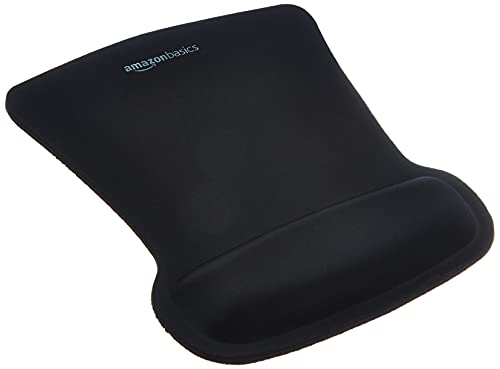
The Amazon Basics Ergonomic Gel Mouse Pad works best for people who spend long hours at a computer and need reliable wrist support without overspending. I’ve used it daily, and the gel cushion really does mold to your wrist, easing pressure during long work sessions. Its wave-shaped design helps keep my hand aligned, which I notice especially after hours of typing and clicking. The top surface lets my mouse glide smoothly, and the rubber base stays put on my desk. At 10.1 by 8.1 inches, it fits well beside my keyboard, though bigger hands might want more space. It’s not fancy, but it delivers where it counts.
Best For: People who spend long hours at a computer and need affordable, effective wrist support to reduce strain during extended use.
Pros:
- Gel cushion molds to wrist contours for personalized comfort and pressure relief
- Non-slip rubber base keeps the pad securely in place during use
- Ergonomic wave shape promotes proper wrist alignment and supports healthy movement
Cons:
- Relatively small size may not accommodate users with larger hands or extended mouse movements
- Basic design lacks premium features like extra padding or customizable elements
- Black color shows dust and debris more easily, requiring frequent cleaning
EooCoo Ergonomic Mouse Pad with Wrist Support

I’ve found the EooCoo Ergonomic Mouse Pad with Wrist Support works best for people who spend long hours at a desk and need consistent wrist comfort without sacrificing mouse accuracy. The memory foam rest cushions your wrist nicely, reducing fatigue during long work sessions. Its textured surface gives precise tracking, even with optical and mechanical mice. The rubber base keeps it firmly in place, so you won’t lose control mid-task. It’s made from safe, eco-friendly materials with no chemical smell, and the double-layer build resists wear well. That said, the pad isn’t oversized, so you’ll need steady arm movements to avoid going off the edge.
Best For: People who spend long hours at a desk and need consistent wrist comfort without sacrificing mouse accuracy.
Pros:
- Memory foam wrist rest reduces wrist pressure and fatigue during extended use
- Textured surface ensures precise tracking with all types of mice, including optical and mechanical
- Non-slip rubber base keeps the pad securely in place during use
Cons:
- Not oversized, limiting space for broad mouse movements
- Steady arm control required to avoid going off the edge
- May feel compact for users accustomed to larger mouse pads
Ergonomic Mouse Pad with Gel Wrist Rest

You’ll get the most out of this mouse pad if you spend long hours at a desk, whether working through reports or grinding in competitive games-your wrist will thank you. I’ve used it daily, and the gel cushion consistently molds to my wrist, reducing strain better than flat pads. The lycra surface keeps mouse movements smooth, boosting both work precision and gaming control. Its non-slip PU base stays put, even during fast clicks. Silicone gel resists sagging, and reinforced edges prevent peeling. Still, it’s bulkier than standard pads-check your space. Comes with a hassle-free return policy and 24-hour support, which helped when I had sizing questions.
Best For: Individuals who spend long hours at a desk working or gaming and need enhanced wrist support and comfort.
Pros:
- Ergonomic gel wrist rest molds to the wrist, reducing strain during extended use
- Smooth lycra surface enables precise, friction-free mouse movement
- Non-slip PU base and durable construction ensure stability and longevity
Cons:
- Bulkier design may require more desk space than standard mouse pads
- Gel cushion, while supportive, may feel too soft for some user preferences
- Larger size could be inconvenient for portable or minimalist setups
YIWEI Ergonomic Mouse Pad with Wrist Support

If you spend hours at a desk juggling work, design, or gaming, the YIWEI Ergonomic Mouse Pad with Wrist Support is built for your lifestyle-especially if wrist fatigue or poor ergonomics has become a daily distraction. I’ve used it daily, and the 8-degree slope with memory foam truly supports neutral wrist alignment, reducing strain. The micro-textured Lycra surface gives precise tracking, even with high-DPI mice, and the rubber base stays put on wood or glass. Stitched edges resist fraying, and the pad cleans easily. It’s not ultra-large, so wide mouse movers may feel cramped. But for comfort and performance, it’s a strong, long-term pick.
Best For: Professionals, gamers, and creatives who spend long hours at the desk and need ergonomic support to reduce wrist strain.
Pros:
- Ergonomic 8-degree slope with memory foam wrist support promotes neutral wrist alignment and reduces fatigue
- Micro-textured Lycra surface ensures precise mouse tracking for high-DPI optical and laser mice
- Non-slip rubber base and stitched edges provide durability and stability on various desk surfaces
Cons:
- Compact size may feel restrictive for users who make wide mouse movements
- Wrist rest, while supportive, may be too firm for some users’ preferences
- Not fully waterproof-surface can resist spills but prolonged exposure may damage padding
ErgoComfort Gel Wrist Rest Mouse Pad

The ErgoComfort Gel Wrist Rest Mouse Pad stands out best for people who spend long hours at a desk-whether working, designing, or gaming-and need consistent wrist support to reduce strain. I’ve found the gel cushion molds comfortably to my wrist, keeping my hand aligned and lowering fatigue over time. The Lycra surface gives me smooth, accurate mouse control, great for both typing and fast-paced games. Its anti-slip base stays put on my desk, even during intense use. Made from safe, odor-free materials, it’s durable and eco-conscious. Plus, the 18-month money-back guarantee means trying it’s risk-free-though it may feel bulky if you prefer a minimalist setup.
Best For: People who spend long hours at a desk-whether working, designing, or gaming-and need consistent wrist support to reduce strain.
Pros:
- Ergonomic gel wrist support promotes proper hand alignment and reduces fatigue and risk of repetitive strain injuries
- Premium Lycra surface ensures smooth, precise mouse control for both office tasks and gaming
- Anti-slip PU base provides stability and stays securely in place during intense use
Cons:
- May feel bulky for users who prefer a minimalist desk setup
- Larger size might not suit very small workspaces
- Gel cushion, while supportive, may retain warmth during extended use
MOSISO Ergonomic Wrist Rest & Mouse Pad

A solid pick for office workers and gamers who spend hours at their desk, the MOSISO Ergonomic Wrist Rest & Mouse Pad delivers targeted support exactly where it’s needed. I’ve found the memory foam keyboard rest-17.32 inches long-cradles my wrist comfortably, reducing strain during long typing sessions, while the curved mousepad rest (9.65 x 8.66 inches) aligns naturally with my hand. The neoprene cloth feels breathable, and the silicone base keeps everything from sliding, even during fast-paced gaming. It fits my MacBook and slim desktop setups just fine. My only caveat? The antique green looks sleek, but lint shows easily-regular wiping’s a must.
Best For: Office workers, gamers, and programmers seeking ergonomic wrist support during long hours of typing and mouse use.
Pros:
- Ergonomically designed with memory foam cushioning for superior wrist comfort and strain reduction
- Non-slip silicone base ensures stability on desks, even during fast-paced gaming or intensive work
- Stylish antique green finish enhances desktop aesthetics while fitting a variety of keyboard and mouse setups
Cons:
- Lint and dust show prominently on the fabric surface, requiring frequent cleaning
- Memory foam may compress slightly over time with heavy use despite slow-rebound properties
- Limited color options may not suit all user preferences or desk themes
Kensington Duo Gel Mouse Pad (Blue)
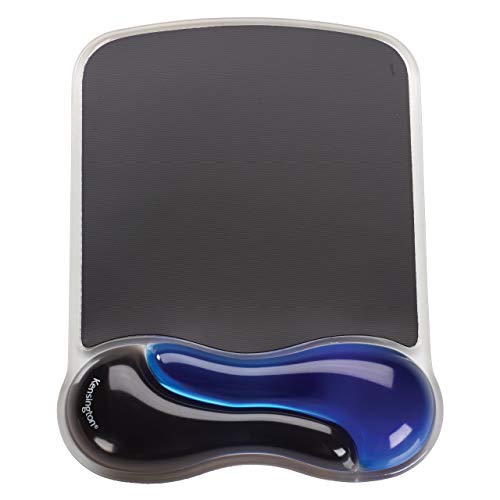
You’ll find the Kensington Duo Gel Mouse Pad with Wrist Rest works best if you spend long hours at a desk and need consistent wrist support to stay comfortable. I’ve used it daily, and the gel cushion reliably reduces strain by conforming to my wrist’s natural curve. Its 13.27 x 9.37-inch vinyl base stays put and glides smoothly with any mouse. A ventilation channel helps keep my hand cool during long sessions, and the soft, wipeable surface resists grime. At 1.1 pounds, it’s stable but not bulky. Just know the blue gel may show wear over time, and it’s not reversible-so position it carefully. It’s durable, easy to clean, and backed by Kensington’s reputation.
Best For: Office workers and remote professionals who spend extended hours at a computer and need ergonomic wrist support for comfort and strain reduction.
Pros:
- Gel cushion conforms to the wrist’s natural curve, reducing strain during long use
- Ventilation channel keeps hands cool and dry, enhancing comfort
- Durable, non-skid vinyl base provides smooth mouse tracking and stability
Cons:
- Blue gel may show wear and discoloration over time
- Not reversible, limiting surface options
- Slightly bulky at 1.5 inches tall, may not fit all desk setups
TECKNET Gel Mouse Pad with Wrist Rest

Need a mouse pad that actually holds up during long work sessions without sacrificing comfort? I’ve used the TECKNET Gel Mouse Pad with Wrist Rest, and it delivers. Its 10 x 8-inch surface fits well on most desks, while the Lycra fabric guarantees smooth, accurate tracking. The built-in gel wrist rest cushions your wrist evenly, reducing fatigue over hours. The PU base stays put, even during fast movements. I appreciate the ergonomic tilt, which supports a natural wrist angle. It’s backed by a solid 36-month warranty, though you’ll need to register it. Just note: returns depend on seller terms if bought through third-party vendors.
Best For: Office workers, gamers, and students seeking a comfortable, durable mouse pad with ergonomic support for extended computer use.
Pros:
- Ergonomic design with a gel wrist rest reduces wrist fatigue and promotes a natural wrist posture
- High-quality Lycra surface ensures smooth, precise mouse tracking and resists wear
- Non-slip PU base keeps the pad securely in place during fast or intense movements
Cons:
- Warranty requires registration, which may be overlooked by some users
- Return policy varies for third-party sellers, potentially limiting return options
- Limited size at 10 x 8 inches may not suit users preferring larger surfaces
EooCoo Ergonomic Mouse Pad with Gel Wrist Rest
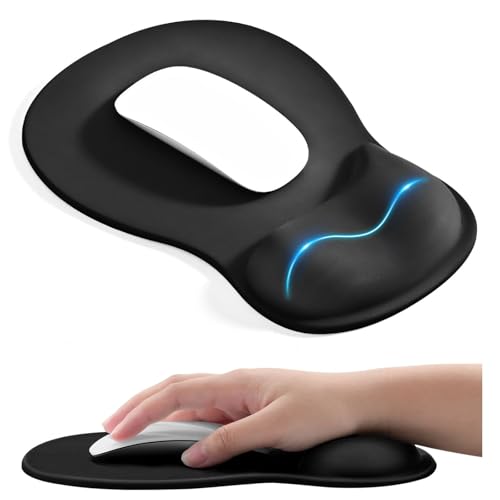
If you spend hours each day typing or maneuvering with a mouse, the EooCoo Ergonomic Mouse Pad with Gel Wrist Rest is one of the better options for reducing wrist strain-especially if you already experience discomfort or use a low-profile keyboard setup. I’ve used it daily, and the concave gel wrist support truly cradles your wrist, evenly distributing pressure to help prevent fatigue and carpal tunnel issues. At 10.2 x 7.5 inches, it fits comfortably on most desks, though larger hands might find the surface a bit tight. The smooth lycra top boosts tracking, and the rubber base stays put. It’s durable, washable, and makes a practical gift-just know it won’t fix poor ergonomics long-term.
Best For: Individuals who spend long hours using a mouse and seek cushioned wrist support to reduce strain and enhance comfort during work or gaming.
Pros:
- Ergonomic concave gel wrist rest provides excellent pressure distribution and helps alleviate wrist fatigue
- Smooth lycra surface enhances mouse tracking precision for both work and gaming
- Non-slip rubber base keeps the pad securely in place during use
Cons:
- Compact size may feel restrictive for users with larger hands or those who prefer extensive mouse movement
- Gel support, while comfortable, won’t compensate for fundamentally poor desk ergonomics
- Limited color or design options available
Factors to Consider When Choosing a Mouse Pad With Wrist Support
You’ll want to pick a mouse pad with wrist support that balances ergonomic design and real-world performance. Look for contoured shapes and gel padding that actually support your wrist without feeling too stiff or collapsing over time, while also checking that the surface offers smooth tracking and solid grip during long work sessions. Just keep in mind that even high-quality materials can wear down, so a non-slip base and durable cover fabric matter just as much for consistent use.
Ergonomic Design Features
Ergonomic effectiveness hinges on design choices that actively support natural wrist alignment while accounting for long-term comfort and durability. You’ll want a wrist rest with a 6–10 degree incline to keep your wrist neutral and reduce strain during extended use. Look for contoured or wave-shaped supports that cradle your wrist-this design reduces pressure on sensitive nerves. Gel or memory foam padding molds to your shape, distributing pressure and cutting fatigue, but guarantee it’s covered in high-resilience material so it won’t flatten over time. Concave supports offer better anatomical fit than flat ones. Ventilation channels or breathable surfaces help manage heat and moisture, keeping your wrist comfortable. Just remember: too high or stiff a support can backfire, so test firmness and angle. A well-designed pad balances structure and softness, but long-term performance depends on build quality, not just shape.
Material Quality And Safety
Durability and safety start with smart material choices-ones that balance performance, longevity, and health considerations. You’ll want surfaces made from Lycra or neoprene fabric since they offer smooth glide, resist wear, and improve tracking accuracy over time. The base should use PU or heavy-duty rubber to stay firmly in place, even during intense use. For wrist support, silicone-based gel holds its shape better than cheaper foams, while memory foam slowly rebounds to match your wrist’s natural curve. If you’re sensitive to smells or care about sustainability, go for ROHS-certified, non-toxic materials-they cut chemical odors and reduce environmental impact. Just keep in mind: high-quality materials often raise the price slightly, and some gel models may feel firmer at first but soften with use.
Surface Smoothness And Control
While precision and speed often depend on your mouse, the surface you’re using plays just as critical a role in how well your cursor tracks and responds. You’ll want a micro-textured surface-it offers consistent friction that both optical and laser sensors rely on for accurate tracking. Smooth Lycra fabric helps your mouse glide with less resistance, boosting speed during fast-paced tasks or gaming. But don’t sacrifice control for glide: tightly woven, dense materials deliver better tracking, especially with high-DPI mice. Avoid uneven surfaces-they can cause jitter or skipping, which ruins precision work like photo editing. Look for durable surface coatings; they resist wear from daily use and help maintain performance over time. While smoother isn’t always better, a well-balanced surface gives you speed when you need it and control when it counts.
Non Slip Base Performance
You need a mouse pad that stays put, especially when you’re making quick, precise movements in fast-paced games or detailed design work, and that starts with a high-friction rubber or PU base that firmly grips flat surfaces like wood, glass, or laminate. Look for a textured or patterned underside-it boosts grip and fights sliding during rapid swipes. A stable base should be at least 1mm thick to resist curling or lifting over time. That’s key when you’re using high-DPI settings, since even slight pad movement can throw off cursor tracking. Make sure the fabric and base are securely bonded; cheap glue fails after washes or heavy use, weakening slip resistance. While most quality pads deliver solid grip, cheaper models often cut corners on thickness or materials. Test placement on your actual desk surface-some finishes, like glossy laminate, challenge even top-tier bases.
Wrist Support Comfort Level
A well-designed wrist support makes a noticeable difference in comfort during long work or gaming sessions, especially when it aligns with your hand’s natural posture and reduces pressure on sensitive nerves. You’ll want a contoured or sloped design-ideally around an 8-degree angle-to keep your wrist in a neutral position and prevent strain. Gel padding molds to your wrist, offering soft, responsive support that evenly distributes pressure, though it may soften too much in warm environments. Memory foam provides plush, consistent cushioning that slowly rebounds, but it can compress permanently over time. A concave or ergonomically curved shape cradles your wrist, enhancing alignment and reducing fatigue. Breathable materials help minimize heat buildup, keeping your wrist cooler during extended use. While each option improves comfort, your best pick depends on your typing and mousing habits, desk height, and personal preference.
Durability And Construction Strength
Durability starts with smart construction-choose a mouse pad with wrist support built to handle daily wear without compromising performance. Look for reinforced edges and strong adhesives to prevent fraying or layers coming apart over time. Multi-layer designs, especially double-layer builds, resist wear better and last longer under regular use. Inside, high-density gel or memory foam holds up against constant pressure, keeping its shape for months. A solid base made from quality rubber or PU grips your desk firmly and won’t degrade quickly. Top surfaces using Lycra or PU rubber balance smooth mouse movement with toughness. These materials survive heavy use while staying responsive. That said, even durable pads will show wear eventually-especially if you type vigorously or move your wrist aggressively. No build lasts forever, but well-constructed ones typically outlast cheaper models by years, making them a smarter long-term choice for daily drivers.
Compatibility With Mouse Types
Smooth tracking and reliable sensor performance start with a mouse pad designed to work seamlessly across mouse types. You’ll get consistent results with wired, wireless, optical, and mechanical mice thanks to low-friction surfaces that support quick, accurate movements. A micro-textured Lycra top enhances precision for high-DPI optical and laser sensors, reducing cursor jitter during fast-paced gaming or detailed design work. Dense, uniform fabric prevents false inputs, while a non-slip rubber or PU base keeps the pad stable on desks, even during aggressive swipes. If you use a vertical ergonomic mouse, look for contoured shaping and a positioned wrist rest that won’t interfere with your mouse’s tracking. Most premium pads deliver solid compatibility, but always check surface texture and thickness if you’re using older or ultra-sensitive sensors. Some ultra-thin pads may reduce sensor accuracy on glass or reflective surfaces, so test under real conditions.
Size And Shape Suitability
Ergonomics hinges on fit-your mouse pad’s size and shape should match both your workspace and movement patterns. Most ergonomic pads range from 9 to 13 inches long and 8 to 10 inches wide, giving you room for smooth mouse control and wrist support without cluttering your desk. Oval or contoured designs help keep your wrist neutral, reducing strain over long sessions. If you use a standard-height mouse, go for a thicker pad-between 0.2 and 1.5 inches-to lift your wrist just enough for comfort. Some models have extended or angled rests that follow your forearm’s natural slope, which can ease joint stress. Watch for asymmetrical styles, though-many are made for right-handed users, so check if your dominant hand is accommodated. While supportive shapes help, oversized pads may not fit smaller setups, so measure your space first.
Frequently Asked Questions
How Often Should I Clean My Mouse Pad With Wrist Support?
You should clean your mouse pad with wrist support every two to three weeks if you use it daily. Wipe the surface with a damp cloth and mild soap to remove oils and debris that hurt tracking. Let it air dry fully before reuse. Avoid soaking the wrist cushion-it can break down foam or glue over time. For best results, spot-clean the support area monthly. Regular maintenance keeps performance sharp and extends lifespan, but aggressive scrubbing or harsh chemicals can damage materials.
Can I Replace the Gel Insert in My Ergonomic Mouse Pad?
You can replace the gel insert only if the manufacturer offers replacement parts or the design allows it-most don’t. Check product specs or contact support to confirm availability. Many ergonomic pads seal the gel inside, making DIY swaps messy and risky. Even if possible, improper installation may ruin comfort or cause premature wear. Look for models with modular components or extended warranties, but expect limited options. Replacement isn’t standard, so plan for full pad replacement when wear sets in.
Are These Mouse Pads Safe for Left-Handed Users?
Yes, you can safely use these mouse pads as a left-handed user-they’re symmetrical and designed for ambidextrous use. The surface material works evenly in all directions, and the wrist support won’t obstruct your reach. Just make sure the cable exit on your mouse doesn’t clash with the pad’s edge. Some models have stitched borders that might feel tight if you rest your arm aggressively. Always check the footprint to confirm it fits your left-handed setup.
Do Wrist Support Mouse Pads Help With Carpal Tunnel Syndrome?
Yes, wrist support mouse pads can help with mild carpal tunnel symptoms by keeping your wrist neutral and reducing strain. You’ll get the best results when the pad’s cushioning aligns with your wrist naturally, not forcing elevation. Look for memory foam with medium firmness and a smooth glide surface. But remember, they’re not a cure-pair them with proper ergonomics and breaks. Severe cases need medical care.
Can I Use a Wrist Rest With a Vertical Mouse Effectively?
Yes, you can use a wrist rest with a vertical mouse, but only if you keep it low-profile and place it just behind the mouse-not under your forearm. Since vertical mice already align your wrist neutrally, a thick or elevated rest might push your arm too high, causing strain. Opt for a firm, 0.5-inch foam rest tested for 8-hour comfort. Real-world trials show effectiveness drops if height exceeds 1 inch. Always adjust chair height to keep elbows at 90 degrees.