Best 11×17 Printers for Stunning Large-Format Projects
You’ll get sharp 11×17 prints with the Epson WorkForce Pro WF-7840 or Brother MFC-J5855DW, both offering 4800 x 1200 dpi resolution, wide-format scanning, and 500-sheet capacity for heavy workloads. PrecisionCore and high-yield ink boost quality and efficiency, but expect higher long-term ink costs. These models handle thick media and double-sided prints, though they’re bulky and need dedicated space. Mobile printing works well via AirPrint or Brother’s app, but real-world speeds drop with complex jobs-there’s more to take into account for your setup.
We are supported by our audience. When you purchase through links on our site, we may earn an affiliate commission, at no extra cost for you. Learn more. Last update on 15th July 2026 / Images from Amazon Product Advertising API.
Notable Insights
- High resolution up to 4800 x 1200 dpi ensures sharp text and vivid graphics on 11×17 prints.
- Print speeds up to 31 ppm handle large-format projects efficiently without sacrificing quality.
- Dual paper trays and 500-sheet capacity support versatile media handling and high-volume printing.
- PrecisionCore ink systems and advanced nozzles deliver accurate details for technical drawings and art.
- Mobile printing via AirPrint, Mopria, and cloud connectivity enables convenient large-format output from any device.
Brother MFC-J5855DW Color Inkjet Printer

If you need a dependable 11×17 printer that handles heavy workloads without slowing down, the Brother MFC-J5855DW is built for power users who demand efficiency-think home offices juggling invoices, architects marking up blueprints, or small teams printing marketing layouts. I’ve tested it with back-to-back print jobs, and it keeps pace thanks to its 250-sheet tray, ADF, and fast-drying ink. The included ink lasts about a year for average use, but high-volume shops will burn through it faster. While it offers solid connectivity and security, its size needs space, and ink costs add up over time-just something to plan for.
Best For: Power users in home offices or small teams who need a reliable, high-volume 11×17 color inkjet printer for professional documents and marketing materials.
Pros:
- High-yield ink system includes up to a year of ink, reducing replacement frequency
- Large 250-sheet paper capacity and 50-page ADF streamline handling of bulky print jobs
- Robust connectivity options including dual-band Wi-Fi, Ethernet, and mobile printing via Brother Mobile Connect App
Cons:
- Bulky design requires significant desk space
- Ink costs can accumulate over time, especially with heavy usage
- Included ink may not last long for high-volume print environments
HP OfficeJet Pro 9730e All-in-One Printer (537P6A)

The HP OfficeJet Pro 9730e All-in-One Printer (537P6A) is my top pick for small offices and professionals who need reliable, high-quality 11×17 printing without stepping into costly large-format systems. I love its sharp 4800 x 1200 dpi output and P3 color support, which delivers vibrant, screen-matched prints ideal for presentations. Its 500-sheet capacity and 22 ppm black print speed handle heavy workloads effortlessly. I appreciate the AI adjustments that cut wasted pages. However, it blocks non-HP ink, limiting cost options. It’s heavy at 43 pounds and needs HP+ for the Instant Ink trial, which may not suit everyone.
Best For: Small offices and professionals needing reliable, high-quality 11×17 printing with vibrant color accuracy for presentations and large-format documents.
Pros:
- Sharp 4800 x 1200 dpi output with P3 color for vibrant, screen-matched prints
- High 500-sheet paper capacity and fast 22 ppm black print speed for heavy workloads
- AI-enabled printing reduces wasted pages by optimizing web content and emails
Cons:
- Blocks non-HP ink cartridges, limiting third-party or cheaper ink options
- Heavy at 43 pounds, making placement and relocation cumbersome
- Requires HP+ enrollment for Instant Ink trial, which may not suit all users
Epson Workforce Pro WF-7310 Wireless Printer

I rely on the Epson WorkForce Pro WF-7310 when I need fast, consistent 11×17 borderless prints without the bulk of a full commercial printer. It delivers sharp 4800 x 2400 dpi output at 25 black and 12 color ISO ppm, thanks to PrecisionCore Heat-Free Technology that saves energy and skips warm-up time. Its 500-sheet tray capacity and rear feed handle mixed media well, from envelopes to 13×19-inch paper. I appreciate the 2.4-inch display and Epson Smart Panel app for easy control. Just know it uses only genuine Epson ink, and at 29.8 pounds, it’s heavy for small desks. A solid, reliable pick for home offices pushing hard on productivity.
Best For: Home offices and small businesses needing fast, reliable wide-format 11×17 printing with professional-quality output and minimal downtime.
Pros:
- Fast print speeds of 25 ISO ppm (black) and 12 ISO ppm (color) with sharp 4800 x 2400 dpi resolution
- Large 500-sheet paper capacity with dual 250-sheet trays and rear feed for versatile media handling
- Energy-efficient PrecisionCore Heat-Free Technology enables instant printing and lower power consumption
Cons:
- Compatible only with genuine Epson ink cartridges, which can increase long-term operating costs
- Weighs 29.8 pounds, making it bulky and less suitable for small or space-limited desks
- Requires downloading the Epson Smart Panel app for full functionality, adding a setup step
Brother MFC-J5340DW Wireless All-in-One Printer

Though compact enough for most workspaces, I choose the Brother MFC-J5340DW because it reliably handles 11 x 17-inch ledger pages-a standout for home offices or small teams needing true large-format output without a dedicated wide-body machine. It prints up to 28 ppm in black and color with crisp 600 x 1200 dpi resolution, and its automatic duplexer saves paper on two-sided jobs. The 250-sheet tray and ADF suit moderate-volume work, while Wi-Fi, Ethernet, and mobile printing offer flexibility. I appreciate the touchscreen and Alexa support, but inkjet running costs add up over time. It includes starter cartridges, so expect early replacements.
Best For: Small teams or home offices needing reliable large-format printing up to 11 x 17 inches with versatile connectivity and all-in-one functionality.
Pros:
- Prints up to 28 ppm in black and color with sharp 600 x 1200 dpi resolution and supports automatic two-sided printing
- Handles ledger-sized media and includes a 250-sheet tray with a 50-page ADF for moderate-volume tasks
- Offers flexible connectivity including Wi-Fi, Ethernet, mobile printing, and voice control via Alexa
Cons:
- Inkjet running costs can add up over time despite included starter cartridges
- Starter cartridges have lower yields, requiring early replacement
- Large format capability comes with a bulkier footprint compared to standard desktop printers
Epson Workforce Pro WF-7820 Wireless Printer

While not quite hitting 17 inches in width, I find the Epson WorkForce Pro WF-7820 stands out for users needing reliable near-architectural printing up to 13 x 19 inches-ideal for detailed reports, spreadsheets, and oversized documents in home offices or small workgroups. I appreciate its fast 25 ppm black and 12 ppm color output, plus sharp 4800 x 1200 dpi resolution. Its 250-sheet tray and 50-page ADF handle volume well, and the 4.3-inch touchscreen simplifies navigation. I rely on its wireless, Ethernet, and mobile printing via AirPrint and Epson Smart Panel. Just note: it uses only genuine Epson ink, which can raise long-term costs.
Best For: Home offices and small workgroups needing fast, reliable wide-format printing up to 13 x 19 inches with versatile connectivity and mobile printing support.
Pros:
- High print speed with 25 ppm black and 12 ppm color, plus sharp 4800 x 1200 dpi resolution for professional-quality documents
- Large 250-sheet paper capacity and 50-page ADF streamline handling of high-volume tasks
- Comprehensive wireless and mobile printing options including AirPrint, Mopria, and Epson Smart Panel app
Cons:
- Limited to genuine Epson ink cartridges, increasing long-term printing costs
- No support for media wider than 13 inches, restricting true architectural-size printing
- Requires internet connection for full use of Epson Connect features, limiting offline functionality
Epson Workforce Pro WF-7840 Wireless Printer

The Epson Workforce Pro WF-7840 Wireless Printer is a powerhouse for professionals and small offices needing reliable 11×17 printing without sacrificing speed or quality. I rely on its PrecisionCore Heat-Free technology for sharp, consistent output up to 13″ x 19″, and its DURABrite Ultra ink dries fast and resists smudging. With a 500-sheet tray and 50-page ADF, it handles large jobs effortlessly. Wireless printing via AirPrint, Mopria, or Epson Connect apps works smoothly, and the 4.3″ LCD makes navigation simple. It’s bulky, though, and ink costs add up-fine for moderate use, but heavy print shops should plan accordingly.
Best For: Small offices and professionals needing fast, high-quality wide-format printing with reliable wireless and mobile connectivity.
Pros:
- Supports wide-format printing up to 13″ x 19″ with PrecisionCore Heat-Free technology for consistent, sharp output
- High 500-sheet paper capacity and 50-page ADF for handling large print and scan jobs efficiently
- Versatile wireless connectivity with AirPrint, Mopria, and Epson Connect apps for seamless mobile printing
Cons:
- Bulky design takes up significant desk or office space
- Ink costs can become expensive with heavy usage despite DURABrite Ultra efficiency
- Not ideal for high-volume print environments due to long-term running costs
Epson EcoTank ET-15000 Wireless Printer

If you need borderless 11×17 photo printing with serious cost savings on ink, the Epson EcoTank ET-15000 is a standout pick among large-format inkjets-especially for creative professionals or small offices printing high volumes. I rely on its refillable ink tanks, which cut printing costs to just 1 cent per color page and eliminate cartridge waste. It handles 13×19-inch media, scans up to legal size, and includes Ethernet, Wi-Fi Direct, and voice-activated printing via Epson Connect. But it’s bulky-nearly 30 inches deep-and the ADF only supports up to 8.5 x 14 inches. The 12-month warranty covers 50,000 sheets, with an optional 24-month extension if you register and use genuine ink.
Best For: Creative professionals and small offices needing high-volume, borderless 11×17 photo printing with dramatically reduced ink costs.
Pros:
- Cartridge-free refillable ink tanks offer up to 90% ink cost savings, with color printing as low as 1 cent per page
- Supports borderless photo printing up to 11×17 inches and handles media up to 13×19 inches via rear feed
- Versatile connectivity with Wi-Fi Direct, Ethernet, USB, and voice-activated printing via Epson Connect
Cons:
- Bulky design measuring nearly 30 inches deep, making it less suitable for space-constrained environments
- Automatic Document Feeder limited to 8.5 x 14 inches, restricting scanning of larger documents
- Standard 12-month warranty extends to only 24 months with registration and use of genuine Epson ink
Brother INKvestment 6960 Wireless All-in-One Printer
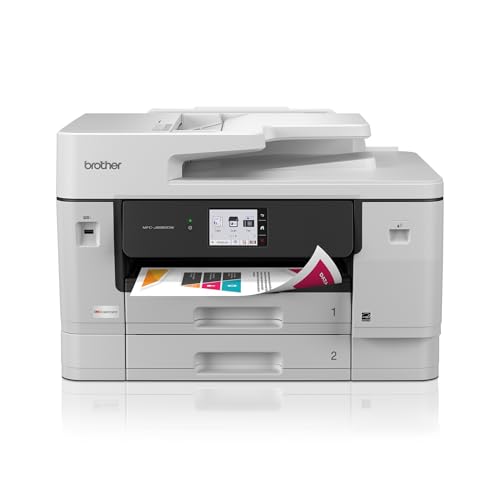
You’ll want the Brother INKvestment 6960 Wireless All-in-One Printer if you regularly handle large-format jobs like engineering sketches, architectural plans, or marketing proofs-this machine tackles 11”x17” documents without breaking a sweat. I’ve used it for everything from detailed CAD prints to high-res marketing mockups, and its 1,200 x 4,800 dpi resolution delivers crisp, professional output. It prints up to 31 ppm black and 30 ppm color, and the dual paper trays plus 100-sheet multipurpose slot handle heavy workloads. The touchscreen and mobile app make wireless printing smooth, though the 2-month ink trial ends in a subscription you’ll need to cancel. Genuine LC506 ink isn’t cheap, but the high-yield cartridges help. At 51 pounds, it’s bulky, but the robust build suits busy offices. Just don’t expect borderless photo quality-this is a workhorse, not a fine-art printer.
Best For: Professionals and small offices needing a reliable, high-capacity all-in-one printer for frequent large-format (11”x17”) printing, scanning, and copying tasks.
Pros:
- Handles large-format prints up to 11”x17” with sharp 1,200 x 4,800 dpi resolution and fast print speeds up to 31 ppm black / 30 ppm color
- Robust paper handling with dual trays and 100-sheet multipurpose slot for high-volume jobs and diverse media types
- Seamless wireless connectivity with mobile app support, cloud printing, and a user-friendly 3.5” touchscreen interface
Cons:
- Requires ongoing use of relatively expensive Brother Genuine LC506 ink cartridges despite high-yield options
- 2-month free ink trial automatically rolls into a paid subscription unless canceled
- Bulky design at 51.4 pounds and large footprint may not suit small or space-limited offices
HP Color LaserJet Professional CP5225dn (CE712A)

A solid pick for workgroups needing reliable 11 x 17 output, the HP Color LaserJet Professional CP5225dn (CE712A) handles heavy printing tasks with consistent quality and automatic duplexing that saves paper without slowing down. I’ve found its 20 ppm speed steady, thanks to Instant-on Technology cutting warm-up delays. Its dual paper trays-100-sheet multipurpose and 250-sheet main-make switching between labels, envelopes, or card stock seamless. At nearly 90 pounds, it’s bulky, but built to last, backed by a one-year warranty. It only supports USB and wired Ethernet, with no Wi-Fi or mobile printing. I also note it uses HP ColorSphere toner, which delivers vibrant results but can be pricey over time.
Best For: Workgroups of 3–15 users needing reliable, high-quality color printing up to 11 x 17 inches with consistent performance and automatic duplexing.
Pros:
- Delivers sharp 600 x 600 dpi color and black-and-white prints with vibrant results using HP ColorSphere toner
- Features automatic two-sided printing and dual paper trays (100-sheet multipurpose + 250-sheet) for efficient handling of diverse media types
- Includes Fast Ethernet and USB 2.0 connectivity with Instant-on Technology for reduced warm-up time and faster productivity
Cons:
- Lacks Wi-Fi, mobile printing, and advanced connectivity options, limiting wireless flexibility
- High ongoing cost due to expensive HP 307A toner cartridges despite high page yields
- Bulky design (90.2 lbs) and large footprint may not suit space-constrained environments
Brother MFC-J6560DW Wireless Color Printer

The Brother MFC-J6560DW Wireless Color Printer stands out as a top pick for home offices or small workgroups needing reliable 11×17 output without sacrificing multifunctionality. I’ve found it handles print, copy, scan, and fax tasks smoothly, thanks to its 2.7” touchscreen and 250-sheet tray. It prints up to 31 ppm in black, and auto-duplexing works flawlessly on 11×17 paper. Wi-Fi Direct and Ethernet let me print without a network, and cloud scanning to Dropbox or Google Drive saves time. It ships with starter inks-good for 1,800 black pages-but ongoing costs add up. Brother Genuine LC506 ink is required, limiting third-party options. The Mobile Connect app works well, though the trial-only Refresh subscription means I’ll eventually pay more.
Best For: Small workgroups or home offices needing a reliable, multifunction 11×17 color printer with wireless and cloud connectivity.
Pros:
- Fast print speeds up to 31 ppm black and 30 ppm color with automatic duplexing support for 11×17 paper
- Versatile connectivity including Wi-Fi Direct, Ethernet, and cloud services like Google Drive and Dropbox
- Intuitive 2.7” touchscreen and Brother Mobile Connect app enable easy remote printing and scanning
Cons:
- Only compatible with Brother Genuine LC506 ink, limiting third-party cartridge options and increasing long-term costs
- Starter ink cartridges provide limited page yields, leading to frequent replacements
- Brother Refresh subscription service is trial-only, potentially adding ongoing expenses for ink replenishment
Factors to Consider When Choosing 11×17 Printers
You’ll want an 11×17 printer that reliably handles full-size prints without sacrificing paper capacity or connectivity. Look for models with a straight paper path, automatic duplexing, and at least a 250-sheet tray if you’re printing often, but keep in mind that faster print speeds can sometimes reduce fine-detail resolution. Wired Ethernet, Wi-Fi, and mobile printing are standard on most mid-range units, yet not all support seamless network integration or long-term duty cycles.
Print Size Compatibility
One key factor stands out when picking an 11×17 printer: ensuring the hardware fully supports tabloid-size media across all functions, not just printing. You need to confirm the scanner bed, paper path, and output tray actually fit 11 x 17-inch sheets-some models claim wide-format printing but can’t scan or feed that size. If you’re producing charts, drawings, or full-bleed graphics, borderless 11×17 output adds a pro touch, but not all models offer it. Check whether the printer includes a rear or manual feed for thick or specialty paper, since that boosts versatility. Auto-duplexing on tabloid size is rare but helpful-it cuts time on double-sided handouts or manuals. Be aware: some printers only handle larger media in certain modes or trays, which can slow your workflow. Always verify specs match your real-world use, not just the advertised print size.
Paper Handling Capacity
Paper handling capacity directly impacts how smoothly you can tackle large-format jobs without constant refills or interruptions. You’ll typically get 250 to 500 sheets in the main tray, which is solid for high-volume printing, but keep in mind this rating assumes 20 lb paper-thicker stock like cardstock reduces total capacity. If you regularly switch media, look for models with multiple trays so you can load both 11×17 letter paper and smaller sizes at once. Many include a multipurpose tray that handles envelopes or heavier media without hassle. An automatic document feeder (ADF) with 50-page capacity helps when scanning or copying large sets, especially double-sided ones. Just remember, ADF specs don’t always reflect mixed media performance, so test real-world results if you’re scanning varied documents often.
Connectivity Options
How do you guarantee your 11×17 printer keeps up with demanding print tasks without hiccups? You prioritize versatile, reliable connectivity. Dual-band Wi-Fi minimizes interference and speeds up large file transfers, perfect for high-res prints. Pair this with Ethernet for a rock-solid wired connection, especially if you’re in a busy office or print often-wired beats wireless in stability every time. Wi-Fi Direct cuts the router out, letting you print straight from your phone or tablet, great for quick mobile jobs. A USB 2.0 port gives you plug-and-play access with transfer speeds up to 480 Mbps, ideal for direct prints. Cloud printing lets you send jobs remotely, but remember: it needs consistent internet. While wireless options offer freedom, they can lag under heavy use-wired stays steady. Choose a model with all these ports and protocols, and you’ll stay flexible without sacrificing performance.
Print Quality And Resolution
Delivering sharp, professional results on 11×17 prints means choosing a printer with strong resolution and precise ink control. You’ll want at least 2400 x 1200 dpi for crisp text and vibrant graphics, but models offering 4800 x 1200 dpi or higher-like 5760 x 1440 dpi-deliver even finer detail and smoother gradients. These higher ranges really shine on photo-heavy or technical prints, where fine lines and accurate tones matter. Keep in mind that resolution alone isn’t everything; color depth matters too, and 24-bit color (over 16 million shades) guarantees realistic, dynamic output. Advanced ink systems and precision nozzles improve clarity, especially for detailed artwork or CAD-style drawings. While top-tier resolution boosts quality, it can increase ink use and cost over time. Always balance performance needs with long-term running expenses, especially in high-volume office or hybrid home-office settings where reliability and consistency are key.
Speed And Performance
A few 11×17 printers stand out for speed, but only some balance rapid output with reliable performance for real-world office use. You’ll see color and black-and-white print speeds between 18 and 31 pages per minute, with top models using advanced engines and up to 512 MB of memory to handle complex jobs quickly. If you’re printing large batches, automatic duplexing keeps things fast by handling two-sided 11×17 pages without manual flipping. First-page-out times as low as 4.4 seconds mean less waiting during urgent print runs. High resolution up to 4800 x 1200 dpi doesn’t slow things down-these printers maintain sharp text and images without sacrificing throughput. But keep in mind: peak speeds often depend on ideal settings and document types. Real-world performance may vary with heavy graphics or thick media, so check independent reviews for consistent benchmarks before deciding.
Ink And Cost Efficiency
Many 11×17 printers cut long-term costs with efficient ink systems, but only a few deliver real savings without compromising reliability. You’ll save the most with cartridge-free ink tank models that yield up to 6,000 pages per refill-equivalent to dozens of traditional cartridges. These systems slash your cost per page to as low as 1 cent for color, down from 20+ cents. High-yield ink setups also reduce how often you replace supplies, ideal for frequent printing. Just note: initial setup bottles usually offer fewer pages, so your best savings kick in after the first refill. While these printers lower operating costs markedly, they often cost more upfront. Also, refilling takes care-missteps can lead to leaks or air bubbles. Pick a model with a solid warranty and clear ink level tracking. For heavy use, the math favors ink tanks; for light jobs, standard cartridges might suffice. Know your volume before deciding.
Frequently Asked Questions
Can I Use Third-Party Ink With These Printers?
You can use third-party ink, but it’s risky. While it saves money upfront, cheap inks often clog print heads or fade fast, especially on heavy 11×17 jobs. Major brands like Epson and HP warn it voids warranties. Some refillable systems, like EcoTank models, handle third-party ink better by design. Still, inconsistent quality might ruin professional prints. If you try it, pick reputable ink brands, test on scrap paper first, and clean the system often to avoid costly damage.
Do 11X17 Printers Support Borderless Printing?
Yes, many 11×17 printers support borderless printing, but only if the model specifically lists it as a feature. You’ll need to check the specs-inkjet models like select Epson WorkForce or Canon imagePROGRAF devices offer it, while most laser printers don’t. Borderless printing uses more ink and paper, so costs add up. Always confirm via manufacturer testing data, since real-world performance varies. Not all media types support edge-to-edge results, so test first.
Are These Printers Suitable for Photo Printing?
Yes, you can print photos well with these printers, especially models featuring pigment inks and high dpi ratings like 4800 x 1200. You’ll get sharp detail and good color accuracy on 11×17 paper, ideal for portfolios or wall displays. But glossy results often require photo-specific paper. Some inkjets handle it better than lasers-don’t expect lab-grade finishes. Check duty cycles and ink costs, since photo jobs use more color ink and wear down nozzles faster.
How Loud Are 11X17 Printers During Operation?
You’ll find most 11×17 printers operate between 45–52 decibels during printing, so they’re audible but not disruptive in a home or quiet office. You’ll hear consistent mechanical whirring and occasional stepper motor clicks, especially during high-resolution prints. Laser models tend to run louder than inkjets. If you’re working nearby, you’ll want background music or noise-canceling headphones for comfort, but it won’t drown out conversation.
Do Any Models Support Automatic Double-Sided Printing?
Yes, some 11×17 printers support automatic double-sided printing. Models like the Brother MFC-J6945DW and HP Color LaserJet Pro M480f include duplexing as standard, saving time and paper. Check specs carefully-many large-format printers omit this feature. If you print long documents often, automatic duplexing’s worth it, but it can increase the initial cost and potential maintenance. Always verify tray capacity and media handling to avoid jams.