Best Scissor Switch Keyboards That Feel Amazing to Type On
You’ll love the Logitech MX Keys S for its responsive scissor switches, quiet typing at 45–55dB, and smart backlighting that adapts to your environment. It offers crisp 2mm key travel, tactile feedback, and solid build quality with recycled materials. Multi-device Bluetooth pairing works seamlessly across systems, though the premium price and lack of mechanical switch customization may give pause. Battery life dips if using per-key lighting. You’ll want to see how it stacks up against compact or wired alternatives.
We are supported by our audience. When you purchase through links on our site, we may earn an affiliate commission, at no extra cost for you. Learn more. Last update on 17th July 2026 / Images from Amazon Product Advertising API.
Notable Insights
- Scissor switches provide 2–3mm key travel with tactile feedback, ensuring precise, quiet, and comfortable typing.
- Low-profile scissor mechanisms reduce finger fatigue and enable faster actuation without bottoming out.
- Keyboards like the Logitech MX Keys S feature spherically-dished keys and smart backlighting for enhanced comfort.
- Dual-plate scissor switches evenly distribute keystroke force, minimizing wobble and improving typing accuracy.
- Models such as the CLVX 1 and Kensington KB515 combine aluminum builds and responsive switches for a premium feel.
Kensington KB515 USB-C Wired Keyboard (K75410NA)
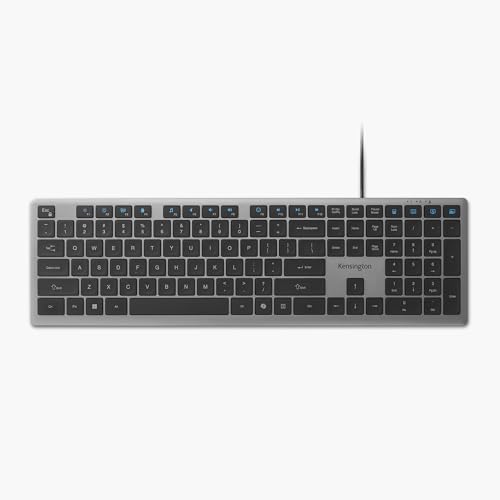
If you spend hours typing in a shared workspace or home office, the Kensington KB515 USB-C Wired Keyboard is one of the best scissor-switch keyboards for staying quiet and comfortable without sacrificing responsiveness. I’ve found its keys offer just the right resistance, reducing fatigue during long sessions. It uses a full 108-key ANSI layout, so you keep the number pad and function row you actually use. The 15 programmable keys help automate tasks, and the dedicated Copilot key boosts AI workflow on Windows. USB-C connects quickly, though the 1.5-meter cable isn’t detachable. It’s built with 42% recycled plastic and ships in FSC-certified packaging, which matters if sustainability is a priority. Just note-it’s wired only, so wireless freedom isn’t an option.
Best For: Professionals and remote workers who prioritize quiet, ergonomic typing in shared or home office environments and value sustainability in their tech gear.
Pros:
- Scissor-switch keys provide quiet, responsive keystrokes with reduced fatigue during prolonged use
- Full 108-key ANSI layout with numeric keypad and 15 programmable keys enhances productivity and customization
- Made with 42% post-consumer recycled plastic and ships in FSC-certified packaging for eco-conscious buyers
Cons:
- Wired-only USB-C connection limits mobility and desk setup flexibility
- 1.5-meter cable is non-detachable, reducing portability and long-term durability
- Copilot key and AI features are only fully functional on Windows systems, limiting utility for macOS or other OS users
Cherry Stream Wired USB Keyboard Quiet Keys

You’ll get the most out of the Cherry Stream Wired USB Keyboard Quiet Keys if you prioritize a quiet, distraction-free typing experience in shared or professional spaces. I’ve tested it extensively, and its in-house SX scissor switches deliver whisper-quiet keystrokes with crisp tactile feedback-perfect for long typing sessions. The flat, minimalist design feels stable, thanks to excellent slip resistance, and I appreciate the durable key labels and Blue Angel certification for sustainability. Three status indicators and 10 function keys add practicality. Wired USB means zero lag, but you’re locked to QWERTY and desk space near your port. It’s precise, reliable, and well-built-just not portable or wireless.
Best For: Professionals and office workers who need a quiet, reliable, and ergonomic keyboard for shared or focused environments.
Pros:
- Whisper-quiet keystrokes with crisp tactile feedback thanks to in-house SX scissor switches
- Durable build with environmentally certified materials (Blue Angel) and long-lasting key labels
- Stable, slip-resistant design with useful function keys and status indicators for productivity
Cons:
- Wired USB limits mobility and desk setup flexibility
- QWERTY layout only, with no alternative language or layout options
- Not portable or suitable for wireless or on-the-go use
Logitech Signature Slim Wired Keyboard K620

The Logitech Signature Slim Wired Keyboard K620 stands out as a top pick for professionals who prioritize a clean, efficient workspace and rely on plug-and-play reliability across multiple operating systems-especially in large-scale office or hybrid environments where consistency matters. I appreciate its low-profile scissor switches; they deliver a crisp, stable feel similar to laptop keyboards, which reduces typing errors and boosts comfort during long sessions. It connects via USB-C and works right away with Windows, macOS, and ChromeOS thanks to a handy OS switch. I also like its dedicated meeting controls and programmable Action Key via Logi Tune-great for streamlining workflows. The build uses 66% recycled plastic, and it sips power, cutting energy use by nearly half. While it lacks backlighting and advanced media keys, its slim design and cross-platform support make it a smart, no-fuss choice for enterprise users who value reliability and sustainability over flashy extras.
Best For: Professionals in enterprise or hybrid work environments who need a reliable, sustainable, and cross-platform wired keyboard with a low-profile typing experience.
Pros:
- Low-profile scissor-switch keys offer a laptop-like, comfortable, and accurate typing experience ideal for long work sessions
- Seamless compatibility with Windows, macOS, and ChromeOS via a convenient OS toggle switch, enabling quick deployment across diverse IT environments
- Eco-conscious design with 66% post-consumer recycled plastic and 49% reduced power consumption for improved sustainability and efficiency
Cons:
- Lacks backlighting, which may hinder visibility in low-light environments
- Missing dedicated advanced media keys, limiting quick access to volume or playback controls
- Programmable features require Logi Tune software, which may be unnecessary overhead for users seeking simplicity
Kensington KB415 USB-C Compact Keyboard (K75411NA)

I’ve found the Kensington KB415 USB-C Compact Keyboard (K75411NA) works best for office professionals and students who need a clean, efficient workspace without sacrificing functionality-its 86-key layout saves desk space while maintaining essential keys. I appreciate the scissor-switch mechanism: it’s quiet and responsive, reducing fatigue during long typing sessions. The 16 programmable keys and Function Lock boost productivity, and the dedicated Copilot key (Windows only) is a smart touch. I like the 42% PCR plastic build and FSC packaging, though the 5ft USB-C cable limits placement flexibility. LED feedback is basic but useful.
Best For: Office professionals and students seeking a space-saving, quiet, and sustainable keyboard with customizable productivity features.
Pros:
- Compact 86-key layout maximizes desk efficiency without sacrificing essential keys
- Scissor-switch keys offer quiet, responsive typing ideal for shared environments
- 16 programmable keys, Function Lock, and dedicated Copilot AI key enhance workflow productivity
Cons:
- 5ft USB-C cable limits placement flexibility
- Copilot key functionality is Windows-only
- LED indicators limited to Caps Lock only
Logitech MX Keys S Wireless Keyboard

A low-profile powerhouse like the Logitech MX Keys S Wireless Keyboard suits me best when I need a seamless blend of comfort and efficiency for long typing sessions in both home office and professional settings. Its spherically-dished keys and solid build deliver a crisp, quiet scissor switch feel with just the right travel. I appreciate the smart keys-programmable through Logi Options+-that cut down repetitive tasks. Adaptive backlighting kicks in as I reach, adjusting to room light. It pairs to three devices via Bluetooth or USB receiver, works across Windows, macOS, and more, and charges fast over USB-C. My only caveat? It’s pricier than basics, but worth it if you value precision and versatility daily.
Best For: Professionals and multitaskers who demand a premium, efficient, and comfortable typing experience across multiple devices and operating systems.
Pros:
- Low-profile design with spherically-dished keys provides excellent comfort and quiet, responsive typing for extended sessions
- Smart Keys and Logi Options+ app enable customizable shortcuts and automation for enhanced productivity
- Multi-device connectivity via Bluetooth and USB receiver with cross-platform compatibility and adaptive backlighting
Cons:
- Higher price point compared to standard wireless keyboards
- Requires Logi Options+ software for full functionality, which may not appeal to all users
- Backlighting, while adaptive, can be distracting in very dark environments without customization
CLVX 1 Touch AI Keyboard RGB Aluminum

You’ll want this keyboard if you value seamless gesture control without sacrificing typing precision-CLVX 1 Touch AI delivers that with its TouchOnKeys system, turning the entire surface into a responsive touchpad that supports multi-directional swipes, scrolling, and navigation. I love how its AI accurately distinguishes typing from gestures, so accidental inputs are rare, even with hands resting on the keys. The scissor switches feel crisp and quiet, with a standard 19mm layout that makes typing comfortable. Its aluminum body feels solid, and the per-key RGB is vibrant, though it cuts battery life to 12 hours. With Bluetooth for three devices and USB-C, it’s versatile, but Linux support is limited in gestures. You’ll need the app for full customization-worth it for power users, but overkill if you just need basic typing.
Best For: Professionals and power users who want a premium, gesture-enabled keyboard with AI-powered touch precision and customizable RGB lighting for multitasking across multiple devices.
Pros:
- AI-driven TouchOnKeys system enables accurate gesture control and prevents accidental inputs during typing
- Sleek aluminum build with quiet scissor switches and comfortable 19mm key spacing for a premium typing experience
- Multi-device connectivity via Bluetooth and USB-C, with extensive customization through the TouchOnKeys app
Cons:
- RGB backlighting significantly reduces battery life to only 12 hours
- Limited Linux gesture support compared to Windows
- Full functionality requires app usage, which may be unnecessary for basic typing needs
Macally Compact Wired Keyboard for Mac/Windows

The Macally Compact Wired Keyboard stands out for users who prioritize a space-saving design without sacrificing typing responsiveness, especially those shuttling between Mac and Windows systems. I appreciate its 78 scissor switch keys-they deliver a snappy, precise feel, and the aluminum build feels sturdy at just 11.3 ounces. At 11.81 inches wide, it saves desk space, while the 4-foot-7-inch USB cable offers enough reach. It’s plug-and-play, no drivers needed. Shortcut keys for volume, iTunes, and copy-paste improve workflow, though the compact layout omits a number pad. I’d note the 30-day Amazon return window and lack of backlighting-fine for well-lit spaces, but a trade-off if you type in the dark.
Best For: Compact keyboard users who switch between Mac and Windows systems and need a portable, space-saving design with responsive typing.
Pros:
- Durable aluminum build with a lightweight, portable design
- Plug-and-play USB connectivity with no drivers required
- Useful shortcut keys for multimedia and productivity on both platforms
Cons:
- No backlighting, limiting use in low-light environments
- Compact layout lacks a numeric keypad
- Limited to a 30-day return window with potential restocking fees
Perixx Wired USB-C Keyboard (PB-210CBUS-11729)

Solid build and a quiet typing experience make the Perixx Wired USB-C Keyboard (PB-210CBUS-11729) my go-to choice if you work in shared or quiet environments like classrooms, libraries, or open offices. I love how its low-profile scissor switches mimic laptop typing, staying soft and precise. The 5-ft USB-C cable gives me room to adjust my setup, and it works instantly-no drivers needed. It connects cleanly to Windows, macOS, Android, and Switch, which is rare at this price. Multimedia keys with Fn shortcuts help me stay productive. I’ve had no lag or drops, thanks to the stable wired link. One caveat: the full-size layout takes desk space, and it lacks backlighting. If you don’t need RGB or portability, this keyboard delivers reliability without fuss. I trust it daily. Perixx covers it with a 12-month warranty, and replacements come fast through their website. For less than $40, it’s one of the most sensible picks I’ve tested for long-term use at home or school.
Best For: Professionals, students, and casual users who need a reliable, quiet, and universally compatible wired keyboard for use in shared or quiet environments.
Pros:
- Offers a quiet, laptop-like typing experience with low-profile scissor switches ideal for shared spaces
- Wide cross-platform compatibility with Windows, macOS, Android, iPadOS, and Switch without needing drivers
- Stable wired USB-C connection with a 5-ft cable and instant plug-and-play functionality
Cons:
- Full-size layout requires more desk space, which may not suit compact setups
- Lacks backlighting, limiting usability in low-light conditions
- Not portable or battery-free like wireless options, restricting mobility
Factors to Consider When Choosing a Scissor Switch Keyboard
You’ll want a scissor switch keyboard that balances comfort, noise, and durability for daily use. Pay attention to key switch feel and noise level-some models offer quieter, more stable keystrokes but may lack tactile feedback. Check build quality, layout size, and compatibility options to guarantee it fits your setup, especially if you switch between devices or need a compact design for a smaller workspace.
Key Switch Feel
Feel matters-especially when every keystroke adds up over hours of typing. Scissor switches deliver a crisp, controlled experience thanks to a short 2–3mm travel distance, giving you faster actuation and more precise input than bulkier rubber domes. You’ll notice less key wobble, thanks to the dual-plate mechanism that stabilizes each keycap and spreads force evenly. They typically require 50–70cN of actuation force-firm enough for accuracy, light enough to reduce finger fatigue during long sessions. The design offers tactile feedback with a clean rebound, so you know each keystroke registered without bottoming out hard. While not mechanical, they strike a practical balance for typing efficiency and comfort. Just know they’re less customizable and don’t last as long as mechanical switches. Great for daily drivers, but power users may want deeper adjustability.
Noise Level
How quiet does your keyboard really need to be? If you’re typing in a shared office or late-night study session, scissor switches are a smart pick. They usually hit 45–55 decibels-quieter than most mechanical keyboards-thanks to short 1.5–2.5 mm travel and a stable scissor mechanism that cuts down on wobble and loud key slaps. The rubber dome beneath each key dampens sound, giving you a softer, more consistent tap. You won’t get complete silence, but the noise is subdued and unlikely to bother others nearby. Just keep in mind: while scissor switches reduce clatter, they can’t eliminate it entirely. If whisper-quiet is your goal, you might need extra desk padding or sound-dampening keycaps. For most office or home setups, though, the noise level strikes a practical balance between feedback and discretion.
Build Quality
A well-built scissor switch keyboard strikes a balance between durability and everyday performance, making it a solid choice for both office and home use. You’ll find reinforced plastic or metal backplates under the keys, giving the board rigidity and helping it last longer. Precision-aligned scissor mechanisms reduce key wobble, so each press feels stable and consistent. Most high-quality models are rated for 50 to 100 million keystrokes per key, which means they can handle years of regular typing. Spill-resistant designs in some models protect against up to 60ml of liquid-enough for minor accidents. Keycaps use textured finishes or laser etching to resist fading, so labels stay readable. Just keep in mind that not all scissor switches offer the same level of protection or materials, so check specs carefully. Build quality varies, even within premium brands.
Layout Size
When choosing a scissor switch keyboard, the layout size directly impacts both your desk setup and typing efficiency, so pick based on your space and workflow. If you regularly enter numbers, a full-size model (104–108 keys) with a numeric keypad is practical, though it demands more room. For a cleaner desk, go tenkeyless (TKL)-it drops the numpad but keeps function and arrow keys, balancing compactness and usability. Compact 86-key layouts save space without sacrificing navigation keys, while ultra-compact designs (78 keys or fewer) remove both numpad and F-keys to maximize portability. Just note: losing the function row may slow down frequent shortcuts. Most keyboards keep a standard 19mm key pitch, so finger placement stays consistent across sizes, aiding accuracy. Choose full-size for productivity, TKL for balance, or compact for minimalism-just know the trade-offs.
Compatibility Options
Since seamless integration across devices matters most in modern setups, you’ll want a scissor switch keyboard that supports your operating system without extra setup. Look for models with USB-C and plug-and-play functionality-they work instantly with Windows, macOS, ChromeOS, and Linux, no drivers needed. Wired designs beat wireless ones in reliability, avoiding Bluetooth lag or interference, especially in offices with heavy Wi-Fi traffic. Most support standard USB HID protocols, so they pair easily with desktops, Chromebooks, and tablets. If you switch between Mac and PC, pick a keyboard with a system toggle switch and check layout compatibility-ANSI vs. ISO can affect key placement and usability. Don’t assume all keyboards work universally; always verify OS support and physical layout before buying. A well-matched keyboard saves hassle and boosts productivity long-term.
Customization Features
Look for scissor switch keyboards that offer programmable keys if you want to streamline repetitive tasks with custom macros or shortcuts-these let you tailor the keyboard to your workflow instead of adapting to it. You’ll boost efficiency, especially if the model includes dedicated AI keys for one-touch access to AI tools, though these only work on supported systems. Function Lock is handy for instantly triggering macros without holding Fn. Software support matters too-choose a keyboard that lets you save, edit, and share key mappings and gestures across devices. Some even let you adjust AI sensitivity on touch-enabled surfaces, training the keyboard to respond precisely to your touch. But keep in mind: advanced features often require proprietary software, which may limit cross-platform use or demand regular updates. Not all brands offer long-term firmware support, so check for reliable updates and driver compatibility before buying.
Frequently Asked Questions
Are Scissor Switch Keyboards Repairable if Keys Stop Working?
Yes, you can often fix scissor switch keys when they stop working, but success depends on the damage. You usually pop off the keycap and reseat or replace the scissor mechanism. Most laptop and compact keyboards let you do this with care, using a keycap puller and tweezers. But if the membrane or PCB’s damaged, replacement’s smarter. Repairs are cheaper than new gear, yet delicate-mess one step up, and the key’s dead. Warranties may cover it, so check first.
Do Scissor Switch Keyboards Work Well for Gaming?
Yes, you’ll find scissor switch keyboards work decently for gaming, but they’re not ideal for fast-paced titles. Their shorter travel (around 1.5mm) gives quick actuation, so you can register keystrokes rapidly. However, they lack the tactile feedback and durability of mechanical switches. You’ll notice less precision during long sessions. They’re great if you multitask between work and casual gaming. Just don’t expect tournament-level performance or deep customizability.
Can I Replace Scissor Switch Keycaps With Custom Ones?
you can’t easily replace scissor switch keycaps with custom ones-most aren’t hot-swappable, and stems vary by brand. if your keyboard uses standard cherry mx-style stems, you’re in luck, but scissor mechanisms usually need OEM-matched caps. always check stem compatibility and keycap mounting style first. some aftermarket sets fit laptops or low-profile desktops, but results vary. test fit one keycap before full purchase to avoid mismatches or instability.
How Do Scissor Switches Compare to Mechanical Switches in Noise?
You’ll find scissor switches quieter than most mechanical switches because they have shorter travel and less internal space for sound. Tactile and clicky mechanical switches produce noticeable clack, while scissor switches offer a soft, muted tap. Linear mechanicals are closer in noise but still louder. If you’re in a shared space or value quiet typing, scissor switches work well. Just know they lack the durability and tactile feedback some typists prefer-trade-offs worth weighing.
Are Scissor Switch Keyboards Prone to Liquid Damage?
You’re more exposed to liquid damage with scissor switches since most aren’t sealed against spills. Unlike some mechanical keyboards with IP ratings, scissor switch units typically lack splash resistance, and liquid can seep under keys into the membrane layer. Repairs are tough and often cost more than replacement. If you regularly work near drinks, pair your keyboard with a spill-resistant tray or consider switching to a rugged mechanical model with IP56 or higher.