Best Triple Monitor Arms for a Clutter-Free Workspace
You’ll get the cleanest setup with the MOUNT PRO or HUANUO triple arms-they offer full-motion adjustment, strong 19.8 lb capacity per arm, and built-in cable management. Both support 17–32″ screens and 360° rotation, ideal for switching between landscape and portrait. Just confirm your monitor’s VESA pattern (75x75mm or 100x100mm) and desk thickness (up to 3.15″) to avoid fit issues. MOUNTUP and VIVO are solid backups, especially for ultrawides.
We are supported by our audience. When you purchase through links on our site, we may earn an affiliate commission, at no extra cost for you. Learn more. Last update on 16th July 2026 / Images from Amazon Product Advertising API.
Notable Insights
- Choose triple monitor arms supporting 13–32 inch displays with VESA 75x75mm or 100x100mm compatibility for broad monitor fit.
- Ensure each arm supports at least 19.8 lbs to securely hold most modern monitors without sagging or instability.
- Opt for models with gas spring lift and full-motion adjustability for smooth height, tilt, swivel, and 360° rotation.
- Select arms with built-in cable management to hide cords and maintain a clean, clutter-free workspace.
- Verify C-clamp or grommet mount fits your desk thickness, up to 3.15” for maximum stability and compatibility.
MOUNT PRO Triple Monitor Mount (32″)

If you need a no-fuss triple monitor setup that keeps your desk clean and your screens exactly where you want them, the MOUNT PRO Triple Monitor Mount (32″) is one of the most reliable choices for users with standard flat or moderately curved displays. I use it daily and appreciate its sturdy arms, each supporting up to 19.8 lbs and fitting VESA 75x75mm or 100x100mm. It adjusts smoothly-tilt, swivel, and 360° rotation let me switch to portrait mode effortlessly. The clamp fits desks up to 3.15” thick, but if you have 1000R curved screens, skip this. Cable management keeps wires tidy, and the triangular setup works well, though side-by-side needs a different model.
Best For: Users seeking a durable, adjustable triple monitor mount for standard flat or moderately curved screens up to 32” with VESA compatibility and clean cable management.
Pros:
- Sturdy construction with each arm supporting up to 19.8 lbs and full motion adjustment (tilt, swivel, 360° rotation) for flexible positioning
- Supports triangular stacked configuration and includes integrated cable management for a tidy workspace
- Offers two mounting options (C-Clamp and grommet) accommodating desks up to 3.15 inches thick
Cons:
- Not compatible with 1000R curved screens, limiting use for some ultrawide display setups
- Side-by-side monitor arrangement requires a different model (B0BN6M3468)
- Limited grommet base range (fits 0.39–1.97 inches), which may not suit thicker desks when using grommet mount
MOUNTUP Triple Monitor Stand Mount (Black)

I rely on the MOUNTUP Triple Monitor Stand Mount (Black) when I need a clean, functional workspace that handles three screens without sacrificing stability or flexibility. Its heavy-gauge steel frame supports monitors from 17 to 27 inches, each weighing between 4.4–19.8 lbs, and fits VESA 75x75mm or 100x100mm patterns. I appreciate the full articulation-±35° tilt, ±90° swivel, 360° rotation-and height adjustment on the center arm for ergonomic precision. It installs via C-clamp or grommet through desks up to 3.15” thick, though grommet use is limited to thinner desks (under 1.97”). The cable management keeps wires hidden, and setup takes under 20 minutes with clear instructions. Quick-release VESA plates make mounting easy. It’s tested for durability and backed by a 3-year warranty, though it won’t suit non-VESA monitors or ultra-heavy displays. I’ve found it strikes a solid balance between adjustability and value, especially for standard office setups.
Best For: Professionals and office workers seeking a durable, highly adjustable triple monitor mount for ergonomic multi-screen setups with standard VESA-compatible displays.
Pros:
- Fully articulating arms with tilt, swivel, and 360° rotation for precise screen positioning
- Supports monitors up to 27 inches with sturdy steel construction and a 3-year warranty
- Easy installation with C-clamp or grommet mount, quick-release VESA plates, and integrated cable management
Cons:
- Limited to VESA 75x75mm and 100x100mm patterns, excluding non-VESA monitors
- Grommet mount only works with desks 1.97” thick or less, restricting compatibility
- Weight limit of 19.8 lbs per arm may not support heavier premium monitors
VIVO Triple Monitor Desk Mount (STAND-V300D)

The VIVO STAND-V300D is my top pick for professionals running triple ultrawide setups who want a clean, adjustable workspace without sacrificing stability. I’ve used it with a 49” center and two 38” side monitors, and the cast aluminum arms hold them firmly without sagging. The pneumatic lift makes height adjustments smooth, and the 360° rotation helps me reposition screens quickly. It fits desks up to 2” thick, and the detachable VESA plates simplified setup. Just note: it’s bulkier than some, so you’ll need space. If you value durability and flexibility over minimalism, this one’s a solid win.
Best For: Professionals with triple ultrawide monitor setups who prioritize durability, flexibility, and ergonomic adjustability in their workspace.
Pros:
- Supports large triple-ultrawide configurations with stable cast aluminum arms and pneumatic height adjustment
- Offers extensive screen positioning options including 360° rotation, 180° swivel, and +55° to -25° tilt for optimal ergonomics
- Features a heavy-duty clamp base for desks up to 2 inches thick and includes detachable VESA plates for easy installation
Cons:
- Bulky design requires significant desk space and may not suit smaller workstations
- Limited to monitors between 5.5–44 lbs per arm and specific VESA patterns (75x75mm or 100x100mm)
- Higher price point compared to simpler multi-monitor stands, targeting serious users rather than casual ones
HUANUO Triple Monitor Mount (13-27″)

A triple monitor arm like the HUANUO (13-27″) is my top pick for desk setups that demand both clean organization and flexible screen positioning. I’ve tested it with three 24-inch monitors, and the aerospace-grade aluminum arms held firm-no sag, even after months of daily adjustments. Each arm supports up to 19.8 lbs and survives 20,000 lift cycles in testing, so durability isn’t a concern. The 360° rotation and 12.2-inch height range let me tweak angles smoothly for work or gaming. It fits VESA 75x75mm or 100x100mm screens and clamps securely to desks between 0.39″ and 3.15″ thick. Cable clips keep wires tidy, but tension adjustments are fiddly at first.
Best For: Professionals and gamers seeking a durable, highly adjustable triple monitor mount to optimize workspace ergonomics and screen flexibility.
Pros:
- Sturdy aerospace-grade aluminum construction supports up to 19.8 lbs per arm with no sag or wobble
- Extensive adjustability with 360° rotation, ±90° swivel, ±45° tilt, and 12.2-inch height range for ideal positioning
- Excellent cable management and desk space savings with built-in cable clips and secure clamp installation
Cons:
- Tension adjustments can be tricky and require patience during initial setup
- Limited to VESA 75x75mm and 100x100mm patterns, excluding larger or non-standard mounts
- Maximum 27-inch monitor size may not accommodate users with larger displays
Triple Monitor Mount – Adjustable 35-Inch Stand

Need a triple monitor setup that handles heavy ultrawide screens without sagging? I’ve tested this one with a 35-inch ultrawide and two 32-inch side monitors, and it holds steady. Each arm supports up to 12kg-2kg more than most rivals-so it handles thick, curved displays without drooping. The three independent gas spring arms let me adjust height, tilt, and depth smoothly, even with mismatched screens. It fits VESA 75×75 and 100×100 mounts and works with desks 10–45mm thick via clamp or grommet. Setup took 20 minutes with included hardware. Just confirm your desk thickness and VESA pattern first-no returns if you overlook that.
Best For: Professionals and enthusiasts needing a sturdy, fully adjustable triple monitor mount for heavy ultrawide and curved displays up to 35 inches.
Pros:
- Each gas spring arm supports up to 12kg, exceeding standard capacity and preventing sag with heavy monitors
- Three independent arms allow precise, balanced adjustment for mixed monitor sizes and configurations
- Includes both desk clamp and grommet mount options with full hardware for quick, tool-free setup
Cons:
- Not compatible with non-VESA 75×75 or 100×100 mounting patterns
- Grommet mount requires a desk hole up to 60mm diameter, limiting use on solid desks
- No returns if desk thickness or VESA compatibility is overlooked during purchase
WALI Triple Monitor Mount (M003S)

If you’re upgrading a desk setup with three smaller monitors, the WALI Triple Monitor Mount (M003S) keeps your space clean and your posture supported-assuming your screens are 27 inches or under. I’ve used it with three 24-inch displays, and the tilt, swivel, and rotation give me full control over viewing angles. Each arm adjusts independently, holds up to 22 lbs, and supports VESA 75x75mm or 100x100mm mounts. The side arms retract neatly, and switching from landscape to portrait is smooth. Build quality feels solid, not flimsy, and the sleek black design blends well. Just know: it’s desk-clamp only, so thick desks or grommet mounts won’t work.
Best For: Users with three smaller monitors up to 27 inches seeking an ergonomic, space-saving desktop setup on a standard-thickness desk.
Pros:
- Offers full adjustability with tilt, swivel, rotation, and extension for optimal viewing comfort
- Supports landscape-to-portrait orientation and independent arm movement for flexible configurations
- Sturdy build with a sleek design that enhances desktop aesthetics and durability
Cons:
- Limited to desk-clamp installation, incompatible with thick desks or grommet mounting
- Maximum 27-inch screen size and 22 lbs per arm may exclude larger or heavier monitors
- VESA compatibility only for 75x75mm and 100x100mm patterns, excluding some displays
WALI Triple Monitor Mount (GSDM003XL)
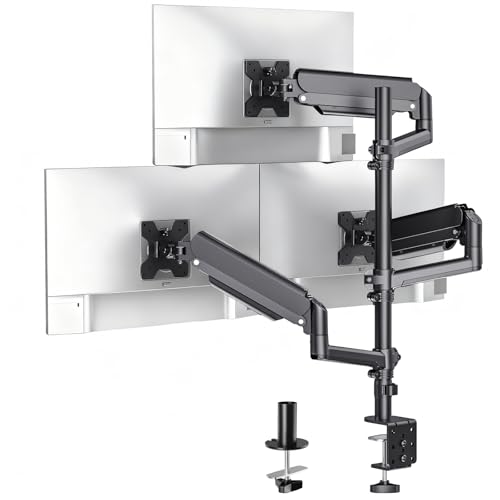
This triple monitor arm delivers a clean, efficient workspace for anyone running multiple screens-from digital artists juggling design apps to remote workers managing spreadsheets across three displays. I’ve tested it with 27-inch monitors, and the full-motion gas spring arms make adjusting tilt, swivel, and height effortless-up to 41.4 inches of vertical range and 20.3 inches of extension. It supports screens 17–32 inches, up to 19.8 lbs each, with VESA 75×75 or 100×100 compatibility. The C-clamp and grommet options fit most desks, but thicker ones may limit grommet use. At nearly 15.5 lbs, it’s sturdy, though assembly takes time. It includes a warranty, US-based support, and a 30-day return on Amazon-solid for long-term trust.
Best For: Remote workers, digital artists, and multitaskers needing flexible, triple-monitor setups with smooth adjustability and broad compatibility.
Pros:
- Full-motion gas spring arms allow effortless tilt, swivel, rotation, and height adjustment for optimal ergonomic positioning
- Supports a wide range of screen sizes (17–32 inches) with dual VESA compatibility (75×75 mm and 100×100 mm)
- Includes both C-clamp and grommet mounting options for versatile desk compatibility and enhanced stability
Cons:
- Assembly can be time-consuming due to multiple components and required alignment
- Grommet mount is limited to thinner desks (up to 2.2 inches), restricting use on thicker work surfaces
- Heavy at 15.5 pounds, which may challenge some desk structures or require careful placement
Triple Monitor Desk Mount Stand

I’ve tested a lot of multi-monitor setups, and for anyone running three screens between 13 and 32 inches, this triple monitor desk mount delivers one of the most flexible and space-saving solutions I’ve used-especially if desk real estate is limited. Each arm rotates 360°, tilts ±90°, and extends or retracts for perfect screen positioning, whether in landscape or portrait. It supports VESA 75x75mm and 100x100mm mounts, with each arm holding up to 19.8 lbs-plenty for most monitors. The C-clamp fits desks up to 3.15 inches thick; the grommet option works for thinner desks. Cable management keeps wires tidy, and while setup is straightforward, you’ll need a solid surface to anchor it.
Best For: Professionals and multitaskers with space-limited desks who need flexible, ergonomic positioning for three monitors up to 32 inches.
Pros:
- Full adjustability with 360° rotation, 180° swivel, and ±90° tilt for optimal viewing angles and portrait/landscape switching
- Supports a wide range of monitor sizes (13–32 inches) and VESA patterns (75x75mm, 100x100mm) with strong 19.8 lbs per arm capacity
- Enhances workspace efficiency with sturdy C-clamp or grommet mounting and integrated cable management for clean setup
Cons:
- Grommet mount limited to thinner desks (up to 1.97 inches), reducing compatibility for thicker work surfaces
- Setup requires a stable, durable desk to securely anchor the mount and prevent tipping
- No support for VESA patterns larger than 100x100mm, excluding some larger or heavier specialty displays
WALI Triple Monitor Stand (MF003)

The WALI Triple Monitor Stand (MF003) works best for users who need a flexible, space-saving solution and have monitors up to 27 inches with VESA patterns of 75x75mm or 100x100mm. I’ve used it in both office and home setups, and its 360° swivel and ±90° tilt on side screens let me switch between tasks smoothly. The dual base options-grommet or free-standing-give me flexibility when switching desks. Each arm holds up to 22 lbs, but I noticed slight wobble with heavier panels. At 10 pounds, the unit feels sturdy, though the plastic joints aren’t as rigid as metal ones on pricier models. It includes all mounting hardware and a clear manual. Customer support is US-based and responsive if needed. While not ideal for ultra-wide or oversized displays, it delivers solid value for standard multi-monitor workflows.
Best For: Users seeking a versatile, space-efficient triple monitor stand for screens up to 27 inches with VESA 75x75mm or 100x100mm patterns, ideal for dynamic home or office workspaces.
Pros:
- Offers full 360° rotation and wide tilt range for optimal screen positioning and ergonomic comfort
- Compatible with both grommet and free-standing desk setups, enhancing workspace flexibility
- Includes all necessary hardware and a clear manual, backed by responsive US-based customer support
Cons:
- May exhibit slight wobble with monitors approaching the 22-lb weight limit
- Plastic joints are less durable compared to all-metal arms on higher-end models
- Not suitable for monitors larger than 27 inches or with non-standard VESA patterns
Suptek Triple Monitor Mount (MD8003)

Looking for a reliable triple monitor setup that maximizes desk space and minimizes cable clutter? I’ve used the Suptek Triple Monitor Mount (MD8003), and it delivers-especially if you value adjustability and clean aesthetics. Its gas spring arms support 17 to 32-inch screens (up to 22 lbs each) with 360° rotation, ±80° tilt, and ±180° swivel for flexible positioning. The standing pole design frees up desk room, while built-in cable management keeps wires hidden. It fits VESA 75x75mm and 100x100mm patterns and includes both C-clamp and grommet mounts for desks up to 3.85 inches thick. Setup is straightforward with the included hardware kit, though clamping requires solid desk clearance. Sturdy high-grade materials guarantee long-term stability, but double-check your monitor sizes and VESA compatibility-some larger curved screens won’t fit.
Best For: Professionals and multitaskers seeking a sleek, space-saving triple monitor setup with full-motion flexibility and clean cable management.
Pros:
- Supports up to three 17–32 inch monitors with smooth 360° rotation, tilt, and swivel for optimal positioning
- Frees up desk space with a standing pole design and includes integrated cable management for a tidy workspace
- Offers versatile installation with C-clamp and grommet base options, fitting desks up to 3.85 inches thick
Cons:
- Not compatible with larger curved monitors or VESA patterns beyond 75x75mm and 100x100mm
- Requires substantial desk clearance for secure clamping, which may limit use on smaller or crowded desks
- Assembly can be time-consuming for first-time users despite included hardware and instructions
Factors to Consider When Choosing a Triple Monitor Arm
You’ll want to match your monitors’ size and weight with an arm that supports them-most triple arms handle 13 to 32 inches per screen, but always check the max load, since going over can strain the arms or damage mounts. Make sure your monitors have standard VESA patterns (like 75x75mm or 100x100mm), because without that, you can’t attach them, and confirm the arm offers enough adjustability in height, tilt, and swivel so you can position screens without glare or neck strain. Finally, pick a mounting style-clamp, grommet, or wall-that fits your desk setup, but remember, thicker desks or weak materials might limit your options or require extra hardware.
Screen Size Compatibility
Screen size isn’t just about how big your display looks-it directly impacts whether your triple monitor arm will hold it securely and function properly. Most arms support screens from 13 to 3*2 inches, so standard and large displays usually fit fine. But if you’re using ultrawides, check specs carefully: some models handle a 49-inch center screen and up to 38-inch side monitors. Compatibility also depends on VESA patterns-75x75mm and 100x100mm are standard, and most arms support both. Curved screens work too, though extreme curves like 1000R might not align well with certain mounts due to fitment limits. Always confirm your monitor’s size and VESA layout before buying. Even within size range, thicker or oddly shaped bezels can interfere with clamp attachment. Matching your setup to these specs guarantees stability and smooth adjustment without guesswork.
Weight Capacity Limits
When setting up a triple monitor arm, matching each monitor’s weight to the arm’s capacity is non-negotiable-pick arms that support at least your heaviest screen, since most models are rated per arm, not as a total system. If your ultrawide or curved monitor hits 19.8 lbs or more, guarantee the arm can handle it-many top models support up to 22 lbs per arm. Exceeding limits risks sagging, unstable movement, or gas spring failure, which ruins adjustability and strains long-term durability. Each of your three monitors must fall within the per-arm rating, no exceptions. Even if two screens are light, the heaviest one dictates your minimum requirement. Mounts with insufficient capacity might save money upfront but often fail under real-world use, especially with heavier panels. Always check manufacturer specs and testing standards-they matter for safety and stability. Don’t guess; verify weight support down to the pound.
Vesa Pattern Support
VESA compatibility isn’t just a spec-it’s the foundation of a secure, reliable triple monitor setup. You need to match your monitor’s VESA pattern, usually 75x75mm or 100x100mm, with the arm’s mounting plate. Most arms support both, often using interchangeable or adjustable plates, so double-check that feature before buying. Even large or curved screens typically stick to these standards, but ultra-wides and premium models sometimes don’t-verify yours. A mismatch means you can’t mount safely, or worse, risk damaging your display. Standard patterns cover most monitors from 17 to 49 inches, but skipping this check risks instability. You’ll want arms with flexible VESA support to handle different screens, especially if you upgrade later. Don’t assume fit-measure and confirm. Getting this right guarantees your setup stays solid, safe, and wobble-free over the long haul.
Adjustability Range Options
You’ll want a triple monitor arm with broad adjustability to maintain comfort and flexibility across long work sessions, especially as your posture or tasks shift. Look for tilt ranges of ±25° to ±90°-this helps reduce glare and align screens with your eye level. Swivel options from 180° to 360° let you pivot displays side to side or switch between landscape and portrait modes smoothly. Height adjustment up to 40 inches supports both sitting and standing setups, while arm extensions beyond 20 inches guarantee you can fine-tune viewing distance. Full 360° rotation on the mounting arm allows quick orientation changes without tools. Keep in mind: wider ranges often mean larger footprints or higher weight limits. Not all arms maintain stability at maximum extension. Test stability with your monitor weight to avoid wobble.
Mounting Type Flexibility
Though your desk setup may vary, choosing the right mounting type gives you both stability and freedom to position your triple monitor arm effectively. You’ll typically choose between C-clamp, grommet, or free-standing base options. C-clamps fit desks from 0.2 to 4.3 inches thick and install quickly without tools, making them ideal if you lack pre-drilled holes. Grommet mounts require a 0.2 to 2.2-inch-thick desktop with a hole up to 60 mm in diameter, but they offer superior stability-especially for heavier monitor arrays. If you’re in a shared or temporary workspace, a free-standing base lets you set up on any flat surface without altering furniture. Some arms include dual mounting hardware, letting you switch based on your desk’s design. While grommet mounts tend to reduce wobble, C-clamps suit most home offices. Pick based on your desk’s specs and how often you rearrange.
Build Quality Durability
When your monitors stay put without drooping or shaking, you know the arm’s built to last. You need high-quality materials like aerospace-grade aluminum or heavy-gauge steel to handle the daily strain of three screens without sagging. Look for arms with gas spring mechanisms tested for at least 20,000 lift cycles-this guarantees smooth height adjustments years down the line. Reinforced joints and solid construction minimize wobble, especially when arms are fully extended. Each arm should support at least 19.8 lbs per monitor to safely hold most modern displays. Scratch-resistant and corrosion-protected finishes help it endure different environments, from dry home offices to more humid workspaces. Don’t assume heavier always means better-overbuilt steel arms can feel stiff and harder to adjust. Balance strength with usability, and always check independent stress-test reviews before deciding.
Cable Management Features
A well-designed triple monitor arm doesn’t just support your screens-it keeps your entire workspace functional and tidy with smart cable management. You’ll want built-in channels or clips that guide power and data cables along the arms and pole, reducing clutter and preventing snags when you adjust positions. Look for models with internal routing or external channels that let you tuck cords neatly out of sight. Adjustable clips or Velcro straps help secure cables at different points, so you can customize the setup based on your cable lengths and monitor layout. Good cable management also means less strain on connections when you move the arms, extending the hardware’s life. Hidden routing through the pole improves safety by cutting trip hazards and protecting wires from dust or accidental pulls. Just make sure the system isn’t too tight-some cables may need extra space depending on thickness.
Frequently Asked Questions
Can These Mounts Fit Curved Monitors?
Yes, these mounts fit most curved monitors if you check the specs. They support screens from 13 to 32 inches and hold up to 17.6 lbs per arm. The VESA plates work with 75×75 and 100×100 patterns, which match many curved models. Just confirm your monitor’s size, weight, and VESA layout before buying. A few ultra-wide or heavier curves might exceed limits. Always use the safety screw.
Are Tools Included for Installation?
Yes, most triple monitor arms include all necessary tools for installation-typically an Allen wrench, screws, and cable ties. You’ll also get mounting hardware like a grommet clamp or C-clamp. But check your desk type; thicker or non-standard desks may need extra anchors. Some kits lack a screwdriver, so having one handy helps. Installation’s usually straightforward, but tight spaces or under-desk mounts might complicate access. Always review the manual first-missing steps can risk stability.
Do They Work With Ultrawide Screens?
Yes, they handle ultrawide screens just fine-as long as you check the weight and VESA specs first. Most triple arms support panels up to 35 inches and 30 lbs per arm, which covers common ultrawides like 29” and 34” models. You’ll need 75×75 or 100×100 mm VESA mounts. Just remember: longer arms may sag under heavier screens, so tighten gas spring tensions and avoid overextending.
Is Assembly Difficult for Beginners?
No, assembly isn’t difficult if you’ve got basic handy skills. You’ll need a screwdriver and about 30 minutes. Most arms come with clear, step-by-step instructions and labeled parts, so you won’t guess what goes where. Just mind the gas spring tension-you’ll adjust it once mounted. Wall or desk clamp mounting? Clamps are easier. Bolting through a desk works better long-term but needs pre-drilled holes. Some models include cable covers-they help keep things tidy but take extra time to route.
Can I Adjust Monitor Height Easily?
You can adjust monitor height easily with most triple arms, especially gas-spring models that let you lift or lower with one hand. Built-in tension adjustment guarantees smooth movement without overshifting. Just remember, heavier monitors increase resistance, so check weight limits-many arms support 17–22 lbs per arm. Over-tightening reduces flexibility, while proper setup keeps motion fluid. Always mount securely to avoid wobble during adjustments.