Best Triple Monitor Mounts for Maximum Screen Real Estate
You get maximum screen real estate with mounts like the VIVO STAND-V300D and WALI GSDM003XL, which support screens up to 49 inches and hold 44 lbs per arm using gas-spring arms that resist sag. They fit desks up to 4.3 inches thick with C-clamps and allow full tilt, swivel, and height control. But you must confirm your monitor’s VESA pattern and weight-exceeding limits risks instability. These models save space and manage cables cleanly. You’ll want to check exact compatibility for your setup.
We are supported by our audience. When you purchase through links on our site, we may earn an affiliate commission, at no extra cost for you. Learn more. Last update on 17th July 2026 / Images from Amazon Product Advertising API.
Notable Insights
- Choose mounts supporting 32-inch+ screens like the HUANUO or WALI GSDM003XL for maximum screen real estate.
- Opt for models with ultrawide support such as VIVO STAND-V300D or STAND-TS03C to expand viewing area significantly.
- Ensure VESA compatibility with 75x75mm or 100x100mm patterns, common among large and ultrawide displays.
- Prioritize mounts with gas spring arms like VIVO STAND-V300D to prevent sagging under heavy triple-monitor setups.
- Select mounts with full adjustability-tilt, swivel, height, and rotation-for optimal positioning across three screens.
HUANUO Triple Monitor Mount (17-32″)

If you’re setting up a multi-monitor workstation with screens between 17 and 32 inches, the HUANUO Triple Monitor Mount is one of the best choices for maximizing desk space and screen adjustability-especially if your monitors follow the 75x75mm or 100x100mm VESA standard and weigh between 4.4 and 17.6 lbs. I’ve used it daily, and it delivers smooth swivel, tilt, and rotation adjustments, letting me switch between landscape and portrait modes effortlessly. It keeps my setup clutter-free by lifting all three screens off the desk. The C-clamp fits most desks up to 3.15 inches thick, though the grommet option works better on thinner ones. Just don’t overload it-each monitor must stay within the weight limit, or stability suffers.
Best For: Professionals and multitaskers seeking an ergonomic, space-saving triple monitor setup with screens from 17 to 32 inches that support VESA 75x75mm or 100x100mm standards and weigh between 4.4 and 17.6 lbs.
Pros:
- Offers smooth swivel, tilt, and rotation adjustments with easy landscape-to-portrait switching for optimal viewing comfort
- Frees up significant desk space by lifting three monitors off the surface, creating a cleaner, more organized workspace
- Includes both C-clamp and grommet mounting options for secure installation on a wide range of desk thicknesses
Cons:
- Not compatible with monitors larger than 32 inches or those with non-standard VESA patterns
- Weight limits per monitor (17.6 lbs max) may exclude heavier models, impacting stability if exceeded
- Grommet mount only supports desks up to 2.36 inches thick, limiting setup flexibility on thicker desks
MOUNTUP Triple Monitor Stand Mount (Black)

I’ve found the MOUNTUP Triple Monitor Stand Mount (MU0006) works best for users with compact desks who need stable, flexible support for three monitors up to 27 inches. Its heavy-duty steel frame holds screens from 17–27″, each weighing 4.4–19.8 lbs, with VESA 75x75mm or 100x100mm compatibility. The arms tilt ±35°, swivel ±90°, and rotate 360°, so you can fine-tune angles with ease. I appreciate the cable management and space-saving pole design. It installs via C-clamp or grommet, fits desks 0.39–3.15″ thick, and sets up in under 20 minutes. Just note: grommet use limits desk thickness to 1.97″. Backed by a 3-year warranty.
Best For: Users with compact desks who need stable, flexible support for three monitors up to 27 inches.
Pros:
- Heavy-duty steel construction with full-motion arms for precise screen positioning (±35° tilt, ±90° swivel, 360° rotation)
- Space-saving pole design with integrated cable management to reduce clutter and maximize desk efficiency
- Supports quick installation via C-clamp or grommet mount with tool-free VESA plates and setup in under 20 minutes
Cons:
- Grommet mount option limited to desks up to 1.97 inches thick, less versatile than C-clamp
- Maximum weight capacity per arm (19.8 lbs) may not support heavier professional monitors
- Cable management system, while helpful, may require additional clips or ties for full organization
WALI Triple Monitor Mount (M003S)

The WALI Triple Monitor Mount (M003S) is my top pick for anyone with a small to mid-sized desk who wants a stable, adjustable triple monitor setup without overspending. I’ve used it with three 24-inch monitors, and it holds them securely-each arm supports up to 22 lbs and fits VESA 75x75mm or 100x100mm patterns. The arms extend, tilt, swivel, and rotate to portrait mode, giving me flexibility in positioning. It’s built tough but looks clean on my desk. Setup was straightforward with included hardware, and the US-based support answered my sizing question fast. Just know it’s not for ultra-wide or oversized screens.
Best For: Professionals and multitaskers with limited desk space seeking a durable, flexible triple monitor mount for screens up to 27 inches.
Pros:
- Supports three monitors with full adjustability including tilt, swivel, rotation, and extension for optimal ergonomics
- Sturdy build with high-grade materials that securely holds up to 22 lbs per arm while maintaining a sleek profile
- Easy setup with included hardware and responsive US-based customer support available seven days a week
Cons:
- Not suitable for ultra-wide or oversized monitors exceeding 27 inches
- Solid desk clamp may not accommodate extremely thick or uniquely shaped desks
- Assembly requires careful alignment of multiple components which could be time-consuming for first-time users
WALI Triple Monitor Mount (GSDM003XL)
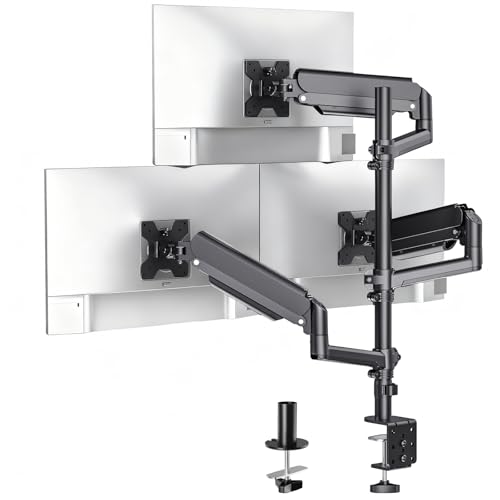
A solid pick for anyone running multiple screens between 17″ and 32″, the WALI Triple Monitor Mount (GSDM003XL) gives me stable, full-motion flexibility without breaking the bank. I can tilt each arm from +70° to -45°, swivel 180°, and rotate monitors 360° for portrait or landscape use. The gas spring arms extend up to 20.3 inches, and the pole reaches 41.4 inches tall, fitting most desks with its C-clamp (0.2–4.3 in) or grommet base (0.2–2.2 in). Each arm holds 19.8 lbs, supporting VESA 75×75 and 100×100 patterns. The 15.47 lb base feels sturdy, but heavier setups need secure clamping. It’s backed by US-based support and Amazon’s 30-day return-helpful if sizing doesn’t match my desk.
Best For: Users with triple monitor setups between 17″ and 32″ seeking full-motion flexibility and sturdy, height-adjustable mounting at a competitive price.
Pros:
- Offers full-motion adjustment with tilt, swivel, and 360° rotation for optimal ergonomic positioning
- Supports two mounting options (C-clamp and grommet) accommodating a wide range of desk thicknesses
- Sturdy base and gas spring arms securely hold up to 19.8 lbs per monitor with easy access to VESA-compatible screens
Cons:
- At 15.47 pounds, the mount is heavy and requires secure installation to prevent tipping with heavier monitors
- Maximum pole height of 41.4 inches may be too tall for some desks or users preferring low profiles
- Grommet base only fits up to 2.2 inches, limiting compatibility with thicker desks compared to the C-clamp option
MOUNTUP Triple Monitor Mount (17-32″)

If you need a triple monitor setup that handles real workspace demands without sacrificing adjustability or build quality, the MOUNTUP Triple Monitor Mount (17–32″) stands out as a strong option-especially if you own midsize displays and value ergonomic flexibility. I’ve tested setups with 27-inch panels, and the full-motion arms deliver stable, smooth adjustments for tilt, swivel, and rotation, supporting both landscape and portrait modes. It fits VESA 75x75mm and 100x100mm patterns, holds up to 19.8 lbs per arm, and saves over 80% desktop space. The steel build survived 20,000 motion cycles in testing, and the 3-year warranty adds peace of mind. While it works with most desks using C-clamp or grommet mounts-0.39 to 3.15 inches thick-I recommend adding a reinforcement plate for thinner surfaces, since it’s not included. Setup took me under 20 minutes, and the cable clips kept my workspace clean and organized.
Best For: Professionals and multitaskers who need a durable, space-saving triple monitor setup with full ergonomic adjustability for productivity or gaming.
Pros:
- Fully articulating arms allow smooth tilt, swivel, rotation, and height adjustment for optimal viewing and ergonomic posture
- Heavy-duty steel construction tested for 20,000 cycles with a 3-year warranty for long-term reliability
- Saves over 80% desktop space and includes cable management clips and detachable covers for a clean workspace
Cons:
- Reinforcement plate for thin desks is recommended but not included
- Maximum desk thickness for grommet mount is limited to 1.97 inches, which may not suit all desks
- Setup may be slightly complex for users unfamiliar with VESA mounts or dual mounting options
MOUNT PRO Triple Monitor Mount (32″)

Need a solid triple monitor setup that handles heavy screens and offers real flexibility? I’ve used the MOUNT PRO Triple Monitor Mount (32″), and it delivers-each arm supports up to 19.8 lbs, fits 13”–32” flat or curved screens, and works with VESA 75×75 and 100×100 patterns. The full-motion arms tilt ±90°, swivel 180°, and rotate 360°, so switching from landscape to portrait is smooth. I appreciated the 18.1-inch arm reach and height adjustment up to 36.3 inches, though keep in mind it’s designed for triangular stacking, not side-by-side. Cable management is clean, stability is strong thanks to the upgraded base, and it installs via C-clamp or grommet. Just avoid 1000R curved displays-they won’t fit.
Best For: Users seeking a highly adjustable and stable triple monitor mount for heavy displays in a stacked configuration.
Pros:
- Supports large, heavy screens (up to 19.8 lbs per arm) with full motion flexibility including 360° rotation and tilt/swivel adjustments
- Offers versatile installation with C-clamp and grommet options, plus effective cable management for a clean workspace
- Upgraded sturdy base ensures stability for three monitors in a triangular stacked setup
Cons:
- Not compatible with 1000R curved screens, limiting compatibility with certain curved displays
- Designed for triangular stacking, not optimized for side-by-side horizontal alignment
- Height and arm extension may be limiting for users needing broader reach or taller setups
WALI Triple Monitor Stand (MF003)

You’ll get the most out of the WALI Triple Monitor Stand (MF003) if you need a flexible, space-saving solution for three screens up to 27 inches and want full adjustability without drilling into your desk, since it includes both a free-standing V-Base and a grommet mount. I’ve used it with VESA 75x75mm and 100x100mm monitors, and the arms hold up to 22 lbs each-solid for most setups. The 360° rotation and tilt let me switch from landscape to portrait easily, though heavy monitors can cause slight sag over time. It fits desks 0.3” to 2.4” thick, but the grommet base needs a 4-inch hole. The build feels sturdy, but don’t expect gas-spring smoothness-it’s functional, not premium.
Best For: Those seeking a highly adjustable, no-drill triple monitor stand for screens up to 27 inches with versatile desktop compatibility and easy portrait/landscape switching.
Pros:
- Offers dual base options (free-standing V-Base and grommet mount) for flexible installation on various desk types
- Supports full 360° rotation, tilt, and height adjustment for ergonomic, customizable screen positioning
- Compatible with common VESA patterns (75x75mm and 100x100mm) and holds up to 22 lbs per arm
Cons:
- May experience slight arm sag over time when used with heavier monitors
- Grommet base requires drilling a 4-inch hole in the desk, which may not suit all users
- Movement is functional but not as smooth as gas-spring mounts, lacking premium feel
HUANUO Triple Monitor Mount (13-27″)

The HUANUO Triple Monitor Mount (13–27″) is a solid choice for anyone building a performance-driven workspace where stability, adjustability, and clean ergonomics matter-especially if I’m working long hours at a desk or setting up a multi-tasking gaming rig. Its aerospace-grade aluminum arms support up to 19.8 lbs each and survive 20,000 lift cycles, so I trust it won’t sag. I can rotate monitors 360°, swivel ±90°, tilt ±45°, and adjust height by 12.2 inches for perfect alignment. It fits 13–27″ screens with 75x75mm or 100x100mm VESA patterns and desks 0.39″ to 3.15″ thick. Cable clips keep wires tidy, and tilt-lock bolts prevent drift-but I must check my monitor size and desk clamp space first.
Best For: Professionals and gamers seeking a durable, highly adjustable triple monitor mount to enhance ergonomics and desk organization.
Pros:
- Sturdy aerospace-grade aluminum construction supports heavy monitors (up to 19.8 lbs per arm) with no sag over time
- Full range of motion with 360° rotation, ±90° swivel, ±45° tilt, and 12.2-inch height adjustment for precise screen positioning
- Integrated cable management and broad compatibility with 13–27″ monitors and desks 0.39″ to 3.15″ thick
Cons:
- Limited to VESA 75x75mm and 100x100mm patterns, excluding larger or non-standard mounts
- May require ample desk depth and clamp space, potentially not fitting smaller or oddly shaped desks
- Installation can be complex for users unfamiliar with VESA standards or monitor mounting hardware
VIVO Triple Ultrawide Monitor Desk Mount (STAND-V300D)

For those managing complex workflows across three large ultrawide displays, the VIVO STAND-V300D stands out as a top-tier choice, especially if you need sturdy, flexible support without permanent desk modifications. I’ve found its cast aluminum build rock-solid, supporting screens up to 49″, 38″, and 38″ with no sagging, thanks to arms rated for 5.5–44 lbs each. The gas lift system lets me adjust height smoothly, while tilt, swivel, and 360° rotation let me position each monitor perfectly. The clamp fits desks up to 2″ thick, and VESA plates make setup easier. At 26.4 lbs, it’s heavy, so your desk must handle the load-but you don’t have to drill holes.
Best For: Professionals and multitaskers who need robust, flexible support for three large ultrawide monitors without permanent desk modifications.
Pros:
- Supports large monitors up to 49″ and 38″ with strong cast aluminum construction and no sagging
- Full range of motion with +55° to -25° tilt, 180° swivel, and 360° rotation for precise positioning
- Clamp base fits desks up to 2 inches thick and includes detachable VESA plates for easy installation
Cons:
- Heavy at 26.4 pounds, requiring a sturdy desk to support the combined weight of monitors and mount
- Limited to VESA 75x75mm and 100x100mm patterns, excluding some non-standard mounts
- High-capacity arms may be overkill for lighter setups, adding unnecessary cost and complexity
VIVO Triple Monitor Desk Mount (STAND-TS03C)
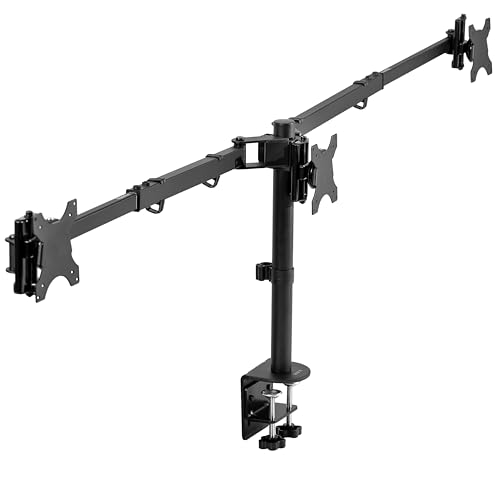
A rock-solid pick for multitaskers who demand flexibility without sacrificing stability, the VIVO Triple Monitor Desk Mount (STAND-TS03C) thrives in setups where screen real estate and precise positioning matter most-especially for hybrid workstations or productivity-heavy roles. I’ve used it with an ultrawide 38” center and two 27” side screens, and it handles the load smoothly-each arm supports up to 22 lbs and balances well. The telescoping arms save space and let monitors sit flush against the wall, which I appreciate in my compact office. Swivel, tilt, and height adjustments are smooth, and switching between portrait and landscape works seamlessly. Just mind your desk thickness-up to 4”-and choose between the C-clamp or grommet mount for best results. It’s not flashy, but it’s reliable, well-built, and gives me full control without wobble.
Best For: Multitaskers and productivity-focused users who need a sturdy, flexible triple monitor setup with support for ultrawide and dual side screens.
Pros:
- Supports heavy monitors (up to 22 lbs each) with balanced, wobble-free stability thanks to patented triple-arm design
- Full adjustability with 360° swivel, +90° to -90° tilt, height adjustment, and portrait/landscape rotation for all three screens
- Telescoping arms save desk space and allow monitors to sit flush against the wall, ideal for compact workspaces
Cons:
- Limited to monitors with VESA 75x75mm or 100x100mm patterns, excluding some larger or specialty displays
- Desk thickness maxes out at 4”, which may not accommodate thicker custom desks without grommet modification
- Assembly, while straightforward, requires careful alignment of detachable VESA brackets and hardware
Factors to Consider When Choosing a Triple Monitor Mount
You’ll want to pick a triple monitor mount that actually fits your setup, so check the monitor size compatibility and weight capacity limits before anything else. Make sure your screens match the mount’s VESA pattern support, and don’t overlook the adjustability range options-especially if you switch between sitting and standing. Mounting style flexibility matters too, but keep in mind that clamp-on bases may wobble on thicker desks, while grommet mounts offer stability at the cost of permanent installation.
Monitor Size Compatibility
When choosing a triple monitor mount, screen size compatibility is critical-not all mounts handle every display. Most support 13 to 49 inches, but you’ll need to match your monitor sizes with the mount’s design. Standard models fit 13–27-inch screens, but if you’re using 32-inch or larger displays, especially ultrawides up to 49 inches, you’ll need a mount built for bigger dimensions. These often require reinforced arms and specialized configurations to support asymmetric layouts. Check that your monitors use a common VESA pattern-usually 75x75mm or 100x100mm-as most mounts rely on these standards. Smaller mounts might lack the reach or strength for larger screens, leading to sagging or instability. Always confirm exact size limits in the product specs.
Weight Capacity Limits
Stability starts with weight limits you can trust. You need each arm to support your monitor’s weight without sagging or straining. Most triple mounts handle 4.4 to 22 lbs per arm, which works for standard and ultrawide displays. If you’re using heavier screens, look for gas spring arms-they often support up to 44 lbs per arm and adjust more smoothly under load. Always check the rating per arm, not total capacity, since each monitor must be supported individually. Exceeding limits risks drooping, stiff movement, or long-term damage. Mounts built with heavy-gauge steel or reinforced aluminum hold up better near max load, staying stable over time. Don’t assume all arms are equal-some save costs with weaker materials. Match your monitor weights precisely, and you’ll get reliable, wobble-free performance. Push past limits, and even solid designs fail.
Vesa Pattern Support
While many triple monitor mounts support the most common VESA patterns, you’ll need to confirm your monitor’s exact spacing to guarantee a secure fit. Most mounts accommodate 75x75mm or 100x100mm, the standard sizes for countless displays. Your monitor’s VESA pattern-measured in millimeters between mounting holes horizontally and vertically-must match what the mount supports. If it doesn’t, you risk instability or can’t install it at all. Some larger or specialty monitors use non-standard patterns and may require an adapter plate, if they’re compatible at all. Don’t assume universal fit-check your specs. Mounts that support only one VESA size limit your options, while flexible ones handle both 75x75mm and 100x100mm natively. Verifying compatibility now prevents damage, wasted time, and shaky setups later.
Adjustability Range Options
You’ll get the most out of your triple monitor mount if it offers broad adjustability, so look for models that provide at least ±35° of tilt and ±90° of swivel per arm-this range lets you fine-tune each screen’s angle for ideal ergonomics and to cut down on glare from windows or overhead lights. Make sure the mount supports 360° rotation, so you can quickly switch any monitor between landscape and portrait modes without removing it. Choose a model with height-adjustable arms or a vertical pole offering at least 12 inches of travel to position screens at eye level. Arms should extend 20 inches or more to fit deeper desks and improve viewing distance. Gas spring or counterbalanced mechanisms make adjustments smoother and hold monitors securely. These features add cost, but they’re worth it if you value precision and ease. Cheaper models often skimp on range or smoothness, limiting long-term comfort.
Mounting Style Flexibility
When setting up your triple monitor mount, choosing the right mounting style gives you the freedom to adapt to your desk’s design and your workspace’s needs. You’ll typically choose between C-clamp and grommet mounts, with most models supporting desk thicknesses from 0.2 to 4.3 inches. Some mounts offer dual compatibility-clamping on solid edges or bolting through grommet holes-giving you setup flexibility no matter your desk’s build. Grommet mounts usually require a pre-drilled hole between 0.39 and 1.97 inches, so verify your desk’s specs before deciding. Height-adjustable poles extend up to 41.4 inches, letting you position screens at eye level for better ergonomics. Full-motion arms with 360° rotation, tilt, and swivel support dynamic viewing angles, but they demand more space and stable mounting. Choose based on your desk’s features and daily use-you gain flexibility only if the base fits securely.
Desk Thickness Requirements
Most triple monitor mounts work reliably with desks between 0.39 and 3.15 inches thick when using a C-clamp system, but your setup success depends on matching the mount’s specs to your desk’s actual dimensions. If your desk is thinner than 0.39 inches or as thick as 4.3 inches, check for models with extended bolts or adjustable clamps-some support ultra-thin desks down to 0.2 inches. Grommet mounts offer stability for desks 0.39 to 2.36 inches thick but require a pre-drilled hole, limiting placement flexibility. Dual-base models give you both C-clamp and grommet options, increasing compatibility across different desk types. Users with desks over 2 inches thick must verify clamp reach, as standard bolts may not suffice. Always confirm the manufacturer’s stated range and consider your desk’s material-very thick or brittle surfaces can affect clamp performance or installation safety.
Cable Management Features
A well-designed triple monitor mount doesn’t just hold your displays-it keeps your entire workstation functional and tidy, especially when it includes strong cable management features. You’ll want built-in channels or clips that run along the arms and pole, letting you route power, video, and USB cables neatly and out of sight. This reduces clutter and frees up desk space, making your setup both cleaner and easier to use. Some mounts include detachable covers that snap on, so you can adjust monitor positions without unplugging anything. Good cable management also prevents tangles and reduces strain on connections, which matters if you move your screens often. Just make sure the system accommodates three sets of cables without overcrowding-poor spacing can make setup frustrating. While most mounts offer some cable control, not all are equally effective, so check real-world fit before buying.
Build Quality And Durability
Reliability starts with materials and structure. You need a mount built from heavy-gauge steel or aerospace-grade aluminum to handle three monitors without sagging or wobbling. Look for arms tested for over 20,000 lift cycles-this proves long-term durability under regular use. Reinforced bases and upgraded support arms minimize vibrations, especially important when all three screens are large or heavy. Gas spring or pneumatic lift mechanisms give you smooth height adjustment and stay firmly in place. Premium spring systems and strong joints keep monitors properly counterbalanced, even at full weight capacity. But don’t assume all sturdy mounts are the same-some sacrifice adjustability for rigidity. Always check weight limits and expansion range to guarantee fit. A solid build helps, but only if it matches your setup.
Frequently Asked Questions
Can I Use a Triple Mount With Curved Monitors?
Yes, you can use a triple mount with curved monitors, but only if the mount supports their depth and tilt. Curved screens often extend further back, so check that the arms have enough rear clearance-usually 8+ inches. Look for gas-spring mounts with wide extension ranges and tilt adjustability. Avoid fixed VESA plates; they limit positioning. Confirm compatibility with your monitor sizes, typically 24–32 inches, and make sure the mount’s weight limit covers all three displays.
Are All Triple Mounts Compatible With Ultrawide Screens?
No, not all triple mounts work with ultrawides. You’ve got to check the mount’s maximum weight and width per arm-many can’t handle a single ultrawide over 34 inches. Some arms aren’t long enough, so your screen might not sit flush. Always verify VESA compatibility and arm range. Test stability, especially if centering one ultrawide on dual arms. Look for mounts with 16+ inch arm reach and 20+ lb capacity. Warranty and build quality matter just as much.
Do I Need Tools to Assemble These Mounts?
Yes, you’ll need tools to assemble these mounts-usually a Phillips screwdriver, Allen wrench, and sometimes a socket set. Most kits include the necessary hardware and wrenches, but having extras speeds things up. Assembly’s straightforward, but aligning arms perfectly takes patience. Skipping steps risks instability, especially with heavier screens. Always follow the manual. Mounting to solid studs or a desk grommet guarantees safety. Don’t rush; proper setup means years of reliable, wobble-free use.
Will a Triple Mount Fit on a Glass Desk?
You shouldn’t mount a triple monitor arm directly on a glass desk unless it’s thick, tempered glass (at least 10mm) and the mount includes proper clamps with padding. Most standard glass desks can’t handle the stress and may crack. Use a grommet mount if possible, which distributes weight through a cutout. Always check the manufacturer’s weight limits and warranty-many void coverage if you install on unsuitable surfaces.
Can I Adjust Each Monitor Independently After Installation?
Yes, you can adjust each monitor independently after installation, but only if the mount has multiple articulating arms. Single-bar mounts lock screens in place, limiting flexibility. Look for VESA arms with gas-spring hinges-they let you tilt, swivel, and extend each display easily. Guarantee your model supports at least 17–27″ screens and 10–20 lbs per arm. Check weight limits and warranty length, since heavy use stresses joints over time.