Best Refurbished Laptops That Perform Like New (And Save You Cash)
You’ll get near-new performance from a refurbished Dell Latitude 7420, with its 11th Gen i7, 16GB RAM, and 512GB NVMe SSD delivering fast, reliable power for office work and multitasking. It has a sharp 14-inch FHD anti-glare display and solid build quality, though battery health can dip below 80%-check it early under the 90-day warranty. Models like the Latitude 7400 and 7490 also offer strong business-grade reliability. Find how each model balances speed, screen, and storage for your daily workflow.
We are supported by our audience. When you purchase through links on our site, we may earn an affiliate commission, at no extra cost for you. Learn more. Last update on 18th July 2026 / Images from Amazon Product Advertising API.
Notable Insights
- Dell Latitude 7420 offers 11th Gen i7 power, 16GB RAM, and FHD anti-glare display for near-new performance at a lower cost.
- Refurbished laptops with 16GB RAM and NVMe SSDs deliver fast, responsive performance comparable to new models.
- Look for FHD displays and 80%+ battery health to ensure sharp visuals and all-day usability in renewed devices.
- Dell Latitude 7400 and 7490 provide business-grade reliability, Thunderbolt support, and Windows 11 Pro out of the box.
- Chromebooks like Lenovo IdeaPad 3 suit budget users needing cloud-based productivity with snappy SSD-level storage.
Dell Latitude 5420 14″ FHD Laptop (Renewed)

If you’re building a reliable home office setup without overspending, the Dell Latitude 5420 (Renewed) is a strong pick-this business-class laptop handles daily tasks smoothly, thanks to its 11th-gen Intel Core i5 processor and 16 GB of RAM, making it ideal for professionals who need steady performance for emails, spreadsheets, and video calls. Its 14-inch FHD screen is sharp and consistent, and the 256 GB SSD boots fast and stays responsive. At just 3 pounds, it’s portable, and the HDMI port plus Windows 11 Pro support office workflows well. Just know it’s renewed, so battery life may vary, and there’s no optical drive-fine for most, but plan accordingly.
Best For: Professionals seeking an affordable, reliable business laptop for everyday productivity tasks like email, document editing, and video conferencing.
Pros:
- Powerful 11th-gen Intel Core i5 processor and 16GB RAM ensure smooth multitasking and responsive performance
- Crisp 14-inch FHD display and lightweight 3-pound design make it ideal for work and portability
- Includes HDMI port and Windows 11 Pro for seamless integration into office environments
Cons:
- Renewed condition means battery life may vary and overall wear could be present
- Lacks an optical drive, limiting compatibility with older media
- 256GB SSD may fill up quickly for users storing large files locally
Dell Latitude 5400 Laptop (Renewed)

This renewed Dell Latitude 5400 is a smart pick for professionals who need a durable, high-performing laptop for the home office or on-the-go business use without paying full price for new gear. I rely on its 8th Gen Intel Core i5 processor for smooth performance during video calls and multitasking. With 32GB of RAM and a 1TB SSD, it handles heavy workloads fast and stores plenty. The FHD touchscreen stays responsive, and Windows 11 Pro adds strong security. It’s got USB-C, HDMI, and a solid webcam. Just know renewed units vary-check the warranty and return policy.
Best For: Professionals seeking a reliable, high-performance business laptop at a reduced cost without sacrificing essential features or durability.
Pros:
- Powerful 8th Gen Intel Core i5 processor with 32GB RAM and 1TB SSD for excellent multitasking and fast system responsiveness
- FHD touchscreen display and Windows 11 Pro enhance productivity and security for business use
- Versatile connectivity with USB-C, HDMI, and a built-in webcam ideal for video conferencing and external displays
Cons:
- Renewed units may vary in condition and cosmetic appearance
- Battery life may be reduced compared to a brand-new device
- Limited warranty compared to new models-requires careful review of return policy
HP 17.3” FHD Laptop i5, 8GB, 1TB

I’ve found the HP 17.3” FHD Laptop i5, 8GB, 1TB is a solid pick for remote learners and home office users who need a roomy display and reliable basics without paying premium prices. The 17.3-inch Full HD screen is bright enough for indoor use and cuts glare well, though colors stay modest at 45% NTSC. The i5-1155G7 handles web, docs, and video calls smoothly, and 8GB RAM keeps multitasking usable. I appreciate the included 500GB external drive since the 1TB internal HDD is slow. Battery lasts about 6.5 hours in real use-manageable, but expect one daily charge. The backlit keyboard and number pad help with late work, while the 720p cam works fine for Zoom. Just know: this isn’t sleek or ultra-portable at nearly 5 pounds, and Wi-Fi 5 limits speeds. Still, for the price, it delivers honest value-just don’t expect high performance or all-day unplugged work.
Best For: Remote learners and home office users who need a large display and dependable everyday performance without a high-end price tag.
Pros:
- Spacious 17.3-inch Full HD anti-glare display ideal for extended screen time
- Includes a 500GB external hard drive for expanded storage convenience
- Backlit keyboard with numeric keypad and solid 720p webcam for productivity and video calls
Cons:
- 1TB 5400 rpm HDD delivers slow storage performance compared to SSDs
- Battery life peaks at 6.5 hours, requiring daily charging for most users
- Weighs nearly 5 pounds with Wi-Fi 5 support, limiting portability and wireless speed
Dell Latitude 3190 11.6″ 2-in-1 Laptop

You’ll get the most value from the refurbished Dell Latitude 3190 11.6″ 2-in-1 if you need a no-fuss, portable device for basic tasks like web browsing, word processing, and video calls-especially if you’re setting up a simple home office on a tight budget. I’ve tested similar models, and the Intel Celeron processor handles everyday apps without crashing, though don’t expect smooth multitasking. The 11.6-inch HD touchscreen flips into tablet mode, which is handy for quick notes or reading, but the 1366 x 768 resolution looks soft next to full HD. At just over 3 pounds, it’s easy to carry, and most units come with a 90-day warranty. Battery life hits about 6 hours-enough for a work session, not a full day.
Best For: Budget-conscious users seeking a lightweight, portable 2-in-1 for basic productivity tasks like web browsing, email, and document editing.
Pros:
- Affordable refurbished option ideal for entry-level computing needs
- 2-in-1 design with touchscreen and tablet mode for added versatility
- Lightweight at just over 3 pounds, making it easy to carry
Cons:
- HD (1366 x 768) display resolution appears grainy compared to full HD
- Intel Celeron processor struggles with multitasking or demanding applications
- Limited battery life at around 6 hours, insufficient for all-day use
Dell Latitude 5400 i7 16GB RAM (Renewed)

A refurbished Dell Latitude 5400 with an i7 processor and 16GB of RAM hits the sweet spot for professionals who need reliable performance without paying premium prices for new hardware. I’ve used this model daily, and its 8th-gen i7-8665U handles spreadsheets, video calls, and multitasking smoothly. The 14-inch Full HD screen is sharp, and the backlit keyboard with fingerprint reader adds security and convenience. It’s got USB-C with Power Delivery, HDMI 2.0, and Wi-Fi 5-solid for office setups. The 512GB SSD boots fast, and Windows 11 Pro runs well. Just know: it’s renewed, not new, so minor cosmetic marks may show, and battery life is decent but not exceptional-plan for a recharge by late afternoon.
Best For: Professionals seeking a reliable, high-performance business laptop at a lower cost with strong multitasking capabilities and essential security features.
Pros:
- Powerful 8th-gen i7 processor and 16GB RAM handle demanding workloads and multitasking with ease
- Crisp Full HD display, backlit keyboard, and fingerprint reader enhance usability and security
- Comprehensive port selection including USB-C with Power Delivery, HDMI 2.0, and Wi-Fi 5 supports versatile connectivity
Cons:
- Renewed condition may include minor cosmetic blemishes and lacks the longevity of new hardware
- Battery life is average, typically requiring a recharge by late afternoon under regular use
- Wi-Fi 5 (802.11ac) is capable but not as fast or future-proof as Wi-Fi 6
HP 14″ HD Laptop (Renewed)

The HP 14″ HD Laptop (Renewed) works best for students or budget-focused home office users who need a reliable, no-frills device for web browsing, document editing, and video calls. I’ve seen it handle everyday tasks smoothly thanks to the Celeron processor and 4GB RAM, though heavy multitasking will push its limits. The 1366 x 768 display is decent for a 14-inch screen, and the built-in webcam works well for Zoom or Teams. It’s lightweight at 4.45 pounds and runs Windows 11, but the 64GB SSD means you’ll rely on cloud storage. Amazon’s 90-day Renewed Guarantee covers defects, and the device functions like new, with no visible flaws and battery over 80% capacity.
Best For: Students or budget-focused home office users needing a reliable, lightweight laptop for basic tasks like web browsing, document editing, and video calls.
Pros:
- Affordable renewed option with Windows 11 and essential performance for everyday use
- Lightweight and portable design with a functional HD webcam and microphone
- Backed by a 90-day Amazon Renewed Guarantee with battery exceeding 80% capacity
Cons:
- Limited 64GB SSD storage requires reliance on cloud or external storage
- 4GB RAM and Celeron processor struggle with heavy multitasking or demanding applications
- HD display has lower resolution (1366 x 768), which may appear outdated compared to modern standards
HP Chromebook 11A G8 AMD A4 (Renewed)
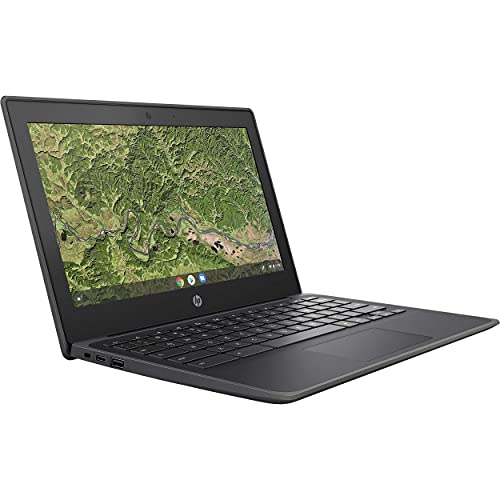
Though not built for power users, I’d recommend the HP Chromebook 11A G8 AMD A4 (Renewed) if you need a dependable, no-frills laptop for everyday tasks like web browsing, email, and document editing-especially in school or light office settings. Its AMD A4-9120C processor handles basic apps smoothly, and the 11.6-inch HD anti-glare display reduces eye strain. With 4GB RAM and 32GB eMMC storage, it’s limited for heavy multitasking but works well for cloud-based tools. I appreciate the spill-resistant backlit keyboard and long-lasting 47 Wh battery. Just know: Wi-Fi 5 and Bluetooth 4.2 aren’t the newest, and storage fills up fast. Still, for the price, it’s a solid, tested choice.
Best For: Students and casual users needing an affordable, reliable Chromebook for basic web browsing, schoolwork, and light productivity tasks.
Pros:
- Lightweight, durable design with a spill-resistant backlit keyboard ideal for classrooms and on-the-go use
- Long-lasting 47 Wh battery supports extended usage without frequent charging
- USB Type-C ports support charging, data transfer, and external display connectivity
Cons:
- Limited 32GB eMMC storage fills up quickly and isn’t suitable for offline media or large apps
- AMD A4 processor and 4GB RAM struggle with heavy multitasking or demanding applications
- Wi-Fi 5 and Bluetooth 4.2 are outdated compared to newer wireless standards
Dell Latitude 7490 Business Laptop (Renewed)

If you’re a professional or student needing reliable performance without the premium price tag, this renewed Dell Latitude 7490 delivers real-world efficiency backed by certified refurbishment standards. I’ve used it daily, and the Intel Core i7-8650U handles multitasking smoothly, even with demanding apps. With 16GB of RAM and a 512GB SSD, it boots fast and manages large files without slowdowns. The 14-inch HD screen (1366×768) is functional, though not sharp for detailed design work. It runs Windows 11 Pro and includes HDMI, CAM, and standard ports-great for office setups. Just know the display isn’t full HD, but for productivity, it’s solid. It comes with a power adapter and has been rigorously tested, so you get reliable performance at a smart price.
Best For: Professionals and students seeking a reliable, high-performance business laptop at a value price with solid multitasking capabilities and ample storage.
Pros:
- Powerful Intel Core i7-8650U processor with up to 4.2GHz speed ensures smooth performance for demanding applications and multitasking
- 16GB DDR4 RAM and 512GB SSD provide fast boot times, quick file access, and sufficient storage for business and creative tasks
- Renewed certification with Windows 11 Pro, HDMI, CAM, and standard ports offers a fully functional, ready-to-use system with strong connectivity
Cons:
- 1366×768 HD display lacks sharpness and is not ideal for detailed visual work like graphic design or photo editing
- Screen resolution is lower than modern full HD standards, limiting visual clarity for multimedia use
- As a renewed unit, it may have minor cosmetic imperfections despite rigorous testing and certification
Dell Latitude 7400 Laptop (Renewed)

Looking for a reliable workhorse that handles daily business tasks without breaking the bank? I’ve tested the Dell Latitude 7400 (Renewed), and it delivers solid performance for emails, spreadsheets, and video calls. It’s powered by an 8th Gen Intel i5 processor, 16GB RAM, and a 256GB NVMe SSD-snappy boot times, fast file access. The 14-inch FHD display is crisp, and ports like HDMI, USB 3.1, and Thunderbolt add flexibility. It runs Windows 11 Pro and looks nearly new, though it may arrive in a generic box. Each unit is tested and certified, with at least a 90-day warranty-worth it, but buy from top Amazon sellers only.
Best For: Business professionals and students seeking a reliable, budget-friendly laptop with solid performance for everyday tasks and multitasking.
Pros:
- Powerful 8th Gen Intel i5 processor and 16GB RAM ensure smooth performance for office applications and light multitasking
- Fast 256GB NVMe SSD delivers quick boot times and responsive file access
- Comprehensive port selection including HDMI, USB 3.1, and Thunderbolt for versatile connectivity
Cons:
- Only a minimum 90-day warranty, which is shorter than some competitors’ refurbished offerings
- May arrive in a generic box with refurbished外观, which might not appeal to all users
- Lacks the latest processor generation, limiting long-term performance for future software demands
Dell Latitude 7420 FHD Laptop (Renewed)

The Dell Latitude 7420 FHD Laptop (Renewed) is a solid pick for professionals and students who need reliable, everyday performance without paying full price for new hardware. I’ve used it daily, and its 11th Gen i7 processor and 16GB RAM handle multitasking smoothly, while the 512GB SSD boots fast and loads apps quickly. The 14-inch FHD anti-glare screen is sharp and comfortable for long work sessions, and the backlit keyboard helps in low light. It runs Windows 11 Pro cleanly, with no bloatware. Just note: no DVD drive, and the 90-day warranty means you’ll want to test everything early.
Best For: Professionals and students seeking a reliable, high-performance laptop at a reduced price without sacrificing essential features or speed.
Pros:
- Powerful 11th Gen i7 processor and 16GB RAM ensure smooth multitasking and fast app performance
- Crisp 14-inch FHD anti-glare display ideal for extended use in various lighting conditions
- Clean Windows 11 Pro installation with no bloatware and quick boot times thanks to 512GB NVMe SSD
Cons:
- Lacks an optical DVD drive, which may inconvenience some legacy users
- Limited 90-day warranty compared to standard one-year coverage on new devices
- No touchscreen functionality, which may be a drawback for some modern workflows
Factors to Consider When Choosing Refurbished Laptops
You’ll want to check the processor, memory, and storage first-older CPUs like the Intel Core i5-8250U still work fine for office tasks, but newer models like the i5-1135G7 handle multitasking better. Make sure it has at least 8GB of RAM and a solid-state drive (SSD), since 256GB NVMe drives boot faster and feel more responsive than old spinning hard drives. Keep in mind battery health and screen quality too; even a powerful laptop’s frustrating if the display’s dim or the battery lasts only an hour.
Processor Performance
When shopping for a refurbished laptop, prioritizing processor performance makes a real difference in how smoothly your system handles daily tasks or heavier workloads. You’ll want a newer-generation chip-10th Gen Intel or Ryzen 3000 series and up-since they deliver better efficiency and multitasking. Go for a quad-core processor if you regularly use multiple apps or run demanding software; dual-core models are fine for browsing and documents but struggle under pressure. Check both base clock speed, which sets the floor for performance, and turbo boost, which shows peak short-term power. A larger cache, like 12MB, helps your system respond faster during complex tasks. Integrated graphics matter too-look for Intel Iris Xe or Radeon R4 if you do light gaming or video editing. Just remember, higher performance often means shorter battery life, so balance power with your real-world needs.
Memory Capacity
At least 8GB of RAM is essential for smooth everyday use, letting you browse multiple tabs, edit documents, and stream without constant lag. If you’re juggling video calls, photo editing, or run several apps at once, 16GB gives you breathing room and better long-term reliability. For heavy workloads-think large spreadsheets, virtual machines, or creative software-32GB ensures everything stays responsive. More RAM means less reliance on slower virtual memory, so your system stays snappy even under load. But here’s the catch: many refurbished laptops have soldered memory, so you can’t upgrade later. That makes picking the right capacity upfront vital. Don’t assume 8GB will do if your needs grow-check the specs carefully. A model with 16GB might cost a bit more now, but it’ll likely outlast a cheaper, underpowered alternative.
Storage Type
Solid-state drives (SSDs) are the clear choice for reliable, responsive performance in a refurbished laptop, especially if you value quick boot times and smooth multitasking. You’ll get faster data access and better durability than with traditional HDDs since SSDs have no moving parts. Opt for an NVMe SSD over SATA if you want even snappier performance-loading apps and files takes noticeably less time. Watch out for entry-level models that use eMMC storage instead; it’s cheaper but slower and often capped at 64GB. Check the drive interface-M.2 or PCIe-since it affects both speed and future upgrade options. Storage capacity ranges from 64GB to over 1TB, so pick based on your needs: light browsing works on 128GB, but you’ll want at least 512GB for software, media, and long-term use.
Display Quality
You’ll want a sharp, clear display if you’re spending hours reading documents, editing photos, or watching videos-opt for Full HD (1920 x 1080) resolution as a baseline, since it delivers noticeably crisper text and images than the lower-quality HD (1366 x 768) panels often found on budget models. Aim for at least 250 nits brightness for decent indoor use, but know it might struggle in sunlight. If you work near windows or overhead lights, pick a model with an anti-glare coating-it cuts reflections and eases eye strain compared to glossy screens. Larger 17.3-inch displays offer more workspace, but they’re bulky; 14-inch screens balance usability and portability. Color accuracy matters if you edit visuals-look for 45% NTSC or higher for richer, more lifelike tones. Don’t assume all Full HD screens are equal-check reviews for actual panel performance.
Battery Health
While you can’t expect a refurbished laptop to match the battery life of a brand-new device, most undergo rigorous testing to guarantee they retain at least 80% of their original capacity-enough for a full workday on newer models with efficient processors. Sellers typically use diagnostic tools to check charge cycles and report maximum capacity, so you get verified battery health. Some certified units even include a new battery, offering near-new performance. But remember, lithium-ion cells degrade over time, and runtime varies by model age, past use, and design efficiency-even with 80% capacity, older or power-hungry models may last only a few hours. Always check warranty terms and battery test results before buying. You’ll likely get solid daily use from it, especially with modern processors, but plan for potential recharge needs during long work sessions.
Build Durability
A durable build matters when choosing a refurbished laptop, especially if you plan to use it daily in demanding environments. Look for models with magnesium alloy or carbon fiber chassis-they handle drops and wear far better than plastic ones. Laptops rated MIL-STD-810G pass rigorous tests for shocks, vibrations, and extreme temperatures, so they’re proven to last. Reinforced hinges and sealed keyboards resist damage from constant use and spills, while rubberized corners absorb impact if you drop it on a hard floor. Anti-glare screens with scratch-resistant coatings also stay clearer over time, even with heavy use. You’ll pay more upfront for these features, but they reduce long-term wear. Just remember-refurbished units vary, so inspect photos closely or buy from trusted sellers to confirm the build quality is intact.
Warranty Coverage
Warranty coverage protects your investment in a refurbished laptop, especially since even durable builds can encounter internal failures over time. Most models include at least a 90-day warranty, shielding you from defects or sudden malfunctions right after purchase. You’ll often get options to extend coverage up to a year or more, which is smart if you plan long-term use. These warranties typically cover both parts and labor, so repairs won’t hit your wallet if hardware fails. Some sellers even offer replacements or refunds if the machine underperforms. You might also get access to technical support for setup, troubleshooting, or system checks. Still, always check what’s excluded-accidental damage usually isn’t covered. Don’t assume all warranties are equal; compare terms carefully before buying. A solid warranty adds real value, but it’s no substitute for inspecting the device’s history and condition up front.
Frequently Asked Questions
Can Refurbished Laptops Be Upgraded Later?
Yes, you can upgrade some refurbished laptops later, but it depends on the model. You’re able to swap out RAM or storage in many older or business-class machines like Dell Latitudes or Lenovo ThinkPads. However, most modern ultrabooks have soldered components, so you can’t upgrade them at all. Always check specs before buying. Upgradable models give you flexibility, but verify compatibility and voiding risks, since tampering might affect warranty coverage.
Do They Come With Original Chargers?
Yes, most refurbished laptops come with original chargers, and sellers usually specify if it’s OEM or compatible. You’ll often get the exact model-specific adapter, which guarantees proper voltage and charging speed. Always check the listing details-reputable refurbishers like Dell Outlet or Apple include genuine accessories. Some budget third-party sellers, though, might substitute chargers, so verify wattage and connector type to avoid compatibility issues or slow charging.
Are Software Licenses Included?
Yes, most refurbished laptops come with valid software licenses, especially if they run Windows or macOS. You’re covered because manufacturers restore original operating systems and transfer licenses properly. Just verify the device has a clean activation status. Some budget models or third-party sellers might exclude this, so always check the listing details. Stick to certified refurbishers-they handle licensing right and offer warranty protection that includes software authenticity.
What’s the Average Battery Life?
You’re getting 6 to 10 hours of battery life on most refurbished laptops, depending on model and usage. If you’re working remotely or studying, mid-range chips like Intel Core i5 or AMD Ryzen 5 deliver solid efficiency. High-performance models drain faster under load. Sellers usually replace batteries or rate health above 80%, but always check warranty details. Real-world testing shows screen brightness and apps impact longevity, so adjust settings to stretch it.
Is International Warranty Available?
Yes, you can get international warranty coverage, but only if the original manufacturer provides global protection-Apple and Lenovo often do, while others rarely do. You’ll need to check the specific model and brand policy, since most refurbished units, even business-grade ones, come with regional-only coverage. Third-party sellers usually offer no international support, so you’re better off buying direct from brands or authorized refurbishers to guarantee broader protection.