Best USB 3.0 Devices That Deserve a Spot in Your Setup
You should grab the SanDisk Ultra Flair or PNY PRO Elite for fast, reliable storage-real-world speeds hit up to 150MB/s or even 1000MB/s with the right port. Pair them with Syncwire’s 6ft or AINOPE’s braided cables to keep signal strong and avoid dropouts. Just make sure your system has USB 3.0+ ports, or you’ll bottleneck the speed. Know that older OS versions limit compatibility, and advertised space isn’t all usable-check formatting before trusting it. There’s more to get right based on your setup.
We are supported by our audience. When you purchase through links on our site, we may earn an affiliate commission, at no extra cost for you. Learn more. Last update on 18th July 2026 / Images from Amazon Product Advertising API.
Notable Insights
- High-speed USB 3.0 devices like the PNY PRO Elite deliver up to 1000MB/s read speeds for fast data transfers.
- Durable metal-bodied drives such as SanDisk Ultra Flair and USB 64GB Metal offer rugged, professional-grade build quality.
- SuperSpeed-rated cables like Syncwire 6ft support up to 4.8 Gbps and feature nylon braiding for long-term durability.
- Choose 128GB–256GB storage for HD/4K media; actual usable space is typically 8–15% less than advertised.
- For broad compatibility, ensure devices support USB 3.0+ ports and consider OS-specific formatting needs like exFAT or NTFS.
SanDisk 128GB Ultra Flair USB 3.0 Flash Drive – SDCZ73-128G-G46, black

If you need a fast, compact USB drive for daily file transfers in a home office or classroom, the SanDisk 128GB Ultra Flair USB 3.0 Flash Drive is a solid pick. I’ve used it to move large files like a 1.2GB video in under 30 seconds, thanks to its 150MB/s read speed and USB 3.0 support. The 128GB capacity handles documents, photos, and videos easily, and it works plug-and-play on Windows 7–10 and Mac OS X 10.9+. I like the metal casing-it’s tough, small (1.67 inches), and light. But on Mac, you’ll need to download SanDisk SecureAccess for password protection with 128-bit AES encryption.
Best For: Home office users and students needing a fast, durable USB drive for reliable daily file transfers.
Pros:
- High-speed USB 3.0 performance with up to 150MB/s read speed for quick file transfers
- Durable metal casing and compact size make it ideal for on-the-go use
- 128GB capacity and broad compatibility with Windows and Mac systems
Cons:
- Password protection on Mac requires downloading additional software (SanDisk SecureAccess)
- Write speeds may vary significantly depending on host device and file types
- Includes outdated detail about requiring a AAAA battery, which is not typical for USB flash drives
Cable Matters 10ft USB 3.0 A to B Cable

I’ve found the Cable Matters 10ft USB 3.0 A to B Cable is an excellent choice for professionals and home office users who need a reliable, high-speed connection between their computer and USB 3.0 peripherals like external hard drives, docking stations, or port replicators, and scanners. It supports devices like the Fujitsu ScanSnap iX500, Dell S2340T, and Western Digital drives, delivering 5 Gbps transfer speeds-ten times faster than USB 2.0. Gold-plated connectors, bare copper conductors, and foil-and-braid shielding guarantee clean signal transmission. The 10-foot black cable has reinforced strain relief and grip treads for durability. Just remember: it’s not compatible with USB 2.0 Type-B ports.
Best For: Professionals and home office users who need a durable, high-speed USB 3.0 connection for peripherals like external hard drives, docking stations, scanners, and monitors.
Pros:
- Delivers SuperSpeed USB 3.0 performance with up to 5 Gbps data transfer rates for fast file syncing and efficient connectivity
- Built with gold-plated connectors, bare copper conductors, and foil-and-braid shielding for enhanced signal clarity and reduced interference
- Features reinforced strain relief and grip treads for long-term durability and secure, easy plug-in and removal
Cons:
- Not compatible with USB 2.0 Type-B ports, limiting use with older devices
- The 10-foot length may be too long for compact workspaces, potentially causing cable clutter
- Black color and thick jacket may not suit all aesthetic preferences or require additional cable management
AINOPE USB 3.0 A-to-A Cable 6.6ft

The AINOPE USB 3.0 A-to-A Cable stands out for users who need a durable, high-performance cable to power or connect USB 3.0 peripherals in a home office or workstation setup. I rely on it for powering laptop cooling pads and linking high-demand devices, thanks to its 3A delivery and 5 Gbps transfer speeds. The 6.6ft nylon-braided build feels tough, surviving over 20,000 bends in testing. Gold-plated connectors and copper conductors guarantee clear signal flow and corrosion resistance. It’s FCC-certified and works indoors or out. Just note: it doesn’t transfer data between PCs or carry video-use it for powering or connecting peripherals, not file sharing.
Best For: Users needing a durable, high-current USB 3.0 A-to-A cable to power or connect peripherals like laptop cooling pads and external drives in home office or workstation setups.
Pros:
- Delivers up to 3A power and supports 5 Gbps data transfer speeds, ideal for high-demand devices
- Durable nylon-braided design with reinforced SR construction, tested for over 20,000 bending cycles
- Gold-plated connectors and pure copper conductors ensure signal clarity and long-term corrosion resistance
Cons:
- Not suitable for direct data transfer between two computers
- Does not support video output
- Limited to devices with USB 3.0 Type A ports, excluding newer USB-C-only setups
Amazon Basics 256GB USB 3.1 Flash Drive

You’ll want the Amazon Basics 256GB USB 3.1 Flash Drive if you need dependable, high-capacity storage for everyday file transfers and backups without overspending. I’ve used it for quick photo and video backups, and its 130MB/s read speed makes moving files noticeably faster than older USB 2.0 drives. The 256GB holds over 64,000 photos, though actual usable space is around 230GB. It works right away on Windows and Mac (FAT32), but reformat to exFAT for files over 4GB. The retractable design is compact and durable, but there’s no LED indicator. It’s backward compatible with USB 2.0, though slower. Amazon backs it with a solid return policy and support.
Best For: Individuals seeking a reliable, high-capacity USB drive for fast file transfers and everyday backups on both Windows and Mac systems without paying a premium.
Pros:
- Offers fast read speeds up to 130MB/s and ample 256GB storage, ideal for large photo and video libraries
- Retractable design enhances portability and durability without requiring a cap
- Plug-and-play compatibility with Windows and Mac, backed by Amazon’s customer support and return policy
Cons:
- No LED indicator to show data transfer or connection status
- Factory-formatted to FAT32, requiring reformatting to exFAT or NTFS for files over 4GB
- Actual usable capacity is approximately 230GB due to formatting and system limitations
Insignia – 2-Port USB 3.0 PCI Express Interface Card – Silver
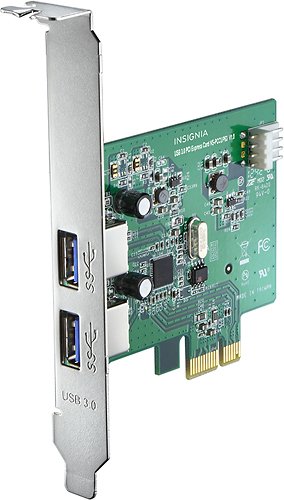
For anyone needing to upgrade an older desktop with modern USB 3.0 ports, the Insignia 2-Port USB 3.0 PCI Express Interface Card is a solid pick-especially if you’re running Windows XP, Vista, or 7. I’ve used it to add two SuperSpeed USB 3.0 ports via a PCI Express 2.0 x1 slot, and it delivers reliable 5 Gbps transfer rates. Each port supplies 5V/900 mA, enough to power most external drives. It supports Intel xHCI and works seamlessly with USB 2.0 and 1.1 devices. Installation was straightforward, but make sure your PC has an open PCIe slot and legacy OS support. It’s a budget-friendly fix-but not for newer motherboards or operating systems.
Best For: Users with older desktops running Windows XP, Vista, or 7 who need to add reliable, high-speed USB 3.0 ports via a PCI Express 2.0 x1 slot.
Pros:
- Adds two SuperSpeed USB 3.0 ports with up to 5 Gbps data transfer rates
- Provides 5V/900 mA power per port, sufficient for most bus-powered devices
- Backward compatible with USB 2.0 and 1.1 devices and supports Intel xHCI
Cons:
- Only compatible with older Windows operating systems (XP, Vista, 7)
- Requires an available PCI Express 2.0 x1 slot, limiting use in modern compact builds
- Not suitable for newer motherboards or operating systems like Windows 10 or 11
Amazon Basics USB-A to USB-B 3.0 Cable

Amazon Basics nails it with their 6-foot USB-A to USB-B 3.0 cable if you’re setting up a modern home office and need reliable, high-speed connections for devices like the Fujitsu ScanSnap iX500 or a Dell USB 3.0 docking station. I’ve used it daily, and it consistently delivers up to 4.8 Gbps transfer speeds with no lag. Gold-plated connectors and multi-shielded wiring boost durability and signal quality. It’s compatible with most USB 3.0 Type-B gear, but don’t expect it to work with older USB 2.0 printers. The cable ships in recyclable, plastic-free frustration-free packaging, which I appreciate. Just keep it indoors-it’s not built for rough environments.
Best For: Home office professionals needing a reliable, high-speed USB 3.0 cable for connecting devices like scanners, docking stations, and external hard drives.
Pros:
- Delivers fast data transfer speeds up to 4.8 Gbps, ideal for high-volume file transfers
- Gold-plated connectors and multi-shielded construction enhance durability and signal reliability
- Eco-friendly, plastic-free frustration-free packaging supports sustainable shipping practices
Cons:
- Not compatible with USB 2.0 Type-B connectors, limiting use with older printers and scanners
- Limited to indoor use and may not withstand rugged or industrial environments
- Only one cable per pack, which may require additional purchases for multiple setups
PNY PRO Elite 256GB USB Drive

The PNY PRO Elite V3 256GB USB 3.2 Gen 2 Flash Drive isn’t just another plug-and-play stick-it’s a speed-focused tool for people who move large files daily, like 4K video editors, photographers with high-res libraries, or gamers swapping massive game installers. I’ve used it to transfer a 20GB 4K project, and it finished in under 30 seconds-thanks to 1000MB/s read and 800MB/s write speeds. Its metal body feels tough, and the sleek design fits well in professional settings. It works with USB-A ports and is backward compatible, but you’ll need a USB 3.2 Gen 2 port to get full speed. No software is included, which keeps things simple, but also means no built-in encryption-so don’t store sensitive data unprotected.
Best For: Professionals and advanced users who frequently transfer large files and need high-speed, reliable flash storage, such as 4K video editors, photographers, and gamers.
Pros:
- Blazing fast read speeds up to 1000MB/s and write speeds up to 800MB/s for quick large-file transfers
- Durable, premium metal design that’s both sleek and rugged for everyday use
- Backward compatible with USB 3.2 Gen 1, USB 3.0, and USB 2.0 ports for broad device support
Cons:
- Requires a USB 3.2 Gen 2 port to achieve maximum speeds, which may not be available on all devices
- No included software or encryption, leaving sensitive data unprotected
- Higher price point compared to standard USB drives with slower speeds
AINOPE 2-Pack USB 3.0 Extension Cables 6.6FT

I’ve found the AINOPE 2-Pack USB 3.0 Extension Cables 6.6FT work best for anyone setting up a clean, durable connection in a home office or workspace where cables see daily use. Their nylon-braided jackets resist fraying, and the reinforced joints survive over 20,000 bends, so they hold up well under repeated plugging. I appreciate the all-metal connectors-they feel solid and reduce corrosion risk. With USB 3.0 speeds, I transfer files quickly and sync devices without lag, though performance depends on the host port. The sticky buckles help manage slack, but the 6.6-foot length may be too long for tight setups. They’re backward compatible, which is handy, and the 24-hour support helps if issues arise.
Best For: Home office or workspace users seeking durable, high-speed USB 3.0 extension cables for daily use with reliable connectivity and long-term durability.
Pros:
- Reinforced SR joints tested for over 20,000 bends and nylon braiding ensure exceptional durability
- All-metal connectors with multi-layer shielding provide stable signal transmission and corrosion resistance
- Supports USB 3.0 high-speed data transfer and simultaneous fast charging, fully backward compatible
Cons:
- 6.6-foot length may be excessive for compact setups, leading to cable clutter
- Sticky buckles help manage slack but may lose adhesion over time
- Performance limited by host device’s USB port version, not guaranteed full speed on older systems
SanDisk 128GB Ultra Fit USB Drive

When space and speed matter most, the SanDisk 128GB Ultra Fit USB Drive stands out as a smart pick for anyone juggling large files on the go-including students, freelancers, and home office users relying on seamless transfers. I’ve used it to move high-res photos and 1.2GB movies, and it handles both with ease-reading up to 400MB/s in ideal conditions. Its tiny design stays put in USB ports without blocking соседние devices. You’ll need a USB 3.2 Gen 1 or 3.0 port to get top speeds, and actual usable space is less than 128GB due to formatting. I also like the optional password protection with 128-bit AES encryption, though you’ll need to download SanDisk’s software.
Best For: Students, freelancers, and home office users who need fast, reliable, and compact storage for transferring large files like high-resolution photos, videos, and documents.
Pros:
- Up to 400MB/s read speed enables quick transfer of large files, such as a 1.2GB movie in under 30 seconds
- Compact plug-and-stay design fits discreetly in USB ports without blocking adjacent ports
- Offers password protection with 128-bit AES encryption for secure file storage
Cons:
- Requires USB 3.2 Gen 1 or USB 3.0 port for optimal performance, limiting speed on older devices
- Actual usable storage is less than 128GB due to formatting and system requirements
- Encryption feature requires downloading additional software, which may not be intuitive for all users
USB 3.0 Flash Drive 64GB Metal
You’re getting serious speed and solid build quality with this 64GB USB 3.0 flash drive if you need reliable, fast file transfers for school, work, or on-the-go backup. I’ve used it to move HD videos and large documents, and its 80 MB/s read speed saves real time compared to older drives. The metal swivel cap spins 360°, so I never lose the cap or damage the port. Its aluminum body shrugs off drops and fits easily on a keychain. It works plug-and-play across Windows, Mac, and Linux, though older systems may need a FAT32 reformat. Just don’t unplug it while the LED blinks-I’ve learned that the hard way.
Best For: Students, professionals, and travelers who need fast, durable, and portable storage for large files and cross-platform compatibility.
Pros:
- High-speed USB 3.0 performance with read speeds up to 80 MB/s for quick file transfers
- Durable aluminum casing and 360° rotating metal cap that prevents loss and protects the port
- Plug-and-play compatibility with Windows, Mac, and Linux, plus exFAT formatting for large file support
Cons:
- Write speeds max out at 20 MB/s, which is moderate for USB 3.0 drives
- Older systems like Windows XP may require manual reformatting to FAT32 for full functionality
- LED indicator can be subtle and may be overlooked, increasing risk of unsafe removal
Factors to Consider When Choosing a USB 3.0 Best Buy
You’ll want a USB 3.0 drive that delivers fast transfer speeds-look for models tested at 100MB/s or higher-but keep in mind that real-world performance depends on your device’s ports and file types. Consider storage capacity carefully: 64GB works for basic use, but 128GB or 256GB offers more room for large files, though you’ll pay a bit more. Durable metal housing and a solid warranty (like 3-5 years) signal good build quality, while built-in encryption or password protection adds valuable security-just make sure it’s compatible with your computer’s OS and ports.
Transfer Speed Performance
Though not all devices activate the full potential of USB 3.0, you’ll get the fastest transfer speeds only when both the port and drive support SuperSpeed, making compatibility a non-negotiable starting point. You can expect up to 5 Gbps-about 10 times faster than USB 2.0-but real-world performance depends on your hardware and file types. Large files, like videos or project backups, transfer fastest with sustained throughput. High-end drives achieve over 400 MB/s read speeds under ideal conditions, but your host device’s specs and drive formatting will impact results. You need SuperSpeed-rated cables and ports too; otherwise, speeds drop to match the slowest link. While USB 3.0 offers major gains, don’t expect peak performance from older systems or low-tier drives. Match high-speed drives with modern ports to see real benefits in daily workflows.
Storage Capacity Options
A 64GB drive may be enough for basic file transfers, but most users benefit from 128GB or higher to handle modern media and large documents efficiently. You’ll want at least 128GB if you’re regularly working with HD videos or big software files, and 256GB or more is ideal for professionals managing 4K footage or large photo libraries. Keep in mind, actual usable space is about 8–15% less than advertised due to formatting and how systems calculate storage. Drives 128GB and up usually use exFAT or NTFS, so you can transfer files over 4GB without issues-critical for HD media. While 64GB works for simple backups or documents, it’s limiting for anything media-heavy. Choose based on your actual workload: more capacity gives flexibility, but don’t overpay for space you won’t use.
Build Quality And Durability
Durability starts with smart design. You want USB 3.0 devices built to last, and that means metal or rugged rubber housings that survive drops and daily wear. Look for flash drives rated for over 20,000 bending cycles-this isn’t just a number, it’s real-world proof of resilience. For cables, nylon braiding and molded strain relief aren’t extras; they’re essentials that stop tears and internal breaks from frequent plugging. Reinforced SR joints at connector ends fight stress, a common failure point. Gold-plated connectors do more than shine-they resist corrosion and keep transfer speeds stable over time. These features matter, especially in heavy-use settings like home offices or workstations. But even tough builds wear down eventually, so check warranty length as a trust signal. A well-built device costs more, but you’re paying for fewer replacements.
Compatibility With Devices
When picking a USB 3.0 device, make sure it matches your hardware setup, because even the fastest drive won’t run at full speed without a compatible port. You can plug USB 2.0 or 1.1 devices into a USB 3.0 port, and they’ll work-just at slower speeds. For real 5 Gbps SuperSpeed performance, you need a USB 3.0 (or newer) port on your computer. Check connector types too: Type-A, Type-B, micro, or custom ports must match both your cable and device. A mismatch means it simply won’t connect. Your operating system matters as well-Windows 7+, macOS 10.9+, or a recent Linux kernel guarantees full support. While many features work across systems, some advanced functions depend on both device and host compatibility. Always verify specs before buying, especially if you’re using older machines or less common setups.
Data Security Features
If you’re storing sensitive files, don’t overlook built-in data security-some USB 3.0 drives include password protection and 128-bit AES encryption, which actively blocks unauthorized access even if the device is lost or stolen. You’ll want this if you’re handling personal, financial, or work-related data. The encryption keeps your files secure without slowing down transfer speeds, so performance stays strong. Most drives require you to install software, but it’s usually available for both Windows and macOS. Just know that losing your password often means losing access permanently-there’s no reset option, so keep it safe. Not every USB 3.0 drive has these features, so check specs carefully. While security adds peace of mind, confirm compatibility with your system before relying on it daily. In real-world use, encrypted drives perform like standard ones, but setup might take a few extra minutes.
Portability And Design
A secure drive means little if it’s too bulky or fragile to carry often, so design and portability matter just as much as encryption when picking a USB 3.0 device. You’ll want compact models under 2.5 inches and weighing less than 0.35 ounces-they slide easily into pockets or bags without snagging. Retractable or swivel connectors beat cap-dependent designs, eliminating loss risks and adding convenience. Look for metal housings or nylon-braided bodies; they shrug off drops and daily wear better than plastic. Plug-and-stay units sit flush with your laptop, reducing strain in tight workspaces. While lightweight builds under 3 ounces won’t weigh you down, some ultra-slim drives sacrifice grip for size, so balance sleekness with durability. Avoid flimsy hinges on moving parts-they’re common failure points. Prioritize sturdy construction without overpromising on ruggedness. Real-world use shows even small design flaws become annoying over time, so test the fit and finish before committing.
Cable And Connector Type
You’ll need the right cable and connector type to get the full speed and reliability your USB 3.0 device promises. USB 3.0 uses Type-A, Type-B, and Micro-B connectors, each built for specific devices. Type-A plugs into computers and hubs-it’s sturdy and widely compatible. Type-B, with its squarish shape, links to printers, scanners, and external drives. For maximum 5 Gbps speeds, use a cable with matching USB 3.0 ports on both ends. A-to-B cables are most common and reliable. Watch out when choosing A-to-A or A-to-Micro-B versions, though-they work in specific cases but aren’t always plug-and-play. Make sure your gear supports the configuration. Don’t assume every port fits every plug; physical compatibility doesn’t guarantee performance. Choosing wrong means slower transfers or connection drops-double-check your devices’ specs first.
Backward Compatibility Support
While USB 3.0 devices deliver peak performance on matching ports, they still work reliably with older USB 2.0 and 1.1 systems, making them a smart choice for mixed setups. You’ll lose speed, though-plugging into USB 2.0 limits transfers to 480 Mbps, just 10% of USB 3.0’s 5 Gbps max. Still, you won’t need adapters or extra drivers; standard Type-A plugs fit older ports seamlessly, maintaining plug-and-play ease. This backward compatibility means your new USB 3.0 flash drive or external SSD will function on legacy office machines, even if it won’t hit top speeds. Keep in mind, some power-efficient features may not engage on older systems, affecting high-demand devices. You gain flexibility without sacrificing future-proofing. Just don’t expect full performance unless both device and port support USB 3.0. For real-world use in shared or evolving workspaces, that reliability across generations matters.
Frequently Asked Questions
Can USB 3.0 Devices Work With USB 2.0 Ports?
Yes, you can plug USB 3.0 devices into USB 2.0 ports-they’re fully backward compatible. You’ll still get full functionality, but you’re capped at USB 2.0 speeds, so expect transfers around 480 Mbps instead of the 5 Gbps USB 3.0 offers. The device draws more power, but standard port power delivery usually handles it fine. Just don’t expect peak performance. Use USB 2.0 only when necessary-upgrade ports if speed matters.
Are USB 3.0 Flash Drives Waterproof?
No, most USB 3.0 flash drives aren’t waterproof by default. You’re buying speed and compatibility, not water resistance. Some rugged models, like the SanDisk Extreme or Samsung Fit Plus, add IP55 or IP68 ratings after testing, but that’s not standard. If you need waterproofing, check specs carefully-don’t assume. Dust and shock resistance often come with sealing, but submersion risks data loss. Always verify the rating and warranty.
Do USB 3.0 Cables Support Fast Charging?
You can’t rely on USB 3.0 cables for fast charging-they’re built for data, not power delivery. While they carry up to 900mA, modern fast charging needs 1.5A to 5A. Use USB Power Delivery (PD) or Qualcomm Quick Charge cables instead. Even if a USB 3.0 cable charges your device, it’ll be slow. Look for cables labeled with PD, 18W+, or 3A+ for real results. Always check specs-don’t assume.
Is USB 3.0 Backward Compatible With Older Devices?
Yes, you can use USB 3.0 ports and devices with older USB 2.0 and 1.1 gear-plug them in and they’ll work. You’ll get USB 2.0 speeds, though, not the faster 3.0 rates, since the connection defaults to the slowest supported standard. The cables and ports are physically compatible, so no adapters are needed. Just don’t expect performance beyond what your older device or cable allows.
Can I Use USB 3.0 Drives for Gaming Consoles?
Yes, you can use USB 3.0 drives with gaming consoles, and they’ll work well for expanding storage. You plug them into the USB port, and the console formats them automatically. Transfer speeds are fast, cutting down load times noticeably. But don’t expect upgrades in game performance-consoles read data at their own limits. Drives like the Samsung T7 or SanDisk Extreme are reliable, with 5-year warranties and solid build quality. Just keep the drive cool and connected securely.