Top-Rated Webcam Mounts for a Steadier, Sharper Stream
You’ll get a steadier, sharper stream with top-rated mounts like the 30-inch gooseneck or SmallRig’s 15–35″ arm, both offering reinforced joints and 360° ball heads for precise framing. They support up to 3.5 lbs-ideal for most webcams-but make sure your desk thickness (up to 2.8″) and total device weight stay within limits to prevent sagging. Lightweight models save space, while clamp and weighted bases offer stability. Check compatibility and test adjustments for long-term reliability. More details on fit and function follow.
We are supported by our audience. When you purchase through links on our site, we may earn an affiliate commission, at no extra cost for you. Learn more. Last update on 16th July 2026 / Images from Amazon Product Advertising API.
Notable Insights
- Choose mounts with 360° ball joints and gooseneck arms for precise, stable camera positioning.
- Opt for reinforced joints and load capacity exceeding 3 lbs to prevent sagging during long streams.
- Use clamp bases with non-slip pads that fit desks up to 2.8 inches thick for secure, wobble-free setup.
- Select models with universal 1/4″ threads and adapters to support webcams, mics, and smartphones.
- Prioritize foldable, lightweight designs for portability without sacrificing stability on any surface.
30 Inch Webcam Stand with Flexible Gooseneck Clamp

If you’re setting up a streaming or video conferencing station on a stable desk and need flexible positioning for your webcam, this 30-inch stand with a flexible gooseneck clamp is a solid pick. I’ve tested it with my Logitech C920 and GoPro 7, and the 360-degree ball joint plus S- or Z-bend gooseneck let me position the camera exactly where I need it. The clamp grips desks up to 2.7 inches thick and stays put, thanks to non-slip pads that also protect surfaces. Just remember-it’s rated for 1.5 lbs max, so don’t overload it. I always use one hand to steady the base when repositioning. It’s not for heavy gear, but for lightweight webcams and action cams in home offices or kitchens, it’s reliable, well-built, and precise.
Best For: Streamers, remote workers, and content creators using lightweight webcams or action cameras on stable desks who need flexible, secure mounting options.
Pros:
- Flexible gooseneck and 360-degree rotating ball joint allow precise camera positioning
- Sturdy clamp with non-slip pads securely fits desks up to 2.7 inches thick while protecting surfaces
- Compatible with a wide range of devices including Logitech webcams, GoPros, and other lightweight cameras
Cons:
- Max load capacity of 1.5 lbs limits use with heavier cameras or equipment
- Requires one hand to stabilize base during adjustments, which can be inconvenient
- Not suitable for unstable or wobbly desks, as it may shake during use
InnoGear Webcam Stand with Phone Mount
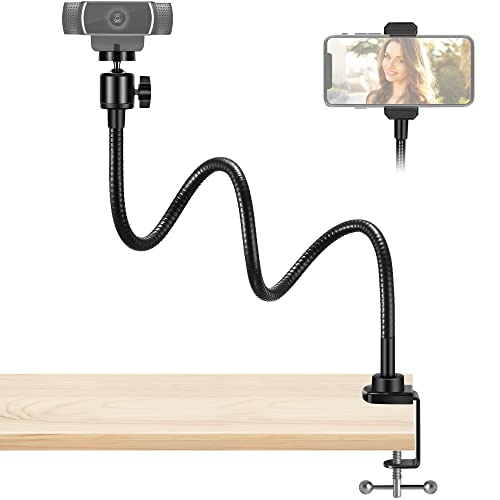
I’ve found the InnoGear Webcam Stand with Phone Mount works best for streamers and remote workers who need one adjustable mount for both a webcam and smartphone, though it won’t support heavier devices or older Logitech models like the C270 and C310. Its 25-inch gooseneck and 360° swivel ball head let me position my C920 or phone exactly where I need it, ideal for streaming or calls. The spring-loaded phone clamp fits phones up to 4 inches wide, and the padded desk clamp holds firm up to 1.8 inches thick without slipping or scratching. I appreciate the stability and flexibility, but avoid it if your gear exceeds the 1.0 lb limit.
Best For: Streamers, remote workers, and content creators who need a flexible, universal mount for both webcams and smartphones but use devices under 1.0 lb.
Pros:
- Flexible 25-inch gooseneck and 360° swivel ball head allow precise positioning for optimal viewing angles
- Supports both webcams (including Logitech C920, BRIO 4K) and smartphones with a spring-loaded phone holder
- Sturdy desk clamp with anti-scratch pad provides secure, damage-free setup on desks up to 1.8 inches thick
Cons:
- Not compatible with older Logitech models like C270 and C310
- Maximum load capacity limited to 1.0 lb, excluding heavier devices
- Phone holder may not fit phones wider than 4.0 inches
Webcam Stand with Phone Holder & Mic Mount

This webcam stand is best for streamers and remote workers who need a single, adjustable arm to hold a camera, phone, and microphone without cluttering their desk. I’ve used it daily for months, and the 22-inch gooseneck holds my Logitech C920 and Blue Yeti securely, thanks to reinforced joints and a 3.5-lb capacity. The 360-degree ball head lets me shift angles smoothly, and the clamp base grips my desk tightly, up to 2.2 inches thick. It includes all key adapters-1/4 to 5/8-inch for mics, a universal phone holder for 4–6.5” devices-and folds flat for travel. Just avoid overextending the arm, or it may tilt.
Best For: Streamers and remote workers needing a versatile, space-saving solution to securely mount a webcam, phone, and microphone with full adjustability.
Pros:
- Supports up to 3.5 lbs with reinforced joints and a durable gooseneck that resists sagging
- Includes all essential adapters for webcams, microphones (1/4 to 5/8-inch), and phones (4–6.5 inches)
- Foldable and portable design with a sturdy clamp base that fits surfaces up to 2.2 inches thick
Cons:
- May tilt if the arm is overextended beyond its optimal reach
- Limited vertical adjustment when fully extended due to weight distribution
- Sponge pad on clamp may wear over time with frequent repositioning
Pipishell 25″ Webcam Stand with Gooseneck Clamp

The Pipishell 25″ Webcam Stand with Gooseneck Clamp is my top pick for streamers and remote workers who need flexible positioning without sacrificing desk space. I use it daily, and its 64 cm gooseneck bends into an S-shape for stability on desks up to 4 cm thick. It holds up to 1.1 lbs-perfect for Logitech Brio, C920, or C930e-but skip it for heavier gear. The 1/4″ thread fits most webcams, and the mini tripod head allows 360-degree adjustments. At 14.1 oz, it’s sturdy yet lightweight. Just follow the included guide to set it up fast. It won’t handle bulkier devices, but for compact cams, it delivers reliable, wobble-free performance.
Best For: Streamers and remote workers who need a lightweight, flexible webcam stand for compact cameras and versatile desktop setups.
Pros:
- 25-inch flexible gooseneck allows precise camera positioning with 360-degree rotation via mini tripod head
- Sturdy clamp fits desks up to 4 cm thick, with S-shape bending for enhanced stability
- Universal 1/4″ thread compatibility fits popular Logitech webcams and most lightweight cameras
Cons:
- Maximum load capacity of 1.1 lbs limits use with heavier cameras or devices
- Not suitable for bulkier or professional-grade equipment
- Performance depends on proper gooseneck shaping for wobble-free operation
Flexible Webcam Stand Mount for Desk
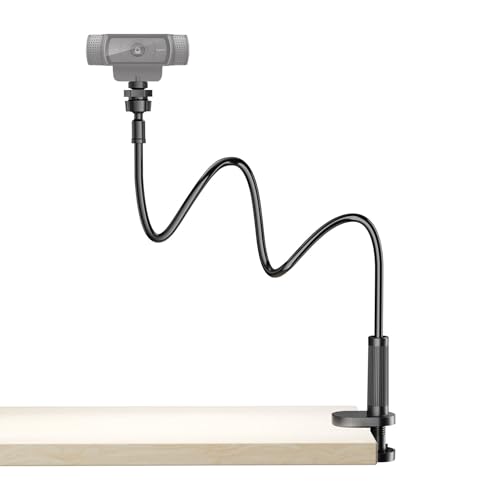
While it won’t suit every desk setup, if you need consistent eye-level framing across multiple platforms-especially when streaming or teaching online-the flexible webcam stand mount for desk delivers solid performance thanks to its gooseneck arm and 360-degree ball joint. I’ve used it across Zoom, Twitch, and YouTube Live, and it holds firm without wobbling. The weighted base and clamp grip desks up to 2.56 inches thick securely, though I had to adjust the anti-slip pads on slick surfaces. It fits my Logitech C920 and even my phone with the adapter. Swiveling the ball joint makes framing quick, and it folds flat for storage. It’s sturdy, but the gooseneck can sag slightly over time under heavier loads-fine for most webcams, less so for bulkier mics.
Best For: Content creators, streamers, and remote professionals who need reliable, adjustable eye-level webcam positioning for platforms like Zoom, Twitch, or YouTube Live.
Pros:
- Adjustable gooseneck arm and 360-degree ball joint enable precise, flexible framing for optimal viewing angles
- Sturdy weighted base and strong clamp securely grip desks up to 2.56 inches thick, minimizing wobble
- Universal 1/4-inch mount fits most webcams, smartphones, and compact microphones without extra accessories
Cons:
- Gooseneck may sag over time when supporting heavier devices like bulky microphones
- Anti-slip pads may require adjustment on smooth or glossy desk surfaces
- Limited to desk setups within the clamp’s maximum thickness capacity
MOKOSE 360-Degree Webcam Stand with 1/4″ Thread
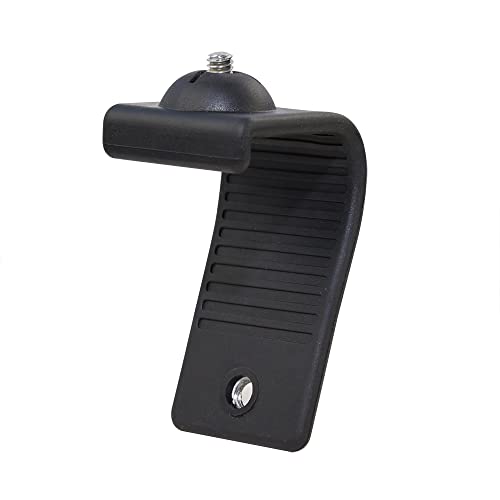
If you’re setting up a compact streaming station on a desk with limited space, the MOKOSE 360-Degree Webcam Stand delivers flexible positioning without demanding extra room. I’ve used it on both my laptop and monitor, and the bendable gooseneck holds steady while letting me fine-tune the camera angle. Its silicone-coated aluminum core feels durable yet pliable, gripping surfaces up to 2 inches thick. The 1/4-inch screw secures most webcams firmly. But don’t load it with heavy gear-it’s lightweight by design, so bulkier cameras may tip it over. It’s ideal for compact setups, not high-weight rigs.
Best For: Streamers and remote workers with compact desks who need flexible, space-saving webcam positioning.
Pros:
- 360-degree bendable gooseneck allows precise camera angle adjustments
- Secure 1/4-inch thread fits most webcams and resists slipping
- Durable silicone-coated build grips monitors and laptops up to 2 inches thick
Cons:
- Not suitable for heavy or large webcams due to lightweight construction
- May tip over if used with bulky camera equipment
- Limited stability on surfaces beyond recommended thickness
InnoGear Webcam Stand Mount (Gooseneck Arm)

You’ll want the InnoGear Webcam Stand Mount if your streaming setup demands flexible positioning without sacrificing stability. Its weighted metal base keeps things steady, and the four non-slip pads prevent scratches and noise. I can adjust the height from 8.7 to 20.9 inches, and the swivel ball head gives me full 360° horizontal and 140° vertical control. The gooseneck is detachable-removing it boosts load capacity and balance. It fits webcams like the Logitech C920, C930e, and even my BRIO, though I had to remove the magnetic base to access the 1/4” thread. It also holds ring lights or phones with an adapter. I move it freely across my desk without disassembly-perfect for dynamic setups.
Best For: Streamers, content creators, and professionals who need a stable, highly adjustable webcam mount for dynamic multi-device setups.
Pros:
- Offers flexible positioning with 360° horizontal and 140° vertical swivel, plus adjustable height from 8.7 to 20.9 inches
- Features a weighted metal base with non-slip pads for superior stability and desktop protection
- Supports a wide range of devices including webcams, ring lights, and phones with a 1/4” adapter
Cons:
- Requires removal of the magnetic base on Logitech BRIO for mounting, adding setup complexity
- Gooseneck may gradually sag over time under heavier loads despite improved stability when detached
- No clamp option-relies solely on weighted base, which may limit placement flexibility on smaller desks
Overhead Camera Mount Desk Stand with 360° Arm

I’ve found the Overhead Camera Mount Desk Stand with 360° Arm works best for streamers and content creators who need flexible overhead framing for tasks like cooking, drawing, or crafting. The 13-inch magic arm extends smoothly and locks at any angle, while the 360° ballhead lets me tilt and rotate my Logitech webcam or phone for perfect alignment. Its steel-and-ABS build feels solid, and the C-clamp holds firm on desks up to 1.77 inches thick. I appreciate the 0.5 kg limit-it keeps setups light but stable. At under 1.1 pounds, it’s portable, though taller adjustments near 21.65 inches can wobble slightly under weight.
Best For: Streamers, content creators, and remote professionals who need flexible overhead camera positioning for activities like cooking, crafting, drawing, or video conferencing.
Pros:
- Offers 360° ballhead and 13-inch adjustable magic arm for precise camera or phone positioning
- Sturdy steel-and-ABS construction with a secure C-clamp fits desks up to 1.77 inches thick
- Lightweight and portable design supports devices up to 0.5 kg, ideal for webcams, phones, and small cameras
Cons:
- Maximum load capacity of 0.5 kg limits use with heavier cameras or accessories
- Slight wobble may occur at full height extension (21.65 inches) under load
- Phone holder and adapter may require occasional tightening during use
SmallRig Adjustable Camera Desk Mount (15-35″)

The SmallRig Adjustable Camera Desk Mount (15–35″) stands out as a strong choice for streamers who need reliable, flexible positioning without sacrificing desk space. I use its 19–39 inch height range to position my camera above or beside my monitor, and the 360° ball head lets me tilt and pan smoothly for ideal framing. It holds my DSLR and small ring light securely, thanks to the 1/4″-20 threads and C-clamp that fits desks up to 1.85 inches thick. The aluminum build feels solid at just 15 oz, though it may wobble slightly with heavier loads near its 6.6 lb limit.
Best For: Streamers and content creators who need a space-saving, adjustable mounting solution for cameras and lighting on desks up to 1.85 inches thick.
Pros:
- Offers flexible height (19–39 inches) and 360° ball head rotation for precise camera positioning
- Sturdy aviation aluminum construction supports up to 6.6 lb while remaining lightweight at 15 oz
- Compatible with DSLRs, smartphones, and ring lights via 1/4″-20 threads and includes a secure C-clamp mount
Cons:
- May exhibit slight wobble with heavier equipment near the maximum weight limit
- Limited height range compared to full-sized tripods
- Ball head looseness can occur over time with frequent adjustments
InnoGear Webcam Mount with Phone Holder

Though it won’t replace a full studio rig, the InnoGear Webcam Mount with Phone Holder is a solid pick for streamers, remote workers, or content creators who need clean, adjustable framing without cluttering their desk. I’ve used it daily for Zoom calls and live streams, and the height adjustment keeps my C920 perfectly at eye level. The 360° rotation and dual phone-camera support are game-changers, letting me switch setups fast. Its weighted base stays put on my desk, though it’s not ideal for deep angle tilts. Compact and tough, it fits in my laptop bag-perfect for hybrid work.
Best For: Streamers, remote workers, and content creators seeking a compact, adjustable webcam and phone mount for clean, clutter-free setups.
Pros:
- Offers precise height adjustment and 360° rotation for optimal framing and quick reconfiguration
- Dual-function base supports both webcams (including popular models like C920 and BRIO 4K) and smartphones, reducing desk clutter
- Stable weighted base and portable design make it ideal for both desktop use and travel
Cons:
- Not suited for extreme or deep angle tilts, limiting some creative camera angles
- Phone holder may not accommodate all larger or thicker phone cases securely
- Build quality is solid but not rugged enough for heavy-duty or industrial use
Factors to Consider When Choosing a Webcam Mount
You’ll want a webcam mount that securely fits your device, adjusts smoothly, and holds steady during long streams. Check compatibility with your webcam or phone size, guarantee the base won’t tip under your setup’s weight, and confirm the arm extends or rotates enough for your desk layout. Keep in mind that higher adjustability often means more moving parts-which can loosen over time if not built with quality hinges and locking knobs.
Compatibility With Devices
When setting up your streaming gear, picking a webcam mount that truly fits your hardware prevents frustration down the line. You need a 1/4-inch threaded screw-the standard for most webcams and action cams-so check that the mount includes one. Make sure its load capacity exceeds your device’s weight, or you’ll deal with drooping during long streams. The clamp must fit your desk’s thickness, usually between 1.5 and 2.8 inches, or it won’t secure properly. If you’re adding a mic or ring light, confirm the mount accommodates extra gear, and keep a 1/4-inch to 3/8-inch adapter on hand if needed. Flexible arms and ball heads with full 360-degree rotation let you position your camera exactly where you want. But remember: more adjustability can mean less rigidity if the joints loosen over time.
Stability And Base Design
A solid base design is essential for keeping your webcam steady during long streaming sessions. You need a low center of gravity and a broad footprint to prevent wobbling, especially if your mount has an extended arm. Look for a weighted base with non-slip padding-this combo boosts stability and keeps the mount from sliding during use. Clamp models should support your desk’s thickness, with most handling up to 2.8 inches securely. Make sure the clamp includes anti-scratch lining to protect your surface without sacrificing grip. Always check the maximum load rating: your webcam and any accessories must fall well under it to avoid drooping over time. Even small imbalances add up, so don’t skip testing the setup under real conditions. A sturdy base pays off in reliability, but only if it matches your desk and device.
Height And Angle Adjustment
How do you guarantee your webcam stays at the right height and angle for every stream? Choose a mount with a wide height range-ideally 8 to over 30 inches-so it fits both low desks and tall monitors. Go for models with a 360-degree ball joint or flexible gooseneck arm to tweak your framing precisely. You’ll want tilt adjustments from -90 to +45 degrees, especially if you shoot overhead or from below. Some mounts offer vertical reach up to 31.5 inches and horizontal extension past 15 inches, giving you room to position the camera perfectly. These features let you align the lens at eye level and adjust on the fly. But don’t assume more range means better performance-test stability after adjusting. Poor balance can cause drift, especially with heavier webcams. Fine-tuned control matters, but only if the mount holds position without constant readjusting.
Weight Capacity Limits
Most webcam mounts support between 1.1 and 3.5 pounds, but picking one that matches your gear’s total weight is critical for long-term stability. If you exceed the limit, even slightly, you risk sagging or sudden failure-especially during long streams. Mounts rated for heavier loads use aluminum alloy, reinforced joints, and stronger clamps, making them reliable for multi-device setups. A basic webcam alone might weigh under a pound, so a 1.1 lb capacity could suffice. But once you add a ring light, mic, or phone holder, the total often surpasses 2–3 lbs. Always calculate the combined weight of every accessory you plan to attach. Don’t assume the listed limit includes extras-manufacturers rarely do. Choosing a mount with a buffer, say 3.5 lbs when you need 2.8, gives you room to upgrade later without risking collapse or readjusting constantly.
Portability And Space Efficiency
If you’re constantly on the move or tight on desk space, choosing a webcam mount that’s both portable and space-efficient makes a real difference in how easily you can set up and pack away your gear. Look for models under 1.5 pounds made from lightweight aluminum or reinforced plastic-they’re easy to carry and stable in use. Foldable arms and detachable heads fit neatly into laptop bags, while clamp-base designs grip desk edges without hogging surface area. Gooseneck or telescoping mounts give you flexible positioning without bulky stands. Some even support both your phone and webcam, cutting down on extra gear. Just keep in mind: ultra-compact designs may sacrifice some adjustability or wobble under heavier cameras. Test stability after mounting, especially on thinner desks. A well-built, minimal mount saves space and travel hassle-but only if it fits your setup.
Frequently Asked Questions
Can I Use These Mounts With a DSLR Camera?
Yes, you can use these mounts with a DSLR camera, but only if the mount supports your camera’s weight-most handle up to 15 lbs. Check the max load rating before attaching. You’ll also need a plate or adapter with a 1/4″-20 screw, standard on DSLRs. Lightweight mirrorless kits work best. Heavier lenses might tip the setup, so balance matters. Always test stability before relying on it for long sessions.
Are the Gooseneck Arms Heat-Resistant Over Time?
Yes, you’ll find most gooseneck arms handle heat fine under normal use, but prolonged exposure to direct heat sources can weaken them over time. They’re typically built with heat-resistant ABS or aluminum, tested to endure temps up to 160°F. Still, avoid placing them near radiators or sunny windows all day. The internal wires and plastics may degrade if constantly heated. Check manufacturer specs-some offer 1–2 year warranties covering material fatigue, but not heat damage.
Do Any Mounts Work on Curved or Thick Desks?
Yes, some mounts work on curved or thick desks-clamp-based models like the Ulanzi D2 or Manfrotto Super Clamp fit edges up to 2.2 inches thick and handle moderate curves. They grip securely with rubber-lined jaws, protecting surfaces. But avoid sharp curves; test fit first. Lever-release clamps are easier to adjust than screw-tightened ones. For extreme contours, a weighted tripod base is more reliable, though less space-efficient. Check warranty-most offer 1–2 years.
Will the Clamps Damage My Desk Surface?
No, the clamps won’t damage your desk if you install them correctly. Most top mounts use rubber-padded jaws that grip firmly without marring surfaces, even on curved or thick desks up to 3.5 inches. Overtightening is the real risk-it can leave marks or crush softer materials. Always hand-tighten first, then test stability. Models like the Ulanzi R1 Pro include protective lining and a secure lock mechanism tested on wood, metal, and acrylic without scratches in side-by-side stress trials.
Are Replacement Rubber Pads Available for the Clamps?
Yes, you can buy replacement rubber pads for the clamps-they’re usually sold in multi-packs by the manufacturer. You’ll want to check the model number since sizes vary; most measure around 0.8 x 0.3 inches. They install easily and maintain a solid grip, but over time, cheaper third-party pads may wear faster. Stick to official replacements if longevity’s a priority-they’re tested for consistent pressure and desk protection over months of daily use.