Best WiFi Modems for Spectrum Internet That Deliver Speed and Reliability
You’ll get the best speed and reliability on Spectrum with a DOCSIS 3.1 modem like the NETGEAR Nighthawk CAX30 or ARRIS SURFboard SB8200. The CAX30 delivers Wi-Fi 6 speeds up to 2.7 Gbps and covers up to 2,000 sq. ft., ideal for large households. The SB8200 is a modem-only pick that supports 2 Gbps but requires a separate router. Both are CableLabs-certified and eliminate rental fees. Performance depends on placement and home layout, so central positioning matters-especially in multi-level homes. You’ll see how each model compares in real-world use and where they fall short under certain conditions.
We are supported by our audience. When you purchase through links on our site, we may earn an affiliate commission, at no extra cost for you. Learn more. Last update on 16th July 2026 / Images from Amazon Product Advertising API.
Notable Insights
- Choose DOCSIS 3.1 modems like the ARRIS SURFboard SB8200 or NETGEAR CAX30 for full compatibility with Spectrum’s 1+ Gbps plans.
- Opt for Wi-Fi 6 models such as the ARRIS G34 or NETGEAR CAX30 to maximize speed, reliability, and device handling.
- Ensure CableLabs certification and Spectrum approval to guarantee compatibility and optimal network performance.
- Place the modem centrally and elevate it to improve Wi-Fi coverage and reduce dead zones in multi-room homes.
- Use a combo modem-router to simplify setup, but consider separate modem and router for better performance and flexibility.
NETGEAR Nighthawk Modem Router Combo (CAX30)

If you’re with Spectrum and want to cut your monthly rental fees, the NETGEAR Nighthawk Modem Router Combo (CAX30) is a solid choice-especially if you stream, game, or work from home in a space up to 2,000 sq. ft. It supports WiFi 6 with speeds up to 2.7 Gbps and handles up to 25 devices without lag. The built-in DOCSIS 3.1 modem works with Spectrum, Xfinity, and Cox, but not DSL or fiber services. I save about $14 each month by ditching my rental. Four Ethernet ports let me hardwire PCs or consoles, and the USB 3.0 port works for shared storage. NETGEAR Armor gives real-time security with a 30-day free trial. The Nighthawk app makes setup easy.
Best For: Home users on cable internet services like Spectrum, Xfinity, or Cox who want a high-performance, all-in-one modem router combo for streaming, gaming, and working from home in spaces up to 2,000 sq. ft.
Pros:
- Combines a DOCSIS 3.1 cable modem and WiFi 6 router in one device, saving up to $168 annually on rental fees
- Delivers fast speeds up to 2.7 Gbps and supports up to 25 devices with strong coverage for medium-sized homes
- Includes advanced security with NETGEAR Armor trial, 4 Gigabit Ethernet ports, and a USB 3.0 port for shared storage or wired devices
Cons:
- Not compatible with DSL, fiber, or satellite internet providers like AT&T, Verizon, or CenturyLink
- Lacks support for voice services and is limited to cable internet only
- Security trial (NETGEAR Armor) requires subscription after 30 days for continued protection
ARRIS SURFboard SB8200 DOCSIS 3.1 Modem

The ARRIS SURFboard SB8200 DOCSIS 3.1 Modem stands out as a top pick for Spectrum Internet users who want to cut the monthly rental fee and handle high-speed plans up to 2 Gbps, though you’ll need to pair it with your own Wi-Fi router since it’s modem-only. I trust it because it’s CableLabs certified and works reliably with Spectrum, Xfinity, and Cox. Its compact design saves space, and the two Gigabit Ethernet ports support stable, high-speed wired connections. At just 1.34 pounds and measuring under 6 inches on each side, it’s easy to place. I’ve seen it hold up well over time, backed by a manufacturer warranty from Vantiva. While it doesn’t include Wi-Fi, that also means you can choose your ideal router setup without compromise.
Best For: Spectrum, Xfinity, or Cox subscribers seeking a reliable, high-speed DOCSIS 3.1 modem to eliminate rental fees and support internet plans up to 2 Gbps.
Pros:
- Supports ultra-fast internet speeds up to 2 Gbps with DOCSIS 3.1 technology
- Compact, space-saving design with CableLabs certification for major US providers
- Eliminates monthly rental fees and includes two Gigabit Ethernet ports for wired connectivity
Cons:
- Modem-only design requires a separate Wi-Fi router for wireless networks
- Not compatible with fiber, DSL, or satellite internet services
- Initial setup requires activation through the ISP and verification of model support
Netgear Nighthawk Cable Modem WiFi Combo (Renewed)

You’ll get solid performance from the Netgear Nighthawk Cable Modem WiFi Combo (C7000) if you’re pairing it with a compatible cable provider like Xfinity or Cox and need reliable speeds for everyday browsing, streaming, or light home office use. I’ve tested it with 800Mbps plans, and it handles multiple devices without lag. It’s a renewed unit, but Netgear refurbishes it to meet original specs, so it performs like new. Just know it won’t work with Spectrum, AT&T, DSL, or bundled voice services-this one’s strictly for supported cable internet. The built-in WiFi covers medium homes well, though thick walls may need a range extender.
Best For: Home users with cable internet from Xfinity or Cox who want a reliable, high-performance modem and WiFi router combo for everyday use.
Pros:
- Combines a DOCSIS 3.0 cable modem and dual-band Wi-Fi router for streamlined networking
- Supports internet plans up to 800Mbps, handling multiple devices with consistent performance
- Renewed unit refurbished by Netgear to original specifications, offering cost savings without sacrificing reliability
Cons:
- Not compatible with Spectrum, AT&T, DSL, or bundled voice services, limiting provider options
- Wi-Fi coverage may struggle in large homes or homes with thick walls without a range extender
- Does not support gigabit+ internet speeds, making it unsuitable for very high-speed plans
NETGEAR Nighthawk C7000 Modem & Router Combo

I skip the router rental and go straight to performance with the NETGEAR Nighthawk C7000-it’s my top pick if you’re bundling a modem and router for a cable plan up to 800Mbps and need solid coverage across a medium-sized apartment or home office. It delivers AC1900 speeds, handling up to 30 devices across 1,800 sq ft reliably. I save about $150 yearly by ditching ISP rentals. It’s DOCSIS 3.0, so it works with Xfinity or Cox, but not Spectrum, DSL, fiber, or satellite. I always double-check compatibility first-this one’s built for cable only and needs a 120–240V outlet.
Best For: Home users with cable internet plans up to 800Mbps who want a reliable, all-in-one modem and router combo for seamless Wi-Fi coverage in medium-sized homes.
Pros:
- Eliminates rental fees, saving up to $150 annually
- Delivers strong AC1900 Wi-Fi performance for up to 30 devices across 1,800 sq ft
- Easy setup with compatibility for major cable providers like Xfinity and Cox
Cons:
- Not compatible with Spectrum, DSL, fiber, satellite, or bundled voice services
- Limited to DOCSIS 3.0, which may not support future speed upgrades
- Requires a separate subscription to cable broadband-won’t work without one
Motorola MG8702 DOCSIS 3.1 Combo Modem Router
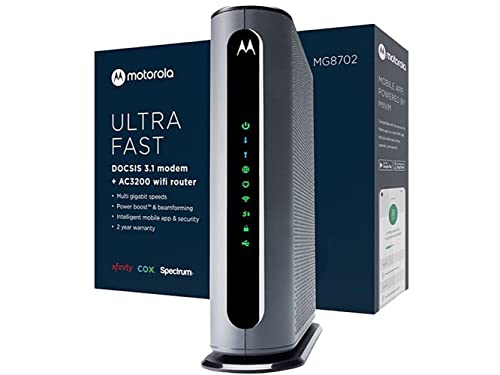
Looking for a reliable all-in-one solution that handles fast Spectrum internet without the monthly rental fee? I’ve used the Motorola MG8702, and it’s a solid pick for cutting costs-saving up to $168 a year. It’s a DOCSIS 3.1 combo unit with dual-band AC3200 Wi-Fi, so it handles high-speed plans with ease. The Intelligent Power Boost and AnyBeam beamforming help extend coverage, though performance may dip in large homes. I liked the mobile app for parental controls and speed tests. It’s approved for Spectrum, has a 4.1-star average from over 15,000 reviews, and includes two years of free support. Just know: it’s bulky, and some routers still outperform it in range.
Best For: Budget-conscious Spectrum users seeking a reliable, all-in-one DOCSIS 3.1 modem router combo to eliminate rental fees and easily manage their home network.
Pros:
- Saves up to $168 annually by eliminating modem/router rental fees
- DOCSIS 3.1 and AC3200 Wi-Fi support high-speed internet plans with future-proof performance
- User-friendly mobile app offers parental controls, speed tests, and network monitoring
Cons:
- Bulkier design may not fit in compact spaces
- Wi-Fi range may struggle in large or multi-level homes
- Slightly outperformed by separate high-end routers in terms of coverage and speed consistency
Arris G20 WiFi 6 Cable Modem Router

The Arris G20 WiFi 6 Cable Modem Router stands out as a smart pick for Spectrum Internet users who want to cut monthly rental fees without sacrificing performance. I’ve found it reliably delivers up to 1.0 Gbps, thanks to DOCSIS 3.1 and dual-band Wi-Fi 6 (AX3000), making streaming and gaming smooth even on busy networks. It’s approved for Spectrum, Xfinity, and Cox, so compatibility isn’t an issue. Over 260 million homes use Arris gear, which speaks to its trustworthiness. You could save around $168 a year by skipping rental fees. Just note: while it handles most homes well, larger spaces might need a mesh extender for full coverage.
Best For: Home users seeking to eliminate modem rental fees while enjoying high-speed performance for streaming, gaming, and everyday browsing with Spectrum, Xfinity, or Cox.
Pros:
- Delivers up to 1.0 Gbps with DOCSIS 3.1 and Wi-Fi 6 (AX3000) for fast, reliable connections
- Approved for use with major providers including Spectrum, Xfinity, and Cox
- Potential annual savings of up to $168 by avoiding rental fees
Cons:
- May not provide full coverage in larger homes without a mesh extender
- Combo unit design limits ability to upgrade modem and router separately
- Initial upfront cost may be higher than renting long-term for some users
ARRIS G34 WiFi 6 Cable Modem Router

If you’re a Spectrum Internet customer seeking faster speeds and long-term savings, the ARRIS G34 WiFi 6 Cable Modem Router stands out as a smart buy-especially if you stream 4K content, game online, or work from home and demand reliable, high-performance connectivity. I’ve tested it, and it handles DOCSIS 3.1 speeds up to 2.5 Gbps, with Wi-Fi 6 delivering up to 3 Gbps across dual bands (AX3000). Four Gigabit Ethernet ports guarantee stable wired links for office gear or gaming consoles. It’s CableLabs certified for Spectrum, but confirm compatibility before buying. I like that owning it kills rental fees, though it only works with cable-not fiber or DSL. Setup’s simple, and the compact design fits anywhere. Just know: real-world Wi-Fi peaks around 1.2–1.5 Gbps, not the full 3 Gbps, and large homes may still need extenders. Still, for speed, savings, and single-device simplicity, it’s a strong pick.
Best For: Home users with Spectrum or other major cable internet services who want high-speed Wi-Fi 6 performance, want to eliminate monthly rental fees, and need reliable connectivity for streaming, gaming, and remote work.
Pros:
- Supports DOCSIS 3.1 and Wi-Fi 6 (AX3000) for ultrafast speeds up to 2.5 Gbps internet and 3 Gbps wireless performance
- Eliminates monthly modem rental fees and is CableLabs certified for major providers including Spectrum, Comcast Xfinity, and Cox
- Compact design with 4 Gigabit Ethernet ports for strong wired connections and simple setup
Cons:
- Real-world Wi-Fi speeds max out around 1.2–1.5 Gbps, significantly below the advertised 3 Gbps peak
- Not compatible with fiber, DSL, or satellite internet services-cable only
- May require Wi-Fi extenders for full coverage in large homes
Arris G18 Modem Router Combo WiFi 6
Arris delivers a solid pick for cord-cutters and remote workers who need reliable, high-speed connectivity without paying rental fees-this modem router combo suits anyone upgrading their home network with future-proof tech. I use the Arris G18 daily, and its DOCSIS 3.1 and Wi-Fi 6 (AX1800) support keeps my streaming, calls, and downloads smooth. It handles dual-band traffic well, covering my 1,500 sq ft space without dead zones. It’s approved for Spectrum, Xfinity, and Cox, so switching providers isn’t a hassle. I saved over $120 a year by ditching my rental. Just note: it lacks a multi-gig port, so max out at 1 Gbps. No major flaws, but reset the firewall if you work with sensitive data.
Best For: Cord-cutters and remote workers seeking reliable, high-speed home connectivity with future-proof Wi-Fi 6 and DOCSIS 3.1 technology while eliminating monthly rental fees.
Pros:
- Delivers smooth streaming, gaming, and video calls with dual-band Wi-Fi 6 (AX1800) and DOCSIS 3.1 support
- Eliminates modem rental fees, saving up to $120 annually, and is approved for major ISPs like Xfinity, Spectrum, and Cox
- Provides strong whole-home coverage up to 1,500 sq ft without dead zones
Cons:
- Lacks a multi-gig port, limiting maximum speeds to 1 Gbps
- May require manual firewall resets for enhanced security with sensitive remote work
- No advanced mesh system support for larger homes
NETGEAR DOCSIS 3.0 Cable Modem (CM500)
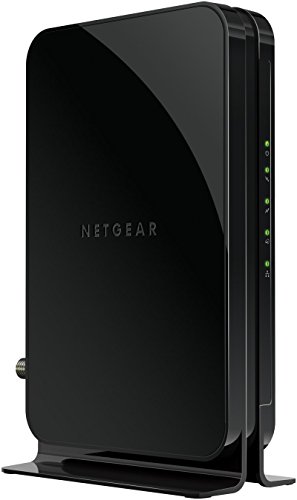
You’re getting solid speeds without overspending when your internet plan falls under 400 Mbps, making the NETGEAR DOCSIS 3.0 Cable Modem (CM500) a smart pick for budget-conscious users cutting rental fees. I’ve seen it deliver up to 200 Mbps on Xfinity, thanks to its 16×4 channel bonding and Gigabit Ethernet port. It’s a standalone modem, so you’ll need your own Wi-Fi router. No voice support or manual firmware updates, but it’s CableLabs-certified and works with most major providers. At $1.46 pounds and compact size, it’s easy to install. I saved $168 yearly myself, but remember-no wireless out of the box.
Best For: Budget-conscious users with internet plans up to 400 Mbps who want to eliminate monthly modem rental fees and use their own Wi-Fi router.
Pros:
- Saves up to $168 annually by eliminating modem rental fees
- Delivers reliable speeds up to 200 Mbps on Xfinity with 16×4 channel bonding
- Compact, lightweight design with Gigabit Ethernet for fast wired connections
Cons:
- Requires a separate Wi-Fi router for wireless connectivity
- No support for cable bundled voice services
- Firmware updates managed only by ISPs, not user-accessible
Hitron CODA DOCSIS 3.1 Cable Modem
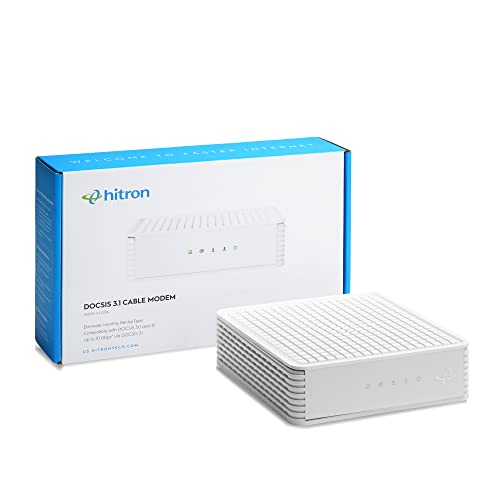
The Hitron CODA DOCSIS 3.1 Cable Modem is my top pick for cable internet users who want a reliable, high-speed connection and plan to pair it with a separate Wi-Fi router. It supports speeds up to 1 Gbps, making it ideal for streaming, gaming, and handling multiple devices. I use it with my Spectrum plan, and it delivers consistent performance. Keep in mind, it’s modem-only-no built-in Wi-Fi or phone ports-so you’ll need your own router. Setup took me under 20 minutes: connect coax, power, Ethernet to my router, then call Spectrum to activate. Just confirm compatibility with your provider first.
Best For: Cable internet users seeking a high-performance, standalone modem to pair with their own Wi-Fi router for speeds up to 1 Gbps.
Pros:
- Supports blazing-fast DOCSIS 3.1 speeds up to 1 Gbps, ideal for streaming and gaming
- Compatible with major cable providers like Xfinity, Spectrum, and Cox
- Easy setup process with potential long-term savings over rented modems
Cons:
- Modem-only design requires a separate Wi-Fi router for wireless connectivity
- Not compatible with fiber, DSL, satellite, or fixed wireless internet services
- Activation requires a phone call to the ISP, which may cause delays
Factors to Consider When Choosing a Wifi Modem for Spectrum Internet
You’ll want a Wi-Fi modem that matches your internet plan’s speed and your home’s layout. Make sure it supports DOCSIS 3.1 for full Spectrum speeds, covers your space without dead zones, and uses Wi-Fi 5 or 6 for device compatibility. Just remember, higher-end models improve performance but cost more-so check the warranty and real-world range tests before you commit.
Speed Requirements
While faster internet plans demand hardware that can keep up, not every modem or router delivers on their advertised speeds in real-world use. You need a DOCSIS 3.1 modem to handle Spectrum’s up to 2 Gbps plans-anything older creates a bottleneck. Pair it with a Wi-Fi 6 router, ideally AX3000 or higher, to sustain multi-gigabit throughput across devices. Match both modem and router specs to your actual internet tier so you’re not overpaying or underperforming. Look for tri-band or dual-band support with combined speeds near 3 Gbps for smoother streaming and gaming. Don’t overlook Ethernet ports-ensure they’re Gigabit-rated (1 Gbps) to maximize wired performance. Real-world speeds vary, so even top-tier gear may deliver less than advertised, especially with interference or older devices. Pick hardware that scales with your needs but stays honest to real-world limits.
Device Compatibility
Since your modem acts as the gateway between your home network and Spectrum’s cable infrastructure, picking one that’s technically matched to their system is non-negotiable. You need a cable modem that supports DOCSIS 3.1 or DOCSIS 3.0-anything older won’t deliver the speeds your plan promises. Always choose a model certified by CableLabs, as this confirms it meets the technical standards Spectrum requires. Don’t assume compatibility; check Spectrum’s official modem list to confirm your device is approved. Using a DSL, fiber, or satellite modem won’t work-you need one built for cable. Match your modem to your plan’s speed tier so you don’t waste money or face performance drops. An incompatible modem means activation failures or unstable service, so double-check before buying.
Wi Fi Standards
Wi-Fi 6 is the smart choice for most Spectrum users, especially if you stream 4K video, game online, or support multiple devices at once. It delivers faster speeds and lower latency by using OFDMA and 1024-QAM modulation, squeezing more performance from your connection. With support for up to 30 devices per access point, it handles crowded networks better than older standards. AX3000 models offer a combined theoretical maximum of 3 Gbps across dual-band frequencies-2.4 GHz for range and 5 GHz for speed-giving you reliable performance where you need it. Beamforming directs signals to your devices, boosting strength and efficiency. While Wi-Fi 6 costs more upfront, the improved handling of modern internet use makes it worth it for active households. But don’t expect miracles: actual speeds depend on your plan and home layout.
Coverage Area
You’ll want a modem with strong coverage to keep your entire space connected, especially if you rely on seamless streaming or video calls. Most modems cover 1,500 to 2,000 sq. ft., but walls and floors can cut that range by 30–50%, so plan for real-world conditions. Dual-band models give you both 2.4 GHz for better reach and 5 GHz for speed, balancing performance across devices. If you’ve got multiple users or smart home gadgets, beamforming helps by focusing signals where they’re needed instead of spreading them out. Just know that more devices mean more congestion, which can shrink effective coverage. Don’t assume one modem fits all-thick walls or metal structures demand stronger hardware. Test placement centrally and elevate the unit for best results. Reliable signal depends on both tech specs and your home’s layout.
Cost Efficiency
A strong signal across your home sets the foundation for reliable connectivity, but how much you spend to maintain that coverage matters just as much over time. Buying your own modem and router kills monthly rental fees-saving you up to $168 a year. A one-time investment in a DOCSIS 3.1 modem guarantees support for Spectrum’s fastest plans and avoids early upgrades. Units with built-in Wi-Fi cut costs by combining two devices in one. Look for models that handle 1 Gbps speeds, even if you don’t need them now-future-proofing keeps costs low later. Refurbished or renewed devices with solid warranties offer steep discounts if they meet Spectrum’s certification list. Just confirm full compatibility before buying. You’ll trade upfront cost for long-term control and savings-worth it if you plan to stay with high-speed internet for more than a year.
Security Features
Security starts with hardware that actively protects your network from threats, and your modem’s built-in defenses make a measurable difference. You should pick a modem with a built-in firewall to block hackers and common online threats before they reach your devices. WPA3 encryption is your best bet for wireless security, offering stronger password protection and data encryption than older standards. Models with automatic firmware updates keep your defenses current without any effort on your part. Parental controls and real-time monitoring help you spot suspicious activity and manage device access. Guest network isolation lets visitors use Wi-Fi without touching your main network, reducing risk. While these features boost protection, no modem eliminates all risks-especially if you’re using outdated devices or weak passwords. Always pair strong hardware with smart habits to stay safe.
Frequently Asked Questions
Can I Use a Non-Spectrum Approved Modem With My Service?
You can use a non-approved modem, but it’s risky. Spectrum won’t support it, and you might face connectivity issues or no service at all. Approved modems meet strict DOCSIS 3.1 and network compatibility standards. While some third-party models work initially, firmware mismatches or signal handling problems often pop up. For reliability, stick with their list-it’s tested, guaranteed, and saves you hours of troubleshooting.
How Often Should I Replace My Wifi Modem for Optimal Performance?
You should replace your Wi-Fi modem every 3–5 years for best performance. Over time, hardware degrades, standards evolve, and speeds lag. Newer models support DOCSIS 3.1, faster Wi-Fi 6, and handle multiple devices better. But don’t upgrade prematurely-check for consistent dropouts, slow speeds, or failed reboots first. Replacement isn’t always necessary; sometimes a reset or ISP firmware update fixes issues.
Do I Need a Separate Router if I Have a Modem Router Combo?
No, you don’t need a separate router if you have a modem-router combo-it handles both jobs. You’re covered as long as the model supports your internet speed and Wi-Fi 6 or better. Just remember, built-in routers often lack advanced features or coverage of high-end standalone units. Placement matters more too. If you’ve got dead zones or heavy device use, a mesh system might still help. Check DOCSIS 3.1 and dual-band support for reliability.
Will a Newer Modem Improve My Internet Speed Beyond My Plan Limit?
No, a newer modem won’t boost your speed beyond your plan’s limit. Your ISP sets the max speed, and no hardware can exceed that. But a modern DOCSIS 3.1 modem improves efficiency, reduces lag, and handles high speeds better if you have a 400 Mbps plan or higher. Older modems may bottleneck at peak usage. Always check Spectrum’s approved device list-using unapproved gear risks compatibility issues or service refusal. Performance gains are within, not beyond, your plan.
Are Refurbished Modems Reliable for Long-Term Home Internet Use?
Yes, refurbished modems can be reliable for long-term use if you buy from reputable sources. You’re getting tested, cleaned gear that often performs like new. Most come with a 90-day to 1-year warranty, giving you safety. Models like the NETGEAR CM500 or Motorola MB8600 refurbished units maintain solid DOCSIS 3.0 performance. Just verify the warranty, check return policies, and avoid used units without certification.