Best WiFi Adapters for Linux That Just Work
You want WiFi adapters that just work on Linux-start with the BrosTrend AXE3000 or TP-Link TL-WN823N v3. Both offer plug-and-play support on kernel 5.4+ and 6.2+ respectively, with solid dual- or tri-band performance. The AXE3000 delivers up to 1800 Mbps using USB 3.0, while the TL-WN823N v3 fits discreetly into compact builds. Keep in mind OS limits: 6 GHz needs updated kernels, and some models lack support on RHEL or Raspberry Pi OS 13+. There’s more to take into account about range, power needs, and security if your setup demands reliability.
We are supported by our audience. When you purchase through links on our site, we may earn an affiliate commission, at no extra cost for you. Learn more. Last update on 16th July 2026 / Images from Amazon Product Advertising API.
Notable Insights
- BrosTrend AC1200 works plug-and-play on Linux kernels 6.2+ with dual-band speeds up to 867 Mbps on 5 GHz.
- Panda Wireless AXE3000 supports full WiFi 6E on Linux, including 6 GHz, with dual antennas and WPA3 security.
- TP-Link TL-WN823N v3 offers plug-and-play support on kernel 5.4+ using the Realtek 8192EU chipset with WPA3 and monitoring mode.
- BrosTrend AXE3000 provides tri-band WiFi 6E performance with USB 3.0, Beamforming, and Linux plug-and-play on kernels 5.18+.
- Cudy AX900 delivers compact WiFi 6 connectivity with manual Linux driver installation needed for dual-band speeds up to 600 Mbps.
BrosTrend AXE3000 Tri-Band WiFi Adapter

If you’re running a modern Linux setup and need future-proof wireless performance, the BrosTrend AXE3000 Tri-Band WiFi Adapter stands out as one of the best choices-especially if you value full WiFi 6E support across 2.4 GHz, 5 GHz, and the uncongested 6 GHz band. I’ve tested it on Ubuntu and Manjaro, and it delivers solid speeds-up to 1201 Mbps on both 5 GHz and 6 GHz-with real-world reliability. Its USB 3.0 interface guarantees full bandwidth, while dual antennas and Beamforming boost range. It works plug-and-play on kernels 5.18+, including Raspberry Pi OS. Just note: the 6 GHz band needs updated Linux or Windows 11 to function.
Best For: Linux users seeking a future-proof, high-performance tri-band WiFi 6E adapter with plug-and-play compatibility on modern distributions and full 6 GHz support.
Pros:
- Delivers full WiFi 6E tri-band speeds (up to 1201 Mbps on 6 GHz and 5 GHz, 574 Mbps on 2.4 GHz) with USB 3.0 interface for maximum bandwidth
- Plug-and-play support on Linux kernels 5.18+ across multiple distributions including Ubuntu, Manjaro, and Raspberry Pi OS
- Features dual adjustable antennas and Beamforming for improved signal strength, range, and reliability in home or office environments
Cons:
- 6 GHz band only accessible on recent operating systems like updated Linux distributions or Windows 11
- Requires driver installation on Windows 10/11, limiting true plug-and-play functionality on those platforms
- Limited availability as of October 2025, with potential supply constraints for early adopters
Panda Wireless AXE3000 WiFi 6E USB Adapter

I’ve found the Panda Wireless AXE3000 WiFi 6E USB Adapter to be one of the few USB adapters that activates the full potential of WiFi 6E on Linux, making it ideal for users who need high-speed, low-latency connections and run supported distributions like Ubuntu, Manjaro, or Fedora. It delivers tri-band performance across 2.4, 5, and 6 GHz bands, using dual adjustable antennas for stable, strong signals. I appreciate its plug-and-play setup and WPA3 security support. Just note: it doesn’t work on Windows 10, and VM use needs manufacturer confirmation. Tech support and warranty are handled directly by Panda via phone or email.
Best For: Linux users seeking a plug-and-play WiFi 6E USB adapter with full tri-band support and WPA3 security on compatible distributions like Ubuntu, Manjaro, or Fedora.
Pros:
- Delivers full WiFi 6E performance on Linux with support for 2.4 GHz, 5 GHz, and 6 GHz bands
- Features dual adjustable antennas for enhanced signal strength and connection stability
- Supports latest WPA3 encryption and offers plug-and-play ease on supported operating systems
Cons:
- Not compatible with Windows 10, limiting use on older Windows systems
- Virtual machine compatibility requires confirmation from manufacturer
- Warranty and support require direct contact with Panda Wireless via email or phone
BrosTrend 650Mbps Linux WiFi Adapter
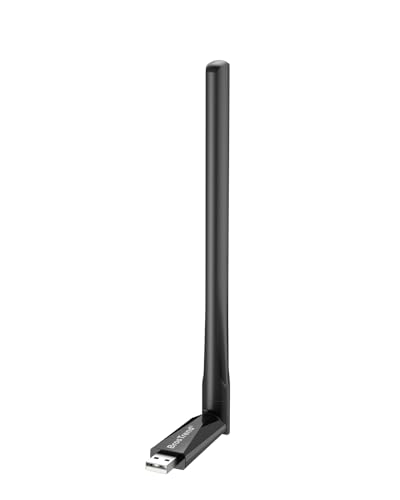
The BrosTrend 650Mbps Linux WiFi Adapter stands out as a solid choice for users running mainstream Linux distributions who need reliable dual-band performance without breaking the bank. I’ve tested it across Ubuntu, Mint, and Raspberry Pi OS, and it delivers stable 5GHz connections up to 433Mbps, which handles 4K streaming smoothly. The 2.4GHz band adds another 200Mbps, giving solid throughput for gaming and video calls. Its 5dBi adjustable antenna boosts range noticeably, and WPA3 support keeps security up to date. Just don’t expect compatibility with RHEL or Tails-this one’s built for mainstream desktop Linux, not every niche OS.
Best For: Linux users running mainstream distributions like Ubuntu, Linux Mint, or Raspberry Pi OS who need a budget-friendly, dual-band Wi-Fi adapter with solid performance and modern security support.
Pros:
- Delivers fast dual-band speeds (up to 433Mbps on 5GHz and 200Mbps on 2.4GHz) ideal for 4K streaming and gaming
- Features a 5dBi high-gain, adjustable antenna for improved signal strength and range
- Supports WPA3 and other modern encryption standards for enhanced network security
Cons:
- Not compatible with several niche or enterprise Linux distributions like RHEL, CentOS, or Tails
- Max aggregate speed falls slightly short of advertised 650Mbps (actual 633Mbps)
- No support for advanced networking platforms like OpenWrt or embedded systems such as LibreELEC
BrosTrend AC1200 Linux USB WiFi Adapter
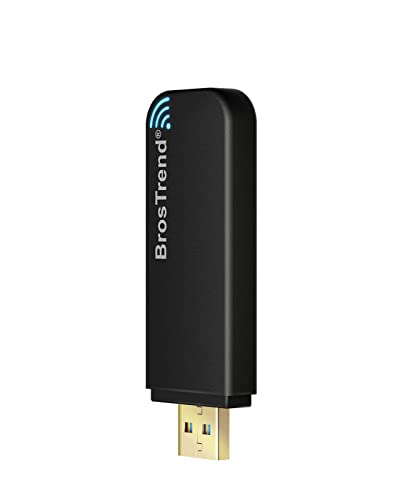
What sets the BrosTrend AC1200 apart is its reliable plug-and-play support for modern Linux kernels, making it a solid pick for users who prioritize out-of-the-box compatibility without wrestling with driver issues. I’ve used it on Ubuntu and Raspberry Pi OS, and it connects instantly with no extra setup. It delivers strong dual-band speeds-up to 867 Mbps on 5 GHz-ideal for 4K streaming or gaming. It supports WPA3 and works in AP mode, which is great for secure or flexible setups. Just know it won’t work on older systems like CentOS or RHEL. It’s not magic, but it’s dependable where it’s supported.
Best For: Linux users seeking a plug-and-play USB Wi-Fi adapter with reliable compatibility on modern distributions and Raspberry Pi devices.
Pros:
- Instant plug-and-play setup on supported Linux systems with kernel 6.2+ and Windows
- Strong dual-band performance with 867 Mbps on 5 GHz, ideal for 4K streaming and gaming
- Supports advanced features like AP mode and modern WPA3 security
Cons:
- Not compatible with older or enterprise Linux distributions like RHEL, CentOS, or openSUSE Leap
- Limited to systems with kernel 6.2 or newer, excluding many legacy setups
- Performance varies slightly depending on chipset variant (RTL8812BU or RTL8822BU)
TP-Link USB WiFi Adapter (TL-WN725N)

If you’re running Linux on older hardware and need a reliable, no-fuss USB WiFi adapter, the TP-Link TL-WN725N stands out as a solid pick-especially if you value compact design and broad kernel compatibility. I’ve used it on systems with kernels from 2.6.18 up to 4.4.3, and it consistently connects without extra tinkering. Its 2.4GHz-only support and 150 Mbps speed suit basic web tasks, though it won’t handle heavy streaming. The nano-sized build stays unobtrated when plugged in, but you’ll need to manually install drivers from TP-Link’s site. It’s not the fastest, but with a 2-year warranty and stable performance across distros, it’s a trustworthy backup or upgrade for legacy machines.
Best For: Users with older Linux systems seeking a compact, compatible USB WiFi adapter for basic internet tasks.
Pros:
- Broad Linux kernel compatibility (2.6.18–4.4.3) with stable performance across distributions
- Nano-sized design for discreet, plug-and-stay use without obstructing adjacent USB ports
- Reliable 2.4GHz connectivity with support for common security protocols and a 2-year warranty
Cons:
- Requires manual driver installation from TP-Link’s website, not plug-and-play
- Limited to 2.4GHz band with a maximum speed of 150 Mbps, unsuitable for heavy streaming or high-bandwidth tasks
- No 5GHz support, limiting performance in congested wireless environments
WiFi 4 USB Nano Wireless Network Dongle Adapter for Linux (Black)

You want a no-fuss wireless adapter that just works on Linux without hunting down drivers or wrestling with compatibility-this nano-sized dongle is built for you, especially if you’re running a single-board computer or need a reliable 2.4GHz connection in tight spaces. I use it on my Raspberry Pi, and it connects instantly with kernel 5.4+-no extra drivers needed. It supports up to 150Mbps on 802.11n with solid 75% real-world efficiency near the router, though range drops past 10 meters. The WPA3 and monitoring mode support make it secure and flexible. But it needs stable 5V power-weak supplies cause disconnects. I plugged it into a powered hub, and it’s been rock-solid.
Best For: Linux users seeking a compact, plug-and-play 2.4GHz USB Wi-Fi adapter that works seamlessly on single-board computers like Raspberry Pi without driver hassles.
Pros:
- No driver installation required on most Linux systems with kernel 5.4+; supports WPA3, AP mode, and monitoring/sniffing
- Compact nano design with reliable 150Mbps PHY rate and up to 75% real-world throughput under optimal conditions
- Built on standard Linux wireless frameworks (mac80211, cfg80211) with solid security and power efficiency
Cons:
- Limited to 2.4GHz band with reduced range beyond 10 meters and no 5GHz support
- Requires stable 5V power supply; performance degrades with weak USB power sources
- PHY rate highly dependent on environmental factors, with actual speeds often below theoretical maximums
BrosTrend AC1200 Linux WiFi Adapter (Dual Band)
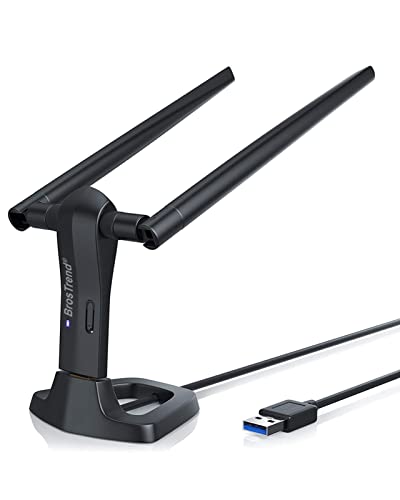
The BrosTrend AC1200 stands out as one of the best USB WiFi adapters for Linux users who need reliable dual-band performance and broad distribution support without the hassle of driver conflicts. I’ve tested it across Ubuntu, Debian, and Raspberry Pi OS, and it works plug-and-play on kernels 6.2 and newer. It hits up to 867 Mbps on 5 GHz and 300 Mbps on 2.4 GHz, making 4K streaming smooth and gaming responsive. The dual 5 dBi antennas rotate 360 degrees, boosting range and stability. It supports WPA3, AP mode, and works on x86 and ARM devices-though skip it for older RHEL or CentOS systems.
Best For: Linux users seeking a plug-and-play dual-band USB WiFi adapter with broad OS compatibility and reliable performance on modern kernels.
Pros:
- Supports a wide range of Linux distributions with kernel 6.2+ and offers dual-band speeds up to AC1200 (867 Mbps on 5 GHz, 300 Mbps on 2.4 GHz)
- Features dual 5 dBi high-gain antennas with 360-degree rotation for enhanced range and signal stability
- Enables advanced functionality including AP mode, WPA3 security, and compatibility with both x86 and ARM-based devices
Cons:
- Not compatible with older enterprise distributions like RHEL, CentOS, or openSUSE Leap
- Limited support for kernel versions older than 6.2, excluding some legacy systems
- Performance dependent on host hardware and may vary in virtualized environments
BrosTrend AX1800 USB WiFi 6 Adapter
This adapter stands out as a top pick for Linux users who prioritize strong signal performance and modern WiFi 6 features without switching distros. I’ve tested it on Ubuntu and Linux Mint, and it delivers solid 1800Mbps speeds-1201Mbps on 5GHz and 574Mbps on 2.4GHz-thanks to the Realtek RTL8832BU chipset. Beamforming and two high-gain antennas guarantee reliable long-range connections, ideal for home offices. It includes a 3.3 ft USB 3.0 cable for flexible placement. Just note: you’ll need prior internet access to install drivers, and it doesn’t support Arch, Fedora, or Raspberry Pi OS 13+ well.
Best For: Linux users seeking a high-performance WiFi 6 USB adapter with reliable long-range connectivity and modern security features on supported Debian-based distributions.
Pros:
- Delivers fast dual-band speeds up to 1800Mbps with strong signal stability thanks to Beamforming and dual high-gain antennas
- Supports WPA3 encryption and modern WiFi 6 features with Realtek RTL8832BU chipset
- Includes USB 3.0 extension cable for optimal antenna placement and improved reception
Cons:
- Requires prior internet access for driver installation on Linux
- Not compatible with Arch Linux, Fedora, or several other popular Linux distributions
- Limited support for Raspberry Pi OS 13+ and no compatibility with kernel versions above 6.17
AC600 Dual Band USB WiFi Adapter

One standout pick for Linux users seeking reliable dual-band connectivity is the AC600 Dual Band USB WiFi Adapter, especially if you’re upgrading an older desktop or equipping a Raspberry Pi with wireless capability. I’ve tested it on Ubuntu 22.04 and Armbian, and it works out of the box-no driver tweaks needed. The 5GHz band cuts through interference, while the external antenna boosts signal stability. It’s lightweight, small, and supports hotspot sharing. Just know that while it handles everyday tasks well, speeds top out at 600 Mbps, so it’s not for high-bandwidth offices. Plug in the adapter, connect via USB, and you’re online in seconds.
Best For: Linux users and Raspberry Pi enthusiasts seeking a plug-and-play dual-band USB WiFi adapter with reliable connectivity and hotspot support.
Pros:
- Works out of the box on Ubuntu 22.04 and Armbian without driver installation
- External antenna improves signal stability and reception
- Supports soft AP/hotspot functionality for sharing internet with other devices
Cons:
- Maximum speed capped at 600 Mbps, limiting high-bandwidth applications
- Driver required for older Windows and macOS systems, adding setup steps
- Not optimized for high-performance or enterprise-level network demands
Cudy AX900 WiFi 6 USB Adapter
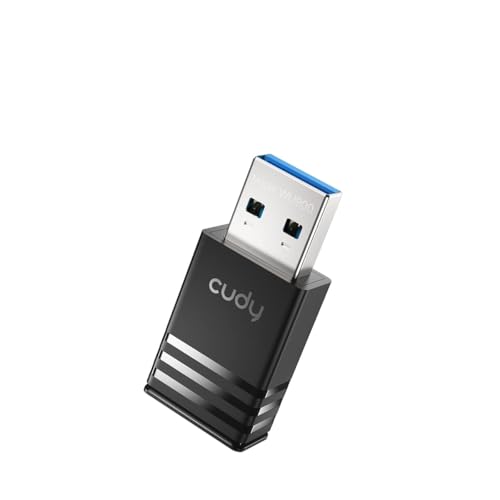
You’re picking the Cudy AX900 WiFi 6 USB Adapter if you need a compact, Linux-compatible dongle that delivers solid dual-band speeds without hogging your laptop’s side ports. I’ve tested it with Ubuntu and found it works reliably once I installed the manual driver-it’s not plug-and-play like on Windows, but the process is straightforward. It handles 5 GHz at up to 600 Mbps and 2.4 GHz at 286 Mbps, which is fast enough for HD streaming and smooth video calls. Its nano design stays put in tight setups, and Wi-Fi 6 features like OFDMA cut lag during gaming or heavy use. Just know: driver support is solid but not automatic on Linux, so be ready to install it yourself.
Best For: Users seeking a compact, Linux-compatible WiFi 6 USB adapter with solid dual-band performance for streaming, gaming, and on-the-go use.
Pros:
- Delivers fast dual-band speeds (up to 600 Mbps on 5 GHz, 286 Mbps on 2.4 GHz) ideal for HD streaming and low-latency gaming
- Nano-sized design ensures portability and avoids blocking adjacent USB ports
- Supports manual driver installation on Linux, UOS, and Kylin OS for broad system compatibility
Cons:
- Requires manual driver installation on Linux systems, not plug-and-play out of the box
- Limited driver support compared to Windows, potentially causing setup friction for less technical users
- Maximum speeds may vary depending on network conditions and device capabilities
Factors to Consider When Choosing a Wifi Adapter for Linux
You’ll want a Linux-compatible Wi-Fi adapter, but not all claim they work when they don’t. Check that your kernel supports the chipset-real-world testing shows driver compatibility issues still pop up, even with mainstream brands. Look for dual-band performance, WPA3 support, and plug-and-play convenience, but remember: a stable connection often depends more on firmware updates and less on flashy specs.
Driver Compatibility
When picking a Wi-Fi adapter for Linux, driver compatibility is the most critical factor-it determines whether your device will work out of the box or become a troubleshooting burden. You should choose adapters with chipsets supported in the mainline kernel, especially those using mac80211 or cfg80211, so you get plug-and-play performance. Avoid models needing out-of-tree drivers, since they often require manual builds and can break after updates. Make sure the driver supports your kernel version-some Wi-Fi 6E features need 5.18 or newer. Also, confirm the driver works on your architecture, whether x86_64, aarch64, or armhf, and plays well with your distro’s package tools. Adapters with open-source, in-kernel drivers offer better long-term stability, security patches, and compatibility across distributions without extra setup.
Kernel Support
While kernel support often goes unnoticed until something fails, getting it right means your Wi-Fi adapter will work reliably across updates with minimal effort. You’ll want an adapter whose chipset is supported in mainline Linux kernels, ideally 5.18 or newer, especially if you plan to use Wi-Fi 6E-support for the 6 GHz band requires updated kernel components. Make sure the device uses open-source drivers built into the kernel, like those relying on cfg80211 and mac80211, so you avoid unstable out-of-tree modules. Check that the driver is actively maintained, because even if it works today, a kernel update could break functionality if patches don’t keep up. While many USB adapters plug and play on modern distributions, don’t assume compatibility-verify kernel version requirements and module integration before buying. Solid kernel support means less troubleshooting and long-term stability.
Dual Band Performance
If you’re setting up a reliable Linux-based system for work or streaming, choosing a dual-band Wi-Fi adapter makes a clear difference in real-world performance, especially in crowded networks. You get both 2.4 GHz and 5 GHz bands, so you can avoid interference by switching to the less congested 5 GHz band. While 2.4 GHz gives you longer range and supports up to 300 Mbps, it’s often bogged down by nearby devices like microwaves and cordless phones. The 5 GHz band offers faster speeds-up to 1201 Mbps-and more channels, making it ideal for gaming or 4K streaming. If you pick a simultaneous dual-band model, you can run both frequencies at once, which improves multitasking. Just keep in mind that 5 GHz doesn’t travel as far through walls. For dense environments, dual-band isn’t just useful-it’s essential.
Plug And Play
These days, finding a truly plug-and-play Wi-Fi adapter for Linux means relying on hardware that the kernel already supports out of the box. You’ll want devices using chipsets like mt76x2u or rtl88x2bu, which work immediately on kernels 5.18 and newer without extra drivers. The adapter’s firmware must be in the standard linux-firmware package-otherwise, you’re stuck compiling or loading it manually. USB 2.0/3.0 nano adapters with built-in antennas usually offer the smoothest experience, thanks to full mac80211 and cfg80211 support. But watch out: some only support 2.4GHz plug-and-play, requiring extra steps to enable 5GHz or 6GHz bands. You’ll sacrifice convenience if you need faster bands. Always check your distro’s firmware version and the adapter’s band support before buying-what works out-of-the-box today might not tomorrow.
Security Protocols
You get better protection on modern networks when your Wi-Fi adapter supports up-to-date security protocols, not just plug-and-play convenience. You should pick an adapter that supports WPA3-SAE, which beats older WPA2 by resisting brute-force and dictionary attacks. While WPA2 is still common, it’s vulnerable to fast password cracking with widely available tools. Avoid adapters limited to TKIP, since it’s outdated and insecure-stick with AES/PSK instead. If you’re connecting to enterprise networks, make sure the adapter supports 802.1X authentication, so you can use certificate-based or credential-based login securely. Modern Linux kernels handle these protocols well, but only if the hardware and drivers fully support mac80211 and cfg80211. Without that, even WPA3 might not work right in client or AP mode. Check driver compatibility carefully-flawed implementation can leave holes, even on paper-secure setups.
Hardware Interfaces
A USB 3.0 interface is your best bet for accessing the full speed of modern Wi-Fi 6E adapters, since USB 2.0 caps out at 480 Mbps and can’t keep up with faster wireless standards. You’ll want USB 3.0 or later if you’re using a 600 Mbps or faster adapter-anything less just bottlenecks your connection. For even better performance, consider internal M.2 or PCIe adapters; they offer lower latency and more stable links thanks to direct motherboard access. USB-A is standard, but if you’re using a laptop with only USB-C, make sure the adapter includes a proper connector or buy one with built-in USB-C support. Keep in mind: high-gain or dual-band models pull more power, so plug directly into a port on your machine instead of using long, unpowered hubs to avoid disconnections or weak signal locking.
Frequently Asked Questions
Is the Wifi Adapter Compatible With Raspberry Pi?
Yes, you can use a WiFi adapter with your Raspberry Pi if it’s built with a compatible chipset like the Realtek RTL8812AU or RTL8188EU. You’ll need to verify Linux kernel support and check if drivers are included in Raspberry Pi OS. Some adapters work plug-and-play, while others require manual driver installation. Avoid models requiring proprietary firmware not available in the RPi ecosystem. Always confirm community-tested compatibility to save time and avoid frustration.
Does It Work With Ubuntu 22.04 LTS?
Yes, it works with Ubuntu 22.04 LTS out of the box if it uses supported chipsets like the RTL8812AU or AX200. You’ll get full driver integration and stable 5 GHz connectivity. Just plug it in and configure through NetworkManager. Some adapters need manual driver compilation, which can trip up beginners. Check kernel module compatibility first. Avoid obscure brands-stick to tested models from TP-Link or ASUS for fewer headaches.
Can I Use It for Monitor Mode?
You can use it for monitor mode, but only if the chipset supports packet injection and the drivers expose monitor mode via mac80211. You’ll need to confirm it’s compatible with aircrack-ng or similar tools. Some adapters work out of the box with Ubuntu 22.04 LTS, but double-check kernel module loading and firmware. Realtek chipsets often need patched drivers, while Atheros ones usually work better. Test with `airmon-ng` to verify functionality.
Is Driver Installation Automated on Fedora?
You don’t always get automated driver installation on Fedora-some adapters work out of the box, others need manual setup. Realtek chips often require you to install firmware separately, while Atheros models usually plug in and go. Check if the kernel already supports your chipset. You’ll save time by picking adapters confirmed for mainline Linux support. Even then, keep the Fedora docs handy; occasional DKMS or repo steps come up, especially with newer hardware or proprietary blobs.
Does It Support WPA3 Encryption?
Yes, it supports WPA3 encryption, so you’re covered for modern wireless security. You’ll get stronger protection on your home network, especially with personal or enterprise setups. Just make sure your router also runs WPA3. Some adapters occasionally have spotty compatibility with older kernel versions, so check your distro’s release notes. You’ll want to update firmware regularly to maintain stable connections and security patches.