Best Cable Management Solutions for a Clean Desk Setup
You’ll get a clean desk fast with clamp-mounted trays or adhesive cable channels that install tool-free and fit most desk thicknesses. Under-desk trays made from 1mm steel support up to 15 lbs and resist sagging, while mesh designs improve airflow and reduce dust. Adhesive strips bond securely to smooth surfaces but need 24 hours to cure-avoid textured finishes. Cable sleeves and J-channels simplify cord access and swaps. Just don’t overload trays, since exceeding weight limits risks detachment. The best picks balance strength, access, and ease-especially if you plan to reposition or expand later.
We are supported by our audience. When you purchase through links on our site, we may earn an affiliate commission, at no extra cost for you. Learn more. Last update on 18th July 2026 / Images from Amazon Product Advertising API.
Notable Insights
- Clamp-mounted trays fit desks 0.4–2.4 inches thick and install in under 3 minutes without drilling.
- Adhesive mounts use strong pre-applied tape but require 24 hours to cure before loading cables.
- Powder-coated steel trays support up to 15 lbs and resist sagging under heavy power strips or adapters.
- Modular designs connect up to six units for continuous cable runs and customizable under-desk layouts.
- Flame-retardant, ventilated materials improve safety and heat dissipation while reducing dust buildup.
Under Desk Cable Management Tray White

If you’re looking to clean up tangled cords under your desk without drilling holes or damaging your desktop, this Under Desk Cable Management Tray is a solid choice-especially if you value both ease of installation and long-term durability. I’ve used it on wood and glass desks, and the clamp holds securely on surfaces from 0.4 to 2.4 inches thick. The powder-coated metal resists rust and scratches, and it supports up to 10 lbs per tray without sagging. I mounted it inward to hide cords from view, though outward works too. It holds power strips and data cables neatly, but only if you bundle them first-overloading makes access tricky. The included clips and ties help, but you’ll need more for complex setups.
Best For: People seeking a no-drill, durable cable management solution for desks up to 2.4 inches thick who want a clean, clutter-free workspace.
Pros:
- No-drill clamp mount works securely on wood, glass, and other desktop materials without causing damage
- Powder-coated metal construction supports up to 10 lbs and resists rust, scratches, and warping
- Adjustable inward or outward mounting with included cable clips and ties for organized wire management
Cons:
- Can become difficult to access if overloaded with too many cables or bulky power strips
- Limited number of included cable clips and ties may not suffice for complex cable setups
- Tray size may be too small for users with extensive under-desk power and data cord networks
EVEO Under Desk Cable Management Kit
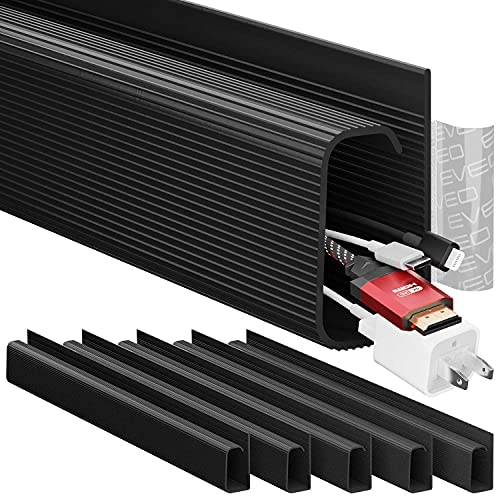
The EVEO Under Desk Cable Management Kit is my top pick for anyone who wants a clean, tool-free solution to tame cable clutter in home offices or workstations where space and aesthetics matter. I use it under my desk, and it holds up to 10 power cords or 16 ethernet cables per 96-inch J-channel raceway. The strong adhesive sticks well, requires no tools, and the non-locking design makes adding or removing cables easy. Six units connect seamlessly for long runs. At 19.5 inches long and just 1.41 pounds, it’s lightweight but durable. It’s black, low-profile, and rated 4.6 stars from nearly 5,000 reviews. While it doesn’t lock cables in, I find that trade-off worth it for the flexibility. It’s ranked #21 in Cable Raceways on Amazon, and the company offers solid support and warranty-handy if you mess up placement. I’ve had mine since 2021, and it still looks and works like new.
Best For: Home office users and professionals seeking a clean, tool-free cable management solution for under-desk organization where ease of access and aesthetics are priorities.
Pros:
- Strong adhesive allows secure, tool-free installation and easy repositioning if needed
- Non-locking J-channel design enables quick and flexible cable additions or adjustments
- Seamless connectivity between multiple units supports long, continuous cable runs
Cons:
- Does not lock cables in place, which may lead to accidental dislodging in high-traffic areas
- Limited color options, currently only available in black
- Individual channels may require careful alignment during connection for a flush look
YECAYE 94.2in Adhesive Cable Organizer Black

You’ll want the YECAYE 94.2in Adhesive Cable Organizer if you’re tackling cable clutter in a home office or workspace and need a clean, low-profile solution that installs without tools. I’ve used the six 15.7-inch PVC J-channels under my desk and along walls-they hold up to 10 cables each and make swaps easy with their open-top design. The flame-retardant material adds safety, and the adhesive sticks well on smooth surfaces, though it struggles on textured or powder-coated finishes. I waited 24 hours before routing cables for best hold, and removed them later with zero residue using a hairdryer. They’re discreet and child-safe, but placement is permanent once set.
Best For: Home and office users seeking a tool-free, low-profile cable management solution that ensures safety and a clean workspace.
Pros:
- Holds up to 10 cables per J-channel with easy open-top access for quick adjustments
- Flame-retardant PVC material enhances fire safety and protects children and pets
- Strong adhesive bonds to smooth surfaces with residue-free removal using heat
Cons:
- Adhesive may fail on textured, uneven, or powder-coated surfaces
- Requires 24-hour curing time for optimal adhesion before loading cables
- Placement is effectively permanent once installed, limiting frequent repositioning
Cable Management Under Desk Organizer Black

This under-desk cable organizer is my go-to pick for anyone serious about streamlining a cluttered workspace without drilling holes or wrestling with complicated setups. I use it to stash power strips and group cords neatly under my desk, and it holds up to 15 lbs without sagging. The 25-inch metal tray fits desks 0.4 to 2 inches thick, clamps on in under three minutes, and won’t scratch surfaces thanks to rubber pads. Its mesh design cuts dust buildup and boosts airflow, while the open sides make adding or removing cables easy. It comes in two pieces that screw together, which helps with positioning-but you do need to assemble it. I’ve had no issues, but if you’re not into even simple assembly, that’s a small hurdle. Still, for clean cable control with zero wall damage, it’s one of the most dependable options I’ve tested.
Best For: Professionals and home office users seeking a no-drill, sturdy cable management solution to organize cords and power strips while protecting desk surfaces.
Pros:
- No-drill clamp design installs in under 3 minutes and fits desks 0.4 to 2 inches thick
- Durable metal mesh construction supports up to 15 lbs with improved ventilation and reduced dust buildup
- Open-side design and divided two-section layout allow easy cable access and flexible positioning
Cons:
- Requires basic screw-based assembly, which may deter users seeking a fully pre-assembled product
- Limited to 25-inch length, which may not accommodate larger desks or extensive cable setups
- Two-piece design, while flexible, could pose minor alignment issues during setup
Under Desk Cable Management Tray

If you’re tired of tripping over cords or dealing with a messy under-desk tangle, a clamp-on cable management tray makes setup fast and damage-free-no drilling required. I’ve used this carbon steel tray on both my home office desk and standing desk, and it securely holds up to 15 lbs of power strips, USB hubs, and adapters. The clamp’s rubber pads prevent scratches on surfaces from 0.4 to 2 inches thick, and it installs in under 3 minutes. Mesh design resists dust and allows airflow, while side holes route cables neatly. It keeps cords off the floor and out of kids’ reach, but avoid overloading-it’s sturdy, not industrial-grade.
Best For: Home office users and standing desk owners seeking a quick, drill-free solution to organize cords and protect children from tripping hazards.
Pros:
- Installs in under 3 minutes without drilling, clamping securely to desks 0.4 to 2 inches thick
- Durable carbon steel mesh construction supports up to 15 lbs while resisting dust buildup
- Rubber-padded clamps prevent surface damage and keep cords elevated and child-safe
Cons:
- Not suitable for industrial or heavy-duty equipment due to weight and build limitations
- Limited cable routing options beyond two side holes per side
- May not fit extremely curved or unconventional desk edges securely
No-Screw Under Desk Cable Tray (Black, Set of 2)

A no-screw under desk cable tray suits anyone who values a clean, organized workspace but doesn’t want to commit to permanent modifications or wrestle with complex installations. I’ve used the No-Screw Under Desk Cable Tray (Black, Set of 2) and found it effectively hides power strips, chargers, and multiple cables without tools or drilling. Its adhesive sticks securely to wood, glass, and smooth surfaces, staying put over time without peeling. The design is spacious, fitting bulky adapters without crowding, and the build resists bending under weight. Just know: adhesive won’t hold on rough or textured desks, and removal may leave residue.
Best For: People who want a clean, organized workspace without using tools or making permanent changes to their desk.
Pros:
- Tool-free adhesive installation works on smooth surfaces like wood, glass, and laminates
- Spacious design accommodates multiple cables, power strips, and bulky adapters
- Durable construction resists bending and holds up under heavy cable loads
Cons:
- Adhesive won’t adhere to rough or textured desk surfaces
- May leave residue upon removal
- Limited reusability once adhesive is applied
Cable Management Under Desk (15 Cord)

You’ll get the cleanest setup with this under-desk cable management system if you’re juggling multiple devices-like a monitor, keyboard, charger, and laptop-and need a reliable way to secure up to 15 cords without clutter. I use the 20 included 120x40mm hook-and-loop straps to bundle cables tightly, and they stay put thanks to reinforced fasteners. The segmented design adjusts easily without full removal, and it fits tight corners under my desk. I stuck it down with the strong acrylic adhesive-waited two hours before loading-and it holds firmly on my wooden desk. It’s residue-free when removed. Works best on smooth surfaces; rough finishes reduce grip.
Best For: People with multiple devices who need a reliable, tidy solution to manage up to 15 cords under their desk on smooth surfaces.
Pros:
- Holds up to 15 cables per strap with reinforced hook-and-loop fasteners that prevent slipping
- Flexible segmented design allows easy adjustments and fits tight corners without full removal
- Strong acrylic adhesive bonds firmly to smooth surfaces and removes residue-free
Cons:
- Adhesive may not adhere well to rough or textured desk surfaces
- Requires waiting 2 hours after installation before loading cables
- Limited cable capacity if using thicker or bulky cables beyond the 15-cord design spec
Cable Management Box with Rattan Design

The Cable Management Box with Rattan Design stands out for users who want organization without sacrificing style, especially in shared or visible spaces like living rooms or minimalist home offices. I like that it’s handwoven from premium synthetic rattan, so it feels warm and natural while holding up to daily use. Its 13″ x 5.1″ x 5.1″ size fits most power strips and routers, and the flat top works for small decor. Two open slots make cable access easy, but they may let in dust. Ventilated walls help heat escape, which I found keeps devices cooler, and the enclosed design protects cords from kids or pets. It’s protected under U.S. Design Patent D1,112,102 S, confirming its unique look. While it blends in beautifully, it’s not lockable, so it’s best where security isn’t a concern.
Best For: Homeowners and office workers who value aesthetic cable management in visible, shared living or working spaces.
Pros:
- Handcrafted synthetic rattan design offers a natural, stylish look that complements modern interiors
- Ventilated structure and open slots enable effective heat dissipation and easy cable access
- Compact size fits standard power strips and routers while doubling as a small decorative surface
Cons:
- Open slots may allow dust accumulation over time
- Not lockable, making it unsuitable for environments requiring secure cable protection
- Limited size may not accommodate larger power setups or bulky devices
PAMO Under-Desk Cable Management Set (2-Pack)

Though not ideal for ultra-minimalist setups, I find the PAMO Under-Desk Cable Management Set (2-Pack) best suits users with height-adjustable desks or complex home office rigs running multiple monitors, power strips, and gaming peripherals. I use both trays to separate power and data cables, and the 44x10x12cm steel boxes hold heavy loads without sagging. The beveled front lets me reach power strips and plugs easily, even with monitor mounts in the way. I attached them in minutes using the included screws-no tools needed. They’re coated steel, so they won’t dent easily, and the rounded edges feel safe. I keep cable ties handy for quick reconfigs, though you might need more if you’ve got a dense setup.
Best For: Users with height-adjustable desks or complex home office and gaming setups needing durable, accessible under-desk cable management for multiple power strips, monitors, and peripherals.
Pros:
- Durable 1mm powder-coated steel construction supports heavy cable loads without sagging
- Beveled front design allows easy access to power strips and plugs, even with monitor mounts installed
- Tool-free installation with included screws and reusable cable ties for quick, organized setup
Cons:
- May be too bulky for ultra-minimalist or small desk setups
- Only includes 6 cable ties, which may be insufficient for dense cable configurations
- Limited color options (white, black, silver) may not match all desk aesthetics
AGPTEK White Cable Sleeve Cover (2-Pack)

I’d recommend the AGPTEK White Cable Sleeve Cover (2-Pack) most strongly to users managing multiple cords in shared or pet-inclusive spaces, where both safety and neatness matter. Each sleeve is 5 feet long, totaling 10 feet, with a 0.75–1.2-inch diameter-ideal for grouping power strips, desk, or TV cables. The self-closing design speeds up installation, and you can cut it to size with scissors, though sealing edges prevents fraying. Made from flame-retardant, UL94 V-2 certified material, it withstands -50°C to +150°C and resists pet chewing. It’s durable and flexible, but the rigid structure may limit tight bends.
Best For: Users managing multiple cords in shared or pet-inclusive spaces where safety, durability, and neat cable organization are priorities.
Pros:
- Self-closing design allows for quick and easy cable bundling and installation
- Made from flame-retardant, UL94 V-2 certified material with wide temperature resistance (-50°C to +150°C)
- Pet-proof construction effectively deters chewing from cats, dogs, and small animals
Cons:
- Rigid structure may restrict tight bends or routing in compact spaces
- Cut edges require sealing to prevent fraying over time
- Limited diameter range (0.75–1.2 inches) may not accommodate bulky cable bundles
Factors to Consider When Choosing Cable Management for Desk Cable Hiding
You’ll want a cable management solution that’s easy to install and offers flexible mounting options, especially if you’re working with limited desk space or varied surface types. Look for durable materials and a solid load capacity to handle multiple cables without sagging, but keep in mind that designs allowing easy cable access often trade off some structural rigidity. Test fit before final setup-some adhesive mounts fail on textured or uneven surfaces, and not all kits let you add or remove cables efficiently once installed.
Ease Of Installation
How much time should you really spend setting up cable management? Not much-look for systems with pre-applied adhesive or clamp-on designs that install tool-free in under three minutes. These won’t damage your desk and skip the need for drilling or screws, a real win if you rent or switch setups often. Make sure the model fits your desk’s thickness, ideally between 0.4 to 2.4 inches, so it stays put without wobbling. Check for non-slip rubber pads or anti-scratch materials; they protect surfaces and prevent movement during daily use. While installation is quick, wait 24 hours before loading cables to let adhesives cure fully-otherwise, you risk detachment. Don’t trade speed for stability: a solid bond now prevents frustration later. Ease matters, but only if it doesn’t compromise long-term hold.
Mounting Flexibility
Mounting flexibility separates basic cable trays from systems that truly adapt to your workspace. You’ll want options that fit your desk without permanent changes. Adjustable clamps handle thicknesses from 0.4 to 2.4 inches, so they grip securely without drilling. Tool-free adhesive mounts use strong pre-applied tape, bonding well to wood, glass, or metal-ideal if you can’t use screws. Look for rubber padding on clips or trays; it protects surfaces from scratches during setup and daily use. Some trays pivot, letting you position them inward or outward depending on cable access needs. Modular designs connect seamlessly or work in segments, adapting to L-shaped desks or compact corners. While adhesive strips are convenient, they’re less reliable on textured or dusty surfaces. Clamps offer sturdier hold but need enough desk edge clearance. Choose based on your desk’s material, shape, and how often you rearrange.
Load Capacity
Weight matters when choosing a cable management tray-some models handle up to 15 pounds, but exceeding that limit risks sagging or detachment. You’ll need to account for everything: power strips, surge protectors, adapters, and bundled cables, since their combined weight adds up fast. Look for trays with reinforced construction, like welded steel frames, which maintain stability under continuous load. Your setup’s longevity depends on matching the tray’s rated capacity to your actual cable load. Distribute weight evenly across the mounting points to avoid stressing clips or brackets. Even strong systems fail if overloaded, so when in doubt, go for a higher capacity than you think you need. Always check manufacturer specs-don’t assume all trays are built the same. A well-chosen tray won’t just hold your gear; it’ll keep your desk safe, clean, and fully functional over time.
Material Durability
Durability starts with smart material choices-carbon steel trays hold up to 15 lbs without warping, making them ideal for dense cable setups, but only if properly supported. You’ll want powder-coated finishes to block rust and dust, especially in humid or dusty rooms where bare metal would degrade. Flame-retardant PVC is a solid pick if safety’s a concern-it resists ignition during electrical spikes and lasts longer near power strips or surge protectors. Mesh or perforated metal designs don’t just look sleek; they boost airflow, cutting heat buildup that can weaken cables and housing over time. For mounting, go with reinforced hook-and-loop straps or acrylic-based adhesives-they stick firmly on desks or walls without residue, yet stay tool-free. Just know smooth surfaces work best; rough or porous ones reduce grip. These materials hold up under daily use, but only if matched to your setup’s conditions.
Cable Access
You want to adjust a charger or unplug a device without tearing apart your whole cable setup-so pick a management system that makes access fast and hassle-free. Look for open-sided or mesh designs that let you reach cables without dismantling clips or covers. Choose options with tool-free installation and adjustable dividers so you can reconfigure quickly as your devices change. Non-locking channels are better for daily tweaks, letting you slide cords in and out with ease. Divided trays help-you can access one section without disturbing others, keeping your setup tidy. Make sure routing holes are placed at corners or along edges for smooth entry and exit, reducing strain on cables when you plug and unplug often. These features save time, but don’t expect rigid organization-easy access means slightly looser management than enclosed systems. Balance convenience with neatness based on how often you change connections.
Safety Features
While keeping your desk cables neat is important, prioritizing safety guarantees your setup doesn’t trade convenience for risk. Choose cable management solutions made from flame-retardant materials-they resist ignition and only discolor under extreme heat, adding critical fire protection. Use enclosed or mesh designs to keep cords away from kids and pets, reducing chewing hazards and tripping. Always check for smooth edges and padding; these prevent cable damage and protect your furniture and skin during installation. Pick ventilated options to help heat dissipate, especially when bundling power strips or charging devices that run hot. Make sure mounts use strong adhesives or secure clamps so cables stay fixed-loose systems create hazards over time. While some designs sacrifice access for safety, balance both by testing fit before final setup. No product eliminates all risks, but smart material and structural choices meaningfully reduce them.
Frequently Asked Questions
Can These Trays Support Heavy Cables?
Yes, these trays hold heavy cables just fine-most support up to 15 lbs when mounted with screws into studs or desk frame rails. The steel-reinforced ones handle thick power strips and multiple Ethernet cables without sagging. Just don’t overload a single tray; spread the weight across mounts. Adhesive versions? Skip those for heavy loads-they’ll peel over time. Always check load ratings and use proper hardware. Real-world tests show solid performance, but improper installation is the top failure point.
Are Adhesive Strips Removable Without Residue?
Yes, most high-quality adhesive strips remove cleanly without residue, especially those using 3M Command or similar removable tech. You just peel them slowly at a 180-degree angle. But if left for over 6 months or exposed to dust and oils, some stickiness may linger. Test in a small spot first. Surfaces like painted walls or plastic desks work best. Avoid using on textured surfaces or cheap laminates-they might peel or leave traces.
Do Kits Include Tools for Installation?
Yes, most kits include basic tools like screwdrivers, zip ties, and cable clips, but don’t assume they cover every need. You’ll often get what’s essential for standard setups-mounting hardware, adhesive anchors, maybe a velcro strap or two. Still, complex builds might require extras like a drill or longer screws. Always check the contents list. Don’t rely solely on included tools; test fit hardware first to avoid wall damage.
Will Cable Sleeves Reduce Cord Tangling?
Yes, cable sleeves will reduce tangling by bundling loose cords into a single, organized line. You’ll notice less knotting during daily use, especially if you route them through under-desk trays or adhesive clips. However, thick bundles can stiffen the sleeve, making adjustments awkward. Choose a braided nylon sleeve with a split design-it’s easier to edit later. For long-term neatness, pair it with Velcro ties every 6–8 inches.
Are Rattan Boxes Fire-Resistant?
No, rattan boxes aren’t fire-resistant-they’re made from natural woven fibers that can ignite easily under high heat or direct flame. While they look great for hiding cords or office supplies, they offer zero fire protection. If you’re routing cables that generate heat or near lamps and power strips, avoid enclosing them in rattan. Use metal or UL-rated plastic enclosures instead. Always prioritize safety over style when managing electronics, especially near power sources or in cluttered setups.