Evaluating Color Rendering Index (CRI) in Lamps: Importance and Practical Applications for Enhanced Home Office Productivity
You need a high-CRI lamp-90 or above-for your home office to see true colors in documents and screens, reducing eye strain during long work sessions. Unlike bright LEDs with low CRI that wash out reds and skin tones, high-CRI lighting improves clarity and focus. Just don’t assume “full-spectrum” means accurate color-check specs. Watch for flicker, even in high-CRI models, and consider DC-powered or flicker-free certified options. There’s more to get right than just the number.
Notable Insights
- A CRI of 90 or higher ensures accurate color representation, enhancing clarity for documents and screens in home offices.
- High-CRI lighting reduces eye strain by delivering natural color rendering, supporting focus during prolonged work sessions.
- Pair high CRI with warm white temperatures (2700K–3000K) to minimize blue light and improve visual comfort.
- Verify CRI ratings in product specifications, as “full-spectrum” claims don’t always guarantee true color accuracy.
- Combine high-CRI task lighting with ambient layers to create a balanced, flicker-free environment that boosts productivity.
What Is CRI and Why It Matters for Home Offices
Ever wonder why some lamps make your workspace feel sharp and true to life while others leave colors looking dull or off? That’s where CRI-Color Rendering Index-comes in. A high CRI (90+) means better color accuracy, so documents, screens, and materials appear as they should. For home offices, this isn’t just about aesthetics-it directly affects visual comfort during long work hours. Lamps with strong CRI reduce the guesswork in distinguishing hues, which matters if you’re reviewing design work or reading detailed text. But don’t assume all “bright” LEDs deliver this-many have CRI values as low as 70, distorting reds and skin tones. While CRI 90+ models often cost more and may require specific bulbs like full-spectrum phosphor-coated LEDs, the improvement in clarity is measurable in lab-tested settings. Just note: CRI isn’t everything-color temperature and brightness still play key roles.
How High CRI Reduces Eye Strain and Boosts Focus
Clearer vision starts with better light, and high CRI lamps deliver that by rendering colors more accurately, which in turn reduces the subtle stress your eyes accumulate over hours of screen work. You’ll experience less visual fatigue because your eyes don’t have to strain to interpret distorted hues. While high CRI doesn’t eliminate blue light, pairing it with warm color temperatures (2700K–3000K) can help minimize its impact. This improved clarity keeps your focus sharper during long tasks, especially in dim or mixed lighting. But don’t assume all high-CRI lamps are equal-look for a CRI of 90+ and consistent spectral output, verified in third-party testing. Some LEDs boast high CRI but flicker subtly, worsening eye strain over time. Check for DC drivers or flicker-free certifications. Balance quality with cost; premium models from reputable brands often include better diffusers and longer warranties, but real-world performance varies. Test under your actual working conditions. For desk setups with monitors, consider a monitor light bar to maintain uniform illumination and reduce screen glare.
Why Good Color Matters More Than Bright Light
Why settle for blinding brightness when your eyes and work might need truer color instead? You’re better off with high color accuracy-it reveals subtle details in text, art, and screens the way they’re meant to look. Brightness alone can’t deliver visual comfort; in fact, overly intense light without good color rendering often creates glare and fatigue. Lamps with strong CRI (90+) enhance contrast and reduce strain, helping you stay sharp during long tasks. But don’t assume all premium bulbs are equal-check the CRI rating, not just lumens. Some LEDs boast high output but skimp on spectral quality, leading to flat or unnatural tones. For consistent results, pick lamps tested under controlled conditions and backed by solid warranties. While high-CRI lighting often costs more, it’s a measurable upgrade. Just remember: no amount of color accuracy fixes poor placement or harsh fixtures, so balance both in your setup.
What CRI Level Do You Need for Work and Video Calls?
How accurately does your workspace lighting render skin tones and document colors during video calls and focused tasks? For reliable color accuracy and visual comfort, aim for a CRI of 90 or higher. Lights in this range make your appearance more natural on camera and reduce eye strain during long work sessions. While brightness matters, poor color rendering can distort tones, making presentations or shared screens look unprofessional. A CRI of 90+ guarantees whites stay true and skin tones don’t look washed out. However, higher CRI lamps often cost more and may use premium LEDs. Not all brands test consistently, so look for third-party lab data if possible. Don’t assume all “full-spectrum” labels mean high CRI-verify specs. Inconsistent performance exists even among top brands, so check return policies. For most home offices, 90 CRI balances quality and value without overpromising. Consider models highlighted in the best desk lamps for Zoom calls for proven performance in video conferencing environments.
How to Spot a High-CRI Lamp When Shopping
Where do you even begin when trying to pick a high-CRI lamp among dozens of similar-looking options online? Look for clear CRI certification-ideally 90 or above-listed in the product specs, not just marketing claims. Reliable brands often include test reports or第三方 (third-party) data, so check reviews for real-world color accuracy. Pay attention to lamp design: full-spectrum LEDs with diffused covers reduce glare and deliver even light, essential for long work sessions. While sleek designs are tempting, don’t let aesthetics override function-some stylish lamps cut corners on consistent color rendering. Also, high CRI doesn’t guarantee flicker-free performance, so verify frequency and dimming compatibility. Many high-CRI lamps cost more, and while the improvement is noticeable, it may not justify the price if your tasks don’t demand precise color judgment. For those prioritizing both performance and comfort, consider lamps featured in a curated desk lamps roundup that balance CRI quality with ergonomic design.
Best High-CRI Lamps for Home Offices
You’ll find that the best high-CRI lamps for home offices combine accurate color rendering with practical design, making them strong picks if your work involves screen time, creative tasks, or long reading sessions. Look for lamps with a CRI of 95 or higher and a color temperature near 4000K-it balances focus and comfort. A well-thought-out lamp design reduces glare and allows flexible positioning, especially important during late hours. Many top models use LEDs with excellent bulb longevity, lasting 25,000 to 50,000 hours, which means fewer replacements and lower long-term costs. However, higher performance often comes with a steeper price, and some designs sacrifice adjustability for aesthetics. Always check warranty terms-reputable brands offer at least a 3-year guarantee. While high-CRI lamps improve visual clarity, they aren’t a fix for poor room lighting. Choose one that complements your workspace without overwhelming it.
Layer Lights for Best High-CRI Results
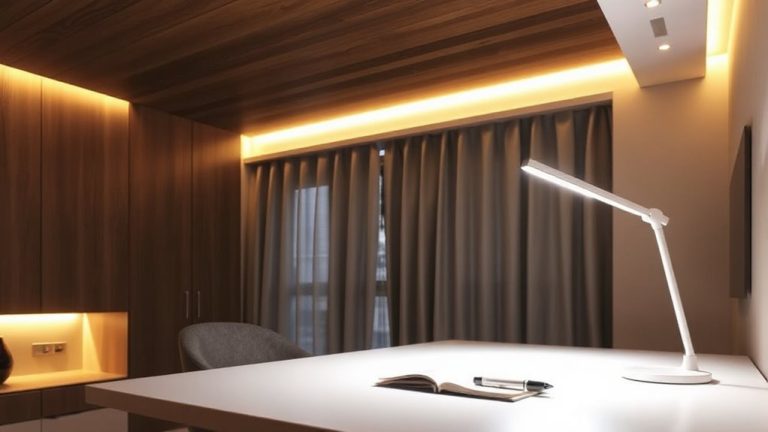
A single high-CRI lamp won’t deliver ideal lighting on its own-layering multiple sources is key to achieving balanced, accurate color rendering in your home office. Light layering combines ambient, task, and accent lighting to reduce eye strain and improve visual clarity. Start with overhead fixtures that provide uniform ambient light, then add a high-CRI desk lamp (90+ CRI, preferably 2700K–4000K) for precise task work. This setup enhances ambient contrast, making screens easier to view and materials more color-accurate. Consider adjustable arms or dimmable options for flexibility. However, too much brightness variation can create glare, so avoid placing bright lights directly in your line of sight. Use diffusers or indirect fixtures to soften harsh shadows. While layered lighting improves accuracy and comfort, it requires careful placement-poor alignment can negate the benefits of high-CRI bulbs. Test configurations during different times of day to fine-tune balance and effectiveness.
On a final note
You should choose a high-CRI lamp (90+) for your home office-it sharpens focus and cuts eye strain by rendering colors accurately. While brighter isn’t always better, consistent color helps during long work sessions and video calls. Look for LEDs labeled CRI 90+, preferably with a 50,000-hour rating and 3-year warranty. Keep in mind: high-CRI models cost more, and results vary under mixed lighting.