The Science Behind Neutral Posture and Its Role in Home Office Ergonomics
You’ll reduce strain and boost focus by aligning your body in neutral posture-where joints stack efficiently and muscles work evenly. It minimizes disc pressure and supports your spine’s natural curves, especially with an adjustable chair that has proper lumbar support and seat depth control. But even the best gear fails if you stay still too long; movement every 30 minutes is essential. Small, consistent adjustments make the difference-and what comes next reveals exactly how to get them right.
Notable Insights
- Neutral posture aligns joints and supports natural spinal curves to reduce musculoskeletal strain during prolonged sitting.
- Proper ergonomic setup, including adjustable chairs and monitor height, is essential to maintain neutral posture at home desks.
- Prolonged static sitting negates neutral posture benefits, making regular movement crucial for spinal disc health.
- Poor lighting, clutter, and incorrect workstation geometry disrupt neutral alignment, increasing neck and back strain.
- Core strength and sit-stand routines enhance posture endurance, reducing fatigue and long-term injury risk.
What Is Neutral Posture and Why It Matters
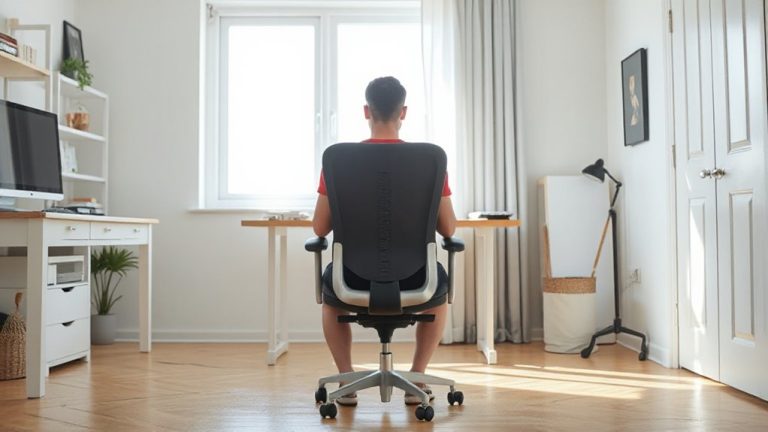
A neutral posture isn’t just a buzzword-it’s the foundation of sustainable comfort during long workdays. You maintain it when your joints are aligned to minimize strain, especially through proper spinal alignment. This position supports natural curves in your back, keeping your head over your shoulders and feet flat on the floor. Muscle relaxation follows when your body isn’t compensating for awkward angles, reducing fatigue over time. You’ll need an adjustable chair-preferably with lumbar support and seat depth control-to achieve this setup consistently. A desk at elbow height and a monitor at eye level help, too. But be honest: even with ideal gear, posture slips without regular movement. No chair or standing desk fixes prolonged stillness. Results depend on consistent adjustments, not one-time purchases. Real benefits come from habit, not hardware-so invest in awareness as much as equipment. Ergonomic stools can also promote active sitting and support neutral posture when used correctly, especially those with adjustable height and back support.
How Neutral Posture Protects Your Body
While you might think comfort is just about having a cushy chair, neutral posture actually plays a key role in preventing long-term strain-especially in areas like your lower back, neck, and shoulders. By maintaining proper spinal alignment, you reduce uneven pressure on discs and joints, which over time can prevent chronic pain. This position also supports natural muscle relaxation, so you’re not constantly fighting tension from slouching or craning forward. When your feet are flat, back supported, and arms at 90 degrees, your body works more efficiently, requiring less energy to stay upright. You’ll likely feel less fatigue during long work sessions. However, no chair or desk setup can fix poor posture alone-consistent awareness matters. Even high-end ergonomic gear has limits if you ignore body signals. Small adjustments make a difference, but they’re not a cure-all. Stay mindful. Choosing the right ergonomic office chair can significantly enhance your ability to maintain neutral posture throughout the day.
How to Set Up Your Desk for Neutral Posture
Your workstation’s layout makes or breaks your ability to maintain neutral posture-no matter how good your chair or keyboard claims to be. Start by setting your monitor height so the top of the screen aligns with your eyes, reducing neck strain during prolonged use. Pull your chair close enough to the desk so your arms rest at 90 degrees; proper chair depth guarantees your back stays supported without pressing against the seat edge. A seat pan that’s too deep cuts circulation behind the knees, while one too shallow lacks lower back support. Use adjustable furniture to dial in fit-most ergonomic benefits depend on personalized tweaks, not premium materials. Even the best gear fails if poorly arranged. Accuracy beats cost: measure twice, adjust once. Consider using a top desk riser to achieve optimal monitor and desk height alignment for sustained neutral posture.
Common Home Office Mistakes That Break Neutral Posture
You’ve arranged your chair, monitor, and keyboard just right-yet discomfort still creeps in. Small oversights can break neutral posture just as easily as poor setup. Common mistakes include poor lighting that forces you to tilt your head or squint, straining your neck and eyes. A cluttered workspace limits arm movement and encourages slouching. You might not realize how much these factors disrupt alignment over time.
| Mistake | Effect on Posture |
|---|---|
| Poor lighting | Causes forward head tilt |
| Cluttered workspace | Restricts limb movement |
| Monitor too low | Promotes neck flexion |
| Chair too far forward | Encourages leaning, lower back stress |
| Keyboard on lap | Elevates shoulders, strains wrists |
Even small fixes help-but lighting upgrades and cable organizers must suit your space to avoid new issues.
Science-Backed Habits to Maintain Neutral Posture All Day
A consistent neutral posture throughout the day isn’t achieved by perfect setup alone-it’s maintained through deliberate, science-backed habits. You need to actively support spinal alignment and muscle balance with regular movement. Every 30 minutes, stand and stretch or take a short walk-this reduces disc pressure and resets posture. Sit with feet flat, hips slightly above knees, and lower back supported to keep natural spinal curves. Use a chair with adjustable lumbar support and a firm seat pan, but know even top models won’t fix prolonged sitting. Pair sit-stand desks with intentional shifts-standing too long causes fatigue. Wear supportive shoes if standing, and avoid soft, unstable surfaces. Exercises like planks and glute bridges build core stability, improving endurance. These habits, backed by biomechanical studies, help maintain alignment, but require discipline. No gear replaces movement; rely on routine, not gadgets, for lasting results.
On a final note
You’ll likely feel less strain by aiming for neutral posture-it’s proven to reduce injury risk during long sits. Set your chair so thighs are parallel to the floor, arms bent at 90°, and wrists straight while typing. A height-adjustable desk and ergonomic chair with lumbar support help, but even small tweaks to setup height or monitor position matter. Results vary by body type; no gear fixes poor habits. Test changes over weeks, not days.