Best Desk Risers for a Healthier, More Productive Workspace
You’ll get the best ergonomic results with the FITUEYES sit-stand desk converter-it adjusts from 4.3” to 19.8”, supports 33 lbs, and locks securely with a touch mechanism. Its gas springs allow smooth height changes, helping you maintain eye-level screen alignment and reduce neck strain. Just make sure your desk fits its 31.5” x 15.7” base to avoid overhang. While it’s sturdy and requires no assembly, compact workspaces may struggle with the footprint. You’ll find useful comparisons and key differences across top models that could better suit your setup.
We are supported by our audience. When you purchase through links on our site, we may earn an affiliate commission, at no extra cost for you. Learn more. Last update on 9th June 2026 / Images from Amazon Product Advertising API.
Notable Insights
- Adjustable desk risers promote ergonomic posture by elevating screens to eye level, reducing neck and back strain.
- Models like FITUEYES and VIVO offer sit-stand functionality with smooth height adjustment for dynamic work sessions.
- Sturdy metal construction supports up to 33 lbs, safely holding dual monitors and laptops without wobbling.
- Non-slip pads and wide bases protect floors and enhance stability on various surfaces, including hardwood.
- Rapid or no assembly designs, like the foldable laptop stands, save time and simplify workspace integration.
shouwuhho 8 Pack Adjustable Furniture Risers

If you need a simple, budget-friendly way to lift slim-legged furniture for easier cleaning or improved ergonomics, the shouwuhho 8 Pack Adjustable Furniture Risers are a solid pick-especially if you own a robotic vacuum or struggle with sitting and standing. Made from thickened PP plastic, they’re lightweight yet strong, supporting heavy furniture without cracking. Each riser adds about 1 inch of height, and you can stack them for 1.9 or 2.8 inches total-just remove the rubber base to connect. They fit legs up to 1.97 inches square or round, suiting desks, beds, and more. Non-slip dots and rubber bottoms prevent sliding and protect floors. I wouldn’t stack them too high-they’re stable at lower heights, but taller setups may wobble under heavy loads.
Best For: Individuals seeking an affordable, adjustable solution to elevate slim-legged furniture for easier cleaning with robotic vacuums or improved accessibility, especially those with mobility challenges.
Pros:
- Adjustable height options (1, 1.9, or 2.8 inches) via stacking for customizable furniture elevation
- Durable thickened PP plastic construction with non-slip dots and rubber bottoms for stability and floor protection
- Fits both square and round legs up to 1.97 inches, compatible with a wide range of furniture and appliances
Cons:
- Stacking beyond two units is not recommended due to potential wobbling under heavy loads
- Minimal height increase per unit may not be sufficient for users needing substantial elevation
- Rubber bottoms must be removed to stack, adding an extra step and potentially reducing grip when used individually
Bed Risers Heavy-Duty Adjustable Support Blocks

I recommend the Bed Risers Heavy-Duty Adjustable Support Blocks if you need a versatile, high-capacity solution for lifting heavy furniture like beds, desks, or appliances-especially when floor protection and stability matter. Each set of four supports up to 4,000 pounds thanks to durable polypropylene construction, and the stackable design gives you 1.5-, 3-, or 4.3-inch height options-though only the taller versions can be adjusted. The L-shaped half-side design fits various leg sizes securely, while textured tops and TPU rubber bottoms prevent slips and floor damage. Just note: these work best under large legs, and the 1.5-inch version isn’t stackable.
Best For: Homeowners and renters seeking a durable, adjustable solution to safely elevate heavy furniture or appliances while protecting floors and improving under-bed or under-furniture access.
Pros:
- Supports up to 4,000 pounds per set, ideal for heavy-duty applications with beds, sofas, or appliances
- Stackable design (for 3-inch and 4.3-inch versions) allows customizable height adjustments up to 4.3 inches
- TPU rubber bottoms and textured tops prevent slippage and protect floors from scratches and dents
Cons:
- 1.5-inch risers cannot be stacked, limiting height customization options
- L-shaped design works best with larger furniture legs, potentially less stable with very small legs
- Intermediate stacking pieces only available with taller models, reducing flexibility for low-profile lifts
Utopia Bedding Adjustable Bed Risers (4-Pack, Black)
The Utopia Bedding Adjustable Bed Risers are my top pick if you need a sturdy, adaptable lift system that works across multiple furniture types-especially in tight spaces like dorms or small apartments where storage and floor protection matter. They give you 3-inch or 5-inch lift options, and stacking them gets you up to 8 inches of elevation. Each riser holds up to 1,300 lbs, so your desk or bed stays stable without wobbling. The 0.7-inch recessed cup keeps legs centered, and the wide base prevents floor damage. They fit legs up to 2.8 inches, so they work on desks, beds, or sofas. I like that they help tuck storage underneath, but the plastic may feel lightweight for industrial setups. Still, for everyday use, they deliver solid performance.
Best For: Individuals seeking a durable, adjustable furniture riser solution for small living spaces like apartments or dorms, where added storage, floor protection, and stability are priorities.
Pros:
- Offers customizable height options (3-inch, 5-inch, or stacked up to 8-inch) for versatile furniture elevation
- Supports up to 1,300 lbs per riser with a wide base and recessed cup for stability and floor protection
- Fits furniture legs up to 2.8 inches and works with beds, desks, sofas, and more to optimize under-furniture space
Cons:
- Constructed from plastic, which may feel less robust for heavy-duty or industrial applications
- May not accommodate furniture with legs exceeding 2.8 inches in width
- Stacking risers could potentially increase wobble if not properly aligned
WALI Adjustable Laptop Riser (STT003) Black

This riser’s rock-solid metal build and 10-year warranty make it a no-brainer for anyone who wants a durable, long-term fix for poor posture at work or school. I use it daily, and the adjustable heights-3.9, 4.7, or 5.5 inches-let me pick the best fit for my laptop or monitor. It holds up to 44 lbs, so it’s sturdy, and the vented holes keep my devices from overheating. Rubber pads keep everything from sliding, and I appreciate the space underneath for stashing a keyboard or notebooks. It requires assembly, which takes about ten minutes, but the sleek black finish looks sharp on any desk. Just note: it only fits screens and devices under 14.6 inches wide, so check your setup first.
Best For: Professionals, students, and remote workers seeking an ergonomic, long-lasting laptop or monitor riser to improve posture and desk organization.
Pros:
- Sturdy metal build with a 10-year warranty ensures durability and long-term use
- Adjustable heights (3.9″, 4.7″, 5.5″) promote ergonomic comfort and customizable setup
- Vented design and rubber pads enhance device cooling and prevent slipping
Cons:
- Requires assembly, which may take around 10 minutes
- Limited width capacity-only fits devices up to 14.6 inches wide
- Under desk storage may be too shallow for larger peripherals or accessories
Gianotter Dual Monitor Stand with Drawer

A dual monitor stand with built-in storage stands out for those who value both clean workspace aesthetics and functional organization, and the Gianotter Dual Monitor Stand with Drawer delivers that balance without compromise. I’ve used it daily, and it keeps my pens, notepads, and cables tucked away with two magnetic pen holders and a smooth-gliding drawer. Adjusting the height brings screens to eye level, reducing strain and improving posture. The sturdy metal frame holds up reliably, and the elevated base frees up desk space underneath for my keyboard and mouse. It’s ready to use right out of the box, which I appreciate-no confusing assembly. While it fits most monitors, you’ll need to check your setup for ideal compatibility.
Best For: Professionals and home office users seeking an ergonomic, clutter-free workspace with smart storage and easy setup.
Pros:
- Adjustable height promotes better posture and reduces neck and eye strain
- Built-in drawer and magnetic pen holders keep essentials organized and within reach
- Durable metal construction with no assembly required for immediate use
Cons:
- Limited compatibility with larger or heavier monitor setups
- Drawer space may be insufficient for users with many accessories
- Elevated design may not suit users who prefer a lower screen position
WESTREE Dual Monitor Stand Riser
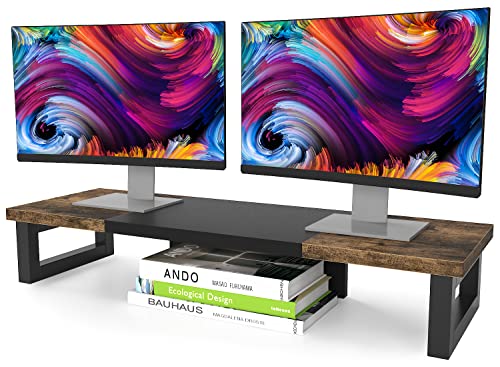
You’ll want the WESTREE Dual Monitor Stand Riser if your workspace demands rugged stability without sacrificing style-this isn’t just another flimsy shelf but a heavy-duty steel-framed riser built to hold dual monitors securely. I’ve used it for weeks, and the thick steel legs don’t wobble, even with two 27-inch screens. The rustic brown wood top looks sharp and hides scratches well, though dust gathers on the frame’s edges. It elevates my screens to eye level, reducing neck strain noticeably. Assembly took under three minutes with the included tools-no hassle. Anti-slip pads work, but I don’t use them; the unit stays put. It’s also great for my printer and supplies underneath. Just know: the 24×10-inch surface won’t fit ultra-wide setups.
Best For: Professionals and remote workers seeking a durable, stylish dual monitor riser that enhances ergonomics and maximizes desktop organization.
Pros:
- Sturdy steel frame with a rustic wood finish provides exceptional stability and a modern-rustic aesthetic
- Elevates screens to eye level, reducing neck strain and improving posture during long work sessions
- Quick, tool-free assembly in under three minutes with all hardware and instructions included
Cons:
- Surface size (24×10 inches) may not accommodate ultra-wide monitor setups
- Dust can accumulate on the steel frame edges, requiring regular cleaning
- Anti-slip pads are optional and may not be necessary due to already stable base
FITUEYES Height Adjustable Standing Desk Converter

The FITUEYES Height Adjustable Standing Desk Converter stands out for those who want a ready-to-use, sit-stand upgrade without assembly hassles and need reliable support for a single or dual monitor setup. I’ve found it handles up to 33 lbs across configurations, with a 31.5” x 15.7” surface that fits most monitors and laptops. The dual gas springs let me switch heights smoothly from 4.3” to 19.8” using light touch locks-ideal for frequent posture changes. Since it’s fully assembled, setup takes minutes. Just know it’s bulkier than some risers, so desk space matters.
Best For: Professionals seeking a ready-to-use, height-adjustable desk converter that supports single or dual monitor setups with smooth, tool-free transitions between sitting and standing.
Pros:
- Fully assembled and ready to use right out of the box, saving setup time
- Dual gas spring mechanism enables smooth, quiet height adjustments with simple touch locking
- Spacious 31.5” x 15.7” work surface supports up to 33 lbs, accommodating laptops, single, or dual monitors
Cons:
- Bulkier design requires ample desk space, which may not suit smaller workstations
- Maximum height of 19.8” may not be sufficient for taller users seeking higher standing positions
- Limited adjustability range compared to full standing desks with electric lift systems
Rectangle Bed Risers 3 Inch (4-Pack)

Four sturdy layers of solid polypropylene mean these risers handle extreme weight without flexing-ideal for anyone stacking heavy office desks or motorized standing bases needing precise, stable lift. I’ve used them under my desk, and they support up to 1,300 pounds total with zero wobble. Their stackable design gives 1.5 inches per layer, so two layers hit nearly 3 inches-close enough for most ergonomic setups. The L-shape fits legs up to 4.5” × 2.4”, but measure your furniture first. Non-slip TPU pads and textured tops keep everything steady and scratch-free on hardwood. They’re not *made* for desks, so alignment matters, but with care, they’re a durable, affordable lift.
Best For: Heavy-duty furniture elevation needs, especially for individuals seeking stable, stackable risers for beds, desks, or sofas in home or office settings.
Pros:
- Supports up to 1,300 pounds total with durable polypropylene construction and non-slip TPU rubber for maximum stability
- Stackable design allows customizable height adjustment-1.5 inches per layer, up to nearly 3 inches when doubled
- L-shape design accommodates a variety of leg sizes and protects floors from scratches on hardwood and hard surfaces
Cons:
- Not specifically designed for desks, so alignment and fit must be carefully checked for proper use
- Maximum two-layer stack only reaches 2.9 inches, slightly under the advertised 3-inch lift
- Requires precise measurement of furniture legs up to 4.5” × 2.4” to ensure compatibility
VIVO 32″ Height Adjustable Sit-Stand Desk Converter

While not ideal for compact workspaces, I choose the VIVO 32″ Height Adjustable Sit-Stand Desk Converter if I need a spacious, dual-monitor-ready riser that maintains ergonomic alignment with a synchronously lifting keyboard tray. Its 31.5” x 15.7” worksurface fits two monitors comfortably, and the 31.3” tray rises with the top platform, so my wrists stay level when typing. The lift system handles up to 33 lbs smoothly, adjusting from 4.5” to 20” with a simple touch. It’s built tough with steel, needs little assembly, and comes with a 3-year warranty-solid for long-term use, though it demands wide desk space.
Best For: Users seeking a spacious, durable sit-stand desk converter that supports dual monitors and maintains ergonomic alignment with a synchronously lifting keyboard tray.
Pros:
- Spacious 31.5” x 15.7” worksurface ideal for dual monitor setups
- Synchronous lift mechanism keeps keyboard tray aligned with the top platform for consistent ergonomics
- Durable steel construction with a 33 lb capacity and a 3-year warranty
Cons:
- Requires ample desk space, not suitable for compact workstations
- Limited height adjustment range (4.5” to 20”) may not fit all user heights
- Top platform does not tilt, limiting viewing angle customization
Adjustable Metal Laptop Stand for 10-15.6

You’ll want this Adjustable Metal Laptop Stand if you need a durable, portable solution for better posture across work environments-especially if you carry your laptop between home, office, or coffee shops. I use it daily and appreciate the adjustable height and angle, which help reduce neck and back strain. The sturdy metal frame holds up to 17.6 lbs, and rubberized pads keep my 14-inch MacBook Pro from slipping or scratching. Ventilation holes boost airflow, keeping my laptop cooler than on my desk. It folds flat and fits in my backpack, though it doesn’t suit laptops over 15.6 inches.
Best For: Professionals and students who need a durable, portable laptop stand to improve posture and comfort while working across multiple environments.
Pros:
- Adjustable height and angle promote ergonomic positioning, reducing neck and back strain
- Sturdy metal construction with anti-slip pads securely supports laptops up to 17.6 lbs
- Foldable design and lightweight build make it highly portable for travel or commuting
Cons:
- Limited to laptops up to 15.6 inches, excluding larger models
- Minimal structural padding may transfer vibrations on uneven surfaces
- No built-in cable management or accessory storage features
Factors to Consider When Choosing Desk Risers
You’ll want a desk riser that matches your setup and daily habits, so check the weight capacity first-many models support 15–30 lbs, but heavier monitors or dual setups need sturdier frames. Look for smooth height adjustability and an ergonomic design that aligns your screen with eye level, though keep in mind higher ranges often trade off some stability. Durable materials like steel or solid wood hold up over time, while nonslip pads and felt bottoms protect your desk surface without scratching.
Weight Capacity
Weight capacity can make or break your desk riser’s performance. You’ll typically find models rated for 15 to 50 pounds, with heavy-duty options handling dual monitors or bulkier setups of 33 pounds or more. Your riser’s material matters-metal frames support heavier loads than plastic or wood, offering better long-term stability. If you exceed the stated limit, you risk warping, wobbling, or even collapse, especially during height adjustments. Look for designs that spread weight across multiple support points; they reduce stress on individual joints and improve durability. Always calculate the combined weight of your monitors, laptop, and accessories before buying. Even a sturdy-looking riser can fail if overloaded, so matching your gear to the manufacturer’s specs is essential. Don’t assume-verify. A mismatch here can undo the ergonomic benefits you’re aiming for.
Height Adjustability
A riser’s height range determines how well it supports your posture throughout the day. You’ll want a model that adjusts between 4.3 and 19.8 inches, so you can align your screen with your eye level whether sitting or standing. Some offer only fixed heights-like 3.9, 4.7, or 5.5 inches-giving you limited but stable options. Others use gas springs or lift assist for smoother shifts across a broader range, even up to 20 inches. If you need flexibility, look for incremental layers that snap together for custom heights like 1, 1.9, or 2.8 inches. But keep in mind: more adjustability often means more moving parts, which could affect stability. Always match the max height to your torso and desk setup-otherwise, you risk neck or back strain. Test the mechanism if possible; cheap lifts can wobble or stick.
Material Durability
Solid construction starts with smart material choices, just as much as it depends on proper height settings. You’ll want desk risers built from tough materials like polypropylene or steel-they handle 1,300 to 4,000 pounds, depending on reinforcements. Thickened plastics and solid metal resist bending, even with heavy monitors or CPUs, so your setup stays stable over years. Look for rubberized or TPU non-slip pads; they cut down on shifting and surface wear, which helps the frame last longer. Reinforced bases with wide footprints distribute weight evenly, preventing stress cracks or warping. Open-frame metal designs offer strength while letting heat escape, reducing long-term fatigue from hot devices. Just keep in mind: lighter materials may save space or cost, but they often sacrifice load capacity and longevity, especially under daily, heavy use.
Floor Protection
Every inch of your floor matters when choosing a desk riser, and protecting it starts with smart design choices. You should pick models with non-slip rubber or TPU pads-they grip hard surfaces well and prevent scratches. Rugged bottom textures add stability, but avoid overly aggressive treads that might trap debris and damage finish. Look for a wide footprint; it spreads weight evenly and lowers the risk of dents, especially under heavy gear. Raised or recessed bases keep metal legs from touching the floor directly, which helps prevent marks. Choose risers made from thickened polypropylene or reinforced metal-they resist compression and cracking over time. Just remember, even solid designs can shift if your surface isn’t level, so always check floor condition first. Protection isn’t just about materials-it’s how everything works together.
Ergonomic Design
If you’re aiming to reduce strain during long work sessions, prioritize desk risers with height adjustability between 3.6 and 20 inches so you can align your screen with eye level and maintain a neutral spine. Look for models offering tilt adjustments from 0 to 45 degrees-this helps minimize eye fatigue by optimizing viewing angles. Sit-stand options with ranges like 4.3 to 19.8 inches support dynamic postures and suit varied desk heights or body types. Ventilated surfaces aren’t just about cooling your devices; they also promote airflow to keep your workspace comfortable during extended use. Always check for non-slip rubberized pads that lock the riser in place, preventing unwanted shifts that disrupt your alignment. While higher adjustability improves ergonomics, some models sacrifice stability at maximum height, so balance range with sturdiness. Don’t assume more features mean better performance-test smoothness of adjustment and ease of repositioning to guarantee it fits your daily workflow.
Compatibility
While it’s tempting to focus solely on adjustability and design, making sure a desk riser actually fits your setup is critical-start by checking the top surface dimensions, which should comfortably hold your monitor up to 32 inches wide or a 15.6-inch laptop without crowding your workspace. You’ll also want to confirm the weight capacity exceeds the combined load of your devices; underestimating this risks wobbling or collapse. Make sure the riser’s maximum height fits within your clearance, allowing proper sit-stand alignment without hitting shelves or monitors above. Its base footprint must suit your desk size, avoiding overhang that compromises stability. Look for rubberized, non-slip surfaces on top and bottom-these keep gear and the unit itself firmly in place during daily use. Skipping these checks could mean buying a riser that looks good but doesn’t work.
Stackability
Stacking desk risers gives you a simple way to customize your workstation height, letting you boost your setup by nearly 3 inches with just two tiers. You can fine-tune ergonomics by combining units, especially if your desk is too low or you’re alternating between sitting and standing. Look for models with interlocking edges or removable top plates-they snap together securely, reducing wobble and ensuring stability. Most manufacturers warn against stacking more than three tiers, as taller configurations increase tipping risk and reduce balance. Keep in mind that weight capacity usually drops when you stack; what holds 20 lbs solo might only handle 12–15 lbs when elevated. Always check load ratings for stacked use and avoid heavy gear like bulky monitors or towers. Well-designed stackable risers offer flexibility, but only work if built for it-don’t assume all models are safe to layer.
Frequently Asked Questions
Can Desk Risers Be Used on Carpeted Floors?
Yes, you can use desk risers on carpeted floors, but stability depends on the design. Models with wide, flat bases or non-slip pads work best, preventing sinking or wobbling. Avoid taller, narrow risers-they tip more easily. Electric dual-motor lift desks handle carpet better due to even weight distribution. Test the riser on your carpet pile depth; high-pile rugs may require a solid platform underneath. Always check warranty terms-some brands void coverage if used on unstable surfaces.
Do Laptop Risers Improve Posture During Long Work Sessions?
Yes, laptop risers improve your posture during long work sessions by elevating your screen to eye level, so you’re not hunching forward. You’ll reduce neck and shoulder strain, especially if you pair the riser with an external keyboard and mouse. Just make certain the height’s adjustable-most people need 6 to 10 inches. Watch for wobble; solid steel or wood bases work best. Some models limit airflow, so pick one with ventilation slots to avoid overheating.
Are Adjustable Monitor Stands Easy to Assemble Without Tools?
Yes, most adjustable monitor stands are tool-free to assemble, especially gas-spring or clamp-on models. You lift the panel and lock it in place with knobs or levers. Setup takes under 5 minutes and works smoothly if your desk is within compatible thickness-usually 1 to 2.4 inches. But cheaper plastic mechanisms might wobble or wear faster. Always check load limits-many support 15 to 30 lbs. A solid steel base and warranty of 1–2 years indicate reliability.
Will Bed Risers Work With Metal Frame Beds?
No, bed risers won’t work reliably with most metal frame beds. Their open slat design lacks solid contact points, causing instability. You need risers with flat, non-slip surfaces and proper height-usually 3 to 5 inches-to pair safely. Even then, uneven weight distribution risks tipping. For metal frames, consider purpose-built bed extensions or adjustable legs instead. Always check weight limits and test stability-your safety depends on it.
Can Standing Desk Converters Hold Dual Monitors Safely?
Yes, most standing desk converters support dual monitors safely-if you pick the right model. You’ll need a wide platform, ideally at least 42 inches, with a solid build. Check weight capacity; aim for 30+ pounds. Clamp-on models stay steadier than portable ones. Make sure your arms stay level when typing, and avoid wobble during use. Always confirm VESA compatibility and balance for your monitor setup.