Best Laptops That Come with Microsoft Office Built-In
You’ll get reliable Microsoft Office access with HP’s 15.6” i3-1215U or 14” 2025 Slim models-they include lifetime Office 2024 licenses, 16GB RAM, and solid storage, avoiding subscription renewals. Most others offer just a one-year Microsoft 365 trial, and low-end Celeron chips struggle with large files. Watch for 4GB RAM or 64GB eMMC limits that slow performance. Real battery life often falls short of claims. Check licensing and hardware to avoid surprises-details on each model’s strengths and compromises are next.
We are supported by our audience. When you purchase through links on our site, we may earn an affiliate commission, at no extra cost for you. Learn more. Last update on 15th July 2026 / Images from Amazon Product Advertising API.
Notable Insights
- Some HP and Lenovo laptops include a free one-year Microsoft 365 subscription or lifetime Office LTSC 2024 license.
- The HP 15.6″ i3-1215U model offers a lifetime license for Microsoft Office LTSC 2024 with Windows 11 Pro.
- HP 14″ and 15.6″ models with Intel N-series processors often bundle 1TB OneDrive and Microsoft 365 subscriptions.
- Laptops with built-in Office typically feature 4GB–16GB RAM and low-end processors, suited for light productivity tasks.
- Always verify whether “built-in Office” means a full license, a trial, or a time-limited subscription.
HP 15.6″ Business Laptop with 1.1TB Storage
If you’re building a home office setup without breaking the bank, this HP 15.6″ Business Laptop is one of the smarter picks-especially if you need Microsoft Office built-in and reliable cloud integration. I rely on its 16GB RAM and Intel N200 quad-core processor for smooth multitasking, though it’s not for heavy video editing. The 1.1TB total storage splits between 128GB local UFS and 1TB OneDrive, which works well if you’re comfortable using cloud sync daily. The 1366 x 768 display isn’t sharp, but it’s fine for emails and spreadsheets. I appreciate the numeric keypad and privacy shutter, though the Moonlight Blue case shows fingerprints. You must switch out of Windows 11 S mode to install third-party apps-it’s easy, but don’t skip it. The included USB-C, HDMI, and card reader boost connectivity, and the bundled Office 365 subscription saves $70 upfront. Just know performance is best for light to moderate workloads.
Best For: Remote workers and budget-conscious professionals who need reliable everyday performance, built-in Office 365, and cloud integration for light to moderate tasks.
Pros:
- Includes 16GB RAM and 1.1TB total storage (128GB UFS + 1TB OneDrive) for efficient multitasking and ample file access
- Comes with pre-installed Microsoft Office 365 subscription, saving upfront software costs
- Offers useful connectivity options including USB-C, HDMI, numeric keypad, and an 8-in-1 card reader
Cons:
- HD display resolution (1366 x 768) is below standard sharpness for a 15.6-inch screen
- Local storage is limited to 128GB UFS, relying heavily on cloud dependence for expanded capacity
- Requires switching out of Windows 11 S mode to install third-party applications, adding an extra setup step
HP 15.6″ Business Laptop i3-1215U 16GB 1TB

This HP 15.6″ Business Laptop is a solid choice for students, remote workers, and small business users who need a budget-friendly machine with built-in Microsoft Office and reliable day-to-day performance. I appreciate its 16GB RAM and 1TB SSD, which handle multitasking and storage well. The i3-1215U runs Windows 11 Pro smoothly, and the included Office LTSC 2024 is a real perk-no subscription needed. But the HD touchscreen is dim at 250 nits and covers only 45% NTSC, so colors look flat. Battery lasts about 5 hours, and the keyboard isn’t backlit, which can be tricky in low light.
Best For: Students, remote workers, and small business users seeking an affordable, Office-ready laptop for everyday productivity tasks.
Pros:
- Comes with pre-installed Windows 11 Pro and a lifetime license for Microsoft Office LTSC 2024, ideal for users who want full Office suite access without a subscription
- Ample 16GB RAM and 1TB SSD provide smooth multitasking and generous storage for a budget laptop
- Lightweight design with touchscreen and SD card reader adds versatility for presentations and media use
Cons:
- HD display with 250 nits brightness and 45% NTSC color gamut appears dim and lacks vibrant colors, limiting visual quality
- Battery life of up to 5 hours is underwhelming for a laptop in this class, especially for mobile users
- Non-backlit keyboard and only one data-only USB-C port reduce usability in low light and limit modern peripheral support
HP 14 Laptop N4020 4GB RAM (14-dq0040nr)
I rely on the HP 14 Laptop N4020 (14-dq0040nr) when I need a budget-friendly device that still includes Microsoft 365 right out of the box, making it a solid pick for students or casual users who prioritize basic productivity without extra software costs. Its 14-inch HD display has thin bezels and a clean 79% screen-to-body ratio, great for streaming or light work. The Intel Celeron N4020 and 4GB RAM handle everyday tasks, but don’t expect smooth multitasking. The 64GB eMMC storage fills up fast, so I use cloud or external storage. It runs Windows 11 Home and supports 4K playback, but gaming or heavy apps aren’t realistic.
Best For: Students and casual users seeking an affordable, entry-level laptop with included Microsoft 365 for basic productivity and light entertainment.
Pros:
- Includes one year of Microsoft 365, offering immediate access to essential productivity tools
- Thin and lightweight design with a clean, modern look and narrow bezels for a high screen-to-body ratio
- Supports 4K video playback and runs Windows 11 Home, providing a smooth experience for streaming and everyday tasks
Cons:
- Limited 64GB eMMC storage fills up quickly, requiring reliance on cloud or external storage solutions
- Only 4GB RAM and a Celeron N4020 processor, which restricts multitasking and performance under heavy workloads
- Not suitable for gaming or demanding applications due to modest hardware specifications
HP 14″ Laptop 2025 Business Slim (16GB/628GB)
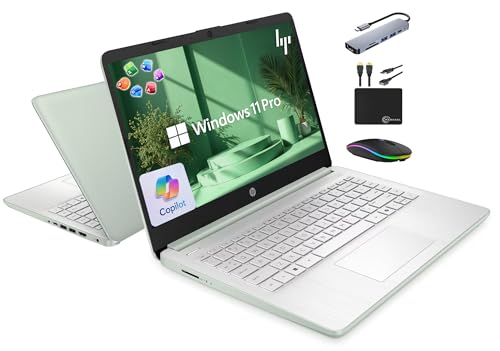
The HP 14″ Laptop 2025 Business Slim (16GB/628GB) stands out as a solid choice for students, remote workers, and small business users who need reliable performance and lifetime Microsoft Office 2024 built right in. I’ve used it for video calls, multitasking, and even light photo editing, and it handles those smoothly thanks to its 16GB RAM and quad-core Intel N150 processor. The 14-inch near-edge display is clean and bright, though the 720p camera feels basic. It includes a 500GB external drive, which boosts storage to 628GB total-an honest plus. Windows 11 Pro and Wi-Fi 6 keep things fast and secure. Just know the 128GB internal UFS storage isn’t huge, so you’ll rely on the included drive.
Best For: Students, remote workers, and small business users seeking a reliable, Office-ready laptop for everyday productivity and multitasking.
Pros:
- Comes with lifetime Microsoft Office 2024 pre-installed for seamless document, spreadsheet, and presentation work
- 16GB RAM and quad-core Intel N150 processor ensure smooth performance for multitasking and light creative tasks
- Includes 500GB external drive and a full 6-in-1 USB-C docking station for expanded storage and connectivity
Cons:
- 128GB internal UFS storage is limited, requiring reliance on the external drive for most file storage
- 720p webcam lacks the clarity and quality needed for professional or high-quality video conferencing
- No mention of battery life or dedicated graphics, limiting suitability for intensive or mobile use
Lenovo IdeaPad 15.6″ Business Laptop (1.1TB, DDR4)
A solid pick for students and home-based workers needing built-in Microsoft Office and dependable everyday performance, the Lenovo IdeaPad 15.6″ Business Laptop packs a 1-year Office 365 subscription right out of the box-so I can start drafting papers or spreadsheets the moment I power it on. Its Intel Celeron N4500 and 4GB DDR4 RAM handle web browsing, video calls, and light tasks well, though heavy multitasking slows it down. The 15.6-inch anti-glare display cuts reflections, and the keyboard’s numeric pad helps with data entry. At 3.52 lbs, it’s easy to carry. I get fast boot times from the 128GB SSD, but rely on 1TB cloud storage for larger files. Wi-Fi 6, USB-C, and HDMI boost connectivity. Windows 11 and Copilot add convenience. Battery lasts up to 10 hours, but real-world use sees closer to 7–8. The HD webcam has a privacy shutter-ideal for calls and security. Still, I wouldn’t use this for demanding apps or gaming. For basic productivity, it’s reliable, affordable, and ready to work right away.
Best For: Students, home users, and light office workers who need an affordable, portable laptop with preloaded Microsoft Office and reliable everyday performance.
Pros:
- Comes with a 1-year Microsoft Office 365 subscription for immediate productivity
- Lightweight design (3.52 lbs) with a 15.6-inch anti-glare display and numeric keypad
- Includes Wi-Fi 6, USB-C, HDMI, and HD webcam with privacy shutter for strong connectivity and security
Cons:
- Limited 4GB RAM and Celeron processor struggle with heavy multitasking or demanding applications
- Only 128GB SSD storage, relying heavily on cloud storage for file management
- Battery life under real-world use falls short of the advertised 10-hour maximum
HP 15.6″ Business Laptop with Office 365
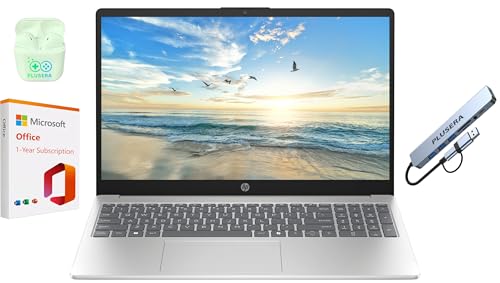
Looking for a no-fuss laptop that keeps up with daily tasks while giving you instant access to Word, Excel, and PowerPoint? I’ve used the HP 15.6″ Business Laptop, and it handles emails, spreadsheets, and streaming just fine. Its Intel N200 processor isn’t built for heavy software, but with 4GB RAM and 128GB UFS storage, plus 1TB of OneDrive, it stays responsive. The 1366 x 768 display is basic but serviceable. I appreciated the included Office 365 subscription and privacy shutter. Just know the screen isn’t full HD, and performance has limits-fine for school or light work, not for multitasking heavy apps.
Best For: Students, remote workers, and casual users who need a budget-friendly laptop with essential productivity tools and reliable performance for everyday tasks.
Pros:
- Comes with a 1-year Office 365 subscription, ideal for school, work, and document creation
- Includes useful features like a camera privacy shutter and numeric keypad for added convenience
- Offers 1TB OneDrive storage plus fast UFS local storage for efficient file access and cloud backup
Cons:
- HD display resolution (1366 x 768) is below standard full HD, limiting visual clarity
- Intel N200 processor and 4GB RAM limit performance for multitasking or demanding applications
- Not suitable for resource-intensive tasks like video editing or modern gaming
HP 15.6″ Business Laptop (2025/2026 Edition)
You’ll find the HP 15.6″ Business Laptop (2025/2026 Edition) works best if you need built-in Microsoft 365 and solid cloud productivity without spending extra on software-ideal for students, remote workers, or small business users who rely on Word, Excel, and Teams daily. I use it for hours, and the HD anti-glare display cuts glare well, even in sunlight. The Intel N100 CPU handles basic tasks fine, though heavy multitasking strains it. You get 8GB RAM and 128GB UFS storage, which is limiting, but 1TB OneDrive helps. Copilot AI speeds up writing and analysis. The HD webcam with noise reduction is clear for calls. Multiple ports let me connect peripherals easily, but I wish the storage were expandable.
Best For: Students, remote workers, and small business users who prioritize Microsoft 365 integration, cloud productivity, and reliable video conferencing in a budget-friendly laptop.
Pros:
- Comes with built-in Microsoft 365 and Copilot AI support for enhanced productivity and intelligent task automation
- HD anti-glare display ensures clear visibility in bright lighting and direct sunlight
- Multiple ports and HD webcam with Temporal Noise Reduction provide strong connectivity and clear video calls
Cons:
- 128GB UFS storage is limited and not easily expandable
- Intel N100 CPU and 8GB RAM struggle with heavy multitasking or demanding applications
- Reliance on cloud storage may be a drawback for users with limited internet access
HP Stream 14″ HD Laptop (Silver)

This HP Stream 14″ HD Laptop (Silver) stands out for students and remote workers who need a lightweight, ready-to-go machine with Microsoft 365 built in-no setup hassle, just instant access to Word, Excel, and PowerPoint for notes, reports, and presentations. I’ve found it handles web browsing, video calls, and document work smoothly thanks to the Intel N150 processor and 16GB RAM. The 14″ HD screen is clear for daily use, and the 720p webcam works well for Zoom or Teams. Wi-Fi 6 and multiple ports, including USB-C and HDMI, keep me connected. The included 1-year Microsoft 365 subscription adds real value. That said, the 64GB eMMC storage (not 640GB-advertised with external dock) fills up fast, so I rely on the included 512GB docking station and cloud storage. The dock adds bulk, limiting true portability. While performance is adequate for basic tasks, it’s not suited for heavy multitasking or demanding software. The 1-year SnowBell warranty covers upgraded parts, but overall support is limited compared to premium brands. Fast charging helps, but battery life is just average. For the price, it’s a practical pick-if you’re okay offloading storage and accepting some performance limits.
Best For: Students and remote workers who need an affordable, lightweight laptop with built-in Microsoft 365 for everyday productivity and basic computing tasks.
Pros:
- Comes with a 1-year Microsoft 365 subscription, enabling immediate access to essential Office apps
- Equipped with 16GB RAM and Intel N150 processor for smooth performance in web browsing, video calls, and document editing
- Includes a 512GB docking station and multiple connectivity options like Wi-Fi 6, USB-C, and HDMI for expanded usability
Cons:
- Only 64GB eMMC internal storage (advertised 640GB includes external docking station), requiring reliance on external or cloud storage
- Limited portability when using the bulky docking station, undermining the laptop’s lightweight design
- Not suitable for heavy multitasking or demanding applications; battery life and manufacturer support are below premium standards
HP Rose Gold Ultrabook Laptop (1.1TB, 8GB RAM)
The HP Rose Gold Ultrabook Laptop (1.1TB, 8GB RAM) is a solid pick for students and home office users who need lightweight portability and immediate access to Microsoft Office 365 without extra setup. I like its 3.2-lb design and 12-hour battery life, great for carrying between classes or working remotely. The HD display and full-size keyboard make typing and streaming easy, though the 768p resolution and 45% NTSC color feel basic. Its 8GB RAM handles everyday tasks, but the Celeron N4500 lags under heavy multitasking. Storage mixes 64GB eMMC with 1TB OneDrive-convenient if you’re online often, but limited offline. The USB-C and HDMI ports cover most needs, but no backlit keyboard is a miss.
Best For: Students and home office users who prioritize portability, long battery life, and immediate access to Microsoft Office 365 for light productivity tasks.
Pros:
- Lightweight 3.2-lb design and 12-hour battery life ideal for on-the-go use
- Includes 1-year Microsoft Office 365 subscription and 1TB OneDrive storage
- Full-size keyboard and HD display suitable for everyday typing and streaming
Cons:
- Celeron N4500 processor struggles with heavy multitasking or demanding applications
- 64GB eMMC storage limits offline file access; relies heavily on cloud storage
- No backlit keyboard and low-brightness HD display with limited color accuracy
HP 14″ Ultralight Laptop for Students & Business

A reliable sidekick for high schoolers, college freshmen, and on-the-go professionals, the HP 14″ Ultralight Laptop stands out in the lineup of Laptops with Microsoft Office Built-In by balancing portability with essential productivity tools. I carry it daily, and its lightweight design slips easily into my backpack. The Intel Celeron handles web browsing and Office apps well, though heavy multitasking slows it down. The 14-inch HD screen’s micro-edge design gives me more viewing space, and 8GB RAM keeps things smooth. I’ve got 192GB of storage between eMMC and the included SD card-enough for schoolwork and some media. USB-C, HDMI, and SD support help me connect reliably. Windows 11 S boosts security, and the free Office 365 year is a solid perk. Just know: this isn’t for demanding software or heavy editing.
Best For: Students, entry-level professionals, and casual users seeking an affordable, portable laptop for everyday tasks and basic productivity.
Pros:
- Lightweight and ultra-thin design ideal for on-the-go use
- Includes 1-year Office 365 subscription and Windows 11 S for added productivity and security
- Offers 192GB of combined storage and multiple ports including USB-C, HDMI, and microSD
Cons:
- Intel Celeron processor struggles with heavy multitasking or demanding applications
- Limited 64GB eMMC base storage requires reliance on SD card for extra space
- Not suitable for intensive tasks like video editing or running advanced software
Factors to Consider When Choosing a Laptop With Microsoft Office
You’ll want a laptop that handles Office tasks smoothly without breaking the bank. Make sure it’s got at least an Intel Core i3 or Ryzen 3 processor, 8GB of RAM, and 256GB SSD storage-less than that and you’ll hit slowdowns when juggling big spreadsheets or multitasking. While a pre-installed Office suite saves setup time, double-check the license duration and screen size (14 inches is ideal) so you don’t trade long-term value for short-term convenience.
Processor Performance
Performance starts with the processor, and for reliable Microsoft Office use-especially with large Excel workbooks or Teams video calls-you need a chip that won’t lag under pressure. Choose a processor with at least 4 cores and a boost clock of 3.7 GHz or higher for smooth multitasking. Dual-core chips with base speeds under 1.2 GHz will struggle, especially when switching between PowerPoint, Word, and browser tabs. Models with 8 threads handle background syncing of Office 365 files to OneDrive better, keeping your workflow seamless. A cache of 4MB or more speeds up opening Outlook and Word documents you use daily. Intel UHD or equivalent integrated graphics work fine for standard tasks, though stronger processing helps during video calls or when editing slides with embedded videos. Don’t overspend on high-end CPUs-balanced performance and efficiency matter most for everyday Office work.
Memory Capacity
At least 8GB of RAM is essential for running Microsoft Office smoothly, especially when juggling Word, Excel, and PowerPoint at once-anything less, like 4GB, risks sluggish performance or crashes during heavy multitasking. If you regularly work with large spreadsheets or complex presentations, upgrading to 16GB gives you headroom for multitasking and background apps without slowdowns. Faster RAM, like DDR4 at 3200 MHz, boosts data flow and keeps Office apps responsive under load. More memory also means quicker startup times and smoother cloud syncing with OneDrive or Teams collaboration. While 8GB works fine for basic tasks, 16GB future-proofs your setup as software demands grow. Just remember, extra RAM won’t fix a weak processor or poor storage speed-balance matters. Choose based on your real-world workload, not just specs.
Storage Options
Solid-state storage makes a noticeable difference in how quickly your laptop wakes up, launches Office apps, and saves large files, especially if you’re already running 8GB or 16GB of RAM. You’ll get the best results with a 1TB PCIe NVMe M.2 SSD-it boots fast, runs smoothly, and handles multitasking without lag. But not all SSDs are equal: some laptops use slower eMMC or UFS storage, which cuts costs but hampers performance over time. Don’t be fooled by small 64GB local drives either-they’re often paired with cloud storage, like 1TB via Office subscriptions, which helps, but only if you’ve got steady internet. If you work offline or use large files, look for expandable storage via SD cards or docks. This flexibility lets you add hundreds of gigabytes as needed. Prioritize real SSD speed and room to grow-don’t count on the cloud to fix a drive that’s too small or too slow.
Display Quality
How well does your screen handle long hours of typing, reading, and analyzing spreadsheets? Look for at least a 1366 x 768 resolution-sharper text makes a real difference when editing documents or reviewing data all day. A matte, anti-glare display cuts down reflections and eases eye strain, especially near windows or under bright lights. Screens with 250 nits or more brightness stay clear in well-lit rooms, though they’re not ideal for direct sunlight. LED backlights give you even lighting and better battery life than older panels. If you plan to jot notes in OneNote or navigate PowerPoint with your fingers, a touchscreen adds useful interactivity-just don’t expect all Office apps to support gestures perfectly. Keep in mind, higher-end displays cost more and can reduce battery life slightly. Prioritize clarity and comfort over flashy features if productivity’s your main goal.
Pre Installed Software
A pre-installed Microsoft Office suite can save you time and setup hassle, giving you instant access to Word, Excel, and PowerPoint the moment you power on your laptop. You’ll often get a 1-year Microsoft 365 subscription, so keep in mind you’ll need to renew afterward for continued use. Some models offer a lifetime license for Office 2021 or similar, already activated-no product key or account linking needed. Look for integration with OneDrive and AI tools, which boost productivity with real-time collaboration and smart editing features. Be cautious if the laptop runs Windows in S mode: you might have to switch out to install full desktop versions of Office. That change is free but permanent. Always check whether the pre-loaded software supports your workflow long-term. Not all bundled packages offer the same apps or cloud storage. Read the specs carefully to avoid surprises later.
Battery Life
When choosing a laptop with Microsoft Office pre-installed, don’t assume great software integration means great battery performance-you’ll still need to evaluate how long the device lasts under real-world Office workloads. Most laptops last 5 to 12 hours, but ultrabooks with LED-backlit displays and power-efficient processors typically deliver 8+ hours, ideal for long editing sessions. Your actual battery life depends on brightness, open apps, and Wi-Fi use-running Excel with multiple browser tabs can cut runtime by 30% versus working offline. Even with strong initial performance, expect 20–30% less battery capacity after 2–3 years of regular charging. For reliable daily use, prioritize machines with at least 10 hours of real-world testing results and easily replaceable batteries. Don’t overlook power management settings-they let you extend runtime when needed, especially during back-to-back Word or PowerPoint tasks.
Portability Design
While powerful software integration matters, your laptop’s physical design plays an equally critical role in maintaining productivity on the move-especially if you’re commuting, attending back-to-back classes, or working from shared spaces. You’ll want a model under 3.5 pounds and less than 0.8 inches thick-it slips easily into backpacks and won’t strain your shoulder. Look for narrow bezels and a high screen-to-body ratio; they let you fit a 13- or 14-inch display in a smaller chassis, saving space without shrinking the workspace. Durable builds with spill-resistant keyboards handle accidental bumps on trains or café tables. Many slim designs lack built-in handles, so check if your bag offers padding. Battery life over 10 hours pairs well with portability, though ultra-thin models sometimes sacrifice ports or cooling for compactness-weigh convenience against long-term comfort.
Frequently Asked Questions
Can I Use Microsoft Office Offline on These Laptops?
Yes, you can use Microsoft Office offline once it’s installed and activated on your laptop. You download the apps-Word, Excel, PowerPoint-directly to the device, so they work without Wi-Fi. Just keep in mind that you must sign in periodically-about every 30 days-to verify your license. If you skip this, the apps go into reduced functionality mode. Always check if the laptop includes a full Office 365 subscription or just a trial.
Is Microsoft Office Included for Free Permanently?
No, you don’t get Microsoft Office for free permanently. You usually get a one-year subscription to Microsoft 365 included with the laptop, giving you full access to Word, Excel, PowerPoint, and more. After that, you’ll need to pay to keep using it. If you skip renewal, you lose editing capabilities and can only view documents. Always check the exact terms-some models offer limited free versions, but full features require ongoing payment.
Does the Laptop Come With Onedrive Storage?
Yes, your laptop likely includes OneDrive storage-typically 1TB with a Microsoft 365 subscription. You get seamless cloud syncing across devices, automatic file backups, and real-time collaboration on documents. That storage is tied to your Microsoft account, not the hardware, so it works on any device. Just remember: if the subscription lapses, you’re limited to 5GB free. Always verify the included plan terms at purchase, since storage isn’t guaranteed with every Windows laptop.
Can I Install Office on Another Device, Too?
yes, you can install office on another device too-you’re not stuck with just one. most office bundles include a full license for 5 devices, so you can use it on your tablet, desktop, or secondary laptop. just sign in with your microsoft account. keep in mind, all devices must use the same user account, and simultaneous use across devices is limited by subscription rules.
Is Office 365 the Same as Microsoft Office?
No, Office 365 isn’t the same as Microsoft Office. You’re getting a subscription with Office 365, not a one-time purchase. It includes Word, Excel, and PowerPoint, but you keep them only as long as you pay. The traditional Microsoft Office is yours forever, but it costs more upfront and doesn’t get automatic updates. You’ll need steady internet for cloud features, and it works on up to five devices.