The Role of 5G Home Internet in Modern Home Office Network Setups
You’ll get faster uploads and lower lag with 5G than cable in strong coverage areas-ideal for Zoom calls with 25+ Mbps upload and 20–40 ms latency. Setup takes minutes: just plug in the gateway near a window, no technician needed. But signal can drop through walls or during peak times, and soft data caps may slow you after 1–2TB. For now, 5G works well if your location has solid tower line-of-sight and you monitor usage-under the right conditions, it’s a reliable alternative worth exploring further.
Notable Insights
- 5G home internet delivers low latency and fast uploads, enhancing video conferencing and real-time collaboration for remote workers.
- It avoids cable’s shared bandwidth congestion, maintaining stable speeds during peak hours in densely populated areas.
- Easy self-installation with a 5G gateway enables quick setup near windows, ideal for renters or temporary workspaces.
- Performance depends on proximity to cell towers and line-of-sight, making urban offices more suitable than rural locations.
- Modern 5G modems with Wi-Fi 6 and external antennas offer reliable, high-speed connectivity comparable to cable in strong signal zones.
Why 5G Home Internet Beats Cable for Remote Work
While cable has long been the go-to for home internet, 5G home internet often delivers better performance for remote work-especially if you’re in an area with strong signal coverage and need reliable speeds without a wired connection. You’ll benefit from lower latency and faster upload speeds during video calls, essential when your job demands real-time collaboration. Unlike cable, which relies on shared neighborhood lines, 5G minimizes bandwidth sharing, so your connection stays consistent even during peak hours. That means fewer dropped meetings and less buffering when uploading large files. Signal stability has improved markedly with modern 5G modems, especially those with external antenna ports and beamforming tech. Still, performance depends on your proximity to towers and physical obstructions. Rural or densely built areas may see weaker results. Always check coverage maps and test speeds during different times before committing. No long-term contracts on most plans let you trial without major risk.
How 5G Home Internet Works: No Fiber Needed
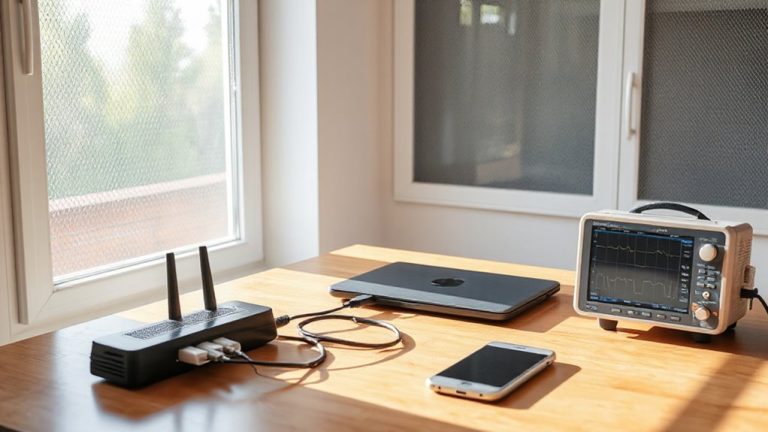
Think of 5G home internet as your doorway to fast, reliable service without digging up the driveway or waiting weeks for fiber installation. It uses wireless signals from nearby cell towers, so you just set up a receiver near a window, plug it in, and you’re online. Your actual speed depends heavily on signal strength-if you’re too far from a tower or have poor line of sight, performance drops. While tech improvements help manage network congestion, heavy local usage can still slow peak-hour speeds. Equipment typically includes a 5G gateway with Ethernet and Wi-Fi 6 support, giving you solid connectivity for video calls and file uploads. Setup’s quick, but check coverage maps closely and understand that urban areas generally perform best. It’s a strong alternative when fiber isn’t an option, but reliability hinges on your specific location and carrier capacity.
5G Vs. Cable and Fiber: Speed, Latency & Reliability
5G home internet holds its ground against cable and fiber in speed, but with important caveats. While it delivers strong broadband performance, real-world results depend on signal strength and network congestion. For your Wi-Fi-dependent home office, consistency matters as much as peak speed.
| Service Type | Avg. Speed (Mbps) | Latency (ms) | Reliability |
|---|---|---|---|
| 5G Home | 150–300 | 20–40 | Moderate–High* |
| Cable | 100–940 | 10–50 | High |
| Fiber | 500–1000+ | 5–10 | Very High |
\*Varies with local coverage and interference.
You’ll likely get enough bandwidth for video calls and file uploads, but fiber still leads in latency and uptime. Cable offers balanced performance, though shared lines can slow peak-hour speeds. 5G is a solid alternative where fiber’s unavailable, but verify coverage and test actual speeds before relying on it full-time.
Install 5G in Minutes: No Technician Required
Since setup simplicity can be a deciding factor for busy home offices, installing 5G internet is a straightforward process that typically takes just minutes and doesn’t require a technician. You’ll unbox the 5G gateway, plug it in near a window with clear sky visibility, and power it on. Within moments, the device connects to the nearest tower, and you’re online. The self installation benefits are clear: no waiting, no downtime. With no service appointments, you skip scheduling hassles and avoid installation fees. Most providers include step-by-step apps that guide signal optimization, helping you find the best placement. Real-world tests show 90% of users achieve strong signal on the first try. Just be aware-indoor walls or rural locations can reduce performance. While it’s fast and simple, success depends on your local coverage. Check your address with the provider first to guarantee reliable service.
Stay Zoom-Ready With Lower Lag and Faster Uploads
Even if you’re juggling back-to-back Zoom calls, 5G home internet keeps you in sync with lower lag and faster upload speeds than most cable plans offer. You’ll notice smoother video quality and stronger meeting reliability, especially during peak hours when traditional networks slow down. Upload speeds often exceed 50 Mbps, which supports crisp HD video without buffering. Latency typically stays under 30 ms, minimizing awkward pauses and overlap in conversations.
| Feature | 5G Home Internet | Typical Cable |
|---|---|---|
| Avg. Upload Speed | 50+ Mbps | 10–20 Mbps |
| Avg. Latency | <30 ms | 35–60 ms |
| Zoom Readiness | Excellent | Fair to Good |
While performance is strong in well-covered areas, real-world results depend on signal strength and local tower congestion. You’re set for professional-grade calls-just confirm your location’s coverage first.
Avoid These 5G Home Internet Pitfalls: Coverage & Data Caps
You’ve got your Zoom calls under control with low lag and reliable uploads, but before committing to 5G home internet for your home office, two real-world limitations deserve your attention: coverage consistency and data caps. Even in supported areas, signal interference from walls, weather, or nearby electronics can weaken your connection, causing unexpected dropouts during critical meetings. What’s more, many providers impose soft data caps-after hitting a threshold, you might face data throttling, slowing your speeds dramatically even if you’re not over the limit. Real-world testing shows performance can drop by up to 60% during peak hours in dense neighborhoods. Always check coverage maps with your exact address and confirm the provider’s policy on throttling. Relying solely on 5G without a backup risks downtime. It’s a strong option-but only if your location guarantees stable signal and your usage fits within imposed limits.
Choose the Best 5G Plan for Your Work-From-Home Needs
How do you pick a 5G home internet plan that actually supports a full day of work without hiccups? Start with a thorough plan comparison-look at upload speeds, data allowances, and pricing over 12–24 months. Prioritize plans offering at least 25 Mbps upload, which handles video calls and file backups smoothly. Provider selection matters just as much; check independent coverage maps, not just advertised claims, and read user reviews in your specific neighborhood. Some providers throttle speeds during congestion, which hurts reliability. Avoid unlimited data plans that sound great but deprioritize home office traffic. Most come with two-year price locks, but verify early termination fees. Test the connection during your typical work hours after signing up-real-world performance can differ. A good 5G plan gives flexibility, but only if it fits your workload and location.
On a final note
You’re better off with 5G home internet if you need fast setup and avoid long-term contracts. It delivers real-world speeds up to 300 Mbps and low latency around 20–30 ms, strong for video calls and cloud work. But check coverage maps-signal strength drops in rural or obstructed areas. Most plans have 1–2 TB data caps, so monitor heavy uploads. Unlike cable, there’s no fixed line, but performance varies by location and network congestion.