Combining Surge Protection With Cable Management Trays for Efficiency
You get a cleaner desk and better protection when you combine surge suppression with cable trays-just make sure the model has at least 1,000 joules and a clamping voltage under 400V. Built-in MOVs stop surges in nanoseconds, while organized channels reduce tripping hazards and signal loss. Avoid overloading by keeping capacity under 50% and always verify proper grounding. Wall mounting improves airflow and access. Units with UL 1449 certification and multi-year warranties back their promises-smart features like USB-C hubs or power monitoring add value, but check joule ratings and exclusions carefully. There’s more to optimizing your setup than just picking the right tray.
Notable Insights
- Combines surge protection and cable organization to reduce clutter and enhance power stability.
- Uses MOVs to block surges instantly, with at least 1,000 joules and under 400V clamping for optimal safety.
- Features built-in cable channels and clips for clean routing of power and data cords.
- Install under or behind work surfaces with proper ventilation and accessible plug access.
- Avoid overloading; follow 50% fill rule and verify grounding to maintain performance and warranty.
Why Surge Protection and Cable Management Work Best Together
Smart setups start with smart foundations-so if you’re running computers, monitors, or networking gear, pairing surge protection with cable management trays isn’t just convenient, it’s a practical safeguard. You gain better cable organization and improved power stability, two essentials for reliable performance. Tangled cords lead to tripped connections; unstable power risks data loss. Together, these systems reduce clutter while guarding against surges that standard power strips might miss. Look for trays with built-in surge protectors rated at least 1,000 joules and low clamping voltage (under 400V). Steel trays offer durability, but plastic ones work fine for light-duty setups. Just remember-no tray fixes poor wiring or replaces whole-house surge protection. Use these units as part of a broader strategy, not a standalone fix. Real-world testing shows fewer dropouts and neater desks, but they won’t stop lightning strikes. Balance benefits with realistic expectations. For optimal performance, consider models featured in expert-recommended top picks lists to ensure reliable protection and functionality.
How Surge-Integrated Trays Stop Tangles and Power Spikes
While they won’t replace a full home surge system, surge-integrated cable trays do tackle two common workspace headaches at once: messy cords and sudden voltage spikes. You get organized routing and real-time protection in one compact setup. These trays reduce cable chaos with built-in channels and clips, keeping power strips, USB hubs, and device cords neatly aligned. Inside, metal oxide varistors (MOVs) respond in nanoseconds to absorb damaging power surges, typically rated between 600–1,000 joules. That’s enough for minor electrical spikes from appliances or distant lightning. Units often include status LEDs and 3- to 5-year warranties. Just remember: they can’t handle direct lightning strikes or whole-house surges. For heavy office gear like desktops or AV systems, you’ll still need dedicated suppressors. But for desks with monitors, lamps, and chargers, surge-integrated trays offer solid, space-saving defense without overkill. For optimal results, choose models with a high joule rating to ensure longer-lasting protection against cumulative surges.
Where to Install These Systems for Maximum Protection
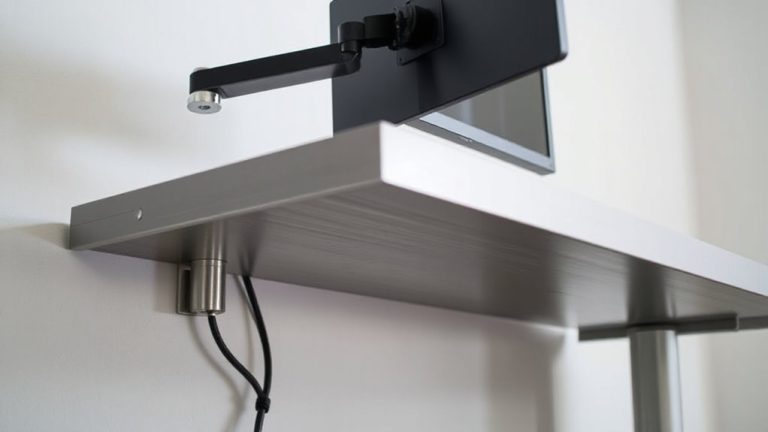
You’ll get the most out of surge-integrated cable trays by installing them right at your primary work surface-think under or behind a desk where your monitor, laptop charger, and lamp plug in. Your placement strategy should prioritize easy access and short cable runs to reduce clutter and response lag during surges. Focus location planning around outlets near high-use devices, but avoid cramped spots that hinder ventilation or plug removal. Mounting under desks works well for most, but wall mounting offers cleaner sightlines and better weight distribution. Just make sure the tray’s weight rating exceeds your cable load. Units with modular clips let you adjust layouts as gear changes. While these trays simplify management and add protection, they’re only as strong as their joule rating-look for at least 1,000 joules for reliable defense. Placement isn’t one-size-fits-all, so measure space and usage first. For optimal performance, choose models tested and rated by independent labs as part of the best office power strips roundup.
5 Common Installation Mistakes (And How to Avoid Them)
If you skip planning for cable load and surge specs, even a well-placed tray won’t deliver reliable protection or clean management. Improper grounding and loose connections are top pitfalls-you risk system failure or fire. Secure all grounding paths to manufacturer standards and double-check terminal tightness after initial setup.
| Mistake | Risk | Fix |
|---|---|---|
| Improper grounding | Surge damage, equipment failure | Use dedicated ground rod, verify continuity |
| Loose connections | Overheating, signal loss | Torque terminals to spec, inspect annually |
| Overloading tray | Poor airflow, fire hazard | Follow fill capacity (usually 50% of width) |
Always match your surge-integrated tray’s joule rating and clamping voltage to your office gear’s sensitivity. Don’t assume one-size-fits-all. Test the system under load, and keep documentation for warranty claims-many failures stem from overlooked installation details, not product flaws.
Must-Have Features in Surge-Integrated Cable Trays
You need a surge-integrated cable tray that does more than just hold wires-it should actively protect sensitive office gear without complicating installation. Look for a modular design so you can scale the system across workstations or compact home offices; it lets you add sections or reconfigure quickly without tools. Real time monitoring is key-models with LED status indicators or network-connected alerts show surge events instantly, so you know when protection kicks in. Units tested to UL 1449 standards with at least 600 joules offer reliable defense against spikes. But don’t assume all trays handle heavy-duty loads; check per-segment amperage ratings. Some modular systems sacrifice shielding quality for flexibility, so verify EMI ratings. Warranties covering connected equipment up to $50,000 add peace of mind, but read exclusions carefully.
From Basic to Smart: Upgrading Your Cable Tray System
One solid upgrade path for any workspace starts with swapping basic cable trays for smart models that combine power management and real-time monitoring. These systems enhance cable aesthetics by neatly routing wires while integrating surge protection to guard connected devices. You’ll also gain airflow optimization-open designs prevent heat buildup around cables, improving hardware longevity. Smart trays often include USB-C hubs, power meters, and app-based usage tracking, giving you real control. But they cost more, typically $120–$200, versus $40–$60 for basic versions. Installation is straightforward but may require wall anchoring for stability. Look for models with at least a 5-year warranty and UL certification for safety. While not essential for every setup, they’re worth it if you run multiple devices or need cleaner power delivery. Just don’t expect miracles-smart trays won’t fix poor room layout or overloaded circuits.
On a final note
You should combine surge protection with cable management trays-it boosts efficiency and safeguards devices. Units with 900+ joules and UL 1449 certification reliably stop spikes while keeping cords organized. But confirm amperage ratings match your load, and avoid daisy-chaining. Proper grounding is non-negotiable. These systems save space and reduce fire risk, yet cost 20–30% more than basic trays. Installation demands precise bracket spacing (16” on-center) to support weight.