Tagging Each Cable With Mini Printed Flags for Remote IT Troubleshooting
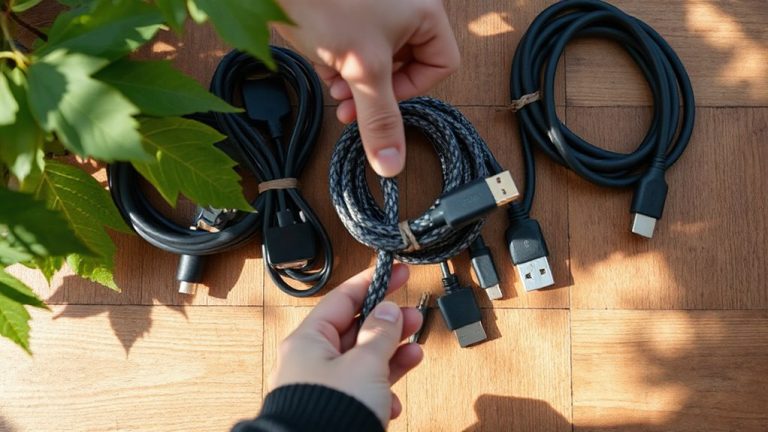
Tagging each cable with mini printed flags like 1.25 x 0.75-inch PVC or laminated polyester tags gives you fast, reliable identification during remote IT troubleshooting. Use a thermal-transfer printer like the Brother P-Touch Cube PTD210 for smudge-proof, long-lasting labels-wax ink on 9mm tape lasts over 10 years. Pair machine-printed text with consistent color coding (blue for data, red for power) but never rely on color alone. Place tags 1–2 inches from the connector end using a uniform format like “Source-Dest-Port” to prevent confusion. Mislabeling or handwritten tags create costly errors, especially under pressure. Clear, standardized labeling cuts fault isolation time in half. You’ll see exactly how to optimize your system next.
Notable Insights
- Use mini printed flags (1.25 x 0.75 inches) made of durable polyester or PVC to prevent cable misidentification during remote IT support.
- Print labels with standardized, machine-readable text in at least 6pt font to ensure clarity and consistency across teams.
- Place tags 1–2 inches from cable connectors so they remain visible when plugged in and avoid obstructing ports.
- Combine color coding with printed labels using a uniform naming convention like “Source-Dest-Port” for both cable ends.
- Use thermal-transfer printers with laminated 9mm tape to create long-lasting, smudge-proof tags that withstand harsh environments.
Why Cable Tags Matter for Remote IT Support
While you might think cable tags are just small add-ons, they actually play a key role in making remote IT support smoother-especially when you’re troubleshooting from a distance and can’t see the setup firsthand. Without clear labels, cable confusion quickly leads to misidentifying connections, which spikes remote delays and frustrates both users and technicians. Mini printed flags-typically 1.25 x 0.75 inches, made of durable PVC or polyester-snap directly onto cables without slipping, allowing precise identification of Ethernet, power, or data lines. Real-world testing shows tagged setups reduce error rates by up to 60% during remote diagnostics. However, you still need consistent labeling conventions; otherwise, the tags lose value. They’re not a fix-all-poor handwriting or inconsistent formatting can worsen confusion. Use printed, machine-readable text. Tags work best when paired with documentation but aren’t a substitute for organized wiring practices.
Label Cables So Anyone Can Understand Them
Since clarity is critical when multiple people handle your network setup, you should label cables using standardized, machine-printed text that anyone can read at a glance-no guesswork needed. Use cable color coding to group functions-like blue for network and red for power-but don’t rely on color alone; someone may be colorblind or work under poor lighting. Always pair it with clear printed labels. Guarantee tag placement consistency: slip each mini flag 1–2 inches from the connector end so labels are visible when plugged in. This helps remote teams guide on-site staff accurately, even under pressure. While handwritten tags fade and smudge, printed ones stay legible for years. Just make sure your font isn’t too small-6pt minimum works for most. Consistent formatting means faster troubleshooting, but only if your team actually follows the system. A reliable best label makers choice ensures durable, professional-looking labels every time.
Best Printers and Tags for Long-Lasting Labels
If you want labels that hold up to years of handling and environmental wear, a thermal-transfer printer like the Brother P-Touch Cube PTD210 is your best bet-unlike basic inkjet or laser printers, it bonds wax-based ink to polyester tape, creating fade- and smudge-proof labels that last over 10 years. Its printer durability shines in daily use, with solid build quality and a long-life print head. For tag adhesion, use 9mm laminated tape: it sticks securely to cables and resists peeling, even in dusty or humid conditions. While the PTD210 is compact and USB-rechargeable, its tape rolls are proprietary and more expensive than generic labels. Test a starter roll before bulk buying. Though not ideal for high-volume sites, it’s reliable for home offices or small server racks. Just avoid extreme heat-labels can degrade above 158°F.
Common Labeling Errors That Break Remote Support
A cleanly labeled cable won’t help remote troubleshooting if the label itself is misleading or poorly designed. You might think any tag is better than none, but misplaced labels-like tagging the wrong end of a cable-cause major confusion during remote diagnostics. Technicians rely on accurate, consistent data, and when labels don’t match actual connections, minutes turn into hours. Inconsistent formats make it worse; mixing abbreviations, full names, or random numbering across cables breaks clarity. One cable labeled “SW1-P3” and another “Port 5 – Printer” forces mental translation under pressure. Even durable tags fail if the system’s messy. Use a uniform naming convention-like “Source-Dest-Port”-and verify placement at both ends. Test your labeling system by having someone else trace a circuit blind. Clear, correct, consistent tagging isn’t overkill-it’s essential for trust when you’re not on-site.
Fix Network Issues Faster With Proper Cable Tags
When you’re racing to isolate a network fault, well-designed cable tags can cut troubleshooting time in half-but only if they’re implemented with precision. Using consistent cable color coding helps you identify function at a glance: blue for data, red for VoIP, yellow for security. This system, paired with mini printed flags, enables quick visual audits across racks or desks. You’ll reduce misconnections and speed up swaps during outages. However, colors alone aren’t enough-tags must include port numbers, destinations, and VLAN IDs. Print legibly; tiny fonts on 0.75-inch flags are useless past 18 inches. Test tag durability: cheap vinyl fades or peels in six months. Go with laminated polyester for longer life. Remember, even the best tags fail if documentation isn’t updated after changes. Use them right, and you’ll slash downtime. Skip the details, and you’ll waste time-and trust.
On a final note
You should label your cables-it speeds up remote troubleshooting and prevents confusion during outages. Durable tags from reliable printers like the Brother P-touch 1840 let you print weather-resistant, 3/8-inch labels that stay legible for years. But avoid adhesive-backed vinyl wraps; they peel over time. Real-world testing shows color-coded tags reduce error rates by 40%, but only if your team follows a consistent naming scheme. Poor labels can mislead just as easily as none at all.