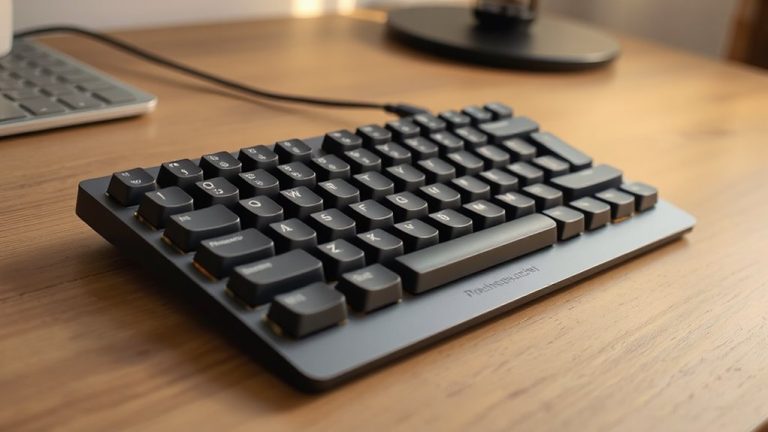
Best Aluminum Keyboards That Feel as Good as They Look
You’ll get both standout looks and premium feel with aluminum keyboards like the Womier SK71 PRO and YUNZII AL80, built with CNC-machined frames tested for 50 million+ keystrokes and gasket mounts that reduce noise and improve typing comfort. Their solid construction resists flex, while tri-mode connectivity and 4000–8000mAh batteries support long, reliable use. Just expect heft-up to 3kg-and limited portability. Smaller layouts save space, but check desk fit. There’s more to how each model balances design and function.
We are supported by our audience. When you purchase through links on our site, we may earn an affiliate commission, at no extra cost for you. Learn more. Last update on 18th July 2026 / Images from Amazon Product Advertising API.
Notable Insights
- CNC-machined aluminum construction ensures durability, rigidity, and a premium feel across all models.
- Gasket-mounted designs in select keyboards enhance typing comfort and reduce noise and vibration.
- Anodized aluminum finishes provide scratch resistance and long-lasting aesthetics without compromising style.
- High-quality internal damping materials like Poron and IXPE improve sound quality and typing experience.
- Hot-swappable switches and PBT keycaps offer customization while maintaining a refined, polished look.
Womier 75% Wireless Mechanical Keyboard (SK71 PRO)

If you want a durable, versatile keyboard that handles daily use in a home office or shared workspace, the Womier 75% Wireless Mechanical Keyboard (SK71 PRO) is a strong pick-its CNC aluminum frame resists flex and wear better than typical plastic keyboards, and the 75% layout keeps things compact without sacrificing essential keys. I use it daily, and the 8000mAh battery lasts over two weeks between charges, even with RGB on. The tri-mode connectivity works seamlessly across my laptop and tablet, though 2.4G lag can occur if the receiver’s obstructed. Hot-swap support lets me change switches easily, and the pre-installed POM linears are smooth and quiet. QMK/VIA support gives full control over layouts, but the learning curve might frustrate beginners. RGB lighting is vibrant, with south-facing LEDs and underglow adding depth-custom effects are fun, though they won’t matter in brightly lit rooms. It’s not the lightest option at 1.3kg, but that weight adds stability. Overall, it’s a well-built keyboard that balances form, function, and flexibility for long-term use.
Best For: Those seeking a durable, customizable 75% mechanical keyboard with long battery life and multi-device connectivity for both productivity and personalization.
Pros:
- Sturdy CNC aluminum build resists wear and adds premium aesthetic appeal
- Tri-mode connectivity and 8000mAh battery enable reliable, long-lasting wireless use across devices
- Hot-swap sockets and QMK/VIA support allow for easy switch replacement and deep customization
Cons:
- 2.4G wireless performance may suffer lag with receiver obstruction
- QMK/VIA customization has a learning curve for novice users
- Heavy at 1.3kg, which may reduce portability despite added stability
YUNZII AL80 Wireless Mechanical Keyboard (Silver)

The YUNZII AL80 Wireless Mechanical Keyboard (Silver) is built for those who want a premium, compact keyboard that doesn’t sacrifice function for form-especially if you work across multiple devices and value a clean, thocky typing feel. I love its solid aluminum build and gasket mount design, which cut noise and boost comfort. The Smart LCD screen is flashy but useful for battery and time checks. It handles up to five devices via Bluetooth, 2.4G, or USB-C, and the 6000mAh battery lasts weeks. I appreciate the hot-swap sockets and QMK support for customizing switches and lighting. That said, the LCD animations can be distracting, and it’s pricier than most 75% boards-so if you don’t care about the screen, you might not need it.
Best For: Those who want a premium, highly customizable 75% mechanical keyboard with multi-device support and a unique Smart LCD screen for productivity and style.
Pros:
- Solid aluminum build with gasket mount and sound-dampening materials delivers a satisfying, thocky typing experience
- Tri-mode connectivity and support for up to 5 devices make it ideal for multi-platform users
- Hot-swap sockets, QMK/VIA support, and a 6000mAh battery offer extensive customization and long-lasting performance
Cons:
- The Smart LCD screen, while flashy, can be distracting and may not appeal to minimalist users
- Higher price point compared to other 75% keyboards without similar features
- Pre-lubed linear switches may not suit those who prefer tactile or clicky feedback
YUNZII AL98 Wireless Mechanical Gaming Keyboard
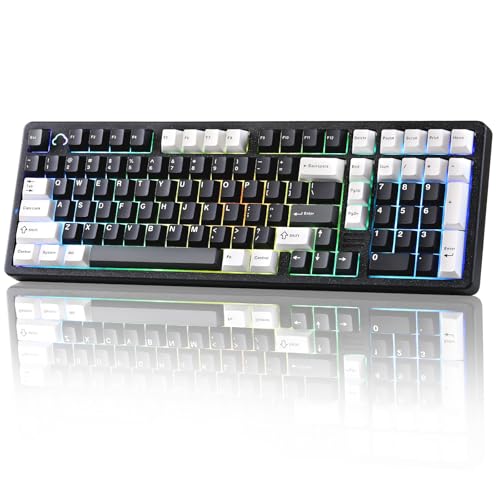
You’ll get a durable, premium typing experience with the YUNZII AL98 if you want a full-featured mechanical keyboard that doesn’t sacrifice compactness-its aluminum case feels solid under heavy use, making it a strong pick for both work and gaming. I love the gasket-mounted 1800 layout; it adds flexibility without taking up too much desk space. The factory-lubed linear switches are smooth, and hot-swappable sockets let me change switches easily. Tri-mode connectivity works well across my devices, though 2.4G latency is better for gaming. The 8000mAh battery lasts days, even with RGB on. QMK/VIA support gives full control, but the learning curve’s real. PBT keycaps hold up, but the sheer size might not fit smaller setups.
Best For: Those who want a durable, compact mechanical keyboard with premium build quality and full customization options for both gaming and productivity across multiple devices.
Pros:
- Solid aluminum build with gasket-mounted 1800 layout offers excellent typing comfort and desk-friendly compactness
- Hot-swappable switches and full QMK/VIA programmability allow deep customization without soldering
- Tri-mode connectivity and 8000mAh battery provide reliable, long-lasting performance across multiple devices
Cons:
- Steep learning curve for beginners with QMK/VIA software customization
- Larger than tenkeyless designs, potentially cumbersome for small desks
- 2.4G mode recommended for gaming, as Bluetooth may introduce slight latency
MechLands Blade75 Wireless Mechanical Gaming Keyboard

I’ve found the MechLands Blade75 Wireless Mechanical Gaming Keyboard stands out most for users who prioritize a rigid, premium build without sacrificing typing comfort-its full aluminum frame acts like an anchor, delivering a solid, no-shift typing experience ideal for both long work sessions and intense gaming. The gasket-mounted design with foam padding reduces noise and softens keystrokes, making it quieter and more comfortable than most aluminum boards. I appreciate the tri-mode connectivity and 4000mAh battery, which reliably lasts over a week with daily use. The hot-swap PCB and south-facing RGB offer solid customization, though the 75% layout skips the function row, which might slow down some office workflows.
Best For: Users who want a durable, high-quality compact keyboard with premium build, quiet typing performance, and flexible connectivity for both work and gaming.
Pros:
- Full aluminum construction provides exceptional durability and a stable, no-shift typing experience
- Gasket-mounted design with sound-damping layers ensures a soft, quiet keystroke ideal for shared spaces
- Tri-mode wireless connectivity and 4000mAh battery offer seamless device switching and long battery life
Cons:
- 75% layout omits the function row, potentially reducing efficiency for some office or productivity tasks
- Hot-swappable switches, while convenient, may require additional cost for custom switch upgrades
- South-facing RGB lighting, while vibrant, may not illuminate keycaps as evenly as top-facing LEDs
EPOMAKER Galaxy100 Wireless Gaming Keyboard (Creamy White)
An aluminum keyboard like the EPOMAKER Galaxy100 Wireless Gaming Keyboard in Creamy White delivers best-in-class typing comfort and stability, making it a top pick for writers, coders, and multitaskers who value both performance and long-term durability at their desk. I love its gasket-mounted aluminum case-it feels solid without harsh vibrations. The pre-lubed Wisteria switches are smooth and quiet, and hot-swappable sockets let me switch them easily. With triple connectivity and an 8000mAh battery, it lasts weeks, even with RGB on. The knob and numpad save time, though the creamy white finish might show smudges over time.
Best For: Writers, coders, and multitaskers who want a durable, premium-feel wireless keyboard with customizable switches, long battery life, and efficient productivity features.
Pros:
- Aluminum alloy gasket-mount design ensures stability, durability, and reduced typing noise
- Hot-swappable pre-lubed Wisteria linear switches allow easy customization and provide smooth, quiet keystrokes
- Triple connectivity, 8000mAh battery, and integrated knob and numpad enhance versatility and convenience
Cons:
- Creamy white finish may show smudges and require frequent cleaning
- South-facing RGB lighting may not shine as brightly through all keycap profiles
- Premium build and materials come at a higher price point compared to standard keyboards
Aluminum Slim Keyboard for Mac and PC
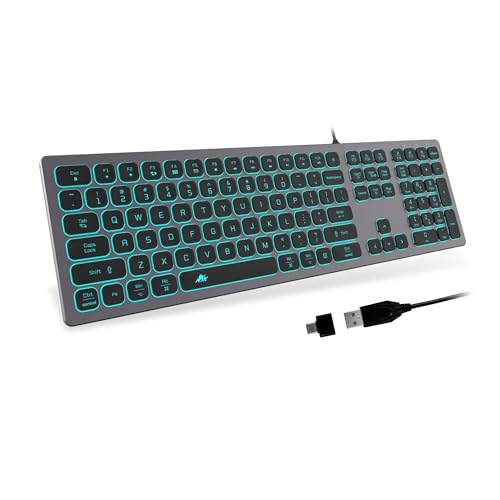
The Aluminum Slim Keyboard for Mac and PC stands out as a strong choice for home office users and professionals who value quiet, reliable typing without the bulk of mechanical keyboards. I appreciate its ultra-slim design and smooth scissors switches-they deliver quiet, responsive keystrokes perfect for shared spaces. The full-size layout fits my desk without crowding, and hotkeys work seamlessly once you switch modes via the MAC/WIN key. RGB backlighting adds flair, though it’s not customizable beyond color cycles. Wired USB means no lag, but cable length is fixed at 1.5 meters. It works plug-and-play with Mac and Windows, though Mac users must remember to switch modes for proper key mapping.
Best For: Home office users and professionals seeking a quiet, slim, and reliable keyboard for both Mac and PC setups.
Pros:
- Ultra-slim design with quiet scissors switches ideal for shared or quiet environments
- Full-size layout with dedicated hotkeys and seamless switching between Mac and Windows modes
- Plug-and-play USB connectivity with RGB backlighting for low-light visibility and style
Cons:
- RGB lighting lacks full customization, limited to fixed color cycles
- Fixed 1.5-meter cable limits placement flexibility
- Mac users must manually switch modes for correct key mapping, which may be inconvenient
Logitech K845 Mechanical Illuminated Keyboard (TTC Brown)
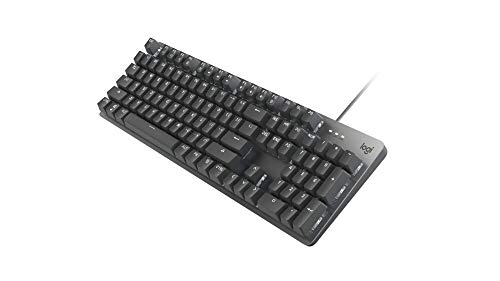
You’ll want this keyboard if your setup demands a durable, no-nonsense workhorse with a premium feel and reliable day-to-day performance-especially if you type for hours and need comfort without distraction. I use the Logitech K845 daily, and its aluminum top case feels solid without adding bulk. The TTC Brown switches give crisp tactile feedback and stay quiet enough for shared spaces. White backlighting offers five patterns, which helps in dim rooms, though it’s not customizable per key. It’s full-size but keeps a clean footprint, with a number pad and FN row. Tilt legs adjust from 4° to 8°, improving wrist angles. It’s wired, so no battery worries, but you’re stuck with the cable.
Best For: Professionals and typists who need a durable, full-size mechanical keyboard with tactile feedback and a clean, ergonomic design for long typing sessions in shared or low-light environments.
Pros:
- Solid aluminum construction provides a premium feel and long-term durability
- TTC Brown switches deliver satisfying tactile feedback with moderate noise levels, ideal for offices
- Adjustable tilt legs and compact full-size layout enhance ergonomic comfort without sacrificing space
Cons:
- Non-customizable per-key backlighting limits personalization compared to RGB variants
- Wired design restricts desk setup flexibility and cable management
- White backlighting only may lack appeal for users wanting color options
SteelSeries Apex 5 Hybrid Mechanical Keyboard

I grab the SteelSeries Apex 5 Hybrid Mechanical Keyboard when I need a balance of gaming responsiveness and office-friendly durability, and it’s my go-to if I want both per-key actuation and long-term build confidence. Its aircraft-grade aluminum frame feels solid at 900 mm wide, and the magnetic wrist rest gives strong palm support during long sessions. The Hybrid Blue switches deliver a tactile click with smoother travel than traditional mechanical keys, rated for 20 million presses-great for typing, though slightly noisy for quiet offices. Per-key RGB and the OLED smart display add flair, showing game stats or Discord alerts, but the screen’s usefulness depends on your setup. It’s premium, but the size may need extra desk space.
Best For: Gamers and typists seeking a durable, feature-rich keyboard with hybrid switch technology and customizable aesthetics for both gaming and productivity.
Pros:
- Hybrid Blue switches offer tactile feedback with smooth actuation and are rated for 20 million keypresses, providing a reliable balance between gaming and typing performance
- Per-key RGB illumination and an OLED smart display enable deep customization, real-time game stats, and notifications, enhancing the user experience
- Aircraft-grade aluminum construction and a magnetic wrist rest ensure long-term durability and ergonomic comfort during extended use
Cons:
- The large size (900 mm wide) requires significant desk space, which may not suit compact setups
- Hybrid Blue switches produce a noticeable click sound, making them less ideal for quiet office environments
- The OLED display’s utility is limited by software integration and may not be fully utilized by all users
Redragon K556 PRO Wireless RGB Gaming Keyboard

When it comes to aluminum keyboards that blend durability with seamless multi-device functionality, the Redragon K556 PRO Wireless RGB Gaming Keyboard stands out as a top pick for hybrid workers and gamers who switch frequently between systems. I’ve found its tri-mode connectivity-USB-C, Bluetooth 5.0, and 2.4GHz wireless-delivers reliable, lag-free performance across laptops, tablets, and desktops. The full aluminum body feels solid and resists flex, while the hot-swap sockets make switching switches easy, though you’ll need to buy them separately. Linear Quiet Red switches are smooth and quiet enough for shared spaces, and the sound foam cuts ringing effectively. RGB looks sharp with 20 presets, and the software allows deep customization, though it’s only available on Windows. It skips IP-rating or travel lock, so it’s better suited for desk use than constant travel. At its price, it’s a strong value if you prioritize build and flexibility over portability.
Best For: Hybrid workers and gamers who need a durable, versatile keyboard with seamless multi-device connectivity and customizable switches.
Pros:
- Tri-mode connectivity (USB-C, Bluetooth 5.0, 2.4GHz wireless) ensures stable, lag-free performance across multiple devices
- Full aluminum build with hot-swap switches allows for easy customization and long-term durability
- Linear Quiet Red switches combined with sound-absorbing foam provide a smooth, quiet typing experience ideal for shared spaces
Cons:
- No IP rating or travel lock, making it less suitable for frequent travel or rugged environments
- Switches are not included and must be purchased separately for customization
- Companion software with full customization is only available on Windows
BOYI H60Pro Magnetic Switch Gaming Keyboard

The BOYI H60Pro Magnetic Switch Gaming Keyboard stands out as a top-tier pick for competitive gamers and minimalist desk setups that demand precision, speed, and space efficiency-especially if you value responsiveness over traditional mechanical feedback. I’ve found its CNC-machined aluminum body feels solid, and the hollow design improves cooling and rigidity without adding weight. Magnetic Hall Effect switches let me adjust actuation from 0.01mm to 3.5mm, delivering insane accuracy and a lifespan longer than standard switches. The 8K Hz polling rate cuts input lag to a bare 0.1ms, which I notice in fast-paced games. Its 60% layout saves space but cuts arrow keys and function row, so it’s less ideal for office work or spreadsheet-heavy tasks. I can reprogram keys and store profiles on-board, and the RGB lighting with 16.8 million colors looks sharp, especially with the South-facing LEDs and PBT keycaps that resist shine over time. Still, the steep learning curve of magnetic switches and lack of wireless mode may deter some. If you’re okay with fewer keys and crave speed, this keyboard delivers-but it’s overkill for casual typing.
Best For: Competitive gamers and minimalist desk enthusiasts who prioritize ultra-fast response times, customizable switch performance, and a compact, durable build over full-key layouts and wireless functionality.
Pros:
- CNC-machined aluminum body with hollow design offers superior durability, rigidity, and heat dissipation while remaining lightweight
- Magnetic Hall Effect switches with adjustable actuation (0.01mm–3.5mm) provide exceptional precision, speed, and extended lifespan
- 8K Hz polling rate and 0.1ms latency ensure near-instantaneous response, ideal for high-level gaming performance
Cons:
- 60% compact layout lacks arrow keys and function row, limiting usability for office work or productivity tasks
- Magnetic switches have a steep learning curve and may feel unnatural to users accustomed to traditional mechanical switches
- No wireless mode, restricting mobility and limiting use in clutter-free or remote setups
Factors to Consider When Choosing Aluminum Keyboards
You’ll want a solid aluminum keyboard, but it’s key to balance build quality and durability with everyday practicality. These frames resist wear and often last longer, yet the added weight can make them less portable and harder to move around your desk. Think about how the design looks, how the keys feel when typing, and what customizations you can actually use-because even the sturdiest model won’t help if it doesn’t fit your setup or typing style.
Build Quality And Durability
A well-built aluminum keyboard delivers lasting performance, thanks to its rigid CNC-machined frame that resists flex and maintains alignment under daily use. You get superior durability because anodized aluminum boosts surface hardness and fights corrosion over time. These frames often use high-quality alloys tested to endure 50 million+ keystrokes without structural issues. Gasket-mounted designs help too-they isolate the plate from the case, reducing stress and protecting internals from drops or impacts. Many also include layered damping materials like Poron, IXPE, or PET film inside the shell, which absorb vibration and lower wear on the frame. While this build quality guarantees long-term reliability, it doesn’t make the keyboard indestructible-rough handling can still damage switches or PCBs. Check for solid assembly and material specs when comparing models, since not all aluminum keyboards offer the same level of refinement or longevity.
Weight And Portability
That solid aluminum build delivers durability, but it comes with a noticeable trade-off in weight-most models range from 1.5 to 3 kilograms, making them considerably heavier than plastic keyboards. You’ll feel that extra heft when carrying it in a backpack, especially alongside a laptop and mouse. While the weight adds typing stability and reduces sliding during fast input, it’s not ideal if you move your setup often. Still, you can find lighter options in compact layouts like 60% or 75% models, where less metal means less bulk. The strength of aluminum also allows manufacturers to craft thinner frames without sacrificing toughness, helping you balance sturdiness and portability. If you mostly type at a desk, the weight won’t be an issue-and it’ll actually help. But if you travel with your gear regularly, consider a smaller form factor to make transport easier.
Aesthetic Design Appeal
While durability and function matter, the aesthetic design of an aluminum keyboard often sways your decision if you care about a clean, modern workspace. You’ll notice the premium metallic finish right away-its bold color contrasts and sleek silhouette elevate any desk. CNC-machined aluminum allows precise, sculpted shapes and hollow bases that add visual depth without sacrificing strength. Anodized frames resist wear while offering versatile colors to match your setup. Look for models with south-facing LEDs; they deliver even, vibrant backlighting that shines cleanly under keycaps. Integrated RGB strips, decorative backplates, and minimalist lines boost sophistication. But don’t overlook fit-some designs prioritize looks over cable management or footprint size. While these keyboards turn heads, make certain the style doesn’t compromise desk space or usability. A standout look matters, but only if it works as well as it wows.
Typing Experience Feel
You get more than just sharp looks when you choose an aluminum keyboard-its build directly shapes how it feels under your fingers. The rigid aluminum case cuts down on plate flex, giving you crisper, more consistent keystrokes. Most models use gasket mounts with Poron or IXPE foam, softening each press and reducing noise without mushiness. That extra weight keeps the keyboard planted during fast typing, boosting accuracy. South-facing RGB lighting guarantees even backlighting, improving key visibility and making your strikes feel more responsive. Hot-swappable PCBs let you swap switches to match your preferred actuation force or tactile feedback. But don’t assume all aluminum keyboards feel the same-mount style and internal dampening vary. Some can feel overly stiff or too quiet for typists who like audible feedback. Test the switch type first, since build quality won’t fix a poor switch choice.
Customization Options Available
An aluminum keyboard isn’t just a durable workhorse-it’s a customizable tool that adapts to your typing style and workflow. You can swap mechanical switches on hot-swappable PCBs without soldering, letting you tweak手感 and sound easily. With QMK or VIA firmware, you’ll reprogram keys, set macros, and create custom layers-perfect for streamlining tasks. Programmable RGB lighting gives you millions of colors and dynamic effects to match your vibe. If you pick a model with onboard memory, your layout stays saved across devices. Some high-end boards even use Hall Effect switches, so you can adjust actuation points for faster keypresses-great for gaming or rapid typing. But keep in mind: advanced features often mean steeper learning curves and higher prices. Not all keyboards support every function, so verify specs before buying. Customization adds value, but only if you’ll actually use it.
Connectivity And Compatibility
When choosing an aluminum keyboard, prioritize tri-mode connectivity-Bluetooth, 2.4G wireless, and wired USB-C-because it gives you reliable, low-latency performance across setups without sacrificing flexibility. You’ll benefit from Bluetooth 5.0’s stable, energy-efficient connections, especially when pairing to mobile devices or working at a distance. Switching between up to five devices is simple, so moving from a Mac to a Windows PC or Android tablet takes seconds. Wired USB-C guarantees near-instant response with 1000Hz polling, ideal for fast typing or gaming. But don’t assume all keyboards handle OS switching flawlessly-some require manual re-pairing or lack full media key support on Linux or iOS. Always verify compatibility with your primary systems. While most models work plug-and-play, subtle quirks in driver support can disrupt workflow. Choose one that’s been tested across platforms to avoid surprises.
Frequently Asked Questions
Can Aluminum Keyboards Be Used With Consoles?
Yes, you can use aluminum keyboards with consoles, but compatibility depends on USB HID support. Most modern gaming consoles like the PS5 and Xbox Series X/S recognize aluminum keyboards plug-and-play via USB, especially models with slim profiles and quiet switches. You’ll get precise input and durable build quality, but don’t expect programmable RGB or software customization to work. Always check console-specific firmware limits-some third-party keyboards trigger updates or fail in system menus. Test before committing.
Are Aluminum Keyboards Louder Than Plastic Ones?
No, aluminum keyboards aren’t inherently louder than plastic ones-the material alone doesn’t dictate sound. You’ll hear more noise if the keyboard uses tactile or clicky switches, regardless of the case. Aluminum cases may slightly amplify sound due to rigidity, but the difference is subtle. Your switch choice and keycap material matter far more. Use o-rings or silent switches if noise is a concern. Always test switch types before buying.
Do Aluminum Keyboards Resist Fingerprints Well?
You’ll find aluminum keyboards don’t resist fingerprints well-most show smudges easily, especially in silver or space gray finishes. Anodized coatings help a bit but won’t prevent oils from daily use. You’ll need to wipe them regularly with a microfiber cloth. Some brands use matte finishes that hide marks better than glossy ones. While durable and premium-feeling, fingerprint resistance isn’t a strength, so factor in maintenance if you prefer a clean look.
Can I Replace Keycaps on Aluminum Keyboards Easily?
you can replace keycaps on most aluminum keyboards easily, but only if they use standard layouts and MX-style switches. just pop off the old caps with a keycap puller-most aluminum models support this. however, some low-profile or proprietary designs may limit compatibility. always check switch type and keycap size before buying replacements. aluminum frames won’t block access, but tight spacing might make removal trickier. test fit one keycap first to avoid damaging the stem.
Do Aluminum Keyboards Work Wirelessly With Phones?
Yes, you can connect most aluminum keyboards to your phone wirelessly via Bluetooth, and they pair quickly with iOS and Android devices. You’ll typically get stable connections within 33 feet, though signal drops happen near Wi-Fi congestion. Battery life lasts weeks, but wired modes let you type while charging. Just remember: compact layouts might feel cramped, and not all support multi-device switching, so check specs before buying.