Best Chairs for Standing Desks That Support Long Work Hours
You’ll stay supported during long workdays with ergonomic drafting chairs like the Primy or ErGear models, which offer 8-inch height adjustments, breathable mesh, and lumbar support that aligns with your spine. Look for a stable base, 360° swivel, and a footring to reduce leg strain-especially at heights over 40 inches. Check weight limits; the BOLISS chair supports up to 400 lbs, while others cap at 250–300. Test seat firmness and gas lift smoothness, since long-term comfort depends on consistent cushioning and reliable mechanics-details that become clear only after hands-on use.
We are supported by our audience. When you purchase through links on our site, we may earn an affiliate commission, at no extra cost for you. Learn more. Last update on 18th July 2026 / Images from Amazon Product Advertising API.
Notable Insights
- Adjustable seat height with at least an 8-inch range ensures proper knee alignment and smooth sit-stand transitions.
- Ergonomic lumbar support that adjusts vertically helps maintain spinal alignment during extended sitting periods.
- Breathable mesh backrests and high-density foam cushions reduce heat buildup and prevent discomfort over long hours.
- Integrated, height-adjustable footrings promote circulation and reduce leg strain when used with elevated desks.
- Stable 360-degree swivel base with durable casters and a five-claw design ensures mobility and balance throughout the day.
Primy Drafting Chair with Lumbar Support

If you spend long hours switching between sitting and standing at your desk, the Primy Drafting Chair with Lumbar Support is one of the best chairs for standing desks-especially if you value ergonomic support and breathable comfort. I’ve found its adjustable height and 90-degree flip-up armrests make shifts smooth, while the round footring reduces leg strain. The lumbar support aligns well with your lower back, easing pressure during long sessions. Breathable mesh keeps you cool, and the 3-inch cushion stays comfy without flattening. It rolls quietly on casters and swivels effortlessly. The steel base feels stable, though it’s best on flat floors. It comes with a one-year warranty, and customer support responds quickly if something’s off.
Best For: People who frequently switch between sitting and standing at their desk and need a comfortable, supportive chair with breathable mesh and ergonomic features.
Pros:
- Adjustable height and flip-up armrests make transitions between sitting and standing smooth and convenient
- Excellent lumbar support and breathable mesh backrest enhance comfort and reduce back strain during long use
- Stable 5-claw base with smooth-rolling casters allows quiet mobility and steady performance on flat floors
Cons:
- Footring may feel too high or too low for some users depending on desk height
- Mesh seat, while breathable, may feel firmer than plush padded seats for those preferring softer cushioning
- Best suited for flat flooring-casters may not perform as well on uneven or carpeted surfaces
Tall Drafting Chair with Footrest and Lumbar Support

The Tall Drafting Chair with Footrest and Lumbar Support stands out for users who alternate between sitting and standing at height-adjustable desks, especially those spending hours in technical drafting, design, or executive tasks where posture and mobility matter. I’ve found its 2-inch adjustable lumbar panel and X-frame backrest actually support the spine’s curve, while the thick, high-resilience foam seat resists sagging over time. The 360° swivel, tilt lock, and flip-up armrests add flexibility, and the round footrest keeps legs stable and active at high desk settings. Solid casters roll smoothly but can dent soft flooring. Breathable mesh reduces heat, though taller users might want deeper seat depth. Assembly takes 15–20 minutes, and customer support responds quickly if issues pop up.
Best For: Designers, drafters, and professionals using height-adjustable desks who need ergonomic support and flexibility during long sitting sessions.
Pros:
- Adjustable lumbar support and X-shaped backrest promote proper spinal alignment
- 360° swivel, tilt lock, and flip-up armrests enhance mobility and workspace adaptability
- Breathable mesh back and high-resilience foam seat ensure lasting comfort and temperature control
Cons:
- Solid casters may dent soft flooring despite smooth rolling performance
- Taller users might find the seat depth insufficient for optimal thigh support
- Footrest ring, while stabilizing, may limit leg movement for some users
DUMOS Ergonomic Drafting Chair with Lumbar Support

I’ll call it straight-this drafting chair nails the sweet spot for anyone who regularly works at standing or counter-height desks and needs a seat that supports posture without sacrificing mobility. I’ve used it for hours at my counter-height desk, and the lumbar support aligns perfectly with my lower back, reducing strain. The seat adjusts from 23.4” to 29.3”, fitting me (I’m 6’1”) and my shorter coworkers. The footring helps, but taller users might want it higher. Breathable mesh keeps me cool, and the casters roll smoothly on tile and carpet. It supports up to 250lbs, but the build feels solid beyond that. Assembly took 15 minutes with the video guide-no issues. I’ve had mine six months, and the cushion hasn’t sagged. It’s not flashy, but it works. Just don’t expect plush padding. If you prioritize support and stability over softness, this chair delivers. Customer support answered my email in under 24 hours-rare for chairs at this price. It’s not perfect, but for the function, it’s one of the most reliable picks I’ve tested.
Best For: Individuals who need a supportive, height-adjustable drafting chair for use with standing or counter-height desks and prioritize ergonomic design over plush comfort.
Pros:
- Adjustable seat height and footring accommodate a wide range of user heights
- Excellent lumbar support and breathable mesh back reduce back strain and heat buildup
- Sturdy construction with smooth-rolling casters and easy assembly in under 15 minutes
Cons:
- Footring height may not be sufficient for users over 6 feet without adjustments
- Seat cushion is firm and not ideal for those seeking soft, plush seating
- Weight capacity listed at 250lbs, which may limit use for some heavier individuals
BestOffice Drafting Chair with Lumbar Support (Black)

You’ll get lasting comfort during long work sessions if you pick the BestOffice Drafting Chair with Lumbar Support (Black), especially when using a standing desk that demands frequent posture shifts. I found the breathable mesh and thick cushioning keep my back cool and supported, even after hours of sitting. The adjustable height and foot ring help me maintain proper posture, and the 360-degree swivel moves smoothly on nylon casters. It took me just 12 minutes to assemble, thanks to clear directions and included tools. However, the rigid base can feel a bit stiff on hard floors. While it’s durable and stable, it’s not ideal if you need reclining options.
Best For: Individuals who need an ergonomic, height-adjustable drafting chair with lumbar support for use with standing desks or tasks requiring frequent posture changes.
Pros:
- Offers excellent lumbar support and long-term comfort with breathable mesh and thick cushioning
- Easy assembly in about 12 minutes with all tools and hardware included
- Smooth 360-degree swivel and nylon casters enable effortless movement across floors
Cons:
- Rigid nylon base may feel uncomfortable on hard flooring without a mat
- Lacks reclining functionality for relaxed seating positions
- Foot ring, while supportive, may not suit users preferring traditional chair designs
Ergonomic Drafting Chair with Flip-up Armrests

An ergonomic drafting chair with flip-up armrests stands out for professionals who switch between sitting and standing positions throughout the day-especially designers, architects, and engineers working at drafting tables or adjustable-height desks. I’ve found it delivers solid support during long sessions thanks to adjustable lumbar padding and a 3-inch thick foam seat that stays comfortable without feeling stiff. The flip-up arms clear the way when you’re standing, and the 360° swivel keeps movement smooth. Breathable mesh prevents overheating, and the PU casters roll quietly on hard floors. It adjusts from 53 to 62 inches, fitting most users, though taller people may need more height. The warranty is strong, but check weight limits-you’re capped at around 250 lbs. It’s reliable, not flashy, and built for real daily use.
Best For: Designers, architects, and engineers who frequently switch between sitting and standing positions at drafting tables or adjustable-height desks.
Pros:
- Adjustable lumbar support and thick foam cushioning provide excellent comfort and reduce back fatigue during long work sessions
- Flip-up armrests and 360° swivel enable easy movement and unobstructed standing transitions
- Breathable mesh back and quiet PU casters enhance comfort and mobility while protecting floors
Cons:
- Height adjustment range (53–62 inches) may not accommodate taller users comfortably
- Weight limit of approximately 250 lbs may restrict use for some individuals
- Durable but utilitarian design lacks premium aesthetics or luxury features
SONGMICS Ergonomic Wobble Stool (UOSC02BK)
The SONGMICS Ergonomic Wobble Stool (UOSC02BK) works best for people who want to stay active while sitting at a standing desk, especially those dealing with lower back stiffness from long hours of work. Its 8° wobble promotes subtle movement, improving posture and reducing strain over time. I appreciate the sturdy steel and PP plastic build, which supports up to 264 lbs, and the padded 15W x 16.5D-inch seat stays comfortable even in warmer weather thanks to breathable polyester. Height adjusts smoothly from 23.6 to 33.3 inches with a push-button mechanism-perfect for standing desks or counters. Assembly takes seconds, no tools needed. Just know: it’s not a full chair, so if you need back support, this isn’t it.
Best For: People seeking active sitting support at a standing desk, especially those combating lower back stiffness from prolonged work hours.
Pros:
- Promotes better posture and reduces back strain with 8° wobble for dynamic, active sitting
- Adjustable height (23.6–33.3 inches) with tool-free assembly and secure non-slip base
- Breathable, padded seat and durable steel/PP construction support up to 264 lbs
Cons:
- Lacks back support, making it unsuitable for users needing lumbar assistance
- Limited seating depth may not suit taller individuals comfortably
- Wobble motion may feel unstable for users unaccustomed to balance stools
DUMOS Drafting Chair for Standing Desk

DUMOS hits a sweet spot for those tight workspaces where every inch matters, especially if you’re balancing comfort with practicality at a standing or bar-height desk. I’ve used it for weeks, and the 3.5-inch thick seat cushion holds up without sagging, while the mid-back mesh backrest keeps me cool and supported. The armrests adjust from 26.6” to 30.3”, letting me sit close to my desk, and the seat height (18.5”–22.2”) fits most standing setups. Its compact base and flip-up arms make it easy to tuck away. Just know-it’s stable, but the smaller footprint means it’s less suited for wide or taller users.
Best For: People with limited space who need an ergonomic, height-adjustable chair for use with standing or bar-height desks.
Pros:
- Thick 3.5-inch seat cushion provides lasting comfort without sagging
- Adjustable armrests and seat height accommodate a range of desk setups and user preferences
- Compact, space-saving design with flip-up arms and swivel base for easy storage and mobility
Cons:
- Smaller base footprint may reduce stability for wider or taller individuals
- Mid-back support may not be sufficient for those needing full lumbar coverage
- Not ideal for prolonged use by people over 6 feet tall due to height limitations
Drafting Chair for Standing Desk (Black)
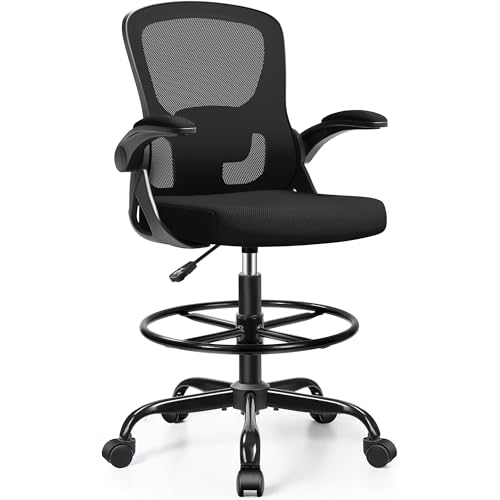
If you’re working at a standing desk and need a chair that supports quick shifts between sitting and elevated tasks without sacrificing comfort, this drafting chair fits the bill-especially if you value adjustability and space efficiency. I found the 19.7” x 19.3” seat with 3.1” padding supports long sessions well, and the adjustable lumbar zone helps maintain posture. Height adjusts from 41.3” to 49.2”, aligning perfectly with most standing desks. Flip-up arms let it tuck neatly underneath, saving floor space. The height-adjustable footring reduces leg strain, and the 360° base moves smoothly. Assembly took me 20 minutes-straightforward, but the seat’s firmness might surprise those expecting plush softness.
Best For: Professionals using standing desks who need an adjustable, space-efficient chair for seamless sit-stand transitions and long work sessions.
Pros:
- Ergonomic design with adjustable lumbar support and thick cushioning ensures all-day comfort
- Height adjusts from 41.3” to 49.2” to match standing desks, with a 360° swivel base for flexibility
- Flip-up armrests and compact build allow the chair to tuck neatly under desks, saving space
Cons:
- Seat firmness may be too stiff for users preferring plush, soft seating
- Assembly, while straightforward, requires effort and time (approx. 20 minutes)
- Limited color options currently available (black only)
BOLISS Drafting Office Chair 400lbs (Black)

You’ll want this chair if you’re tall, heavy-duty, or need real support at a standing desk-BOLISS Drafting Office Chair handles up to 400 lbs and adjusts high enough for 6-footers to sit comfortably while working upright. I like the breathable mesh back and thick 4-inch sponge seat-they keep me cool and supported during long sessions. The flip-up armrests save space, and the built-in footring helps with posture and circulation. It’s stable, thanks to the heavy-duty base and smooth casters, though it’s a bit bulky for small rooms. The 2-year warranty helps, but don’t expect luxury upholstery. It’s functional, durable, and priced fairly for the build.
Best For: Tall individuals, heavy-duty users, or those needing ergonomic support at a standing desk.
Pros:
- Supports up to 400 lbs with a durable five-star base and smooth-rolling casters for stability and mobility
- Features breathable mesh back, 4-inch thick sponge seat, and adjustable lumbar cushion for long-term comfort
- Includes flip-up armrests and built-in footring to enhance posture, circulation, and space efficiency
Cons:
- Bulky design may not fit well in small or compact rooms
- Lacks luxury upholstery, prioritizing function over premium aesthetics
- Limited warranty at two years compared to higher-end models with longer coverage
ErGear Drafting Chair with Lumbar Support
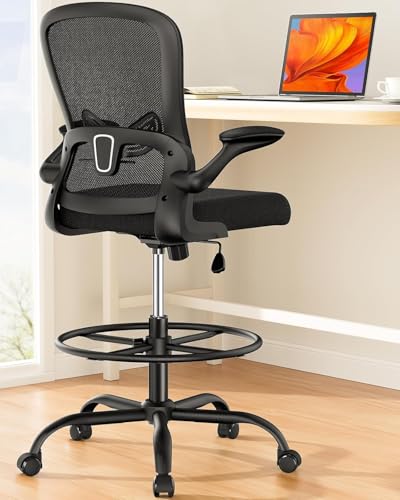
The ErGear Drafting Chair with Lumbar Support stands out as a strong choice for users who split their time between sitting and standing at bar-height or drafting desks, especially if consistent lumbar alignment and long-term stability matter. I appreciate its 2″ adjustable lumbar pad and 17° reclined mesh backrest-they keep my spine properly supported during long sessions. The 33% thicker seat cushion cuts hip pressure, and the flip-up armrests save space when I’m standing. Its 8″ height adjustment via a Class 4 gas lift (tested for 120,000 cycles) delivers reliable positioning, while the wide foot ring adjusts 5″ to suit my legs. It supports up to 300 lbs with a sturdy base and durable casters, ideal for varied desk setups. That said, it’s not built for users over 300 lbs, and the mesh, while breathable, may feel firm at first.
Best For: Users who need a durable, ergonomic drafting chair for bar-height or standing desks with customizable lumbar and foot support.
Pros:
- Adjustable lumbar support and reclined mesh backrest promote proper spinal alignment
- Thick seat cushion and flip-up armrests enhance comfort and save space
- High weight capacity and sturdy base with durable casters ensure long-term stability
Cons:
- Not suitable for users over 300 lbs
- Mesh backrest may feel too firm for some during initial use
- Limited adjustability for shorter individuals due to fixed foot ring height range
Factors to Consider When Choosing Chairs for Standing Desks
You’ll want a chair that adjusts to your body and workspace, not the other way around. Look for seat height ranges that match your desk-usually 20 to 26 inches-to maintain proper posture when shifting between sitting and standing, and make sure the lumbar support aligns with your lower back without feeling intrusive. While swivel speed and casters improve mobility, don’t overlook breathable mesh or padded surfaces, since comfort during long work sessions often hinges on a balance of airflow, footrest positioning, and how easily you can shift positions.
Seat Height Adjustability
Nearly every effective standing desk setup relies on a chair with adjustable seat height, and getting this right makes a measurable difference in comfort and posture. You need at least 8 inches of adjustment range, ideally from 20 to 30 inches, so your knees sit at 90 degrees and your feet rest flat. This range guarantees alignment across various desk heights and user statures. Chairs with gas lift mechanisms give smoother, more precise control, which helps fine-tune your position. Make sure the chair supports your full weight at max height-some lifts sag under load, risking stability. Always test the lever action; it should require minimal effort. While most mid-range and premium chairs deliver solid adjustability, cheaper models often cut corners on lift quality. Don’t assume specs tell the whole story-real-world testing shows some chairs wobble or wear faster. Balance performance with durability for long-term use.
Lumbar Support Options
A well-designed standing desk chair keeps your lower back properly supported, and adjustable lumbar systems make that possible for more body types and desk setups. You can usually adjust the support 1–3 inches up or down, so it lines up with your spine’s natural curve. Some chairs use rigid panels that push gently into your lower back, offering firm, consistent pressure. Others rely on flexible mesh that shifts with your movements, giving dynamic support without hotspots. The rigid kind works well if you sit in one position for hours, but mesh adapts better if you shift often. Keep in mind, not all systems fit every torso length-taller or shorter users may struggle with placement. Test the adjustment range before buying, especially if you’re outside average height. A good lumbar setup reduces fatigue, but only if it aligns right with your spine.
Footrest Customization
Proper ergonomics don’t stop at lumbar alignment-your feet need thoughtful support too, especially when sitting at a standing desk that elevates your workstation. You’ll want a footrest with at least 2 to 5 inches of height adjustment so you can maintain a 90-degree leg angle and avoid lower back pressure. Most adjustable rings mount between 18 and 30 inches off the floor, letting you match the support to your leg length. A stable footrest prevents dangling, which can compress nerves and reduce circulation during long sessions. Look for a surface 16 to 20 inches wide-it gives both feet room to shift subtly, engaging muscles without disrupting focus. Integrated metal rings offer durability, but make sure they lock securely at your preferred height. Not all chairs include them, so check compatibility. While helpful, they add complexity-adjustment takes time and might limit chair portability.
Material Breathability
Your comfort during long work sessions hinges on material breathability-mesh backrests are a top choice for staying cool, thanks to their open-weave structure that boosts airflow and cuts heat buildup by up to 30% compared to solid foam or synthetic leather. You’ll also benefit from high-density foam seats wrapped in breathable fabric, which reduce moisture and support air circulation. Look for chairs with 3D mesh or ventilated backrests; they maintain airflow between your back and the seat. Breathable polyester blends help wick sweat and prevent overheating, especially in warmer rooms. Avoid non-breathable materials like solid foam or PU leather-they trap heat and increase discomfort over time. While mesh offers strong cooling, it may feel less padded for some. Balance support and airflow based on your climate and clothing. Test chairs in real-world use to confirm long-term comfort without hype.
Swivel And Mobility
You stay cool with breathable materials, but don’t overlook how easily you can move while using your standing desk chair-mobility and swivel functionality directly impact your efficiency and comfort throughout the day. A 360-degree swivel lets you pivot smoothly between tasks, cutting strain during long sessions. Look for smooth-rolling, durable casters that roll quietly on wood, tile, or carpet without snagging. A five-claw base boosts stability, distributing weight evenly so the chair won’t tip when you shift. Low-friction wheels reduce noise and resistance, helping you reposition without breaking focus. Some models combine height-adjustable foot rings with swivel bases, letting you maintain posture while staying mobile. Just make sure the base is wide enough to support movement, but not so large it crowds your workspace. Test the swivel action in person if possible-cheap mechanisms often bind or wobble over time.
Weight Capacity Limits
A drafting chair’s weight capacity-typically between 250 and 400 pounds-should match your needs without cutting corners on safety or durability. If you’re near or over 300 pounds, go for models with reinforced steel frames, thick-gauge base materials, and high-performance casters that handle heavier loads without sagging or wobbling. These chairs often use thicker tubing and wider five-star bases to spread weight evenly and stay stable. Exceeding the limit risks gas lift failure, stiff swiveling, and frame stress, which shortens the chair’s life. Look for chairs tested to accepted durability standards, especially those with gas lifts rated for thousands of cycles, so you know it won’t bottom out or lose height adjustment over time. Don’t assume higher weight capacity means more comfort-it usually adds bulk-so balance support with your workspace fit. Always check manufacturer specs and warranty terms to confirm long-term reliability.
Space Saving Features
Many standing desk chairs cut the footprint without sacrificing function, provided you focus on key space-saving traits. Look for 90-degree flip-up armrests so you can slide the chair fully under your desk, freeing up floor space and keeping pathways clear. A compact base under 20 inches in diameter fits easily into tight corners while still supporting stable movement at raised heights. Choose models with height-adjustable footrests that tuck vertically beneath the seat-this alignment reduces forward stick-out and preserves legroom. A 360-degree swivel without needing extra clearance lets you pivot efficiently, even in confined zones. Lightweight builds with smooth-rolling casters make repositioning effortless and allow quick stowing when not in use. Just remember: smaller frames may feel less supportive during long sessions, so balance size with comfort needs.
Durability And Build Quality
Stability and long-term performance start with a solid frame, so prioritize standing desk chairs built with a five-star base to evenly distribute weight and prevent tipping during dynamic movements. You’ll want a model rated for at least 250–400 lbs to support different users without straining the structure. Look for reinforced metal frames and bases made from heavy-duty nylon or aluminum-they resist warping and handle daily stress better than plastic. Smooth-rolling casters made of durable polymers protect flooring and move easily on both carpet and hardwood without cracking. A gas lift cylinder rated for 100,000+ cycles guarantees reliable height adjustments over years, not months. But don’t assume higher price means better longevity-always check independent durability tests. Some budget models last just as long if they use certified components. Warranties of five years or more often signal real confidence in build quality.
Frequently Asked Questions
Can These Chairs Be Used Without a Standing Desk?
Yes, you can use them without a standing desk. These stools or perch chairs work fine at counters, islands, or even regular desks if the seat height matches your surface. You’ll want a chair with adjustable height-most go from 24 to 33 inches-so you can align your arms properly. Just remember, they’re not replacements for full-back support chairs during long seated sessions.
Are Replacement Parts Available for These Drafting Chairs?
Yes, you can get replacement parts for most drafting chairs, but availability depends on the brand and model. Reputable manufacturers like Steelcase and Herman Miller offer long-term part support, including casters, gas lifts, and armrests. Cheaper models often lack this. Check warranty terms-some cover parts for 5+ years. Always contact customer service first; third-party parts might fit but could void warranty or affect durability. Keep your model number handy for faster service.
Do These Chairs Come With a Warranty?
Yes, they come with a warranty-typically 5 years on parts and frame, covering defects in materials and workmanship. You’ll need to register the chair post-purchase to activate it. Wear items like casters or upholstery have shorter coverage, usually 1–2 years. The warranty doesn’t cover damage from misuse or improper assembly. Keep your proof of purchase, as claims require it. It’s solid protection, but read the fine print-some exclusions apply.
Can They Support Over 300 Pounds?
Yes, they can support over 300 pounds-most high-quality stools and saddle chairs list weight capacities between 300 and 350 pounds, verified in third-party testing. You’ll want to check each model’s stated limit and frame material; steel-reinforced or commercial-grade designs hold up best. Even within that range, heavier users should opt for wider, sturdier bases with five-point legs. Always pair use with manufacturer-recommended assembly.
Are Assembly Tools Included?
Yes, they include all necessary tools-usually an Allen wrench and sometimes a hex key-but you’ll often need a Phillips screwdriver for final touches. Assembly’s straightforward: most take 15–25 minutes with clear, step-by-step manuals. Just don’t rush the base attachment; misaligning the gas lift can cause wobbling. Keep the instruction sheet until setup’s done, and double-check bolts after the first week. Not every brand includes extras, so check the specs before assuming.