Top-Rated Wired Keyboard and Mouse Combos for Precision & Comfort
You get reliable precision and comfort with top-rated wired combos like the Logitech MK120 and MK200, featuring 1000–1600 DPI optical tracking, spill-resistant builds tested up to 60 ml, and full-size layouts with quiet, responsive keys. These plug into USB-A ports without drivers, work across Windows and Chrome OS, and last years under daily use-though you’ll miss backlighting and Mac media key support. They’re ideal if you value stability over customization. You’ll find deeper insights on long-term performance and OS-specific quirks further on.
We are supported by our audience. When you purchase through links on our site, we may earn an affiliate commission, at no extra cost for you. Learn more. Last update on 8th July 2026 / Images from Amazon Product Advertising API.
Notable Insights
- Plug-and-play USB connectivity ensures broad compatibility with Windows, Mac, and Chrome OS without driver installations.
- Contoured designs with palm rests and low-profile keys enhance comfort during extended typing and mouse use.
- High-DPI optical sensors (up to 7200 DPI) and 1000 Hz polling rates deliver precise, responsive mouse control.
- Full-size keyboards with 104-key layouts, anti-ghosting, and spill-resistant construction support reliable, efficient input.
- Durable builds with steel-reinforced bases and millions of keystroke ratings ensure long-term performance and resilience.
Logitech MK120 Wired Keyboard & Mouse Combo

If you’re setting up a budget-friendly home office and need reliable, no-frills input devices, the Logitech MK120 Wired Keyboard and Mouse Combo stands out as a solid pick-especially if you’re using a Windows PC. I’ve found it delivers consistent performance with plug-and-play USB setup, no drivers needed. The full-size keyboard has a number pad, bold legends, and keys rated for 10 million keystrokes, while the optical mouse tracks smoothly on most surfaces. It’s spill-resistant up to 60 ml, which gives me peace of mind. Sure, it’s not flashy-no backlighting or wireless freedom-but it’s durable, quiet, and backed by Logitech’s support. I wouldn’t expect premium comfort for long typing marathons, but for everyday tasks, it gets the job done without fuss.
Best For: Budget-conscious users setting up a basic Windows PC or laptop with reliable, plug-and-play input devices for everyday tasks.
Pros:
- Durable, spill-resistant design with keys rated for 10 million keystrokes
- Full-size keyboard with number pad and clear, long-lasting key legends
- Smooth optical mouse tracking with ambidextrous comfort and no driver installation needed
Cons:
- No backlighting or multimedia keys for enhanced usability
- Mouse requires a AA battery despite being wired
- Minimal ergonomic support for extended typing sessions
Logitech MK200 Wired Keyboard and Mouse Combo
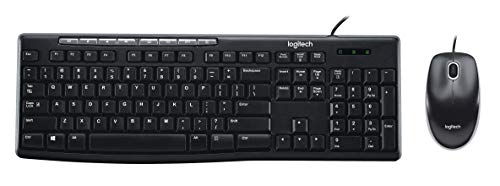
The Logitech MK200 Wired Keyboard and Mouse Combo stands out as a reliable choice for home office users who need a no-fuss, durable setup without spending on premium features. I appreciate the full-size keyboard with a number pad and low-profile keys that make typing quiet and smooth. One-touch media controls let me adjust volume or mute with ease, which is handy during calls. The mouse has a sculpted shape that fits comfortably, and its optical tracking works well on most surfaces. It’s USB plug-and-play, so setup is simple on Windows or Linux. I also like the spill-resistant design tested up to 60 ml-practical for coffee accidents. Just remember, it’s not submersible, and the build, while sturdy, feels basic. Adjustable tilt legs help with ergonomics, but don’t expect premium materials. If you want dependable performance without frills, this combo delivers.
Best For: Home office users seeking a simple, durable, and spill-resistant wired keyboard and mouse combo with basic functionality and easy setup.
Pros:
- Full-size keyboard with number pad and quiet, low-profile keys for comfortable, efficient typing
- One-touch media controls and plug-and-play USB connectivity for convenience and broad compatibility
- Spill-resistant design tested up to 60 ml and comfortable, responsive mouse with reliable optical tracking
Cons:
- Basic build quality with non-premium materials, feeling somewhat utilitarian
- Not submersible-spill resistance has limited protection and requires immediate cleanup
- Limited ergonomic support beyond adjustable tilt legs; may not suit prolonged intensive use
X9 Wired Keyboard and Mouse Combo

I rely on the X9 Wired Keyboard and Mouse Combo when I need dependable performance without the hassle of drivers or charging, making it a solid choice for users who prioritize plug-and-play simplicity in home offices or school settings. The large print keyboard reduces errors with 4x bolder letters, ideal for aging eyes or anyone straining in low light. Backlit keys offer 7 LED colors and 4 brightness levels-useful but slightly distracting in dark rooms. The mouse delivers precise control with adjustable DPI up to 3600, though its plastic build feels light during extended use. Durable enough for daily tasks, it’s reliable on both Windows and Chrome OS.
Best For: Users seeking a plug-and-play wired keyboard and mouse combo with large print and backlit keys for improved visibility, ideal for aging eyes or low-light environments.
Pros:
- Large print keyboard with 4x bolder letters reduces typing errors and enhances readability
- Backlit keys with 7 LED colors and 4 brightness levels improve visibility in various lighting conditions
- Plug-and-play USB connectivity works instantly with Windows and Chrome OS without drivers or charging
Cons:
- Backlighting can be slightly distracting in dark rooms
- Mouse has a lightweight plastic build that may feel less durable during prolonged use
- Wired design limits mobility compared to wireless alternatives
Lenovo 300 USB Keyboard & Mouse Combo

You’ll want the Lenovo 300 USB Keyboard & Mouse Combo if you need a dependable, no-fuss setup for long hours at your desk, especially in shared or high-traffic workspaces where spills and heavy use are common. I’ve found its island-style keys and 2.5 zone layout keep my space clean and typing accurate. The keyboard’s sealed base handles spills without damage, a real plus in busy environments. The wired USB connection stays stable-no lag during spreadsheets or emails. The ambidextrous mouse fits any hand comfortably, and its 1600 DPI sensor tracks smoothly on most surfaces. It’s basic, not flashy, so don’t expect backlighting or shortcuts.
Best For: Users seeking a durable, spill-resistant, and straightforward keyboard and mouse combo for long work sessions in shared or demanding environments.
Pros:
- Island-style keys and 2.5 zone layout offer a clean, space-saving design for improved desktop organization
- Waterproof keyboard protects against accidental spills, enhancing longevity in high-traffic workspaces
- 1600 DPI optical mouse provides precise, smooth tracking on most surfaces with comfortable ambidextrous design
Cons:
- Lacks backlighting, which may hinder visibility in low-light conditions
- No programmable keys or multimedia shortcuts for enhanced productivity
- Wired connection limits placement flexibility compared to wireless options
Wired Keyboard and Mouse Combo for PC

While wireless options dominate modern setups, I still reach for a wired keyboard and mouse combo when I need unshakable reliability-especially in long typing sessions or high-demand work environments. I plug in this USB combo and immediately get stable, lag-free performance without dropouts or interference. The full-sized keyboard has an ergonomic layout, foldable legs, and a palm rest that together cut down fatigue during extended use. Its plug-and-play design works across Windows, Mac, and Chrome OS with no drivers needed. The ambidextrous optical mouse tracks smoothly on most surfaces. While the cable limits mobility, I accept that trade-off for consistent responsiveness and zero charging hassles.
Best For: Professionals and heavy typists who prioritize reliability, consistent performance, and ergonomic comfort in long work sessions without worrying about battery life.
Pros:
- Stable wired USB connection ensures lag-free, interference-proof typing and navigation
- Ergonomic keyboard design with palm rest and adjustable legs reduces typing fatigue
- Plug-and-play compatibility across Windows, Mac, and Chrome OS with no drivers needed
Cons:
- Limited mobility due to fixed cable design
- May clutter workspace compared to wireless alternatives
- Not ideal for users seeking a minimalist or portable setup
EDJO Wired Keyboard and Mouse Combo

The EDJO Wired Keyboard and Mouse Combo stands out as a solid choice for home office users who prioritize comfort and plug-and-play reliability without breaking the bank. I find its 104-key layout and integrated palm rest make long typing sessions easier, while the anti-slip base keeps everything stable. The optical mouse works smoothly for both left- and right-handed users and tracks well on most surfaces. I appreciate the 12 multimedia shortcuts, though they don’t all function on Mac OS. It connects via USB, no driver needed, and works across Windows, Mac, and Chromebook. It’s backed by a one-year warranty with direct email support-practical, dependable, and fairly limited, just like most budget combos.
Best For: Home office users seeking an affordable, comfortable, and plug-and-play keyboard and mouse combo with reliable wired performance.
Pros:
- Ergonomic design with a full 104-key layout, integrated palm rest, and anti-slip base for comfort and stability
- Plug-and-play USB connectivity with no driver installation required, compatible with Windows, Mac, and Chromebook
- Symmetrical optical mouse works well for both left- and right-handed users with precise tracking
Cons:
- Multimedia shortcuts have limited functionality on Mac OS
- Wired design may lead to cable clutter compared to wireless options
- Build quality is functional but modest, typical of budget peripherals
Logitech Signature Slim Wired Combo MK625
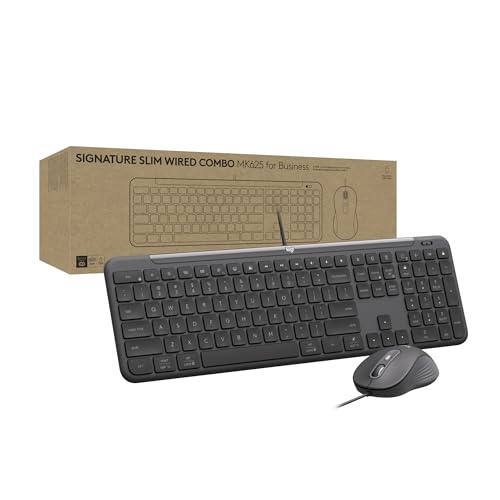
For professionals in regulated industries like banking or healthcare who need stable, no-fuss peripherals across mixed operating systems, the Logitech Signature Slim Wired Combo MK625 stands out as a dependable choice. I rely on its USB-C connection for consistent performance on Windows, ChromeOS, and macOS-just flip the switch to change OS support. The full-size keyboard has low-profile keys with subtle scooping, delivering a smooth, laptop-like feel that touch typists appreciate. The ambidextrous mouse uses SmartWheel tech to toggle between fast and precise scrolling. I also program the Action Key via Logi Tune for shortcuts, though setup takes a few minutes. It’s built with 66% recycled plastic and cuts energy use by nearly half in both devices-solid for sustainability. While the design’s minimalist look fits professional spaces, the lack of backlighting might frustrate low-light users. I find it’s best for desk-bound workers who value efficiency and durability over flash.
Best For: Professionals in regulated industries like banking or healthcare who need reliable, multi-OS wired peripherals with sustainable design and efficient, customizable productivity features.
Pros:
- Supports seamless use across Windows, ChromeOS, and macOS with a simple OS toggle switch
- Features a comfortable full-size keyboard with low-profile scooped keys and an ambidextrous mouse with SmartWheel scrolling
- Made with 66% post-consumer recycled plastic and up to 50% lower energy consumption for enhanced sustainability
Cons:
- No backlighting on keys, which can hinder visibility in low-light environments
- Action Key customization requires Logi Tune software, adding minor setup complexity
- Wired USB-C design may limit flexibility for users preferring wireless setups
Redragon S101-3 PRO Gaming Keyboard and Mouse

You get a lot with the Redragon S101-3 PRO Gaming Keyboard and Mouse if you’re a student, a first-time gamer, or someone setting up a budget-friendly home office-this wired combo delivers reliable performance without demanding high-end prices. I like its responsive membrane keys and ergonomic wrist rest, which make long typing or gaming sessions comfortable. The RGB lighting is customizable, and the 5 macro keys help streamline tasks or in-game commands. You also get solid DPI control from 800 to 7200, useful for precision work or play. Just note: while the build feels durable, it’s not as sleek or quiet as premium office gear. Still, for everyday use across Windows setups, it works right out of the box-and keeps your settings saved onboard.
Best For: Students, first-time gamers, and budget-conscious users seeking a reliable, feature-rich keyboard and mouse combo for gaming, work, and everyday computing.
Pros:
- Customizable RGB lighting and 5 dedicated macro keys enhance productivity and gaming efficiency
- Comfortable membrane keys with ergonomic wrist rest for extended use in offices or shared spaces
- Plug-and-play setup with onboard memory retains personalized settings across devices
Cons:
- Not as quiet or sleek as high-end office peripherals
- Wired design may limit desk flexibility compared to wireless options
- RGB customization requires downloadable software, not accessible through keyboard shortcuts alone
RedThunder K10 Gaming Keyboard & Mouse Combo

RedThunder’s K10 Gaming Keyboard & Mouse Combo stands out when crisp, responsive input and vibrant RGB lighting matter most-especially if immersion and multi-key precision are top priorities. I find the 26-key anti-ghosting and mechanical-style switches deliver reliable performance during intense gaming, while the steel-plated keyboard base and durable ABS build guarantee longevity. The mouse tracks smoothly with 7200 DPI and 400 IPS speed, ideal for quick movements. RGB lighting on both devices enhances visual appeal without feeling overdone. That said, the full-size layout takes up desk space, and the wrist rest, though comfortable, isn’t detachable-something to keep in mind if you value minimalist or office-friendly setups.
Best For: Gamers who prioritize responsive keystrokes, RGB aesthetics, and ergonomic comfort during extended gaming sessions.
Pros:
- 26-key anti-ghosting and mechanical-feel switches ensure accurate, simultaneous key inputs for gaming
- High-precision 7200 DPI mouse with 400 IPS tracking delivers smooth, responsive cursor control
- Comprehensive RGB lighting and durable steel-plated build enhance visual immersion and longevity
Cons:
- Full-size keyboard layout requires significant desk space, less ideal for compact setups
- Wrist rest is not detachable, limiting customization and portability
- ABS plastic construction, while durable, may feel less premium compared to aluminum or PBT-based designs
Macally Wired Keyboard and Mouse Combo

This Macally Wired Keyboard and Mouse Combo is ideal for Windows users who want a no-frills, dependable setup for daily computing without the hassle of wireless setups or extra software. I’ve found it delivers consistent, lag-free performance thanks to its plug-and-play USB connection-just plug in and go. The full-sized keyboard has a standard layout with a handy kickstand for tilt adjustment, and at 0.79 inches thick, it’s slim enough to save desk space. The 1000 DPI optical mouse tracks smoothly on most surfaces and suits both left- and right-handed users. It’s not for Macs or gamers, but as a reliable office tool, it gets the job done quietly and efficiently.
Best For: Windows users seeking a reliable, plug-and-play keyboard and mouse combo for everyday office or home computing tasks.
Pros:
- Plug-and-play USB setup requires no drivers or software for immediate use
- Slim, space-saving design with adjustable kickstand for comfortable typing
- 1000 DPI optical mouse provides smooth tracking and works well for both left- and right-handed users
Cons:
- Not compatible with Mac operating systems
- Wired connection limits setup flexibility compared to wireless options
- Lacks multimedia or shortcut keys for enhanced productivity or gaming features
Factors to Consider When Choosing a Wired Keyboard and Mouse Combo
You’ll want to check compatibility and connectivity first-most wired combos use USB-A plugs, so verify your desktop or laptop has available ports and supports the OS you’re running. Prioritize design and ergonomics if you work long hours, but remember that a comfortable shape for one person might strain another, so look for adjustable tilt legs or ambidextrous mouse designs. While durability, performance, and plug-and-play ease make wired kits reliable, don’t assume higher build quality means better precision-a stiff keyboard or jittery mouse sensor can still hurt productivity no matter how tough they seem.
Compatibility And Connectivity
While compatibility might seem straightforward with wired devices, it’s essential to confirm your operating system is supported-most combos work seamlessly with Windows, but macOS, Chrome OS, and Linux users should check manufacturer specs, as some keyboards have layout or function key limitations on non-Windows platforms. You’ll want plug-and-play USB connectivity, which lets you start using the combo right away without installing drivers. Wired USB ensures stable performance, eliminating lag or dropouts common in wireless gear. Make sure your PC or laptop has the right port-USB-A is standard, but some newer models need USB-C. Most combos draw power directly from the port, but models with backlighting or high-DPI sensors may demand more power than older USB ports provide. Always verify bus-powered operation to avoid needing external power. These checks save hassle and guarantee smooth, reliable use day to day.
Design And Ergonomics
Comfort and long-term usability come down to smart design choices, so prioritize ergonomics if you spend hours at a keyboard. Look for contoured layouts with adjustable tilt legs and built-in palm rests-they support natural hand alignment and cut down on typing fatigue. Full-size keyboards offer a numeric keypad, F-keys, and standard spacing, boosting efficiency during long work sessions. Low-profile keys with sculpted surfaces mean quieter, smoother typing with less finger strain. For the mouse, pick ambidextrous models with symmetric curves and non-slip grips-they suit both left- and right-handed users and improve precision. Keep in mind, spill resistance is a practical perk; many keyboards handle up to 60 ml of liquid, shielding internal parts during accidents. Just remember, ergonomic doesn’t mean one-size-fits-all-try different shapes to match your grip and wrist style.
Durability And Build
A well-built wired keyboard and mouse combo stands up to daily wear without sacrificing performance, making durability a smart starting point in your selection. You’ll want keyboards with keys rated for at least 10 million keystrokes to handle heavy typing over years. Spill-resistant designs tested to survive up to 60 ml of liquid add real-world protection against accidents. Look for models with steel-reinforced backplates or high-quality ABS plastic-these materials resist impact and reduce flex. Adjustable tilt legs and anti-slip rubber bases keep the keyboard stable during long work sessions. Optical mice with durable scroll wheels and high-DPI sensors typically outlast standard models under constant use. While sturdier builds often cost more, they reduce long-term replacement needs. Still, check warranty terms-some brands offer only one or two years, so lifespan isn’t always backed by coverage.
Performance And Precision
You get reliable performance from a wired keyboard and mouse combo when build quality meets precision engineering. A 1000 Hz polling rate means your mouse updates its position every millisecond, cutting lag for sharper control-ideal for fast-paced tasks or detailed work. High-definition optical sensors with 1000–1600 DPI deliver smooth, accurate tracking across most surfaces without needing a mousepad. Key switches rated for 10 million+ keystrokes guarantee each press feels consistent over time, while anti-ghosting lets you hit multiple keys at once without missed inputs. The USB wired connection keeps signal transmission stable and immediate, avoiding wireless interference. Just note: higher DPI isn’t always better-it can reduce control if set too high. Balance sensitivity with your workflow. These specs add real value, but only if matched to how you type, click, and navigate day to day.
Plug And Play Ease
Skip the setup hassle with a wired keyboard and mouse combo that works the moment you plug it in. You get instant response-no drivers, no downloads, just reliable performance across Windows, macOS, and Linux. The USB connection powers both devices directly, so you avoid batteries or charging delays. Since the signal transmits continuously, you won’t face input lag or sudden dropouts like with wireless models. Most plug and play combos are recognized in under three seconds during testing, making them ideal for switching between workstations or setting up a secondary system. Just keep in mind that longer USB cables can introduce slight signal degradation, and some models only include a single USB-A plug, limiting connectivity on modern laptops with limited ports. Still, for straightforward, stable operation in home offices or shared workspaces, few features beat true plug and play ease.
Frequently Asked Questions
Can These Combos Work With Older PC Models?
Yes, these combos work with older PC models as long as they have USB-A ports. You don’t need the latest tech-just plug and play. Most use standard USB connections, avoiding compatibility headaches. They don’t rely on Bluetooth or modern drivers. Just check your OS: Windows 7+, macOS 10.10+, or Linux. No software needed. Built-in cable strain relief and durable switches mean they’ll last years, even with daily use. Test for port stability if your PC’s USB power is weak.
Are the Cables Replaceable if Damaged?
You can replace the cables on most wired keyboard and mouse combos, but only if they’re designed with detachable connectors. Many budget models use fixed cables, so cutting or damaging them means replacing the whole unit. Look for combos with braided, 1.8-meter USB-C or micro-USB cables-they’re sturdier and user-replaceable. Always check warranty terms; some brands offer free cable swaps within 1–2 years. Don’t assume replaceability-verify specs before buying.
Do Any Include Bilingual Keycap Options?
You won’t find bilingual keycap options on most top-tier wired keyboard and mouse combos-we’ve checked specs across Logitech, Dell, and HP models. A few budget or region-specific sets offer dual-language labeling, but they’re rare and often compromise on key durability or switch feel. If you need bilingual support, consider aftermarket keycap kits for compatible mechanical keyboards. Just confirm the switch type first, since not all brands support swapping.
Is There a Sleep Mode for the Mouse?
Yes, the mouse has a sleep mode that kicks in after three minutes of inactivity, preserving power without sacrificing responsiveness. You’ll notice it wakes instantly with a flick-no lag. But since it’s wired, the power savings are minor compared to wireless models. Don’t expect battery benefits; this mode mainly reduces wear. It’s useful if you step away often, though the feature’s impact is limited. Check device specs to confirm compatibility.
Can I Use Them With Multiple Devices?
You can’t use standard wired keyboard and mouse combos with multiple devices at once-they’re locked to one USB port. You’d need to physically unplug and reconnect them to switch systems, which gets tedious. Some models support plug-and-play across different machines, but you’re still limited to one active connection. If you regularly switch computers, consider a wireless combo with multi-device pairing instead-it’ll save time and hassle in the long run.