Creating an Eco-Friendly Workspace: Tips for Reducing Carbon Footprint in Remote Work Environments
You can cut your home office’s carbon footprint by 10% or more by tackling standby power with smart power strips-just make sure to leave critical devices like network storage plugged in. Switch to LED lighting with motion sensors and enable auto-sleep modes on monitors and routers. Opt for EPEAT or Energy Star gear built with recycled materials, though some models cost more upfront. Use 100% post-consumer recycled paper with FSC certification, and check labels-some “recycled” pens contain as little as 30% recycled content. Solar panels or utility wind programs can further reduce your grid impact, especially if your roof gets steady sun and your provider offers net metering. There’s more to optimizing your setup where efficiency and practicality meet.
Notable Insights
- Use smart power strips to eliminate standby power waste from idle home office devices.
- Opt for renewable energy through utility wind programs or rooftop solar with net metering.
- Choose eco-certified, low-carbon office equipment made with recycled and sustainable materials.
- Switch to stationery and packaging made from 100% recycled content with verified environmental certifications.
- Cut digital energy use by enabling sleep modes and installing LED smart lighting with motion sensors.
Find Energy Hogs in Your Home Office
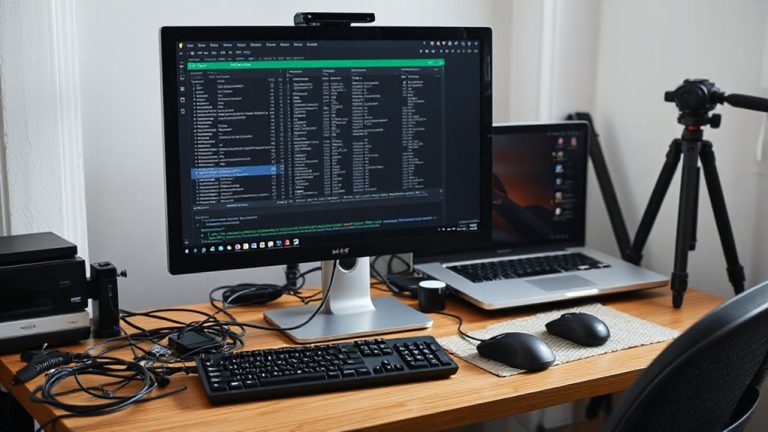
Ever wonder why your electricity bill creeps up even when you’re just working from home? Standby power from devices like printers, monitors, and routers draws energy 24/7-up to 10% of your bill-even when idle. That cable clutter underneath your desk? It’s not just messy; it often hides multiple devices constantly sipping power. Unplugging each one helps, but a simpler fix is a smart power strip that cuts supply automatically. Just be cautious-some equipment, like network-attached storage, needs constant power. Swapping out old gear for ENERGY STAR-rated devices reduces draw, but only if usage habits improve too. Testing shows cutting standby power can save $50–$100 yearly. Still, don’t expect dramatic results overnight. Real savings come from consistent management. Address cable clutter with labeled, shielded cords to prevent interference and make shutdowns easier. You’ll cut waste efficiently-without sacrificing reliability. Consider using cable management solutions to streamline your setup and reduce energy waste from tangled, hard-to-manage cords.
Power Your Workday With Renewable Energy
How much of your workday energy actually comes from clean sources? Switching to renewable energy isn’t just possible-it’s practical. Many utility providers offer wind incentives, letting you support clean grid power with little to no extra cost. These programs often include verified renewable energy certificates, so you know your usage is backed by real wind generation. If you own your home, solar charging through rooftop panels can cover most of your daily needs. Modern setups with net metering feed excess energy back, reducing bills long-term. But installation costs and roof suitability matter-solar isn’t a one-size-fits-all fix. Efficiency varies by region and weather, so check local sun exposure and panel warranties. While renewables cut emissions notably, they work best when paired with reduced energy waste. Don’t expect instant payback, but over time, especially with tax credits, the savings and environmental gains add up.
Choose Low-Carbon Office Gear
Switching to renewable energy cuts your office’s carbon footprint, but it’s only part of the equation-what you plug into that clean power matters just as much. You should pick office gear built with low emissions in mind. Look for laptops and monitors that use sustainable materials like recycled aluminum or bioplastics-they reduce resource strain without sacrificing durability. Devices with eco certifications such as EPEAT or Energy Star meet strict environmental standards for energy use and recyclability. These models often last longer and perform just as well as conventional ones. Still, some eco-friendly gear costs more upfront, and not all claims are verified. Always check third-party test results and warranty terms. Prioritize products with modular designs-ones you can upgrade or repair. Choosing low-carbon gear isn’t a fix-all, but it’s a smart, measurable step when paired with clean energy.
Use Recycled Pens, Paper, and Packaging
Recycled pens, paper, and packaging aren’t just token gestures-they’re practical choices that reduce demand for virgin materials and lower your office’s environmental impact. You’ll find eco friendly stationery like notebooks with 100% post-consumer waste paper or pens made from recycled plastic perform as well as conventional ones-many have smooth ink flow and ergonomic designs backed by user testing. Sustainable packaging choices, such as biodegradable mailers or boxes made from recycled cardboard, cut landfill waste without sacrificing protection. Just be mindful: some “recycled” labels include only 30% recycled content, so check packaging specs. Also, not all recycled paper works in high-speed printers-look for FSC or Rainforest Alliance certification to balance quality and ethics. While durability can vary slightly, especially in humid conditions, most users see no meaningful drop in function. With reliable brands offering solid warranties and consistent performance, switching makes sense-but verify claims to avoid greenwashing.
Slash Digital Energy Use
Your office cuts waste well with recycled pens, paper, and packaging, but shrinking your digital energy footprint offers even greater environmental gains. Start with energy audits-many utility companies provide free assessments that pinpoint high-use devices like aging routers or inefficient monitors. You’ll likely find that small changes add up fast. Switch to smart lighting: LED bulbs with motion sensors or timers cut unnecessary power, especially in rooms you leave during video calls. These systems typically use 75% less energy than incandescents and last up to 25,000 hours. However, not all smart lighting works seamlessly with existing setups; check compatibility with your network and apps before buying. While smart plugs and power strips help, their real benefit shines only when paired with consistent habits. Energy-efficient settings on devices also matter-enable sleep modes and automatic shutoffs. Results vary by usage, so track your progress monthly.
Place Your Desk to Save Power
How much could the position of your desk actually cut energy use? A lot-especially if you maximize natural lighting. Placing your desk near a window reduces reliance on artificial lights, cutting your electricity use during daylight hours. Window proximity is key: aim for 3–5 feet from a south- or east-facing window for consistent brightness without harsh glare. But avoid direct sun exposure on your screen to prevent eye strain and overheating. Natural lighting works best with light-colored walls and matte finishes, which reflect sunlight evenly. Pair this setup with manual light dimmers or motion-sensing LEDs for overcast days. Keep in mind that large windows can increase heating and cooling loads, so use blinds or thermal curtains strategically. This isn’t a one-size-fits-all fix-your climate and room layout matter. Yet smart desk placement remains one of the simplest, most effective ways to lower energy use without sacrificing comfort or productivity. Upgrading to energy-efficient Top LED Desk Lamps ensures minimal power consumption when supplemental lighting is needed.
On a final note
You can cut your home office’s carbon footprint markedly with smart, tested changes. Switching to LED lighting and ENERGY STAR devices reduces energy use by up to 30%. Pair that with renewable energy plans from your provider for real impact. However, recycled paper can smudge on cheaper printers, and solar chargers depend heavily on your region’s sunlight. Always check product warranties and real-world efficiency ratings-what works in testing doesn’t always deliver at home.