Creating a Clutter-Free Charging Station With Labeled Outlets and Surge Protectors
Place your charging station near your bed or desk within arm’s reach, using a UL-certified surge protector with at least 1,000 joules and built-in USB ports to reduce cable clutter. Label each cord with color-coded, smear-resistant tags so you never unplug the wrong device. Secure wires with Velcro ties and adhesive clips to keep them tidy yet accessible. Check monthly for fraying or dust buildup, and replace damaged cables immediately-your safety depends on it. Consider upgrading to a smart strip with a 3-year warranty as you add new gear.
Notable Insights
- Place charging stations near high-use areas with easy access and minimal cord clutter using wall-mounted options.
- Choose a surge protector with at least 1,000 joules, USB-A/C ports, and an indicator light for safety and efficiency.
- Label each outlet or cord with color-coded, durable tags to quickly identify and prevent accidental disconnections.
- Secure cables using adhesive clips, Velcro ties, or zip ties to manage tangles and reduce visual clutter.
- Perform monthly maintenance by inspecting cords, cleaning dust, and verifying surge protector functionality for long-term safety.
Place Your Charging Station Where It’s Easy to Use
Where should you actually put your charging station for everyday use? Go for a spot within arm’s reach of where you spend most of your time-like beside your bed, near your desk, or on a living room console. Good convenience planning means placing it where you’ll actually use it daily without tripping over cords. Location efficiency isn’t just about proximity; it’s also guaranteeing the outlet is near, reducing extension cord reliance and minimizing clutter. Wall-mounted options save surface space and keep devices visible and accessible. Avoid tight corners or behind heavy furniture-easy access matters. If you charge overnight, guarantee the area has some ventilation to prevent overheating. While a central spot might seem ideal, personal usage patterns make the real difference. Balance visibility, safety, and ease of reach. No perfect spot works universally-test a few setups for a week and adjust based on real-world use. For those using a best home office desks setup, integrating your charging station directly into the desk’s design can enhance both functionality and organization.
Pick a Surge Protector That Fits Your Devices
While not every charging spot needs one, you’ll want a surge protector if you’re plugging in multiple devices or using pricier electronics like laptops, tablets, or gaming consoles. Look for a model with at least 1,000 joules of surge capacity-higher is better, especially near power-heavy appliances. Check device compatibility: modern gadgets often need USB-A and USB-C ports, so pick a unit with built-in charging ports that deliver at least 2.4 amps per port for reliable speed. Avoid daisy-chaining multiple protectors, as this reduces effectiveness and increases fire risk. Guarantee the circuit breaker resets easily and that the unit has an indicator light showing protection is active. Units with lifetime equipment warranties are worth considering, but only if you register them. Cheap models may save money now but often fail under high-voltage spikes. For added safety, choose a model tested and rated by an independent lab such as UL certification.
Label Each Cord So You Know Instantly What’s What
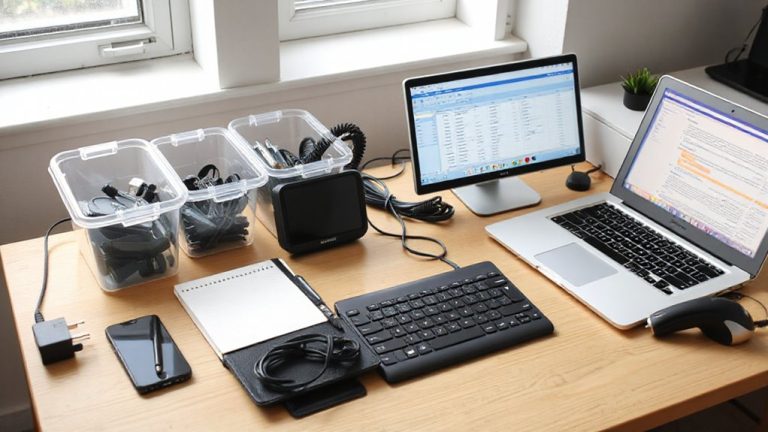
How many times have you tugged at a snarled mess of cords just to unplug your phone charger-only to kill power to your lamp or Wi-Fi router by mistake? Labeling each cord solves this with quick identification and reduces daily frustration. Use color coding with adhesive tags or heat-shrink labels to assign one hue per device-blue for phone, red for tablet, green for laptop. This method works best when paired with consistent placement near your surge protector. You’ll save time and avoid accidentally disconnecting critical devices. While permanent labeling beats handwritten tape (which fades), keep in mind that frequent swapping of devices might require re-labeling. Color coding is especially effective in shared spaces like home offices, but only if everyone follows the system. Test it for a week: if confusion drops, stick with it. For long-term use, pick smear-resistant, low-profile labels that won’t snag.
Tame Wires With Cord Clips and Cable Ties
Most people end up with at least a few loose cords flapping around their desks, but corralling them with cord clips and cable ties makes a noticeable difference in both neatness and daily function. Cable management isn’t just cosmetic-it reduces wear, prevents tripping, and improves airflow. For basic cord organization, adhesive-backed cord clips hold cables flat against desks or walls, while reusable nylon cable ties allow adjustable grouping without damage. Here’s what works best:
| Tool | Best For |
|---|---|
| Cord clips | Securing individual cords along edges |
| Twist ties | Temporary bundling of similar-length cables |
| Velcro ties | Frequent access, like charging hubs |
| Zip ties | Permanent, tight bundling (use carefully) |
Clips stay put unless peeled, and Velcro resists fraying. Avoid over-tightening ties, which can pinch wires. Test fit strain points. Most hardware lasts years, but UV exposure weakens plastics. Choosing the right option depends on durability and ease of use, with top cable tie picks offering reliable performance for long-term setups.
Keep It Clean With a Monthly Check
You should set a monthly reminder to inspect and clean your charging station-it’s the simplest way to extend the life of your cables and devices while keeping performance reliable. Make dust removal a standard part of your inspection routine: use a microfiber cloth and compressed air to clear debris from ports and outlets, preventing overheating and connection issues. Check cables for fraying, bent connectors, or exposed wires-replace any that show wear to avoid damage or safety risks. Test each surge protector’s indicator light to confirm it’s still grounded. Avoid using wet cloths or abrasive cleaners, as these can harm plastic housings or electrical contacts. While regular maintenance helps, don’t over-clean; excessive wiping can degrade insulation over time. This small effort pays off in fewer device failures and consistent charging speeds, especially with high-draw gadgets like laptops and tablets.
Upgrade as You Add New Devices
While your current charging setup might handle today’s devices just fine, it’s worth planning ahead as you add new gear-because a mismatch between power demands and outlet capacity can lead to slow charging or even port damage. Prioritize device compatibility and future expansion by upgrading to smart surge protectors with USB-C PD ports and clear labeling. These let you charge laptops, tablets, and phones efficiently without overloading circuits.
| Port Type | Max Output | Best For |
|---|---|---|
| USB-A | 12W | Older phones, accessories |
| USB-C PD | 60W | Laptops, modern smartphones |
| Standard Outlet | 1875W | High-draw devices, multi-use |
Adequate spacing and a 3-year warranty model guarantee longevity. But don’t overcrowd-overloading negates safety gains. Upgrade mindfully, not just for now, but for what’s next.
On a final note
You’ve got this: a labeled, clutter-free charging station works-if you size your surge protector right and stick to a routine. Cord clips and cable ties keep things neat, but they need monthly checking or tangles return. Labels help, especially with similar-looking cables. Just remember, no system fixes poor habits. Upgrade outlets only as needed; overspending on smart strips rarely pays off for basic setups.