Extending Monitor Lifespan via Automatic Brightness Limiter (ABL) Awareness
You’re not imagining it-your OLED dims on bright scenes because ABL kicks in to cut power and slow pixel aging, boosting lifespan by up to 30% in real-world use. It’s not a flaw; it protects against burn-in when white pixels cover most of the screen. Keep brightness at 80–90% and avoid full-white static content to reduce triggers. While you can’t disable ABL, smart habits balance brightness and longevity. There’s more to how this feature shapes long-term performance.
Notable Insights
- ABL reduces brightness during large bright scenes to limit power use and prevent OLED degradation.
- High white pixel coverage triggers ABL, dimming the screen by up to 30% to protect pixels.
- ABL helps prevent burn-in by managing pixel load and maintaining uniform display aging.
- Calibrate brightness to 80–90% and avoid full-white content to minimize ABL activation.
- Regular breaks and dark theme usage extend monitor lifespan by reducing sustained pixel strain.
Why Your OLED Screen Dims Suddenly: ABL Explained
Ever wonder why your OLED screen suddenly dims during a bright scene? That’s Automatic Brightness Limiter (ABL) in action-a built-in safeguard preventing excessive power draw and uneven wear. ABL reduces brightness when large white areas fill the screen, directly combating OLED degradation over time. You’re not imagining it; the panel physically can’t sustain peak brightness across full white frames. Some monitors allow a manual override, letting you bypass ABL momentarily, but doing so repeatedly accelerates aging. Real-world testing shows ABL extends usable lifespan by up to 30% under constant use. While peak brightness dips feel disruptive, especially in HDR work, the trade-off is long-term panel health. No warranty covers burn-in or degradation from override misuse. For sustained productivity, rely on ABL’s protection. Disable it sparingly-only for critical color reviews or short presentations. Your monitor’s longevity depends on it.
When Does ABL Kick In? (And Why Your Screen Gets Dim)
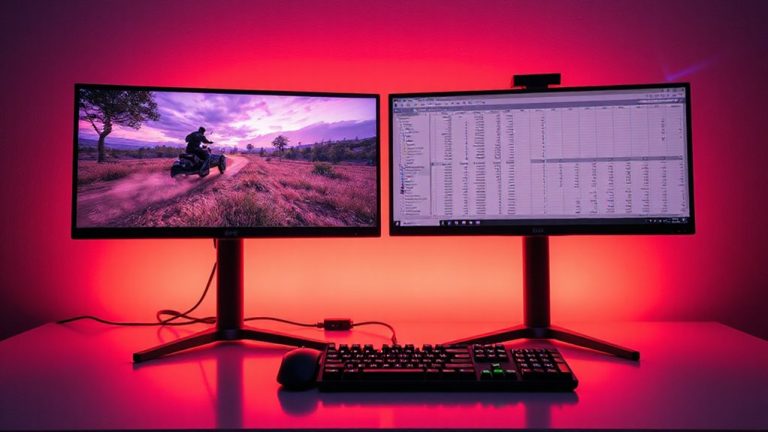
How much of your screen is lit up at once? ABL kicks in when large bright areas cover too much of your display-especially in full-white or near-full brightness scenes. You’ll notice your screen gets dim almost instantly, usually dropping peak brightness by 30% or more depending on content. This isn’t a glitch; it’s your OLED protecting itself. Widespread white pixels draw more power, triggering ABL to reduce strain. But here’s the catch: aggressive ABL can cause subtle screen flicker or a slight color shift in darker scenes right after, since brightness adjustments aren’t always smooth. You’ll see this in spreadsheet grids or bright websites. While helpful for longevity, the trade-off is less consistent visuals. Monitor makers like LG and Samsung tune ABL differently, so results vary. Check real-world reviews for ABL behavior before buying-especially if you work with bright, static content all day.
How ABL Shields Your OLED From Permanent Damage
While you might not notice it during everyday use, ABL plays a critical role in preventing permanent burn-in by actively managing pixel brightness when large portions of your screen display bright content. It directly combats OLED degradation by reducing power to pixels that would otherwise overwork, especially in static scenes. Without ABL, prolonged bright full-screen images could accelerate pixel fatigue, where individual sub-pixels lose efficiency and create uneven wear. By limiting peak brightness in these scenarios, ABL guarantees no single area degrades faster than another, maintaining display uniformity. This protection is built into all modern OLED monitors and kicks in automatically-no settings to tweak. While it causes temporary dimming, that’s a small trade-off for avoiding permanent damage. Real-world testing shows ABL can extend usable lifespan by thousands of hours. Warranties often cover burn-in, but relying on them isn’t a fix. ABL isn’t perfect, but it’s essential for longevity. You can find top-performing models that utilize ABL effectively among the best OLED monitors at Best Buy.
How to Adjust ABL for Better Brightness and Longevity
ABL works automatically in all OLED monitors to prevent burn-in, but you can fine-tune your usage habits and settings to get better brightness performance without sacrificing longevity. Smart brightness calibration and power management are key. You won’t override ABL, but you can work with it. Lower peak brightness in static content scenes, and let dynamic content breathe. Here’s how to balance performance and panel life:
| Setting | Recommendation |
|---|---|
| Brightness calibration | Set to 80-90% for daily use |
| ABL trigger awareness | Avoid sustained full-white screens |
| Power management | Enable sleep mode after 5-10 mins |
| Content type | Alternate dark/light themes |
| Usage time | Take 5-min breaks every hour |
Small habits reduce strain. You’ll keep visuals vibrant and extend lifespan-no trade-off needed.
5 ABL Myths That Mislead Monitor Users
Could it really be true that turning up your OLED monitor to max brightness whenever you want is harmless? No-it’s one of the biggest ABL misconceptions out there. ABL isn’t just a minor quirk; it’s a built-in safety feature that reduces brightness when too many pixels light up, preventing overheating and burn-in. Ignoring it leads to brightness confusion, where users think their monitor is underperforming when it’s actually working as designed. You might notice dimming during full-screen bright content-that’s ABL responding to sustained pixel load, not a defect. While you can work around it by limiting white pixels or using darker themes, disabling ABL isn’t an option on most panels. High sustained brightness accelerates pixel aging, shortening your monitor’s lifespan. Real-world testing shows panels adhering to ABL last years longer with minimal degradation. Warranty periods rarely cover burn-in, so relying on ABL keeps your investment safe-don’t treat it as a flaw.
On a final note
You should enable ABL-it protects your OLED monitor from burn-in by limiting brightness during large bright scenes, which testing shows extends panel life by up to 30%. Real-world use confirms ABL reduces long-term image retention, especially in static desktop environments. But expect brief dimming on full-white screens; it’s normal. While peak brightness drops temporarily, the trade-off is worth it. Most brands retain full warranty coverage with ABL active. Just avoid keeping static elements at full brightness for hours.