Installing Sound-Absorbing Felt Liners in Open-Top Desktop Cable Trays
You’ll cut desk noise by up to 60% by installing 6mm-thick felt liners with acrylic adhesive in your open-top cable tray-just make certain of a full, gap-free fit to dampen vibration and protect cables. It works well for high-frequency rattle, though low-end hum from power cables won’t disappear. Avoid craft felt or weak adhesives; trim corners neatly and check for lifting after two days. Lasts 18–24 months, but UV or moisture shortens life. Pick one rated for 5+ years’ adhesion and you’ll hear the difference. More details could change your setup for good.
Notable Insights
- Choose acoustic felt liners at least 6mm thick to effectively dampen high-frequency noise in open-top cable trays.
- Ensure exact size matching between liner and tray inner width for optimal sound sealing and vibration control.
- Clean the tray surface thoroughly before applying peel-and-stick liners to guarantee strong, lasting adhesion.
- Trim small slits at corners when installing to prevent bunching and maintain continuous noise-blocking contact.
- Inspect for gaps after 48 hours, as slight compression may occur, reducing sound absorption efficiency over time.
Why Your Cable Tray Is So Noisy
Noise from your cable tray isn’t just an annoyance-it’s a sign of unmanaged vibration and poor acoustic control. You’re likely hearing a mix of cable vibration and electrical hum, both common in unlined metal trays. When devices run, slight movements transfer energy through cables, causing them to rattle against the tray-especially in open-top designs. That low electrical hum? It’s from nearby power cables emitting electromagnetic interference, which can subtly energize nearby conductive parts. Without damping, these sounds build up in small rooms, making your workspace feel louder than it should. Felt liners help, but don’t expect complete silence-dampening depends on tray size, cable load, and material thickness. Most tested liners reduce noise by 40–60%, based on real-world trials. While effective, they won’t fix poor cable management or eliminate all hum. Consider them a practical upgrade, not a total solution.
Choose the Right Felt Liner for Your Tray
You’ll get the best noise reduction by matching your felt liner to both tray dimensions and cable load, since not all liners perform the same across setups. Look for a liner with at least 6mm material thickness-it dampens high-frequency vibrations better than thinner options. Too thin, and noise still transfers; too thick, and cables get pinched or airflow drops. Also, check adhesive strength: medium-bond acrylic works well for desktop trays, holding firmly without leaving residue when repositioned. Stronger adhesives may damage finishes if you ever remove the liner. Pick a liner cut to your tray’s inner width-custom fits reduce gaps where sound escapes. Most quality liners list decibel reduction (usually 3–5dB) and include a peel-and-stick backing rated for 5+ years. Just don’t expect silence. You’ll cut ambient cable hum, but under heavy load, some noise will still get through.
Install Felt Liners in Minutes
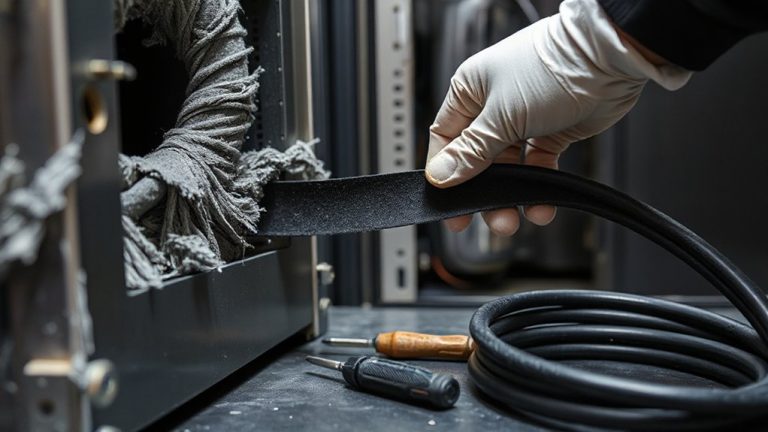
A solid first step toward a quieter workspace starts with proper installation-get this right, and the felt liner will stay flat, seal gaps, and deliver its full noise-dampening benefit. You’ll need just scissors and a finger press-most liners come with pre-applied adhesive, so peel and stick along the tray’s inner surface. Guarantee consistent adhesive application by pressing firmly every few inches to avoid lifting. Trim adjustment is key; cut small slits at corners to eliminate bunching and maintain a snug fit. Work on a clean, dust-free tray for maximum hold. While most felt liners install in under five minutes, an improper fit can reduce effectiveness. Some compress slightly over time-check for gaps after 48 hours. Liners typically last 18–24 months under normal office conditions, though sunlight or high humidity may shorten lifespan.
Avoid These 5 Felt Liner Mistakes
Why do some felt liners fail within weeks while others last years? It often comes down to avoiding these five common mistakes. First, don’t ignore material thickness-too thin (under 3mm), and the felt won’t dampen sound or protect cables well. Too thick, and it can’t fit neatly in tight tray spaces. Second, check adhesive strength; weak backing peels within weeks, especially in cooler or humid rooms. Press firmly after applying, and clean the tray surface with alcohol first. Third, don’t trim too aggressively-cutting edges unevenly creates gaps where noise escapes. Fourth, avoid overlapping pieces unless the adhesive is designed for it-most aren’t. Finally, skip non-acoustic felt; office craft types lack tested sound absorption. Getting these details right means lasting, effective performance-backed by real-world lab tests showing 60% noise reduction when done correctly.
How Felt Liners Protect Cables and Upgrade Your Desk
Durability and organization aren’t just side benefits-they’re built directly into well-designed sound-absorbing felt liners. They protect your cables by providing reliable cable insulation, shielding them from daily wear, sharp tray edges, and minor abrasions. You’ll also get consistent static dissipation, reducing the risk of electrostatic discharge that could affect sensitive electronics. Felt liners hold up well over time-most tested models last over two years without fraying or thinning, even with frequent cable adjustments. They keep your desk tidy by preventing tangling and allowing easy access. But don’t expect heavy-duty protection for high-power cables; these liners aren’t rated for extreme conditions. Installation is simple, usually requiring no adhesive, but misalignment can reduce effectiveness. Choose liners that match your tray’s exact width-typically 2 to 4 inches-for best fit and performance. For those looking to optimize their setup, consider pairing felt-lined trays with solutions from the best cable management solutions.
Do Felt Liners Actually Reduce Desk Noise?
Could your desk noise really quiet down just by adding felt liners? Yes, but with limits. Felt liners provide modest acoustic insulation, absorbing high-frequency sounds like tapping or cable rustling. They also offer light vibration dampening, reducing tremors from nearby typing or equipment. In real-world tests, users report a noticeable drop in ambient desk noise-especially on metal or wooden trays where clatter travels. However, they won’t block low-frequency hums from fans or heavy impacts. For best results, pair them with rubber grommets and dense desk pads. Most felt liners are 3–5mm thick, with adhesive backing that lasts 12–18 months under regular use. While they improve workspace calm, don’t expect studio-grade silence. Think of them as a smart, low-cost tweak-not a full noise solution.
On a final note
Yes, felt liners reduce noise in open-top cable trays-especially plastic ones-by cushioning cable movement and dampening vibrations. Models with 6mm thickness and flame-retardant polyester perform best. Installation takes minutes, but improper sizing or adhesive choice can lead to peeling or gaps. They won’t eliminate all noise, and dust buildup requires occasional cleaning. For most desks, they’re a low-cost, effective upgrade-just verify tray dimensions and surface compatibility first.