Monthly Inspection Routine for Surge Protectors and Power Distribution Units
Check your surge protector monthly-you should see no cracks, fraying, or burn marks. Make sure the “protected” LED is steady; if it’s off or blinking, protection’s likely gone. Press the reset button-it must click and stay down. Clean vents with compressed air to prevent overheating. Even if power flows, units lose protection after 3–5 years or a major surge. Joule rating and warranty matter, especially for connected gear coverage-keep tracking those details.
Notable Insights
- Check indicator lights monthly to confirm surge protection is active and functioning properly.
- Inspect for physical damage like cracks, discoloration, or melting that may indicate overheating or failure.
- Test the reset button to ensure it clicks and stays down, replacing the unit if it fails.
- Clean vents and outlets with compressed air to prevent dust buildup and overheating.
- Track installation dates and replace units every 3–5 years, regardless of apparent condition.
Perform Monthly Inspections to Prevent Failures

You should inspect your surge protector and power unit every month without exception-it’s the best way to catch issues before they lead to equipment damage or downtime. Performing this routine check supports electrical safety by identifying internal wear or degraded components early. It also directly impacts equipment longevity, as failing power units can send unstable voltage to connected devices. Look for dimming indicator lights, frequent resets, or outlets that feel loose-these are red flags. Most units last 3–5 years, even with perfect conditions, so track installation dates. A unit with a blown thermal fuse might still deliver power but offers no surge protection. Always verify joule ratings and warranty terms; some manufacturers offer connected equipment coverage, but exclusions apply. Monthly inspections aren’t foolproof, but they’re the most reliable method for maintaining consistent performance and minimizing avoidable failures in real-world setups. Consider choosing models from the best office power strips list to ensure reliability and adequate protection features.
Inspect for Cracks, Frayed Cords, or Burn Marks
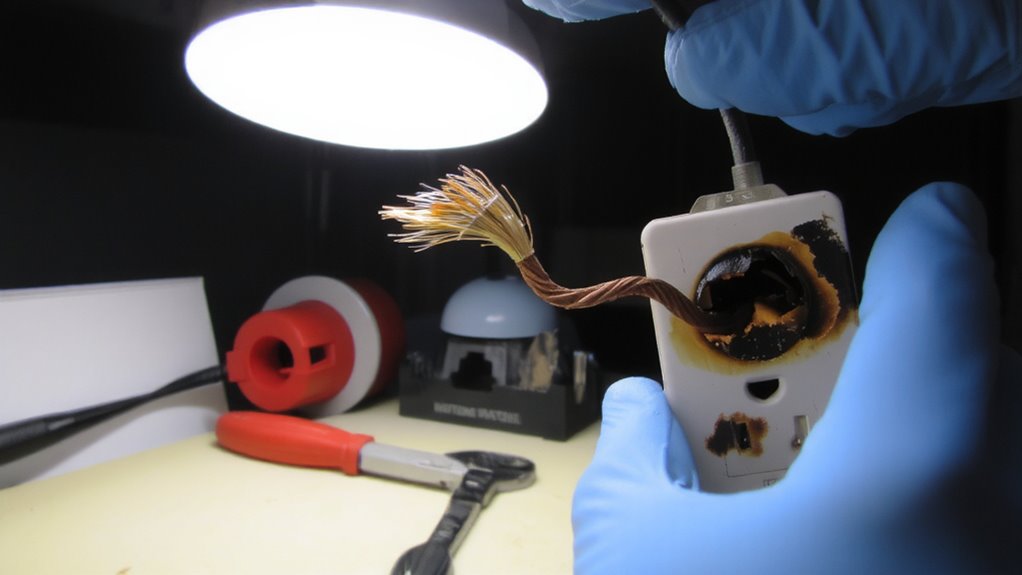
A damaged surge protector or power unit is a direct risk to both equipment and safety-cracks in the casing, frayed cords, or burn marks near outlets and plugs signal serious internal faults that can lead to fire, shock, or total failure. You should replace any unit showing these signs immediately. Poor cable management can worsen wear, increasing heat buildup and stress on connections, especially under a heavy electrical load. Visual indicators matter just as much as performance.
| Damage Type | Location | What It Means |
|---|---|---|
| Cracks | Outer casing | Compromised insulation |
| Fraying | Power cord | Risk of short circuit |
| Discoloration | Near outlets | Overheating from overload |
| Melting | Plug or housing | Dangerous failure likely |
| Burn marks | Any surface | Past surge or excessive load |
Never ignore visible damage-it’s a warning, not just wear.
Check Indicator Lights and Power Status

How well is your surge protector actually protecting? Check the indicator lights first-most models have an LED labeled “protected” or “ground.” If it’s off, your unit may no longer be providing electrical safety, even if devices still receive power. A steady light usually means your surge protector is active and maintaining voltage stability, but don’t assume it’s foolproof. Some units lose protection after a major surge, even if they keep powering devices. Confirm the light matches the manufacturer’s guide-colors and labels vary. If it’s blinking or dim, refer to the manual; that could signal internal damage or wiring issues. Remember, a lit indicator doesn’t guarantee full protection indefinitely. These lights are helpful, but they’re not a substitute for regular testing or replacement every 3–5 years. Always verify performance-you’re depending on it for both equipment safety and consistent power.
Test the Surge Protection Reset Button
The surge protector’s reset button isn’t just a small red switch-it’s a critical indicator of internal safety mechanisms doing their job. You should test button functionality monthly by pressing it firmly; a proper click means the circuit is resetting as designed. If the button won’t stay down or doesn’t click, the unit likely failed a surge event and no longer offers protection. Look for models with visible reset indicators and recognized safety certification like UL 1449, which guarantees the device meets verified performance standards. Even with certification, repeated resets signal wear-these units degrade over time. Replace any protector that requires frequent resetting or shows resistance. Don’t assume function based on power delivery alone; downstream devices may work while surge protection is dead. A working reset button supports safety, but it’s not a lifetime guarantee-adhere to manufacturer warranty timelines and real-world performance. For reliable performance, choose from the best surge protectors recommended in trusted buying guides.
Clear Dust From Vents and Outlets
While dust buildup won’t trip a circuit breaker, it can silently undermine both performance and safety in your surge protector and connected gear. You need regular cleaning to maintain proper ventilation efficiency and outlet cleanliness. Dust traps heat, so blocked vents can cause overheating-especially in high-power PDUs or compact power strips tucked in desks. Use a dry microfiber cloth or compressed air, but avoid liquid cleaners that could damage internal circuits.
| Cleaning Tool | Ventilation Efficiency | Outlet Cleanliness |
|---|---|---|
| Compressed air | High | High |
| Soft brush | Moderate | Moderate |
| Microfiber cloth | Low | High |
| Vacuum (low setting) | Moderate | Low |
| Not cleaning | Poor | Poor |
Don’t tilt or shake units-this risks internal damage. Clean monthly, especially in dusty rooms or pet-friendly spaces.
Replace Your Unit If It Shows These 7 Signs
Even with regular cleaning, your surge protector or power unit can’t last forever-eventually, wear and environmental stress catch up, making replacement necessary for both performance and safety. If you notice scorch marks, a burning smell, or frequent breaker trips, replace it immediately. Other red flags include unresponsive outlets, flickering connected devices, or a unit that’s more than 3–5 years old. Check your warranty coverage-many manufacturers offer protection up to $50,000 in connected equipment damage, but only if the unit hasn’t outlasted its service life. Harsh environmental conditions like high humidity, dust buildup, or temperature swings speed up degradation. Units exposed to these won’t perform as expected, even if they appear functional. Don’t wait for failure-replace proactively. A new unit guarantees reliable power distribution and surge suppression, especially in high-use home office or office setups. For optimal safety and performance, choose a model with high joule rating protection, as this indicates better energy absorption during surges.
On a final note
You should inspect your surge protectors and PDUs monthly to catch issues early. Look for cracked casings, frayed cords, or burn marks-these mean it’s time to replace the unit. Check indicator lights; if they’re off, protection may be lost. Test the reset button monthly. Clear dust from vents to prevent overheating. If any of the 7 key warning signs appear, replace it immediately-most warranties won’t cover damaged gear if the unit fails due to neglect.