Preventing Shoulder Surfing by Positioning Monitors Away From Common Hallway Sightlines
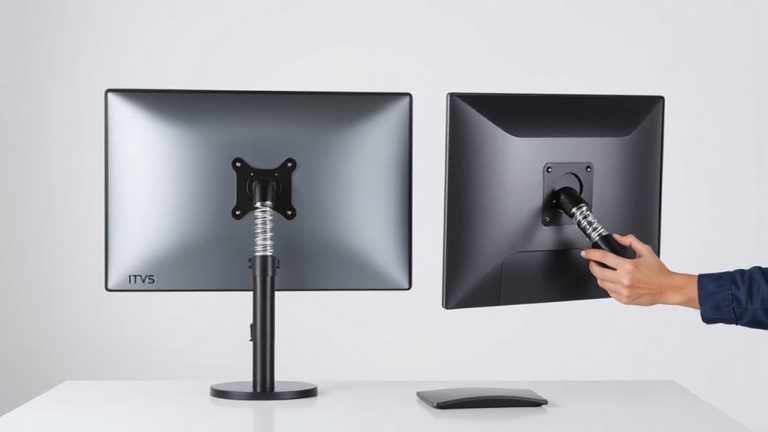
Position your monitor 30 to 45 degrees away from hallways to block onlookers-this simple shift cuts the risk of shoulder surfing, where someone steals passwords just by glancing. Use a swivel mount for precise angles and better ergonomics, but avoid extreme turns that strain your neck. Pair this with clean cable management to maintain flexibility. While positioning helps, it’s not foolproof in high-traffic zones-adding a privacy filter gives stronger protection, especially in shared spaces. There’s more to optimizing your setup where security and comfort meet.
Notable Insights
- Angle your monitor 30 to 45 degrees away from hallways to limit visibility to passersby.
- Position your desk perpendicular to foot traffic to reduce direct sightlines to the screen.
- Use adjustable monitor arms to fine-tune screen orientation for optimal privacy.
- Install privacy filters that block side views beyond 30 degrees for added protection.
- Ensure cables are managed neatly to allow flexible desk and monitor repositioning without hazards.
What Is Shoulder Surfing and Why It Puts You at Risk
A thief doesn’t always need to break in to steal your data-sometimes they just need line of sight. Shoulder surfing is a form of data theft where someone watches you type passwords or view sensitive files in public or shared spaces. You’re at risk if you work near walkways, cafes, or open offices. This kind of privacy breach can lead to stolen accounts, leaked personal info, or corporate espionage. It’s low-tech but effective-no malware required. People can memorize or record what they see within seconds. You might not even notice until it’s too late. While monitor positioning helps, it’s not a full fix. Privacy filters reduce visibility from angles, but they dim screens slightly. Look for ones with 30–45° viewing limits and anti-glare coatings. They’re affordable, usually under $50, and attach with clips or adhesive. Just remember: no solution is perfect if you’re not also aware of your surroundings.
Block Shoulder Surfers With Smart Monitor Position
While you can’t always control who’s around, positioning your monitor strategically cuts the risk of someone catching a glimpse of sensitive info. Proper monitor alignment-angling your screen 30 to 45 degrees away from public view-helps hide content without blocking your access. Mounting arms or adjustable stands make fine-tuning easier and improve posture. You should pair this with clean cable management to avoid visual clutter and maintain setup stability; tangled cords can limit how freely you adjust position. Some models include built-in cable channels, which help keep connections secure and out of sight. While privacy filters add extra protection, good positioning often suffices. Just remember: extreme angles strain your neck over time. Test different positions for comfort and visibility. Keep in mind that open-office plans may require additional measures beyond alignment alone. Consider using a best desk organizer to maintain a clutter-free workspace that supports optimal monitor placement.
Turn Your Desk to Deflect Prying Eyes
You’ve angled your monitor-now take it a step further by repositioning your entire desk to limit visibility from common pathways. Turning your desk perpendicular to foot traffic reduces direct sightlines, making it harder for passersby to glimpse sensitive information. This tweak works best when paired with thoughtful desk layout and secure cable management-both help maintain a clean, efficient workspace while minimizing clutter that could obstruct movement or draw attention. Keep cords tucked and fastened to avoid tripping hazards or snags during repositioning. Depending on your room’s dimensions, rotating your desk might limit proximity to outlets or disrupt ergonomic alignment. Test the shift during peak hours to confirm it actually reduces exposure without sacrificing comfort or function. Some users gain privacy but lose charging access or natural light. Weigh those trade-offs carefully before locking in the new setup. For optimal results, consider choosing a best home office desk that supports flexible positioning and built-in cable management.
Use a Privacy Filter for Extra Protection
Privacy filters are a no-nonsense upgrade when it comes to locking down your screen from wandering eyes. You’ll get effective side-view protection, typically blocking sightlines beyond 30 degrees, so only you see your screen. Most also offer glare reduction, improving readability in bright offices without washing out colors. Look for models with an anti theft design-some include slot locks compatible with Kensington cables, adding physical security in shared environments. Installation is usually simple, using static cling or frame mounts that won’t leave residue. Just be aware: privacy filters slightly dim your display and may reduce touch sensitivity on touchscreen monitors. They also require careful alignment to avoid edge gaps. While they’re not a full substitute for good desk positioning, they’re a smart extra layer. Choose one with a matte finish for best glare reduction and follow the manufacturer’s sizing guide to guarantee full coverage. You can find top-rated options like the Best Privacy Screen Protectors available at major retailers such as Best Buy.
Rethink Shared Desks Without Losing Connection
How do you keep your work private when your desk isn’t really yours? Desk sharing makes visual privacy a real challenge, especially in open layouts. You can’t rely on permanent setups, so think about positioning and habits. Face your monitor away from walkways and log out every time you step away. Use simple desk dividers or privacy screens you can carry-ones with anti-glare coatings help reduce reflection without dimming the screen too much. Just don’t block airflow or light for others. Visual privacy doesn’t mean isolation; quick swivels or pop-up shields let you switch between open and focused modes. It’s not perfect-some coworkers might still peek-but combining smart placement with personal discipline cuts risk. Shared desks work if you balance access with awareness.
Upgrade Your Workspace to Stay Seen Only by You
What if your screen could stay visible only to you? By upgrading your workspace with privacy in mind, you can. Position monitors perpendicular to high-traffic areas and use privacy filters that dim side-angle visibility-ideal for open offices. Good ergonomic alignment isn’t just about comfort; it helps keep your screen tilted slightly downward, reducing glare and line of sight for passersby. Pair this with smart cable management: routing cords neatly minimizes clutter and prevents accidental tugs that shift your monitor out of position. While privacy filters may slightly reduce brightness, models with 3M or Belkin ratings maintain clarity for daily tasks. Desks with built-in grommets or fabric sleeves make cable management easier. Warranties on privacy screens often cover cracking (typically 1–3 years), but they’re not scratch-proof-handle with care. Small trade-offs, big gains in security.
Pair Physical Fixes With Secure Screen Habits
You’ve got the monitor positioned just right and a privacy filter snapped into place, but if you’re not pairing those physical upgrades with smart screen habits, you’re still leaving gaps. Always lock your device when stepping away-use a keyboard shortcut or set automatic locking after one minute of inactivity. It’s a simple move, but it stops prying eyes from accessing open files. Good cable management also plays a role; tangled, visible cords can hint at active workstations, drawing unnecessary attention. Use sleeves or clips to keep cables tidy and out of sight. While these habits boost security, they’re not foolproof-filters can reduce screen brightness, and auto-lock might interrupt quick breaks. Balance convenience and caution. Combine solid equipment choices with consistent routines for the best defense against shoulder surfing in shared or visible spaces.
On a final note
You’ll reduce shoulder surfing by angling your monitor away from hallways and positioning your desk strategically. Privacy filters add a solid layer of defense, blocking side views beyond 30 degrees. Just remember: tighter viewing angles mean you must center yourself. Test models with matte coatings to cut glare without distorting text. These steps help, but stay alert-no fix beats locking your screen when stepping away.